
Your Workplace App for Employees: A No-Nonsense Guide
What is a workplace app for employees? A clear, no-jargon guide on features, use cases, and how to choose and implement a tool that unifies your entire team.
Dan Robin
You can tell a company has outgrown its tools when nobody knows where the authoritative update lives.
The shift change went out by text. The policy change went out by email. The urgent team note landed in WhatsApp. The schedule lives in a separate app. HR posted the form on the intranet, which half the staff never check. Then someone misses an update, a manager scrambles, and everyone acts like this is just the cost of running a business.
It isn't. It's a design problem.
A good workplace app for employees fixes that problem by creating workflow continuity. Not more features. Not more dashboards. Just one place where communication, tasks, scheduling, requests, and everyday work can stay connected.
The Digital Mess We've Made for Our Teams
I've seen this pattern too many times. A frontline manager starts the day in decent shape, then spends the next few hours translating the same message across four channels because the team doesn't live in one system.
The warehouse lead sends an urgent SMS because not everyone checks email. The store manager drops photos into a chat thread because the official platform is too slow. HR uploads the updated handbook to a portal that office staff might open, but shift workers probably won't. Operations uses one tool for scheduling and another for forms. Nobody planned for this mess. It just happened one workaround at a time.
That patchwork used to feel manageable. It doesn't anymore.
Work changed faster than our tool stack
Hybrid work didn't create the problem, but it exposed it. ActivTrak reports that 39% of employees prefer hybrid work, while AI tool usage is up 107% since 2022, which tells you something important about how work now happens: it's digital, distributed, and moving across more surfaces every day (ActivTrak workplace productivity statistics).
If your company still relies on a loose mix of email, messaging apps, paper notices, and one-off systems, the cracks are already there. They just show up as small daily failures instead of one dramatic collapse.
The real cost of fragmented tools isn't the software bill. It's the repeated moment when an employee has to stop and ask, “Where am I supposed to find this?”
That's why I think the conversation around instant messaging and business communication often misses the bigger issue. Messaging matters, sure. But chat by itself doesn't fix a broken operating model. It only gives the chaos a faster lane.
Fragmentation creates friction that nobody owns
The hardest part is that no single team owns the full experience. IT owns access. HR owns policies. Ops owns schedules. Internal comms owns announcements. Facilities owns requests. Each group picks a tool that works for them, and employees inherit the burden of stitching it all together.
That's backwards.
Here's what fragmented work usually looks like in practice:
Urgent updates get improvised because the official channel doesn't reliably reach everyone.
Routine requests get delayed because employees don't know which app or inbox to use.
Managers become human middleware translating information between systems.
Trust drops when people miss updates and get blamed for it.
None of this feels strategic in the moment. It just feels annoying. But when the same friction repeats every day, it shapes culture. People stop expecting clarity. They start working around the company instead of through it.
What a Real Workplace App Actually Is
Most companies say they want a workplace app when what they really mean is “we need another communication tool.” That's usually the first mistake.
A real workplace app for employees isn't just chat with a nicer mobile interface. It isn't a digital bulletin board either. And it definitely shouldn't feel like a tracking device wearing a collaboration costume.
It's the place where work keeps moving
The cleanest definition I know is this: a workplace app is the single employee-facing layer where work continues without interruption.
That means an update leads to action. A schedule change reaches the right people. A task connects to the team discussing it. A policy sits in the same place employees already use to ask questions, request time off, or find a manager. The point is continuity.
A lot of tools do one piece of this well. Slack handles conversation. A scheduling app handles shifts. An intranet handles documents. A forms tool handles requests. But employees don't experience those as neatly separated categories. They experience work as one continuous day.
What it is not
The other trap is confusing a workplace app with monitoring software. Those are not the same thing, and employees know the difference immediately.
An Apploye employee monitoring summary says 96% of companies use time-tracking software. The same summary says 72% of employees believe monitoring has no positive impact, and 54% would consider quitting if surveillance increased. That gap matters. It tells you that oversight and support are not interchangeable.
Practical rule: If employees feel watched more than helped, you did not launch a workplace app. You launched a compliance project.
That's why I prefer the framing in this explanation of the digital workplace. The useful version of a workplace app is transparent, employee-facing, and built to remove friction. It gives people one place to communicate, complete tasks, and find what they need. It doesn't turn every interaction into a trust problem.
The operating system idea is the right one
When companies get this right, they stop thinking in terms of isolated features and start thinking in terms of operating flow.
A strong app becomes the digital front door for the company. News, shifts, requests, files, tasks, team spaces, and everyday coordination live together. Not because bundling is fashionable, but because splitting these things apart creates extra work for the employee every single time.
That shift sounds simple. It isn't small.
It changes the app from “one more thing staff have to check” into the place where the day holds together.
The Building Blocks of a Unified App
The easiest way to judge a workplace app is to stop looking at the feature page and start looking at the seams.
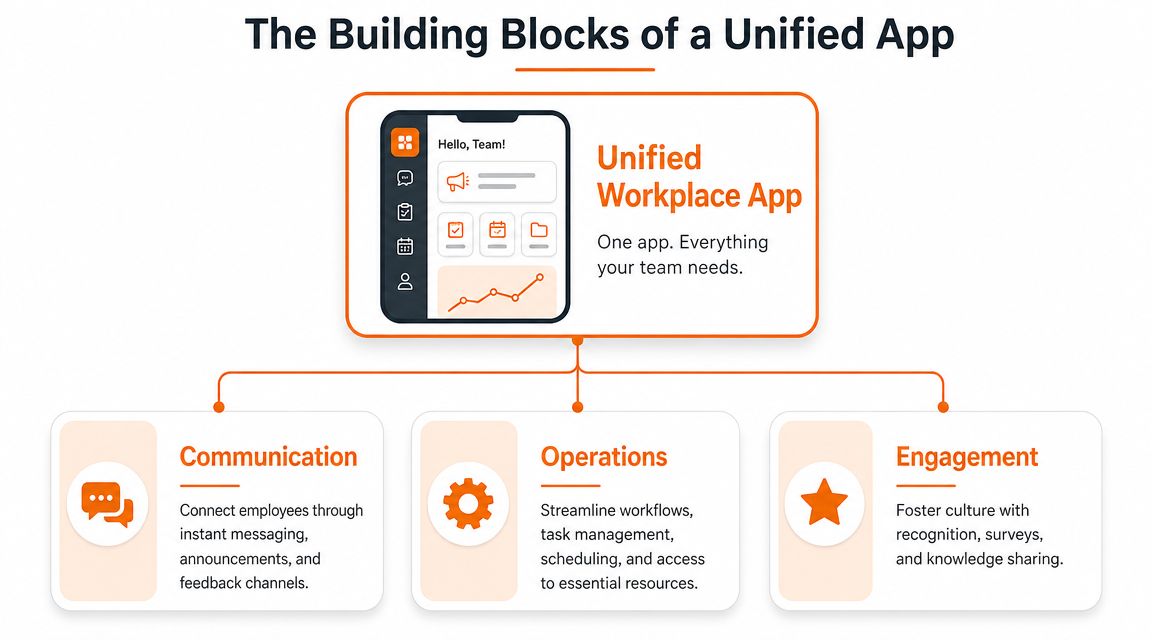
Do communication, operations, and engagement connect cleanly, or are they still pretending to be separate worlds? That's the whole game. The best tools don't just include these functions. They let one activity flow into the next without forcing the employee to switch context.
Communication needs to lead somewhere
Most vendors start with messaging because it's easy to understand. Fine. But communication only matters if it helps people do something next.
A team announcement should connect to the relevant schedule, task, file, or form. A direct message should make it easy to loop in the right group. A company update should live in the same environment where employees can acknowledge it, ask a question, or find the policy behind it.
If communication lives alone, it turns into noise.
Operations are where the app earns its keep
This is the part that usually gets underbuilt. Employees don't need a “community platform” if they still have to leave it to swap a shift, submit a request, book a space, find a document, or complete a routine task.
Modolabs makes the technical case clearly: consolidating high-frequency workflows like desk booking, room reservations, digital ID, communication, events, surveys, and routine requests into one app reduces context switching and operational friction (Modolabs workplace app features and use cases).
That lines up with what works in practice. The more often a task repeats, the less tolerance employees have for app-hopping.
A unified app should comfortably handle things like:
Schedules and shift changes so managers don't chase people manually
Tasks and checklists tied to the team or location doing the work
Requests and approvals for time off, equipment, or routine support
Knowledge access so policies, onboarding steps, and files are easy to find
Engagement should be built into the flow
I'm skeptical of “engagement features” when they sit off to the side like decorations. Recognition, surveys, team spaces, profiles, and feedback only matter when they're woven into daily work.
Here's a simple example. A store manager updates a weekend shift plan. The app notifies the team. Staff confirm availability in the same place. A task list updates automatically. The regional lead sees who acknowledged the change. A shout-out goes to the team that covered the gap. That's communication, operations, and engagement working as one thread.
Pillar | What it handles | What goes wrong without it |
|---|---|---|
Communication | Chat, announcements, updates, feedback | Messages get missed or buried |
Operations | Schedules, tasks, requests, files, workflows | Work stalls between systems |
Engagement | Recognition, surveys, profiles, team connection | Culture feels separate from work |
When these pillars live together, the app feels calmer. Not because it has fewer things in it, but because employees don't have to rebuild the workflow in their own heads.
How Different Teams Actually Use It
A workplace app only proves itself in the messy places. Not on a clean product demo. In the middle of a shift change, a safety issue, a staffing gap, or a policy update that has to reach people right now.
That's why mobile-first delivery matters so much for frontline teams. Appspace argues that important updates need to reach workers through channels they use, and that mobile access with push notifications is essential for closing the communication gap across shifts and locations (Appspace employee mobile app overview).
Healthcare needs speed and clarity
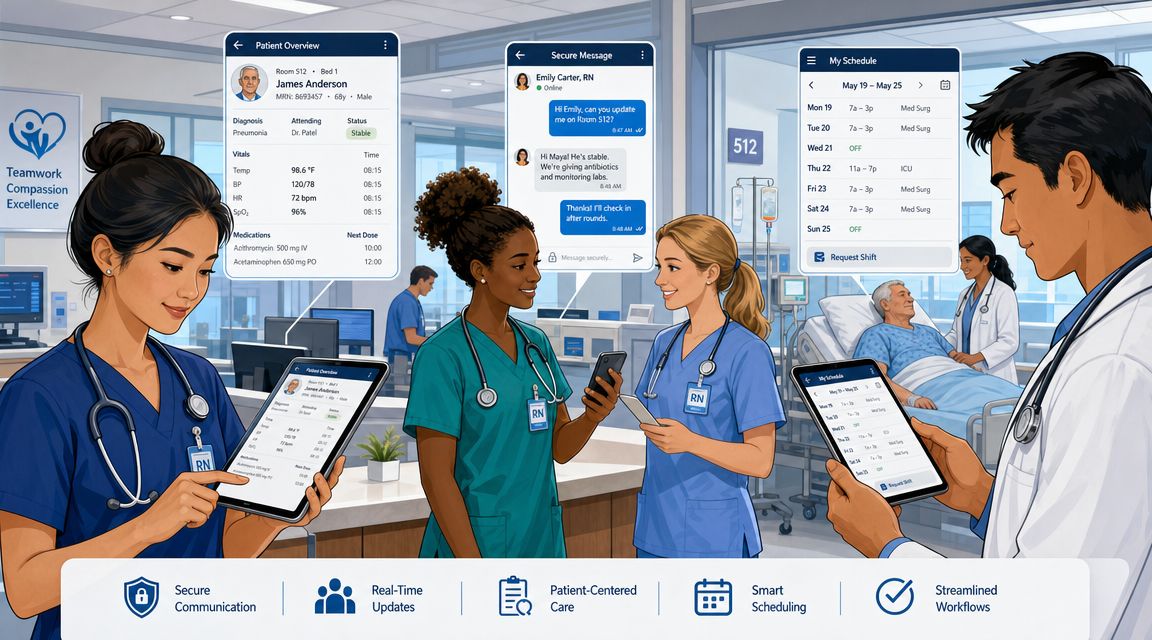
In a hospital unit, nobody has time to hunt for the latest handoff note or wonder whether a shift change was seen. Teams need one mobile place for updates, role-based communication, files, and quick coordination.
The best setup I've seen is simple. Charge nurses post unit updates in one channel. Staff get push notifications on their phones. Protocol documents sit in the same app. Shift coverage requests don't float around in texts. Everyone knows where to look.
That doesn't remove pressure from healthcare work. It removes avoidable confusion.
Retail runs on repeatable execution
Retail has a different rhythm. The store manager needs to send a visual merchandising update to several locations, attach photos, assign a task, and confirm completion before the weekend rush.
If that update goes out by email, half the team won't see it in time. If it goes out in a consumer chat app, it gets buried under side conversation. In a unified app, the update, images, task, and acknowledgment all stay together. That's workflow continuity in plain form.
One clean channel beats five “backup” channels every time.
Logistics needs reach across shifts
Warehouses and logistics sites often struggle with split attention. Some staff are on the floor, some are in transit, some are between shifts, and many aren't sitting at a desk.
In that environment, a safety alert has to be direct. A revised process has to be easy to access. A supervisor shouldn't need three systems to confirm who got the message and where the updated checklist lives.
Distributed office teams need more than chat
Remote and hybrid knowledge workers have the opposite problem. They usually have too many digital tools, not too few.
A unified app helps by putting team updates, lightweight tasks, company news, people directories, and shared knowledge in one place instead of scattering them across chat, intranet, docs, and project tools. For a distributed tech team, that often means fewer “where is this?” interruptions and a more stable sense of connection across time zones.
Different industries use the app differently. The underlying need is the same. People need work to keep moving without making them chase it.
A Simple Checklist for Choosing Your App
Most buying teams compare workplace apps the wrong way. They line up feature grids, score each product, and end up choosing the one that looks the most complete on paper.
That approach sounds rational. It usually leads to a bloated tool nobody enjoys using.
Ask questions that expose real friction
The better approach is to evaluate the app against the work your team keeps struggling to complete. Not abstract capability. Actual friction.
Use questions like these:
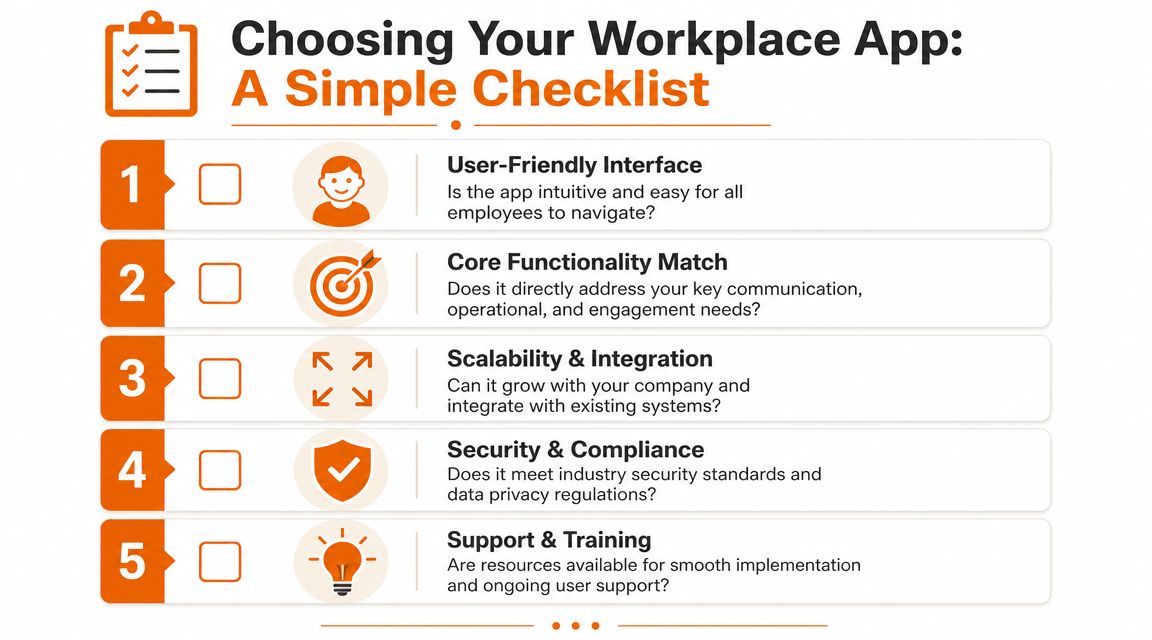
Can employees find what they need without training? If the interface needs a long explanation, adoption will drag.
Can we segment by role, team, or location? A hospital, warehouse, or multi-site retailer can't run on one flat communication stream.
Does it handle both updates and action? News without tasks, requests, or scheduling support is only half useful.
Will frontline staff indeed use it on their phones? If mobile feels like a watered-down add-on, you'll lose the people who most need the tool.
Can it connect with our existing HR, payroll, or identity systems? Duplicate admin work will wear your team out fast.
Prefer coherence over feature sprawl
I'd take a simpler app that does the daily essentials well over a giant suite with a dozen half-finished modules.
A frequent error many teams make is buying for edge cases and demos instead of the hundred repeated actions that shape the employee experience every week. Chat, updates, shifts, tasks, forms, files, directories, and clean permissions matter more than a flashy feature employees will touch twice.
A few products come up often in this category. Microsoft Viva is usually part of the conversation for companies deep in Microsoft 365. Staffbase is often evaluated for internal communications. Workvivo gets attention for culture and communication. Pebb is another option when teams want chat, updates, tasks, knowledge sharing, shift scheduling, clock-in, PTO tracking, and configurable spaces in one employee app.
Buy for the work that happens every day, not the demo that impressed everyone for ten minutes.
Use a simple pass or fail lens
A short table can keep the selection process honest.
Question | Pass looks like | Fail looks like |
|---|---|---|
Is it intuitive? | Staff can use it quickly with minimal guidance | Training becomes a project |
Is it unified? | Messages, tasks, and requests connect naturally | Core work still jumps between tools |
Is it frontline-friendly? | Mobile use feels first-class | Desktop gets the real experience |
Can admins govern it well? | Permissions and roles are clear | Access becomes messy and risky |
Can it grow with us? | New teams and workflows fit cleanly | The app breaks when complexity rises |
If a product misses two or three of these, move on. You're not choosing software. You're choosing what kind of daily friction your team will live with.
Making It Work in the Real World
A bad rollout can make a good app look useless.
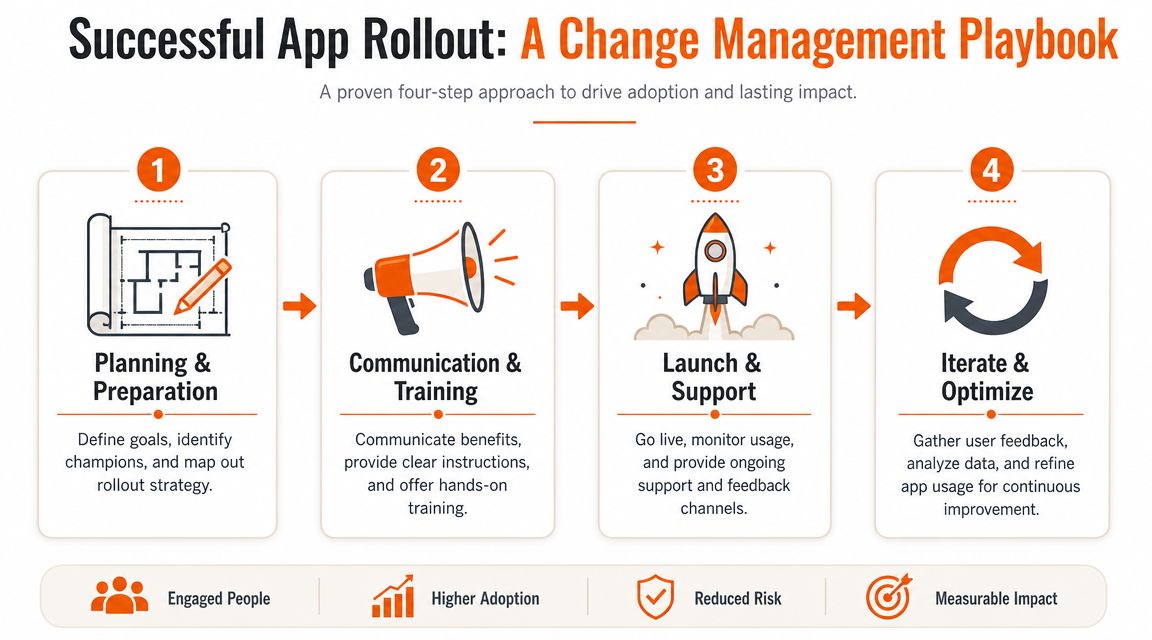
That's why I don't treat implementation as an IT handoff. It's a change project. The app matters, but habits matter more. If people don't understand why the new system exists and what should stop happening because of it, they'll keep using the old shortcuts forever.
Start with one operational problem
Don't launch with a grand speech about transformation. Launch by fixing something concrete.
Maybe missed schedule updates are causing daily frustration. Maybe policy communication doesn't reach frontline staff. Maybe managers are juggling chat, forms, and files in too many places. Pick one pain point employees already feel, then make the app visibly better at that job.
That practical approach is baked into a lot of solid rollout advice, including these employee app rollout best practices.
The rollout that works is usually boring
The successful pattern is rarely dramatic.
Prepare with clear rules. Decide what moves into the app first, what gets retired, who owns each channel, and which managers will act as local champions.
Train in context. Don't give employees a generic tour. Show them how to do the three or four things they need this week.
Support the first month aggressively. Questions come fast after launch. Answer them where people can see the answers.
Tighten based on feedback. If a space is noisy, fix it. If a workflow is clumsy, simplify it. Don't defend the setup just because it went live.
Adoption follows relief. When the app removes a daily annoyance, people come back on their own.
Measure change that people can feel
I don't love vanity metrics here. Daily active users can be useful, but they don't tell the whole story.
Look for signals that the work itself is cleaner:
Scheduling clarity through fewer missed updates and less manual chasing
Manager time saved on routine coordination
Faster access to policies and onboarding material
Better cross-team visibility when tasks, updates, and files sit together
Higher participation in feedback, recognition, or internal communication
There's also a longer-term upside. Cornerstone's Galaxy Mobile App points toward a broader shift where workplace apps help frontline workers set goals, track progress, browse career paths, and express interest in open roles from their phones (Cornerstone on mobile apps for deskless workforce).
That matters because the app can become more than a communication layer. It can become part of how employees grow inside the company. When that happens, rollout stops being a software event and starts becoming part of how the business develops people.
Beyond the App The One Thing That Matters
A workplace app sounds like a technology decision. It isn't, not really.
It's a decision about whether your company expects employees to piece work together on their own, or whether you're willing to give them a clear place to operate. That's the fundamental choice underneath all the product comparisons.
The app won't fix a broken culture by itself. It won't make weak managers strong. It won't replace trust, clarity, or good judgment. But it will reveal what you value. If the tool is fragmented, opaque, and built around control, employees feel that. If it's clear, useful, and respectful of how people work, they feel that too.
That's why I think the best workplace app for employees is usually the one that makes the company feel more coherent. Not louder. Not busier. More coherent.
People should know where to go. They should know where the truth lives. They should be able to move from update to action without getting lost in the gaps between systems.
That kind of continuity sounds small until you've lived without it.
Then it feels like relief.
If you're trying to replace a patchwork of chat tools, scheduling apps, intranet pages, and disconnected workflows, Pebb is worth a look. It brings communication, operations, and engagement into one employee app, with team spaces, chat, updates, tasks, knowledge sharing, shift scheduling, clock-in, PTO tracking, and admin controls for both frontline and office teams.
