
Logistics Workforce Management Software: A Calm Guide
Tired of chaos? Logistics workforce management software brings calm to your ops. Learn its features, ROI, and how to choose the right tool for your team.
Dan Robin
Most logistics teams don't break because people are lazy. They break because the work is scattered.
The schedule lives in a spreadsheet. Shift swaps happen in text threads. Attendance sits in one app. Payroll sits in another. The warehouse board is updated by hand. Dispatch calls when something changes, which is always. By noon, the team isn't managing labor. They're managing confusion.
That kind of friction feels normal when you've lived with it long enough. It isn't. It's a system problem. And logistics workforce management software, when it's chosen well and rolled out with some discipline, is one of the few tools that can turn daily chaos into something calmer.
The Daily Chaos You Know Too Well
A lot of operations managers start the day behind.
Someone called out. A temp worker showed up without the right training. Picking is heavy in one zone and light in another. Drivers are waiting on updates that were sent in a chat nobody checked. A supervisor is trying to fix coverage while also answering questions about timecards. None of this is unusual. That's the problem.
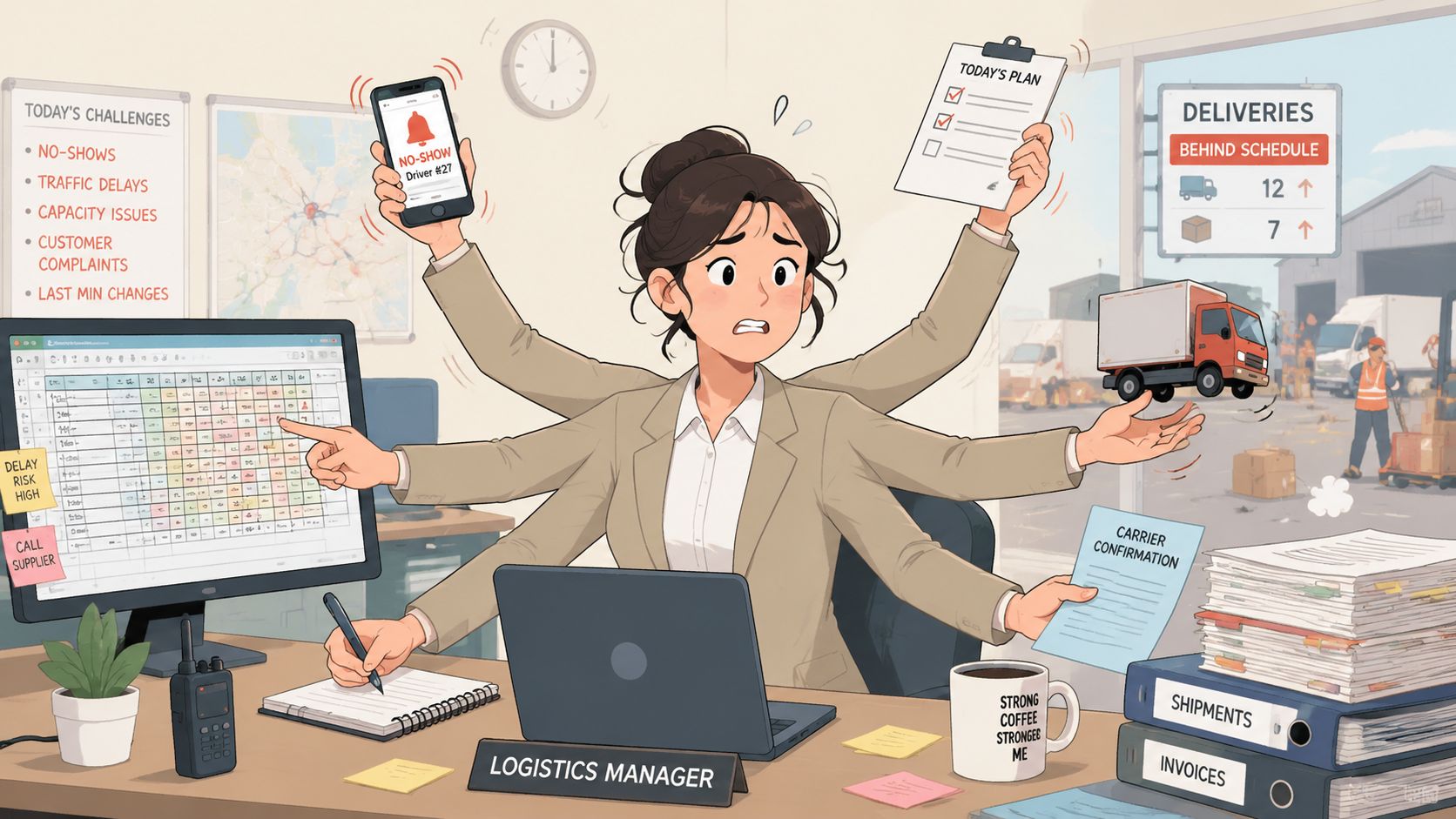
I've seen teams work very hard and still lose the day before lunch because their tools never gave them a fair shot. One system holds the roster. Another holds clock-ins. Messages are spread across personal phones, email, and whatever group chat people happen to use on that shift. When something slips, managers don't get one clean signal. They get five noisy ones.
The patchwork is the real problem
Spreadsheets aren't evil. Whiteboards aren't evil. Even text messages have their place. But a patchwork stops working when the operation gets more complex than one person can hold in their head.
You can usually spot the warning signs fast:
Shift changes take too long because every swap needs manual follow-up
Attendance disputes pile up because the record is fragmented
Supervisors become human routers instead of leading the floor
Frontline staff miss updates because critical information lands in the wrong channel
The firefighting often looks like a people issue. Most of the time, it's a visibility issue.
Companies aren't investing in workforce tools just because the category sounds modern. The market is large because the pain is real. One market study says the global workforce management software market was valued at USD 3.59 billion in 2026 and is projected to reach USD 7.15 billion by 2035, a sign that businesses are putting serious money into tools that fix scheduling, time tracking, and labor visibility problems across operations like logistics, retail, manufacturing, and healthcare, according to Business Research Insights on the workforce management software market.
Calm starts with one source of truth
The best operations I've seen aren't quieter because less happens. They're quieter because the signal is cleaner.
People know where the schedule is. They know where task updates live. Supervisors can see who's available, who's late, what's blocked, and what needs to move now. That kind of calm doesn't come from asking everyone to try harder. It comes from using a system that was built for moving work, not just documenting it after the fact.
What Is Logistics Workforce Management Software Really?
Logistics workforce management software is primarily one place to run labor, not just record it.
A lot of software gets sold as a pile of features. Scheduling. Time tracking. messaging. analytics. On paper, that sounds fine. On the floor, it misses the point. This kind of system's job is to help managers match people to work in real time, with less guesswork and less chasing.
I think of it as air traffic control for labor. Not because it's fancy. Because it keeps moving parts from colliding.
From static roster to live operation
The old way is static. You post a schedule. The day changes anyway. Then everyone scrambles.
The better way is dynamic. You start with a schedule, but the system keeps helping once the shift begins. It shows attendance, task status, bottlenecks, and changes in workload while people can still do something about them.
That shift is already well underway. Around 68% of organizations have adopted automated workforce tools to improve productivity and reduce inefficiencies, according to EPG's overview of logistics workforce management. That matters because it shows this is no longer an edge practice. It's becoming standard operating discipline.
What the software is actually doing
Good logistics workforce management software usually handles a few jobs at once:
It matches labor to demand so you're not staffing by habit
It gives supervisors live visibility into who's on, who's missing, and where work is backing up
It keeps communication in one channel instead of scattering updates across personal apps
It creates a usable record for payroll, compliance, coaching, and planning
Practical rule: If a tool only helps you build the schedule, but doesn't help you run the shift, it's incomplete.
That last part gets overlooked. Plenty of teams buy something for rostering and end up keeping all the core operational work in side channels. Then they wonder why the stress didn't go away. Software doesn't create calm if your critical decisions still depend on phone calls, memory, and luck.
The real payoff is predictability
Predictability is underrated in logistics. Everyone talks about speed. Fewer people talk about what happens when workers know where to look, supervisors know what changed, and managers can make adjustments before a delay turns into overtime or service failure.
That's what this software is really for. Not just tracking time. Not just filling shifts. It's for creating a stable rhythm in an environment that changes by the hour.
The Tools Inside the Toolbox
A unified system earns its keep when it replaces several small headaches at once.
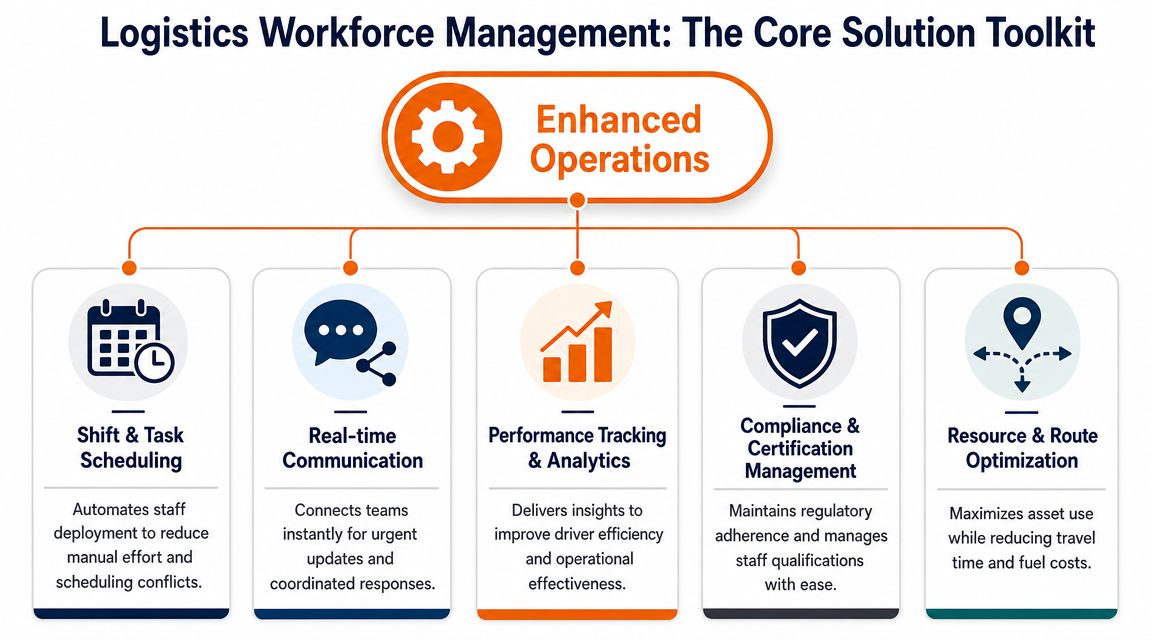
Used separately, scheduling, attendance, communication, tasks, onboarding, and reporting are just categories. Used together, they become operating discipline. That difference matters more than the feature list.
Scheduling that follows work, not habit
The biggest shift is moving away from fixed rosters built on routine and toward labor plans tied to actual demand. A high-value capability is demand-oriented scheduling, where order forecasts are used to calculate required capacity in real time so labor stays aligned with work volume instead of guesswork, as described in EPG ONE's workforce management approach.
That sounds technical. In practice, it's simple. If inbound volume spikes, the system should help you see the pressure early and adjust staffing before a line forms or orders slip. If volume falls off, you shouldn't be paying for idle hours because the schedule was built three days ago and nobody wanted to touch it.
Time and attendance that people trust
Bad time tracking creates two kinds of damage. Payroll errors and resentment.
When clock-ins, breaks, exceptions, and approvals all live in different places, every pay period turns into a small investigation. A good system makes attendance part of the flow of work. The person clocks in. The supervisor sees it. The record feeds the right downstream process. Nobody rebuilds history by hand at the end of the week.
Communication that doesn't leak into chaos
Most logistics teams underestimate how much work gets lost in bad communication. Not dramatic work. Everyday work. Dock changes. task reassignment. late arrivals. policy updates. shift coverage.
If your operation still relies on personal messaging apps, you're not running one communication system. You're running dozens of private ones. For teams trying to bring order to sales handoff and shipment coordination too, tools like TMS CRM lead tools for logistics can help upstream visibility, but the labor side still needs its own clean operating layer.
One option in that broader category is workforce management software from Pebb, which combines shifts, communication, tasks, files, and updates in one workspace. That kind of setup matters because updates and execution stop living in separate apps.
A schedule tells people when to show up. A communication layer tells them what changed after they got there.
Tasks, onboarding, and analytics that reinforce each other
Task management is where a lot of warehouse software still feels half-finished. The roster might be clean, but the actual work still gets assigned verbally. That's fragile. A better setup connects the person, the task, and the timing in one place so supervisors aren't repeating themselves all shift.
Onboarding matters for the same reason. New hires don't just need access. They need context. Where to check schedules, where SOPs live, how to report issues, who approves what. If that knowledge lives in binders and tribal memory, every new person becomes a drain on your best supervisor.
Then analytics ties it together. Not vanity dashboards. Useful signals. Which shifts are always short. Which zones create bottlenecks. Which tasks get delayed during handoff. One feature won't fix that alone. A shared system can.
Where the Rubber Meets the Road
Software matters when it changes the day, not when it looks tidy in a demo.
The strongest results usually don't come from one dramatic feature. They come from fewer handoffs, cleaner communication, and faster decisions on the floor. That's less exciting than a flashy pitch. It's also what holds up in live operations.
In a warehouse, small delays stack up fast
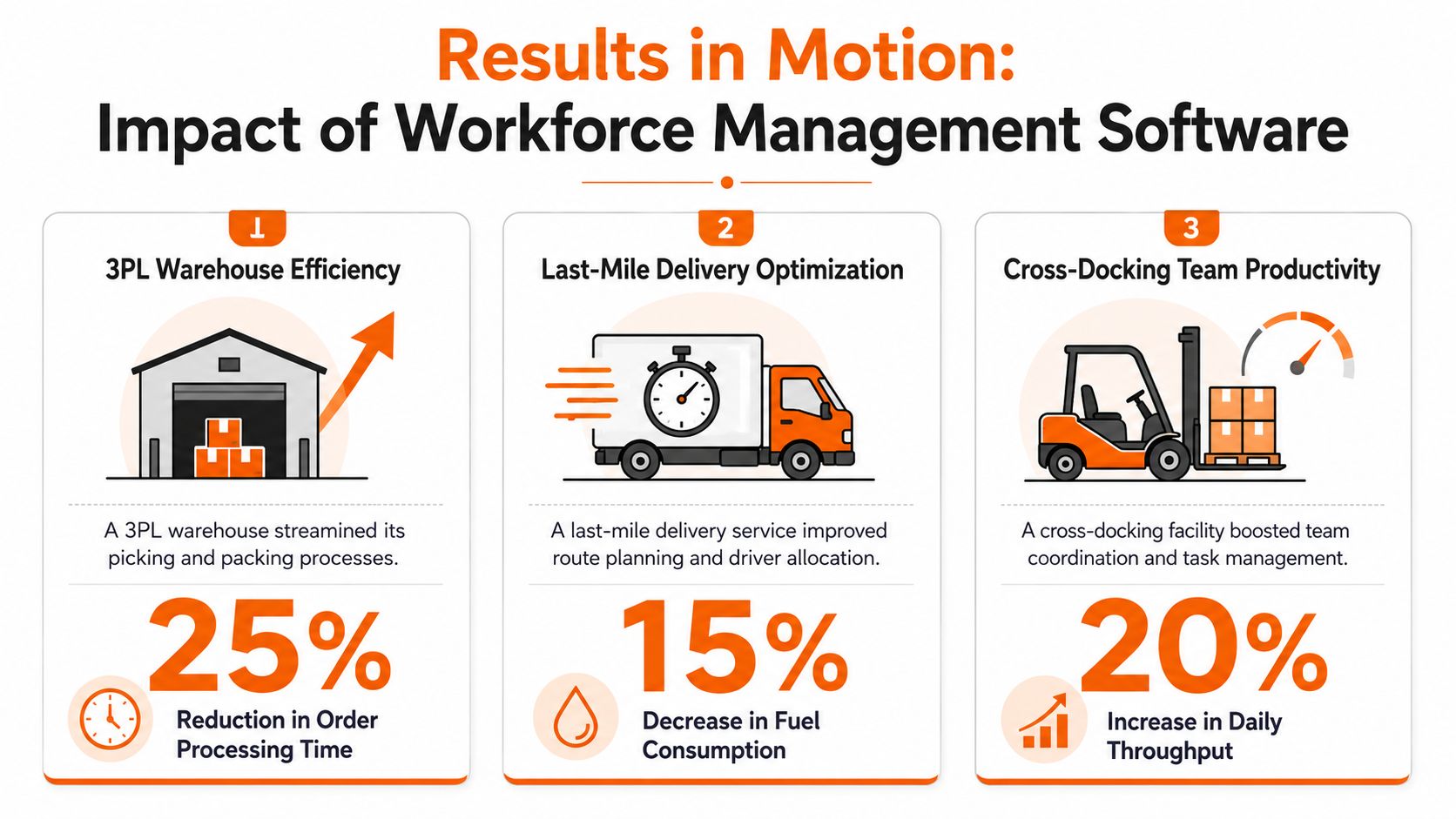
Take a busy warehouse running picking, packing, and shipping across multiple zones. If labor planning happens in one tool and task updates happen somewhere else, supervisors spend half their time reconciling reality. They don't see the shortage until the queue is already growing.
When scheduling is tied to expected workload and live floor conditions, the response changes. Managers can move people earlier. They can rebalance labor between steps instead of overloading one area while another stands idle. Teams don't have to wait for the end-of-shift report to discover where the day went wrong.
Real-time communication becomes an integral part of labor management, rather than a side concern. For a practical look at that side of the operation, centralizing driver and dispatch communication shows why scattered messaging slows decisions when timing matters.
In delivery operations, visibility beats heroics
Last-mile and fleet teams often run on heroics. Dispatchers know who usually picks up the phone. Drivers know which supervisor to text when something changes. It works until it doesn't.
A workforce system helps because it reduces dependence on memory and personal relationships as the operating model. If a route changes, if coverage drops, if attendance shifts, the update belongs in a shared place with shared visibility. Then reassignment becomes a workflow, not a scramble.
The best-run teams don't eliminate surprises. They shorten the time between surprise and response.
In high-turnover environments, structure matters more than slogans
Food distribution, cross-docking, and seasonal operations all share one ugly problem. New people arrive into a system that's often undocumented and overloaded. If the first week feels confusing, the operation pays for it immediately.
A unified system earns trust. New hires can see schedules, tasks, documents, and updates in one place. Supervisors spend less time repeating the basics. The team gets more consistency across shifts. That doesn't make the work easy. It makes the work legible.
And legibility is underrated. People stay steadier when the job feels organized. Managers make better calls when the information is current. Customers feel the difference even if they never hear the name of the software behind it.
Integration and Security The Boring Stuff That Sinks Ships
The boring parts decide whether the tool survives first contact with reality.
You can buy the cleanest scheduling app on the market, but if it can't connect to payroll, HR, your warehouse system, or your communication workflow, your team will end up doing manual patchwork around it. That's how "new software" becomes one more tab in the mess.
Integration is operational, not technical
A disconnected tool creates extra work in places buyers don't always see during evaluation. Supervisors duplicate entries. Admin teams recheck attendance data. Managers export one file to update another. Errors creep in at the seams.
That's not an IT nuisance. It's an operations tax.
What you want is simple. One change should travel. If an employee is assigned, clocks in, gets moved, or no-shows, the right systems should reflect that without someone rebuilding the truth by hand. Open APIs matter, but the practical question is even simpler. Can this tool fit your current flow without creating shadow work?
Personal apps are not a workforce system
A lot of teams still run critical updates through WhatsApp, text threads, and personal calls because it's fast. It is fast. It's also brittle.
Messages get buried. People leave. Devices change. Admins lose visibility. Sensitive information ends up in places the company doesn't control. And when you need to reconstruct what happened, there often isn't one reliable record.
Fast communication isn't the same as controlled communication.
Security sounds abstract until there's a dispute, a missed instruction, or a compliance question. Then suddenly everyone wants a clean audit trail, permission controls, and one place to verify what was sent, seen, and acted on. By then it's late.
The right logistics workforce management software should feel a little boring on this front. That's good. Boring means stable, controlled, and dependable. In logistics, that beats clever every time.
How to Choose Your System Without Losing Your Mind
A common mistake in software acquisition is to begin with a feature checklist.
That sounds disciplined, but it usually leads to buying too much of the wrong thing. A tool can have every box ticked and still miss the one pain that's draining your operation every single day. Start with the pain. Then work backward.
Pick the problem that's costing you the most
Don't ask, "Which platform has the most features?" Ask, "Where do we lose control first?"
For some teams, it's shift coverage. For others, it's dispatch communication. In a warehouse, it may be task execution changing faster than supervisors can keep up. In a growing business, onboarding may be the hidden leak.
This is why I prefer a pain-based buying process:
Name the recurring failure point. Not in general terms. In plain language.
Find the handoff that's breaking. Scheduling to attendance. Attendance to payroll. Dispatch to drivers.
Choose the capability that removes that handoff, not the one that looks the most impressive in a demo.
Matching your pain to the right capability
If Your Biggest Pain Is... | You Need a Platform With... | What That Actually Looks Like |
|---|---|---|
Shift changes and no-shows keep wrecking the day | Live scheduling, availability, and shift reassignment | Supervisors can adjust coverage quickly without rebuilding the whole roster |
Drivers and dispatch miss updates | Centralized communication tied to teams or roles | Route changes, delays, and exceptions land in one managed channel |
Payroll disputes keep returning | Time and attendance linked to approvals | Clock-ins, edits, and exceptions create one trusted record |
New hires take too long to get up to speed | Mobile onboarding, documents, and task guidance | People know where to find SOPs, policies, and first-week instructions |
Supervisors are always reacting late | Real-time visibility and useful analytics | Bottlenecks show up while the shift is still recoverable |
One practical reference if you're comparing logistics-specific options is workforce management software for logistics, especially if you're trying to judge unified systems against point tools.
What to push vendors on
Skip the polished script and ask awkward questions.
Show me the handoff between schedule, attendance, and communication
Show me the mobile experience for a frontline worker, not just the admin view
Show me what happens when plans change mid-shift
Show me the permission model so I know who sees what
Show me implementation reality and what the first rollout phase looks like
If they can't answer those clearly, the platform may still be fine. But it probably won't bring much calm to a busy operation.
Your First 90 Days From Rollout to Rhythm
Buying the software is a project. Getting people to trust it is the essential job.
Most failed rollouts don't fail because the platform was impossible to use. They fail because leadership tried to replace old habits all at once. That's too much change for teams who are already busy and skeptical. Start smaller.
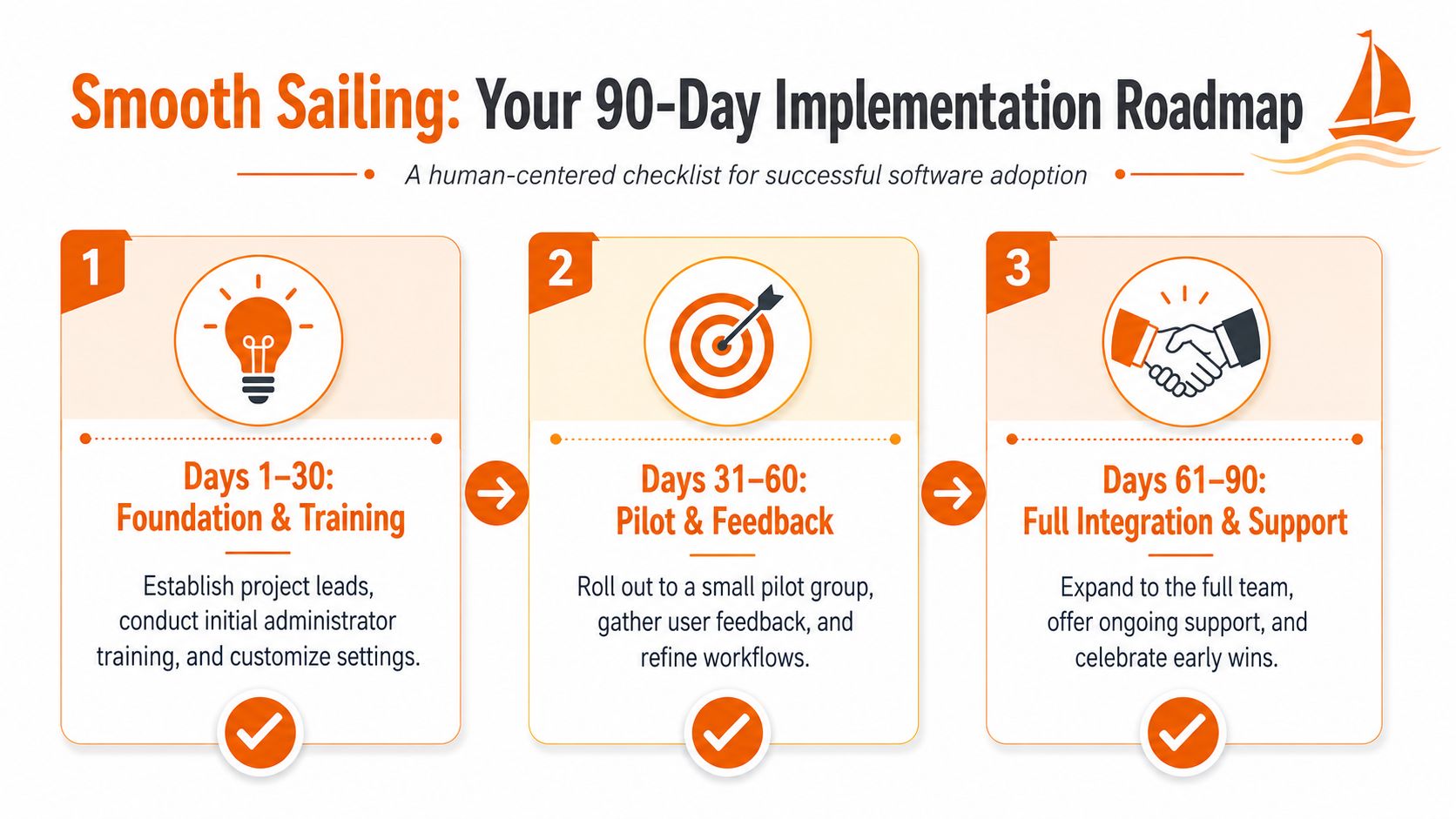
Start with one team and one pain
Pick a group where the need is obvious and the manager wants relief. Maybe it's one warehouse shift. Maybe it's dispatch. Maybe it's attendance and schedule publishing for a high-turnover site.
Don't launch every module just because you paid for them. Fix one visible problem first. Let people feel the difference in their day.
Build trust before you chase compliance
The first win should be practical. Fewer missed updates. Easier shift visibility. Cleaner attendance records. Something people notice without needing a slide deck.
That early trust matters because the team is asking a quiet question during rollout. "Will this make my day simpler or harder?" If the answer is simpler, adoption follows a lot faster.
A few habits help:
Choose internal champions who are respected by the floor, not just management
Keep training short and role-based so people only learn what they need now
Collect complaints early because rough edges show up fast in live operations
Tighten the process weekly instead of waiting for a grand review later
Good rollout discipline is mostly listening, adjusting, and not pretending version one is perfect.
Rhythm is the real milestone
By the end of the first stretch, the goal isn't perfection. It's rhythm.
People know where to check the schedule. Supervisors know where to push updates. Managers trust the attendance record. New hires stop needing five different explanations to get through the week. The operation starts feeling less improvised.
That's the core promise of logistics workforce management software. Not a shinier dashboard. A steadier day.
If you're trying to replace scattered chats, shift tools, task lists, and policy documents with one calmer system, Pebb is worth a look. It brings communication, scheduling, tasks, files, and frontline updates into one app, which is exactly the kind of consolidation many logistics teams need when they're tired of running operations across disconnected tools.
