
Author: Ron Daniel
Best Practices for Employee App Rollout
Four-step approach to plan, pilot, train, and measure employee app rollouts to boost adoption, engagement, and retention.
Most companies get it wrong when launching an employee app. They think, "We’ll just launch it, send an email, and watch adoption skyrocket." But here’s the reality: 70% of digital workplace tools fail because of unclear goals. I’ve seen it happen more times than I can count. A company invests in a shiny new platform, but without a plan, it turns into just another forgotten icon on an employee’s phone.
The good news? It doesn’t have to be that way. When done right, an employee app can transform how your team communicates and works together. I’ve seen firsthand how companies using apps like Pebb can hit 70-90% adoption rates, reduce turnover by 20%, and boost engagement by 25%. But getting there requires strategy, not guesswork. Developing a comprehensive internal communications strategy is the first step toward that success.
In this guide, I’ll walk you through the steps that actually work - from setting clear goals to building excitement before launch, training your team the right way, and tracking success long after rollout day. Let’s dive in and make sure your app rollout is one of those rare success stories.
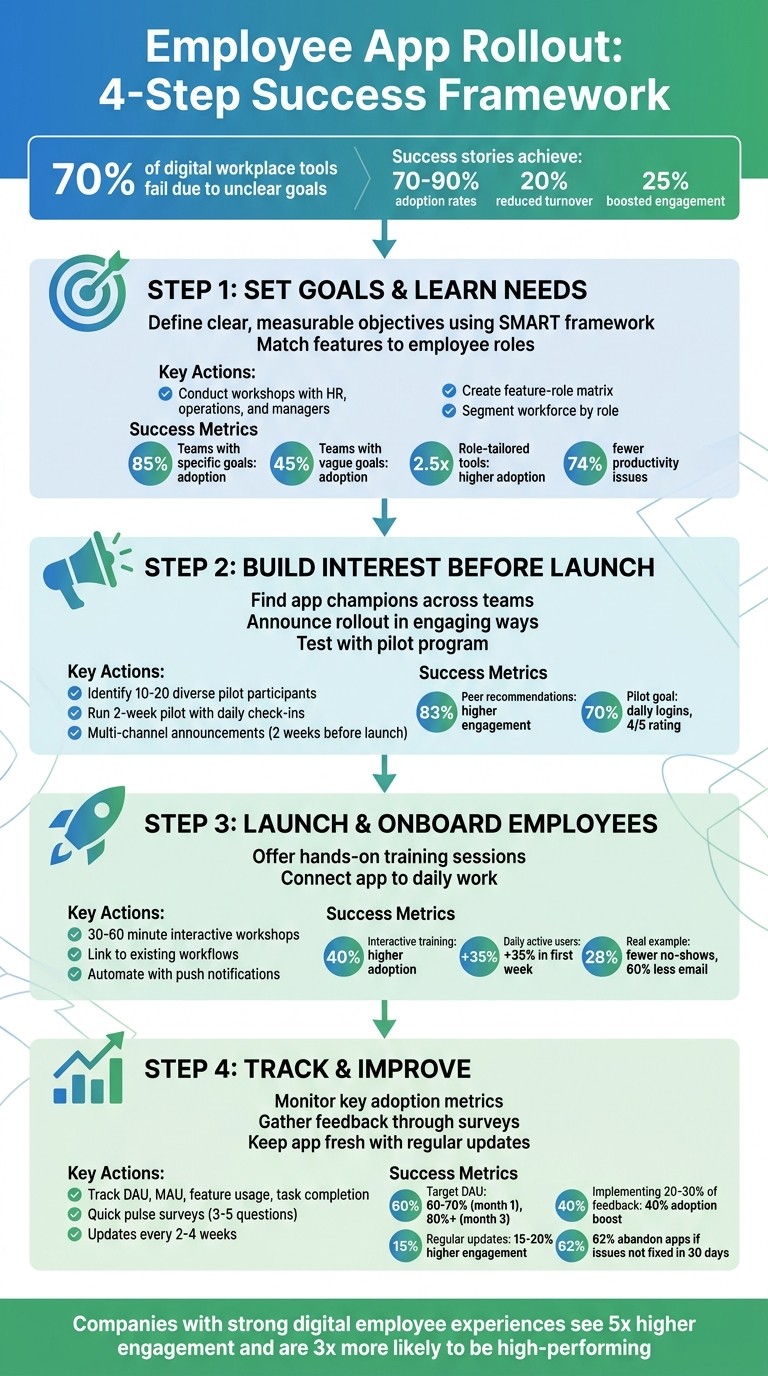
4-Step Employee App Rollout Process with Success Metrics
Step 1: Set Your Goals and Learn What Employees Need
Let me tell you, one of the quickest ways to derail an app rollout is to launch it without a clear purpose. Employees get frustrated, leadership gets confused, and the whole thing feels like a waste of time. I’ve seen it happen, and trust me, it’s not pretty.
But here’s the good news: avoiding this mess starts with two simple questions - What problems are we solving? and What do our people actually need?
Define Clear Objectives for the App
Vague goals like "improve communication" just don’t cut it. Instead, get specific. Think measurable outcomes, like reducing scheduling conflicts by 40%, cutting email overload in half, or bumping engagement survey scores from 6.2 to 8.5 out of 10.
At Pebb, we’ve worked with over 500 clients, and the difference between success and struggle is crystal clear. Teams that set specific goals - like “eliminate paper schedules and reduce no-shows by 25%” - see adoption rates soar to 85%. On the flip side, those with fuzzy objectives often struggle to get even 45% of employees on board.
Start with a workshop. Bring HR, operations, and frontline managers into the same room (or Zoom) and map out the pain points. Ask questions like:
Are shift swaps taking too long?
Are company updates getting buried in email?
Are vacation requests still stuck in the 1990s with paper forms?
From there, identify three to five specific goals and tie each one to a measurable outcome. For instance, one of our retail clients aimed to sync schedules across 15 stores. The result? A 15% drop in shift conflicts within just one quarter.
Use the SMART framework - Specific, Measurable, Achievable, Relevant, and Time-bound. A goal like “Increase app-open rates to 70% within three months” is SMART. “Make communication better”? Not so much. Write everything down in a one-page plan, share it company-wide, and use it to track your progress.
The stats back this up. Gartner says 70% of digital workplace tools fail because of unclear goals, while McKinsey reports that aligned deployments triple adoption rates. When you know what you’re aiming for, you’re much more likely to hit the mark.
Once your goals are locked in, it’s time to figure out how the app can serve the unique needs of each employee group.
Match App Features to Different Employee Roles
Here’s the thing: a frontline worker checking their schedule during a coffee break has very different needs than a district manager reviewing analytics at their desk. If you want employees to actually use the app, it has to work for their specific roles. Research shows that role-tailored tools drive adoption rates 2.5 times higher.
Start by segmenting your workforce into groups like desk-based employees, frontline workers, and remote teams. Then dig deeper with surveys or focus groups. Ask frontline employees what slows them down during the day. Ask managers what eats up too much of their time. You might be surprised by their answers.
At Pebb, we’ve built our platform to address these differences. Frontline employees get mobile-first features like shift swaps, push notifications, and quick-access chat. Managers, on the other hand, get tools for assigning tasks, managing groups, and tracking performance with analytics. It’s all one platform, but the experience is tailored to what each role needs.
In one pilot with a hospitality group, we paired chat and group features for servers with vacation tracking and task management tools for shift leads. The results were incredible - admin time dropped by 35%, and satisfaction scores shot up across the board.
To make this work, create a simple feature-role matrix. List out the app’s capabilities - things like chat, scheduling, updates, tasks, and analytics - and match them to specific roles. For example:
Frontline workers need mobile scheduling and notifications.
Managers want oversight tools and reporting capabilities.
Office staff benefit from collaboration features like file sharing.
And don’t forget permissions! New hires might only need read-only updates, while shift leads should have the ability to approve swaps.
"The biggest mistake is assuming what employees need - always start with their voice." – Josh Bersin, HR Analyst (Bersin by Deloitte, 2024)
Here’s a stat that blew my mind: 80% of the global workforce is on the frontline, but only 40% use enterprise apps effectively when those apps aren’t customized. That’s a huge gap. If the app doesn’t work for the people who actually use it, it’s dead in the water. Validate your choices early by running quick polls or asking employees to rank features by importance. Then adjust based on their feedback.
Companies that get this right report 74% fewer productivity issues tied to poor communication and see engagement levels climb by 20–30%. When employees feel like the app was built with them in mind, they’re far more likely to embrace it. And that’s when the magic happens.
Step 2: Build Interest Before Launch Day
Building interest ahead of launch day is like dropping movie trailers before the blockbuster premiere - it’s all about creating buzz and getting people excited.
Find App Champions Across Your Teams
Here’s the truth: employees trust their peers way more than a generic HR email. That’s why identifying app champions - those natural influencers within your team - is such a game-changer. Studies show that peer recommendations can boost engagement by a whopping 83% compared to top-down announcements.
So, how do you find these champions? Look for team members who are well-respected, approachable, and already the go-to person for advice or support. Once you’ve got them, give them the tools to shine. Let them customize their own Spaces or channels within the app to fit their team’s workflow. Create a group chat for them to share tips and troubleshoot together. And here’s a tip: don’t underestimate the power of a shout-out or a small token of appreciation - it shows you value their efforts.
Announce the Rollout in Engaging Ways
Let’s face it, a plain “New App Coming Soon” email isn’t going to cut it. To get people genuinely excited, you need a multi-channel game plan. At Pebb, we’ve learned that using a blend of tailored announcements gets people talking and drives early adoption.
Start teasing the app about two weeks before launch. Use a mix of posters, digital countdowns, team meetings, and personalized emails to hype up the benefits. The key? Tailor your message to different roles. For example:
Frontline employees might care most about mobile access and quick shift swaps.
Managers are likely drawn to better oversight and analytics.
By showing how the app solves specific pain points for each group, you’re not just announcing a tool - you’re proving its value. This approach builds excitement and lays the groundwork for meaningful feedback during testing.
Test with a Pilot Program First
Skipping a pilot is like skipping a dress rehearsal - you’re just asking for trouble. A pilot program helps you spot issues, refine your training, and build early advocates. As APM puts it:
"A pilot project enables an organisation to manage the risk of a new idea and identify any deficiencies before substantial resources are committed." - APM
Here’s how we run pilots at Pebb: pick a diverse group of 10 to 20 employees from different roles and locations. Over two weeks, hold quick 15-minute daily check-ins to gather feedback. Set clear goals from the start - like aiming for 70% of participants to log in daily and rate their experience 4 out of 5 or higher. These metrics give you a clear signal on whether you’re ready to move forward.
Use the feedback to tweak your training materials, FAQs, and support guides. By the time launch day arrives, you’ll have a polished app experience and a team of early advocates ready to onboard others with confidence. With these steps locked in, you’re perfectly positioned for a smooth rollout in the next phase.
Step 3: Launch and Onboard Employees
The big day is here - launch day! After all the buzz-building and pilot testing, it’s time to get employees not just using the app but feeling confident and excited about it from the very first login.
Offer Hands-On Training Sessions
Here’s what we’ve learned at Pebb: interactive training beats passive learning every time. In fact, Gartner research backs this up, showing that interactive sessions increase adoption rates by 40% compared to just handing out reading materials or guides. That’s why we always recommend hosting 30–60 minute hands-on workshops, customized to fit specific roles. For instance, we’ve run 45-minute sessions for frontline managers that focus on tools like shift scheduling and chat features.
We structure these workshops to keep the energy high and the content engaging. Here’s our typical agenda:
Kickoff (5 minutes): Start with a quick overview of the app’s key benefits. For example, we might say, “Imagine managing your shifts and chatting with your team - all without the hassle of email!”
Live Demo (20 minutes): Walk through the app’s core features - profiles, groups, tasks, and more - showing how they work in real time.
Practice Time (15 minutes): Pair employees up so they can try out tasks themselves, like approving vacation requests or swapping shifts.
Q&A (5 minutes): Wrap up by answering any lingering questions and addressing concerns.
To ensure we reach everyone, we mix up the formats. Virtual teams? We host Zoom sessions with screen sharing. On-site teams? We lead in-person walkthroughs for employees using their own devices. And for those who prefer flexibility, we record sessions so they can revisit the material later.
One secret weapon? Involving champions from the pilot group to co-lead these sessions. When employees hear real success stories from their peers, it builds trust and makes the training feel more relatable.
Once the team is trained, the next step is integrating the app into their daily workflows.
Connect the App to Daily Work
Training is just the start. The real challenge? Making Pebb a must-have in employees’ everyday routines. The key is to tie the app directly to the tasks they already do.
Let me share a couple of examples. When we rolled out Pebb for a 500-employee retail chain, we linked it to their daily shift scheduling. Managers started posting rosters in Pebb groups, which cut no-shows by 28%. In another case, a restaurant group used Pebb for menu updates and task lists, reducing email volume by 60% and driving engagement scores up to an impressive 92%.
Our advice? Start with one process that’s a real pain point - like moving all vacation requests to Pebb instead of juggling emails or paper forms. Once employees get into the habit of using the app for that, you can expand its role to include things like shift reminders, company announcements, or task assignments. This “habit stacking” approach has been a game changer for us, increasing daily active users by 35% in just the first week.
To make the transition even smoother, automate as much as possible. Push notifications, in-app updates, and direct task assignments ensure that Pebb feels like the easiest and most efficient way to get work done. And when something makes life easier? People stick with it. Adoption follows naturally.
Step 4: Track Performance and Make Improvements
Let me tell you, launch day is just the beginning. The real magic happens in the weeks and months that follow. At Pebb, we’ve learned that the apps that stick around and make an impact are the ones where teams keep a close eye on performance and aren’t afraid to make changes along the way.
Monitor Key Adoption Metrics
Here’s where it starts: knowing your numbers. There are five key metrics we always recommend tracking: Daily Active Users (DAU), Monthly Active Users (MAU), feature usage rates, message activity, and task completion rates. These numbers don’t just tell you if people downloaded the app - they show you whether they’re actually using it.
Here’s a benchmark to aim for: DAU should hit around 60–70% in the first month, and ideally climb to over 80% by the third month. Companies hitting these targets see retention rates that are 2.5 times higher after 90 days. The good news? Pebb’s platform automates this tracking, so you’re not stuck crunching numbers manually.
Take Starbucks, for example. In Q1 2023, they used Workplace by Meta to monitor how engaged their frontline workers were. They tracked everything from message open rates (which jumped from 55% to 82%) to task completion rates (improving from 40% to 75%). Over three months, their DAU increased by 45%, from 25,000 to 36,250 workers. And the kicker? Employee satisfaction scores went up by 28%. That’s the power of pairing metrics with actionable insights.
Gather Feedback Through Surveys and Analytics
Metrics tell you what’s happening, but feedback explains why. This is why I’m a huge fan of quick pulse surveys, especially in the first month. Just 3–5 questions about ease of use or any pain points can give you a goldmine of information. After that, monthly check-ins and quarterly Net Promoter Score (NPS) surveys help keep the insights flowing.
Here’s why this matters: 62% of employees abandon apps if onboarding issues aren’t resolved within the first 30 days. That stat hit us hard at Pebb, so we built in-app feedback tools to make it simple. With just one click, employees can share their suggestions. And when companies implement 20–30% of those suggestions, they see a 40% boost in sustained adoption rates. That’s no small feat.
Hilton Hotels is a great example of how this works in practice. In 2022, they piloted Blink’s employee app and collected 4,500 survey responses from their 150,000 staff members. The feedback led to 12 feature updates over six months, pushing their MAU from 12% to 47%. The result? A 22% drop in no-shows, saving them $1.2 million. That’s what happens when you listen and act.
Keep the App Fresh with Regular Updates
Even the most well-designed app can get old fast if it’s not updated regularly. At Pebb, we’ve found that releasing updates every 2–4 weeks keeps engagement 15–20% higher than apps with sporadic updates. But here’s the catch: updates need to solve real problems, not just add fluff.
Our approach is simple. Critical bug fixes go out immediately. Minor UX tweaks? Every two weeks. Major new features? Quarterly. And we don’t just release updates quietly - we announce them with in-app notifications and team-wide messages. When employees see their feedback turning into actual improvements, they stick around.
But let me give you a heads-up: watch out for the “adoption cliff.” This usually happens 4–8 weeks after launch. If DAU drops below 40%, uninstall rates spike, or NPS scores dip below 30, it’s time to act fast. Focus groups, frontline onboarding best practices, and manager involvement can turn things around. Companies that address these issues within 6–8 weeks often bounce back to hit their adoption goals.
Tracking, listening, and improving - it’s a cycle that keeps your app relevant and your team engaged. And trust me, it’s worth every bit of effort.
Conclusion
Rolling out an employee app isn’t just a one-and-done task - it’s a journey. It starts with careful planning, gains traction through meaningful engagement, and thrives with consistent updates. I’ve seen companies, like a mid-sized retail chain, hit 92% adoption in just 90 days because they approached the process as a commitment to their team, not just another tech rollout.
The key? Start with clear goals and match the app’s features to what your team actually needs. Build anticipation before launch with app champions, creative announcements, and small pilot programs. On launch day, focus on hands-on training that ties the app to real, everyday tasks. But don’t stop there - keep tracking progress, gathering feedback, and making updates. The companies that monitor metrics and take action on feedback are the ones that see higher adoption and engagement.
At Pebb, we live by these principles. Every feature we’ve built - from automated analytics to one-click feedback tools - was designed to make this process easier and more effective.
"The best tech rollout isn't about the tool - it's about the people. Plan thoughtfully, engage early, and iterate relentlessly." – Josh Bersin, HR Analyst (2024)
And the numbers don’t lie. Companies with strong digital employee experiences see 5x higher engagement and are 3x more likely to be high-performing. That level of success doesn’t just happen - it’s the result of treating your app rollout as a strategic investment in your people, not just another IT project.
FAQs
What should we launch in the app first to build habits?
To get your team hooked on a new habit, start with the basics: shift scheduling and team communication tools. These features tackle everyday essentials like clock-ins, shift swaps, and quick messaging, solving real problems right away. Once your team experiences how much smoother their day becomes, they’ll naturally start exploring other tools, like PTO management and company news. Before you know it, the app becomes a go-to part of their daily workflow.
How can we ensure managers consistently promote app usage?
Managers play a crucial role in driving app adoption, and it starts with leading by example. When they use the app consistently and highlight its benefits during team interactions, it sets the tone for the rest of the team. To make this even more effective, we’ve found that running engaging internal campaigns - like fun contests or sharing team success stories - can generate excitement and participation.
Of course, confidence is key, so providing proper training ensures managers feel comfortable and capable with the app. Another trick? Weave app usage into routine check-ins and meetings. By making it a natural part of daily operations, it becomes more than just a tool - it’s a resource that supports leadership and team success.
What should we do if adoption drops a month after launch?
If you notice a drop in adoption after launch, it’s time to rethink how you’re communicating with your team. Here’s what worked for us: running focused campaigns with reminders, incentives, and live demos to show off the app’s benefits. We also made sure the features actually solved real problems for employees. Plus, we offered ongoing support and training to keep everyone confident and engaged. The key here is ensuring the app becomes a must-have part of their daily routine - not just another tool they ignore.
