
Teams v Slack: Choose the Right Tool
Teams v Slack: An unbiased comparison for HR, ops, & frontline leaders. Cut through the noise & choose the right communication tool for your team.
Dan Robin
Many teams don’t have a Teams problem or a Slack problem. They have a split-workforce problem.
The office staff are chatting all day, files are moving, meetings are booked, and leadership thinks communication is handled. Then you walk into a warehouse, a clinic, a hotel, or a store and find printed notices taped to a wall, missed updates passed through supervisors, and part-time staff who never see the message until it’s already old.
I’ve seen this play out more than once. A company rolls out Microsoft Teams because it already pays for Microsoft 365. Or a department adopts Slack because people enjoy using it. Both choices can work for desk teams. Both can fail badly the minute you expect them to connect everyone.
That’s why the usual teams v slack comparison misses the point. It treats communication like an office-only problem. For HR leaders, operations managers, and frontline supervisors, the true question is simpler. Which tool helps every employee stay informed, do the work, and not get left out?
Here’s the short version before we get into it: Teams is the enterprise utility. Slack is the better chat product. Neither was built around frontline operations. That last part matters more than most buyers want to admit.
Area | Microsoft Teams | Slack | My take |
|---|---|---|---|
Core idea | Built into Microsoft’s work stack | Built for fast, channel-based collaboration | Teams often wins by default. Slack wins when teams choose it. |
Best at | Meetings, governance, Office integration | Messaging, usability, engagement | Different strengths, different cultures |
Mobile feel | Serviceable, but often shaped by desktop logic | Cleaner for quick communication | Slack feels lighter for day-to-day chat |
Frontline fit | Can be forced into frontline use | Can be adapted for messaging on the go | Neither is a natural fit for shifts, clock-ins, or PTO |
Admin model | Strong for large IT-controlled environments | Better for flexible team-level adoption | Depends on whether control or ease matters more |
Right buyer | Microsoft-first enterprise | Fast-moving teams that live in chat | Mixed workforces usually need something else |
The Office is Connected, What About Everyone Else
A regional manager sends an update at 9:00 a.m. The office team reads it in minutes. The warehouse lead sees it at lunch. The evening shift never sees it at all.
That’s not a software glitch. That’s the normal state of communication in a lot of companies.
I’ve watched HR teams spend weeks polishing internal comms plans that only really reach salaried staff with laptops. Everyone else gets a watered-down version through group texts, shift huddles, notice boards, or a supervisor who’s already overloaded. Then leaders wonder why policy updates don’t land, why training completion lags, or why rumors beat official messages every time.
A lot of this starts with buying an office communication tool and pretending it’s a company communication tool. Those are not the same thing. If you’re trying to build a real digital workplace for every employee, you need something that works just as well for a nurse between rounds as it does for a finance manager at a desk.
What the disconnect looks like in practice
The signs are easy to spot:
Messages travel in layers. Leadership tells managers, managers tell supervisors, supervisors tell whoever is on shift.
Policies live in too many places. Some are in email, some in chat, some in binders, some in nobody’s memory.
Frontline staff are always catching up. They’re not part of the daily flow, so they hear things late.
Communication depends on who’s working. A strong manager keeps people informed. A weak one becomes a bottleneck.
That’s why the teams v slack debate gets distorted. In the office, both tools can look good. On the floor, the cracks show fast.
The minute your communication model depends on “someone will tell them,” you don’t have a system. You have hope.
The bigger question isn’t whether Teams or Slack has better reactions, cleaner channels, or nicer calls. It’s whether your company can run on one shared source of truth without excluding the people doing the most time-sensitive work.
The Two Giants and Their Philosophies
Teams and Slack aren’t just different products. They come from opposite beliefs about how work should happen.
Microsoft Teams is built like infrastructure. It’s part of a larger Microsoft environment, wrapped into Microsoft 365, shaped by enterprise buying, and managed from the top down. That’s a big reason it dominates in scale. Microsoft Teams reported 320 million monthly active users in 2024, while Slack had 65 million monthly active users and 42 million daily active users. Teams’ broader reach is tied closely to bundling and enterprise standardization, as noted in this Slack vs Teams market comparison.
Slack took the opposite path. It became popular because teams wanted to use it. The same source notes that Slack users send 2,000 messages per user per month, compared with 1,000 in Teams. That doesn’t make Slack bigger. It does suggest Slack becomes a more central daily workspace for the people who adopt it.
Teams wins the rollout
I’ve seen Teams get approved in a single meeting. The company already uses Outlook, Word, Excel, SharePoint, and Microsoft identity tools, so Teams feels like the obvious move. Procurement likes it. IT likes it. Security likes it. Finance likes that it’s already in the stack.
That matters. Buying friction kills software choices all the time. Teams avoids a lot of that friction.
It also has the market muscle to back it up. Teams revenue exceeded $8 billion by 2023, and adoption data in the same source shows 60% of organizations using Teams versus 30% for Slack. Those numbers tell you where enterprise gravity sits.
Slack wins the room
Slack’s appeal is simpler. People often enjoy using it more.
A separate survey-based comparison found Slack users report stronger engagement and satisfaction across several measures, including 93% customer satisfaction versus 85% for Teams, and 65% of Slack users saying they feel able to contribute to strategic decisions versus 46% on Teams in a survey of knowledge workers, according to this business communication statistics roundup.
That lines up with what I’ve seen in real teams. Slack usually feels lighter, faster, and more natural for conversation. Teams often feels like part chat app, part meeting tool, part document layer, and part enterprise control panel.
My rule: if a tool spreads because users want it, pay attention. If it spreads because it’s bundled, pay attention for different reasons.
Neither path is wrong. But they produce different behavior.
The real divide
This is the cleanest way I’d put it:
Question | Teams | Slack |
|---|---|---|
How does it usually enter a company | Standardized from above | Adopted by teams that like it |
What does it optimize for | Control, integration, broad enterprise utility | Communication flow, speed, team engagement |
What culture does it suit | Structured, Microsoft-first, governance-heavy | Flexible, chat-first, fast-moving |
If you miss that philosophical divide, the rest of the comparison gets confusing. Teams isn’t trying to be Slack. Slack isn’t trying to be Teams. And neither is trying very hard to be the home for hourly operations.
A Feature Breakdown for Real-World Work
Feature lists usually waste your time. They treat every checkbox like it matters equally. It doesn’t.
What matters is how the tool feels when people are busy, under pressure, switching devices, or trying to get one answer fast.
Messaging and daily coordination
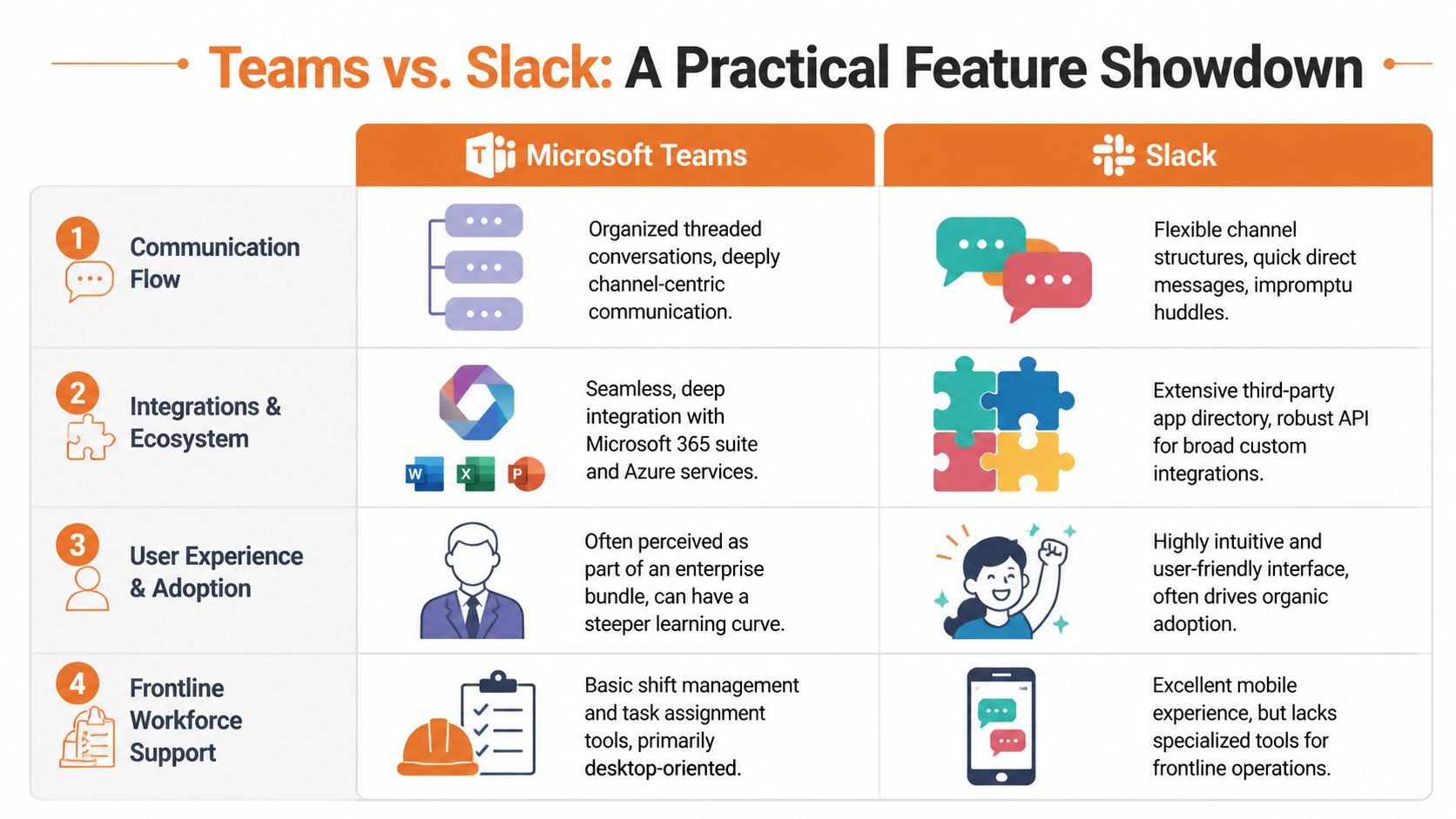
Slack is still the better pure messaging product in my view. It feels built for conversation first. Channels are flexible, direct messages are fast, and the whole thing encourages quick participation.
Teams can handle messaging just fine, but its structure is heavier. The hierarchy of teams and channels makes sense on paper, especially for larger organizations, but it can feel awkward for cross-functional work. That’s especially true when communication cuts across shifts, locations, or temporary projects.
A practical point often missed in teams v slack articles is measurement. If you’re trying to understand what people truly read, respond to, and ignore, analytics matter. A focused guide to Slack analytics for content is useful because it shows how teams can look beyond raw message volume and into whether communication is effectively landing.
Slack is better when the work starts with a message. Teams is better when the work starts with the Microsoft stack around the message.
Meetings and live communication
Teams gains an advantage.
For meetings, broadcasts, and formal live events, Teams is clearly stronger. It supports up to 1,000 participants in meetings and 10,000 view-only attendees for webinars or live events, while Slack huddles are limited to 50 participants. That difference is laid out in this comparison of Teams and Slack meeting capabilities.
If you run all-hands meetings, compliance briefings, training sessions, or executive broadcasts, Teams is the safer choice. Slack treats live communication as lightweight and spontaneous. Teams treats it as a core job.
Quick comparison on practical use
Use case | Better fit |
|---|---|
Fast team chat during the day | Slack |
Scheduled leadership meetings | Teams |
Large internal webinars | Teams |
Informal drop-in conversations | Slack |
Office document collaboration during calls | Teams |
That split isn’t small. It changes how people behave inside the tool.
Integrations and the work around the work
Teams is strongest if your world already runs on Microsoft 365. Co-authoring Word, Excel, and PowerPoint files inside the same environment is convenient. File storage tied to SharePoint and OneDrive also makes sense for companies that already depend on those systems.
Slack is stronger when your stack is mixed and messy, which is most modern companies. It adapts better to different tools and looser workflows. That flexibility is a big reason technical teams, startups, and smaller departments often prefer it.
There’s another difference under the surface. Teams tends to centralize. Slack tends to connect.
Admin, control, and governance
IT teams usually feel more at home in Teams. Governance is deeper. Access controls are stronger. Microsoft’s surrounding identity and compliance tooling is built for big-company oversight.
Slack is easier to get moving, but that ease can make leaders nervous in regulated environments. Simpler adoption often means more cleanup later if standards weren’t set early.
If your legal, security, and compliance teams already drive software decisions, Teams will feel familiar. If speed and adoption matter more, Slack usually creates less friction.
Mobile use and the part nobody likes to admit
Mobile matters more than vendors pretend. Not everyone sits at a laptop.
Slack generally feels cleaner on mobile for fast communication. That matters when people are walking a floor, covering a shift, or checking in between tasks. But mobile chat alone doesn’t solve frontline work. It just makes office-style chat portable.
Teams works on mobile, but too much of the experience still feels inherited from desktop assumptions. That’s tolerable for managers. It’s less tolerable for hourly staff who need fast updates, clear tasks, and minimal clicks.
This is why feature comparisons can mislead. A tool can be good at communication and still be wrong for the actual job.
The Reality for Frontline and Operations Teams
Most software comparisons are written by people thinking about marketers, engineers, and finance teams. That’s fine if that’s your whole company. It’s useless if half your workforce is on shifts.
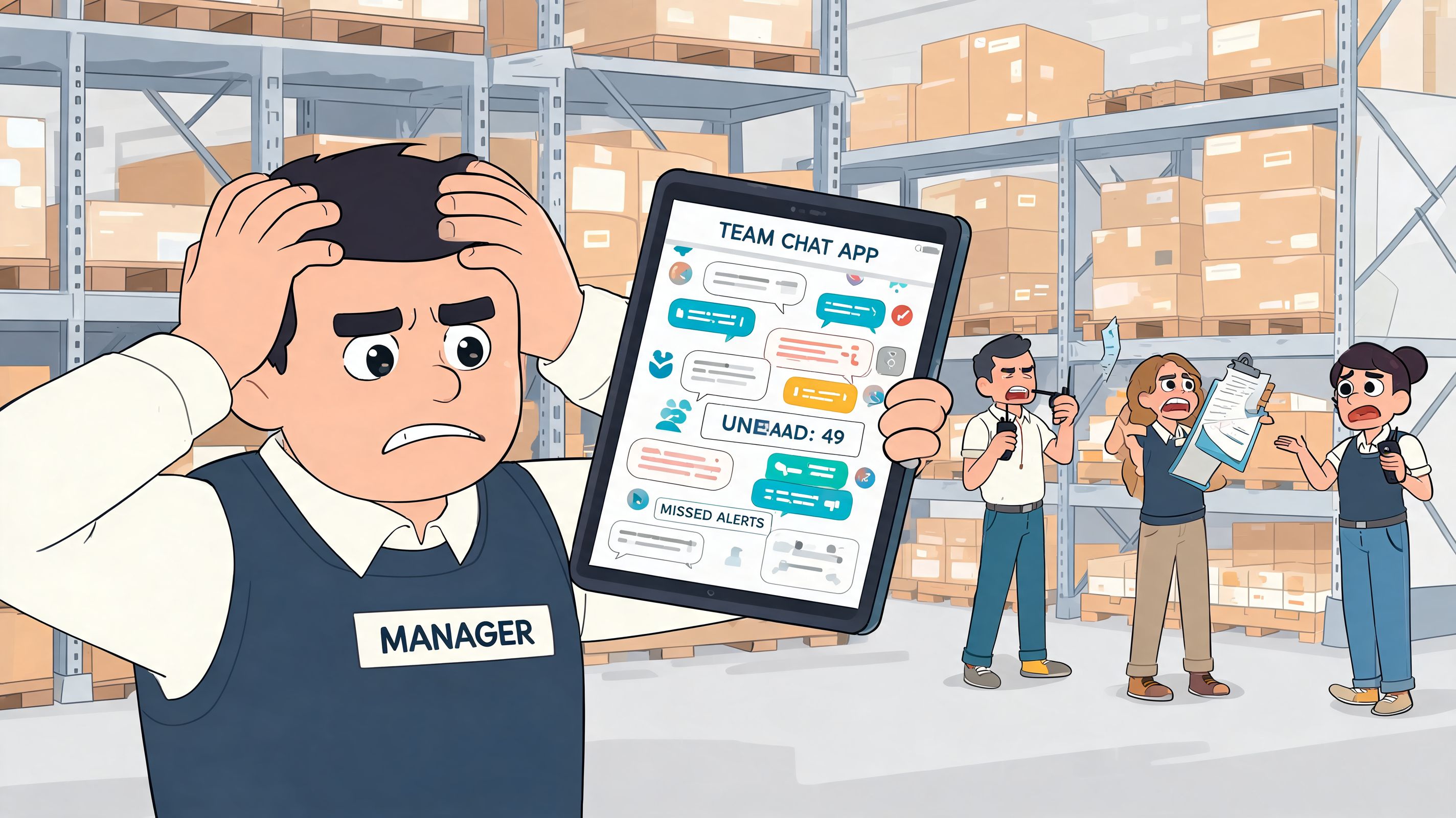
A warehouse supervisor doesn’t need another elegant channel structure. A hotel manager doesn’t need a philosophical debate about huddles versus meetings. They need staff to see updates fast, swap information cleanly, find policies on a phone, and keep work moving without opening five apps.
The office bias in both tools
This is the blind spot. Existing comparisons overwhelmingly focus on knowledge workers and ignore frontline reality. There’s no credible data on how Teams or Slack perform for tasks like shift scheduling and mobile clock-ins because they weren’t built for them, as noted in this analysis of the frontline gap in Slack versus Teams coverage.
That absence matters. HR and operations leaders are making buying decisions without useful benchmarks for the practical jobs they manage.
Here’s what frontline teams usually need that gets treated like an afterthought:
Shift-aware communication. Messages have to reach the right people at the right time, not just whoever is online.
Simple access on mobile. No training course should be required to read an update or confirm a task.
Operational actions inside the same place. Clock-ins, PTO requests, task checklists, incident updates, and policy access can’t be scattered.
Low-friction safety and compliance workflows. If employee safety is part of your operating reality, tools built specifically around that need, such as employee safety app guidance from Safety Space, give a better picture of what frontline-ready software should support.
Where Teams struggles
Teams often breaks down because of structure. Channels living inside teams may sound organized, but that hierarchy can slow cross-shift or cross-location communication. It assumes a stable org chart and a desktop-style workday.
For office departments, that can be fine. For rotating staff, float pools, regional coverage, and temporary crews, it becomes friction.
Where Slack falls short
Slack is more flexible, and for fast mobile messaging it usually feels better. But it still assumes communication is the main event. Frontline work rarely works like that.
A shift lead doesn’t just need a message thread. They need a place to post an update, assign a task, confirm completion, check a policy, and move on. Slack helps with the first part. It leans on other tools for the rest.
Practical rule: if your team needs chat plus operations, a chat app won’t magically become an operations system just because you add integrations.
That’s why many buyers end up hunting for a Slack alternative for frontline workers. They’re not rejecting Slack or Teams as products. They’re rejecting the office assumptions behind them.
When Neither Tool Is The Right Answer
Sometimes the honest answer in teams v slack is neither.
That doesn’t mean both tools are bad. It means you may be trying to solve a frontline operations problem with office collaboration software. Companies do this all the time because Teams and Slack are familiar, approved, and easy to compare. But familiar isn’t the same as fit.
The category mistake
The core problem is simple. Existing comparisons are stuck on knowledge-worker workflows. They ignore shift scheduling, mobile clock-ins, task execution, and daily frontline coordination. As the earlier Productiv analysis argues, there’s a real gap here because these tools weren’t built around those jobs.
That’s why a third model matters. Not another chat app. A work app that combines communication with the basic operating motions of the business.
What a frontline-first model changes
A frontline-first platform should do a few things in one place:
Need | Why it matters |
|---|---|
Chat and updates | People need fast communication without email dependence |
Tasks and checklists | Messages alone don’t ensure work gets done |
Knowledge access | Policies, SOPs, and training have to be easy to find on mobile |
Shifts, clock-ins, and time-off workflows | Operations teams need action, not just conversation |
People directory and roles | Staff need to know who to contact without guessing |
That model fits the reality of mixed workforces much better. Office staff still need communication. Frontline staff need communication plus execution.
One example is team collaboration tools built for mixed workforces, where the platform combines chat, tasks, files, shifts, clock-in, PTO tracking, spaces for teams, and analytics in one mobile-first setup. That’s not a replacement for every enterprise suite in every case. It’s a different category built around a different daily reality.
Why this matters to leaders
A lot of failed rollouts aren’t failure of change management. They’re failure of fit.
Leaders blame adoption, training, or resistance when the bigger issue is that the tool asks people to work in a shape that doesn’t match the job. Frontline workers aren’t “hard to engage” because they don’t love enterprise chat software. They’re busy, moving, and trying to do real work.
If your company has desk and non-desk employees, a frontline-first model usually makes more sense than forcing one office tool on everyone and hoping habits change.
How to Make The Final Call
You don’t need another giant feature matrix. You need a decision you can defend six months from now, after rollout fatigue kicks in and people settle into real usage.
My advice is blunt. Choose based on how your company operates in practice, not on which demo looked cleaner.
Choose Teams if your company is already built around Microsoft
If Outlook, SharePoint, Excel, Word, and Microsoft identity systems already shape daily work, Teams is the practical choice. It will fit procurement, governance, and compliance expectations more easily than Slack.
It’s also the better pick when meetings carry a lot of weight. If your company relies on formal calls, webinars, and large live sessions, Teams has the stronger foundation.
This choice is usually less about love and more about alignment. That’s fine. Utility matters.
Choose Slack if communication quality is the main priority
Slack makes more sense when messaging is the center of collaboration and teams need speed, flexibility, and lighter structure. Product, creative, startup, and cross-functional groups often do better in Slack because the tool feels more natural for day-to-day flow.
That doesn’t mean it’s a universal answer. It means it’s usually the better chat environment.
Look elsewhere if you run a mixed workforce
If your company includes stores, plants, warehouses, clinics, restaurants, field crews, or distributed hourly teams, don’t stop at Teams or Slack. Ask a harder question. Can this tool handle both communication and operations without duct tape?
That’s where many buying processes go wrong. They compare office software to office software and never test the frontline reality.
Don’t ignore privacy and trust
One more thing often gets buried in Teams versus Slack discussions. Surveillance.
Privacy matters because people can feel it, even when they can’t describe the settings behind it. A comparison of enterprise concerns notes that Teams’ deep oversight through Microsoft Purview and Slack’s easier access to private messages raise serious governance questions. The same source also points to a gap in user autonomy, with 65% of Slack users feeling autonomous versus 46% on Teams, in the knowledge-worker survey cited there, according to this overview of enterprise privacy concerns in Teams and Slack.
If a tool makes employees feel watched, don’t be surprised when communication gets cautious, shallow, and less useful.
That doesn’t mean one platform is clean and the other is sinister. It means governance choices affect culture.
A simple decision filter
Use this and you’ll save yourself a lot of rework:
If Microsoft already runs your company, pick Teams.
If your teams live in chat and hate clunky software, pick Slack.
If your workforce includes large frontline groups, expand the shortlist beyond both.
If trust and privacy are sensitive issues, review admin visibility before rollout, not after complaints start.
If you need one place for both communication and operational action, don’t settle for a chat-first tool.
Most bad software decisions come from buying for headquarters and rolling out to everyone else.
The Tool is Just the Beginning
Software doesn’t create a connected company. Leaders do. The tool either helps or gets in the way.
That’s why this decision is bigger than teams v slack. It’s really about whether you want communication to include everyone or just the people with desks. The wrong platform implicitly tells half the company they’re second-tier. Not in words, but in daily experience.
Security and governance matter too. If you’re reviewing tools for a smaller company and want a grounded look at broader protection basics, this guide to the best cybersecurity for small businesses is a useful companion to the communication discussion. Not because chat tools solve security on their own, but because they sit inside a larger trust problem.
Pick the tool that matches the work. Then do the harder part. Build habits, clarify expectations, and make sure nobody gets left outside the flow of information.
If you’re trying to connect office staff and frontline teams in one place, Pebb is worth a look. It combines chat, updates, tasks, file sharing, spaces, shifts, clock-in, PTO tracking, a people directory, and analytics in a mobile-first app, which makes it a better fit when the problem isn’t Teams versus Slack, but getting the whole workforce onto one system that matches how they work.
