
Best Software for Landscaping Business: 2026 Guide
Discover the best software for landscaping business. Streamline estimating, scheduling, and team operations to boost your profitability in 2026.
Dan Robin
A crew texted me at 7:12 a.m. asking why they were standing at the wrong property. The address had changed the night before, buried in a group chat between a client message, two supplier replies, and a photo of a broken trimmer.
That was the day I stopped treating software like office furniture and started treating it like operating equipment.
The Chaos Is Costing You More Than Money
If you run a landscaping company, you already know the pattern. One crew starts late because nobody saw the gate code. Another finishes a job but forgets the site photos. A client says the quote sounded different on the phone. The office scrambles. The field gets blamed. Everyone goes home tired and annoyed.
That kind of chaos looks small when you zoom in. One missed message. One wrong turn. One callback. But stack enough of those days together and you don't just lose time. You lose trust inside your team.
Small mistakes become expensive habits
The hard part is that landscaping is messy by nature. Weather changes the plan. Clients call with last-minute requests. Seasonal workers come and go. Crews move all day, and the office is trying to keep up from a desk.
This isn't a tiny niche where you can just wing it. The U.S. landscaping and lawn care industry reached $159 billion in 2024, up 3% from 2023, with more than 1 million workers across over 600,000 businesses, according to RealGreen's landscaping industry statistics. In a market that fragmented and labor-heavy, standardizing how work gets scheduled, tracked, and billed isn't optional.
Practical rule: If your company relies on one person remembering everything, you don't have a system. You have a bottleneck.
I've tried the patchwork approach. One app for estimates. One for invoices. Text messages for crew updates. Whiteboard for tomorrow's route. It works right up until it doesn't.
Calm is the real product
Good software for landscaping business isn't about looking modern. It's about making the day less reactive. It gives people one place to check what changed, what matters, and what happens next.
That's the part most owners miss. They shop for features when what they really need is calm. Fewer phone calls. Fewer repeated instructions. Fewer "I never got that message" moments.
When the system is right, the business feels lighter. Not easy. Landscaping never gets easy. But lighter, clearer, steadier. That's worth a lot more than another app icon on a phone.
The Two Jobs of Landscaping Software
Owners get tripped up here all the time. They shop for one app to "run the company," sit through a polished demo, buy it, and six months later the office is cleaner but the day is still full of missed notes, repeat calls, and crews showing up half-informed.
That happens because landscaping software has two different jobs. Treat them like one category and you will buy for the office while the field keeps bleeding time.
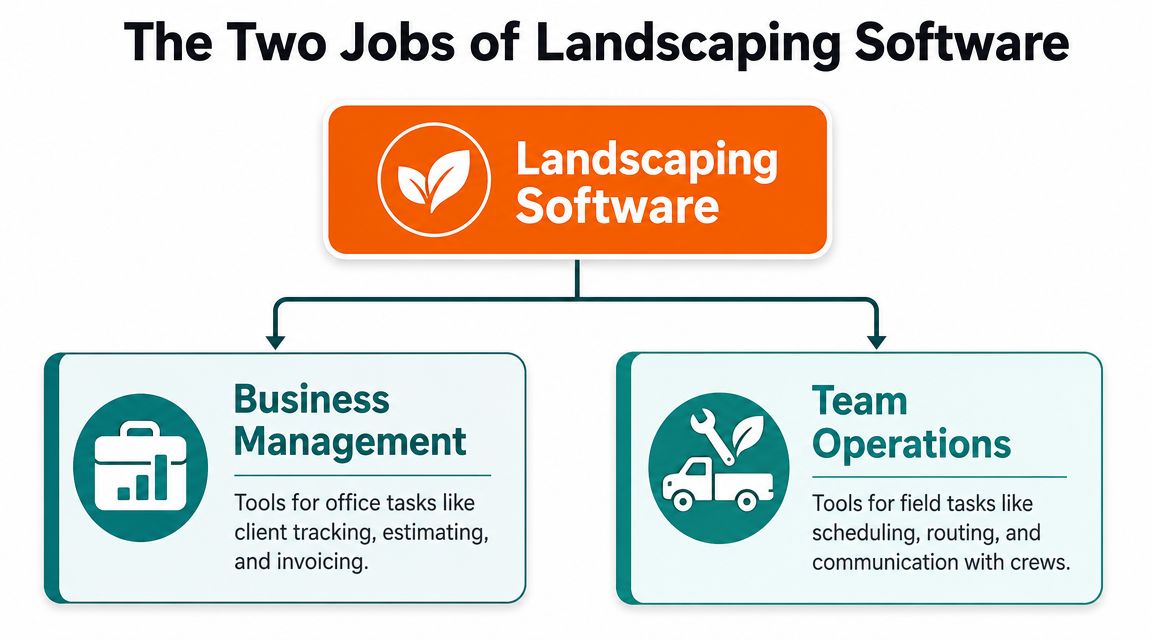
Business management
This side runs the paperwork and the money. Customer records, estimates, invoices, payments, job costing, reporting. It helps you win work, price it correctly, bill it fast, and see whether the job paid off.
Every decent platform covers some version of that. The details matter, but the category is straightforward. If this part is weak, you feel it in slow quotes, late billing, bad follow-up, and margins you cannot explain.
It also affects growth. If you're investing in marketing or cold calling for landscapers, weak office systems waste the leads you worked to get.
Team operations
This side keeps the field aligned. Crew communication. Route changes. Site notes. Photos. Tasks. Safety reminders. Check-ins. Updates that need to reach the right person before a small issue turns into a callback.
A scheduler is not enough. Dispatch tells crews where to go. Operations software tells them what changed, what the customer said, where the gate code is, which bed was added, what to photograph before leaving, and who needs to confirm completion.
That difference decides whether you can scale.
Here is the split that matters:
Software job | What it handles | What breaks without it |
|---|---|---|
Business management | Estimates, customer data, invoicing, job costing | Slow cash flow, weak pricing, poor visibility |
Team operations | Crew communication, updates, tasks, field coordination | Miscommunication, rework, missed details |
Plenty of owners buy for the first job and ignore the second. Then they wonder why the company still feels loud. Of course it does. An invoice system does not stop a crew from missing a note buried in a text thread.
If your business is small and growing, pay close attention to the field side. The first crack usually is not accounting. It is communication. A foreman did not see the update. The office changed the order and nobody confirmed it. A new hire showed up without the day's details. That is the problem employee management software for small business is built to solve.
Ask yourself one blunt question. Is your biggest problem money moving through the office, or information moving through your team? Most companies can survive messy admin for a while. They do not scale past communication failure.
First Things First Run the Business
A lot of owners try to fix field confusion before they fix the office. That usually backfires. If leads are scattered, estimates are inconsistent, and invoices go out late, you do not have a software problem. You have a business process problem, and software will only expose it faster.
What has to work first
Get the money path under control before you chase extras.
You need one place for customer records, property notes, estimate history, approvals, invoices, and payment status. If your estimator writes one version, your office retypes another, and your bookkeeper sends an invoice from a third system, you are bleeding time at every handoff. That kind of mess is why owners stay slammed and still wonder where the cash went.
Start with three core pieces:
A real customer system: Store contact details, property information, service history, and job notes in one record.
Estimating tied to that record: Build proposals from the same customer file so accepted work does not need to be recreated later.
Invoicing tied to completed work: Turn finished jobs into invoices fast, without chasing paper or waiting on someone to confirm what happened.
Basic beats bloated. Every time.
I have used flashy platforms with long feature lists and pretty dashboards. They still failed the simple test. They made the office enter the same information twice. That is where software starts costing you instead of helping you.
Here is the chain your system needs to handle cleanly:
Lead goes in once
Estimate gets built from that same record
Approved work becomes an active job
Completed work becomes an invoice without re-entry
If a tool breaks that chain, skip it. Fancy reporting will not save a broken workflow.
Good business software also supports sales discipline. If you are still building a steady pipeline, this guide to cold calling for landscapers is practical, but it only pays off if new leads land in a system your office can work.
The other mistake is stopping here. Owners get the CRM, estimating, and invoicing cleaned up, then assume they are set. They are not. They have handled the business side. The next layer is getting those office decisions out to the crew without delay, confusion, or missed details. That is where employee management software for small business starts to matter.
Get the front office straight first. Then make sure the field can act on it.
Core Challenge: Connecting Your Team
Here is where growing companies start bleeding time.
The office sells the job, schedules the job, and bills the job. The crew still has to do the job with the right notes, the right photos, the latest client requests, and whatever changed after breakfast. If that information reaches the field through scattered texts and phone calls, you do not have an operations system. You have office software plus improv.
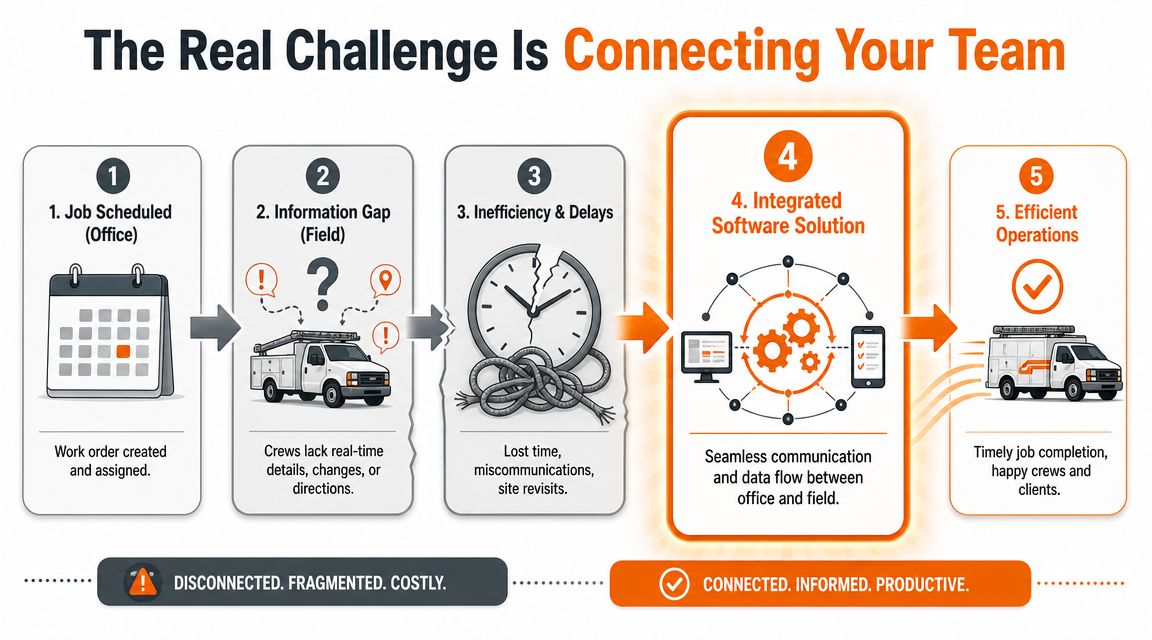
Dispatch alone will not hold a crew together
A job on the schedule covers the address and start time. It rarely covers the stuff that causes mistakes. The client changed the scope. The gate code stopped working. The mulch color is different from last visit. The manager wants progress photos before lunch. A sprinkler flag went in late yesterday.
Those details decide whether the day runs clean or turns into callbacks and confusion.
A lot of software reviews miss this split. They spend pages on estimating and invoicing, then barely touch crew communication. That gap matters more than another reporting widget. For distributed teams and seasonal hires, one place for updates, tasks, files, and acknowledgments does more for daily execution than another dispatch screen. Even outside field services, operations leaders run into the same handoff problem. This guide for HR teams on benefits software makes a different buying decision, but the lesson is familiar. Admin tools are not the same as tools people use day to day.
What crews need in the field
Crews do not need another dashboard. They need answers fast.
They need:
Job notes they can find in seconds
Photos, site files, and special instructions on the phone
Updates that hit everyone at once when plans change
Simple task tracking so nothing gets lost in a text thread
One shared place for daily communication
I learned this after wasting money on software that made the office feel organized while the field stayed blind. We kept asking why mistakes kept repeating. The answer was simple. The office had a polished system. The crew had fragments.
Add the second layer on purpose
This is the part owners skip. They buy business management software and expect it to solve team execution too. It usually does not.
A separate mobile-first communication layer often fixes more than a bigger estimating platform ever will. That can be a crew messaging tool or an employee app that handles chat, updates, tasks, files, and scheduling in one place. Pebb fits that category. It includes chat, updates, tasks, file sharing, shift scheduling, clock-ins, and PTO tracking in one employee app. For crews that start the day in trucks instead of at desks, that setup makes practical sense.
If you are comparing options, this employee communication app guide for field teams will help you sort useful tools from office-first software pretending to serve crews.
If a foreman has to check texts, call the office, and open two apps to figure out what changed, your process is the problem.
Scaling breaks when communication stays informal
One crew can survive on memory and hustle. Four crews cannot.
Once you have multiple supervisors, rotating seasonal workers, and clients spread across town, weak communication stops being an annoyance and starts hitting production, quality, and cash flow.
Field problem | What it turns into |
|---|---|
Missed updates | Rework and unhappy clients |
No shared job notes | Inconsistent quality |
Weak office-to-crew handoff | Delays and finger-pointing |
No simple place for photos or proof | Billing disputes and callbacks |
Owners often say they need better scheduling. Sometimes they do. More often, they need a system that keeps the whole team on the same page after the schedule changes mid-morning.
That is the difference between software that looks good in a demo and software that helps a company grow without more chaos.
Choosing Software That Fits Your Business
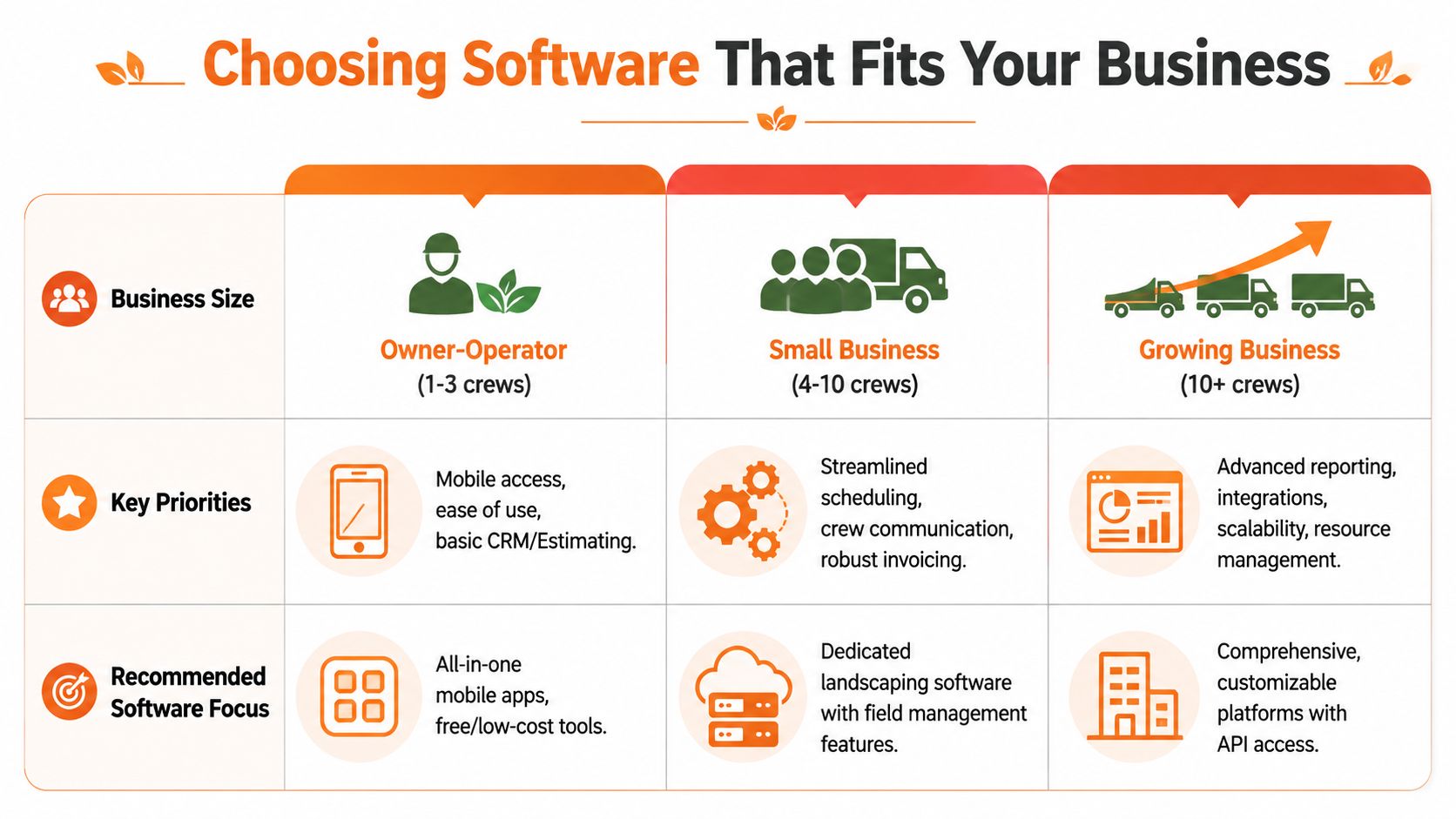
The right software for landscaping business depends less on your ambition and more on your current shape. Too many owners buy for the company they want to be in three years, then spend the next six months fighting a system nobody likes.
Buy for today's complexity, with enough room for tomorrow. No more than that.
Owner-operators and small crews
If you're running one to three crews, keep it simple. You don't need a monster platform with endless settings. You need mobile access, basic CRM, estimating, invoicing, and a way for the field to see what matters without calling the office all day.
All-in-one tools often make sense. Jobber is popular here for a reason. It covers the basics and doesn't ask a small team to become software administrators.
Your biggest mistake at this stage is overbuying.
Pick the tool your least tech-comfortable employee can use without a lecture.
Growing teams need standardization
Once you're managing several crews, the pain shifts. Now the issue isn't whether the software has estimating. The issue is whether everyone follows the same process.
You need stronger scheduling, cleaner handoff from sales to ops, better crew visibility, and tighter invoicing. This is also where team communication becomes part of the buying decision, not an afterthought.
A simple comparison helps:
Business stage | What to prioritize | What to avoid |
|---|---|---|
1 to 3 crews | Easy mobile workflows, clean estimates, basic billing | Heavy systems with long setup |
4 to 10 crews | Standardized processes, crew coordination, integrated billing | Separate tools that don't connect |
10+ crews or multiple locations | Centralized controls, finance visibility, scalable field operations | Cheap tools that break under complexity |
If your company is crossing into that middle range, don't just compare landscaping apps. Look at how adjacent operational software gets chosen too. This guide for HR teams on benefits software is about a different category, but the selection logic is useful. The same lesson applies here. Match the system to the actual administrative load, not the sales pitch.
Larger firms need control, not just convenience
At the larger end, especially with multiple locations, integrated finance controls start to matter as much as field coordination. According to RealGreen's business management software overview, the key differentiator for bigger firms is the combination of mobile crew operations and finance controls. When crew time is captured in the field and tied to job costing, managers can see real-time profitability, reduce timesheet errors, and use GPS-based time capture as proof of service.
That's not small-business convenience. That's managerial control.
At this stage, systems like Aspire, LMN, RealGreen, or WorkWave enter the conversation more seriously because they support deeper operational reporting and broader process discipline. But even then, don't assume one giant suite solves everything. Sometimes a strong business management platform plus a separate team operations app is the cleaner setup.
If you're comparing broader operations stacks, this roundup of field service management software free options can help you sort lightweight tools from serious systems.
My advice is blunt. Start with the least complex stack that fixes your current bottleneck. Add weight only when the business earns it.
Measuring the Return on Your Investment
I learned this one the hard way. A software bill looks expensive on day one, but confusion costs more by the end of the month. You pay for it in missed notes, slow invoicing, crews calling the office from the same job twice, and supervisors fixing preventable mistakes after the work is already done.
That is the return you need to measure.
If you only ask whether the software saved a few admin hours, you will miss the bigger payoff. The better question is whether the business runs cleaner now. Jobs get handed off without drama. Crews stop hunting for details. Completed work turns into invoices faster. Clients deal with a company that looks organized instead of one that is always catching up.
Return shows up in fewer handoff failures
The strongest payoff usually comes from reducing the gap between the office and the field. Estimating and invoicing matter, but scaling usually breaks somewhere else. It breaks when the crew does not have the latest notes, when change requests stay in a text thread, or when completed work never gets confirmed clearly enough to bill it fast.
That is why I look at operational friction first.
Measure the things that signal control:
Fewer callbacks and fewer repeat explanations. Crew leaders already have the notes, photos, scope details, and updates.
Faster billing after job completion. Work does not sit around waiting for someone to piece together what happened.
Better cash flow. Invoices go out while the job is still clear in everyone's head.
Cleaner job costing. You catch labor drift and scope creep before they wreck the month.
Less aggravation across the team. People can handle hard work. They get worn down by confusion.
Software rarely pays off because it looks good in a demo. It pays off when your team stops dropping the baton.
Track outcomes your crew and office can feel
Do not boil ROI down to one number. That is how owners end up keeping software that saves a little office time while crews still run the day through calls, texts, and guesswork.
Check a short scorecard every month:
Are avoidable mistakes going down?
How long does it take to get from approved work to paid invoice?
Do crews get what they need without calling the office for basic job info?
Are supervisors spending less time cleaning up handoff problems?
Do clients see a company that follows through the first time?
If you want a broader framework for tying spending to business outcomes, this practical guide for small business marketing ROI is useful.
Good software gives you more than efficiency. It gives you a steadier operation, faster follow-through, and a business that feels under control on a messy day.
Your Goal Is a Better Business Not More Software
The best system I ever put in place didn't impress anybody in a demo. It just made our mornings quieter. Crews knew where to look. The office stopped forwarding the same message three different ways. Clients got cleaner communication. That was enough.
That's the standard I'd use if I were choosing again.
Don't chase the biggest platform. Don't buy software because a vendor says you need to "scale." Fix the sharpest pain first. If estimates are a mess, start there. If the actual problem is that your crews and office are living in separate worlds, solve that before you buy another quoting tool.
The right software for landscaping business should make the company more predictable for everyone inside it. The owner. The office. The crew leader. The seasonal hire on day three. If it doesn't do that, it isn't helping as much as you think.
And keep this in mind. The best system isn't the one with the longest feature list. It's the one your team uses when the day gets messy.
If the missing piece in your landscaping operation is team communication, not just estimating and invoicing, Pebb is worth a look. It gives crews and office staff one place for chat, updates, tasks, file sharing, scheduling, and clock-ins, which is often the gap traditional landscaping software leaves behind.
