
Define Digital Communication: A Guide for Modern Teams
Define digital communication beyond jargon. A practical guide for modern teams to optimize work with digital tools, from chats to unified apps.
Dan Robin
One manager sends the update by email. Two supervisors repost it in Slack. A shift lead drops a screenshot into WhatsApp because half the team never checks email. Someone else texts the night crew. By the next morning, three versions of the same message are floating around, one person missed the policy change entirely, and everybody thinks communication is the problem.
They're right. But not for the reason people usually mean.
Teams don't struggle because they lack channels. They struggle because they have too many of them, and none of them act like a shared system. Office staff sit in inboxes and meeting links. Frontline staff live on their phones, often outside the tools leadership assumes everyone uses. The result is familiar. Missed updates, repeated questions, version-control chaos, and a quiet divide between people at desks and people running the day.
When people ask me to define digital communication, I don't start with email or chat apps. I start with this mess. Because that mess is the actual definition in practice. It's the set of tools, habits, expectations, and workarounds your company uses to move information from one person to another. If that system is fragmented, your business feels fragmented too.
It's More Than Just Hitting Send
I've seen teams treat communication like a delivery problem. Write the message, hit send, move on. That works only if everyone lives in the same place, works the same hours, and checks the same tool. Most companies don't.
A district manager might use Outlook. Store managers might rely on text. Shift workers may only see updates during a break, on a personal phone, if they see them at all. Add Zoom, WhatsApp, paper notices in the break room, and a team chat app no one fully adopted, and you don't have a communication strategy. You have a scavenger hunt.
That's why "digital communication" needs a better definition than "sending messages online." In modern work, it's closer to the company's nervous system. It carries instructions, feedback, schedules, decisions, reminders, questions, approvals, and context. When that flow is clean, people can work without chasing answers. When it's messy, small problems multiply.
The real problem isn't silence
Most organizations aren't under-communicating. They're over-sending and under-connecting.
People get the same update in four places, but still don't know what action to take. A frontline worker receives a screenshot of a memo but can't find the latest policy. A manager posts an urgent note in a chat channel that scrolls out of view before the next shift starts. The message existed. The communication failed.
A useful way to think about it is by channel purpose. If you want a good primer on that, this breakdown of different workplace communication channels is worth reading. The key is simple. Not every message belongs in every tool, and not every tool reaches every employee equally well.
Practical rule: If employees have to guess where a message lives, the system is broken.
Frontline teams feel the damage first
Office teams can usually compensate for poor communication. They sit near laptops, calendars, inboxes, and shared drives. Frontline teams don't have that luxury. They're moving, serving customers, stocking shelves, caring for patients, loading trucks.
So when leaders define digital communication too narrowly, they often define it around desk work. That leaves the people with the least access carrying the highest communication risk. And that risk shows up in missed updates, avoidable mistakes, and a culture where some employees feel informed while others feel managed from a distance.
Digital communication isn't just about sending information faster. It's about building one dependable path for work to move through the business.
What Digital Communication Actually Means Today
A narrow definition misses what the work has become. Digital communication isn't just email, chat, or video calls. It's the full system a company uses to share information, get feedback, document decisions, and keep work moving across devices and locations.
One scholarly definition gets this right. It describes digital communication as an interactive process where a source uses a digital channel to send a purposive, binarily encoded, measurable, widely accessible, and retrievable message to a destination that can provide feedback, as outlined in this scholarly explanation of digital communication. That sounds academic, but the practical takeaway is useful.
It means a digital message isn't just delivered. It's stored, searchable, measurable, and open to response.
Why that definition matters at work
Once messages are retrievable, they stop being fleeting conversations and start becoming part of the operating record. That's a huge shift.
An email thread can show who approved a change. A chat post can clarify what was said on the morning shift. A knowledge base article can replace ten repeated explanations from supervisors. A reaction, reply, or comment can close the loop. That last part matters most. Digital communication isn't complete without feedback. If your system only broadcasts, it's not doing the full job.
A modern digital communication stack typically includes:
Email for formal updates, external communication, and records.
Instant messaging for fast coordination and short back-and-forth.
Video calls for conversations where tone, nuance, or live discussion matters.
Mobile apps for frontline access to updates, tasks, schedules, and documents.
Knowledge hubs for policies, onboarding, and answers people need more than once.
A broad workplace analysis found that email remains the most commonly used communication tool at 52.5%, followed by cell phones at 48.9%, instant messaging tools at 41.4%, and video calling tools at 40.9%. The same analysis found that 77.3% of workers believe digital communication tools improve productivity, according to EmailTooltester's workplace communication statistics.
The better mental model
If you want to define digital communication well, think less about channels and more about infrastructure.
A chat app on its own is just a pipe. Email on its own is just a mailbox. Video calls on their own are just meetings. What matters is how these tools work together, who can access them, what gets preserved, and whether employees can act on what they receive.
Digital communication works when the message, the context, and the next step live close together.
That's why the modern definition has expanded. In practice, digital communication now includes the behaviors around the tools too. Where updates go. How people respond. What gets archived. Which channel is used for urgent issues. Where frontline workers find the latest version of a policy. Without those rules, teams don't have a system. They have noise.
How Digital Broke the Rules of Traditional Communication
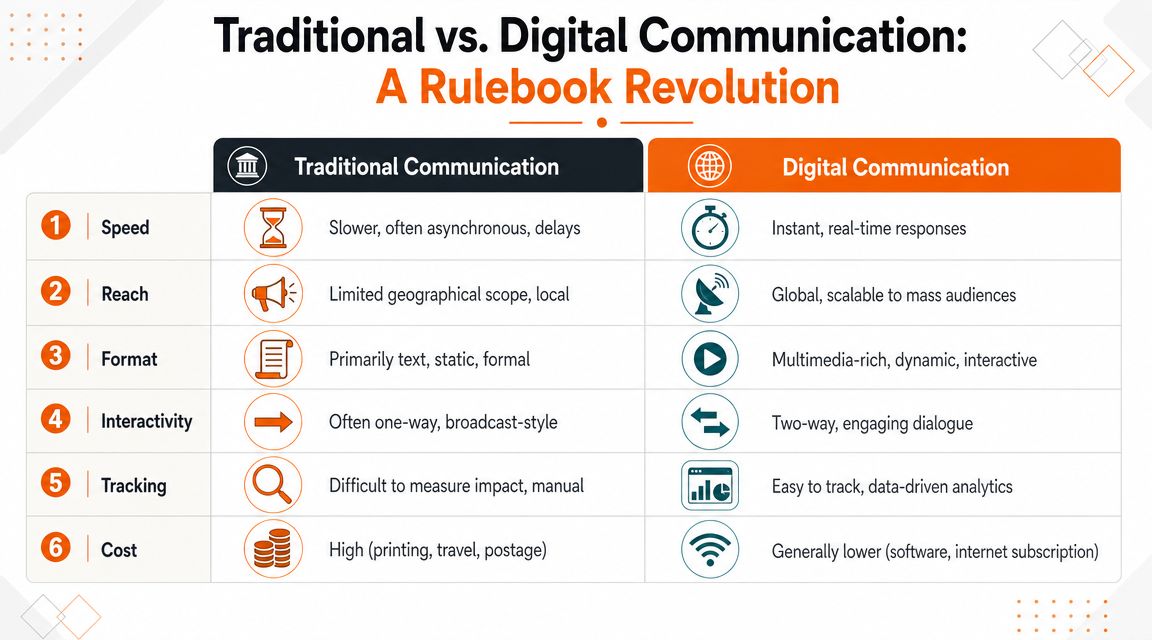
Traditional communication had clear limits. It was tied to place, time, and often the memory of whoever was in the room. A face-to-face conversation could be useful, but unless someone wrote it down, it disappeared. A phone call could solve a problem, but only for the people on the line. A printed memo could travel, but slowly.
Digital communication changed the rules because it removed those constraints. A message can now reach people across locations, shifts, and time zones without requiring everyone to be present at the same moment. It can also stay available after the moment passes.
Old assumptions don't hold anymore
A lot of communication habits still come from the pre-digital workplace. Leaders assume the important thing is to announce. Employees are expected to catch up. Information is treated like an event instead of a resource.
That breaks down fast in distributed teams.
A traditional mindset says, "We told people in the meeting." A digital mindset asks, "Can someone on another shift find this later?" A traditional mindset values immediacy. A digital one values continuity. Both matter, but only one scales cleanly.
A simple comparison makes the difference clear:
Traditional approach | Digital approach |
|---|---|
Depends on presence | Works across time and place |
Often disappears after delivery | Can be stored and found later |
Hard to share at scale | Easy to distribute broadly |
Limited visibility into follow-up | Easier to track response and access |
The internet made this shift unavoidable
This didn't happen because companies got trendy. It happened because connectivity changed the baseline.
One communication statistics source notes there were 4.13 billion internet users globally in the previous year, and the same source says about 65% of companies primarily communicate with clients via email, with messaging apps at 16%, phone calls at 9%, and face-to-face meetings at 5%, according to GoRemotely's communication statistics roundup. Once communication became internet-based at that scale, business communication stopped being local by default.
When communication becomes searchable and portable, people stop relying on memory and proximity. They start relying on systems.
What this changes for leaders
The shift isn't only about speed. It's about permanence, reach, and accountability.
That changes how managers should think. A quick verbal update might still be fine for a small issue on one shift. But policy changes, process updates, and cross-team coordination need a home people can return to. If leaders keep using digital tools with an old broadcast mindset, employees will still miss information. They'll just miss it faster.
A fundamental departure from traditional communication is this. Work no longer has to wait for everyone to be in the same room. But that only helps if information is organized well enough to survive the room.
The Real Benefits and Hidden Risks for Your Team
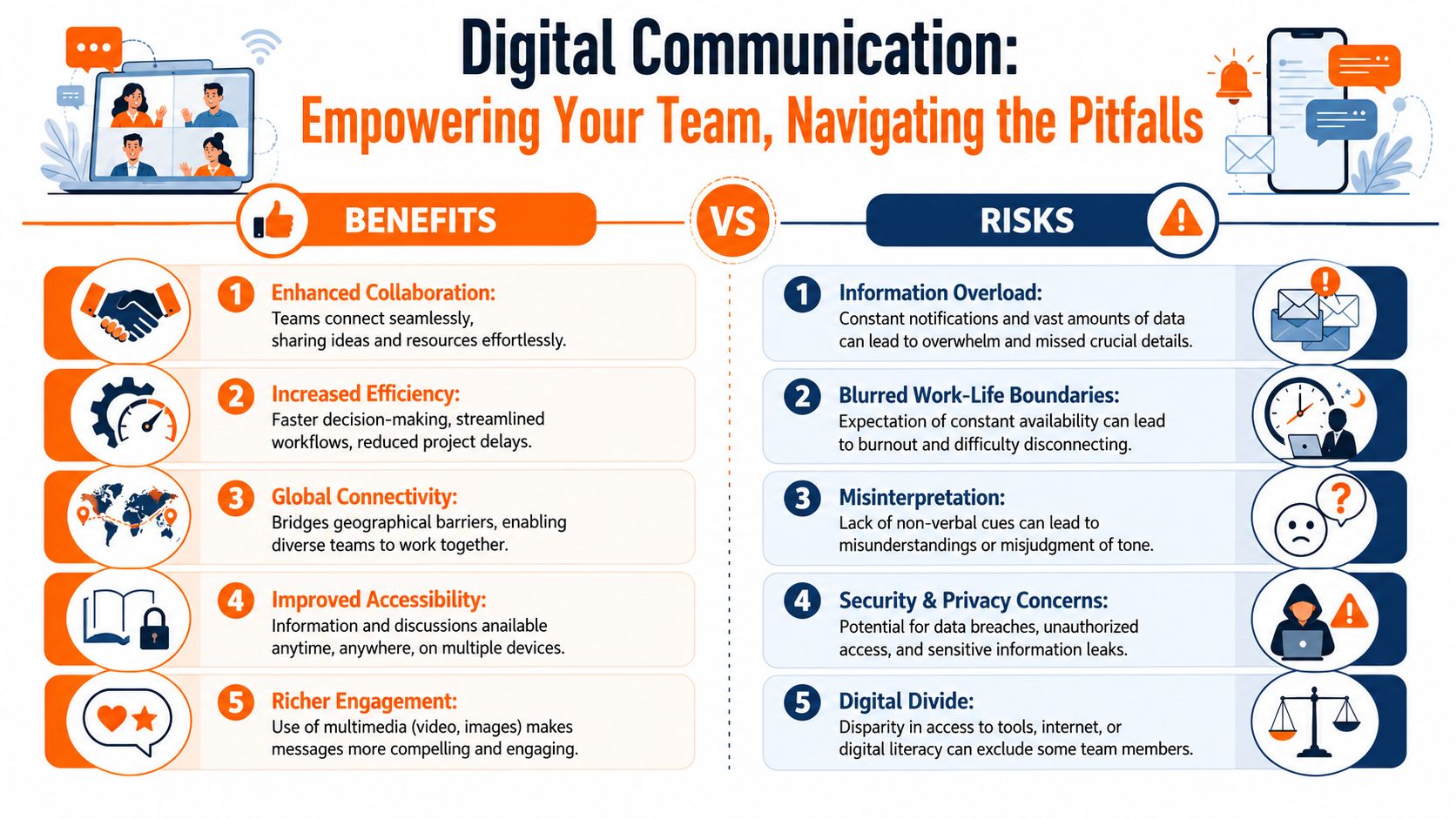
Digital communication does a lot well. It connects people who would otherwise stay isolated from the day-to-day of the company. It gives remote staff and frontline workers a way to participate without being physically present in headquarters. It also creates a written trail, which helps when people need to check what was decided instead of guessing.
Those gains are real. So are the downsides.
I've watched teams move from silence to overload in a matter of months. Once every app can send a notification, every manager starts sending one. The result isn't better communication. It's a constant stream of pings, half-read updates, and employees who mute the very channels leaders depend on.
What works
The best setups don't try to make every channel do everything. They separate live coordination from durable information.
Real-time tools help with immediate issues. A supervisor needs help on a shift. A delivery is late. A team needs a quick answer. That's where chat, calls, or voice notes can work well. Asynchronous tools do a different job. They hold policies, instructions, updates, and decisions that need to remain accessible after the moment passes.
That split matters even more on the frontline, where people may not be available the second a message arrives. If the only path to information is real-time, anyone off shift is already behind.
What fails quietly
Three risks show up again and again:
Notification fatigue. Too many non-urgent messages train people to ignore urgent ones.
Tone errors. Short written messages can sound colder or harsher than intended.
Shadow communication. Teams start using unsanctioned apps because the official tools are slow, clunky, or inaccessible.
The third one causes the biggest headaches. Once updates move into personal texts or consumer messaging apps, leaders lose visibility. Files get scattered. Context disappears. New employees don't know where anything lives.
This is also where governance stops being a legal footnote and becomes an operating issue. For organizations, the practical rule is to match the channel to the message's importance. Compliance-oriented communication often needs monitoring, archiving, retention policies, and audit trails across channels, as explained in this overview of digital communication governance.
A simple decision rule
When teams ask which tool to use, I usually bring it back to three questions:
Does this need an immediate response?
Does someone need to find this later?
Would it matter if we had to prove this was sent and received?
If the answer to the second or third question is yes, don't bury it in a fast-moving chat thread.
A channel is not just a convenience choice. It's a record-keeping choice, a clarity choice, and sometimes a risk choice.
Digital communication helps teams move faster. It also exposes bad habits faster. The goal isn't to avoid the trade-offs. It's to choose them on purpose.
How to Know If Your Communication Is Working
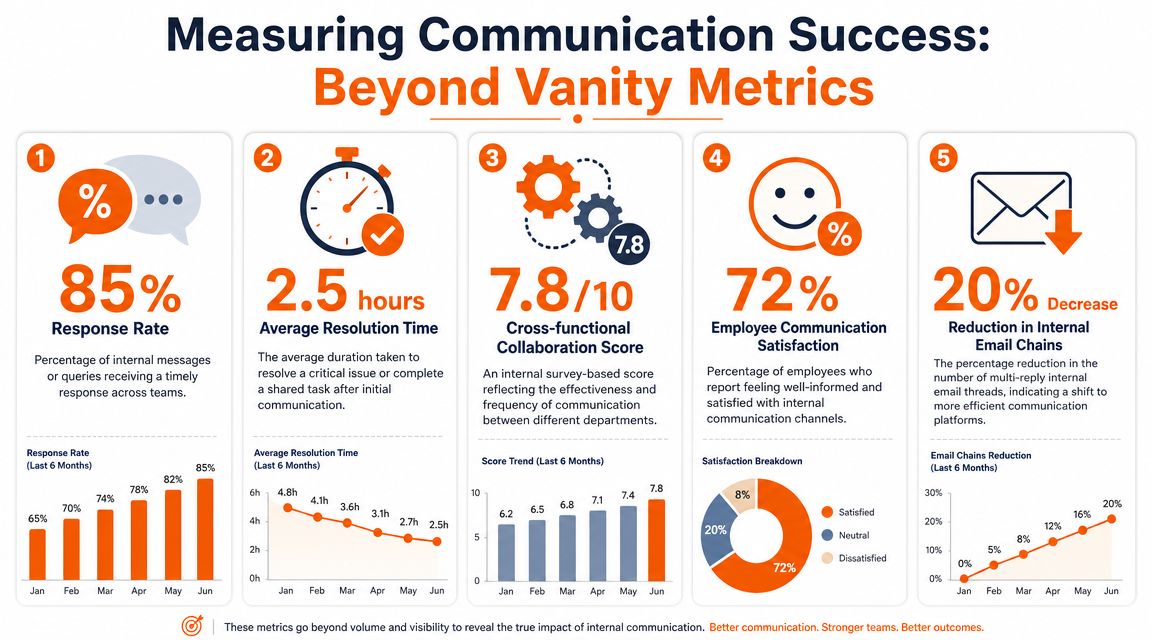
Many organizations measure the wrong things. They count messages sent, posts published, maybe views if the tool offers them. Those numbers can be interesting, but they don't tell you whether people understood the message, trusted the channel, or changed what they did.
A healthy communication system shows up in behavior. People know where to look. Managers stop repeating themselves. Frontline workers can find answers without waiting for someone at a desk. Confusion drops. Follow-up gets cleaner.
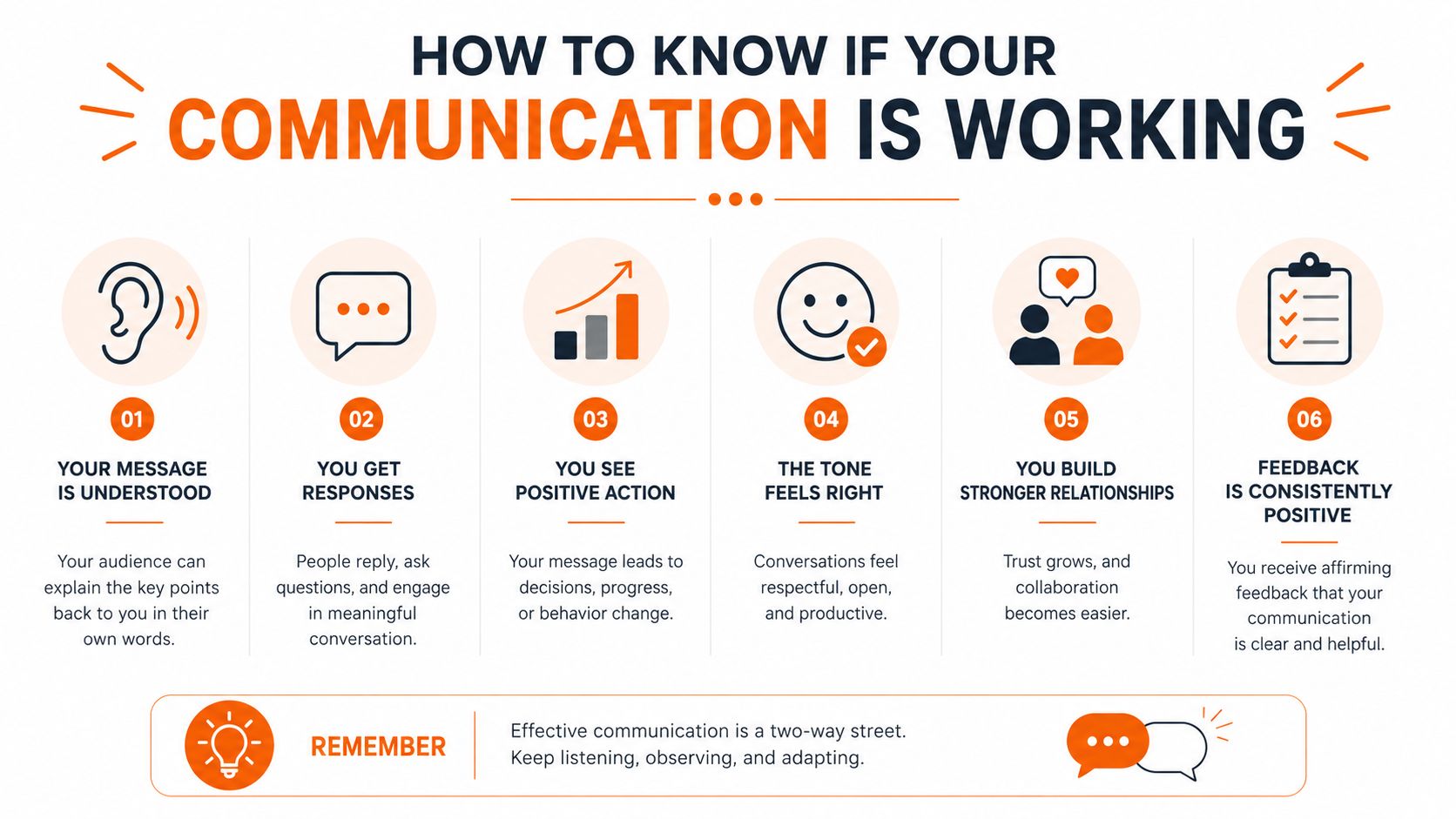
Better signals to watch
Instead of vanity metrics, I look for signs like these:
Adoption across roles. If managers use the tool but shift workers don't, you don't have company communication. You have office communication.
Response speed on important issues. Not every message needs a fast reply, but urgent ones shouldn't disappear.
Engagement with critical updates. Important announcements should reach the people affected, not just collect passive views.
Repeat questions. If the same questions keep coming back, the message wasn't clear or wasn't easy to find.
Employee sentiment. Surveys, feedback channels, and direct comments tell you whether people feel informed or left out.
A low adoption rate on the frontline usually isn't a training problem. It's a relevance problem. The tool isn't helping with the work people do.
What good measurement changes
Once you track practical signals, decisions get easier. You can see whether a problem is channel choice, timing, clarity, or access. You can also stop mistaking activity for effectiveness.
I've found it useful to pair internal metrics with plain-language communication habits. These LeaveWizard tips for better team communication are a good example of the basics that still matter, especially clarity, consistency, and listening. The tools matter, but the habits around them matter just as much.
If you want a deeper framework, this guide on how to measure communication effectiveness is helpful because it pushes beyond surface-level engagement.
The standard to aim for
Ask a blunt question. If a new employee joined tomorrow, would they know where updates live, where policies live, how urgent issues are raised, and how feedback travels back up?
If the answer is fuzzy, your communication isn't working yet.
You don't need perfect measurement. You need measures that help you fix what's broken.
Unifying Your Team in One Digital Home
A store manager starts a shift with one app for rota changes, another for team chat, email for head office updates, and a shared drive link for the latest policy. By lunchtime, someone has acted on an old version of a process because the current one was buried in a different tool. That is what fragmentation looks like in practice. It slows work, creates avoidable mistakes, and leaves frontline staff guessing.
The actual cost is not just extra notifications. It is the time people spend figuring out where the truth lives.
A shared digital home fixes that by putting communication, knowledge, and everyday work in the same place. I do not mean centralization for its own sake. I mean giving employees one reliable environment where updates are visible, questions get answered, and the next action is obvious.
What a digital home changes
In a useful digital home, people can handle the routine tasks that keep a business running without hopping between systems. They can read an update, check a shift, find the current policy, message the right person, open a task, and pull up a file from the same place.
For frontline teams, that difference is bigger than it sounds. If access depends on a desktop, a VPN, or a tool built around office habits, adoption drops fast. Frontline employees need phone-first access to schedules, announcements, documents, conversations, and quick answers while the work is happening, not later.
That is also why digital communication now sits much closer to operations than it used to. A good explanation of the digital workplace and how it supports everyday work makes the point well. Communication works better when it is built into how people do the job, not layered on top of it.
One system beats a pile of tools
The better buying question is not whether a platform can send a message. It is whether people can do something with that message straight away.
Ask:
Can employees act on an update without switching tools?
Can a frontline worker use it easily from a phone during a shift?
Can managers trust it as the current source of truth?
Can head office, site leaders, and frontline teams all work from the same system without creating parallel channels?
That is the model platforms like Pebb are built around. Chat, updates, tasks, knowledge, file sharing, and shift-related workflows sit together in one app for office and frontline teams. The value is practical. Fewer handoffs. Less rework. Fewer moments where employees have to piece together the company from scattered clues.
I have seen this trade-off up close. Adding a specialist tool can solve one local problem, but every extra system creates another place where information can drift out of date. At some point, the flexibility stops helping and starts making the business harder to run.
The companies that get this right treat digital communication as part of their operating system. It is how work gets coordinated, how standards stay current, and how people stay connected to the business, especially when they are nowhere near a desk.
That is the standard worth aiming for. One dependable place where employees can stay informed and get their work done.
