
Company Intranet Alternative: A No-Nonsense Guide
Your company intranet is a ghost town. We get it. This guide is your company intranet alternative plan, focusing on tools that unify work, not just news.
Dan Robin
Teams don't replace the intranet because they love shiny new tools. They replace it because they're tired of talking into the void.
You know the pattern. Leadership posts an update. HR uploads a policy. Someone in IT reorganizes the homepage again. A month later, people are still asking in chat where the form lives, what the new process is, and whether anyone even reads the CEO note. The intranet exists. It just doesn't matter.
I've seen this more than once. The problem usually isn't that the homepage looks dated or the navigation is clumsy, though both things help kill adoption. The deeper issue is that the old intranet model was built for publishing, not for how people work now.
If you're searching for a company intranet alternative, you probably don't need a prettier place to store PDFs. You need a tool people will open because it helps them do the job in front of them. For office staff, that might mean chat, docs, and updates in one place. For frontline teams, it often means something bigger. Communication, shifts, tasks, approvals, and key information have to live together or the whole thing falls apart.
That's the standard I'd use. Not “does it have an intranet feature set?” but “does it reduce friction across a real workday?”
Your Intranet Is Probably a Ghost Town
The old intranet usually fades away.
Nobody sends a memo saying, “We've all agreed to ignore this system.” People just stop going there unless they have to. The homepage becomes a museum of corporate announcements. The documents are technically available, but only if you already know where they are. New hires click around for a week, then learn the unspoken rule from everyone else: ask in Teams, ask your manager, or save the direct link somewhere before it disappears again.
That's why so many internal comms and HR teams feel stuck. They're doing the work. They're writing updates, publishing resources, and trying to keep information clean. But the platform underneath them is built like a bulletin board in a hallway nobody walks past anymore.
The problem is cultural as much as technical
Old intranets were designed around a top-down idea of communication. A small group publishes. Everyone else reads. That model breaks the minute your company becomes distributed, shift-based, mobile, or busy.
People don't want another destination to check out of duty. They want one place that fits into the flow of work. If the tool doesn't help them answer a question, complete a task, or stay aligned with their team, they won't build a habit around it.
Most “intranet problems” are really trust problems. Employees stop checking the system when experience teaches them it won't help.
A ghost town is a signal, not a failure of effort
I don't blame the team managing the intranet. I blame the assumption behind it. If a system depends on people remembering to visit a separate portal just to consume information, it's already fighting uphill.
That's why looking for a company intranet alternative is often the right move. You're not trying to rescue a bad homepage. You're trying to replace a dead pattern with something that matches how your company runs.
Path | What it does well | Where it breaks |
|---|---|---|
Team chat tools like Slack or Teams | Fast conversation, quick coordination | Knowledge gets buried, frontline workflows stay separate |
Knowledge bases like Notion or Confluence | Organized docs and policies | Great for reference, weak for daily execution |
Operations tools for shifts and tasks | Handles frontline work clearly | Often poor at company-wide communication |
Unified work apps | Combines communication, knowledge, and operations | Requires discipline to set up well |
That table is the short version. The actual choice is about what kind of company you are and how much fragmentation you're willing to tolerate.
The Real Problem with Old Intranets
Most legacy intranets fail for the same reason old file servers failed. They assume access equals usefulness.
That's not how people work. A system can contain everything and still be a bad workplace tool. In fact, many intranets are full of content and short on value.
According to Staffbase's intranet benchmarking guidance, teams now judge intranets by the share of employees who actively log in and interact, time spent, most visited pages, and search success rates. That's the right lens. If employees can't find policies or updates quickly, the intranet isn't functioning as a digital workplace hub. It's just storing things badly.
Built for announcements, not conversation
Traditional intranets are one way systems. Someone publishes. Everyone else receives.
That sounds fine until you notice where actual work happens. Questions happen in chat. Clarifications happen in meetings. Feedback happens in side channels. The intranet becomes the final resting place for information after the actual exchange is already over.
People rarely return to a tool that only talks at them. They return to tools where something useful happens.
Practical rule: If your employees discuss the update everywhere except the intranet, the intranet isn't your communication system.
Repositories are not workspaces
A folder tree is not a workflow. A polished homepage is not coordination. A search bar is not execution.
Many buyers often get distracted. They compare page templates, branding controls, and publishing widgets when they should be asking a simpler question: does this tool help a team move from knowing something to doing something?
A lot of companies learn this the hard way during broader tech cleanups. They start by replacing one bad portal, then realize the bigger mess is all the disconnected tools around it. If you're already untangling systems, it helps to look at the broader picture of comprehensive IT services for businesses so the intranet replacement doesn't become one more isolated project.
Office first thinking leaves too many people out
Legacy intranets still carry an office bias. They assume people have desktops, company accounts, stable habits, and time to hunt for information.
That's not most workforces anymore. Nurses, drivers, store associates, warehouse teams, and field crews don't live in browser tabs all day. If the system doesn't meet them on mobile and fit a fast work environment, it becomes irrelevant no matter how much care went into the content.
That's why a company intranet alternative shouldn't start with design. It should start with behavior. What do people need during the day, and will they open this tool when the pressure is on?
The Four Paths Away From the Intranet
Once you stop trying to “fix the intranet,” the market gets easier to read. There are really four paths, and each one reflects a different idea of what employees need most.
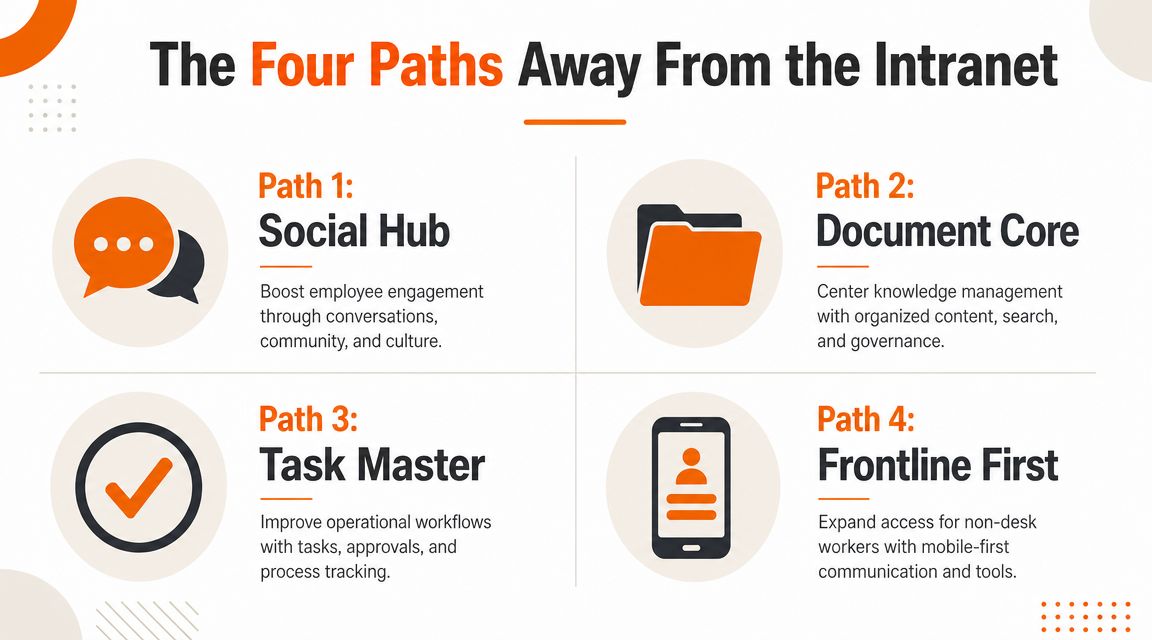
Team chat as the center
Slack and Microsoft Teams are the obvious examples. These tools replace the slow, formal feel of intranets with live conversation.
That's a genuine upgrade if your main problem is speed. Teams can ask, answer, share links, and react in real time. The friction drops immediately.
The tradeoff is equally obvious. Chat is excellent for now and terrible for later. Important decisions sink. Policies fragment across channels. The same question gets answered again and again because the answer lives inside yesterday's thread.
Knowledge base as the center
Notion and Confluence take the opposite approach. They assume the core problem is information chaos, so they focus on structure.
This works well for companies that need a clean internal source of truth. Documentation improves. Onboarding gets easier. Search can become more useful if someone actively curates the system.
But a knowledge base is still mostly a reference layer. It doesn't automatically become a living workplace. You can know where the handbook sits and still have no clean way to manage a shift change, a store checklist, or a frontline task handoff.
A searchable library matters. It just can't carry the full load of communication and execution on its own.
Operations tools as the center
This path is common in retail, hospitality, healthcare, logistics, and field work. The main tool revolves around scheduling, task assignment, checklists, forms, time tracking, or approvals.
If your business runs on shifts and physical work, this category often solves more pain faster than a classic intranet ever could. People open the app because they need it for today's work, not because comms wants them to.
The downside is that many operations tools treat communication as an extra tab. Company updates feel bolted on. Culture gets thin. Cross team visibility suffers.
Unified work apps
This is the category I'd pay the most attention to if your workforce spans office and frontline roles. A unified app tries to combine communication, knowledge, and day to day operations in one experience.
That can include chat, announcements, document access, tasks, scheduling, directory, and admin controls under one roof. Tools in this lane vary a lot. Some lean social. Some lean operational. Some try to be broad and end up muddy.
Here's a simple way to compare the four paths before you get lost in demos:
Category | Best fit | Main risk | Good examples |
|---|---|---|---|
Team chat | Fast moving office teams | Information disappears into threads | Slack, Microsoft Teams |
Knowledge base | Documentation heavy companies | Daily work still happens elsewhere | Notion, Confluence |
Operations platform | Shift based frontline work | Comms and culture can feel secondary | Scheduling and task specific tools |
Unified work app | Mixed workforces needing one home | Setup quality matters more than feature count | Pebb and similar all in one employee apps |
No path is perfect. The mistake is pretending a chat app is a knowledge system, or a knowledge system is a frontline operating layer. Pick the philosophy first. Then pick the product.
How to Choose the Right Alternative
I'd ignore the giant feature grid vendors love to show. Most of it is noise. The better decision comes from three hard questions.
Does it include everyone
Many tools fail before rollout even starts.
The true test isn't whether a platform has intranet features. It's whether it provides governed access and targeted delivery for mixed workforces. As Elcom's guidance on intranet alternatives points out, many tools fall short because they can't include workers without a company email or Microsoft 365 account, and admins can't easily target content by role, location, or shift with auditability.
If you have deskless staff, part time workers, agency workers, or people who share devices, this isn't a detail. It's the whole game.
A useful way to think about it is this: if your “modern workplace” tool excludes the people closest to customers, patients, products, or deliveries, it's not modern. It's selective.
Does it reduce app chaos
Most companies don't have an intranet problem alone. They have a fragmentation problem.
One app for chat. One for schedules. One for forms. One for policies. One for recognition. One for time off. Every extra login adds friction and guarantees that some part of the workforce will ignore some part of the system.
When I evaluate a company intranet alternative, I don't ask how many features it has. I ask whether it removes another tool from the stack. If it doesn't reduce sprawl, it needs a very good reason to exist.
If you're sorting through categories, this guide to an internal communication platform is useful because it frames the decision around how information moves inside a company, not just where content gets posted.
Can people actually find what they need
A busy platform can still be a bad platform.
Industry guidance collected by AgilityPortal's intranet benchmarking comparison recommends starting with a baseline and comparing platforms across strategy and governance, communication and collaboration, usability, and performance. In the performance layer, search effectiveness, task completion rates for workflows or forms, and mobile access stand out for a reason. If search is weak or mobile access is poor, the tool may look active while still failing employees.
Use that as your filter:
Inclusive access: Can every worker get in without heroic setup?
Less fragmentation: Does this replace tools, or just join the pile?
Findability: Can someone on a phone get the right answer fast?
Don't buy the platform with the longest feature page. Buy the one that makes daily confusion harder to create.
That's usually the right answer.
The Gap Most Intranet Alternatives Ignore
Most buying guides still think the intranet is mainly a communication problem. That's too narrow.
For many companies, particularly in retail, hospitality, healthcare, logistics, and field operations, the primary problem is that communication and execution are split across too many tools. News lives in one place. Tasks live in another. Schedules live somewhere else. Time off requests go through a fourth system. Nobody experiences this stack as a coherent workplace.

I believe many “company intranet alternative” articles miss the point. As Flip's discussion of intranet alternatives makes clear, a frequently under answered question is whether the alternative replaces work execution for frontline teams. Buyers in retail, hospitality, and logistics often need shift scheduling, clock in and PTO, and mobile first tasks in the same app if they want to reduce app sprawl and unify the employee experience.
Communication without execution is half a system
A nurse doesn't need a prettier announcement feed. They need to read a policy update, confirm a shift detail, and handle a task without bouncing between disconnected systems.
A store associate doesn't care whether the intranet has a beautiful homepage. They care whether they can see today's shift, read the latest promo change, and complete opening checks from the same screen.
Those are not edge cases. That is the workday.
Frontline teams need one place, not one more place
This is why mobile first matters so much. Not “mobile access” as an afterthought. Mobile first as the default way the system is used.
If your workforce is on the move, the winning tool is usually the one that combines the basics cleanly. Chat. Updates. Tasks. Shifts. Documents. Directory. Permissions. That's why many teams now look beyond classic intranet software toward a dedicated employee app for frontline workers instead of trying to stretch a desktop portal into something it was never built to be.
The right alternative doesn't just tell people what changed. It helps them act on it immediately.
That's the gap. And once you see it, most legacy intranet thinking starts to look oddly small.
A Rollout Plan That Actually Works
Most intranet replacements fail in rollout, not selection. The company buys a promising tool, announces it to everyone at once, uploads a mountain of content, schedules training, and then waits for adoption that never comes.
I'd do the opposite. Start small. Make it useful. Let momentum do the selling.

Start with one team that actually has pain
Pick one location, one department, or one operating unit with obvious friction. Not your most polished team. Your most uncomfortable one. The place where communication breaks, documents get lost, or shift coordination causes daily headaches.
Then give that team a leader who cares. Not a reluctant manager. Someone who wants the mess fixed and will model the behavior.
Solve one or two real problems first
Don't launch with every feature turned on. That's how people get confused and tune out.
Use the tool to fix a couple of concrete issues fast. Maybe it's shift updates and task handoffs. Maybe it's onboarding docs and team communication. Maybe it's replacing three scattered channels with one shared space.
If migration is part of the project, keep that phase disciplined too. A lot of avoidable chaos comes from dumping old junk into a new system. This primer on data migration best practices is worth reviewing before you move documents, folders, and legacy content no one has touched in years.
Measure behavior, not publishing output
This part matters. Modern intranet KPIs have moved from publication volume to participation and utility. Sociabble's intranet KPI guidance highlights daily active users, time spent, content interactions such as clicks and comments, search success rate, and the volume of user generated content as better signals of platform value.
Use that mindset in the pilot:
Watch active use: Are people opening the tool as part of work, not from obligation?
Track interaction: Do they click, comment, ask, respond, and contribute?
Check search and completion: Can they find what they need and finish the task attached to it?
When one team starts relying on the new system, you don't need a loud internal campaign. Other teams notice. They ask for access because the tool solved a real problem nearby. That's the rollout you want.
It Is About Connection Not Content
The point was never to build a better place to post internal news.
The point is to give people a shared place to work, find answers, stay aligned, and feel less scattered. That's why the old intranet model keeps disappointing teams. It mistakes content delivery for connection.
A good company intranet alternative does something simpler and more useful. It removes distance. Between office and frontline. Between policy and action. Between leadership updates and what a team needs to do next. The technology matters, of course, but the bigger shift is philosophical. You stop treating employees like an audience and start treating them like participants.
That changes what you buy. It changes how you roll it out. It changes what success looks like.
If your digital workplace still feels like a quiet archive, you probably don't need a redesign. You need a different center of gravity.
So the question isn't whether you should replace the intranet.
It's whether your company's digital home helps people work together, or just gives them one more place to ignore.
If you want one app that brings together chat, updates, tasks, knowledge, and frontline operations without splitting your workforce into separate systems, take a look at Pebb. It's built for companies that need communication and execution in the same place, especially when office teams and frontline teams both have to stay in sync.
