
How to Improve Work Order Management
Learn how work order management works, which KPIs matter, and how to choose or consolidate tools for mobile frontline teams.
Dan Robin

At 6:12 on Tuesday morning, someone posts a photo of a broken prep fridge in the store group chat. The opening manager sees it and screenshots the message. The day manager misses it. By mid-afternoon, the area lead has reassigned the job verbally to someone who happens to be nearby.
The fridge is still broken, but the bigger failure is harder to see. Nobody can answer who owns the repair, how urgent it is, whether parts are available, what the first manager observed, or whether anyone fixed it. The request became an operations problem because the record disappeared into conversation.
Work order management is the discipline that keeps that from happening. It gives a request a clear owner, a place in the queue, a time window, and a history that survives shift changes. It applies to maintenance, but the underlying pattern reaches much further. Frontline teams use the same structure to coordinate inspections, installations, repairs, safety checks, equipment moves, and recurring operational tasks.
The useful question isn't whether your team has a ticketing tool. It's whether work moves through a shared record, or whether it depends on memory, goodwill, and messages nobody can find later.
When Everyday Work Starts Falling Through the Cracks
At 6:12 on Tuesday morning, a broken prep fridge appears in the store group chat. The opening manager shares a photo and notes the leak. The day manager misses the message. Later, a supervisor assigns the repair verbally to whoever is nearby.
The fridge becomes an operations problem because the request has no durable owner or handoff. A chat message cannot set a deadline for the shift, show whether the technician accepted the job, confirm that the unit was isolated, or record whether a replacement part is available. Each shift has to reconstruct the situation from memory.
That creates predictable workarounds. Staff send another message because the first appears ignored. A technician arrives without the asset history or original photo. Someone marks the issue complete once the fridge runs again, even though the team has not recorded what failed, what was repaired, or whether the same risk remains.
Practical rule: If the next shift needs a private conversation to understand a job, the work order lacks enough context.
A proper work order gives frontline coordination a shared operating record. It captures who reported the issue, where it occurred, what was observed, how the team classified it, who accepted responsibility, what action was taken, and what evidence supports closure. Keep those fields usable across locations and shifts. Require a clear asset or area, an actionable description, an owner, a priority, and a completion note. Mobile access matters because technicians and supervisors need to update the record where the work happens, not after details have faded.
Clean data also determines whether the process can support recurring work. Consistent locations, asset names, statuses, and closure reasons let managers spot repeat failures and compare handoffs between sites. Consolidating the workflow prevents the record from splitting across chat, spreadsheets, email, and separate maintenance tools.
A shared history supports the next decision, whether an asset fails again, a manager explains a delay, or another site faces a similar problem. Audit records can track changes to status, transactions, attachments, and other fields, with filters for work order, location or equipment, date, user, and changed fields, as described in maintenance work order documentation from Research and Markets.
The best operations teams do not ask people to remember more. They make important information hard to lose. That is how a work request becomes coordinated work across shifts and locations.
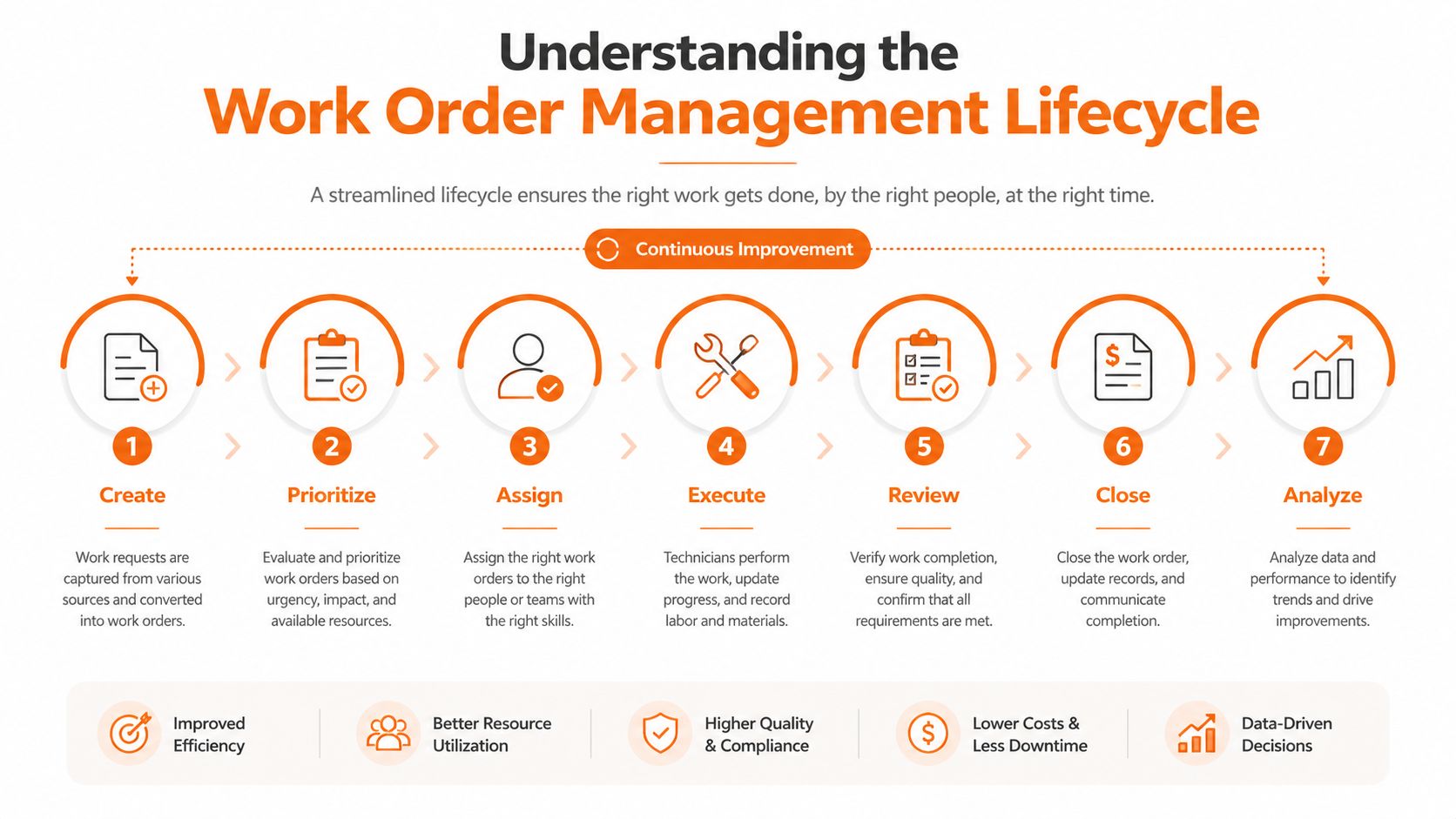
Understanding the Work Order Management Lifecycle
A work order is more than an approved task. It's a structured movement from request to verified completion and review. IBM describes the process through seven phases, task identification, request submission, request evaluation, planning, execution, completion, and review or analysis, as outlined in this Microsoft Dynamics 365 work order lifecycle guide.
Take a leaking HVAC unit on a retail floor.
The request enters with usable context
A staff member submits the request from a phone, selects the store and zone, identifies the unit if the asset register supports it, and adds a photo. The coordinator receives a record rather than a vague message. That first handoff preserves the difference between “water near the aisle” and “condensation leaking from rooftop unit serving the produce zone.”
The coordinator evaluates the request, checks whether it duplicates an open issue, and classifies the work. Safety exposure, customer impact, asset importance, and the reported symptoms belong here. The coordinator then sets priority and assigns the work to an in-house employee or qualified technician.
Planning turns urgency into a workable commitment
Scheduling isn't just finding an empty calendar slot. The coordinator needs to consider the technician's shift, required skills, access to the retail floor, parts availability, and the effect of the repair on store operations. A high-priority job that can't be completed because the right part isn't available is still a planning failure.
Microsoft Dynamics 365 describes lifecycle states such as Created, Scheduled, In progress, and Ended, with states updated manually or automatically during scheduling, according to CMMS University's explanation of preventive maintenance work orders. Those states matter because everyone should interpret “in progress” the same way.
Execution, closure, and review complete the chain
The technician accepts the assignment, updates the status on arrival, documents the diagnosis, records labor and parts, and attaches completion photos or notes. A verifier, supervisor, or requestor then confirms that the job is complete. The record closes with the close date, evidence, and any follow-up action.
That final review turns an isolated repair into operational knowledge. A complete work order can support root-cause analysis, reliability reporting, and preventive maintenance planning because it connects the original problem to the work performed. The execution model should include fields such as asset ID, work type, priority, status, technician, due date, parts, labor, meter reading, downtime, photos, completion notes, and close date, as explained in this complete CMMS work order guide from Maptrack.
This same handoff logic appears in other frontline processes. For a related view of how coordinated operational work moves across distributed teams, see Logivo's transport management overview.
Designing Work Orders People Can Trust
A work order earns trust at intake. If the record is vague, incomplete, or shaped by guesswork, later scheduling cannot fully correct it. Treat the form as part of the operating system for frontline coordination, especially when teams work across shifts and locations.
The minimum data model should answer basic questions without making a technician call the coordinator: Who requested the work? Where exactly is it? Which asset or zone is affected? What happened? Is the issue dangerous, time-sensitive, expensive, or merely inconvenient? What skill, access, part, or approval does the job require?
Separate severity from urgency. A damaged guard on a critical machine may create serious safety implications even if production can continue briefly. A guest-facing light failure may carry low risk but demand quick action during a busy service period. One loose priority label makes the queue reflect the requester's wording instead of the work's consequences.
A recent academic study on work-order prioritization found that decisions depend heavily on responsible staff experience. It also identified weaker results when data collection is inconsistent, required fields are missing, knowledge is limited, cognitive workload is high, or bias affects judgment, as documented in this Virginia Tech study on work-order prioritization.
Make the form carry the judgment
Use templates for common work types. Require a location, asset or zone, plain-language description, and supporting photo where appropriate. Controlled dropdowns for category, subcategory, priority, and status keep records comparable across sites. Validation rules should prevent closure without completion notes, evidence, or required readings.
The requester does not need to identify the correct trade. Collect what that person can observe, then let the coordinator classify the job. A title like “fridge broken” provides almost nothing. “Prep fridge leaking at lower hinge, standing water on floor, produce prep zone” gives the next person something to act on.
Mobile access matters here. A form that works quickly on a phone, with clear required fields and practical evidence capture, protects data quality when employees are away from desks. Teams designing employee-facing workflows can use Pebb's guide to digital forms for employees for guidance on structured data capture.
Define status in operational language
Status names need shared meanings. “Open” might mean submitted, awaiting review, assigned, or blocked unless the team defines it. Use a small taxonomy that reflects real handoffs, such as Submitted, Triaged, Assigned, Scheduled, In progress, Blocked, Awaiting verification, and Closed.
A well-designed record reduces guesswork before the job reaches the field, makes priority easier to defend, and gives managers cleaner information across shifts and locations. Keep the form focused. Every field should support routing, execution, verification, or later analysis.
How Four Industries Put Work Orders to Work
The workflow grammar stays recognizable across industries, but the details change. A store manager, hotel engineer, hospital facilities lead, and fleet supervisor may all create a work order, yet each one needs different evidence and ownership rules.
Industry | Primary Trigger | Critical SLA | Non-Negotiable Data | Owner |
|---|---|---|---|---|
Retail | Opening checks, equipment issue, or facility request | Shift or trading-period response | Store, zone, asset, photo, customer or food-safety impact | Store or area operations lead |
Hospitality | Guest-visible fault or room turnaround issue | Guest recovery and room availability window | Room, asset, guest impact, arrival context, recovery action | Engineering or hotel operations |
Healthcare | Asset fault, safety inspection, or compliance task | Patient-zone and clinical-service priority | Asset ID, location, sterilization or safety status, audit signature | Facilities or clinical engineering |
Logistics | Driver-reported defect, equipment failure, or yard request | Uptime and movement window | Vehicle or equipment ID, timestamp, location, photo, dispatch impact | Fleet or yard operations |
Retail work orders often sit inside a layered daily routine. Opening checklists catch failures before customers arrive. Mid-shift requests may follow sell-through or staffing conditions. Overnight facilities work needs precise routing because the crew, access window, and store location all matter.
Hospitality adds visible service pressure. A leaking bathroom or failed HVAC unit affects a guest directly, so the order needs a recovery commitment and documented follow-up. Closing the repair without recording the guest-facing action leaves the next shift exposed to the same complaint.
Healthcare makes traceability essential. The record may need an asset identifier, the relevant location, sterilization status, and an audit signature. Facilities teams also need to sequence work around patient zones, clinical schedules, and access restrictions.
Logistics centers the work order on movement and uptime. A driver-reported defect needs the vehicle or equipment identity, time, location, and clear photographic evidence. A yard-movement request may be operationally simple, but a missing timestamp can still make accountability difficult when several teams share the same equipment.
The mistake is copying one industry's form into another. Keep the lifecycle consistent, then tailor the fields, service levels, and owners to the risk the operation carries.
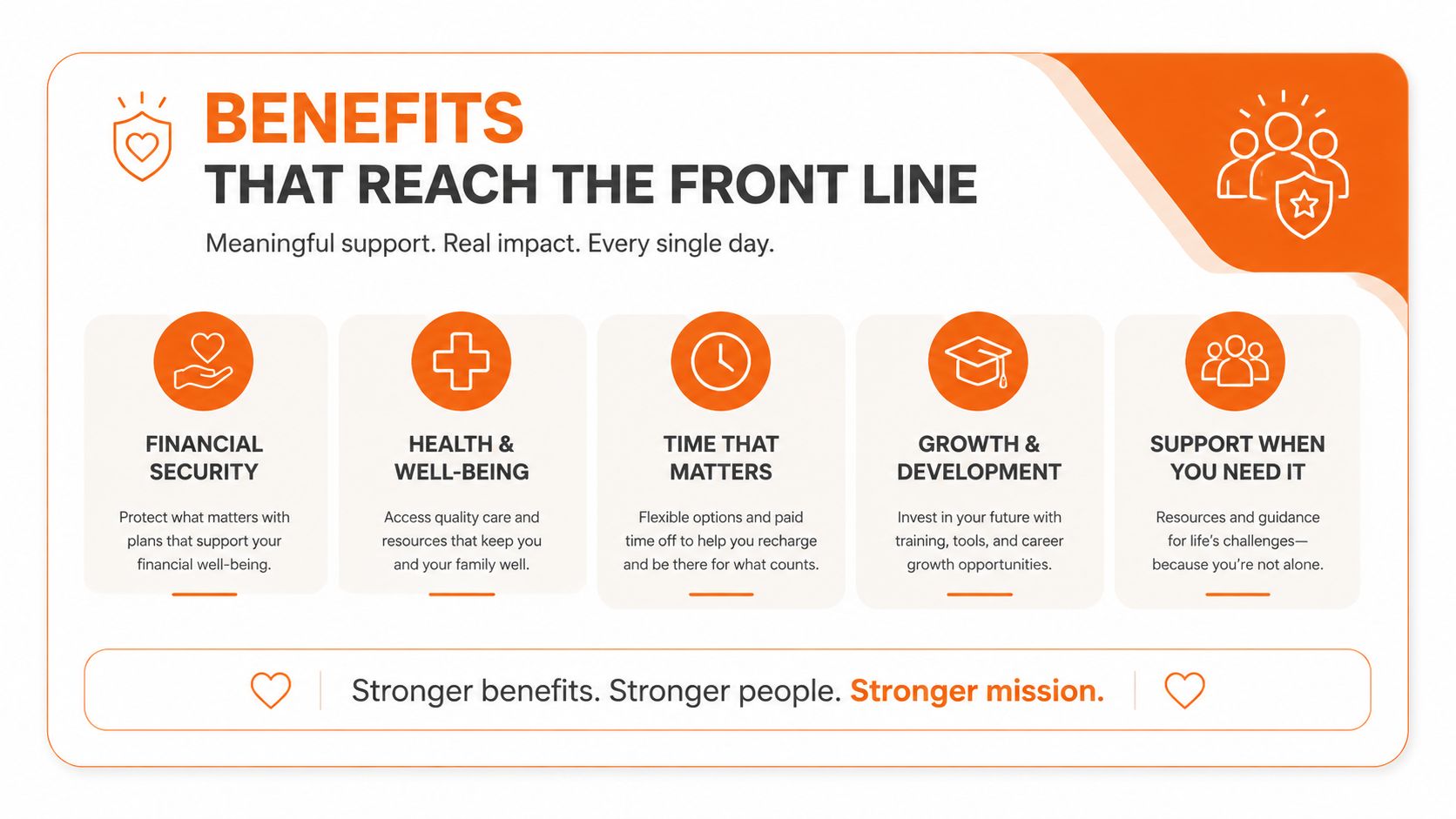
Benefits That Reach the Front Line
The first sign of better work order management isn't a polished dashboard. It's a calmer shift.
When intake captures the right details, coordinators spend less time translating messages. When each handoff has an owner, technicians aren't waiting for someone to confirm what “urgent” meant. When closure requires evidence, the next shift can trust the record instead of reopening the conversation.
That creates practical benefits on the floor:
Faster response: Coordinators can triage from complete information instead of chasing location, symptoms, and access details.
Cleaner handovers: The incoming manager sees what was reported, what changed, and what remains blocked.
Fewer repeat visits: Technicians can arrive with the relevant asset history, parts information, and instructions.
Better workload visibility: Leaders can see overloaded teams before the backlog becomes a source of constant escalation.
Usable asset history: Managers can identify recurring failures and make better repair, replacement, or preventive-maintenance decisions.
Less administrative drag: Frontline staff spend less time rewriting chat messages into spreadsheets or reporting the same status to several people.
Don't confuse activity with performance. A high ticket count may mean the team is productive, or it may mean people create duplicates, close work without evidence, or reopen the same issue repeatedly. A falling backlog can also hide deferred work if managers close orders to improve the report.
The useful measures connect directly to operational outcomes. Look at whether the right information arrives at intake, whether assignments are accepted, whether blocked jobs receive attention, whether repairs hold, and whether the next shift can continue without starting over. The employee experience matters because a process that adds friction at every step won't survive contact with a busy store, ward, kitchen, or warehouse.
Choosing Work Order KPIs That Matter
Maintenance KPIs are reference points, not universal commandments. A team buried in emergency work needs a different starting measure from one struggling with overdue preventive maintenance. Use PreventiveHQ's work-order KPI guidance as a reference, then set targets around the failure your operation needs to fix.
KPI | What It Measures | Typical Benchmark | What It Reveals |
|---|---|---|---|
Completion rate | Orders completed against incoming work | Above 95% | Whether the team is keeping pace or building backlog |
Emergency response | Time to respond to urgent work | Within 1 hour | Whether urgent requests reach an owner quickly |
Planned work | Share of work planned rather than reactive | Above 80% | Whether the team is steering work or firefighting |
First-time fix | Jobs completed without a return visit | Above 85% | Whether diagnosis, skills, parts, and instructions are adequate |
Schedule compliance | Planned work completed as scheduled | Above 90% | Whether commitments match field capacity |
Treat those figures as discussion points, not quotas. A hotel may care more about guest-facing response than planned-work share. A healthcare team may prioritize audit completeness. A warehouse may focus on equipment uptime and recurring defects. The right KPI reflects the operating risk, not a generic industry scorecard.
Mean Time to Acknowledge measures the delay between submission and ownership. Mean Time to Repair measures the time required to resolve the issue after work begins. They expose different failures. Combining them into one response number hides the handoff that needs attention.
Backlog aging exposes prioritization drift. Planned maintenance percentage shows whether the team has room to prevent failures. First-time fix rate tests whether the initial diagnosis and preparation held up in real conditions. Add a measure for data quality when orders move across shifts or locations, because incomplete status, asset, or closure fields can make a healthy dashboard look precise while frontline coordination remains weak.
Pick two or three measures tied to the current failure mode. Review them only after checking record quality. If statuses lag behind reality or technicians close work in batches at shift end, the dashboard measures data-entry habits rather than operations. A KPI is useful only when supervisors can act on it, technicians can update it from the field, and the next shift can trust what it sees.
Rolling Out a Mobile-First Workflow
A mobile workflow requires a different starting point from a desktop system. The person reporting, accepting, or completing work may be walking a floor, carrying tools, wearing gloves, or moving between locations. Treat the workflow as the operating system for frontline coordination across shifts and sites, not merely as a maintenance ticket screen.
Assign one accountable owner before configuring the app. This person needs authority to settle disputes between operations, maintenance, IT, HR, and finance. Without a named decision-maker, disagreements about categories, priority, permissions, or closure evidence will delay the rollout and weaken the records.
Set the minimum before adding polish
The first release should cover the complete work cycle. Leave decorative features for later and require:
Offline-capable forms: Staff must capture work where connectivity is unreliable.
Photo capture: Evidence should attach at the point of observation, not later from memory.
Barcode or QR lookup: Workers should find the correct asset without typing long identifiers.
Push notifications: Owners need alerts when a job is assigned, blocked, or returned.
Role-based views: Requesters, technicians, supervisors, and executives need screens suited to their responsibilities.
Data quality deserves equal attention. Keep asset names, location fields, priority choices, status definitions, and closure requirements consistent across sites. A fast form filled with ambiguous options still produces poor handoffs, especially when one shift leaves work for another.
Set governance before launch. Decide who can raise an emergency, change priority, reassign a job, and approve closure. Specify the evidence a technician must record. If these rules remain informal, the app gives old ambiguity a cleaner interface.
For a broader view of coordinating distributed teams, review these mobile workforce management solutions.
Pilot under different conditions
Choose two pilot sites that stress the process in different ways, such as a high-volume store and a slower back-of-house location. Run both pilots for at least four weeks before expanding. This exposes shift changes, recurring tasks, blocked work, and ordinary exceptions that a launch workshop will miss.
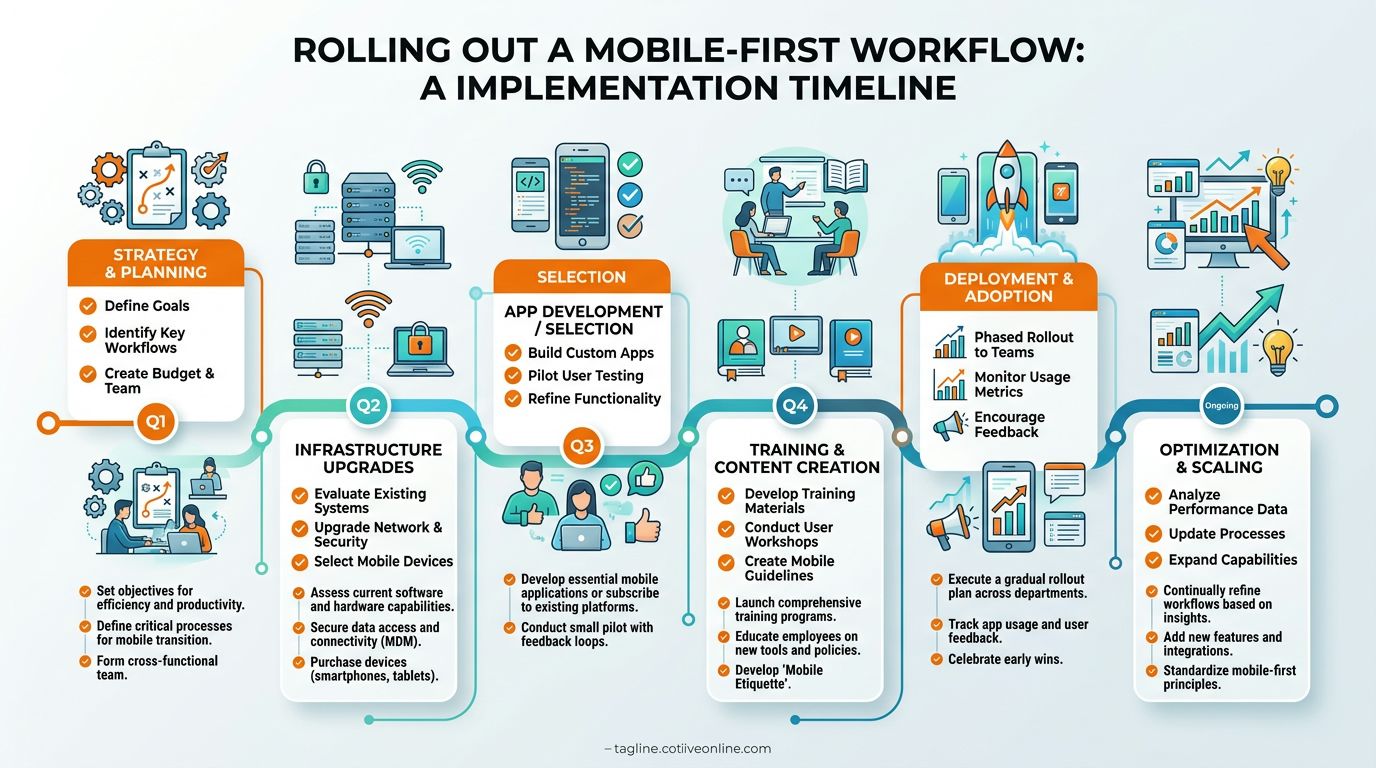
Hold a weekly feedback session with frontline users. Ask where they tap twice, which field labels do not match their language, when they leave the app, and what makes them postpone updates. Track completion rate, first-time acceptance, and repeat edits as early signs of adoption problems.
Expand in waves. Use each pilot to improve templates, training, permissions, and integrations before the next group starts. A healthy rollout makes work easier for the people doing it, while the next shift receives records it can trust.
Choosing and Consolidating the Right Tool
When choosing work order software, feature volume can mislead. A tool that spreads one job across five disconnected screens creates more work than a focused system that carries it from request to verified closure in one place. Choose for the operating system your frontline teams need across shifts and locations, not for the longest vendor checklist.
Start with daily work. List the tasks workers, supervisors, and managers must complete, then test each option against the full lifecycle.
Criterion | What to Check | Red Flag |
|---|---|---|
Lifecycle fit | Can the tool support intake, triage, assignment, execution, verification, and analysis? | One stage depends on email or a separate inbox |
Mobile experience | Can workers capture photos, update status, and close work on the devices they carry? | The mobile app is only a read-only companion |
Governance | Can you control roles, permissions, priority changes, and closure rules? | Anyone can change key fields without an audit trail |
Integrations | Can it connect with CMMS, HR, inventory, scheduling, and identity systems? | Teams re-enter the same data across tools |
Analytics | Can managers see priority, aging, blocked work, repeat failures, and workload? | Reports count tickets but don't explain risk |
Change support | Does the vendor help with templates, training, adoption, and rollout decisions? | Your team is left to configure everything alone |
Review the data path, too. Workers should enter information once, from the device they already carry. Managers should see consistent status and ownership across locations. If the system needs spreadsheets, chat threads, or manual re-entry to fill gaps, its data quality will decline with every shift.
Retire tools that cover only one step, such as a request inbox that feeds a spreadsheet. Consolidation means removing the handoffs that make workers copy information, switch devices, or explain the same job twice. It does not require forcing every process into one application. This workforce management software comparison from Pebb helps assess tool overlap alongside workflow coverage.
Use two questions for the final decision. Can a frontline worker complete the full cycle from request to verified closure in one app on one device? Can a manager view the same record, with the same status, across shifts? If either answer is no, keep looking.
Pebb brings communication, tasks, files, shifts, knowledge, and employee coordination into one mobile-first work app, so work orders don't vanish between chat threads and disconnected systems. Visit Pebb to see how your teams can manage frontline work in one shared space across locations and shifts.
