
What Is Vendor Lock in: Avoid Hidden Costs & Proprietary
Discover what is vendor lock in, its hidden costs, and how to avoid it. Learn to choose flexible software and escape proprietary traps.
Dan Robin

Vendor lock-in is when switching from a software or service becomes so expensive or difficult that you feel trapped, even if the tool is no longer serving you well. In the worst cases, the internal labor to rebuild and migrate can exceed 40% of the total project cost.
If you lead HR or operations for a frontline team, you probably know the feeling already. Your company chat lives in one app. Scheduling lives in another. HR files sit somewhere else. Tasks are split across a project tool, email, and a shared drive nobody cleans up. New hires ask where to find policies, managers answer with screenshots, and payroll week turns into a scavenger hunt.
That mess often gets dismissed as normal growing pains. I don't buy that. A lot of the time, it's not growth. It's drift. And drift hardens into dependence.
I've seen teams accept bad tools for far too long because leaving felt worse than staying. That's what makes what is vendor lock in more than a technical definition. For HR leaders and operations managers, it's the daily cost of fragmented systems, trapped data, and workflows built around someone else's rules.
The Slow Creep of Being Trapped
A store manager opens five apps before 9 a.m. One for shift swaps. One for announcements. One for direct messages. One for incident reporting. One for files. A supervisor calls because an employee missed a policy update. The update was posted, but only in the communications app, and the employee checks the scheduling app first because that's the one they need every day.
Nothing is broken enough to trigger a full rethink. That's why this problem hangs around.
At first, each app looks reasonable on its own. The scheduling tool is good at schedules. The chat app is good at chat. The HR system handles documents and forms. But over time, the cracks show up in the handoffs. Data gets copied manually. Managers become human glue. Employees stop trusting that important information will be in the right place.
The problem rarely announces itself
Lock-in doesn't usually start with a dramatic contract trap. It starts with convenience.
A department picks a tool to solve one urgent problem. Then another team adds an integration. Then someone builds a custom workflow. Then years of shift records, onboarding checklists, and employee conversations pile up inside a system nobody can easily leave. By the time leadership asks whether the tool still fits, the answer is tangled up in exports, retraining, broken automations, and lost history.
You don't notice lock-in when you sign up. You notice it when you try to leave.
For frontline organizations, that pain lands far outside IT. HR carries it when employee records are scattered. Operations carries it when managers re-enter the same information across systems. Internal comms carries it when messages don't reach the people on the floor.
That's the slow creep. It becomes background frustration, then accepted reality, then a budget line you resent but keep paying.
What Vendor Lock-In Really Means
The plain-English answer is simple. Vendor lock-in means you've become dependent on one vendor's product in a way that makes switching hard or expensive. That's the core idea described in Aerospike's explanation of vendor lock-in.
The easiest way to understand it is with a coffee machine.
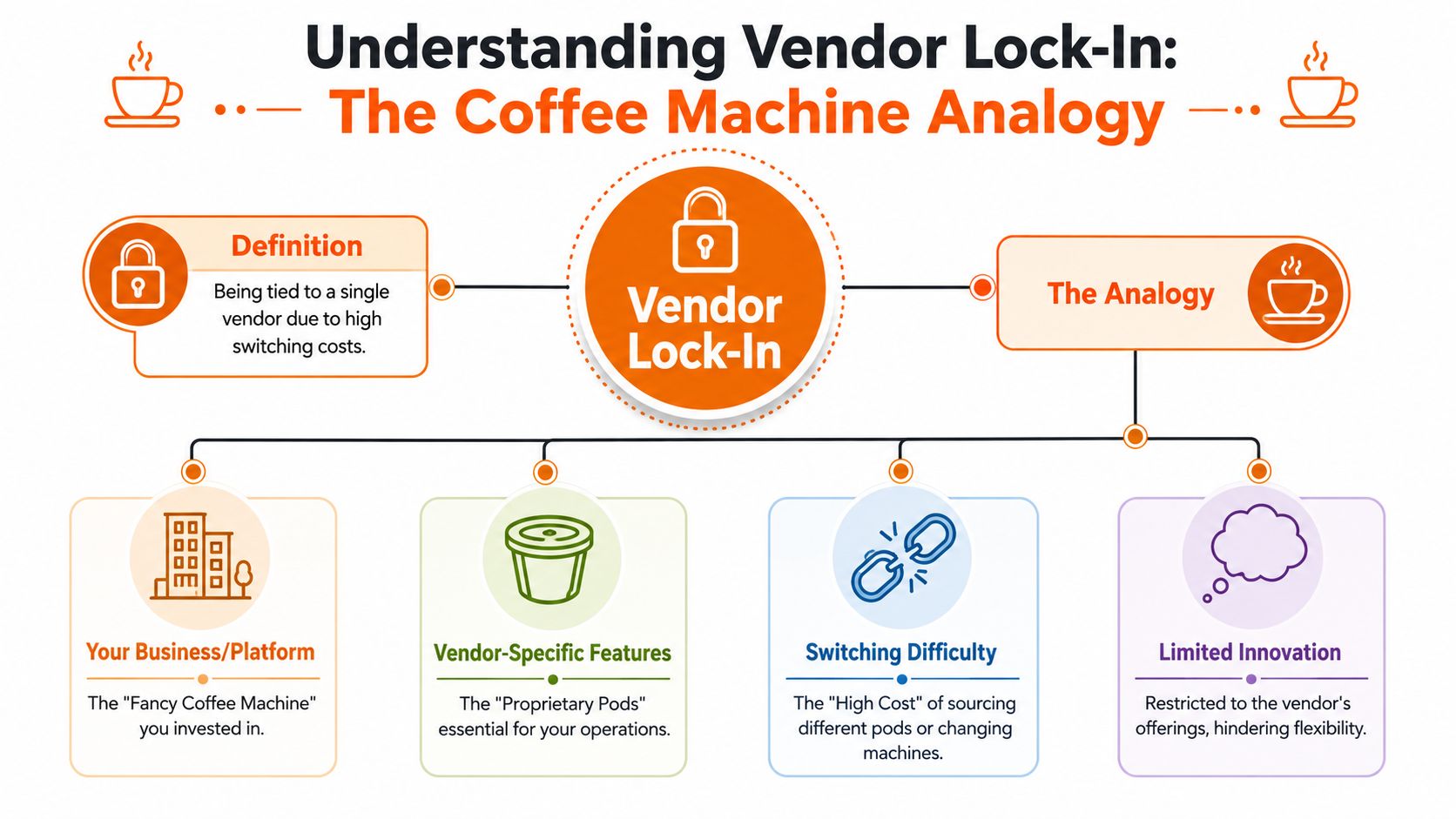
The coffee pod version
You buy a sleek coffee machine because it looks easy. It works well at first. Then you learn it only accepts one kind of pod. Those pods get more expensive. The quality slips. Maybe the store near you stops stocking them. But you've already bought the machine, and switching means replacing the whole setup.
Software vendors do the same thing. Not always maliciously. But the outcome is the same.
Your team starts using one platform's special workflows, one vendor's data model, one set of proprietary integrations, one set of admin habits. Over time, your choice shrinks. You don't stay because it's still best. You stay because leaving hurts.
A contract isn't the real issue
People often get confused about this distinction. A contract alone isn't lock-in. A one-year agreement with clear export options and standard integrations might be completely reasonable. The primary problem is the lack of a practical exit.
If your data can leave in a usable format, your integrations use common standards, and another system can take over without a full rebuild, you're dealing with commitment, not captivity.
According to Wikipedia's overview of vendor lock-in, the trap appears when switching costs force companies to stay with a bad tool through penalties, data loss, or the need to rebuild from scratch, which can stifle flexibility and potentially inflate costs in the long run.
What this looks like in real life
For HR and operations teams, lock-in often shows up in three familiar ways:
Your data is technically exportable: But it comes out as a mess of partial files, missing history, or unreadable structure.
Your workflows depend on vendor-specific behavior: A process that works inside one app can't be recreated elsewhere without custom work.
Your people are trained around the tool's quirks: Managers know all the workarounds, which means the software's flaws become part of your operating system.
Practical rule: If leaving a tool would break your daily operations for months, you're not using software. You're renting dependence.
That is the heart of what vendor lock in means. It isn't loyalty. It isn't convenience. It's lost advantage.
Hidden Traps in Your Everyday Work Tools
The most dangerous lock-in doesn't live in some abstract cloud architecture deck. It lives in the ordinary tools your managers touch all day.
Take the scheduling app that seems harmless enough. Your team uses it for shifts, attendance patterns, and labor planning. Then leadership wants to compare staffing history across locations or move to a different workforce system. You discover the export gives you basic rows, not the decision trail, not the approvals, not the context that helped managers run the operation. The data leaves, but the meaning doesn't.
Where frontline teams get burned
I've seen communication tools work the same way. The product feels simple when you're onboarding. Post updates, create channels, share files. Then a year later, someone asks for old policy discussions, training posts, or acknowledgement history. You realize the useful record of how the company communicated lives inside a subscription wall. Stop paying, and that memory gets a lot harder to reach.
HR systems can be worse because they sit in the middle of everything. Payroll, onboarding, time off, documents, permissions. Once a vendor becomes the hub, every new integration increases the cost of change. One proprietary API, one custom script, one brittle handoff at a time.
A good definition comes from DataCore's vendor lock-in glossary, which explains that restrictive lock-in can stretch switching timelines from months to years when complete data exports are unavailable or too expensive, and that rebuilding can push internal labor above 40% of total migration cost.
The pain is operational, not theoretical
That kind of delay isn't just an IT project headache. It means real people doing extra work while leadership waits. It means a frontline manager still juggling three systems because the replacement isn't ready. It means HR teams postponing process improvements because the tool stack is too tangled.
Here's where the trap gets personal:
Everyday tool | What looks normal | What lock-in looks like later |
|---|---|---|
Scheduling app | Fast shift planning | Missing history and weak exports |
Chat platform | Easy team communication | Knowledge trapped inside old threads |
HR system | Central employee records | Hard-to-replace integrations |
File storage tool | Simple document sharing | Folder structures and permissions that don't transfer cleanly |
The warning sign isn't that a tool is popular or feature-rich. It's that too much of your business only makes sense inside that one vendor's world.
Frontline leaders often inherit this mess rather than choose it. That's why it helps to name the problem correctly. Once you do, the random frustrations start lining up into a pattern.
The Quiet Costs of Being Trapped
Many teams notice the invoice first. That's not the true cost.
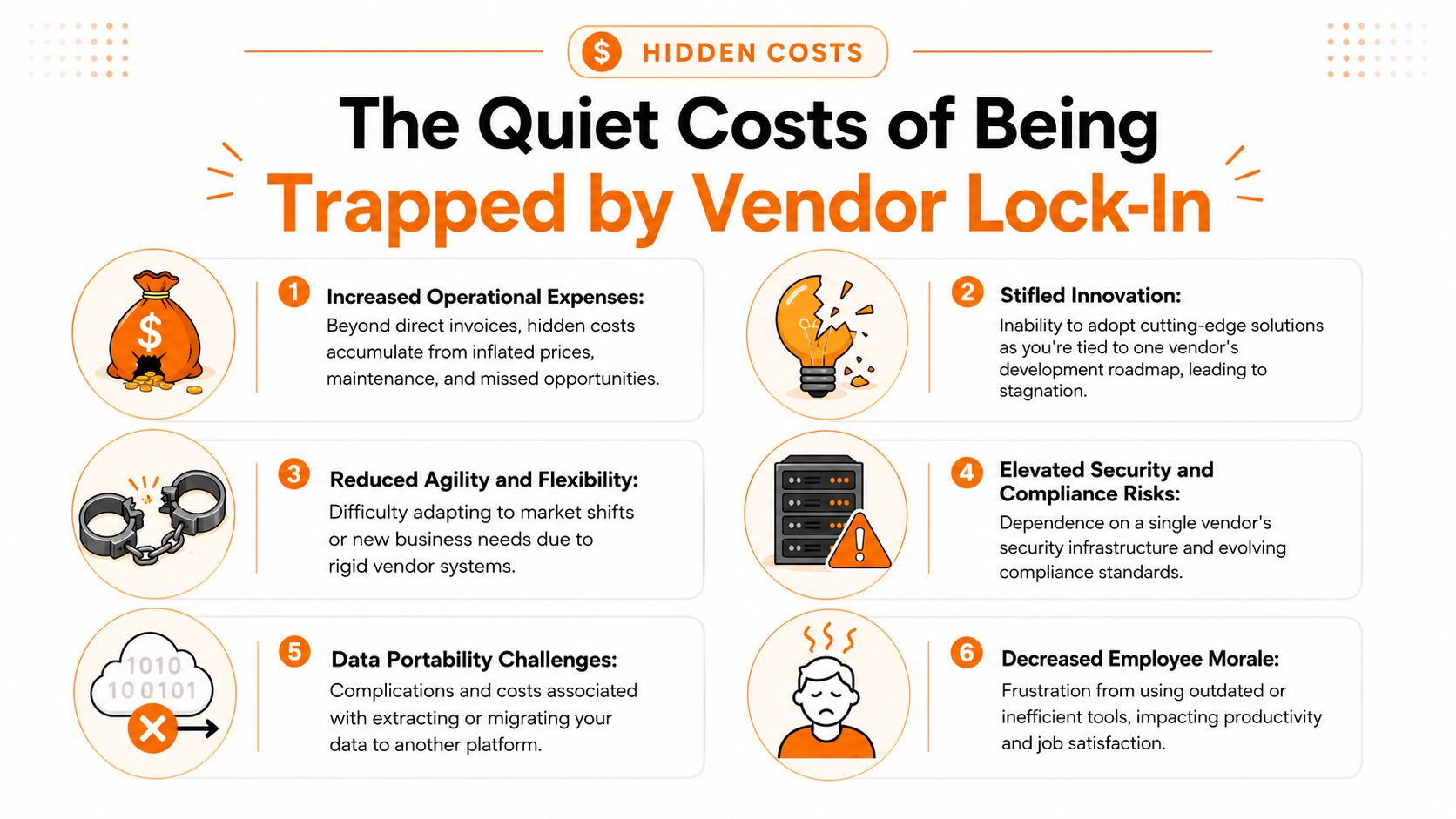
The cost shows up in slower decisions, workaround-heavy processes, and managers who stop expecting their tools to improve. Vendor lock-in drains energy from the business long before anyone writes a migration plan.
Financial cost is only the surface
Yes, trapped companies often keep paying for tools they no longer like. But the larger issue is that they lose bargaining power. If a vendor knows leaving would be ugly, your renewal conversation gets weaker. You start accepting pricing, packaging, and product decisions you wouldn't tolerate in a more competitive relationship.
That matters a lot for smaller businesses and lean operations teams. If you're reviewing options such as free HRIS software for growing teams, the right question isn't just "What can we afford today?" It's "What control are we giving up for tomorrow?"
Operational drag spreads everywhere
Locked-in tools create small frictions that pile up.
A manager enters employee data in one place, then retypes it into another. Someone exports a spreadsheet because two systems don't sync cleanly. An HR coordinator spends hours chasing files because permissions and storage are split across platforms. None of this looks dramatic on its own. Together, it changes how the company works.
You stop designing clean processes. You design around tool limitations.
Process debt: Teams build workarounds, side spreadsheets, and manual checks to bridge system gaps.
Training burden: New managers don't just learn the job. They learn the quirks, exceptions, and unofficial rules created by bad software fit.
Change resistance: Even when better tools exist, leaders delay because the transition feels too risky.
Culture takes the hit too
This is the part software buyers underestimate. Employees feel trapped before executives admit it.
When frontline staff have to check multiple apps, hunt for updates, or repeat the same admin steps every week, they stop seeing the system as helpful. They see it as one more thing standing between them and real work. That frustration spreads to onboarding, compliance, communication, and morale.
The problem isn't abstract. As Veeam's discussion of lock-in and portability notes qualitatively, portability matters because organizations need practical ways to reduce dependence and keep options open.
Bad tools teach people that confusion is normal. Good tools make work feel lighter.
When leaders tolerate lock-in, they're often tolerating a culture of workaround. That has a cost. Not just in money, but in trust. People start assuming the company will keep forcing them to use systems that don't respect their time.
How to Choose Freedom A Vendor Evaluation Checklist
If you want to avoid lock-in, stop buying software based on the demo. Demos show polish. They don't show your exit.
The smartest buyers I know ask awkward questions early. They want to know what happens when the relationship ends, not just when onboarding starts. That's not cynicism. That's discipline.
Ask about freedom before features
My rule is simple. If a vendor can't explain how you leave, I don't trust how they want you to stay.
The strongest protection is choosing tools built around open, portable foundations. As noted in this guide to avoiding vendor lock-in through hardware-agnostic software and open standards, the most effective mitigation is insisting on hardware agnostic software, open standards, and interoperable systems so you can leave when needed.
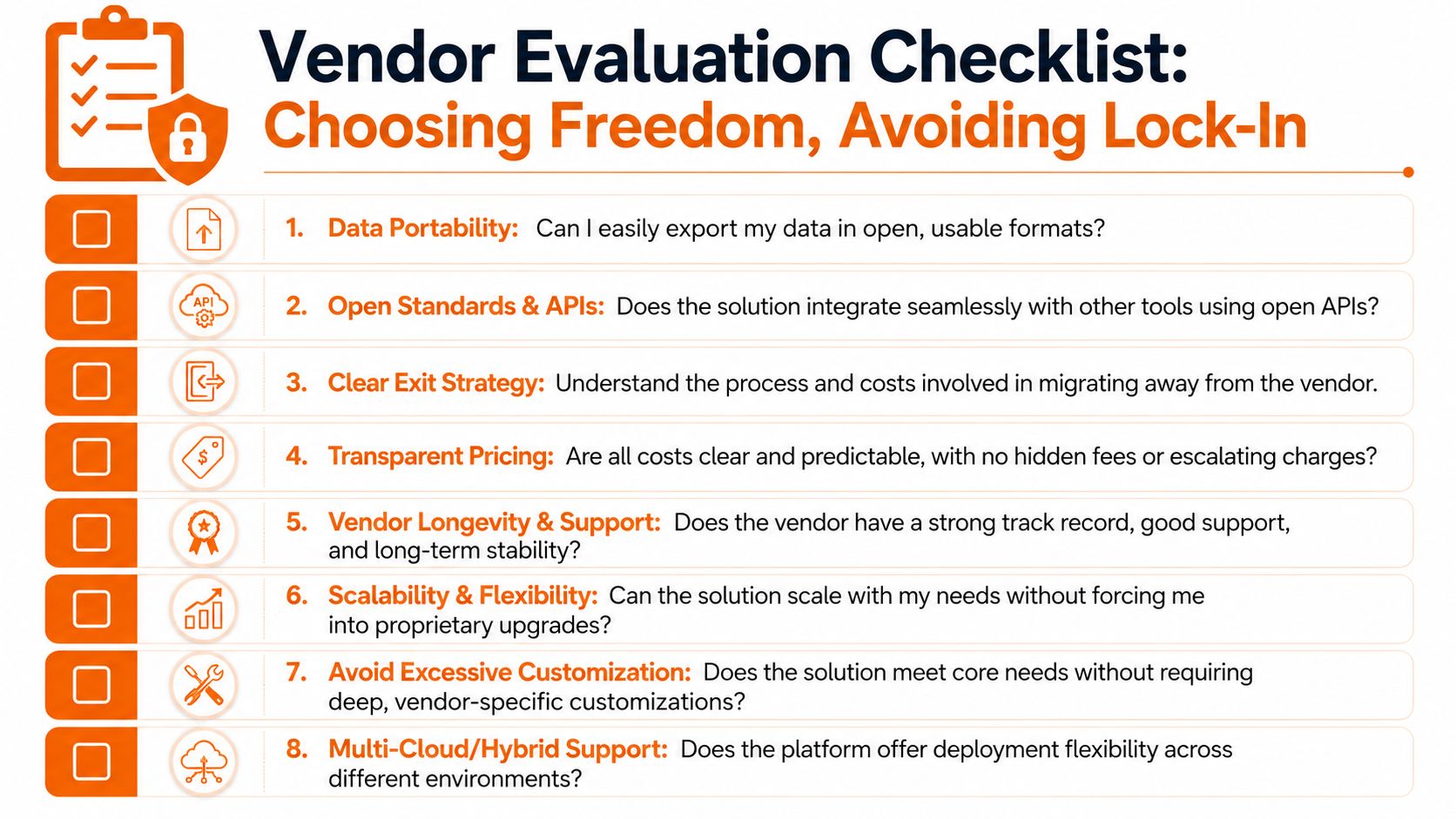
Use this checklist in every buying process:
Data export: Ask for a live demonstration of full export, not a sales promise. You want usable data, not a token CSV that leaves out history.
API maturity: Look for a public, documented API. If integrations require special approval, hidden fees, or vendor professional services every time, that's a warning.
Exit terms: Read termination language carefully. Who helps with handoff, what remains accessible, and what disappears?
Customization risk: Be cautious when a vendor pushes deep custom work early. The more your operation depends on one platform's unique logic, the harder migration gets.
Standards fit: Favor systems that play well with standard protocols and common business tools instead of demanding their own ecosystem.
Do the boring diligence
Most lock-in happens because teams skip diligence when the pressure is on. They need to launch fast, replace something broken, or satisfy one urgent department. I've been there. It's exactly when discipline matters most.
A practical resource I like is this ITAD vendor due diligence checklist. It's aimed at vendor scrutiny more broadly, and that's useful because lock-in rarely appears alone. It often sits beside weak handoff planning, vague support commitments, and sloppy lifecycle thinking.
You should also review whether the tool fits your larger stack and governance model, especially if you're comparing vendor management systems for operational control.
What a healthy answer sounds like
When you ask a strong vendor tough questions, the answers are calm and specific.
Question | Good answer | Bad answer |
|---|---|---|
Can we export all data? | Yes, in usable formats with clear documentation | Yes, talk to support |
How do integrations work? | Public API, standard auth, documented endpoints | Custom integration available on request |
What happens at termination? | Defined handoff process and retention terms | We'll work with you |
How much customization is required? | Minimal for core workflows | We'll tailor everything |
Buy tools that assume you'll stay by choice, not by friction.
That one standard will save you from a lot of expensive mistakes.
Planning Your Escape from Siloed Apps
If you're already stuck, don't panic and don't rip everything out at once. That's how teams create new chaos while trying to fix old chaos.
A better move is to treat the exit like an operations project, not a rebellion. Slow enough to stay safe. Firm enough to keep moving.
Start with the mess you actually have
Most companies underestimate how many tools are doing frontline work. Audit all of them. Not just the apps finance pays for directly, but also the tools department heads adopted because they needed something fast.
Map each system to a real job: scheduling, announcements, onboarding, files, time-off requests, policy access, task tracking. Then write down the hidden costs. Manual re-entry. Duplicate records. Missing visibility. Training overhead.
If you're preparing the move, this guide on data migration best practices for business systems is worth keeping nearby.
Prioritize what must survive
Not every piece of legacy data deserves a heroic rescue. Some does.
Protect the records that matter to payroll, compliance, employee history, schedules, approvals, and operating continuity. Everything else should earn its place. Teams get into trouble when they try to migrate every old thread, every duplicate file, and every abandoned workflow.
A good escape plan usually follows this order:
Audit the stack: Find the systems creating the most friction and the most dependency.
Choose the critical data: Migrate what operations and HR need to function well.
Run a pilot: Test the new environment with one team or one location before broad rollout.
Explain the change: Tell managers and employees how this makes their daily work simpler, not just how the architecture improves.
Favor portable foundations
Your next environment should be easier to leave than the last one. That's the point.
According to Nutanix's explanation of avoiding cloud and infrastructure lock-in with standard APIs and portable data models, teams should demand data models that work across platforms and use standard REST APIs with HTTP, JSON, and OAuth to decouple apps from underlying infrastructure.
You don't need to become a deep technical architect to use that advice. You just need to ask one practical question. If we need to change course later, will this setup help us move or fight us the whole way?
Build a Company That Can Change
The deeper lesson here has nothing to do with software categories. It has to do with agency.
A resilient company doesn't assume today's tool will last forever. It assumes needs will change, teams will grow, processes will evolve, and better options will appear. That's healthy. The goal isn't permanence. The goal is room to adapt without tearing the place apart.
For HR and operations leaders, that mindset matters because your systems shape daily work. They shape how people communicate, how fast managers respond, how new hires learn, and how much friction employees carry through a normal week.
So when people ask me what is vendor lock in, I don't think of a technical definition first. I think of a business losing the freedom to choose. And once you see it that way, the buying standard gets clearer.
Choose tools that respect your future self. Choose systems your team can understand, use, and leave. That's not paranoia. It's good management.
If you're trying to replace scattered workplace tools with one connected employee app, Pebb is worth a look. It brings communication, tasks, files, scheduling, and frontline operations into one place, so your team spends less time bouncing between apps and more time working together effectively.
