
Vendor Management Systems: A No-Nonsense Guide
Tired of tracking vendors in spreadsheets? Our guide explains what vendor management systems are, how they help Ops and HR, and how to choose one.
Dan Robin
Teams typically don't wake up one day and decide they need a vendor management system. They back into it.
It starts with one spreadsheet for cleaning vendors. Then another for temp agencies. Then someone in HR keeps contractor paperwork in a shared drive, finance tracks invoices somewhere else, and store managers text suppliers directly because it's faster than waiting for head office. A few months later, nobody knows which version is current, which contract auto-renews next, or whether the uniform supplier ever sent the updated insurance document.
That's usually the moment the spreadsheet stops being a tool and starts being a liability.
The Spreadsheet Is Officially Full
I've seen this movie too many times. Ops has one file. HR has another. Accounts payable has a third version with “FINAL” in the filename. The area manager has a private list because she got tired of waiting for updates. Everyone is trying to be helpful. The result is chaos.
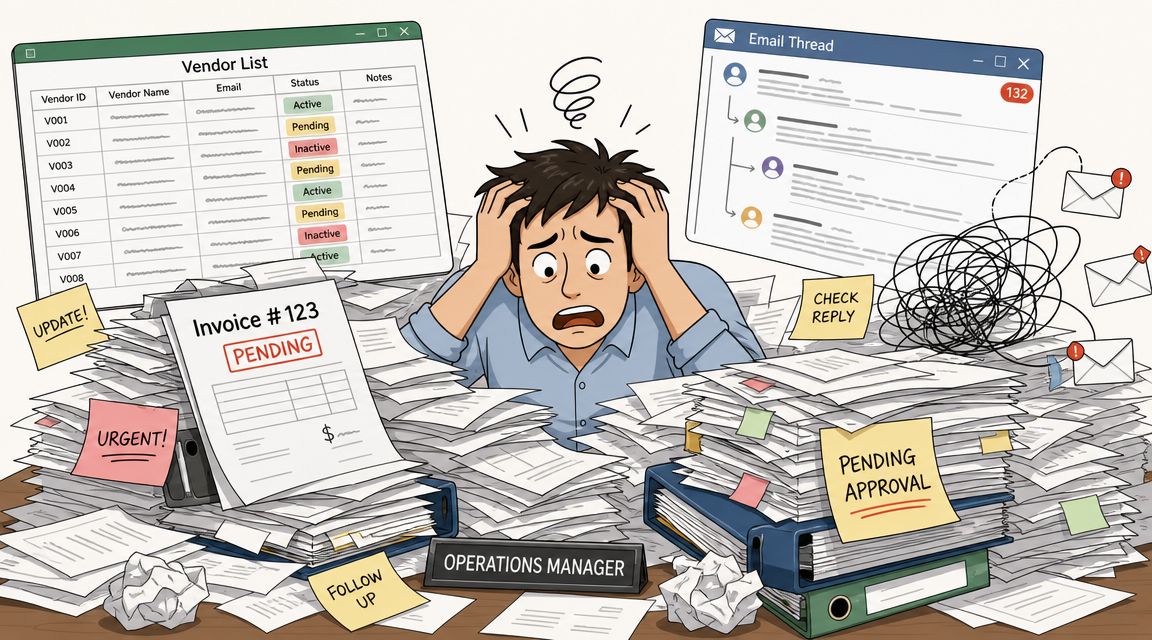
The pain isn't abstract. It shows up in ordinary operational messes:
Missed renewals: A local pest control contract rolls over because nobody saw the date coming.
Duplicate chasing: HR asks for compliance documents that procurement already collected.
Payment confusion: Finance gets an invoice from a supplier a site manager onboarded informally.
Zero visibility: Leadership asks which vendors are critical, and the room goes quiet.
For frontline-heavy businesses, this gets worse fast. You're not just managing software subscriptions or strategic sourcing deals. You're managing the businesses and people that keep the lights on. Cleaning crews, staffing agencies, linen services, security firms, couriers, maintenance contractors, food suppliers. Some are national. Some are local. Some were approved properly. Some arrived through a panic call on a Friday afternoon.
Why manual tracking breaks down
Spreadsheets are fine until the work becomes shared, recurring, and sensitive. Vendor work is all three.
A proper vendor management system gives you one calm place to keep the basics straight. Contracts. Insurance certificates. contacts. Timesheets. Invoices. Performance notes. Approval history. It's less exciting than strategy decks and more useful than most of them.
Spreadsheets don't fail because they're bad. They fail because they ask humans to remember too much.
This isn't some tiny niche category either. One neutral market estimate values the vendor management software market at USD 11.47 billion in 2026, with projected growth at a 10.33% CAGR to USD 18.76 billion by 2031, according to Mordor Intelligence's vendor management software market outlook.
That matters for a simple reason. A market doesn't get that big unless a lot of teams have hit the same wall.
What people actually want
Most ops and HR leaders aren't asking for a grand digital transformation. They want a shorter list:
One place to look: So they can stop asking three people for one answer.
Clear ownership: So someone knows who approves, who reviews, and who follows up.
Less admin drag: So site teams can run the business instead of feeding paperwork into the void.
That's the actual opening for vendor management systems. Not control for control's sake. Relief.
What a Vendor Management System Actually Does
The phrase sounds heavier than it is. In practice, a VMS is a shared operating layer for your external partners.
Think of it as part filing cabinet, part workflow engine, part memory. It holds the records you need, but it also keeps work moving. That matters because a folder full of PDFs is not a system. It's storage.
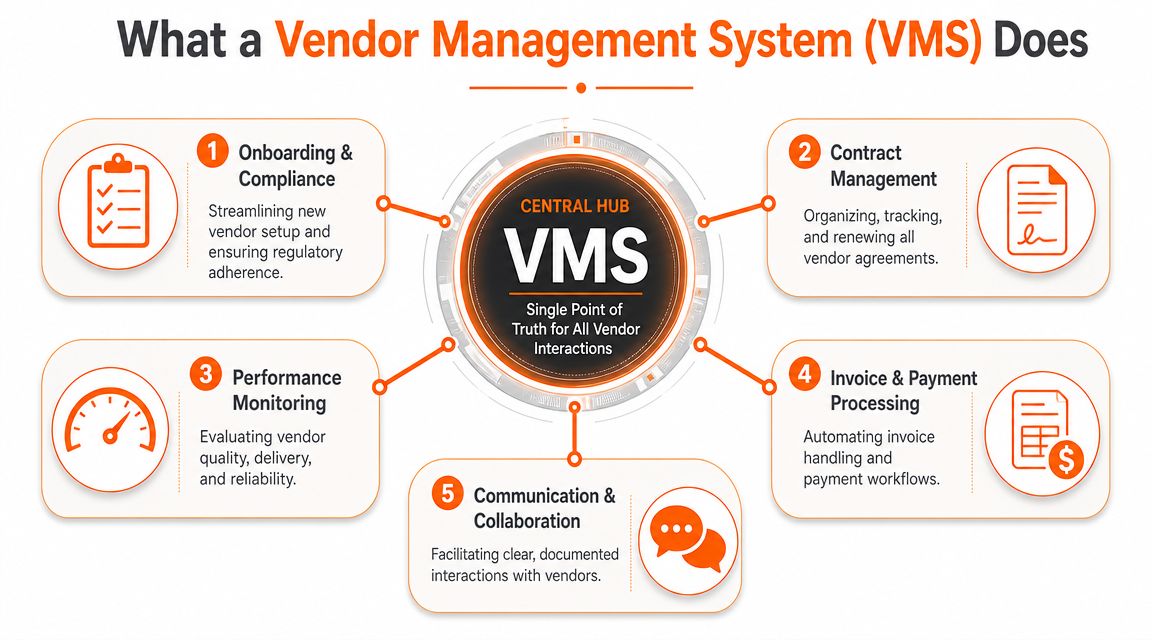
A VMS works best when it becomes the central system of record for supplier contracts, compliance documents, timesheets, payments, and performance data. That kind of setup reduces the fragmentation that creeps in through spreadsheets and email, as described in VectorVMS's explanation of what a vendor management system is.
The real job is creating one version of the truth
Most vendor problems aren't caused by bad intentions. They come from split information.
The contract is in legal's folder. The insurance certificate is in HR's inbox. The approved rate card sits in someone's desktop downloads. A site manager has the vendor's actual mobile number, but nobody else does. Then an issue hits, and people spend more time hunting than fixing.
A good VMS pulls that scattered record into one place and ties it to actual workflows.
Here's what that usually looks like in practice:
Onboarding: A new temp agency can't start until required documents are in, reviewed, and approved.
Ongoing compliance: Expiring documents trigger follow-up before they become a problem.
Invoice handling: Timesheets, service records, and payment approvals connect instead of floating around separately.
Performance tracking: Teams stop relying on “I think they're doing okay.”
It matters even more outside IT
A lot of VMS content is written as if every company is mostly managing software vendors or contingent labor at corporate HQ. That's not how many businesses operate.
Operations teams need something that handles messy reality. Site-level exceptions. Regional suppliers. Last-minute staffing changes. Frontline managers who need mobile access, not a desktop-only maze. If you're looking for practical ideas on the physical-services side, these top facility vendor practices are worth reading because they deal with the vendors that keep buildings and teams running, not just procurement theory.
Practical rule: If your system can't answer “Are they approved, insured, current, and paid?” in one place, it isn't doing the job.
That's what a VMS is for. Not to make vendor management seem unduly elaborate. To make it less fragile.
Core VMS Features That Genuinely Matter
Feature lists are where software buying goes to die. Every platform has a grid. Every grid is full of green checkmarks. None of that tells you whether your payroll coordinator, area manager, or HR generalist will get through a Tuesday with fewer headaches.
The better way to judge vendor management systems is by the jobs they handle well.
Getting vendors in cleanly
The first job is onboarding. Not the glamorous kind. The practical kind.
You need the right documents collected, the right approvals routed, and the right people notified before a vendor starts work. If your current process depends on someone remembering to chase insurance, tax forms, bank details, background documents, credential files, or contract signatures, you do not have a process. You have optimism.
The useful features here are boring and valuable:
Document collection workflows that don't require email ping-pong
Approval routing that matches how your business works
Status visibility so site teams know whether a vendor is cleared to begin
If compliance is a big part of your world, this guide to compliance management systems is useful because the overlap is real. A lot of vendor pain is really compliance pain wearing a different jacket.
Seeing performance without guesswork
Many teams say they track vendor performance. What they usually mean is they remember the last problem.
That's why analytics matter. One market study says the analytics and reporting module leads with an estimated 68.6% share in 2026, and the same report family says cloud deployment is growing at a 12.9% CAGR through 2030, according to Coherent Market Insights on the vendor management systems market. That lines up with what buyers want. They want visibility, and they want access without a painful rollout.
The feature itself isn't the point. The point is being able to answer plain questions:
Which agencies consistently send people who show up?
Which service vendors miss SLAs the most?
Which locations are relying on off-contract suppliers?
Which vendors create the most invoice disputes?
Paying vendors without drama
Many systems tend to overpromise. Automation helps, but only when the underlying rules are clean.
A decent VMS connects service records, timesheets, approvals, and invoices so finance isn't deciphering mystery charges at month-end. It should also leave a visible trail. Who approved it. What work it ties to. Whether supporting documents exist.
The best payment workflow isn't the fanciest one. It's the one that prevents avoidable arguments.
What matters more than the feature grid
Three things usually separate a useful tool from shelfware:
What to check | Why it matters |
|---|---|
Mobile access | Frontline managers won't wait to get back to a laptop |
Cloud delivery | Easier adoption, less setup drag, better access across sites |
Reporting clarity | Teams need answers, not dashboards built for analysts |
That's the pattern I trust. Start with jobs. Then look at features.
How a VMS Works in the Real World
Theory is tidy. Real operations aren't.
A VMS earns its keep when ordinary work gets messy and the system still keeps people aligned. Four examples make that clearer than any product demo ever will.
Retail and the seasonal hiring scramble
A retail manager heading into peak season doesn't care about category definitions. She cares about whether three staffing agencies can send approved people to the right stores on time.
Without a VMS, each agency sends documents in its own format, store managers text updates in separate threads, and HR ends up checking the same details over and over. One worker arrives without the expected paperwork. Another is on-site, but no one can confirm rates. Payroll gets dragged into cleanup.
With a decent system, the agencies submit through the same process, the approval path is already set, and store teams can see who is cleared. The manager spends less time refereeing paperwork and more time making sure the shop floor is covered.
Hospitality and the event week pileup
Hotels and venues live on coordination. Big event weeks expose every weak handoff.
Food suppliers, laundry services, temp staff, security, florists, AV contractors, cleaning teams. None of them work in isolation, and all of them affect guest experience. If one vendor slips, the burden lands on operations.
A VMS helps because the vendor record isn't just contact information. It gives the team a current picture of contract terms, proof of compliance, service expectations, and issue history. When the banquet manager says a supplier is late again, there's somewhere to record that pattern. When finance asks why an invoice is higher than expected, the answer is traceable.
In hospitality, vendor management is guest experience wearing a back-office disguise.
Healthcare and credential pressure
Healthcare teams often deal with external workers whose credentials can't be fuzzy. A clinic bringing in traveling nurses or specialist contractors needs fast verification and clean records. “We think it's current” is not a defensible position.
This is where centralized document handling matters. The VMS becomes the place where credential files, approvals, and work status stay connected. Staff can confirm readiness quickly instead of chasing email attachments across departments.
The key benefit isn't elegance. It's confidence.
Logistics and the constant churn problem
Logistics teams often onboard new carriers, subcontractors, or local service partners on a rolling basis. The pace creates risk. People skip steps because the operation can't stop.
A good VMS doesn't eliminate urgency. It gives urgency guardrails.
Here's what that looks like:
Standard intake: New carriers enter through the same approval path instead of side doors
Performance history: Dispatch and ops can flag repeat issues in one record
Clear status checks: Teams can confirm who is approved before assigning work
That's the common thread across industries. Vendor management systems are most useful when work is repetitive, distributed, and easy to lose track of. Which is another way of saying most real operations.
Choosing the Right VMS for Your Team
Buying the wrong VMS is expensive in the most annoying way possible. You don't just waste money. You create another place people are supposed to update and nobody fully trusts.
So I'd skip the giant feature comparison until you answer a few harder questions.
Start with who will live in it
The daily users matter more than the executive buyer.
If the primary users are HR coordinators, site managers, finance admins, and operations leads, the system has to feel simple to them. Not “simple after training.” Simple on first contact. If it takes six clicks to confirm whether a vendor is approved, people will go back to WhatsApp, email, or their own side spreadsheet.
Ask these questions early:
Can a frontline manager use it without a manual
Can finance find the payment trail quickly
Can HR see document status without chasing ops
Can different departments share one vendor record without stepping on each other
Support different levels of vendor risk
Not every vendor deserves the same amount of attention. Your uniform supplier, staffing agency, and cleaning contractor should not all be managed the same way just because they're all “vendors.”
Vendor governance works better when vendors are tiered by operational criticality and risk, and manual spreadsheet-based management tends to break down beyond about 50 vendors, as noted in TechnologyMatch's write-up on vendor management frameworks and blind spots.
That means your VMS should let you treat vendors differently.
Criteria | Question to Ask | Why It Matters |
|---|---|---|
Ease of use | Will site teams actually use this without workarounds? | Adoption decides whether the data stays current |
Vendor tiering | Can we separate critical vendors from low-risk suppliers? | High-risk vendors need tighter review and monitoring |
Workflow fit | Does it match how approvals happen today? | A rigid tool creates shadow processes |
Integration | Will it connect with payroll, finance, or comms tools we already use? | Re-entry creates mistakes and resentment |
Setup effort | How much work is required to get clean records into the system? | Some tools die during implementation |
Reporting | Can we see issues by vendor, site, and region without exporting everything? | Visibility should not require a side project |
For teams thinking more broadly about operations tech, this guide to operational efficiency software is worth a look because vendor workflows rarely live alone. They're tied to communication, scheduling, finance, and approval habits.
The trap to avoid
Don't buy for the demo. Buy for the handoffs.
Vendors sell polished flows with tidy records and cooperative users. Real life is incomplete forms, urgent exceptions, messy ownership, and managers on phones between shifts. Ask the vendor to show you that version.
If the system only works when everyone behaves perfectly, it doesn't work.
That sounds harsh, but it saves time.
Measuring Success Beyond Simple Cost Savings
A lot of VMS conversations collapse into one question. Will it save money?
Sure, maybe. But cost is the easiest thing to measure and often the least interesting thing to improve.
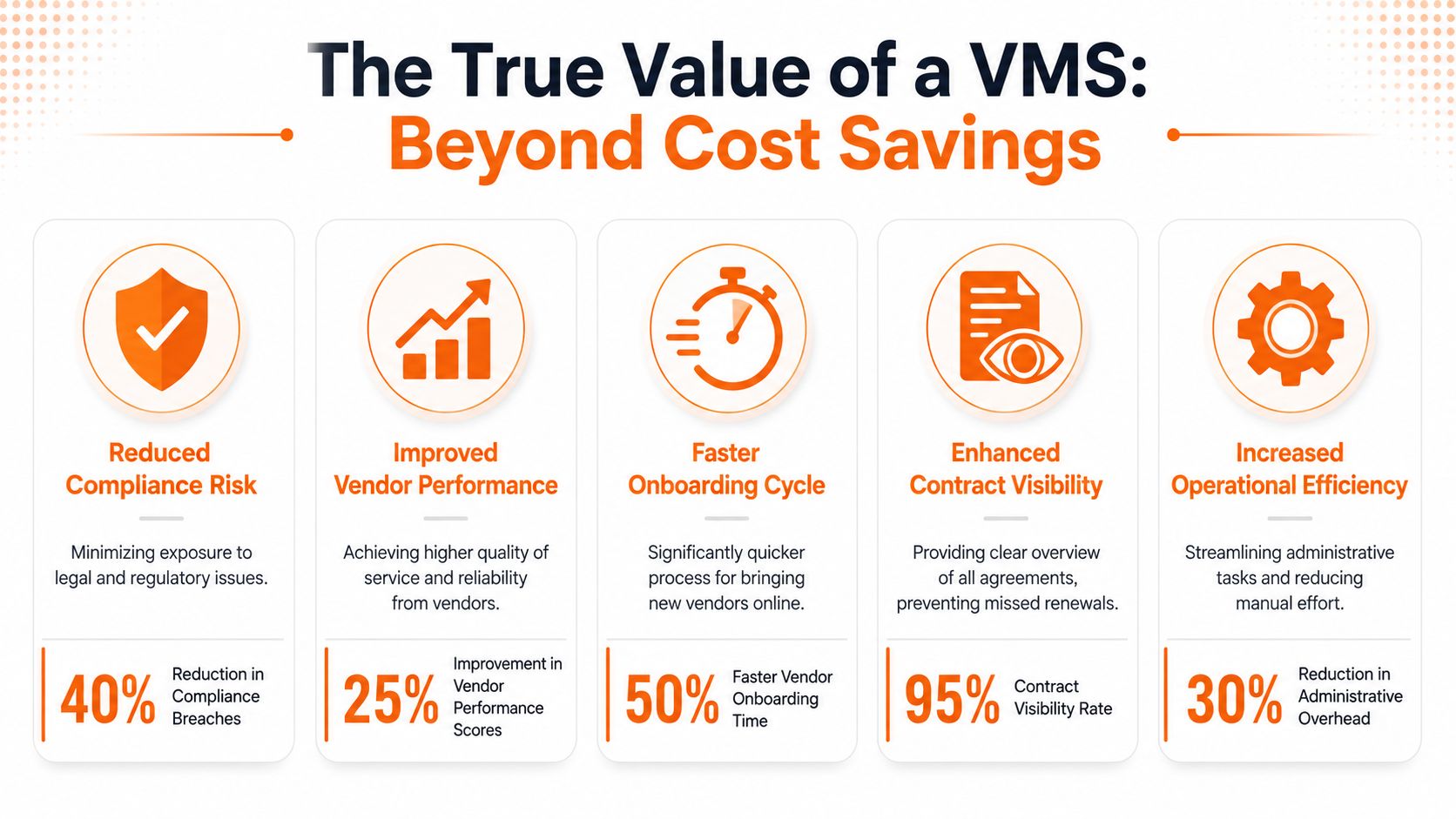
If you only judge vendor management systems by procurement savings, you'll miss the bigger win. Better clarity. Faster onboarding. Fewer surprises. Better service continuity. Less time wasted untangling basic facts.
Better questions to ask
When I look at whether a VMS is helping, I care about things like:
Onboarding cycle time: Are approved vendors getting through the process faster, with less chasing?
Compliance confidence: Can we tell what's missing before someone starts work?
Operational reliability: Are the right vendors showing up consistently and meeting expectations?
Issue resolution: When something goes wrong, can teams see the history and act quickly?
Those measures say more about operational health than a narrow line item ever will.
PMI's vendor strategy guidance takes a useful stance here. It recommends outcome-based contracts and warns against leaning too hard on cost comparisons, because the right vendor often depends on the value stream, not just the price, as explained in PMI's guidance on vendor management strategies.
Cheap can be expensive
The lowest-cost vendor is often the one that creates the most internal work. Late responses. Missing paperwork. Constant supervision. Repeat quality issues. Finance disputes. Escalations from the field.
That's not savings. It's admin debt.
If your team is trying to build a broader discipline around better operations, these operational excellence strategies are a helpful complement because vendor performance rarely sits in a neat box. It affects service, staffing, risk, and team bandwidth all at once.
The right metric isn't “Did we squeeze the vendor?” It's “Did the business run better?”
That's a harder standard. It's also the honest one.
The Real Goal Is Clarity Not Just Control
The best vendor management systems don't turn you into a stricter company. They turn you into a clearer one.
That's a big difference. Control says, “Track everything because we don't trust anyone.” Clarity says, “Let's stop making people guess.” One creates friction. The other removes it.
When the system works, your HR team isn't hunting for expired documents. Your ops managers aren't texting three people to confirm whether a contractor is approved. Finance isn't trying to decode invoices with no context. People can see what's true, what's missing, and what happens next.
That breathing room matters.
What good looks like
Good vendor management is quieter than people expect:
Fewer surprises because records are current
Faster decisions because ownership is obvious
Better relationships because expectations are visible
Less noise because routine admin doesn't need heroic effort
And that's the part a lot of software pages miss. The actual payoff isn't tighter oversight for its own sake. It's giving your team enough structure that they can spend less time chasing paperwork and more time solving real problems with real partners.
That's what most operations leaders want anyway. Not another dashboard. Not another layer. Just a cleaner way to run the parts of the business that are usually held together with memory, goodwill, and a spreadsheet that should've been retired a year ago.
If your team is trying to bring vendor coordination, frontline communication, documents, tasks, and day-to-day operations into one place, Pebb is worth a look. It gives HR and Ops teams a shared home for the work around vendors and the people affected by them, especially across sites, shifts, and distributed teams.
