
Free HRIS Software: An Honest Guide for Growing Teams
Is free HRIS software right for you? Our honest guide covers the real features, hidden costs, and when to choose a unified work app for your entire team.
Dan Robin
You can feel the moment when your people process breaks.
It's not dramatic. Nobody bangs a gong. It's smaller than that. Someone asks how many vacation days a new hire has left, and the answer lives in three places. A manager updates a phone number in one sheet but not the other. A payroll cutoff sneaks up, and now someone is reconciling hours from texts, screenshots, and a note scribbled after a shift change.
That's when “free HRIS software” starts looking attractive.
I get it. I've been there. You're not trying to build a perfect HR department. You just want one clean place for employee records, time off, onboarding docs, and the usual admin mess that keeps leaking into everyone's day. You're tired of carrying process in your head. You're tired of spreadsheets acting like a system.
And if payroll is still stitched together by hand, fix that problem early too. This payroll guide for small businesses is a useful reality check on why “we'll keep doing it ourselves for now” tends to age badly.
The Spreadsheet Is Full
A lot of teams don't decide to look for an HRIS because they suddenly care about HR tech. They look because the patchwork stops holding.
At first, the patchwork feels fine. One spreadsheet for employee details. One folder for contracts. Maybe a shared calendar for time off. A payroll file that one careful person understands. If you've got a small office team and low turnover, you can coast like this for a while.
Then real life shows up.
You hire faster. Someone works weekends. Someone else switches locations. A frontline manager needs to know who's available, who's onboarded, who still hasn't signed a policy, and whether a clock-in issue is payroll's problem or ops' problem. Suddenly, your “simple” setup has turned into five disconnected tools and a lot of polite guessing.
Most teams don't buy free HRIS software because they love software. They buy it because manual coordination has started stealing real work hours.
That's why free HRIS tools get attention. They promise relief without a budget fight. Central employee records. A basic self-service portal. Time-off requests that don't live in Slack, email, and someone's memory. For a stretched operator, that sounds less like software and more like oxygen.
The catch is that software doesn't remove complexity by magic. It only moves it somewhere else. Sometimes that's a win. Sometimes you just trade visible chaos for hidden friction.
I'm not against free tools. I'm against vague expectations. If you know what a free HRIS is good at, and what it will never do well, you can make a smart call. If you don't, you'll waste months teaching your team a tool you'll have to replace anyway.
What Free Actually Means in HR Software
The word free does a lot of dishonest work in software.
Most of the time, it doesn't mean “this product is free to use for as long as you want with meaningful functionality.” It means the vendor has found a clever way to get into your workflow before asking for money.
A 2026 industry roundup notes that many vendors market a free HRIS as a trial or freemium tier that converts users to paid plans after 7–30 days, while only a small number of offerings are free and open source, and it also breaks the market into freemium, open-source, and freeware models (industry roundup on free and paid HRIS platforms).
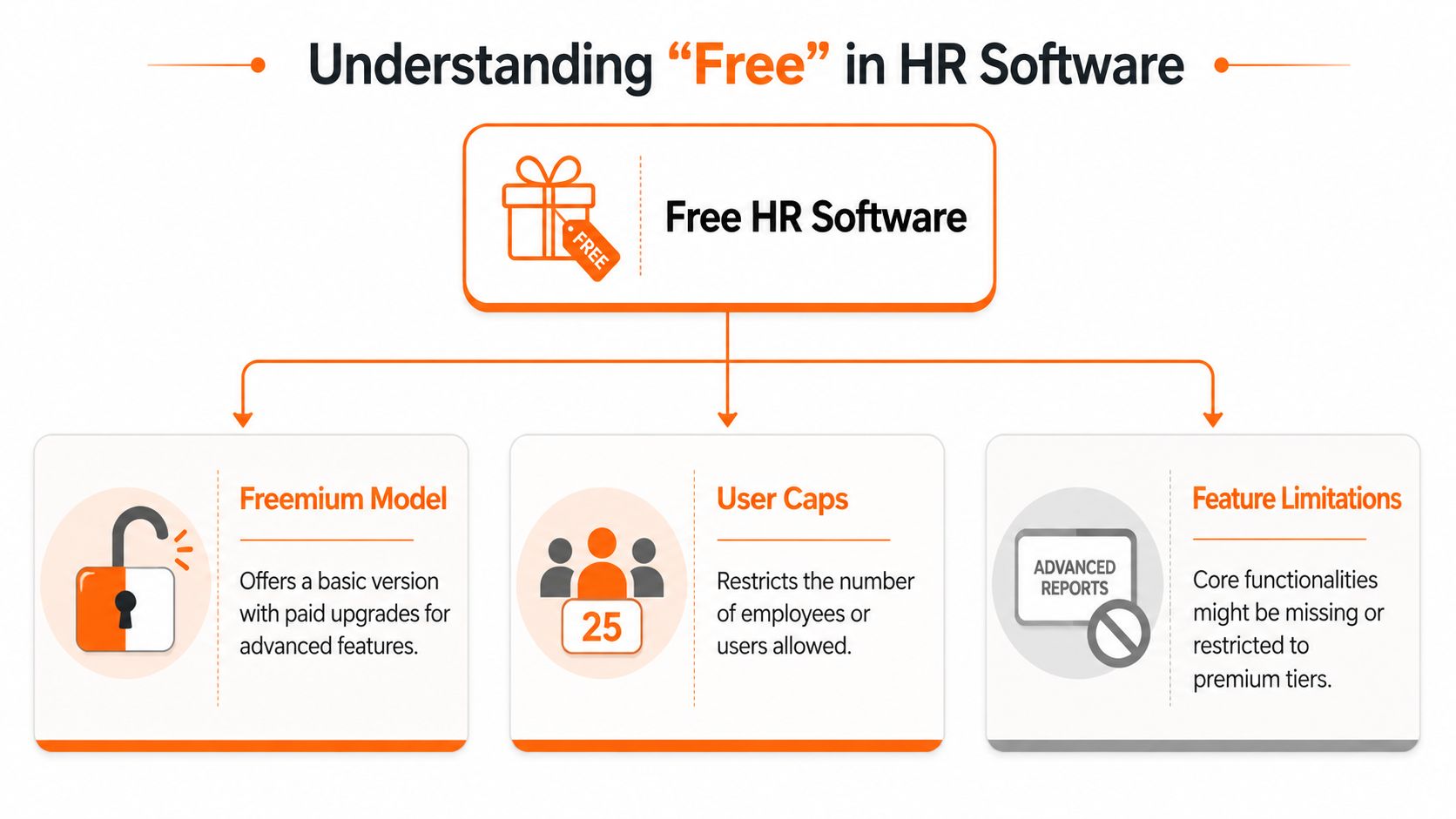
Freemium means the basics are free
This is the most common version. You get a starter tier with just enough value to be useful. Employee records, maybe document storage, maybe time-off tracking. Then the gates appear. More users cost money. Reporting costs money. Permissions cost money. Payroll or integrations definitely cost money.
There's nothing wrong with that model. It's honest when the vendor is honest. The problem is that many teams adopt freemium software as if it were a long-term answer, when it's really a narrow on-ramp.
Open source means the license is free, not the work
Open-source HRIS can be a solid option if you have technical muscle and patience. You don't pay the same kind of license fee, but you take on other burdens. Hosting. Setup. Configuration. Security decisions. Ongoing maintenance. When something breaks, you don't get to act surprised. You own more of the stack.
For some teams, that's a fair trade. For most small businesses, it's an expensive hobby dressed up as savings.
Trial means the clock is running
A trial is not free HRIS software in any practical sense. It's a timed sales process. That can still be useful if you treat it that way. Use the period to test workflows, not to fall in love with a demo. If the trial ends before you've tested onboarding, leave requests, and manager approvals with real users, you haven't evaluated anything.
Practical rule: If a free plan expires, it isn't a free operating model. It's a test drive.
That distinction matters because the wrong expectation creates the wrong decision. Free can be a starting point. It is rarely the destination.
The Typical Features and Frustrating Limits
Free HRIS software is better than it used to be. That's the good news.
Cloud delivery changed the game. Shortlister reports that 98% of businesses considered a cloud-based HRIS, while only 2% contemplated an on-premises HRIS in 2021, and it notes that most free HR tools now cover employee profiles, document storage, time-off tracking, basic onboarding workflows, and simple reporting (Shortlister's HRIS statistics summary).
That's enough to replace some spreadsheets. It's enough to give people a system of record. It's often enough to make HR feel less scattered.
What you'll usually get
Most free plans can handle the plain stuff:
Employee records with names, roles, start dates, and contact details
Document storage for contracts, handbooks, or signed forms
Time-off tracking with simple request and approval flows
Basic onboarding so new hires aren't collected through email threads
Light reporting for headcount or leave balances
If your current setup is a drive folder and a prayer, that's progress.
A lot of teams also discover that what they really wanted first wasn't a giant HR suite. It was a clean source of truth. That's why even something as simple as a proper employee directory software guide can be useful. When people can quickly find the right person, role, and contact details, daily friction drops fast.
What starts breaking first
The limits show up when the company gets more real.
Payroll usually sits outside the free plan or outside the tool altogether. Support is often thin. Permissions can be clumsy. Reporting is basic. Integrations tend to stop right where the hard work begins. If your business has multiple locations, hourly workers, rotating schedules, or compliance-heavy processes, the cracks widen fast.
Here's the issue most buyers miss. A missing feature isn't just a missing feature. It creates a workaround. And workarounds spread.
Need | Free tier reality | What your team ends up doing |
|---|---|---|
Payroll handoff | Often limited or absent | Re-entering hours and leave data manually |
Deeper reporting | Usually basic only | Building side spreadsheets for audits and planning |
Multi-tool sync | Often gated or weak | Copying data between systems |
Complex approvals | May be too simple | Managers handling exceptions over chat or email |
You can live with those compromises for a bit. But they don't stay small. They become the unofficial process.
When a Free HRIS Is Actually a Smart Move
I'm not going to tell you free HRIS software is a trap in every case. Sometimes it's exactly the right move.
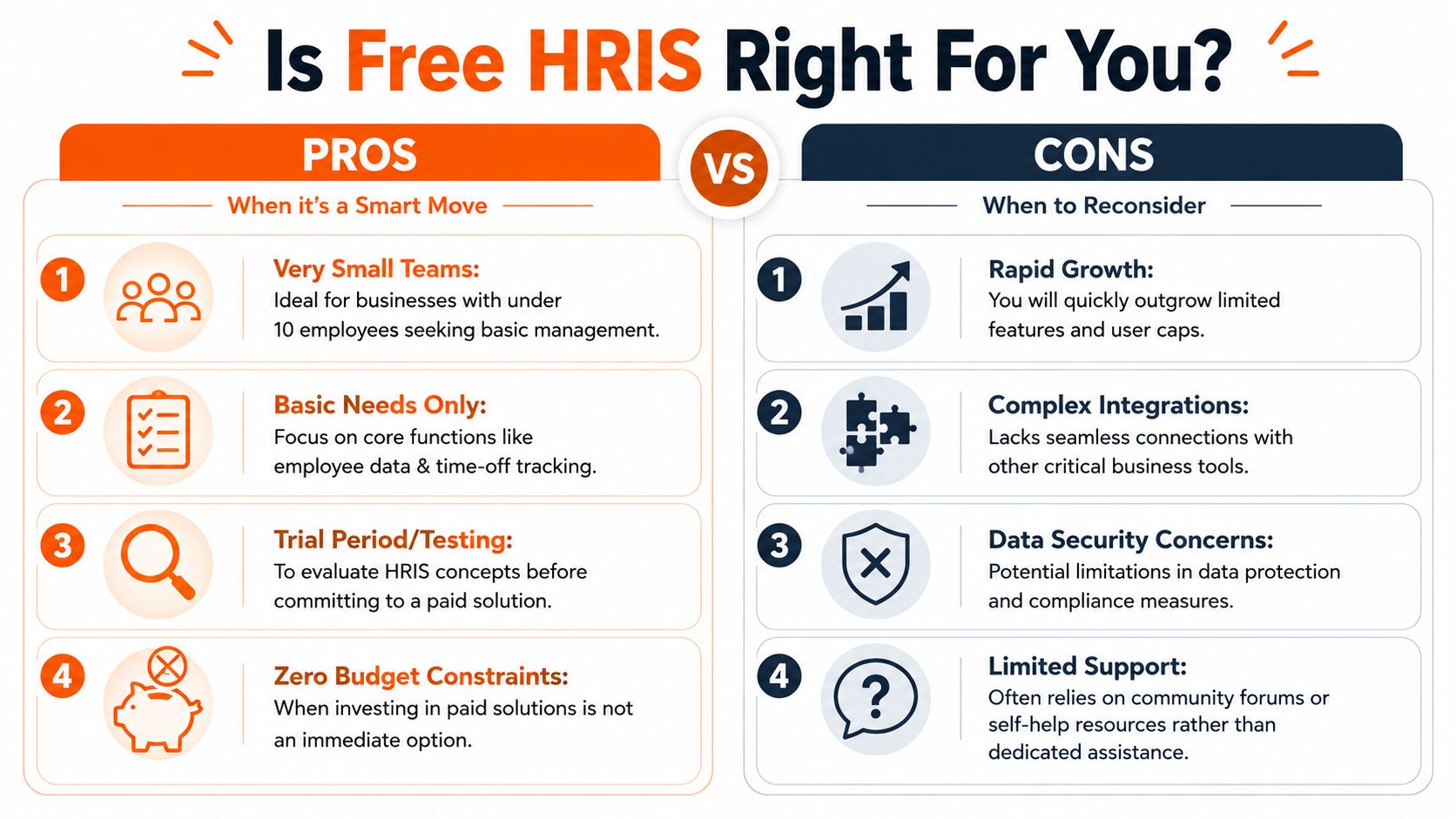
If you have a very small team, simple policies, and no appetite for a bigger system yet, a free tool can clean up the obvious mess. It can get employee records out of random files. It can formalize leave requests. It can help you stop treating onboarding like a scavenger hunt.
That's a good use of free.
When free makes sense
Free usually fits when your business is still narrow in scope and low in operational complexity.
A tiny team with basic admin needs. You need employee profiles, docs, and leave tracking. Nothing fancy.
An early-stage company testing process. You're still learning what approvals, policies, and workflows even need to exist.
A temporary bridge. You know this isn't the forever system. You just need structure now.
A zero-budget environment. Some nonprofits and early operators need a place to start.
In those cases, I'd rather see a team use a modest free HRIS well than buy a bulky platform they resent and ignore.
When free is the wrong call
The answer changes fast when your workforce doesn't sit at desks all day.
The U.S. Chamber notes that modern HR systems should let staff update personal information, check PTO, and access benefits on mobile, and connect to scheduling, time-and-attendance, and collaboration tools (U.S. Chamber guide to HRIS for SMBs). If your team includes store staff, warehouse crews, clinicians, drivers, or hospitality workers, that's not a nice extra. That's table stakes.
A free HRIS is a poor fit when:
Your team is shift-based and needs mobile-first access
Managers run operations in the field, not behind a laptop
You rely on scheduling and attendance data every day
You have regular onboarding volume, especially across sites
Your HR process is really an operations process in disguise
That last point matters most. A lot of “HR” pain is really coordination pain. It isn't just about storing employee records. It's about making sure people can clock in, request time off, find updates, read policies, and get the right information without chasing supervisors.
If you run a frontline business, don't buy an HR database when what you need is a workforce operating system. That's why some teams skip the classic HRIS path and look at tools that combine people data with communication and day-to-day execution. Pebb is one example. It brings chat, directory, scheduling, clock-ins, PTO tracking, tasks, and company information into one app, which makes more sense when your team works in shifts.
Free is smart when it removes chaos without creating dependency. If it can't support how your people actually work, it's cheap in the wrong way.
The Hidden Costs of Getting Something for Nothing
The license might be free. The operation never is.
This is the part people learn after signup. Not during the demo. Not on the pricing page. After the team starts using it and the missing pieces turn into extra labor.
SAP describes HRIS as an employee database that supports payroll, benefits, and time-and-attendance workflows, and it notes that cloud HRIS implementations depend on planning, configuration, data migration, integration, training, and go-live support (SAP's overview of HRIS and implementation work). This is the essential framing. A system is not just a screen with fields. It's the work around the screen.
The cost shows up in time first
Free tools often ask you to do the integration work with your own hands.
You import employee data. You clean naming issues. You rebuild approval paths. You decide who owns updates. You train managers. Then you discover the system stores information fine but doesn't move it where it needs to go. So someone exports, reformats, copies, and checks. Every pay cycle. Every leave exception. Every onboarding wave.
That doesn't look expensive in a screenshot. It looks expensive in a Tuesday.
Weak workflows create strong workarounds
A technically important differentiator is whether the tool supports end-to-end workflow automation. A system that only stores records is weaker than one that can automate things like schedule-based pay calculations and absence handling. The second kind reduces manual reconciliation errors and speeds up operations, because the logic lives in the system once instead of being re-entered by people.
If your free HRIS can't carry a process from start to finish, your team will carry it instead.
That's why I tell people to read free software with a little suspicion. A lot of “features” are really just fields and forms. Useful, yes. But not the same as a working flow. If you're comparing options, this roundup of free human resource software is a decent starting point for spotting where the line sits between basic admin and actual operational support.
The hidden bill for free software gets paid in admin hours, duplicate entry, and delayed decisions.
Migration pain is part of the price
Then comes the exit.
When the free tool no longer fits, you have to move. That means exporting records, cleaning history, rebuilding structures, and asking your team to learn another system after they just learned this one. If data is messy, migration gets messy. If usage has been uneven, trust drops. People stop believing the new system will last.
None of this means free tools are bad. It means they have a cost profile people like to ignore. You don't always pay in cash. Sometimes you pay in friction, and friction is plenty expensive.
Key Questions to Ask Before You Commit
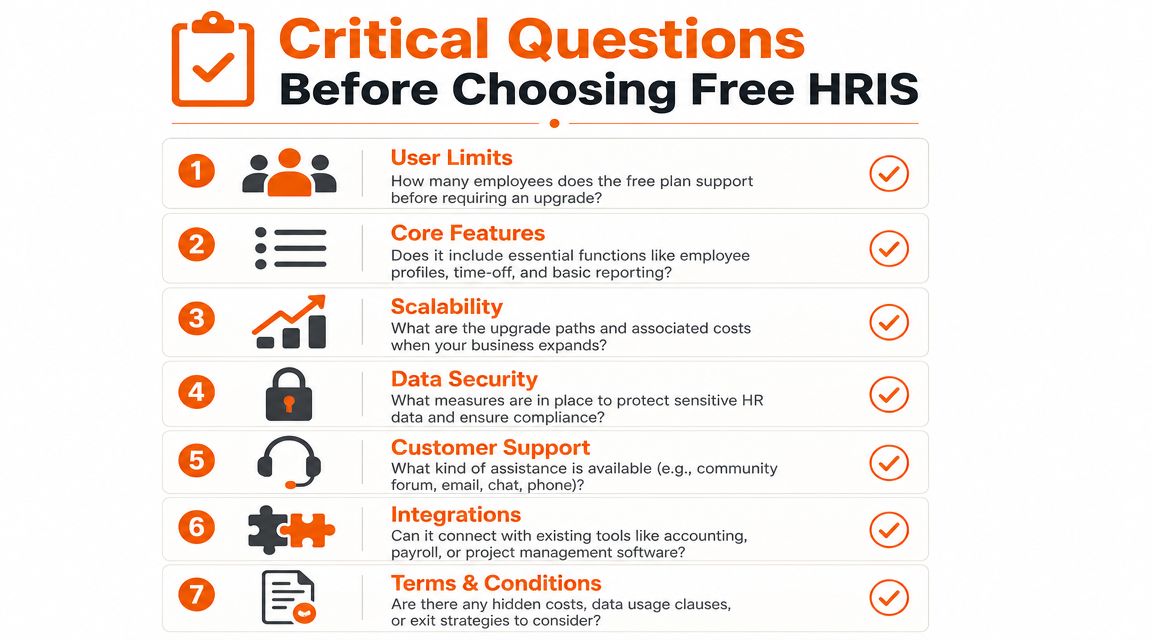
Before any new HR tool touches employee data, ask harder questions than “Is there a free plan?”
That question is too small. You need to know whether the tool can survive contact with your business.
Ask about daily use, not just setup
Start with the obvious things your team will do every week.
Can employees use it from their phones without frustration?
This matters more than most buyers admit. OrangeHRM Starter says its free open-source software is used by over 5 million active users globally and includes Android and iOS access for PTO requests, clock-in and clock-out, attendance viewing, employee management, reporting, analytics, 180° performance reviews, recruitment, and time tracking (OrangeHRM Starter overview). That's a useful benchmark. Mobile self-service plus time capture is not fluff. It shortens the lag between employee activity and HR records.What does the free plan include every day?
Don't ask for a feature list. Ask for the workflow. Can a new hire complete onboarding? Can a manager approve leave from a phone? Can someone correct attendance without opening a second tool?What breaks first when we grow?
User caps, reporting limits, missing approvals, weak integrations. You want the vendor to say this plainly.
Ask about ownership and exit
You're storing sensitive employee information. Act like it.
How do we export our data? If the answer is fuzzy, walk away.
What happens when we upgrade? Not “is there an upgrade path,” but what changes in process, permissions, and support.
What support exists when something goes wrong? Community forums are fine until payroll week.
What other tools does it need to become usable? A free tool that requires three paid companions isn't free in any meaningful sense.
Ask whether it fits the business you actually run
At this point, buyers either save themselves or waste a quarter.
Question | Why it matters |
|---|---|
Do frontline staff have a simple mobile experience? | If not, adoption will collapse outside the office |
Can managers handle approvals in the flow of work? | If not, requests drift into chat and texts |
Will this replace tools, or add another one? | Extra systems create extra confusion |
Is this a records tool, or an operations tool? | You need to know which problem you're solving |
Buy for the next stage of your operations, not just the current mess.
A free HRIS can be useful. Blind faith in one can be expensive.
When You Outgrow Free The Fork in the Road
At some point, the free plan stops helping and starts pinching.
That moment is usually obvious. More manual checks. More side spreadsheets. More exceptions living outside the system. Your team has a tool, but they still don't have one place where work happens.
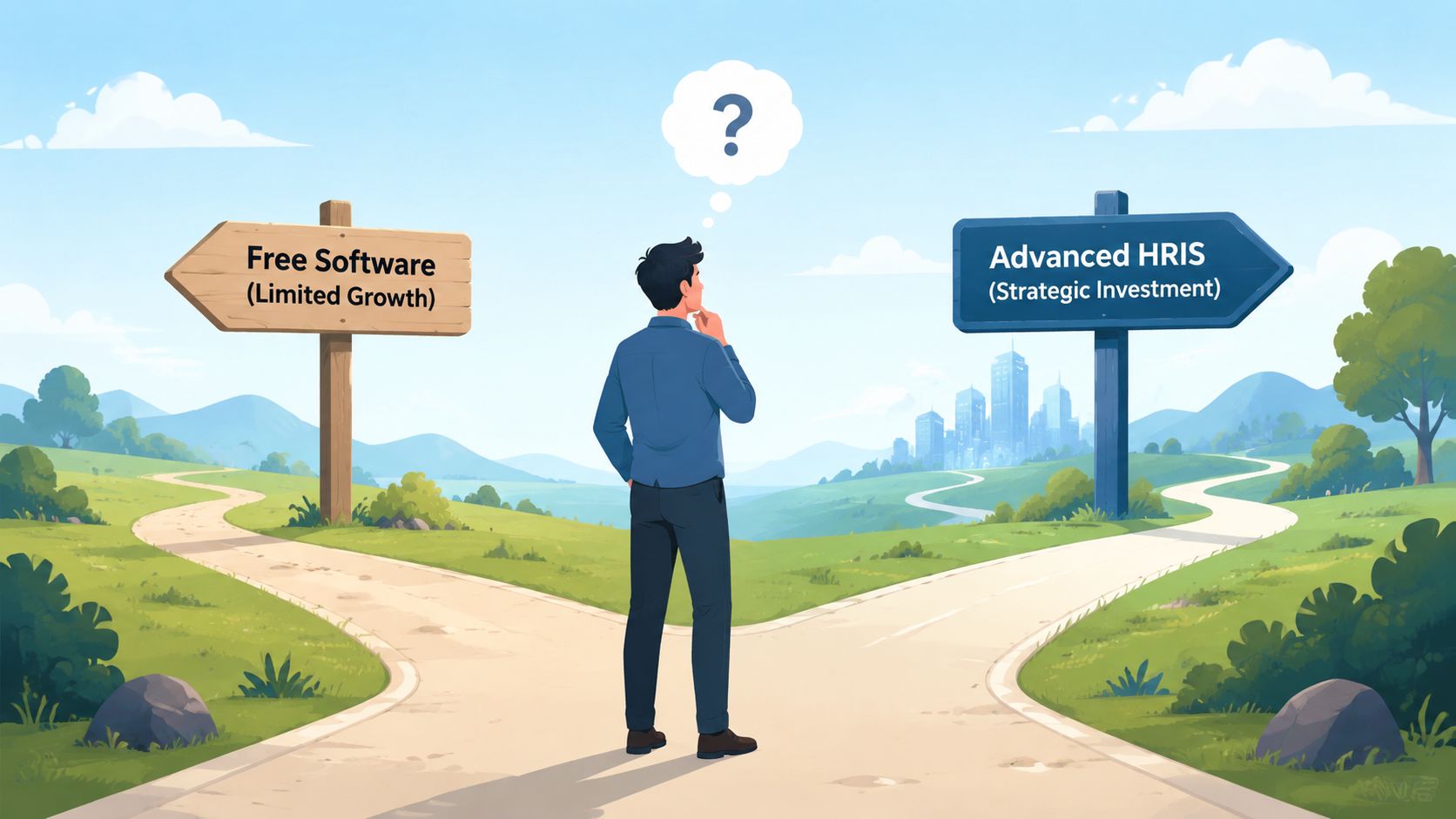
You have two choices.
The first is to upgrade into a larger HRIS stack. That can make sense if your main problem is formal HR administration and you're ready for more structure, more modules, and more process ownership. If you're comparing that path, a review of top HRMS systems can help you see what sits beyond the free tier.
The second choice is the one more teams should consider. Stop treating this as only an HR software decision.
If your biggest pain points are onboarding, communication across locations, shift coordination, policy access, approvals, and keeping frontline and office staff in sync, then buying a stronger HR database won't fully solve it. You'll still be stitching together tools for chat, scheduling, documents, updates, and employee visibility. You'll just have a nicer HR core sitting in the middle of the sprawl.
That's the fork in the road.
A lot of growing teams don't need “more HRIS.” They need a unified place for people data, communication, and daily operations. They need fewer boundaries between HR, internal comms, and line management. They need one app their managers and frontline staff will open.
Free can get you out of spreadsheet hell. It rarely gets you to operational clarity.
And that's fine. It doesn't have to. You just need to know when the starter tool has done its job, and when holding on to it is costing more than replacing it.
If you're past the point where a basic free HRIS can carry the load, take a look at Pebb. It gives teams one place for chat, updates, people directory, tasks, file sharing, scheduling, clock-ins, and PTO tracking, which is often a better fit for companies trying to unify frontline and office work instead of adding another silo.
