
Warehouse Opening Closing Checklist Employee App Guide
Build a reliable warehouse opening closing checklist employee app workflow with templates, roles, automation and compliance tracking for every shift.
Dan Robin
At 5 a.m., the warehouse is quiet enough to hear a bad checklist fail. A supervisor opens the dock, finds a blocked aisle, notices a forklift with a missing pre-use check, and starts calling people. At 11 p.m., the closing team is tired, the last inspection gets rushed, and tomorrow's crew inherits a problem described only as “sort it out.”
Paper makes that pattern easy. A completed box can hide a skipped check. A photo sits on someone's personal phone. A handover note disappears between shifts. The work gets marked complete, but the exception keeps moving.
A warehouse opening closing checklist employee app changes the job when it puts tasks, evidence, ownership, and handover in one place. It doesn't make people more careful by magic. It makes the important work visible, verifiable, and harder to lose. That distinction matters in an operation where every shift starts with limited time and ends with unfinished work that someone else must understand.
Why Warehouse Opening and Closing Checklists Fail Without an App
The morning crew usually doesn't fail because they don't know what safety looks like. They fail because the work is spread across too many places. A laminated list hangs near the office, a maintenance issue lives in a text message, and a damaged rack photo is buried in a camera roll. By the time the shift lead asks what happened, the person who saw it has gone home.
The same problem appears at close. The final team has alarms, dock doors, equipment, housekeeping, waste, and lockup to verify. If the list is long or unclear, people naturally optimize for leaving on time. They initial the routine items, skip the awkward ones, and leave a short note for the opener. The opener then has to reconstruct the story before work can begin.

A warehouse workforce management approach helps only when the routine fits the way people work. Shift-based teams need fast access on a phone, not a process that assumes everyone sits at a desk and checks an intranet before entering a freezer room.
Adoption is part of the control
The adoption problem is bigger than many leaders expect. A 2026 industry benchmark found that only 13% of employees use the intranet daily, while 31% never use it, even though 91% of organizations have an intranet according to the benchmark. The same benchmark uses 60% weekly active usage as a success target and 85% weekly login as best practice.
Those figures explain why a mobile-first employee app has become foundational for frontline work. If the system isn't where the shift happens, the system won't reliably capture the shift.
Practical rule: A checklist is only a control if the person doing the work can open it, complete it, and report a problem without leaving the work area.
The app should give the team one current checklist, clear task ownership, a place for photo evidence, and a handover that carries unresolved issues forward. That turns the opening and closing routine from paperwork into an operating record. The important question isn't whether a team has checked a box. It's whether the next person knows what condition the warehouse is in, what failed, and who owns the fix.
What to Put on Your Warehouse Opening and Closing Checklists
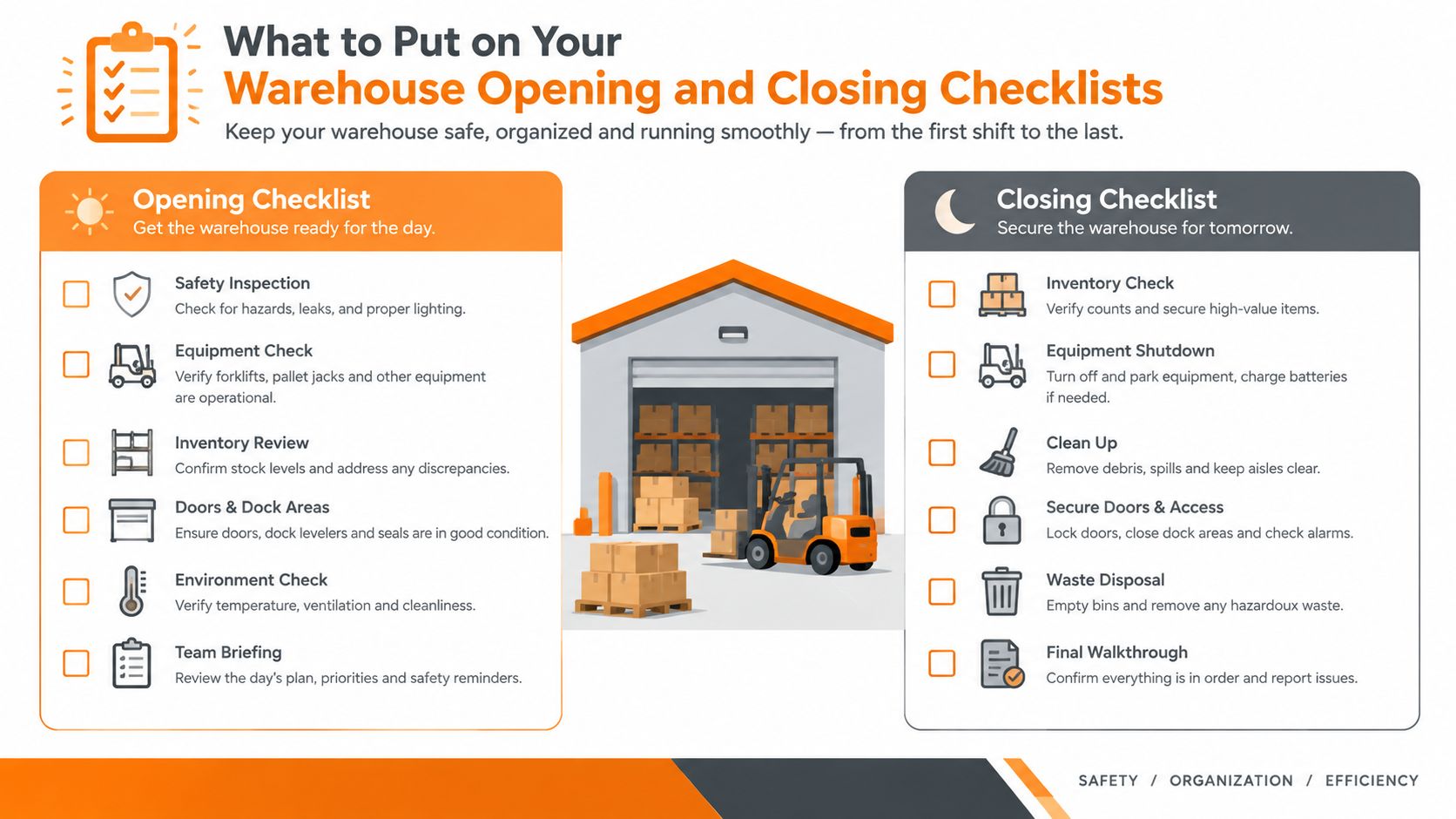
Start with risk, not with a template library. A warehouse opening checklist should answer one question, is the site safe and ready for people, equipment, and product? A closing checklist should answer another, is the site secure, stable, and properly handed over?
Keep each task observable. “Check the dock” is weak. “Dock doors are closed, undamaged, and clear of pedestrians before equipment movement” gives the worker something they can verify.
Build the opening routine by zone
The first group should cover access, fire, and emergency readiness. Check that exits are clear, fire equipment is accessible, alarms and emergency routes show no obvious issue, and security controls are in the expected state. If a check fails, the worker should be able to record the condition and stop or escalate the related work.
Move through the warehouse in the order people use it:
Docks: Verify dock doors, plates, restraints, edges, lighting, and pedestrian routes before loading activity begins.
Racking and aisles: Look for damaged beams, unstable loads, blocked aisles, spills, and unsafe storage conditions.
Equipment: Confirm that forklifts and other powered equipment are available, visibly safe, and supported by the required pre-use checks.
PPE and handling: Make required PPE available and confirm that manual-handling controls are in place for the work planned.
Housekeeping: Remove waste, clear travel paths, and correct anything that could create a slip, trip, or collision risk.
A warehouse safety checklist matters because the injury rate in U.S. warehousing was 4.8 per 100 full-time employees in 2024, compared with 2.3 across all industries, according to a 2026 warehouse safety review. The transportation and warehousing sector was also reported to have 232,000 injury cases in 2024 in that review. The ordinary failures deserve attention because ordinary failures create extraordinary consequences.
Make closing prove the site is ready for tomorrow
Closing items should verify the condition left behind, not merely describe activities. A useful sequence might read:
Equipment parked safely: Forklifts and other equipment are parked in designated areas, powered down, and left with no visible defect awaiting escalation.
Docks secured: Doors, restraints, access points, and external areas are checked and secured.
Housekeeping complete: Waste is removed, aisles are clear, spills are addressed, and staging areas are orderly.
Open issues recorded: Every failed check has an owner, an action, and a handover note.
Final lockup complete: Lights, alarms, doors, and restricted areas are checked according to site procedure.
Security details vary by building, access design, and risk profile. Teams reviewing whether to choose warehouse security systems should connect that decision to the closing workflow, so an alarm or access issue becomes a visible exception rather than a separate conversation.
Specificity beats length. If a task cannot be checked with eyes, a photo, a reading, or a clear sign-off, rewrite it. A digital forms approach for employees makes that structure easier to maintain because the form can require the right evidence at the point of work.
Mapping Tasks to Roles Shifts and Accountability
A checklist assigned to “the warehouse team” belongs to nobody. Assign tasks to roles, then let the shift schedule determine which person holds that role on a given day. That keeps the process stable when employees move, take leave, or change departments.
A site lead might own the opening safety walk. A forklift lead might own equipment readiness. A closing supervisor might own final security and the unresolved-issue review. The names change. The accountability doesn't.
Put context at the top
Every record needs enough context to make sense later. Use a header with the site, warehouse zone, auditor name, date, shift, and reference number, then place the checks underneath it. This is the structure used in a warehouse audit checklist template, and it solves a basic operational problem: a photo or failed item without a location and shift is difficult to act on.
A role matrix makes the handoff concrete:
Role | Opening Ownership | Closing Ownership | Proof Required |
|---|---|---|---|
Opening supervisor | Site access, emergency routes, dock readiness | Review unresolved opening exceptions | Sign-off, photo for failed condition |
Equipment lead | LLOPs, PPTs, FLTs, and VNAs readiness | Park equipment and record defects | Pre-use result, equipment note |
Zone lead | Racking, aisles, housekeeping, PPE | Zone reset and waste removal | Photo where condition is hard to verify |
Temperature-controlled area lead | Ambient, chill, and freezer condition checks | Handover of zone issues and equipment status | Reading or status record |
Closing supervisor | Review incomplete actions | Final lockup, alarm, doors, and handover | Final sign-off and exception summary |
The equipment names matter. A handover that says “all vehicles checked” hides the difference between an LLOP, PPT, FLT, and VNA. The same applies to “cold storage.” Ambient, chill, and freezer areas can have different conditions and different risks. A daily handover checklist covering equipment and warehouse zones shows the value of naming those details directly.
Design the seam between shifts
The closing supervisor shouldn't write a diary entry. They should pass forward decisions. Each exception needs a description, owner, due date, status, and a short note explaining what the next shift must do before using the area or equipment.
The incoming supervisor should see open items before assigning work. That might mean holding a damaged pallet location, keeping a vehicle out of service, or checking a freezer area before the first pick. The checklist has done its job when the next shift starts with context instead of guesswork.
Shift coordination has the same basic logic in other frontline settings. Managers looking at tactics for profitable restaurant shifts will recognize the principle: match work to coverage, make ownership visible, and review what carried over. The environment changes, but the handover problem is familiar.
Configuring Templates and Automations in Your Employee App
Build the app around the shift, not around the administrator. A template that looks elegant in a meeting can still fail at the dock if it takes too long to open, asks for evidence nobody can provide, or buries a critical exception under routine questions.
Start with two templates, opening and closing. Add a location field, zone field, shift, assigned role, and a clear completion state. Then create separate versions for meaningful differences, such as a freezer zone or a site with a different dock layout. Don't create a master checklist with every possible task.
Keep the template small and deliberate
Each item should have one expected action. If a worker must inspect three different things, split them when the evidence or response would differ. A failed fire exit check may require a photo and immediate escalation. A housekeeping check may require a task for the zone lead. Those shouldn't be forced into one vague question.
Use conditional follow-up:
Pass: Mark the item complete and move on.
Fail: Require a reason, photo, or reading where appropriate.
Critical fail: Notify the supervisor and create an assigned corrective task.
Open at handover: Carry the task into the next shift with its owner and due date.
A checklist stops being a longer task list. Completion status tells you what someone selected. Corrective action tells you what the operation is doing about the problem.
Set recurring work once
Create recurring tasks by shift and location, then set a sensible due window. An opening checklist should appear for the opening role at the start of that shift. A closing checklist should appear for the closing role near the end, without relying on someone to remember to send it manually.
Reminders should support the work, not nag people into ignoring the app. Use a reminder when a task is approaching its due time, and notify a supervisor when a required check remains incomplete. Manager approval belongs on high-risk or failed items, not every ordinary housekeeping task.
Spaces can keep the local conversation beside the work. A warehouse team might have a Space for its site, with the checklist, shift updates, files, and relevant discussions in one place. Attach the applicable SOP or safety document to the task so a new employee doesn't need to search through an old folder.
Version control matters more than clever automation. Name templates clearly, archive old versions, and test every change with the people who will use it. A quick invite link can help bring new starters into the app, but onboarding still needs a short explanation of what a pass means, what a fail means, and when a supervisor must be called.
The right setup should feel boring after a few shifts. That's a success. People should spend their attention on the warehouse, not on navigating the software.
Connecting Scheduling Clock In Knowledge Base and Offline Proof
A checklist becomes dependable when it arrives at the right moment, follows the right person, and survives the physical conditions of the warehouse. Template design alone can't do that.
Start with scheduling. Assign the opening and closing checklist to the shift, site, and role. Then connect it to clock-in so the employee sees the relevant work after arriving, rather than receiving a generic reminder that could belong to another location or shift.
A clock-in app for employees can provide the timing signal, but the operational rule should remain simple: clocking in should surface the work that needs to happen next. It shouldn't create extra data entry.

Put the procedure beside the check
A checklist tells someone what to verify. The Knowledge Library should tell them how to respond when the condition is unfamiliar or unsafe. Attach the relevant SOP to the item or zone, rather than expecting a worker to search a general library while standing beside a dock door.
This connection also helps managers distinguish training needs from process failures. If employees repeatedly fail the same check because the procedure is unclear, update the document or coach the role. If the procedure is clear but the issue remains, assign a corrective action and review the local conditions.
Treat offline mode as a buying requirement
Warehouses contain dead zones, freezer rooms, basements, metal-heavy areas, and docks where connectivity can be intermittent. A form that loses a photo or timestamp when the signal drops isn't merely inconvenient. It creates a gap in the record at the exact point where proof matters.
Offline-first execution should answer four practical questions:
Can the employee open the assigned checklist without a live connection?
Can the app capture the completion time, notes, photos, and readings locally?
Does it preserve the record if the worker moves between connected and disconnected areas?
Does it sync later without creating duplicates or dropping evidence?
The offline-first warehouse workflow is still poorly covered in much buyer education, even as mobile forms and app-based checklists become common. The useful differentiator isn't an offline badge. It's reliable, time-stamped capture with later synchronization and visible supervisor accountability.
The real failure mode is compliance drift, not inconvenience.
When a check fails offline, the app should save the exception and make the follow-up clear once connectivity returns. Assign the owner, set the due date, attach the evidence, and include the issue in the next shift's handover. If the worker must leave the checklist to send a separate message, the loop is already weakening.
Measuring Compliance and Closing the Loop for Good
A completion report can make a warehouse look tidy while repeat problems continue underneath. Leaders need to measure the quality of execution, not just the number of green checkmarks.
Track completion by site, zone, role, and shift. Then look at late tasks, missing evidence, failed checks, repeat exceptions, overdue corrective actions, and handovers that contain unresolved work. These views answer different questions. A late task may point to staffing or timing. A repeat exception may point to maintenance, training, layout, or a checklist that asks the wrong question.
Review patterns, not isolated misses
One missed photo isn't a management philosophy. A pattern of missing evidence on the closing shift is worth attention. So is an exception that moves from one handover to the next without an owner.
A lightweight review rhythm works better than a large meeting:
Pull the previous audit or shift record.
Confirm that assigned actions were completed.
Log every non-conformance with an owner, corrective action, and due date.
Review repeat failures by zone and shift.
Escalate serious racking or safety issues immediately.
That approach follows practical warehouse audit guidance that recommends reviewing previous audits, checking maintenance logs and incident reports, planning audits around quieter WMS periods, and recording every non-conformance with ownership and a due date as outlined in this warehouse audit guidance. The point isn't to produce a prettier report. It's to make sure an observed problem changes what someone does next.
Use the data to improve the work
If people routinely skip a task, ask why before adding another reminder. The item may be poorly placed, assigned to the wrong role, too vague, or impossible to complete during the scheduled window. If a task generates too many exceptions, the warehouse may have a recurring physical or equipment problem that a checklist alone can't solve.
Analytics should help managers choose the next action. Update the template when the check is unclear. Change the assignment when ownership is wrong. Schedule maintenance when the same equipment defect appears repeatedly. Adjust staffing when the opening routine consistently runs beyond the available shift coverage.
A warehouse opening and closing checklist earns its place when it prevents the next avoidable problem, not when it proves that yesterday's workers tapped every box. Start with one site, one opening routine, one closing routine, and a clear exception path. Then watch what the team does and improve the system from there.
Pebb combines mobile checklists, task tracking, photo evidence, shift scheduling, clock-in, Knowledge Library documents, and team communication in one employee app. Visit Pebb to see how your warehouse team can connect opening, closing, and handover work without losing the proof between shifts.
