
Training Resource Management: A Real Team's Guide
Master training resource management in 2026 with practical steps to optimize schedules, skills, and budgets for real-world teams.
Dan Robin

The ugly part of training isn't usually the content. It's the morning a floor manager texts that two new hires showed up, one trainer called out, the break room is already booked, and the compliance deck is still sitting in three different folders with three different dates on them. Somewhere else, an L&D lead is fixing a spreadsheet at 10 p.m., and a finance leader is asking why training spend keeps climbing while the work still feels uneven.
That's the core problem. Training resource management is what keeps learning from turning into a pile of good intentions, rushed schedules, and invisible waste. It's the discipline that ties together people, time, money, rooms, tools, and actual business outcomes so the whole thing can run without constant heroics.
The Mess Behind Most Training Programs
Most training programs look like content problems from a distance. A manager says the onboarding deck is too long. A compliance lead says people aren't finishing modules. A trainer says the classroom is always booked at the wrong time. Underneath all that, the issue is usually coordination.
I've seen the same pattern across shifts and sites. Frontline managers try to keep production moving while sending people to training. L&D teams chase attendance, then discover the room was double-booked or the SME was pulled into another meeting. Finance keeps seeing spend move around without a clean way to trace what changed on the floor.
That's why the budget conversation matters. In the U.S., training expenditures reached $102.8 billion in 2025, a 4.9% increase from 2024, with payroll spending at $64.7 billion and other training costs at $22.1 billion according to the 2025 Training Industry Report. When numbers are that large, even small waste adds up fast.
Practical rule: if the calendar is broken, the budget will lie.
The deeper point is simple. Training chaos usually isn't a content failure. It's a resource orchestration failure. Once you see it that way, the fix stops being “make the course better” and starts being “manage the whole system better.”
What Training Resource Management Actually Means
Think of training resource management as air traffic control for learning. Content is the flight plan. People are the planes. Schedules are the runway slots. Budget is the fuel. Technology is the control tower. Each part matters, but none of them works well on its own.
That's why a program can look busy and still be ineffective. You can have polished content and still miss the shift change. You can have a strong trainer and still book them against a room that's unavailable. You can have a good LMS and still fail if no one owns the handoff between scheduling, delivery, and follow-up.
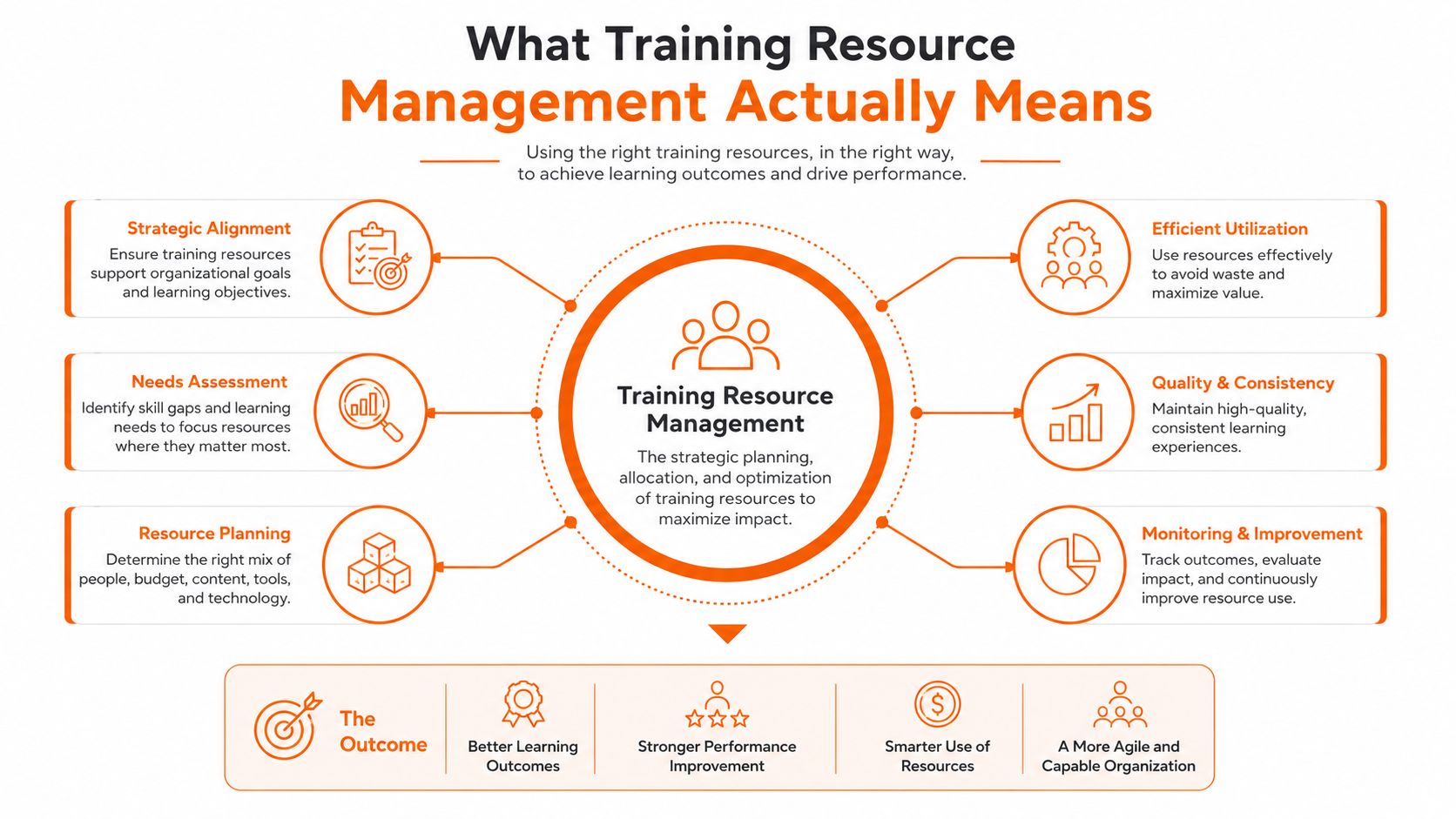
The clean definition is this. Training resource management is the system that converts learning intent into reliably delivered training without burning out people or wasting money. If your team wants a plain example, the logic fits neatly with broader thinking on workplace skill development, where the work is turning intent into repeatable capability.
Training only counts when the right people, tools, and time show up at the same moment.
Brazil's 2025/2026 panorama points in the same direction. It found that 89% of companies had an annual T&D budget, the average investment was R$ 1,199 per employee, and employees received an average of 26 training hours per year. The same source also cites Association for Talent Development evidence that organizations with formal training programs generate 218% more revenue per employee than those without a structured strategy, which underscores why resource discipline matters. Those numbers don't prove magic. They do show that mature programs treat training as an operating system, not a side task.
The Five Resources You Have to Track
The cleanest way to manage training is to stop pretending everything belongs in one bucket. There are five resource domains that always show up in practice. Miss one, and the whole plan gets shaky.
Resource domain | What it includes | Most overlooked constraint | Minimum data to track |
|---|---|---|---|
Content | decks, job aids, videos, quizzes, SOPs | whether it fits the audience and task | version, owner, format, date |
People | instructors, SMEs, mentors, learners | shift patterns, time zones, coverage gaps | availability, role, skill, location |
Schedules | session times, deadlines, calendars | conflicts with production and leave | session date, duration, conflicts |
Budgets | direct cost, travel, rooms, tools, labor time | opportunity cost of pulling people away | planned cost, actual cost, owner |
Technology | LMS, scheduling tools, knowledge base, analytics | tool sprawl and bad handoffs | system, integration, access, usage |
People and schedules are usually where the damage starts
Training teams often think in terms of seats filled. Operations teams think in terms of coverage. Those are not the same thing. If the only good trainer is on the wrong shift, the program is already constrained.
The FEMA idea of resource typing is useful even outside emergency work. A team that can name a resource but can't track its availability is still guessing. FEMA's resource management material is clear that structured typing and qualification matter because people need a shared way to request and deploy the right resource consistently, not just hope someone free appears at the right time. That same discipline belongs in training.
Budget and technology need the same care
Budget is more than the invoice. It includes labor time, missed production, travel, and the friction of rework. Technology is not just the LMS either. It's the stack of scheduling, content storage, messaging, and reporting tools that either help the work or scatter it.
If you want a practical companion piece for structuring internal training assets, see building an internal knowledge base for SOPs training. The point is not to store more stuff. The point is to make the right stuff reachable.
When we manage these five domains as separate constraints, the picture gets clearer fast. Most training problems are really constraint problems. Once the constraint is named, the fix gets more honest.
How to Set Up Training Resource Management Step by Step
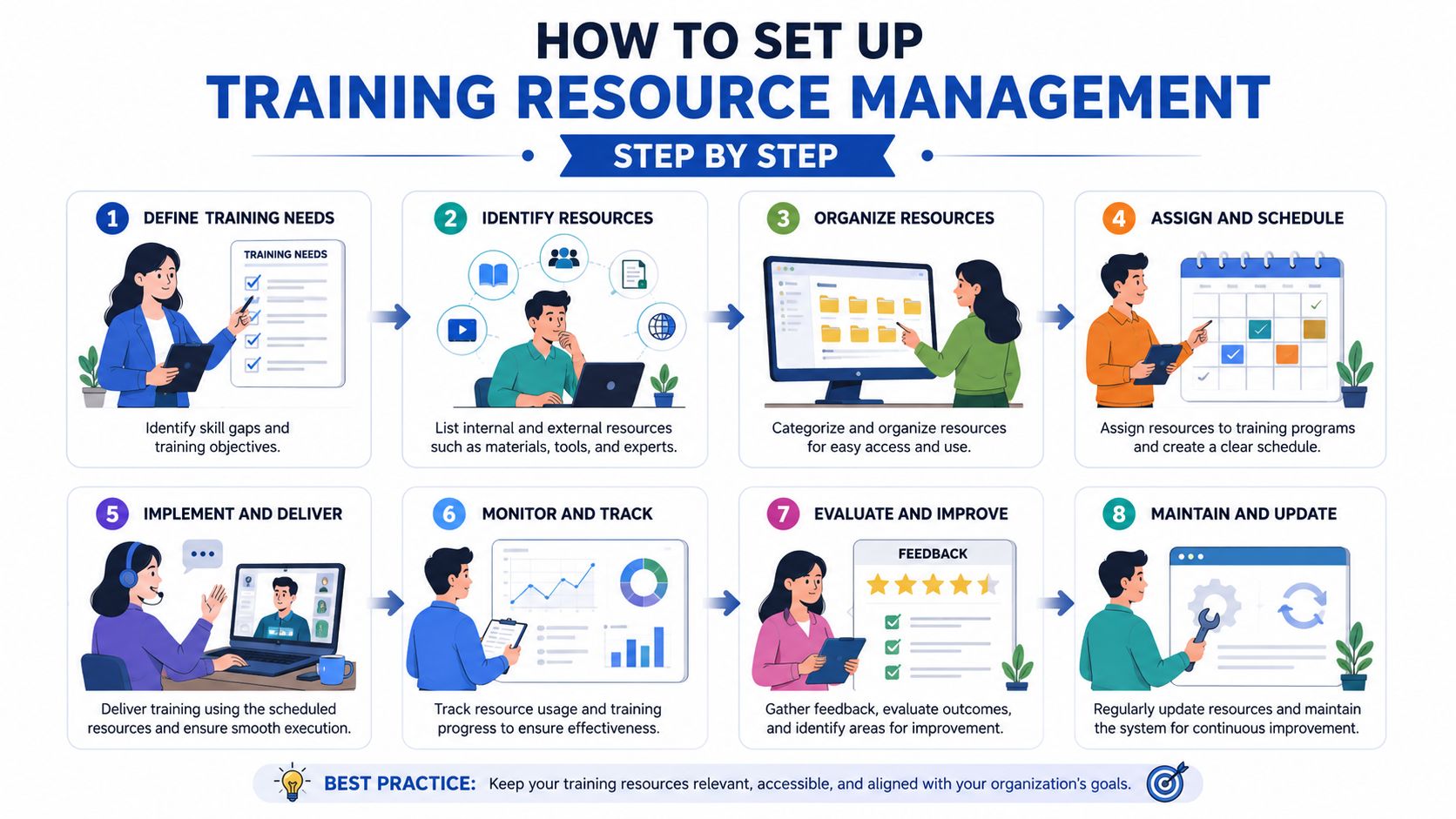
You don't need a giant platform to start. You need one owner, a shared list of resources, and a weekly habit of looking at what changed.
Start with a small audit
Begin by listing every active training effort, the people attached to it, the room or tool it needs, and the date it must happen. Then mark what's missing. In week one, this can be a spreadsheet. That's fine. A good-enough system beats a perfect one nobody updates.
Assign resource owners
Each training stream needs someone responsible for the schedule, someone responsible for content, and someone responsible for learner coordination. Those can be the same person in a small team. They just can't be invisible. Ownership is what keeps a trainer from being booked twice and a cohort from being missed.
Set one weekly review
A short review is enough at the start. Check what's booked, what moved, what's waiting on approval, and what got cancelled. The useful question isn't “did we run training?” It's “did we use the resources the way we planned?”
Add one tool only when the pain is obvious
If the spreadsheet starts breaking under load, move to a tool that can show availability, assignments, and follow-up in one place. That can be a learning system, a scheduling tool, or a broader team platform. The tool should reduce handoffs, not create more.
A shared list and a clear owner solve more than most software buys.
This is also where Pebb can fit naturally for teams that want chat, tasks, knowledge, and scheduling in one place rather than stitched together across five tools. The useful test is simple. If a platform makes it easier to see who is free, what content is current, and what got done, it's doing the job.
The goal in the first 30 days is not elegance. It's visibility. Once the team can see resources clearly, the rest gets easier to improve.
Measuring What Actually Matters
Completion counts are comforting. They're also too shallow to run a program on. A course can be finished and still fail the business. That's why the U.S. Office of Personnel Management distinguishes process indicators from outcome indicators. Process tells you who trained, how many courses were completed, and how many hours were spent. Outcome tells you whether behavior, satisfaction, or performance changed.
That distinction matters because resource decisions based only on throughput can miss the full story. A team can push people through a lot of sessions and still keep making the same mistakes. Another team can run fewer sessions and get better results because the training is better timed, better targeted, and easier to use.
A solid dashboard needs both sides. Operations wants to know whether resources were used. Leaders want to know whether the work improved.
A small KPI stack keeps you honest
Utilization: whether trainers, rooms, and tools are being used well.
Completion: whether people finished the required training.
Time to competence: how long it takes before someone can do the work without heavy support.
Performance lift: whether the training changed behavior or output in the field.
Cost per outcome: how much the training cost compared with the result it produced.
There's also an equity issue that gets missed too often. CDC-linked guidance on underserved workers recommends short, clear materials, visuals, participatory activities, peer trainers, and checking literacy and language needs before delivery. That means a dense, reading-heavy module can look efficient on paper and still miss the people it's supposed to help.
If you're thinking about measurement in a broader people context, the logic overlaps with how to measure employee engagement. The lesson is the same. Throughput is not value.
Practical rule: if the dashboard only tells you who showed up, it's not enough.
What This Looks Like Across Different Industries
The framework holds up, but the binding constraint changes by environment. That's where the work begins.
Retail and hospitality
In retail, restaurants, and hospitality, the constraint is usually shift coverage. People can't disappear for an hour without someone else absorbing the floor. The workaround is modular training, short sessions, and job aids that work in the flow of work. Teams that serve seasonal demand, including those dealing with seasonal staffing for landscaping and hospitality, need the same basic discipline, a clear view of who is available and when.
The metric that matters here is whether new hires can work the floor without constant correction. If the training finishes and the shift still breaks down, the schedule wasn't real.
Healthcare and logistics
In healthcare and logistics, the constraint is usually credentialing and compliance. The resource plan has to be auditable. It has to know who is certified, when recertification comes due, and which sessions were tied to which requirement. That is less about flair and more about control.
Here, the key signal is not just attendance. It's whether the right people stayed current without creating coverage gaps. If recertification turns into scramble mode, the resource system is too loose.
Distributed and hybrid teams
Distributed teams have a different problem. Time zones and async participation are the binding constraints. Training has to work on mobile, and it has to survive people joining from different places at different times. That means content needs a cleaner path back to the knowledge source, not just a live meeting.
For these teams, the metric is follow-through. If people can find the material later, act on it, and still complete the work correctly, the resource plan is doing its job. The constraint isn't attention alone. It's access.
KPIs, Governance, and the Right Tooling
A training program gets easier to run when the meetings are simple and the KPIs are few. Weekly, look at resource movement. Monthly, look at outcome trends. Quarterly, reset the plan against the business priorities that changed.
That cadence doesn't need a heavy org chart. The weekly review should include the resource owner, the trainer or facilitator, and the operations partner who feels the impact on the floor. The monthly review should add a leader who can read performance results without getting lost in the weeds. Quarterly, bring in whoever owns priorities and budgets so the training plan doesn't drift away from the business.
Use a short KPI chain
Utilization tells you if resources are sitting idle.
Completion tells you if the work was delivered.
Time-to-competence tells you if the approach is practical.
Performance lift tells you if behavior changed.
Cost per outcome tells you if the spend made sense.
The tooling should support that cadence, not fight it. A unified platform is useful when chat, tasks, knowledge, scheduling, and reporting sit close together. That's one reason tools like Pebb can be practical for training operations, since they keep the work, the updates, and the supporting materials in one system instead of bouncing people between tabs.
If your team also works with specialized staffing pipelines, such as clinicians using remote physician assistant jobs, the same principle applies. The more distributed the workforce, the more you need one place to track availability and follow-up.
Keep the meeting small. Keep the metrics readable. Keep the tool boring enough that people actually use it.
The platform is not the strategy. The cadence is. But good tooling removes a lot of the glue work that usually eats training leaders alive.
Where You Go From Here
The next move is not to redesign everything. It's to name the one constraint that hurts the most right now. Maybe it's trainer availability. Maybe it's shift coverage. Maybe it's the fact that nobody trusts the numbers in the spreadsheet. Pick the one that keeps showing up.
Then name the owner. Not the department. The person. The work gets clearer the moment someone is accountable for the resource, not just the idea of it.
The smallest real change you can ship in 30 days is a shared resource list with one weekly review. That alone will expose where the schedule breaks, where the budget leaks, and where the team is guessing instead of deciding.
Resource management in training is a discipline, not a project. It's closer to incident command than to a slide deck. People show up expecting to grow, and a company keeps that promise by making sure the time, tools, and support are there when the learning happens.
If you want a cleaner way to run training across shifts, sites, and teams, take a look at Pebb. It brings chat, tasks, knowledge, and scheduling into one place, which makes it easier to manage training resources without stitching together a pile of separate tools. If your team is tired of chasing versions, calendars, and follow-ups across too many systems, it's worth seeing how that feels in practice.
