
Unlock Efficiency: Small Business Scheduling App
Tired of messy schedules? Discover how a small business scheduling app streamlines operations, reduces stress, and saves time. Find your perfect fit for 2026.
Dan Robin

The schedule used to live in four places at once. There was the spreadsheet on the office computer, the printout taped by the back door, the WhatsApp thread nobody could search, and the manager's head, which was doing the worst job of all.
That's when scheduling stops being admin and starts becoming stress.
The Familiar Chaos of Manual Scheduling
If you've run a small team, you know the rhythm. Someone calls in sick before opening. A supervisor starts texting backups. Another employee says they never saw the shift change. The printed rota is already wrong by noon, but it's still hanging there like a bad joke.
Manual scheduling creates a strange kind of background noise. Nobody talks about it much because it feels normal. But it's expensive in attention. Managers carry it home with them. Employees second-guess their hours. New hires learn fast that “check the group chat” is somehow an official process.
The system works until it doesn't
I've seen teams hold things together with Excel, paper, and goodwill for longer than they should. That patchwork can limp along when the team is tiny and the schedule barely changes. Then one person swaps a shift, another asks for time off, someone forgets to update the sheet, and the whole thing starts wobbling.
The worst part isn't even the mess. It's the uncertainty.
You can recover from a busy day. It's much harder to recover from a team that no longer trusts the schedule.
That's especially true in operations-heavy businesses. In logistics, retail, hospitality, healthcare, and field work, a schedule isn't just a calendar. It's how work gets done. If the wrong person shows up, or nobody does, the day gets harder for everyone else. Teams dealing with moving parts like Container Haulage from Felixstowe know this better than most. Timing, coverage, and handoffs matter because the work doesn't wait for your spreadsheet to catch up.
The human cost is the real cost
A messy schedule puts pressure in the wrong places:
Managers lose off-hours: they become the fallback system for every swap, question, and no-show.
Supervisors spend time chasing clarity: instead of running the shift, they're confirming who's meant to be there.
Employees feel the chaos: not because they hate change, but because they hate guessing.
A lot of small businesses live with this longer than they should because it doesn't fail all at once. It fails in drips. A missed message here. A confused arrival time there. A little resentment every week.
That's why a good small business scheduling app matters. Not because software is exciting. It isn't. It matters because calm is useful, and businesses often have less of it than they need.
What We Mean By a Scheduling App
Most articles hear “scheduling app” and immediately start talking about Calendly, Square Appointments, and customer booking pages. That's fine if you run a solo practice and your whole world is appointment slots. It falls apart the moment you have a real team with rotating shifts, coverage gaps, time-off requests, and supervisors trying to keep the place open.
That's the distinction most guides miss.
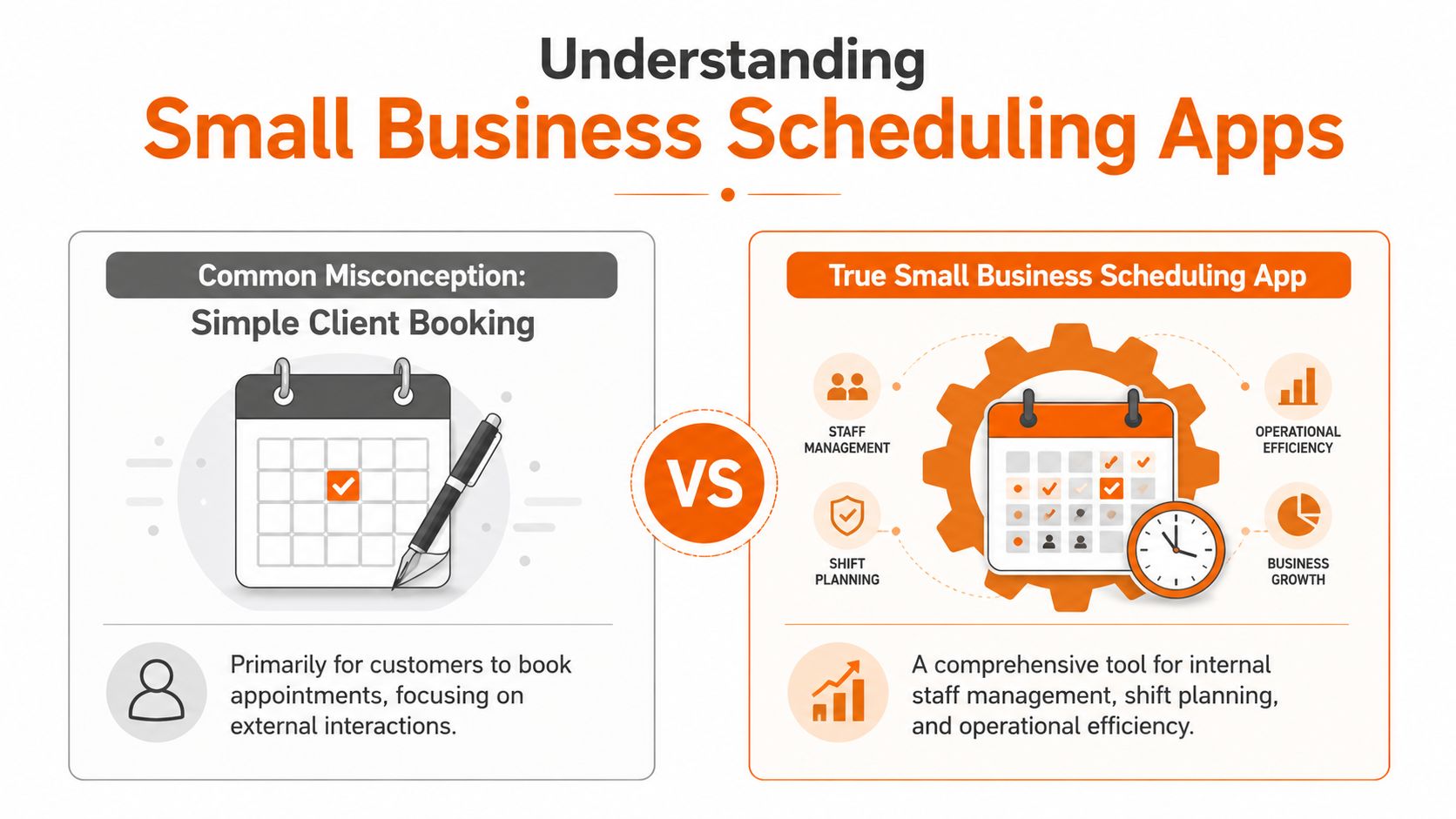
Booking appointments is not the same as staffing a business
A client booking tool answers one question. When can a customer book time?
A real small business scheduling app answers a very different set of questions. Who's available? Who's qualified? Who's already close to overtime? Who can cover this location? Who asked for Friday off two weeks ago? Which shift change reached the team?
That's not a calendar problem. It's an operations problem.
The gap in coverage is obvious once you look for it. Existing content leans hard toward client booking and skips the internal shift side, even though 73% of small businesses report scheduling conflicts directly impact operational efficiency and staff retention, according to this analysis of the booking app gap.
Here's the comparison that's widely needed:
Why the wrong tool creates more work
You can force a client booking app to handle staff scheduling in the same way you can use a butter knife as a screwdriver. It might get the job done once. You'll regret it by the third attempt.
A booking tool usually assumes the “resource” is simple. One person, one slot, one appointment. Internal scheduling is messy by nature. It has rules, exceptions, preferences, handovers, and labor realities. It also has emotions attached to it, because your team feels every bad decision immediately.
Practical rule: If the tool mainly thinks about customers booking time, it probably won't do a good job of helping managers run shifts.
That's why I separate these categories so aggressively. Client booking matters for salons, clinics, consultants, and service businesses. But internal scheduling is the backbone. It decides whether the right people are in place to do the work.
The better definition
When I say small business scheduling app, I mean a tool built for internal team coordination first. One place to create shifts, publish them, handle availability, manage time-off requests, spot conflicts, and keep everyone aligned without turning the manager into a dispatcher.
That doesn't mean external booking is useless. It just means it isn't the center of gravity for most frontline teams. Staffing the work comes first. Everything else depends on that.
The Only Features That Really Matter
Most feature lists are too long to be useful. They turn into shopping catalogs. You don't need thirty things. You need the few things that remove friction every single week.
The basics matter more than the flashy stuff.
Mobile has to be the default
If your team works on its feet, the phone is the workplace. That's why mobile accessibility, employee self-service for availability and time-off requests, and automated conflict detection are essential in small business scheduling software, as outlined in this breakdown of core scheduling features.
A desktop-only system sounds manageable until you remember who the schedule is for. It's not the owner sitting in the office. It's the employee on the bus, the shift lead on the shop floor, the warehouse worker on break, the nurse between rounds.
If they can't check updates, request changes, or confirm shifts from their phone, the app isn't helping. It's just moving the old confusion into a nicer interface.
Self-service prevents bottlenecks
Managers shouldn't be the human inbox for every small scheduling action. Good tools let employees submit availability, request PTO, and flag conflicts without starting a text chain.
That sounds like a convenience feature. It isn't. It's what keeps scheduling from becoming a daily queue of interruptions.
A strong app should make these actions simple:
Set availability clearly: recurring patterns should be easy to enter and easy to update.
Request time off without guesswork: employees need a visible process, not a favor-based one.
Swap or cover shifts with oversight: flexibility helps, but managers still need control.
That balance matters. Too rigid, and everyone works around the app. Too loose, and you're back in message-thread chaos.
Conflict detection should do real work
The phrase “conflict detection” can sound abstract, but the need is concrete. It means the system catches double-booking, overtime risk, or obvious scheduling clashes before the roster goes live.
That's the difference between software that stores a schedule and software that improves one.
I'd also put built-in time tracking and PTO visibility close to the top. Not because every business needs an all-in-one stack on day one, but because disconnected tools create duplicate work fast. If one app handles shifts, another handles clock-ins, and a third handles leave, managers spend their day reconciling three different versions of reality.
Some teams want a broader toolset from the start. Options like Homebase, Deputy, Sling, and Pebb all sit in this broader conversation, especially when you need scheduling tied to messaging or day-to-day team coordination. The point isn't the brand. The point is whether the app removes work instead of adding ceremony.
If employees still have to ask, “Wait, am I on today?” the software hasn't solved the real problem.
What Better Scheduling Looks Like on the Ground
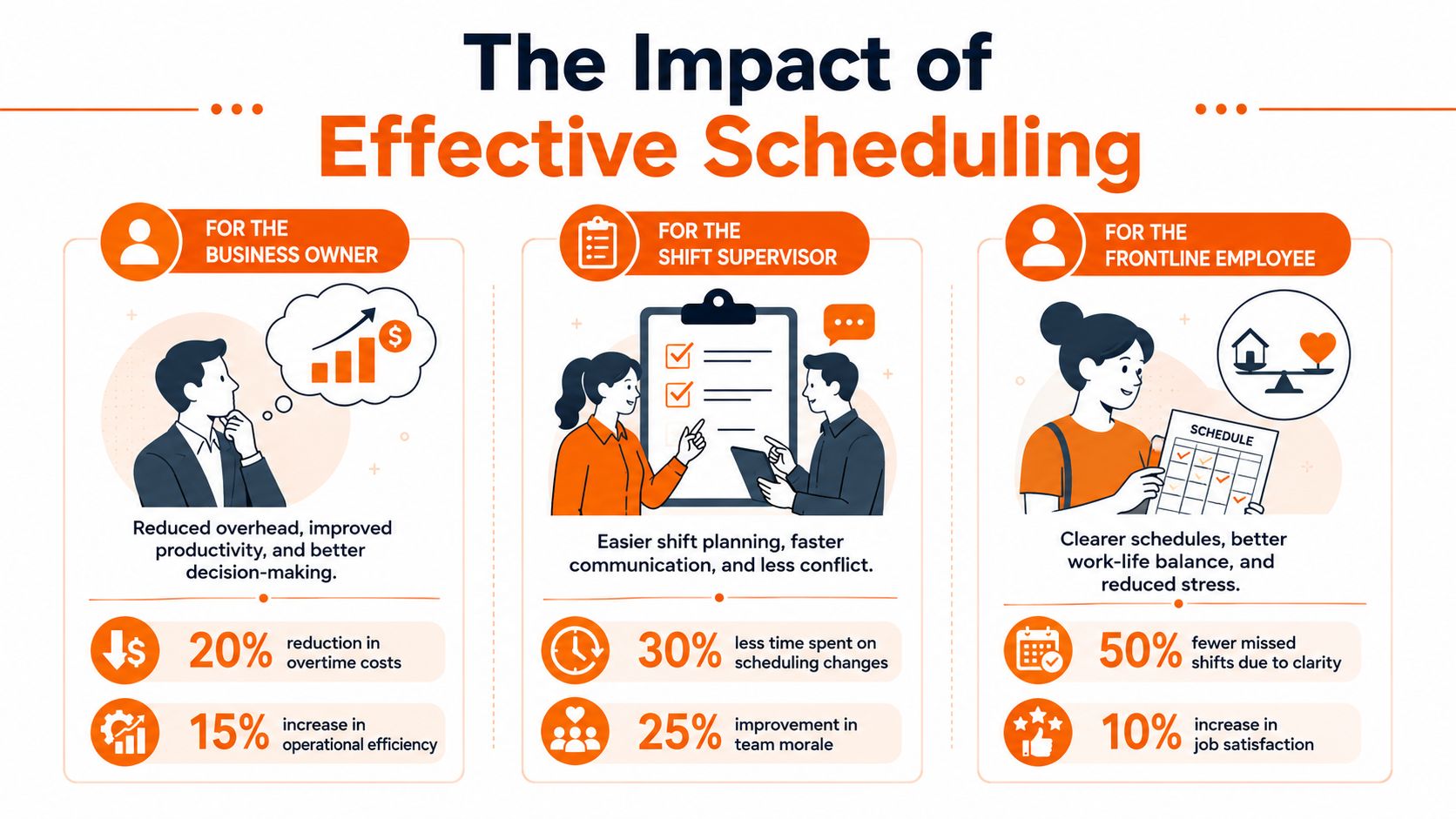
The payoff from a good schedule isn't just neatness. It changes how the day feels. Less chasing. Fewer surprises. More confidence that the plan on the screen is the plan people are following in practice.
That shows up differently depending on where you stand.
For the owner
Owners usually notice one thing first. Fewer preventable mistakes.
When appointment handling is automated, small businesses reduce double-booking and overbooking incidents, which helps avoid conflicts that can cost up to 20% of potential client revenue in service-based businesses, according to this review of scheduling app impact. Even if you're more shift-heavy than appointment-heavy, the lesson is the same. Preventing collisions protects revenue.
Owners also stop managing by rumor. They can see the schedule, see changes, and stop depending on whoever “said they told everyone.”
For the supervisor
The improvement becomes personal. Supervisors don't need abstract efficiency. They need fewer interruptions and fewer avoidable fires.
A better scheduling setup means they can publish shifts once, trust that people saw them, and spend less time doing detective work. If you're trying to connect schedules across mobile teams, this guide on syncing frontline employee schedules in a mobile app is a useful example of the operational thinking that matters. The tool has to meet people where they already work.
Two practical wins matter most for supervisors:
What changes | Why it matters |
|---|---|
Schedule updates reach phones quickly | People stop relying on screenshots and secondhand messages |
Requests live in one system | Managers spend less time searching chats and more time running the shift |
For the employee
Frontline staff usually don't care about “workflow optimization.” They care whether the system respects their time.
Can they check next week's shifts without asking? Can they request time off without cornering a manager in the hallway? Can they swap a shift without setting off a long back-and-forth? Those are the things that make work feel organized instead of arbitrary.
And reminders matter more than people admit. Automated reminders sent to clients and staff can cut appointment absenteeism by up to 30%, based on this look at scheduling software reminders. That's useful because no-shows and forgotten commitments don't just hurt the calendar. They dump stress on the people who did show up.
A schedule should give people clarity. If it creates anxiety, it's broken, even if it looks tidy on a dashboard.
How to Choose a Tool You Wont Hate
Buying scheduling software is easy. Living with it is the test. Many users don't regret skipping a feature. They regret choosing a tool that feels annoying every day.
That's why I wouldn't start with a giant comparison sheet. I'd start with three questions.
Is it simple enough for a tired person to use
This is my first filter. Not “Is the interface modern?” Not “Does it have AI?” Just this. Can a new employee understand it in five minutes on a phone?
If the answer is no, the rollout will drag. People will ask for screenshots. Supervisors will create side channels. The old habits will survive underneath the new software.
That's why broad comparison roundups can be useful as a starting point, not a decision. MoveJoy's top scheduling software picks are worth scanning to get the lay of the land, but the shortlist should get much smaller once you test real workflows with your own team.
Does it understand real scheduling rules
The distinctions between scheduling tools become apparent. Basic apps help fill slots. Better ones understand constraints.
Expert analysis points to constraint logic as the key technical difference in auto-scheduling. The system should build schedules based on availability, skills, and labor demand, not just empty spaces, and that reduces compliance issues and manager admin time, as described in this expert review of employee scheduling software.
In plain English, the tool should know more than “someone is free.” It should know whether the person can do that shift.
That means checking things like:
Role fit: the right person for the task, location, or department
Availability reality: not what worked last week, but what the employee has submitted
Coverage logic: enough people in the right places, not just names in boxes
If you want a practical example of what to evaluate, this employee scheduling app guide shows the kind of criteria that matter more than surface-level feature count.
Will your team feel managed or monitored
This one gets ignored. It shouldn't.
Some tools feel collaborative. Others feel like a compliance machine with a login screen. People can tell the difference quickly. If every interaction feels like surveillance, adoption will be grudging at best.
A good scheduling app should create clarity, not suspicion. It should help people do their jobs, not make them feel watched while doing them.
Rolling Out the New Schedule Without a Revolt
The software isn't the hard part. The hard part is changing a habit that people already half-hate but still understand.
If you replace the old system overnight and send one announcement, expect confusion. Not because your team is resistant. Because they're busy, and busy people default to what they know.
Start smaller than you want to
Roll out with one location, one department, or one manager first. Let the first week expose the rough edges while the risk is still low. You don't need a dramatic launch. You need a stable one.
Run the new system beside the old one briefly. That overlap gives people a safety net and gives managers time to catch mismatches before they become missed shifts.
A practical reference point is this guide on transitioning from paper schedules to a digital shift planner. The useful lesson isn't technical. It's human. People adopt change faster when they can see the bridge between old behavior and new behavior.
Explain what changes for employees
Managers often pitch a new scheduling app as “this will save us time.” True, maybe. But that's not what gets staff on board.
Employees care about different questions:
Will I see changes faster
Can I request time off without chasing someone
Will I finally know where the schedule lives
Lead with that. Show them how the app reduces confusion on their side, not just admin on yours.
Don't sell the platform. Show the team the first small frustration it removes.
Find your champions early
Every team has two or three people others already trust. Get them comfortable first. If they use the app naturally, everyone else follows more easily.
Then celebrate boring wins. A clean shift swap. A time-off request handled without four messages. A week where nobody showed up at the wrong time. That's how adoption becomes normal. Not through hype, but through relief.
Scheduling Is Just the Beginning
A better schedule fixes a painful problem. It doesn't fix the whole operating system.
That's the part more businesses are waking up to. The employee scheduling software market was valued at $0.61 billion in 2026 and is projected to reach $1.71 billion by 2035, growing at a 12.1% CAGR, according to Business Research Insights. I read that less as a software trend and more as a signal. Teams are done tolerating fragmented tools.
The schedule is usually surrounded by clutter
In a lot of small businesses, the rota sits in one app, messages in another, policies in a shared drive nobody opens, and updates in a chat thread that disappears by lunch. Each tool solves one narrow problem. Together they create a low-level tax on everyone's attention.
That's why scheduling often feels harder than it should. It isn't isolated. It touches communication, time tracking, PTO, onboarding, training, and daily coordination.
When those things live apart, managers become connectors between systems. They forward screenshots, repeat announcements, clarify policy, and answer questions the software should have answered already.
Calm comes from having one place people trust
I've come to prefer a simple standard. The team should know where to look without asking.
That means the schedule can't live as an orphaned tool. It works better when it sits inside a broader home for work, where shift details, updates, files, and conversations are tied together. Not because consolidation is fashionable. Because scattered information creates avoidable friction.
A good small business scheduling app is often the first operational fix a team makes. It rarely stays the last. Once the schedule becomes clear, the next question shows up fast. Why are announcements still in text threads? Why are policies still buried? Why does every routine task require three apps and a follow-up message?
That's the bigger opportunity. Not just to schedule people better, but to make work feel less fractured.
If your schedule finally stopped causing chaos tomorrow, what other parts of your team's day would still feel patched together?
If you're trying to replace scattered scheduling, chat, PTO, and shift coordination with one calmer system, Pebb is worth a look. It brings scheduling together with team communication, task management, files, and updates in one mobile-first app, which is often what small teams need after they outgrow spreadsheets and message threads.
