

Author: Ron Daniel
How to transition from paper schedules to a digital shift planner
Replace paper schedules with one live digital shift planner: map processes, import live shifts, run a short parallel test, and train staff.
Most scheduling problems aren’t staffing problems. They’re version problems. I’ve seen teams lose hours every week because one shift lived on a wall calendar, another in a text thread, and a third in someone’s notebook. By the end of the week, nobody was sure which schedule was the schedule.
At Pebb.io, we kept seeing the same pattern: paper made small changes hard to track, and manual fixes piled up fast. One stat says employers correct errors on 80% of submitted timesheets, and that lines up with what I’ve seen when schedules and time records are handled by hand. Once we moved shifts, PTO, availability, and updates into one app, the day-to-day cleanup started to drop.
So let’s get into what makes this switch work. I’ll walk through the steps I’d take to move from paper to digital without losing shift details, confusing staff, or turning rollout week into a mess.
A few lessons changed the way I handle this:
Map the old process first, even if it feels slow
Move only live schedule data at the start, not years of history
Run paper and digital side by side for a short test period
Set one rule for updates: if it isn’t in the app, it doesn’t count
I learned this the hard way. When teams skip setup and rush straight to launch, they end up fixing bad imports, missing PTO, and wrong permissions while employees are already using the app. When they slow down for a clean setup, the switch is far less painful.
My takeaway is simple: don’t treat digital scheduling like a file transfer. Treat it like a process change. If you do that, you give your team one live schedule, fewer missed updates, and less time spent chasing people down.
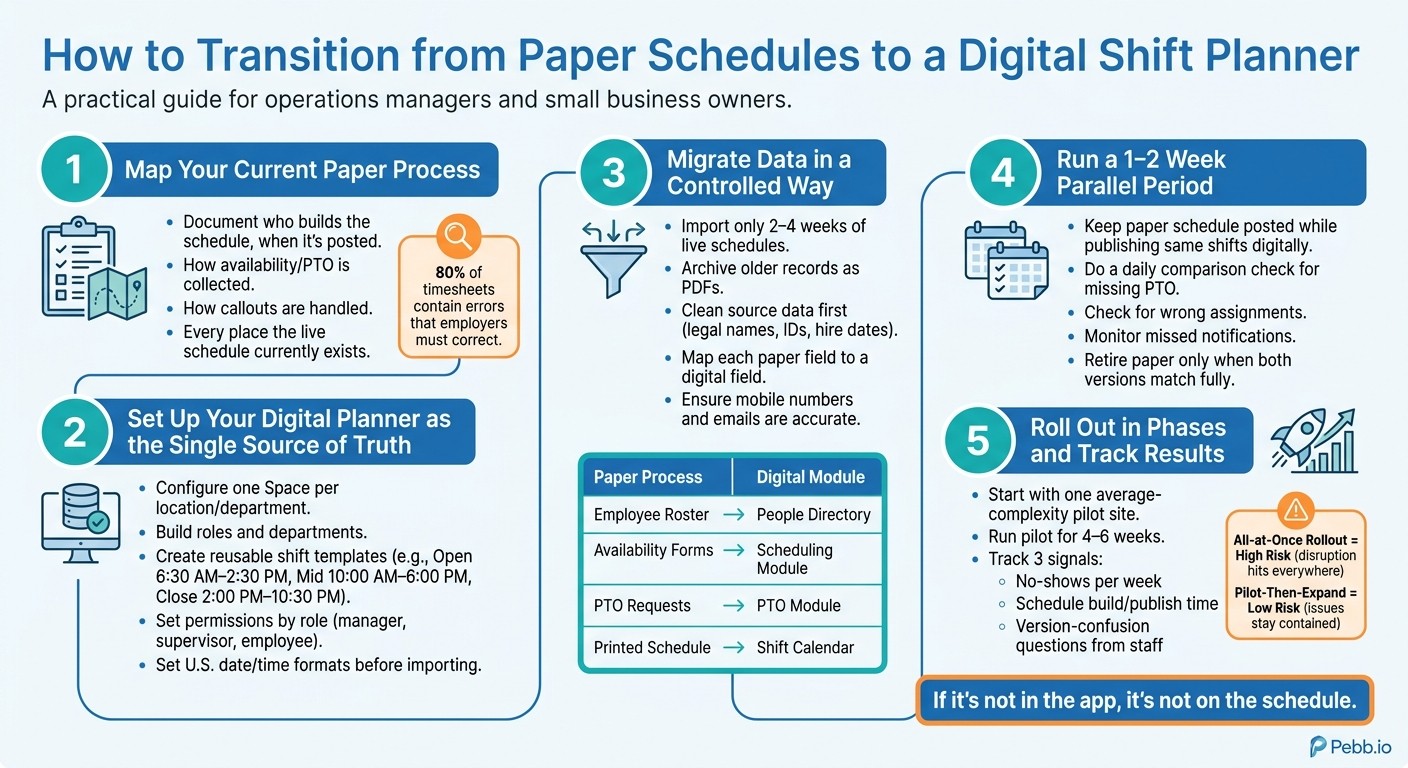
How to Switch from Paper Schedules to a Digital Shift Planner
1. Map your current paper scheduling process before you change anything
The first time I helped move a team off paper scheduling at Pebb.io, I made a mistake that looked small on day one and turned into a mess by the end of the week.
We jumped too fast.
We had the tool. We had the team. We had good intentions. But we hadn’t mapped the old process all the way through. One manager posted schedules on a wall. Another kept edits in a binder. A third handled callouts through group text. Let me tell you what happened next: the digital setup copied only part of the process, and the missing pieces came back to bite us.
That’s why I always tell teams to document one full scheduling cycle before changing anything.
Write down:
who builds the schedule
when it gets posted
how availability and time off are collected
how time off gets approved
every place the live schedule exists today
how callouts are handled
Here’s the thing: that map becomes the blueprint for your digital planner. If something is fuzzy now, it won’t magically fix itself later. It’ll just show up inside the new system.
This gets even more important when you run more than one location or department. I’ve seen one manager swear by a paper binder while another runs the whole week from text messages. Those differences need to come out now, not after the system is already set up.
List every schedule input you need to carry over
When I say “move your schedule,” I don’t just mean copying names and shift times.
You’re moving the rules, exceptions, and all the little details behind each shift. That includes employee roles and job codes, work locations, normal shift patterns, approved PTO and unpaid leave with exact dates in MM/DD/YYYY format, and availability limits like "can't work Tuesdays after 5:00 PM due to classes."
I’ve seen teams miss one small detail here and pay for it later. A worker looked available on paper, but they were only cleared for one type of task. Another employee could cover the shift, but their license had expired two weeks earlier. On paper, those details were buried in folders. In a digital system, they need to be front and center.
Don’t skip certifications. A food handler card, forklift certification, state nursing license, or alcohol server permit can decide who’s allowed to cover a shift. If those expiration dates are sitting in a binder somewhere, now’s the time to pull them out.
The same goes for scheduling rules:
overtime thresholds
meal and rest-break rules
minimum staffing rules
any local fair workweek rules in your city or state
These limits need to live in the digital system from day one. If you wait and patch them in later, you’re asking for avoidable mistakes.
Once you finish this inventory, you’re in a much better spot to move everything into one live system.
Identify the paper-system problems you want to fix
This part matters more than most teams think.
U.S. employers report correcting errors on 80% of submitted timesheets. That number alone tells you how messy manual processes can get. And paper schedules? They’re old the second you print them. Any update after that creates a version gap.
At Pebb.io, I’ve learned that the best setup starts with blunt feedback. I ask managers and employees where the paper process fails most often.
Maybe it’s illegible handwriting on a shift swap request. Maybe it’s an old printout still taped near the register after changes were made. Maybe a callout got texted to one manager and never made it onto the schedule.
Those aren’t random annoyances. They’re setup clues.
Write each failure down as a clear problem. That list becomes your checklist for the digital planner. If double-booking is the main issue, you need automated conflict detection. If people keep working from the wrong version, you need one published schedule with a clear change log.
That’s the part I wouldn’t skip. Don’t start with features. Start with the breakdowns you already know are costing you time.
2. Set up your digital shift planner as the single source of truth
I’ve seen this part go sideways more than once. A team gets excited, rushes to import shifts, and then realizes the structure underneath is messy. Now they’re fixing locations, roles, and permissions after people are already using the system. That’s when small mistakes turn into a week of cleanup.
At Pebb.io, we learned to slow down here. Once we mapped the process, we built the digital setup first and only then brought shifts into the system. That one move saved us a lot of back-and-forth later.
The goal is simple: make your shift planner the one place everyone trusts. No second-guessing. No “check the spreadsheet too.” No manager texting one version while the app shows another.
Configure locations, roles, shift templates, and permissions
Here’s how I’d set it up.
Use one Space per branch, site, or department. If managers need staffing or coverage views tied to one site, don’t lump multiple locations into the same Space. Let me tell you what happened next when teams ignored this: managers ended up digging through the wrong coverage view, and shift gaps got missed. It sounds small until you’re short-staffed at 7:00 AM.
Inside each Space, I’d build the departments to match how the work happens every day - Front of House, Receiving, Nursing - and then add the roles under those, like Cashier, Shift Lead, RN, or Line Cook.
If you want a better read on labor spend while building schedules, attach an optional hourly wage to each role. That way, you’re not just placing people on a calendar. You’re also keeping an eye on labor cost as the schedule comes together.
After that, create reusable shift templates. We usually see teams use patterns like:
Open 6:30 AM–2:30 PM
Mid 10:00 AM–6:00 PM
Close 2:00 PM–10:30 PM
Keep the names plain and easy to scan. And include unpaid breaks in the template so paid hours stay right. Here’s the thing: if breaks are missing, payroll math starts drifting, and that problem doesn’t show up until later.
Permissions matter just as much as structure. Before anything goes live, decide who can create, edit, approve, and publish schedules.
In Pebb, I’d keep it tight:
Location managers own their site’s schedule
Supervisors or leads can suggest changes
Only managers publish
Employees can view their own shifts, request time off, and respond to shift swap or pickup offers
That last part matters. Employees should have access to what they need, but not extra controls that can muddy the process.
Once this setup is done, you can move shifts, availability, and PTO into the system without tearing it all apart later.
Use U.S. date and time settings from the start
This sounds boring until it burns you.
I’ve watched teams import data first and fix formatting later. Bad idea. Dates get misread, reminders fire at odd times, and people start doubting the schedule before day one is even over.
Set your date, time, and time zone formats before you import anything. Use MM/DD/YYYY for dates and 12-hour AM/PM for time before anyone sees a shift.
If you run teams across multiple states, set each location’s time zone on purpose. Don’t let reminders and push alerts go out based on some default system setting. A New York manager and a Texas employee should each get notifications in their own local time.
My rule is simple: fix the format first, then import shifts, PTO, and reminders. It’s one of those small setup calls that saves a pile of confusion later.
3. Migrate shifts, availability, and time-off data in a controlled way
I’ve seen teams make the same mistake over and over: they build the new setup, get excited, and dump everything into the system at once.
That’s where things go sideways.
When we help teams move into Pebb.io, we keep it tight. We only bring over the next 2–4 weeks of live schedules, plus future-approved PTO and each person’s current availability. Older paper records still matter, of course, but we archive those as PDFs or spreadsheets instead of shoving all that history into the live rollout. It keeps the move clean and cuts down on errors.
Here’s the thing: once the source data is cleaned up, I move only the live schedule into the new system first. That one step saves a lot of cleanup later.
Prepare the key data before migration
Before I import anything, I clean the source data in one pass. That means standardizing notes, fixing conflicts, and pulling info out of binders, sticky notes, text threads, and printed rosters into one checked list.
It’s not glamorous work. But it’s the part that keeps the rollout from turning into a mess.
At the bare minimum, I make sure every employee profile includes the full legal name, preferred name, employee ID, employment status, and hire date. If that’s off, shifts can end up tied to the wrong person, and then you’re stuck untangling it later.
I also map each paper field to one digital field before importing anything. No guessing. No “we’ll fix it after.”
Data point | Where it lives now (paper) | Where it goes in Pebb |
|---|---|---|
Employee roster | Printed staff list, HR binder, onboarding forms | Employee profiles (People Directory) |
Mobile contact details | Hiring packets, handwritten contact list | Contact fields in employee profile |
Primary site/location | Store assignment list, manager notes | Location settings linked to employee profile |
Job role/position | Job title on contract, roster column | Role field + role-based permissions |
Recurring availability | Availability forms, sticky notes, whiteboard | Availability settings in scheduling module |
Approved PTO / leave | PTO request forms, office calendar, emails | PTO module with dates and status |
Current schedule commitments | Printed weekly schedule in break room | Shift calendar per location |
One place where I tell managers not to cut corners is mobile numbers and email addresses. Pebb uses that info to send shift alerts and reminders. If those fields are wrong or missing, employees won’t get notified, and you’re right back to calling and texting people one by one.
I learned that the hard way on an early rollout. We had the schedule set up fine, but a handful of phone numbers were outdated. The system did its job. The data didn’t. A few missed alerts later, we had managers saying, “Why isn’t this working?” Let me tell you what happened next: the issue wasn’t the app. It was the input.
The same goes for availability. Vague notes like “works mornings” don’t help much. I turn that into a clear time block like “Mon–Fri, 8:00 AM–12:00 PM.” Pebb can flag conflicts only when availability is structured that way.
Run a short parallel period before retiring paper
I never tell a team to kill paper on day one.
A 1–2 week parallel period gives you a buffer. During that time, I keep the paper schedule posted like usual while also publishing the same shifts in Pebb. Then, once per day, I compare both versions for each location.
That daily check is simple, but it catches the stuff that slips through:
Missing PTO entries
Shifts assigned to the wrong person
Employees who aren’t getting notifications
I also look at three things every day:
Are all approved time-off requests showing as blocked in Pebb?
Did shift changes get updated in the app the same day they were updated on paper?
Did the affected employees get notified?
When both versions match for the full parallel period, that’s when I feel good about moving the team fully into Pebb and dropping paper for live scheduling. At that point, the schedule isn’t split across two systems anymore, and updates and team communication can happen in one place.
4. Move schedule updates and team communication into one workflow
I’ve seen this part trip teams up more than the setup itself.
At Pebb.io, the hard part usually isn’t getting the system live. It’s getting people to stop using the side channels they’ve leaned on for years. Text threads. Facebook groups. Whiteboard notes in the break room. Long email chains. Random calls and texts. None of that fades out by itself.
We had to replace all of it with one clear workflow and then stick to it.
Here’s the thing: once the data is in place, the next move is simple on paper but tough in practice. Every schedule change, request, and reminder has to move out of text threads and into one workflow.
In Pebb, the schedule, requests, alerts, and announcements all move through one workflow. That keeps version conflicts low, missed updates rare, and every action in one place.
Set rules for publishing schedules, changes, and reminders
What worked for us was setting one fixed publish cadence and making sure employees got notified automatically when the schedule went live. In Pebb, that notification fires the moment a manager hits "Publish."
Then we got very clear on the three schedule changes that happen most often:
Schedule changes: Any edit to a published shift triggers an instant alert to the affected employee. No more "I didn't know my shift moved."
Open shifts: When coverage is needed, we post the open shift in the app. Eligible employees get notified and claim it in the app.
Callouts: Employees submit an absence request in the app, which alerts the manager and can automatically create an open shift if coverage is needed.
Shift swaps need the same kind of clarity. We set one clear swap cutoff and log every approval in the app. Let me tell you what happened next when we started doing that: the back-and-forth dropped fast, and when disputes came up, we had a clean record instead of two people telling two different stories.
One rule was worth putting right in the break room during the switch:
"If it's not in the app, it's not on the schedule."
It sounds blunt. But in my experience, that line cuts through confusion fast. It tells everyone that text-based schedule changes are no longer recognized.
Train managers and employees on the new daily routine
Once the rules are set, adoption comes down to habits.
And honestly, manager habits drive almost everything else.
If a manager still replies to scheduling texts instead of sending people back to the app, the whole system starts leaking. I’ve watched that happen. One shortcut turns into five, and before long the team is half in the app and half out of it.
So the daily routine has to stay simple and non-negotiable: check the app first thing, review any callouts or pending swap requests, approve or deny them fast, and post urgent announcements to the right team group.
For employees, the core habit is just as simple: check the app the night before every shift. Not a screenshot someone sent. Not a photo of the break room printout. The app.
We also lean on automatic reminders 24 hours and 2 hours before each shift. That small step saves a lot of cleanup later.
The good news is training doesn’t need to be a big production. A short hands-on session works well. We have each employee log in, set notification preferences, and submit a mock PTO request. That builds muscle memory fast.
What also helped us was having an app champion on each shift, someone comfortable with the app who could answer quick questions on the floor. In practice, that moved adoption faster than top-down instruction alone.
You can feel it when this starts working. Schedule screenshots fade out. Whiteboard notes stop popping up. The "did that change?" questions slow down. Updates move faster, missed shifts decline, and the manual admin load gets smaller.
5. Roll out in phases and track whether the switch is working
I’ve seen this part go sideways more than once.
At Pebb.io, we learned pretty fast that even a good scheduling setup can turn into a mess if you roll it out too fast. One bad permission setting. One missed training step. One manager using the old method “just for this week.” Suddenly, people at multiple sites are looking at different versions of the schedule, and now your team is stuck cleaning up confusion instead of running shifts.
That’s why, once the schedule lives in one workflow, I always push for a phased rollout. It gives us room to catch mistakes before they spread across every location.
Choose a rollout approach and weigh the risk
On paper, an all-at-once rollout sounds like the fast move. Flip the switch, launch everywhere, and move on.
Here’s the thing: if something breaks, it breaks everywhere.
I’ve watched teams underestimate this. A small setup issue or a training gap doesn’t stay small when every site goes live on the same day. It hits the full operation at once. That’s a rough day for managers and an even worse one for frontline staff.
A pilot-first rollout is slower at the start, but it keeps the blast radius small. If one site hits a snag, you fix it there before it rolls into the rest of the business.
Rollout Approach | Risk Level | If Something Goes Wrong | Key Advantage |
|---|---|---|---|
All-at-once | High | Disruption hits every location at once | Faster total timeline |
Pilot-then-expand | Low | Issues stay contained to one site | Real-world testing before scaling |
That makes the next move pretty clear: start with one average-complexity site. Not your easiest location. Not your hardest one either. Pick the site that feels most like the middle of the pack, because that gives you a better read on how the process will hold up in day-to-day use.
When we think through rollouts like this, we don’t just look for a smooth launch. We look for proof in live conditions.
Run the pilot for 4–6 weeks and track three simple signals:
No-shows per week compared to the old process
How long schedule build-and-publish takes
Version-confusion questions from staff and managers
Let me tell you what happened next in one rollout I was close to: the team didn’t need a giant report to know whether the pilot was working. The signs showed up fast. When no-shows dropped, schedule publishing took less time, and those “Which version is right?” questions almost disappeared, we knew the new setup was doing its job.
If the pilot cuts confusion and speeds up publishing, don’t reinvent the process for the next group. Use the same one. Expand by region or district, then let the pilot manager hand it off to the next team.
That peer-to-peer handoff matters more than people think. Managers tend to trust someone who’s already done it in the field. It also keeps the conversation tied to the stuff that counts every day:
Shift accuracy
Availability accuracy
Time-off accuracy
Update visibility
Conclusion: the best transition is the one your team will actually use
I’ll be honest: the best rollout plan isn’t the fanciest one. It’s the one your team will stick with when the week gets busy.
When schedules, PTO, chat, and announcements all live in one app, people stop guessing which version they should trust. And when that guessing goes away, missed shifts, wrong versions, and manual follow-up start shrinking without all the extra chasing.
That’s a big reason we built Pebb the way we did at Pebb.io. With Pebb, that single workflow is ready from day one, so moving away from paper doesn’t feel like one more system to manage. It feels like a better way to work for everyone on the team.
FAQs
How long does it take to switch from paper schedules to a digital planner?
At Pebb.io, I’ve learned this the hard way: rolling out a new system across the whole company in one shot sounds bold on paper, but in practice, it can get messy fast.
We’ve had better luck switching in phases.
Instead of flipping the switch for everyone at once, I like to start with one team or one location first. That keeps disruption lower and gives us room to breathe. If something feels off, we can fix it before the change spreads across the company.
Here’s the thing: a smaller pilot group tells you a lot. You get to test the setup, spot friction early, and make adjustments without dragging the entire company into the chaos. Let me tell you what happened next in one rollout I worked on: we caught a workflow issue with a single department, fixed it in days, and saved ourselves a much bigger headache later.
That’s why I always lean toward a phased rollout with buffer time built in. It helps us avoid the risk of a big-bang migration, and the transition tends to feel a lot smoother for everyone involved.
What data should I move first when setting up a digital shift planner?
I learned this one the hard way: if you skip the data audit, the whole rollout gets messy fast.
When we were setting up scheduling workflows at Pebb.io, it was tempting to jump straight into the tool and start building shifts. Let me tell you what happened next: we hit small errors almost at once. A few employee availability entries were old, one PTO request hadn’t been logged, and parts of the schedule were split across paper notes, spreadsheets, and different apps. Nothing dramatic on its own, but together? Total confusion.
So now I always start with a full data audit of current scheduling information.
First, I move the core items:
existing shift schedules
employee availability
pending PTO requests
That first step keeps the switch clean and accurate. It also saves a lot of back-and-forth later when managers and employees start checking the new system.
From there, I build a master spreadsheet to track everything in one place. For us, that sheet becomes the single source of truth. I use it to see what we already have, check data quality, and flag dependencies between teams, shifts, and time-off requests.
Here’s the thing: when records live in paper files, old spreadsheets, or scattered apps, people fill in the gaps with guesses. That’s when mistakes creep in. A master spreadsheet cuts through that noise and gives the team one clear place to work from.
How do I get employees to stop using texts and paper for schedule changes?
I’ve seen this play out the hard way at Pebb.io.
At one point, schedule changes were popping up everywhere - sticky notes, text threads, DMs, last-minute calls. It didn’t take long for things to get messy. One person thought a shift was covered. Another never saw the update. And suddenly, a simple swap turned into a scramble.
That’s why we kept pushing schedule changes into a centralized digital hub like Pebb. When schedules, availability, time-off requests, and team communication live in one app, the chaos starts to fade. We’re not chasing paper notes. We’re not digging through scattered messages. We know where to look.
Here’s the thing: if it takes too much effort, people won’t use it. But when employees can update availability or ask for a shift swap in just a few taps, adoption gets a lot easier. I’ve watched that happen firsthand. The less friction we create, the more often teams keep things up to date.
Once that happens, Pebb becomes the single source of truth. Every change is recorded. Every update is shared through real-time notifications. And everyone stays on the same page without the usual back-and-forth.
It sounds simple, and honestly, that’s the point.
