
Mobile Time Clock App: Simplify Payroll & Build Trust
Simplify payroll and boost team trust with a mobile time clock app. Reclaim time and discover what truly matters when choosing the right solution.
Dan Robin

Friday at 4:37 p.m. is when bad time tracking shows its teeth.
A supervisor is texting three people for missing hours. Someone swears they clocked in. Someone else wrote their shift on paper and left it in a truck. Payroll is due, nobody wants to stay late, and one wrong entry means a worker gets underpaid or overpaid. Neither outcome is small. One hurts trust. The other creates cleanup next week.
Many teams don't need another lecture about efficiency. They need fewer tiny messes. That's why a mobile time clock app matters. Not because it's modern. Because it replaces a fragile, human-memory-based process with something calmer, clearer, and fairer.
The End of the Late-Night Payroll Scramble
I've seen payroll chaos dressed up as "we've always done it this way." It usually looks harmless until the end of the week. A handwritten note. A screenshot from a text thread. A manager trying to remember whether Jorge started at 7 or 7:30. Then everyone acts surprised when payroll turns into a rescue mission.
The true cost isn't just the missing time entry. It's the mood around it. Managers get stuck cleaning up preventable errors. Employees start watching paychecks more closely because they don't trust the process. That tension spreads fast.
Small errors become culture problems
When people have to argue about time, they stop assuming good intent. An employee thinks, "Why do I have to prove I was there?" A manager thinks, "Why can't anyone submit hours correctly?" Both are reacting to a broken system, not to each other.
Time tracking is one of those quiet processes that shapes culture more than leaders realize.
A cleaner setup changes the tone. Instead of chasing hours, the team records work as it happens. Instead of decoding notes, payroll starts from actual entries. That's less drama for everyone.
It matters even more when the rules are messy
If you're handling different shift types, overtime questions, or local payroll rules, manual tracking gets risky fast. Teams dealing with state-specific details often need a grounded reference point, and these payroll insights for Florida businesses do a good job explaining why small recording mistakes can snowball.
A mobile time clock app isn't magic. It won't fix weak management or bad scheduling. But it does remove one of the most common sources of friction at work. That's not a software win. That's an operations win.
Beyond Punch Cards and Spreadsheets
The old tools weren't evil. They were built for a different kind of work. One building. One shift board. One manager who could see everyone walk in.
That world is gone for a lot of teams.
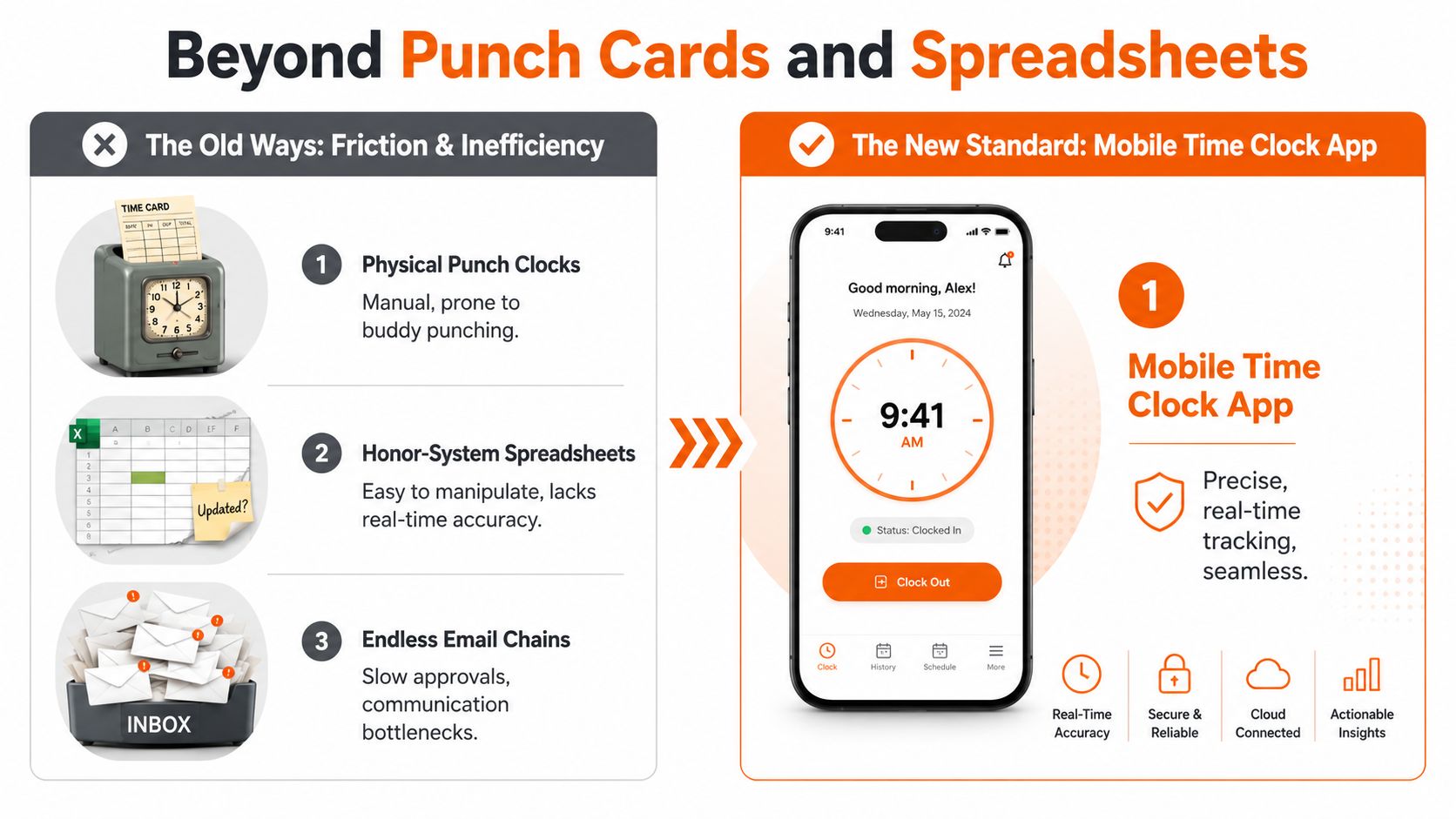
A paper punch clock made sense when everyone stood in the same hallway. A spreadsheet sort of worked when the team was small and honest mistakes were easy to catch. Endless email chains felt manageable until people started swapping shifts from their phones and working across locations.
The old system asks people to remember too much
Manual systems lean on memory and follow-through. That's the flaw.
A worker has to remember the exact start time. A manager has to verify it later. Payroll has to trust both of them. Even when nobody is trying to cheat, the process invites errors and delays.
Here's how the old and new approaches differ:
Method | What it relies on | What usually goes wrong |
|---|---|---|
Physical punch clock | Shared hardware in one place | Lines, missed punches, buddy punching |
Spreadsheet | Manual entry and honesty | Late updates, edits, unclear approvals |
Email or text | Back-and-forth communication | Lost messages, slow signoff |
Mobile time clock app | Real-time entry from the phone | Depends on good setup and clear policy |
A mobile app changes the job from tracking hours to confirming presence
That shift matters. The app on the phone isn't just a digital timesheet. It's a live record of when someone started and where they were when they did it.
As Arcoro explains in its overview of clock-in and clock-out apps, mobile time clock apps use GPS tracking and geofencing to verify employees are physically present at job sites when they clock in, preventing time theft and providing proof of location for each work entry. Used well, that doesn't feel like surveillance. It feels like clarity.
For teams trying to move away from manual reconciliation, this guide on how to track employee hours is a useful next step because it frames time tracking as an operating habit, not just an admin task.
Good systems reduce arguments
That's the part vendors skip. The best time tool isn't the one with the longest feature list. It's the one that removes avoidable debates.
If your timekeeping process depends on "we'll sort it out later," you're already behind.
A modern mobile time clock app works because it records the moment while the moment is happening. No reconstruction. No detective work. No Friday scramble.
What These Apps Actually Do
Most product pages make this painfully dull. They throw around words like geofencing, biometrics, and reporting dashboards, then expect you to connect the dots yourself.
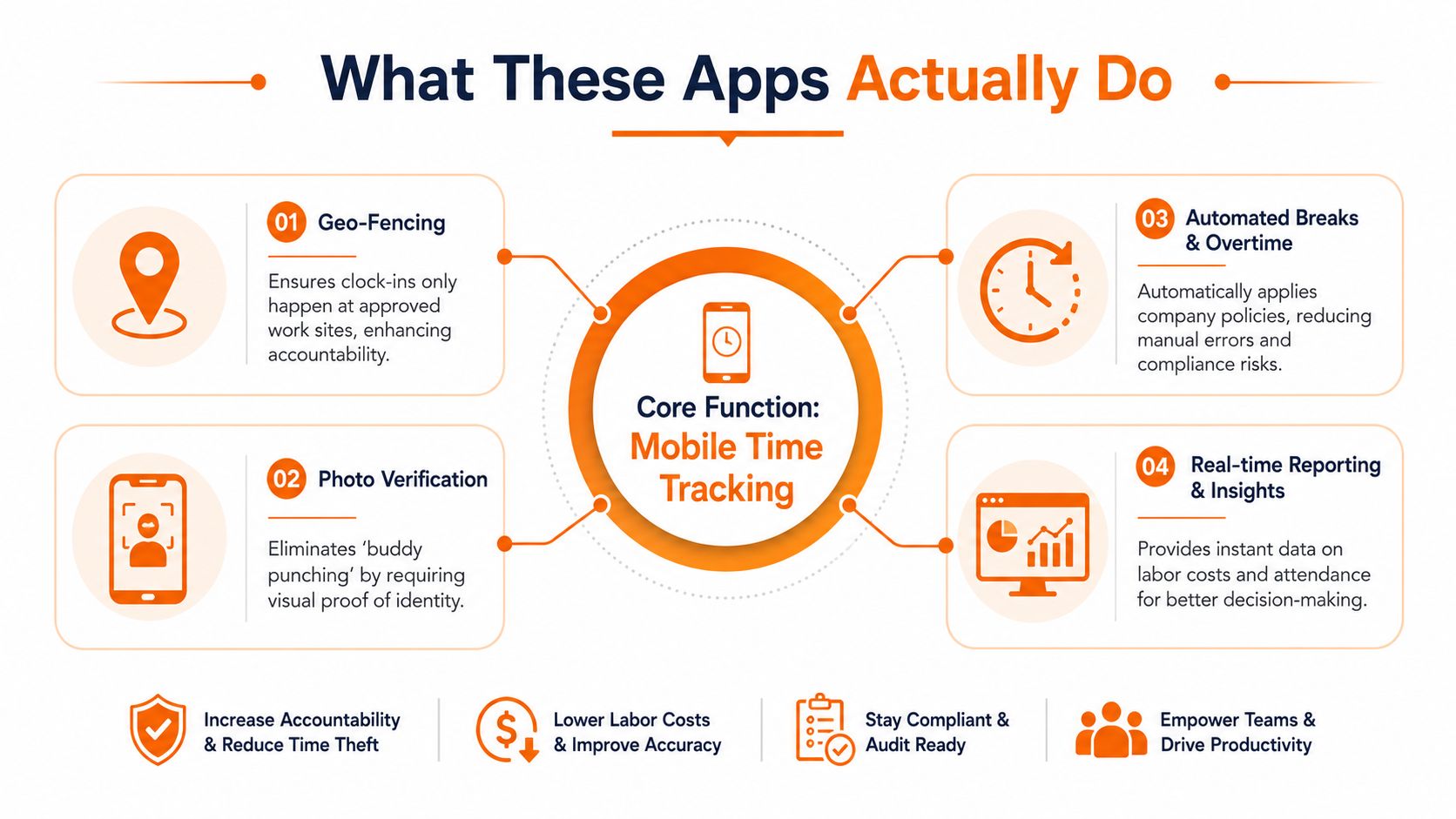
The better way to think about a mobile time clock app is simpler. It answers a handful of basic questions, right when they matter. Did the person start work? Were they where they were supposed to be? What happens if the signal drops? Does the system apply the rules without making a manager clean up the math later?
Presence verification without the daily chase
If you manage people in the field, the first win is simple. You stop asking, "Are you on site yet?"
According to ITEM's write-up on mobile time clocks, mobile time clock applications enforce location integrity through GPS geofencing, creating a cause-effect relationship where geofencing reduces Attendance Fraud by verifying the employee is within a designated work zone before accepting a punch. Offline synchronization protocols store punch data locally on the device when signal is lost, ensuring zero-latency data capture.
That's the technical version. The human version is better. Your employee doesn't need to send proof. Your manager doesn't need to guess. The app handles the check in the background.
Offline support is not a bonus feature
A lot of teams learn this the hard way.
If your people work in hospitals, warehouses, basements, rural stops, or concrete-heavy buildings, someone is going to lose signal. When that happens, the app can't just shrug and fail. A decent tool stores the punch and syncs it when the device reconnects.
That one detail changes whether the system feels dependable or annoying.
Practical rule: If the app breaks the first time someone loses signal, your team won't trust it again.
Rules should live in the system, not in a manager's head
A strong mobile time clock app should also reduce policy cleanup. Break handling. overtime treatment. schedule alignment. early clock-in controls. These are all places where manual habits create inconsistency.
Some tools let you restrict early punches so employees can only clock in within a set window, such as 5 minutes before their scheduled start time, which helps keep labor costs aligned with the schedule, as noted by ezClocker's feature overview. That's not about being strict for the sake of it. It's about preventing sloppy edges from becoming payroll disputes.
In practical terms, consider the following:
Clear clock-in logic so employees know when a punch is valid.
Schedule awareness so the app reflects the shift people were assigned.
Automatic handling of common rules so managers aren't fixing avoidable mistakes.
Identity checks need judgment
Photo verification and facial matching can help in roles where buddy punching is a real problem. They can also create resistance if the team feels mistrusted or over-monitored.
That's why rollout matters as much as the feature itself. If you frame identity checks as punishment, people will resent them. If you explain that the point is to protect accurate pay and honest records, you'll get a much fairer hearing.
The app isn't there to win a technology contest. It's there to make the workday easier to record, easier to approve, and harder to dispute.
The Real Payoff Is More Than Just Money
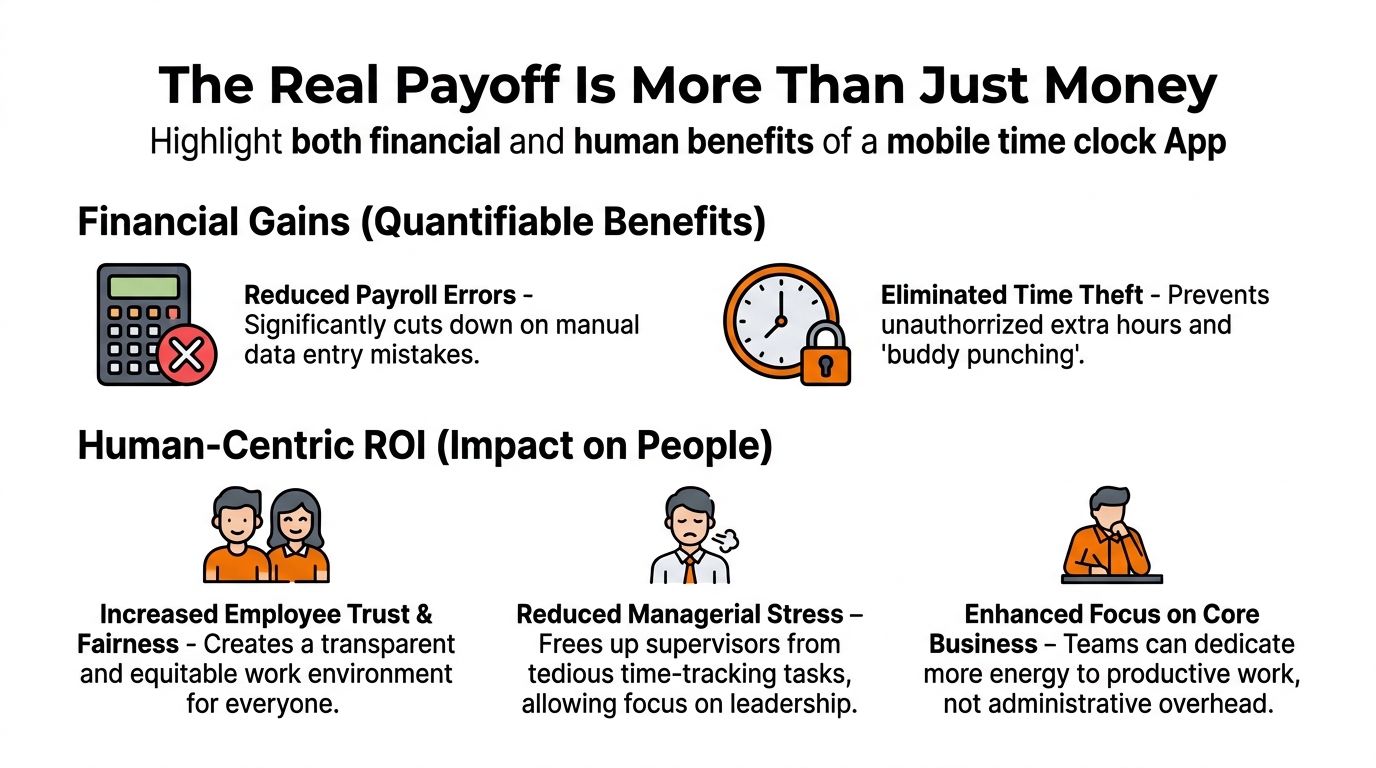
Most buyers start with cost. Fair enough. Payroll errors are expensive, wasted admin time is real, and nobody wants to pay for hours they can't verify.
But if that's your whole frame, you'll miss the bigger benefit.
Managers get their week back
One of the clearest payoffs is time. WorkMax reports that businesses adopting mobile time clock apps cut administrative time by 16 hours weekly per manager and document operational efficiency improvements ranging from 20% to 30%. That tracks with what operators feel almost immediately after a decent rollout. Less manual entry. Fewer corrections. Fewer "Can you send me your hours again?" messages.
Those recovered hours matter because managers usually spend them on the work only a manager can do. Coaching. Staffing. Customer issues. Coverage gaps. The human parts of the job.
Employees stop wondering if payroll got it wrong
Trust is built in ordinary moments. A correct paycheck. Overtime that shows up without a fight. A break deduction that matches policy instead of guesswork.
When timekeeping is messy, employees carry low-grade suspicion into every pay period. They check stubs closely because they have to. They keep screenshots because they don't trust the record. That's a bad use of everyone's energy.
A better process creates a different feeling:
Fairness is visible because records are logged the same way for everyone.
Accountability goes both ways because managers can see attendance clearly, and employees can point to the same record.
Stress drops because routine payroll questions don't become personal conflicts.
This is where culture shows up
Plenty of leaders say they value frontline teams. Then they make those same teams beg to have hours corrected. People notice that contradiction.
A company doesn't prove respect with slogans. It proves respect when time worked becomes time paid, without friction.
The irony is that a time clock app can make work feel less transactional, not more. Once the record is dependable, people stop arguing about the basics. They can focus on the actual work instead of policing each other.
That shift is hard to quantify cleanly in a spreadsheet. It's still real. In some teams, it's the whole point.
How to Choose a Tool Without Losing Your Mind
The market is crowded, and most demos blur together after ten minutes. Every tool claims it handles time tracking, approvals, alerts, and payroll. That's not enough to make a decision.
Start with your operating reality, not the vendor's feature grid.
Ask what kind of work the tool was built for
Some products were clearly designed for desk workers and then stretched into field use. You can tell. The mobile app feels secondary. Offline behavior is shaky. Location logic is clumsy. Approvals assume everyone works in one neat shift block.
That falls apart in healthcare, retail, logistics, and service businesses.
Clockspot's guidance on home health care time clock apps points to a gap that generic reviews often miss. The underserved angle of mobile time clock apps in home health care focuses on integrating travel time and mileage verification with EVV (Electronic Visit Verification) systems, a gap rarely addressed in generic app reviews that prioritize GPS geofencing for standard field work. That's a very different job from clocking into a single fixed site.
Privacy and trust are part of the product
Leaders sometimes treat privacy as a legal box to check. That's too narrow. It's also a culture decision.
If the app tracks too aggressively, people will feel watched. If it tracks too loosely, managers won't trust the data. You're looking for balance. Enough verification to protect payroll integrity, without turning the workday into surveillance theater.
Ask blunt questions during evaluation:
When is location captured and when is it not?
What does the employee see in the app after they clock in?
How are exceptions handled when someone is at a legitimate location but the phone signal is weak?
Can the policy be explained in one minute by a frontline supervisor?
If you can't answer those clearly, the rollout will be rough.
One good test beats ten feature comparisons
Run a real scenario. Don't stay in demo-land.
Take a common shift type from your business and walk it through the app. Miss a signal. Start early. Swap locations. Approve a correction. Export the record. That's when weak tools show themselves.
A short decision table helps:
Question | Why it matters |
|---|---|
Does it work for mobile-first roles? | Field teams need different behavior than office teams |
Can it handle exceptions cleanly? | Real operations are messy |
Does the policy feel fair to employees? | Adoption rises or falls on perceived fairness |
Will managers actually use it daily? | Great features don't matter if supervisors avoid the tool |
For teams that need clock-ins tied closely to shifts and broader workforce workflows, this guide on a time clock app for staff is a practical reference. And if you want one example of a broader operations app, Pebb includes shift scheduling, clock-in, PTO tracking, and team communication in the same mobile environment. For some teams that's cleaner than stitching together separate tools. For others, a narrower time product will fit better. Context decides.
The point isn't to find the most impressive software. It's to find the one your team will still be using six months from now without workarounds, resentment, or side spreadsheets.
Its Just Time But Its Everything
Time is a small thing until it isn't.
It's a tap on a phone before a shift starts. It's a record in payroll. It's a question of whether a manager trusts the team, and whether the team trusts the company back. That's why the choice of a mobile time clock app reaches further than attendance.
The tool reflects the standard
A weak process tells people that cleanup is normal. A clear process tells them accuracy matters. That difference shows up in morale faster than many leaders expect.
The market is moving in that direction anyway. According to Fact.MR's market projection for time tracking software, the global market, which includes mobile time clock apps, is forecast to grow from USD 3.8 billion in 2025 to USD 16.1 billion by 2035, with a projected 15.5% CAGR over that period. That's a projection, not a guarantee. Still, it points to something plain enough. Companies are not treating mobile time tracking as a niche add-on anymore.
Better timekeeping supports better team management
This is especially true when your workforce is spread across shifts or locations. A clean clock-in process won't solve every management problem, but it removes one of the routine frictions that keeps teams defensive and managers distracted.
If you're thinking more broadly about distributed work, these effective remote team strategies are worth a read because they connect tools, habits, and communication in a grounded way. And if your immediate need is tighter attendance flow, this guide to a clock-in clock-out app is a practical companion.
The companies that handle time well usually handle other basics well too. Communication. scheduling. accountability. follow-through.
That's why this decision is bigger than software. You're choosing whether timekeeping stays a weekly argument or becomes a quiet, reliable part of work. If you can remove one recurring source of doubt from your company, it tends to improve more than payroll.
If you're looking for one place to handle clock-ins alongside shifts, communication, tasks, and day-to-day operations, Pebb is worth a look. It gives teams a mobile-first way to manage time and stay aligned without bouncing between separate apps.
