
Legacy System Migration Roadmap for Modern Teams
A practical legacy system migration roadmap covering assessment, strategy, data mapping, testing, and rollout—built for teams moving
Dan Robin

Your payroll runs on a system older than some of your managers. HR keeps critical details in spreadsheets. The intranet still carries announcements from 2019. Then leadership approves a move to one employee app, and the first question isn't about software.
It's, “Where does all the data live?”
That question is the beginning of legacy system migration. The hard part usually isn't moving records or rebuilding an interface. It's finding the undocumented decisions, manual workarounds, ownership disputes, and fragile connections that keep daily operations running.
A 2022 Infosys Modernization Radar study found that 88% of current technology assets are legacy, with 50% of legacy applications expected to modernize within two years and 70% to 90% within five years. The same study reported that 45% of legacy systems are mainframe-based, and 52% of those systems are core to business operations. The study and its migration analysis show why this is now a strategic portfolio decision, not a routine IT refresh.
For teams consolidating communication, HR processes, documents, scheduling, and employee access into one app, visibility comes first. A sound technical plan can still fail if the people who understand the old system aren't in the room.
Why Legacy System Migration Feels Harder Than It Should
The operations team usually knows the visible pieces. Payroll runs on an aging on-premise platform. HR keeps employee information in several spreadsheets. The intranet holds policies, forms, and announcements that employees no longer fully trust. Department managers have created workarounds because the official tools are slow or incomplete.
Leadership sees a clear opportunity: consolidate workplace tools into one employee app, simplify communication, and give frontline staff a single place to find information. The project gets approved, a vendor is selected, and a timeline appears. A roadmap for coordinating digital transformation priorities can help frame that work, but approval does not reveal how the current operation functions.
Then discovery starts.
One spreadsheet feeds another. A supervisor exports payroll data each week and uploads it into scheduling software. Someone in finance maintains an undocumented report that compliance reviews twice a year. A regional manager keeps a local employee list because the central directory is not updated quickly enough. These workarounds rarely appear in the formal architecture, yet employees depend on them to complete routine work.
Practical rule: If a process happens outside the official application, it still belongs in the migration inventory.
The 2025 survey of more than 500 U.S. IT professionals found that 62% of organizations still rely on legacy systems, while 68% depend on internal IT teams to maintain them. Saritasa's 2025 IT professional survey findings also found that 50% said they had not upgraded because the current system still works. That reasoning is understandable. A familiar system can feel safer than a replacement, particularly when employees have learned how to compensate for its weaknesses.
“Still works” often means that people have built a process around its gaps. Those workarounds become tribal knowledge. Risk rises when the person who maintains a report, fixes an exception, or explains a manual handoff changes roles, leaves the company, or cannot support cutover.
The project plan misses the human system
An application inventory shows what software exists. It does not show who can veto a change, who approves exceptions, or which team depends on an old report for an audit. Those decisions need named owners before the unified app becomes the operational system of record.
Japan's Ministry of Economy, Trade and Industry reported a significant correlation between management information sharing, CxO roles, IT asset visibility, and in-house production capacity in its 2025 legacy-systems reporting. METI's report supports a practical conclusion: executive communication and internal ownership affect migration readiness.
Governance therefore belongs in the architecture. Teams need agreement about who owns employee data, who approves access, who maintains content, which exceptions require review, and who decides what gets retired. Without that agreement, technical completion can leave employees with conflicting records and unclear escalation paths.
Migration feels difficult because the old system includes more than code. It includes habits, spreadsheets, permissions, work queues, personal expertise, and informal promises. Make those dependencies visible, assign owners, and resolve disputes before cutover.
Assessing What You Actually Have Before You Move
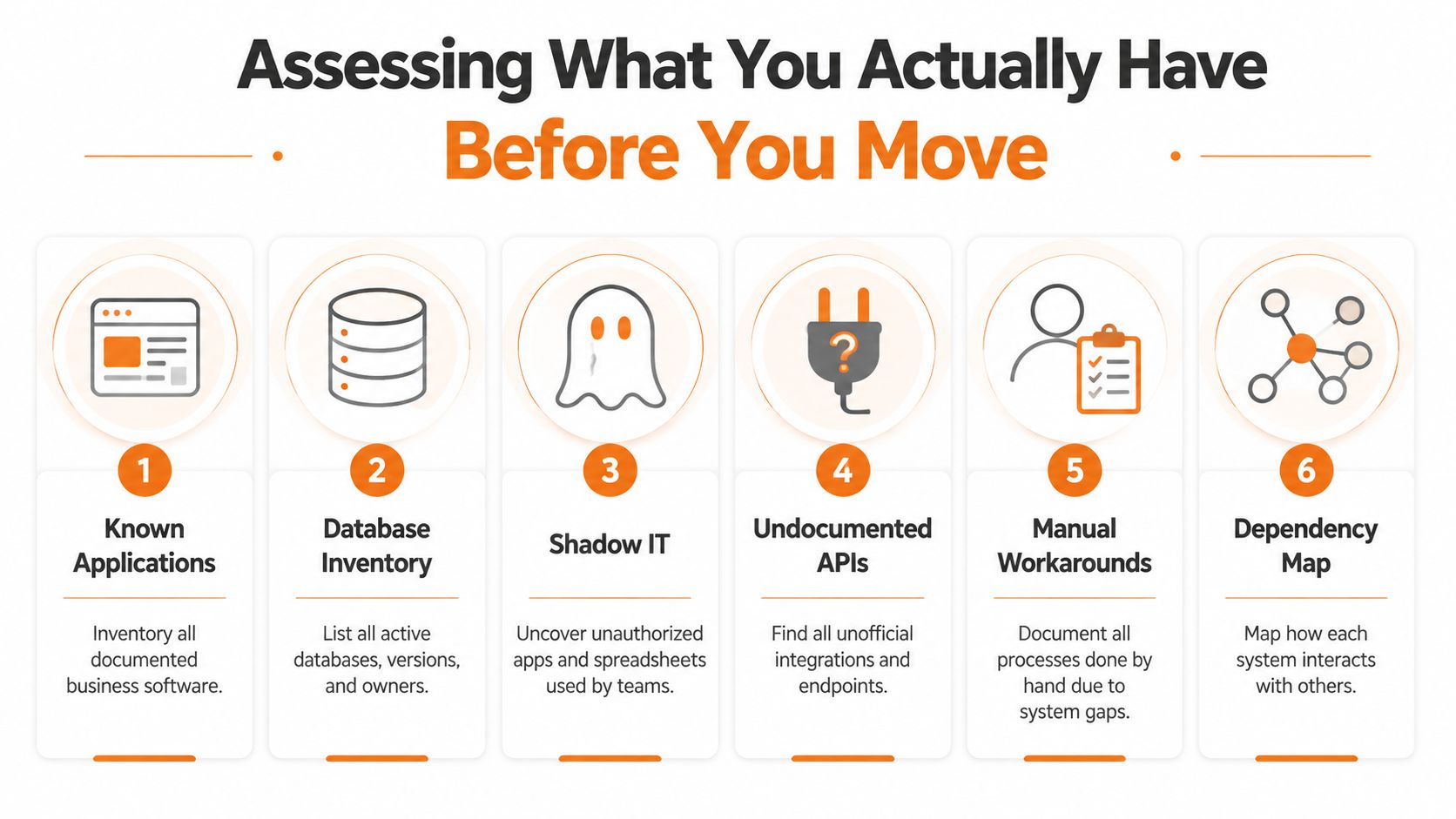
Start with an inventory, but don't stop at the application list. A reliable assessment describes the operating environment around every system, including the people, data, integrations, and manual steps that keep it useful.
The first pass should capture known applications, databases, file repositories, employee directories, scheduling tools, payroll connectors, intranets, and authentication services. Then ask each department a different question: “What do you use to complete work that the official system doesn't support?”
That question surfaces shadow IT quickly. You'll find spreadsheets, shared folders, email templates, local databases, and unofficial integrations. They may not be approved, but they may contain the only usable version of a business process.
Build the inventory with the people who run the work
IT should lead technical discovery, but IT shouldn't own the assessment alone. Operations leaders understand the actual workflow. HR understands employee records and retention rules. Finance knows which outputs support reporting. Frontline supervisors know where the official process breaks down.
For each system, record:
Business owner: The person accountable for the process, not just the person who administers the software.
Technical owner: The team or individual who maintains access, integrations, and infrastructure.
Critical workflows: The work that stops if the system becomes unavailable.
Data categories: Employee identity data, payroll information, documents, schedules, messages, and other records.
Dependencies: Applications, APIs, reports, file transfers, and manual exports connected to the system.
Decision authority: The executive or department head who can approve retirement, retention, or a temporary exception.
Undocumented APIs deserve special attention. A connector may not appear in a vendor diagram because an employee built it years ago. Manual workarounds deserve the same scrutiny. A process that looks inefficient may be compensating for a missing feature, a delayed approval, or poor data quality.
Classify risk before choosing a path
Use three lenses to sort the portfolio: business criticality, integration complexity, and data sensitivity.
A low-criticality system with little integration and limited sensitive data is a good candidate for an early pilot. A system that supports payroll, employee access, or compliance reporting needs stronger controls, clearer ownership, and a rollback plan before anyone changes production data.
Don't confuse technical complexity with business importance. A simple spreadsheet can be operationally critical if managers use it to schedule shifts. An elaborate application may be a retirement candidate if nobody depends on it anymore.
The assessment becomes valuable when it produces decisions, not just documentation. Every system should have a proposed action, such as retain, retire, rehost, re-platform, refactor, re-architect, or replace, along with the owner responsible for confirming that choice.
This is also where you identify governance gaps. If nobody can name the data owner, the system isn't ready to migrate. If two executives claim authority over the same employee records, the conflict must be resolved before technical work begins. The inventory is the evidence you'll use to select a migration strategy that matches the organization, not the organization shown in an old architecture diagram.
Choosing a Migration Strategy That Fits Your Reality
There isn't one correct cutover pattern. The right choice depends on how much disruption the business can absorb, how tangled the dependencies are, and whether the organization can fund temporary operating overhead.
A small team consolidating communication and employee content may favor a direct transition. A company with tightly connected payroll, scheduling, identity, and compliance workflows may need a staged approach. A full re-architecture can create long-term flexibility, but it asks the business to tolerate more change and more engineering work.
Industry cost guidance places lift-and-shift at $40,000 to $150,000, re-platforming at $100,000 to $250,000, and complete re-architecture at $200,000 to more than $1,000,000. This migration cost guide makes the trade-off clear: moving the plumbing costs less than rebuilding the house.
For mid-market teams, another cost guide places most projects between $120,000 and $220,000, taking 4 to 9 months. Multi-system migrations involving data cleansing, integration rewrites, and parallel-run cutovers are estimated at $220,000 to $400,000 and 8 to 14 months. The timeline and budget breakdown reinforces a point teams often miss. More systems create more coordination work, not merely more technical work.
Strategy | Typical Timeline | Cost Profile | Risk Level | Best Fit For |
|---|---|---|---|---|
Big bang cutover | Shortest available path | Lower temporary overhead, but remediation can be expensive | High | Clean dependencies, strong data confidence, decisive ownership |
Phased rollout | Extended across departments, regions, or features | Spread over stages, with ongoing project and support costs | Moderate | Teams that need learning and controlled adoption |
Parallel run | Longer transition with both systems active | Highest operational overhead because both environments must be maintained | Lower cutover risk | Payroll, compliance, or other workflows where failure is unacceptable |
Hybrid re-platforming | Depends on the layers being changed | Moderate to high engineering investment | Moderate to high | Systems worth keeping, but running on unsuitable infrastructure |
Choose based on consequences, not comfort
Big bang isn't automatically reckless. It can be the cleanest option when the data model is simple, the integrations are known, and a single launch reduces confusion. Its weakness is unforgiving timing. A problem discovered after launch affects everyone at once.
Phased rollout lowers the blast radius, but it creates a period where departments use different processes. Support teams must explain those differences, and leaders must keep the project visible long enough to finish. Parallel run offers strong risk protection, yet it can drain attention and budget because teams reconcile two sources of truth.
If your assessment points toward enterprise resource planning dependencies or custom business logic, specialist help may be appropriate. Teams evaluating enterprise ERP development services should use that resource to clarify where custom integration or process design is necessary, not to turn every old feature into a permanent requirement.
Commit with a simple decision test. If the cost of interruption is greater than the cost of temporary duplication, use parallel operation or a carefully staged rollout. If the old system is isolated and replaceable, a direct cutover may be sensible. If the core logic remains valuable but the platform is holding it back, re-platform before attempting a deeper redesign.
The safest-sounding option isn't always the safest option. Indecision keeps the old system in charge while the project loses momentum.
Mapping Data and Integrations Without Breaking Operations
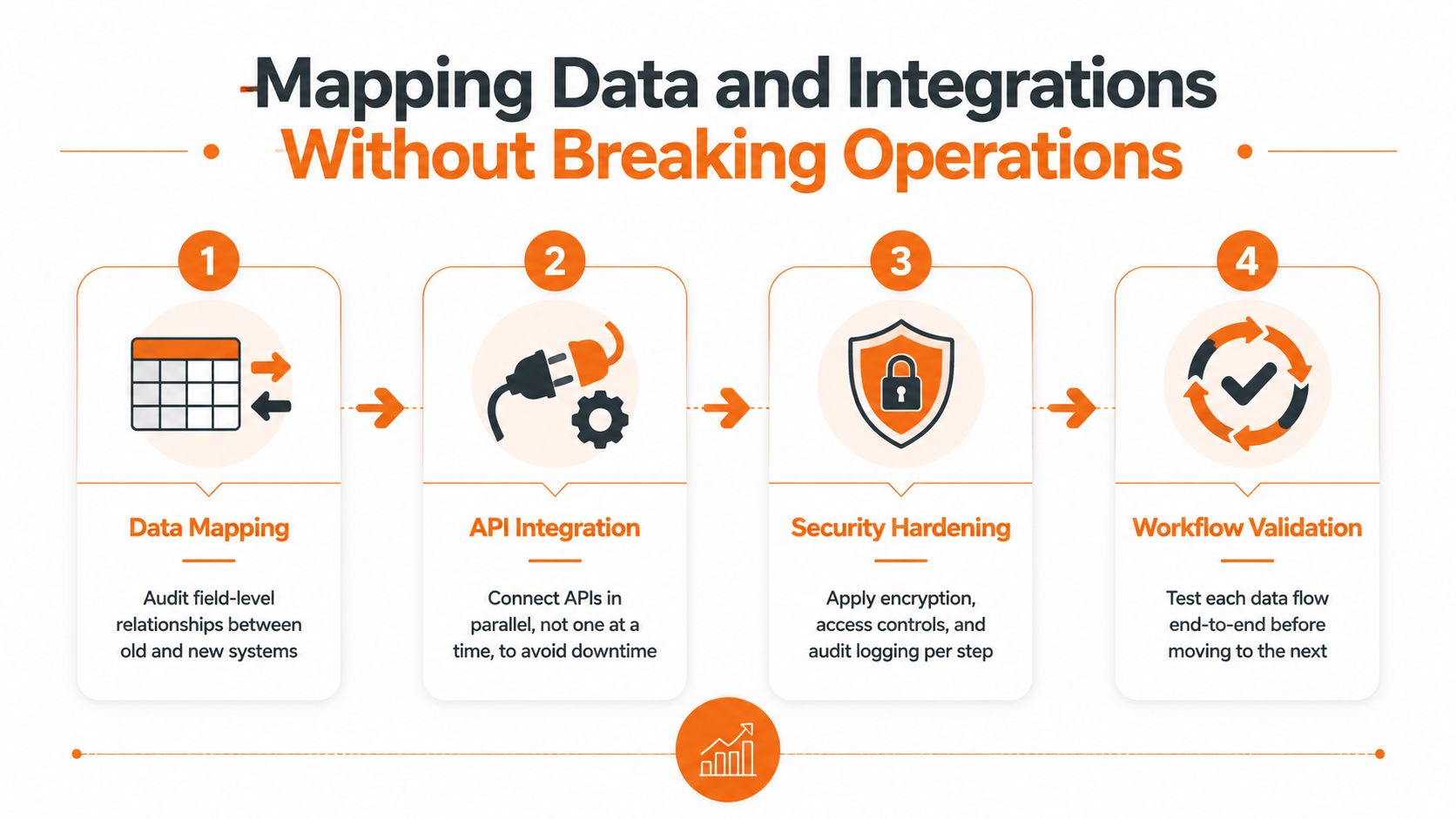
Data migration, integration work, and security hardening should run as one connected sequence. Treating them as separate workstreams creates the classic failure: records arrive in the new platform, but the connector that powers a downstream workflow stops working.
Begin with field-level mapping. For every important source field, identify its target field, transformation rule, validation requirement, and migration action. A source may call a person “employee number,” while the target calls it “worker ID.” A legacy system may store department names as free text, while the new platform expects a controlled value.
Pebb's data migration guidance is useful here because it frames mapping around source fields, target schemas, transformation logic, and explicit actions such as migrate, transform, or do not migrate.
Decide what deserves a place in the new system
Don't migrate everything just because you can. Separate active operational data from historical material, duplicate records, obsolete fields, and content that has no accountable owner.
Orphaned records cause trouble because nobody can confirm their meaning. Custom fields create friction when the new platform has no equivalent. Personally identifiable information can trigger a compliance review when teams discover that a field they planned to copy is more sensitive than expected.
For each data set, ask:
Is it still used? If nobody relies on it, archive or retire it according to policy.
Who owns it? A department must accept responsibility for accuracy after migration.
What changes during transformation? Document normalization, formatting, deduplication, and rejected values.
How will it be checked? Define reconciliation between source and target before release.
Run a representative migration in a non-production environment. Validate counts, relationships, permissions, and business meaning. A record can transfer successfully at the database level and still be wrong for the manager who needs to find it.
Rebuild only the integrations that matter
List every connector, export, import, webhook, scheduled job, and manual handoff. Classify each as rebuild, replace, retire, or temporarily bridge. Prioritize integrations that support payroll, identity, scheduling, employee access, and compliance workflows.
Stage connectors in parallel where possible, but validate each end-to-end. The question isn't whether an API responds. The question is whether the complete workflow still works when an employee changes department, a manager approves a request, or a document permission changes.
Security belongs in every stage. Map roles and access groups from the old system to the new one, confirm encryption requirements, preserve audit logging, and test administrator privileges separately from ordinary employee access. Move production data only after security owners approve the mapping and the workflow owners confirm the outcome.
Testing and Change Management That Prevent Cutover Disasters
Many migration failures look like technical bugs but begin as coordination failures. The team tests each component in isolation, skips a full rehearsal, trains managers but not frontline employees, and discovers on launch day that the documented workflow was never the actual workflow.
An SEI case study notes that operational performance often can't be benchmarked until after cutover, when teams discover problems late. It also recommends designing fallback because problems will arise after cutover. The case study and related migration analysis highlight why a rollback plan belongs in the original design, not in the emergency meeting after launch.
Test the work as people perform it
Start with data validation. Confirm that records, relationships, permissions, and required fields arrived correctly. Move to integration smoke tests, then full workflow tests that cross systems and departments.
A proper rehearsal includes the actual cutover sequence, not just a presentation of it. Use the same scripts, approvals, access changes, data checks, and communications you'll use in production. Record how long each step takes and who performs it. If a step depends on one person's memory, the rehearsal has found a governance defect.
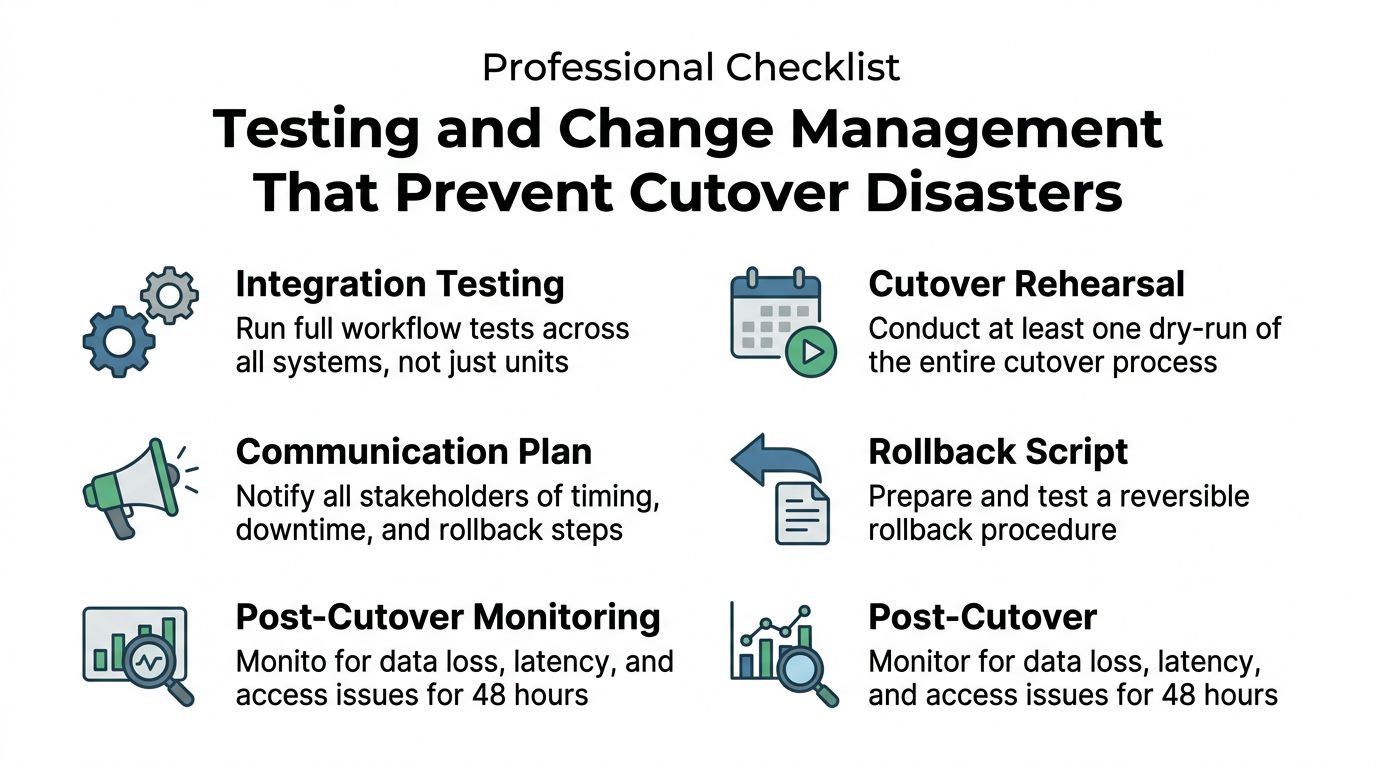
Define fallback triggers before the team is tired and under pressure. A trigger might involve missing records, failed authentication, unavailable payroll data, broken approvals, or unacceptable response times. The exact thresholds should come from the business owners and technical leads. The important part is that someone has authority to act without waiting for a large committee to agree in the middle of the night.
Treat employees as part of the test environment
Training isn't a slide deck delivered once. It's repeated contact before launch, short demonstrations tied to real tasks, and a clear place to ask questions.
These change management practices from Pebb emphasize the value of communication, adoption support, and feedback during workplace change. For a unified employee app, build a champion network across departments and locations. Give champions real access to the new workflows, then let them report where instructions don't match daily work.
Frontline employees should know when the change happens, what they need to do, where to find help, and what will happen to old content. Managers need more than user training. They need guidance on approvals, escalation, permissions, and the decisions they now own.
Keep a staffed support channel active through the first week. Treat every question as evidence. Repeated questions usually indicate unclear communication, a confusing workflow, or a missing permission. The answer isn't to blame users for not reading instructions. Fix the instruction or the workflow.
Rollout Plans and Metrics That Keep Teams Aligned
A migration can meet its technical cutover plan while employees still cannot complete routine work. In a single employee app, rollout success depends on visible ownership, coordinated decisions, and evidence from daily operations.
A phased rollout may follow departments, regions, or feature sets. Department sequencing gives each group a coherent experience, but shared services may need to support two processes. Regional sequencing can reveal local network, language, or staffing problems, while creating an uneven experience for employees working across locations. Feature sequencing introduces capabilities gradually, but the app may feel incomplete while teams wait for related functions.
Choose one operating rhythm and publish it. The rollout owner should maintain current status, open risks, decisions required, and recurring support themes. Every issue needs an owner and a decision date. A project tracker without those fields only records delay.
Use a concrete workflow to test visibility. If a finance team still depends on a legacy export file to reconcile payments, the rollout plan should identify who produces it, when it is checked, where the replacement data appears, and what happens if reconciliation fails. That coordination belongs in the operating plan, not in informal messages between teams.
Make rollback a business decision
Define failure in operational terms. A critical failure blocks payroll, employee access, required approvals, security controls, or essential communication. An expected adjustment period covers ordinary questions, minor content corrections, and small usability problems that do not threaten operations.
The authority chain must be explicit. Technical leads can stop a deployment for system integrity. Security owners can block release for control failures. Operations leaders can pause the rollout when a frontline workflow cannot continue. An executive sponsor decides whether the business accepts a known limitation or returns to the previous process.
Track whether work improved, not merely whether systems stayed online.
Metric Category | Specific KPI | Target Benchmark | Review Cadence |
|---|---|---|---|
Adoption | Active employee use and completion of core tasks | Agreed against the pre-launch adoption baseline | Weekly during stabilization |
Productivity | Time to complete common tasks compared with the legacy baseline | No material regression, with improvement priorities documented | Weekly |
Support | Ticket volume, recurring issue themes, and resolution speed | Downward trend in repeat issues and timely resolution of critical problems | Daily at launch, then weekly |
Data quality | Reconciliation exceptions and unresolved records | Exceptions assigned, explained, and closed by the data owner | Each migration cycle |
Employee experience | Feedback from frontline teams, managers, and champions | Clear themes with named actions, not a single blended score | Weekly |
Governance | Open decisions, access reviews, and ownership gaps | No critical ownership issue left without an accountable decision-maker | Weekly leadership review |
The 90-day stabilization window needs a beginning, middle, and end. Early reviews cover access, data, support, and broken workflows. Later reviews examine adoption, process simplification, and which legacy components can be retired.
Canada's Auditor General recommended reviewing and prioritizing legacy application migrations with estimated timelines and budgets. The Government of Canada also said it would distribute $119.27 million through an Application Modernization Investment Fund. The Auditor General's report illustrates how public programs treat modernization as a portfolio decision requiring sequencing and sustained funding.
The same discipline applies to private teams. Success is not the moment the old login disappears. It is employees completing their work, managers supporting them, and leaders having enough visibility to make the next decision. For teams consolidating systems, Pebb brings employee updates, knowledge, files, scheduling, clock-in, PTO tracking, and people search into one app, with integrations for HR, payroll, and authentication systems.
