
Industry-Specific Solutions for Frontline Teams
What industry-specific solutions really mean for healthcare, retail, hospitality, and logistics — benefits, trade-offs, examples, and a practical evaluation
Dan Robin

A policy changes on Tuesday morning. By Thursday night, a nurse on the overnight shift hears about it from a colleague. A warehouse picker learns about it when a supervisor prints a notice and tapes it beside the time clock. The message existed. The system sent it. The work still moved without it.
That gap is where generic software becomes expensive. Not because the license is always costly, but because information arrives late, people create workarounds, shifts change without a clean record, and managers spend their days repairing the seams. The problem is especially visible in frontline operations, where many employees don't sit at a desk or check email between tasks.
Industry-specific solutions can help, but only when they fit the work closely enough to earn adoption. The point isn't to buy customization for its own sake. It's to find a tool that understands the pressures of your sector, gives leaders control, and changes behavior in ways you can measure.
Why One-Size-Fits-All Tools Fail Frontline Teams
A retail supervisor opens an email before the store opens. The company has changed its returns policy. The supervisor reads it, forwards it to a few team members, and assumes the message will travel. It doesn't. One employee is off that day, another works a different shift, and a third rarely checks company email. By the weekend, customers are receiving different answers from people working in the same store.
I've seen versions of this in healthcare, retail, warehouses, and hospitality. The software usually works exactly as designed. The failure is that the design assumes a stable desk, a predictable schedule, and one shared channel. Frontline work has none of those things.
A 2025 survey of 800 frontline workers across healthcare, retail, manufacturing, aviation, and telecommunications found that important company information took an average of 4.5 days to reach frontline employees. In telecommunications, the delay rose to 7.38 days, creating more time for missed policy changes, safety updates, and execution errors. The frontline communication research makes the operational cost plain.
A message that arrives after the shift has made its decision is not communication. It's documentation.
Generic platforms promise flexibility. Usually, that means they provide a broad set of functions and ask your team to assemble the workflow. You add a group, create a form, write a policy post, and hope employees know where to look. The software stays tidy. The operation accumulates exceptions.
This is why workplace communication problems often look like people problems when they're really design problems. A useful overview of communication problems in the workplace shows how unclear ownership, scattered channels, and delayed messages reinforce one another.
The honest case for industry-specific tools is narrower and stronger. They should reflect the way your people already work, including shifts, roles, locations, approvals, handovers, and compliance constraints. They also introduce trade-offs, such as higher cost, integration work, and dependence on a vendor. The right question is not whether a tool has more features. It's whether your operation can afford the cost of a poor fit.
What Industry-Specific Solutions Mean
An off-the-rack suit and a custom suit meet the same basic need, but they create different amounts of adjustment. One is available quickly, while the sleeves or shoulders may fit poorly. The other is cut around known measurements, reducing changes after delivery.
Software follows the same pattern. Generic tools offer shared functions such as messaging, scheduling, file storage, and reporting. Industry-specific solutions begin with how a sector operates, then shape those functions around its roles, handovers, approvals, and constraints.

Start with the work, not the feature list
A healthcare tool may organize communication around shift handovers, credentialing, and privacy controls. A logistics tool may prioritize driver access, safety notices, route changes, and warehouse coordination. A retail tool may target updates by store, role, and shift instead of sending one announcement to everyone.
Frontline employees do not experience software as a category. They experience a sequence of tasks. Can I see the update before my shift? Can I find the current policy? Can I confirm that I understood it? Can my manager verify that the change reached the right people?
An industry-specific design places those answers inside the workflow. That reduces information latency and gives managers fewer reasons to rely on shadow channels, printed notices, or manual follow-up.
Configuration is not custom software
Two ideas are often confused.
Configuration means setting up a flexible product for a particular operation without rebuilding it. Teams choose roles, permissions, locations, approval paths, integrations, and content structures. The underlying product remains shared, but the working experience reflects the operation.
Customization means changing the product or building software for particular requirements. That may suit unusual or tightly regulated processes, but it increases cost, testing demands, and future maintenance. It can also make upgrades and vendor changes harder to manage.
A tool marketed as industry-specific should offer more than sector language on a sales page. Check for sector-aware workflows, permissions, templates, terminology, integrations, and reporting. If your team must design every frontline process from an empty workspace, the product may be a generic platform with a new label.
Practical rule: Industry-specific means the tool understands the shape of the work before your team starts configuring it.
Benefits and Honest Trade-Offs
A generic tool can work in a demonstration and still fail during a busy shift. If employees must translate a broad announcement into role-specific actions, adoption drops, updates arrive late, and managers create unofficial channels to close the gap.
A 2024 HR technology survey found that 63% of employees discontinue using technology when they don't see relevance to their day-to-day tasks. The same source reported that 83% of HR leaders lacked the right HR technology, while only 59% used HR analytics and 54% used automation. Those figures point to a fit problem, not only a feature problem. The HR adoption data helps explain why a technically capable tool can still fail in practice.
Where specialization pays off
A well-designed industry tool reduces the decisions employees must make about the software itself. The right audience receives the relevant update, supervisors do not rebuild distribution lists for every shift, and workers do not search unrelated corporate content for an instruction that applies to their role.
That supports four practical outcomes:
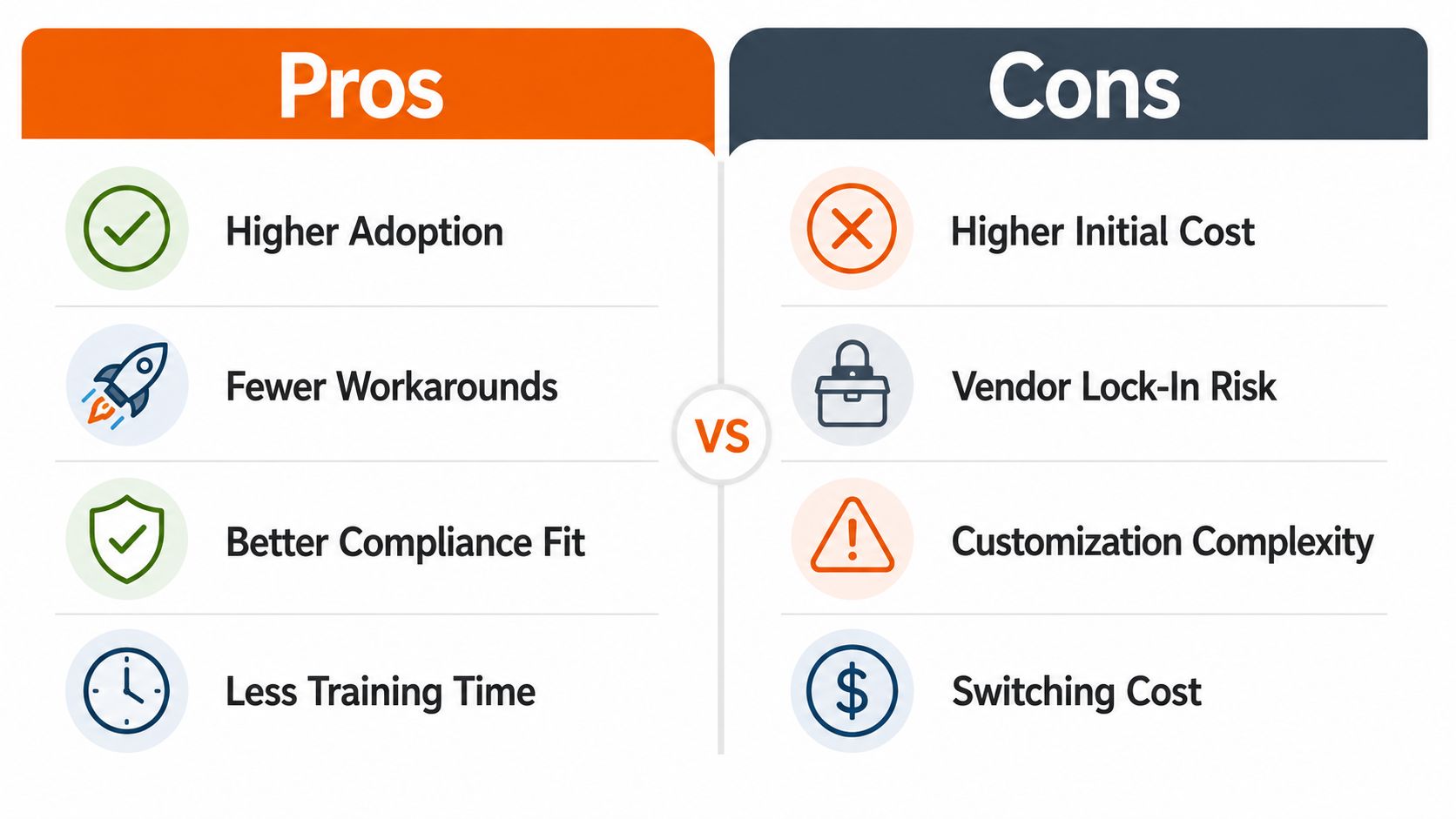
Higher adoption: The tool fits the flow of work instead of asking workers to create another routine.
Fewer workarounds: Teams have less reason to rely on spreadsheets, personal chats, printed notices, or private message groups.
Better compliance fit: Permissions, records, approvals, and content controls can reflect the sector's obligations.
Lower training burden: Workers learn a workflow that resembles their job, rather than a generic system filled with unused options.
The trade-off starts with the product itself. Specialized software can cost more at the start, take longer to evaluate, and reduce flexibility if the vendor's assumptions become outdated. A tool that cannot adapt when the operating model changes turns sector knowledge into rigidity.
The cost of adding another layer
The common failure is adding a specialized tool without removing anything else.
A new communication app, a separate scheduling system, an additional knowledge base, and another engagement platform can leave managers with more tabs and employees with more passwords. This is software sprawl with a custom label. Integrations may reduce friction, but they do not automatically create one coherent operating experience.
Volunteer organizations show why system boundaries matter. Teams evaluating volunteer donation software still need to establish how donor records, volunteer coordination, communications, and reporting connect. A specialized product can fit well when the workflow requires it, provided its role in the wider system is clear.
The decision comes down to operating risk. Generic software fits workflows that are stable, simple, and shared across teams. Industry-specific software makes more sense when information delays, compliance gaps, shift complexity, or low adoption cost more than the additional product. Evaluate the choice by behavior change and governance, not by the number of customized features.
What Industry-Specific Looks Like Across Four Frontline Industries
The same announcement behaves differently in a hospital, a shop, a restaurant, and a delivery network. That's why generic internal-comms templates often feel adequate in a demo and awkward on the floor.
Healthcare
At the end of a shift, a nurse needs to pass along more than a general update. The handover may include a change in procedure, a credentialing reminder, or an operational instruction that must reach a specific role without exposing information to the wrong audience.
A healthcare-focused tool should support HIPAA-aware communication, controlled access, clear shift handovers, and a searchable source of current policies. It should help managers target content by department and role, rather than asking everyone to interpret the same message.
The takeaway is control with speed. Healthcare teams can't treat secure communication and timely communication as separate projects.
Retail
A store manager is preparing for a promotion while the district team sends a policy update. The cashier needs one instruction, the stock associate needs another, and the manager needs confirmation that both groups received the change.
Retail-focused software should connect role-based scheduling, store-level targeting, and rapid policy distribution. It should make local execution visible without forcing every store to build its own communication system. Pebb's perspective on a retail employee app is useful here because the value sits in the connection between updates, people, and daily store work.
Hospitality
A restaurant may have employees arriving for split shifts, seasonal workers joining quickly, and teams speaking more than one language. A message posted in a general corporate channel can disappear before the next service begins.
The right tool supports high-turnover onboarding, multilingual content, shift-aware updates, and simple access from a phone. For operators assessing the wider technology stack, 10Seat fine dining solutions offer a useful reminder that hospitality software must respect service rhythms, staffing patterns, and guest-facing pressure.
The takeaway is simplicity. If a worker needs a training session to find tonight's instruction, the system has already missed the moment.
Logistics
A driver checks a phone between stops. A warehouse team starts work before the office opens. A safety update must reach both groups, even though they move through different environments and may not share the same schedule.
Logistics tools should support distributed teams, safety notices, location-aware information, and clock-in access from wherever the work begins. They should also preserve a record of what was sent, who received it, and what action followed.
Sector engagement data reinforces the need for this kind of fit. A 52,971-response frontline worker study reported 2025 engagement of 72.6% in food service, 73.5% in retail, and 67.1% in manufacturing, showing that sector context matters when organizations design content and workflows. The frontline communication coverage connects those differences to the need for role-specific, actionable communication.
Industry | Core Pressure | Must-Have Capability | Metric to Watch |
|---|---|---|---|
Healthcare | Secure handovers and regulated updates | Role-based, HIPAA-aware communication | Confirmed understanding |
Retail | Store execution across changing shifts | Location and role targeting | Policy adoption |
Hospitality | Turnover, split shifts, and language needs | Mobile onboarding and multilingual content | Time to readiness |
Logistics | Distributed teams and safety changes | Mobile access and traceable updates | Action completion |
How to Evaluate an Industry-Specific Solution Before You Commit
Start with questions, not a vendor's feature page. A polished demo can hide a poor operational fit.
Ask the vendor to show your actual work. Give them a night shift, a late schedule change, a policy update for one role, and a document that only certain managers can open. Watch what happens. If the presenter returns to generic feeds, manual exports, and “you can configure that later,” take it seriously.
Questions worth asking
Does it map to our real shifts and roles?
Use your own locations, departments, job titles, and approval paths. A product that only works with a flat employee directory will struggle in a layered frontline operation.
Can a mobile worker use it without coaching?
Mobile-first doesn't mean a desktop site shrunk onto a phone. Test the sign-in process, notification behavior, search, document access, and response flow on the devices your employees carry.
Can our administrators change the workflow themselves?
If every small edit requires a consultant, the system will drift away from the work. You should be able to adjust audiences, permissions, schedules, and content without creating a service ticket for ordinary changes.
Does it connect to the systems we already trust?
Check HR, payroll, identity, scheduling, and timekeeping integrations. The goal isn't to create another employee directory that becomes outdated the moment someone changes role or location.
Who owns the data and the rules?
Ask about permissions, retention, audit history, exports, administrator roles, and access removal. Governance isn't a legal appendix. It determines whether the tool can stay useful as the organization grows.

One test deserves special attention. If employees already use WhatsApp or another personal tool for work, don't begin by blaming them. Research cited in 2025 found that 71% of frontline workers use personal tools such as WhatsApp for work, and 1 in 3 have shared sensitive data through unofficial channels. The employee app research shows that shadow channels usually fill a gap the company hasn't closed.
I've made the mistake of judging a platform by its administrative dashboard. The better test is whether a supervisor can complete a real task during a busy shift, with one hand and limited time. For a broader view of mobile workforce management solutions, focus on access, coordination, and control together.
A Rollout Roadmap With Governance and Metrics That Matter
Buying the tool is the easy part. The difficult work begins when real employees, real shifts, and real exceptions enter the system.
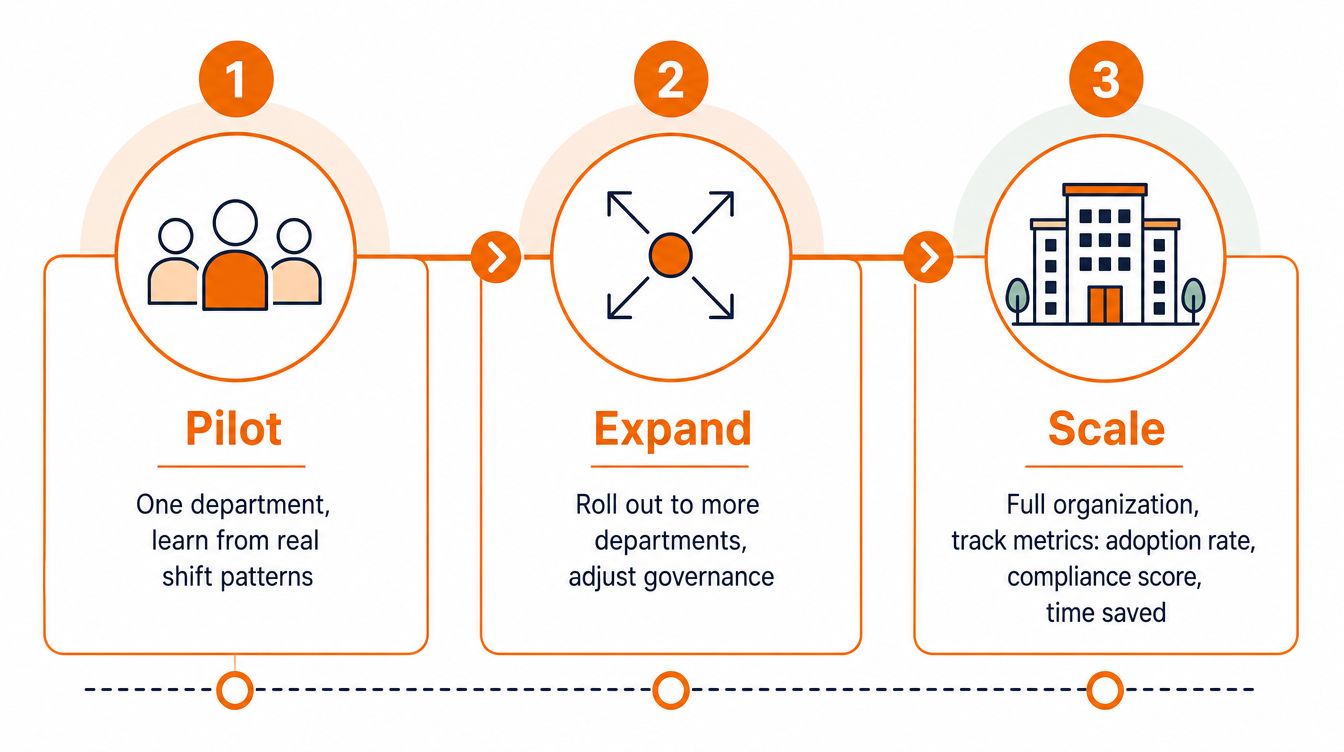
Start with one department or location. Choose a workflow that matters but won't endanger the operation if you need to adjust it. A policy update, shift handover, onboarding process, or safety acknowledgment can work well because the current failure is usually visible.
Pilot with real work
Don't create a showcase environment. Use the actual shift patterns, employee groups, permissions, and content that supervisors handle every week. Listen for friction that won't appear in a conference room, such as a worker missing a notification because the phone is shared, or a manager lacking permission to correct an outdated document.
At the 30-day mark, look for basic reliability. Can employees get in? Can they find the current information? Can managers publish to the right audience without help? Record the exceptions instead of smoothing them over for the steering committee.
Expand with control
At 90 days, add locations or departments only after the first workflow is stable. Update governance before the audience grows. Define who can publish, who approves regulated content, who manages employee access, and who removes old material.
Keep the new tool connected to HR, payroll, identity, and scheduling systems where appropriate. If it becomes a separate silo, employees will recreate the same workarounds you were trying to eliminate.
Governance should also cover data access and retention. A frontline app may contain schedules, employee records, operational instructions, and sensitive conversations. Assign ownership before launch, not after the first incident.
Scale around behavior
At 180 days, evaluate behavior rather than activity. Measure whether the right people received an update, whether they understood it, and whether the expected action happened. Clicks and logins can help diagnose a problem, but they don't prove that work changed.
The production gap makes this discipline important. Independent research found that only 31% of studied enterprise AI use cases reached full production in 2025, according to the ISG State of Enterprise AI Adoption Report. The lesson applies beyond AI. A pilot that never becomes dependable daily infrastructure hasn't delivered value.
Track adoption, reach, understanding, behavior change, compliance signals, and the time managers spend maintaining the process. A specific tool earns its cost when it becomes part of the operating rhythm, not when it produces an impressive launch report.
Choosing Tools That Fit the Work
The U.S. has roughly 50 million frontline workers across 380 occupations, representing about 34.5% of all U.S. workers, according to Brookings data on frontline work. These aren't edge users. They are a large part of how hospitals, stores, restaurants, warehouses, and service networks function every day.
Their work also carries practical constraints. In UK retail and hospitality, 89% of frontline workers had shifts changed or cancelled with less than 48 hours' notice during the prior three months, based on research from Legion and Retail Economics. The Frontline Workforce Index treats that instability as an operating cost, which is the right frame.
The software should match the work, not the organization chart. A corporate directory may group employees by department, while the operation needs to group them by shift, location, credential, route, or task. That difference determines whether a message reaches someone in time to act.
The same logic applies beyond employee communication. Teams evaluating physical access tools, for example, need clear gate access system evaluation criteria that reflect site conditions, permissions, reliability, and audit needs. The category changes, but the buying discipline stays the same.
The best tool is often the one people open without being reminded. Not because it has the longest feature list, but because it answers a question they have during the workday.
Look at your teams this week. Where do employees wait for information, copy it into another channel, or work around a system that was designed for someone else? That answer will tell you more than another product demo.
Pebb gives frontline and office teams one place for chat, updates, tasks, files, knowledge, scheduling, clock-in, PTO, and role-based access across web and mobile. Visit Pebb to see how a connected employee app can replace scattered channels with workflows your teams can use across shifts and locations.
