
Distributed Team Communication That Actually Works
Distributed team communication made simple. Learn the real challenges, best practices, and how a unified mobile app keeps frontline and remote teams in sync.
Dan Robin

At 6:14 a.m., a warehouse lead is standing beside a printer with one hand on a paper roster and the other on her phone. Slack has a new ping. Her supervisor sent an SMS. She missed a Teams call. A calendar invite has already moved twice.
She needs three answers before the shift begins: who's opening, what was supposed to be re-tagged overnight, and whether the late truck cleared customs. The information exists, but it's spread across four tools, two languages, and a paper schedule taped to a locker.
That's the true shape of modern distributed work. It isn't a polished montage of remote meetings and tidy dashboards. It's a frontline operator stitching fragments together while the clock runs. Information is everywhere, but a single trusted update point is nowhere.
The Daily Juggle No One Talks About
The same pattern appears in less visible forms across hospitals, retail stores, logistics depots, and remote startups. A nurse checks a group message for a staffing update, an email for a policy change, and a shared drive for the procedure she needs. A product designer searches Slack for a decision that was made in a video call. A shift worker hears about a schedule change from a colleague because the official notice landed in an app they never open.
The problem isn't that people are careless. They're working inside systems that ask them to remember where each kind of information lives. The desk team has email, calendars, chat, project boards, and document storage. The frontline team may have a personal phone, a printed notice, and partial access to the tools chosen by headquarters.
Microsoft's 2023 Work Trend Index described the scale of the communication load. Knowledge workers spent 57% of their working time on communication tasks, including meetings, email, and chat, leaving 43% for focused work. The same dataset estimated that meetings increased by about 153% between early 2020 and early 2022, while weekly meeting time reached roughly 21.5 hours for knowledge workers. Those figures, reported through Microsoft Work Trend Index data on remote-work collaboration, show a structural shift toward always-on coordination.
The missing piece is trust
Teams don't need every message to arrive everywhere. They need to know which messages matter, where they'll appear, and what action follows.
A communication system earns trust when a shift lead can open one space, find the latest operational update, see what changed overnight, and respond without hunting through private messages. It earns trust when a remote teammate can read a decision after waking up, understand the context, and continue the work without booking a meeting.
Operating rule: If employees must ask, “Where was that posted?” more than once, the system has already failed.
The answer isn't another notification. It's disciplined distributed team communication, designed around the way people work.
What Distributed Team Communication Really Means
Distributed team communication is the set of practices, channels, and norms a group uses to share information, make decisions, and stay aligned when people aren't in the same place. That includes remote employees, hybrid teams, mobile workers, deskless staff, people on different shifts, and colleagues working across time zones.
An office can hide weak communication because people repair gaps informally. Someone points to a whiteboard. A manager repeats an announcement in the hallway. A printed memo sits beside the time clock. Distributed teams lose those shortcuts. The information must travel through a system that people can reach, understand, and search later.
This is a structural change, not a temporary workaround. The Microsoft data cited earlier shows how communication became a dominant part of the knowledge worker's day, while hybrid-work research from Harvard Business School found that work-from-home arrangements reorganized communication into heavier email interaction between employee pairs. The lesson is simple: distributed work changes the flow of information, even when the work itself stays the same.

Three building blocks matter
Asynchronous written communication keeps work moving when people aren't online together. Updates, decisions, handoffs, and reference material should survive a time-zone gap and remain understandable without a live explanation.
Synchronous touchpoints are for work that benefits from immediate exchange. Use calls for ambiguity, conflict, sensitive conversations, relationship building, and decisions that need real-time discussion. Don't use them as a dumping ground for routine status updates.
A shared knowledge layer gives every employee a place to find procedures, policies, onboarding material, and past decisions. That layer must work for the person on a laptop and the person standing in a stockroom. A desktop-only knowledge base excludes the people who need operational information most.
A 2026 study of remote-based teams found that workers choose messaging, traditional media, and video conferencing according to task demands and relational context. It also connected communication quality, especially clarity, responsiveness, and leadership practice, with perceived connection and effectiveness, as described in research on workplace communication in remote-based teams.
The right question isn't, “Which app should everyone use?” It's, “What kind of work is this, and what communication format will preserve the meaning?”
The Four Challenges Distributed Teams Keep Hitting
Most communication failures in distributed organizations fall into four structural problems. They show up differently in a hospital, a warehouse, and a software company, but the underlying pattern is remarkably consistent.
The reach gap
Frontline employees often don't receive the same flow of information as office employees. A desk worker has a corporate inbox, a laptop login, and time between tasks to read an announcement. A driver, nurse, retail associate, or warehouse picker may have none of those advantages.
The gap becomes dangerous when leaders assume that publishing an update equals communicating it. The 2025 internal communications report from Modus Digital found that frontline engagement was identified as a problem by 60% of respondents, while outdated information affected 47%. The report also found that intranet and email remained the most effective channels at 67% and 58%, respectively, which challenges the idea that newer chat-first tools solve reach by themselves. The relevant findings appear in the State of Internal Communications 2025 report.
Fragmented overload
People now move between chat, email, video, task boards, shared drives, HR systems, and text messages. Each tool may work well in isolation, but employees experience the combined system as a stream of interruptions and duplicated context.
A recent review found that 26% of employees miss critical updates because they're overwhelmed by too many messages and channels, while 24% say important information gets buried in long or unclear messages. Those findings are summarized in research on why remote teams struggle to collaborate.
Signal decay
When every channel can carry every kind of message, employees stop knowing which channel deserves attention. A critical safety notice sits beside casual conversation. A decision lives in a direct message. A shift swap remains on paper while managers complain that staff aren't engaging with the official platform.
A qualitative model of globally distributed Scrum teams identified transparency, quality, and discipline as core drivers of a shared mental model. The research also described 11 concrete actions practitioners use to sustain effective communication, as reported in the Australasian Journal of Information Systems study. More messages won't repair a system that lacks structure.
The inclusion tax
Frontline and shift workers often read messages on personal devices, in noisy environments, between tasks, or in a second language. They may not have the same time, bandwidth, or context as an office employee who can sit down and process a long announcement.
The cost isn't only inconvenience. A qualitative study linked communication overload with mental fatigue, emotional exhaustion, and lower job satisfaction, especially when message flows are fragmented, norms are unclear, and teams rely too heavily on synchronous communication, according to research on communication overload in remote work.
Challenge | What It Looks Like | Telltale Metric |
|---|---|---|
Reach gap | Frontline staff miss updates or rely on coworkers | Critical posts lack acknowledgments from deskless roles |
Fragmentation | Employees search across apps and repeat questions | The same request appears in multiple channels |
Signal decay | Urgent information gets buried | People can't identify the official source |
Inclusion tax | Shift workers struggle with access, language, or timing | Read rates differ sharply by role or location |
These aren't people problems. They're design constraints. Leaders who want practical guidance on communication for remote teams should start by studying how information reaches real workers, not just how a tool looks in a product demo.
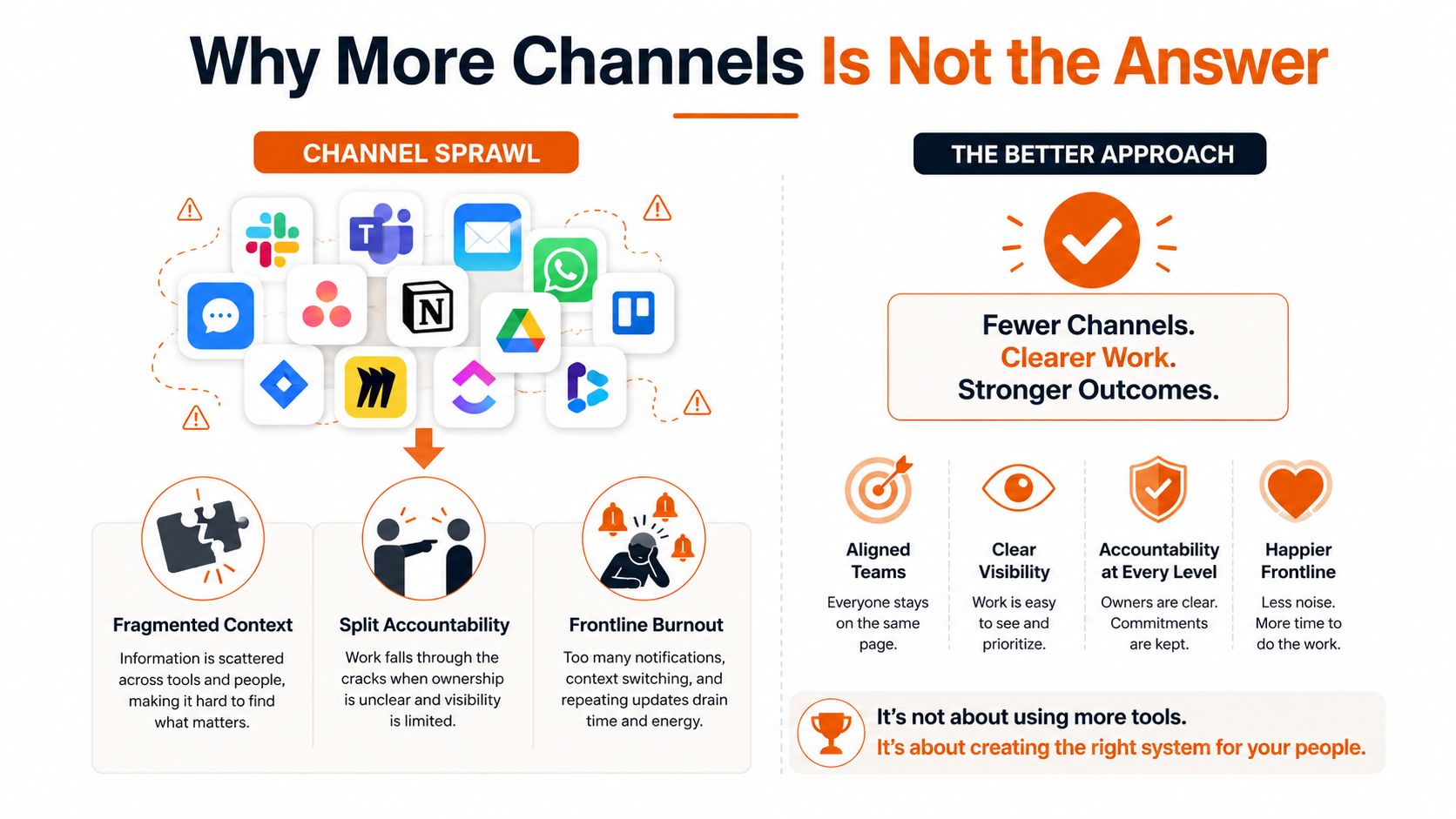
Why More Channels Is Not the Answer
Adding an app feels productive because it creates visible motion. The team gets a new workspace, a rollout email, and another set of notifications. A few weeks later, employees still don't know whether the meeting decision belongs in Slack, Teams, email, or the project board.
Channel sprawl splits context and accountability. A supervisor schedules a meeting in chat, posts the outcome in email, and assigns the task in a project tool. A worker sees only one part of the chain. When the task slips, everyone can point to a different system.
Separate by purpose, not preference
The practical fix is a small communication map:
Urgent: Use one clearly marked path for issues that need immediate attention.
Persistent: Keep team, location, or project context in channels that remain searchable.
Scheduled: Put shifts, events, approvals, and deadlines where employees can find them without scanning chat.
Searchable: Store policies, procedures, and decisions in a knowledge layer.
Social: Give informal connection a visible home instead of forcing every relationship into task threads.
A 2026 study found that channel choice should follow task demands and relational context, with asynchronous written communication suited to updates and coordination, and richer synchronous communication reserved for ambiguity, conflict, and sensitive decisions. That's a better rule than telling everyone to “use Slack more.”
Teams with multilingual workforces may also evaluate a multilingual communication platform when language access is part of the daily operating reality. Translation can help, but it won't rescue unclear ownership or badly organized information.
A useful test: Remove the app name from your policy. If employees still understand where an update belongs, you have a communication framework. If they don't, you have a vendor preference.
The same principle applies to mobile messaging and business workflows. This guide to instant messaging and business is useful because it treats messaging as part of an operating system, not as a replacement for every other form of work.
The goal is subtraction. Fewer channels, sharper purposes, and no important decision trapped in a private thread.
How a Unified Mobile-First App Pulls It Together
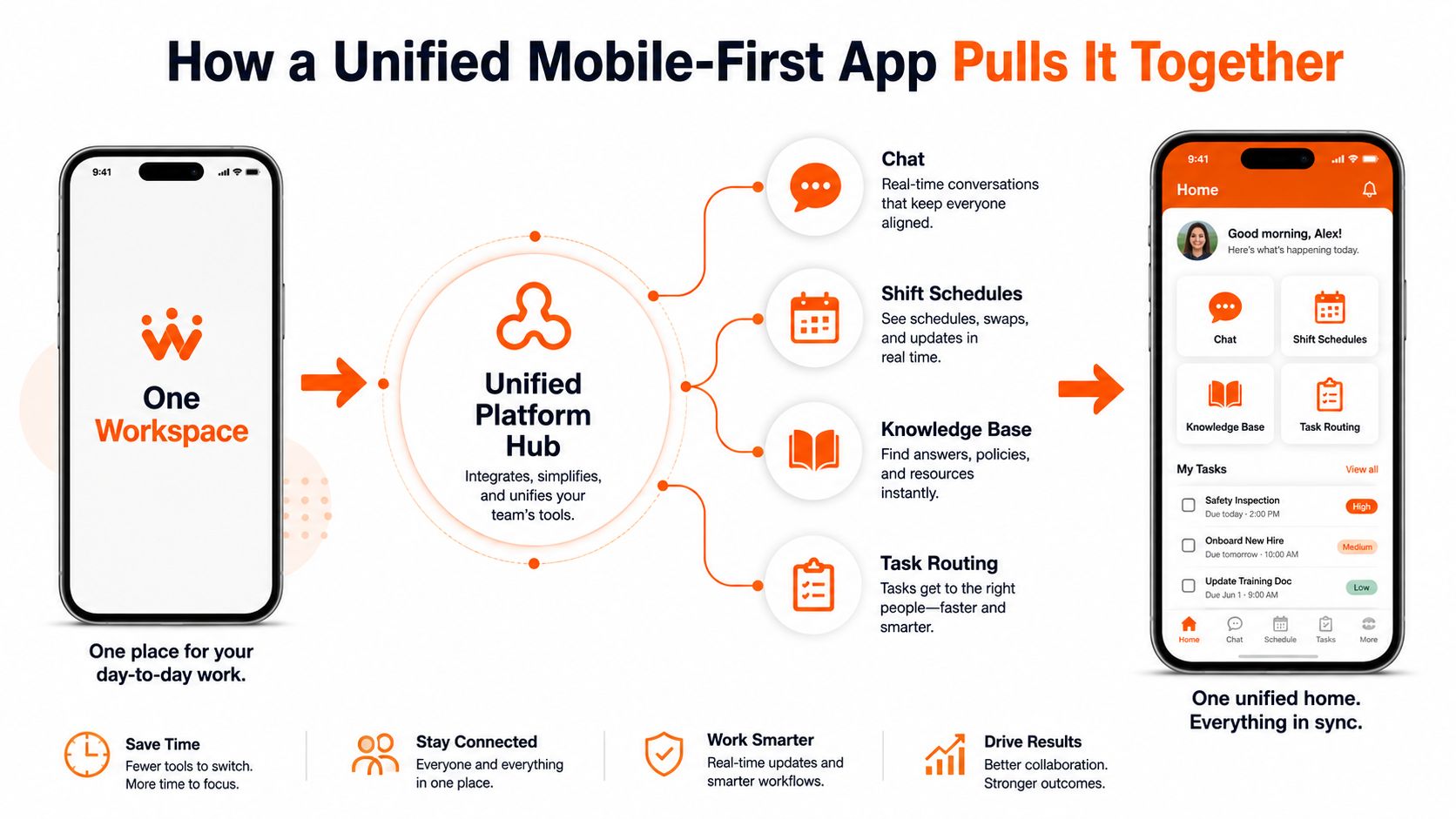
A unified mobile-first workspace gives distributed teams one operating home for communication, schedules, knowledge, and tasks. It should absorb the four or five tools employees juggle now, not force every process into one endless feed. For teams comparing options, this mobile-first workspace guide offers a useful starting point.
The phone is part of the frontline system. A desktop app with a phone companion fails a warehouse lead checking updates beside a loading bay or a nurse between rounds. Mobile parity means the frontline experience gets the same core access, not a reduced version of office software.
Four layers belong together
Real-time messaging handles urgent questions, quick coordination, and direct help. Keep escalation easy, but do not turn chat into the permanent archive.
Persistent spaces organize communication by team, store, ward, region, or project. People see the relevant context before replying, and frontline updates stay attached to the place or group affected.
A knowledge hub stores procedures, policies, training material, and frequently used files. Search matters more than decoration. A new hire should find the current process without asking three managers.
A task layer converts discussion into assigned work. Shift swaps, approvals, onboarding checklists, inspections, and follow-ups need owners and status, not just reactions.
A retail handoff shows the value. The closing lead posts notes in the store space, adds photos of empty shelves, flags a stock issue, and leaves the opener's to-do list in the same thread. The morning team starts with one record instead of reconstructing the night from SMS, paper, and memory.
Remote onboarding follows the same pattern. A new employee receives an invitation, completes paperwork, joins an introduction, reads company policy, and works through initial tasks in a guided mobile sequence. Information stays connected to the work rather than scattering across email, a document folder, and a calendar.
Pebb combines chat, updates, Spaces, tasks, file sharing, a Knowledge Library, events, shift scheduling, clock-in, and PTO tracking in a web and mobile app. The useful idea is not the feature count. It is fewer places for employees to remember and fewer chances for an important update to disappear.
Two Short Stories From Real Teams
A regional grocery chain had a familiar mess. Shift leads used SMS for urgent notes, a printed roster for schedules, and a WhatsApp group for store chatter. When a recall notice went out, managers spent hours forwarding it from store to store, and the morning crew missed the briefing.
The chain moved store communication into one mobile app. Each store received its own space, critical updates could be pinned, and shift handoffs stayed in threads tied to the location. Recall notices reached every store in under thirty minutes instead of eleven hours, and shift swaps no longer required a manager phone tree.
The improvement didn't come from choosing a trendier chat tool. It came from giving the message one trusted home and connecting that message to the people and work affected by it.
A fully remote product studio faced a different version of the same problem. Its 80 people worked across nine time zones, while context sat across Notion, Loom, email, and three Slack workspaces. New hires needed six weeks to ship a first ticket because nobody could easily tell which explanation, decision, or process was current.
The studio moved daily updates, decisions, and onboarding into a unified mobile-first space with searchable threads and a single daily digest. First-ticket ramp time fell to three weeks, and meeting volume dropped by roughly a third.
These stories point to the same operational truth. Frontline and remote teams don't need identical routines, but they do need the same basic promise: the information required to do the job should be reachable, current, and connected to action.
Measuring Whether Communication Is Actually Working
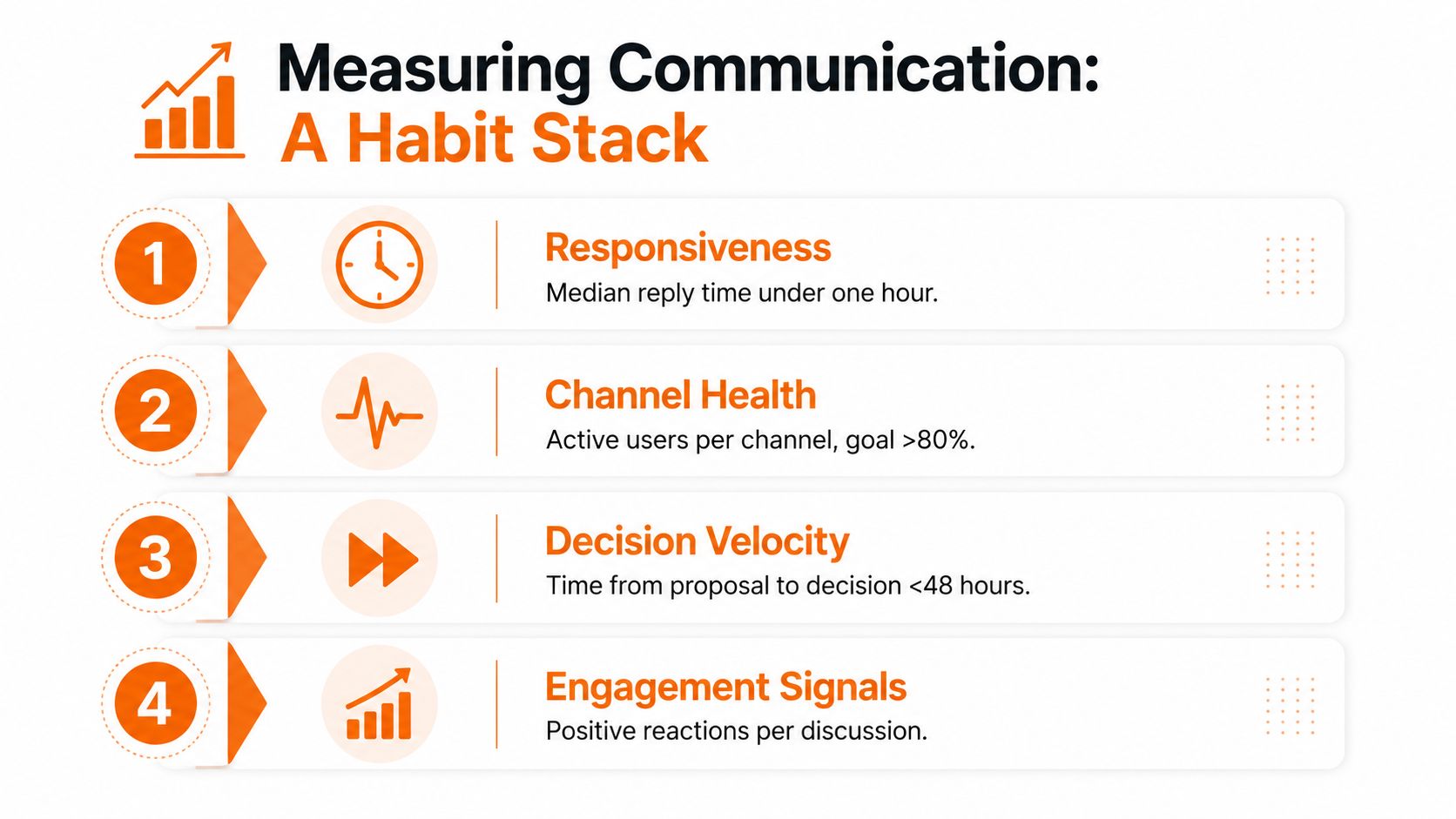
Communication measurement works best as a weekly habit, not a dashboard ceremony. Leaders should look for signs that people received the right information, understood it, and could act without unnecessary effort.
Start with four signals:
Responsiveness: Track median reply time in priority threads. During an active shift, a target of under one hour can reveal whether urgent work is moving.
Reach: Check how many frontline employees acknowledge a critical post within thirty minutes. Segment the result by location, shift, and role.
Engagement: Review read rates and reactions by group. An overall average can hide the fact that office staff read everything while field teams see almost nothing.
Overload: Watch after-hours pings, unread backlogs, and repeat questions in direct messages. Those signals show where the system is asking too much from people.
The Pebb guide to measuring communication effectiveness provides a useful starting point for turning these signals into a repeatable review.
Ask better questions each week
Metrics only help when they lead to a decision. In the weekly review, ask:
What did we send that nobody needed?
What did people need that we never sent?
Which role saw the update last?
Which question appeared repeatedly?
Which channel created confusion?
Don't turn these measures into a report card for employees. Use them to repair the system. If a critical post reaches office staff but misses night workers, change the delivery path. If everyone reads an update but keeps asking the same question, rewrite the message or connect it to the relevant procedure.
Good measurement makes communication quieter and more dependable.
Choosing Less and Doing It Better
The strongest distributed teams I've worked with don't win by collecting tools. They win by making fewer tools easier to trust.
Before adopting a new communication stack, ask five blunt questions:
Does it replace something, or merely sit on top of the current stack?
Does a frontline employee need a separate login from the rest of the organization?
Can a shift worker find yesterday's update in under ten seconds?
Can the system surface critical posts above personal conversation?
Can we retire at least two existing tools within ninety days?
If the answer to the last question is no, you're probably buying another layer. That may be justified for a specialized workflow, but don't call it consolidation.
A unified mobile-first space should absorb the work employees currently spread across chat, shift scheduling, a knowledge base, and task routing. It should also respect the places where specialized tools remain necessary. Payroll, clinical systems, and project software may still have a role. The mistake is making employees manually bridge every system with memory and forwarding.
Discipline beats the logo
Channel hygiene matters. Use consistent names for teams and locations. Pin current procedures. Archive dead spaces. Put decisions beside the work they affect. Give every recurring update a clear owner.
A qualitative model of globally distributed Scrum teams identified transparency, quality, and discipline as the foundations of shared understanding. That finding matches what operators see on the ground. A mediocre tool with strong rules usually beats a powerful tool that everyone uses differently.
Communication is cultural because it teaches people what the organization values. If leaders bury decisions in private messages, employees will do the same. If leaders write down context, include shift workers, and keep one trusted update point, the habit spreads.
Choose less. Make the remaining system obvious. Then give it enough discipline to earn trust every day.
Pebb brings chat, company updates, Spaces, tasks, files, knowledge, scheduling, and frontline access into one mobile-first work app. Visit Pebb to see how your team can replace scattered communication with one connected space for people, operations, and culture.
