
Connecteam Free Plan 10 Users Alternative: What to Use
Looking for a Connecteam free plan 10 users alternative? Compare seat caps, feature tradeoffs, and what to switch to before you outgrow the 10-user limit.
Dan Robin

Maya runs a 14-person landscaping crew in Tucson. For a year, Connecteam's free plan handled the practical stuff: job checklists, onboarding, schedules, and the daily scramble of keeping field workers aligned.
Then a foreman sent her a screenshot. The dashboard was asking her to upgrade. Three new workers couldn't clock in.
Nothing had gone wrong with the crew. The business was growing exactly as planned. The problem was that the free tool stopped working at the moment growth became operationally important.
That's the trap with free workforce software. It feels generous while your team is small, then the limit arrives during a busy season, when budgets are tight and switching tools feels dangerous. If you're searching for a Connecteam free plan 10 users alternative, you're probably deciding between paying Connecteam, finding a larger free tier, or choosing a broader employee app instead of another scheduling tool. This guide to free employee scheduling apps for small businesses helps put that choice in context.
Hitting the 10-User Wall
Maya's account had one supervisor, a few experienced workers, and several recent hires. She'd already done the hard work of teaching people where to find schedules, how to complete checklists, and how to record time. The system had become part of the crew's routine.
That's why the upgrade prompt mattered more than the price itself. Three people were suddenly outside the workflow. They couldn't borrow someone else's login, because time records and task assignments would become unreliable. Maya could pay, pause onboarding, or start a rushed migration while the season was picking up.
The Connecteam Small Business Plan is free for life for up to 10 users, but independent reviews consistently identify that ceiling as the point where growing teams get pushed toward paid plans. Turnozo's Connecteam review describes the free tier as a genuine entry plan while highlighting the 10-user limit as its defining constraint.
Practical rule: A free plan is only free if it still fits the way your team actually works.
The timing creates pain. A company rarely hits the cap after a calm planning cycle. It reaches it after hiring replacements, adding a second crew, bringing in seasonal help, or giving a supervisor proper access. By then, the business has invested time in setup and training, so the switching cost feels larger than the software bill.
Connecteam is still a reasonable choice for a very small, frontline-only team. The mistake is treating its free tier as a long-term growth strategy. The plan is built for micro-teams and trial-scale adoption, not for a business that expects headcount to keep moving upward.
The useful question isn't “How do I find the cheapest copy of Connecteam?” It's “What kind of work do I need this app to handle next?” If the answer is still schedules, clock-ins, and checklists for a small field crew, a focused alternative may be enough. If the answer includes broader communication, knowledge sharing, office collaboration, and culture, moving to another narrow tool delays the same decision.
How the Connecteam Free Plan Actually Works
Connecteam's free plan is easy to misunderstand because the feature set feels broader than the seat limit. The Small Business Plan includes core tools such as scheduling, time tracking, checklists, and in-app chat, and it allows unlimited admins. The restriction is the number of users in the account, not the number of managers who need administrative access. Connecteam documents the plan details in its Small Business Plan FAQ.
The important detail is that the account counts active and archived users together. An employee who leaves doesn't necessarily free a seat immediately. Connecteam's own documentation confirms that archived users remain part of the total, which means turnover can bring the upgrade sooner than the current headcount suggests.
The seat count in daily operations
Consider a small service company with one account manager, one supervisor, and eight workers. That fills the account. There's no room for a weekend part-timer, a replacement hire, or a seasonal employee who needs access for a short period.
A worker who becomes inactive may drop out of the active count after a period of inactivity, but reactivating that person makes them count again. That sounds manageable until a company has several former employees, recurring seasonal staff, or people who move in and out of shifts. Admins end up managing the roster around the software limit instead of managing the business.
Connecteam states that scheduling is fully free under the Small Business Plan for up to 10 users. Teams above that threshold can use a 14-day free trial before choosing the Limited plan or a paid tier, as explained on its employee scheduling page.
Connecteam Free Plan Limits at a Glance | Free Tier Limit | Upgrade Trigger |
|---|---|---|
Users | Up to 10 total users | The account exceeds the user limit |
User counting | Active and archived users count | Churned users can continue consuming seats |
Admin access | Unlimited admins | No admin limit, but workers still count |
Scheduling | Free under the Small Business Plan | More than 10 users |
Time tracking, checklists, and chat | Included at the free tier | Larger headcount or paid features |
Three choices when the cap appears
At the limit, Connecteam blocks new invitations and prompts the account toward an Essential or Advanced plan. The practical choices are straightforward:
Manage the roster: Keep the account under the cap by controlling who remains active. This works only for teams with stable staffing and limited turnover.
Pay to expand: Stay with the workflows your crew already knows. This is the least disruptive path, but the economics change as soon as growth becomes routine.
Move platforms: Choose a broader free tier, a specialized scheduling tool, or an employee app that can cover more than frontline operations.
The free plan itself isn't misleading. It's narrow. Know what the count includes before you build your operating rhythm around it.
What Other Free Alternatives Are Offering in 2026
A larger free user cap usually comes with a narrower job description. That's the central pattern across the alternatives, and it matters more than a feature checklist.
Sling offers a free plan for up to 30 users, three times Connecteam's free-user limit, according to a comparison from SaaS alternatives research. That makes Sling the clearest choice for a growing hourly team that still wants scheduling without an immediate paid commitment. The tradeoff is scope. Sling is strongest around scheduling, time tracking, messaging, and related frontline tasks, not broad employee engagement or company knowledge.
Homebase takes a different approach. Its free plan covers one location and up to 10 employees, so it suits a single restaurant, shop, or service site more than a distributed operation. The user cap isn't the only constraint. Location structure can become the wall.
Jibble is attractive when the actual problem is time tracking. Some free offerings have no user cap, but Jibble is primarily a time clock rather than a full scheduling and employee-management system. You may remove the seat bottleneck while still needing another tool for shifts, communication, and people operations.
Free Tier Comparison | Free Users | Core Strength | Biggest Gap |
|---|---|---|---|
Connecteam | Up to 10 | Frontline scheduling, time tracking, checklists, chat | Tight user ceiling and hub-based expansion |
Sling | Up to 30 | Scheduling and frontline coordination | Narrower employee-app scope |
Homebase | Up to 10 at one location | Single-site scheduling and time tracking | One-location restriction |
Jibble | No cap on some free offerings | Time clock and attendance | No full scheduling or HR workflow |
Slack | Varies by free-plan rules | Workplace chat | Requires separate scheduling and operations tools |
Microsoft Teams | Varies by free-plan rules | Communication and collaboration | Workforce management may require additional tools |
Trello or Asana | Capped collaborators on free tiers | Tasks and project coordination | Neither is a complete frontline workforce platform |
Slack and Microsoft Teams can support a communication-first setup. Trello and Asana can organize tasks. Zoom Workplace Free and Zoho Cliq can cover parts of the collaboration layer. None automatically recreates the same combination of scheduling, clock-in, checklists, and frontline communication in one place.
That can still be the right trade. A construction office with a separate payroll system may prefer Microsoft Teams for communication and Trello for project work. A small agency may need Asana far more than a time clock. For broader people-operations decisions, a useful HR software guide for startups can help separate HR administration from daily collaboration.
The mistake is calling every tool a Connecteam replacement. Some are alternatives for one part of the job. This Connecteam alternative overview is more useful when you treat the search as a workflow decision rather than a shopping list.
Why the Real Question Isn't Just Price
Once you pass 10 users, you're not only deciding whether to pay more. You're deciding whether Connecteam still matches the company you're becoming.
Connecteam is built around deskless work. Schedules, time clocks, job checklists, and frontline communication are its natural territory. That's a strong fit for a small landscaping crew, restaurant team, or retail shift operation. It becomes less comfortable when the same company adds office staff, project collaboration, shared documents, or a need for stronger culture-building.
A cheaper clone with a higher free cap may solve the seat problem and leave the scope problem untouched. You could still end up with limited conversation threads, weak document collaboration, shallow connections to HR or payroll systems, and reporting that tells you who attended without helping you understand how work is moving.

Map the work before comparing plans
Write down the jobs your team needs the app to do. Don't start with vendor names.
Frontline operations: schedules, clock-ins, PTO, checklists, shift changes.
Communication: direct chat, group updates, announcements, searchable conversations.
Shared work: tasks, files, policies, onboarding material, recurring projects.
Employee experience: recognition, surveys, profiles, directory access, culture updates.
Administration: permissions, integrations, reporting, and data ownership.
If almost everything sits in the first category, stay specialized. If the list spreads across all five, a scheduling-only replacement will probably become another temporary fix.
The stronger alternative is a broader employee app that combines communication, tasks, knowledge, and engagement with the operational tools frontline teams already need. Pebb is one example of that model, with chat, updates, Spaces, tasks, file sharing, a People Directory, shift scheduling, clock-in, and PTO tracking in the same app.
A larger free tier solves a pricing problem. A broader app solves a coordination problem.
That distinction matters because teams rarely regret paying for software that replaces several disconnected workflows. They regret paying for a tool that still forces managers to keep separate chats, spreadsheets, file folders, and scheduling systems alive.
Comparing Tools by What Happens After You Switch
Most software comparisons end at features and price. That's where the useful part should begin.
The first week after a switch tells you whether the choice was sound. Can a supervisor understand the new schedule without a training session? Can an owner move employee records and forms without manually rebuilding everything? Can the business preserve enough history to answer a payroll or attendance question later?
Onboarding speed
A focused tool such as Sling or a scheduling-first platform can be quick to introduce because the workflow is familiar and limited. A free Slack-based stack may also feel easy at first, but someone still has to design the connection between chat, tasks, schedules, and time records.
Microsoft Teams can be a natural fit for companies already using Microsoft services, although configuring channels, permissions, files, and operational routines takes more thought than inviting workers into a chat. A unified employee app can reduce the number of separate logins, but it deserves a proper workflow test before rollout.
Data portability
Ask vendors to demonstrate exports, not just promise them. Employee records, schedules, time history, custom forms, chat history, and files may live in different parts of the system. A clean CSV export is useful. A structured JSON export or documented API is better when you're planning a serious migration.
The data migration best-practices guide is a useful checklist for separating information you must preserve from material you can archive.
Migration Reality Check | Typical Onboarding Time | Data Export Quality | Hidden Migration Costs | Best Fit |
|---|---|---|---|---|
Connecteam | Familiar for existing users | Depends on the data type and plan | Rebuilding workflows if the team leaves | Small frontline teams already settled into the app |
Slack-based stack | Fast for chat, slower for operations | Chat and files may be manageable, workflows vary | Connecting scheduling, tasks, and records | Communication-first teams |
Microsoft Teams | Straightforward for existing Microsoft users | Strong for files and collaboration, operational data varies | Permission design and process rebuilding | Office and hybrid teams |
Unified employee app | Quick when setup is simple | Look for broad exports and open integrations | Mapping frontline and office workflows | Mixed distributed teams |
Open-source option | Variable and often technical | Potentially strong if the team controls the database | Hosting, maintenance, security, and training | Technical organizations with internal ownership |
The cheapest option isn't always the fastest to adopt. The most feature-rich platform isn't always the easiest to leave. Before switching, estimate the work involved in rebuilding forms, importing people, retraining supervisors, and running old and new systems during the cutover.
A good migration plan also protects the business from the emotional cost of change. Workers don't care which vendor wins the comparison. They care whether they can find tomorrow's shift and clock in without asking a manager for help.
Choosing the Right Path for Your Team
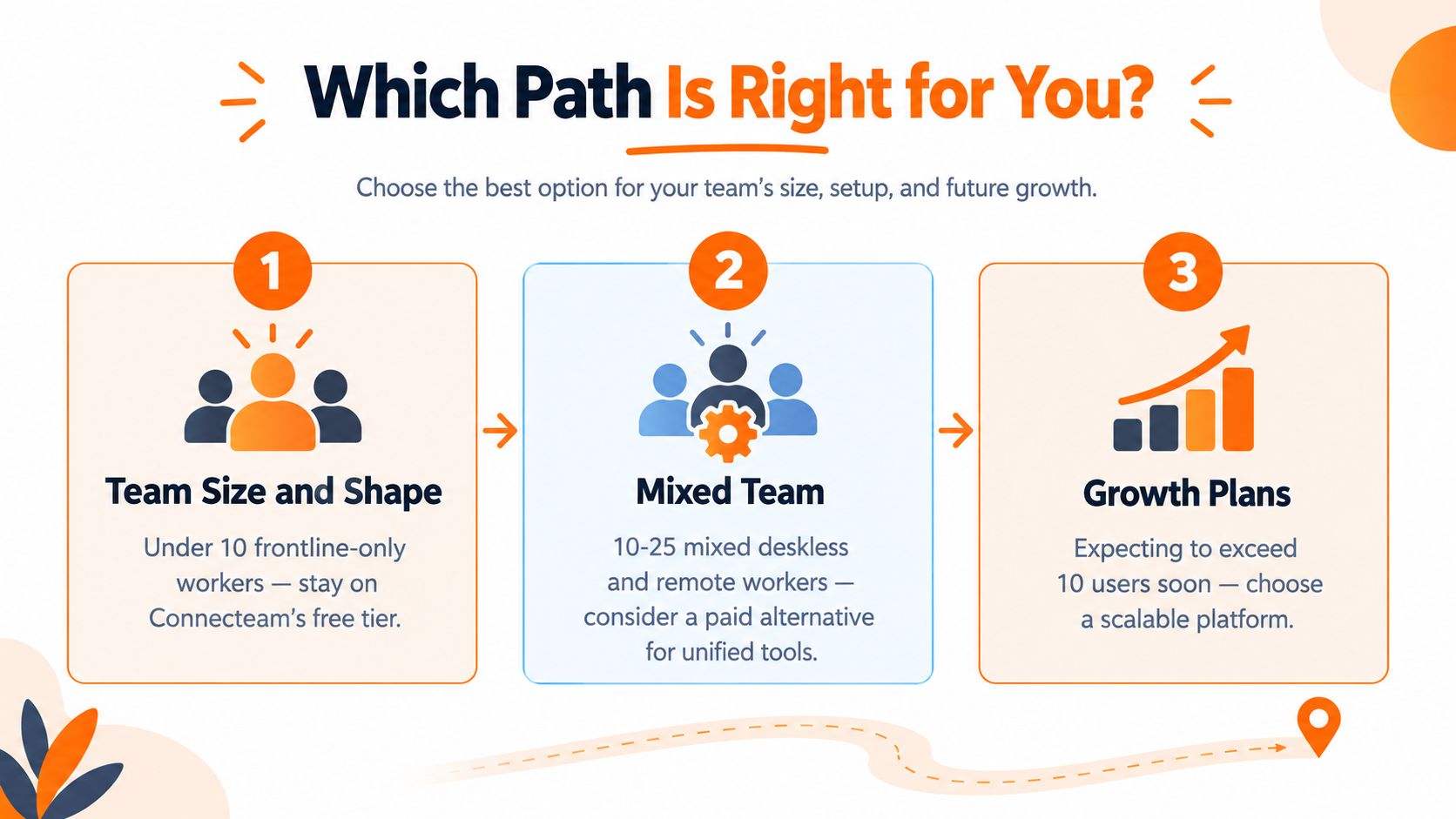
Start with team shape, not software preference.
If you have under 10 frontline-only workers, staying on Connecteam's free tier is sensible. You already have the right feature mix, and the user ceiling isn't blocking daily work. Keep an eye on archived users and hiring plans so the next invitation doesn't become an emergency.
For a team of 10 to 25 mixed deskless and office workers, evaluate a broader setup. Slack plus Trello can work for communication and tasks, while Microsoft Teams can suit companies already organized around Microsoft tools. The tradeoff is that you may need separate scheduling, time tracking, or PTO software.
If you're at 25 or more users, or hiring quickly, plan for a paid employee app now. Don't spend months assembling free tools only to replace them after another growth spurt. The cost of switching twice includes configuration, training, lost history, and the time managers spend explaining two systems.
Match the tool to the work
Hospitality and retail often benefit from specialized scheduling, labor, and location workflows. Agencies and technology companies usually need stronger collaboration, project work, files, and knowledge sharing. Healthcare, logistics, and field services may need both, which is where a unified employee app deserves serious consideration.
Growth direction matters just as much as current size. A stable 10-person crew can choose for today. A company actively hiring should choose for the next operating model, not the current roster.
Use this quick test:
Count the workflows, including communication, onboarding, files, scheduling, clock-in, PTO, and tasks.
Choose the three jobs the app must perform reliably every day.
Check whether one tool handles those jobs or whether you're creating a stack.
Price the annual cost of switching twice, including setup and training.
Test the mobile experience with an actual supervisor and worker before committing.
You should be able to reach a confident answer in fifteen minutes. If your team is small and purely frontline, stay focused. If the company is becoming mixed, distributed, or fast-growing, stop optimizing for a free seat count and choose a platform that fits the work ahead.
Where the Employee App Market Is Headed Next
The next phase of employee apps will make the free-plan question less simple.
Vendors will keep using free tiers to catch companies at the moment they're frustrated with an incumbent. Some will widen the headline user allowance while narrowing the included features. Others will shift pricing toward active users, usage levels, locations, or separate modules. The label “free” will matter less than the rules beneath it.
Scheduling automation will also move closer to the baseline. Teams will expect tools to help fill open shifts, identify conflicts, and connect schedules to attendance without requiring a separate system. At the same time, chat, tasks, knowledge, recognition, and updates will continue moving into shared employee apps instead of living in disconnected point tools.
That creates a buyer risk. A relaxed seat cap can look generous while active-user pricing raises the total cost as adoption improves. A low entry price can hide separate charges for communication, HR, reporting, or integrations. Review the full operating model, not just the signup page.
Over the next year or two, prioritize vendors that publish clear roadmaps, support open data export, and explain whether they charge for active users or registered users. Those details protect you when the next free-plan change arrives.
The best Connecteam free plan 10 users alternative isn't automatically the tool with the most seats. It's the one your team won't need to replace when the work becomes more connected.
If your team has outgrown Connecteam's 10-user ceiling, Pebb brings chat, updates, tasks, files, scheduling, clock-in, PTO, and employee engagement into one mobile-friendly work app. Visit Pebb to see whether a broader employee app fits your frontline and office workflows better than stitching together another set of free tools.
