
Author: Ron Daniel
Best Free Employee Scheduling App for Small Businesses (2026)
Compare top free employee scheduling apps—features, user limits, and pricing to find the best fit for small teams.
Have you ever spent hours juggling spreadsheets and text messages just to get your team’s schedule right - only to have someone call out last minute? I’ve been there. Managing schedules for small teams used to feel like a full-time job. And the worst part? It pulled me away from what I actually wanted to focus on: growing the business and connecting with my team.
Here’s a stat that blew my mind: manual scheduling eats up more than 20 hours a month on average. That’s nearly three full workdays gone. But automating it? That can save you five hours every single week. I don’t know about you, but I’d take those hours back in a heartbeat.
That’s why we built Pebb - an all-in-one employee app for communication and operations in one easy-to-use app. But we didn’t stop there. We took a closer look at other free tools like Homebase, Sling, and Findmyshift to see what’s working, what’s not, and how small businesses can make the smartest choice. Let me walk you through what I’ve learned so you can find the perfect fit for your team.
1. Pebb
At Pebb, we’ve tackled the chaos of managing multiple tools for scheduling, team chat, and time-off tracking by rolling them into one easy-to-use platform. Let me walk you through what makes Pebb stand out.
User Limits
Our free plan is perfect for teams of up to 15 members. Need more seats? The premium plan is just $4 per user per month. To put that in perspective, Slack Pro costs $7.25 per user, and Microsoft Teams starts at $4 per user - neither of which includes built-in scheduling like Pebb does. With us, you’re getting more functionality for less.
Scheduling Features
Pebb’s scheduling tools are a game-changer. Using a drag-and-drop interface, you can easily create shifts, and manage PTO, clock-in tracking, events, and digital forms in one place. The free plan covers the essentials: shift creation, clock-in tracking, and PTO management. If you need more, the premium plan steps it up with analytics and more advanced controls. And since scheduling is tightly integrated with our communication features, keeping your team on the same page is effortless.
Communication Tools
Staying connected is easy with Pebb. The free plan offers unlimited chat history, a dynamic news feed, a people directory, and calendar events to keep everyone in the loop. Want to take it up a notch? The premium plan includes voice and video calls, so you can ditch those extra apps. Whether you’re on the web or mobile, Pebb makes team communication simple - no complicated setups, no extra downloads.
Additional Capabilities
Pebb doesn’t stop at scheduling and chat. It also simplifies your daily workflows with digital forms, task management, and a built-in knowledge base for storing procedures and policies. It’s like having a virtual office assistant, always ready to help your team stay organized and productive.
2. Homebase
Let’s talk about Homebase - a scheduling tool that’s carved out a niche for shift-driven industries. With over 150,000 companies and 3.5 million employees relying on it, Homebase has found a sweet spot, especially with businesses in retail and food service.
User Limits
Homebase’s free "Basic" plan is pretty straightforward: it covers one location and up to 10 employees. Now, while that 10-employee cap might feel limiting compared to Pebb's offerings, it’s a solid starting point for small businesses just getting off the ground. If your team grows beyond 10, you’ll need to upgrade to the Essentials plan, which costs $24 per location per month (when billed annually) or $30 if billed monthly. Here’s the kicker - Homebase charges per location, not per user, so if you’re managing multiple sites, those costs can stack up quickly.
Scheduling Features
When it comes to scheduling, Homebase doesn’t mess around. You’ve got drag-and-drop scheduling, reusable templates, and automated shift reminders sent via text, email, or push notifications. Employees can request shift swaps or grab open shifts themselves. They even offer auto-scheduling that factors in employee availability and labor goals.
Amanda Jensen, Owner of Golden Hour Designs, summed it up perfectly: "I love the ease of making my team's schedule every week! I can do it from my phone wherever I'm at and that's a game changer for someone who's always on the move!"
Communication Tools
Homebase also steps into the communication game with built-in team messaging. Forget juggling group texts - this feature lets managers send shift-specific notes, daily instructions, and updates about schedule changes all in one place. Need someone to cover a shift last-minute? Managers can send out instant messages to all available employees. That said, while these tools are helpful, they don’t quite match the depth of Pebb’s integrated chat and scheduling system.
Additional Capabilities
Homebase doesn’t stop at scheduling. It offers GPS-verified time tracking (complete with photo capture), payroll integration with platforms like QuickBooks, Gusto, Square, and ADP, plus hiring and onboarding tools. It even syncs with popular POS systems like Clover, Toast, and Square to help align schedules with sales forecasts.
Primo Stropoli, Owner of Tetta's Market, shared his experience: "It takes a picture of the employee when they clock in. Having something there that I could rely on... I could track employees even when I'm not always at the store."
However, there’s a catch. If you’re after advanced features like labor forecasting or HR compliance tools, you’ll need to shell out for one of the higher-tier paid plans.
So, while Homebase brings a lot to the table, especially for smaller teams, keep an eye on those extra costs as your needs grow.
3. Sling

Sling has earned a solid reputation, with over 21,000 ratings on the Apple App Store and an impressive 4.7/5 score. Its free plan stands out by accommodating up to 30 users across unlimited locations - about three times the user limit offered by competitors like Homebase.
User Limits
Here’s where Sling shines: most free scheduling apps cap you at 10 users, but Sling’s free plan lets you include up to 30 people. If your team grows beyond that, you can switch to a paid plan starting at just $1.70 per user per month (when billed annually). This flexibility, paired with its straightforward interface, makes managing shifts far less of a headache.
Scheduling Features
Sling’s scheduling tools are designed to save time. The drag-and-drop builder, shift templates, and the option to replicate weekly schedules make planning a breeze. Employees can take control of their schedules too, with features that let them claim open shifts, trade shifts, and update their availability.
Kenneth Taylor from Expeditors shares, "Sling drastically reduced the amount of time I spend scheduling. I post weekly schedule in minutes and it replicates to future weeks."
One standout feature of Sling’s free plan is shift swapping, which some competitors don’t offer. Plus, the platform includes labor cost forecasting, giving you real-time insights into budgets and overtime. Companies using Sling have reported an 88% improvement in shift coverage and a 23% reduction in overtime costs.
Communication Tools
Sling doesn’t stop at scheduling - it also packs in robust communication tools. You get private and group messaging, a newsfeed for company-wide updates, and the ability to send targeted messages to specific teams or locations. Read receipts ensure you know who’s seen your messages.
Lee Weiss from The Musket Room explains, "Sling has been a great organizational tool for our restaurant! It allows me to easily arrange schedules, keeping up with our staff's different requests, and serves as a platform for all internal communication."
What’s great is that these communication tools are baked right into the scheduling interface. Employees can chat with coworkers and accept shifts all from the same app. That said, Pebb offers a more integrated solution by combining scheduling, communication, and engagement into a single platform.
Additional Capabilities
Sling goes beyond basic scheduling with features like task management, which lets you assign specific checklists to shifts - think opening or closing routines. It also includes compliance tools, such as alerts for required rest periods between shifts (to prevent "clopening") and certification tracking. Integration with POS systems like Toast, Square, and Shopify, as well as payroll platforms like Gusto, adds even more functionality.
However, the free plan does have its limitations. Support is restricted, with no phone support and limited live chat hours. For advanced tools like geofencing or kiosk time tracking, you’ll need to upgrade to the Premium tier ($1.70 per user/month) or the Business tier ($3.40 per user/month).
4. Findmyshift
Findmyshift is well-known for its simple drag-and-drop schedule builder. Its free plan is pretty limited, allowing just 5 users, 5 facilities, one week of forward scheduling, and one week of historical data.
User Limits
The free plan is capped at 5 users and 5 facilities. If your team grows beyond that, you'll need to upgrade to a paid plan starting at $25 per team per month (covering up to 20 members). They also offer a 3-month free trial so you can explore the premium features. Independent reviewers have given its scheduling features a 7/10 rating.
Scheduling Features
The drag-and-drop schedule builder is easy to use and lets you color-code shifts by location, which helps keep things organized. Employees can request shift swaps or cancellations, and managers can approve these changes through a straightforward process. However, the free plan doesn’t include shift templates, so you’ll be creating schedules from scratch every week.
John, a business owner, said: "Integrating it into my business was super easy and fast. And the report on hours of operation makes for better time management."
Findmyshift also includes a built-in time clock and attendance tracking, letting managers compare scheduled shifts with actual hours worked. It offers leave management too, supporting custom leave types like sick days, vacations, or training. Employees can submit leave requests through the web or mobile app. These tools make it easier to manage your team’s availability and time.
Communication Tools
The platform provides basic communication tools, including a digital notice board and a one-way messaging system to keep your team updated. Automated shift reminders and change notifications are sent via email, SMS, or push notifications. While these features are useful, they don’t quite measure up to Pebb’s more advanced tools, which include team chat, news feeds, and voice/video calling.
One standout feature is that Findmyshift offers live chat, WhatsApp, and email support for free-tier users - something not all platforms provide.
Additional Capabilities
Findmyshift integrates with popular tools like Slack, Xero, Square, and BambooHR, and it even offers API access for creating custom workflows. But since the free plan only allows you to schedule one week ahead, you’ll need to be diligent about publishing shifts regularly to avoid any gaps in coverage. If you’re looking for more flexibility and a comprehensive solution, Pebb offers all this and more for just $4 per user.
Pros and Cons
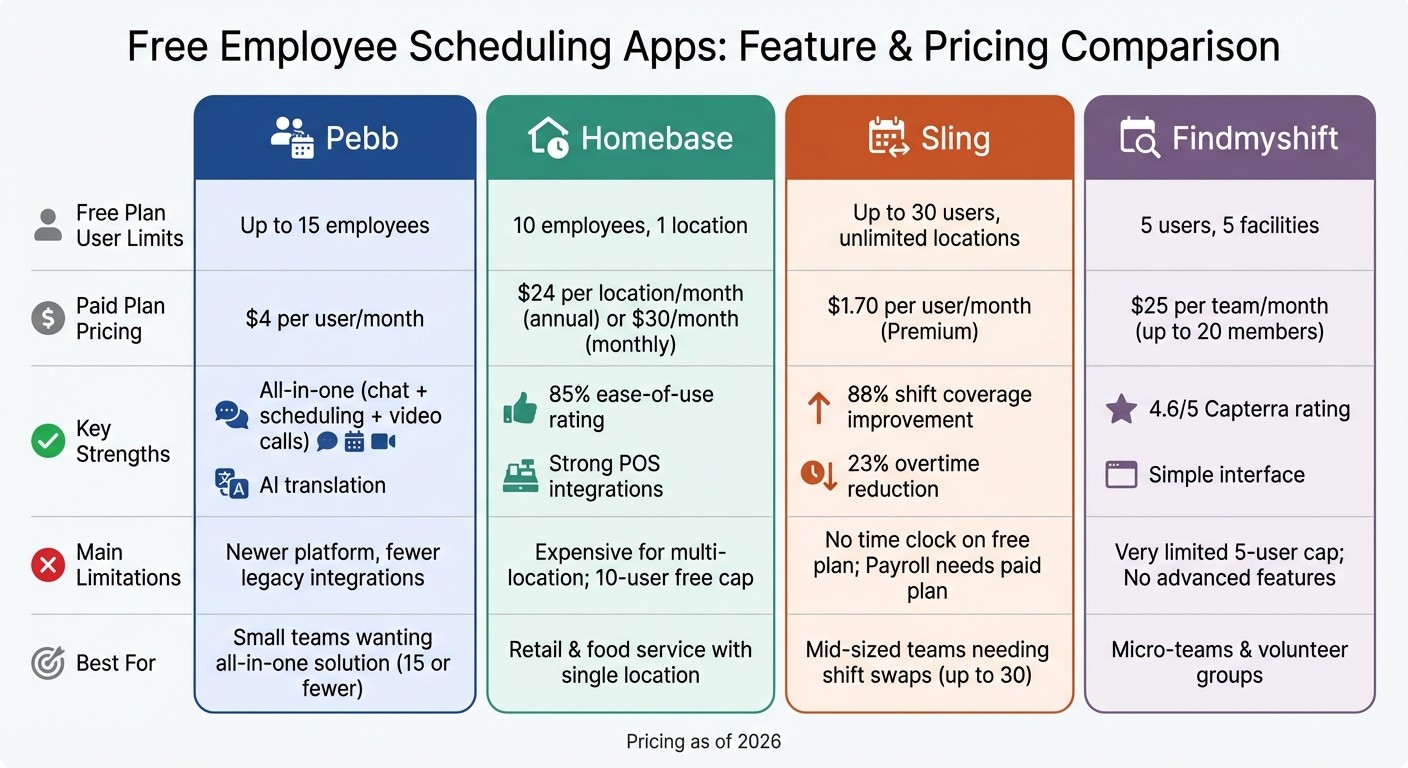
Free Employee Scheduling Apps Comparison: Pebb vs Homebase vs Sling vs Findmyshift
When it comes to scheduling apps, each platform has its own strengths and weaknesses. Here's a quick breakdown of how they stack up, so you can figure out which one might be the best fit for your team.
App | Unique Advantages | Key Weaknesses | Free Plan Limits |
|---|---|---|---|
Pebb | Combines chat, PTO tracking, voice & video calls, tasks, forms, events, and knowledge base; Affordable per-user pricing | Newer platform with fewer legacy integrations | Free for up to 15 employees |
Homebase | Strong POS and payroll integrations; AI-powered scheduling | Expensive per-location pricing for multi-site businesses; Free plan capped at 10 users | 1 location, 10 employees |
Sling | Great for shift swaps; Generous free user limit; Labor tracking included | Free plan lacks a time clock; Payroll integrations require paid plans | Up to 30 users |
Findmyshift | Simple and great for volunteer teams | Very limited user cap; Lacks advanced compliance and labor tools | Up to 5 users |
Now, let’s dig into what these differences mean for your business.
Pebb is an all-in-one employee app, which means it handles scheduling, communication, operations, and collaboration in one place. That’s a big deal for small teams trying to avoid juggling multiple tools. While it’s a newer platform, its $4 per user pricing after the 15-employee free limit makes it budget-friendly as your team grows.
Homebase shines when it comes to ease of use - 85% of customers rate it highly for simplicity. However, the per-location pricing can quickly become a headache for businesses with multiple sites.
Sling stands out with its free plan, which supports up to 30 users - perfect for mid-sized teams. But if you need a time clock or payroll integrations, you’ll have to bump up to a paid plan.
Findmyshift is the simplest tool on this list, earning a 4.6/5 rating on Capterra. It’s ideal for micro-teams or volunteer groups, but the low user cap and lack of advanced features mean most businesses will outgrow it quickly.
Here’s the bottom line: Pebb eliminates the hassle of switching between tools by combining scheduling, communication, operations, and collaboration. It’s built to grow with your business, offering everything you need in one platform - without breaking the bank.
Why Pebb is the Go-To Scheduling App for Small Businesses
Let me tell you why Pebb has become a favorite for small businesses like yours. Unlike Homebase, which limits its free plan to just 10 employees, or Sling, which doesn’t include auto-scheduling, Pebb takes a different approach. It’s designed to give teams of up to 15 everything they need to manage schedules, communication, and operations in one easy-to-use app - without any sneaky fees or restrictions.
For businesses with 15 or fewer team members, Pebb’s Standard plan is a game-changer. You get a powerful all-in-one tool that keeps everything running smoothly, saving you both time and money. And here’s the kicker - there are no extra charges for multiple locations or annoying add-ons. It’s all included, making it the perfect fit for small teams who need simplicity and reliability.
Now, if your business starts to expand (and I hope it does!), Pebb grows with you. The Premium plan is just $4 per user per month, and it’s packed with advanced features like analytics, voice and video calls, integrations, enterprise SSO, permissions control, and premium SLA support. It’s rare to find this kind of value at such a low cost.
Here’s the bottom line: Pebb was built to solve the headache of juggling multiple tools. Whether you’re running a cozy coffee shop, a bustling retail store, or a small office, you can handle scheduling, communication, operations, and collaboration all in one place.
Why wait? Simplify your workday and give Pebb’s free plan a try today!
FAQs
How fast can I set up Pebb for my team?
Setting up Pebb for your team is a breeze. With its user-friendly design, managers can create, publish, and update schedules in just minutes using simple drag-and-drop tools. Employees get instant access to their schedules through the app, keeping everyone on the same page. Depending on the size of your team and how comfortable you are with scheduling software, most users can have Pebb up and running in as little as a few minutes to about an hour.
Can Pebb manage multiple locations on the free plan?
Pebb’s Standard plan makes managing multiple locations a breeze. Whether you’re juggling shifts across branches, departments, or different job roles, it’s built to simplify scheduling for teams that are spread out or operate on rotating schedules.
What happens when my team grows past 15 employees?
When your team grows beyond 15 employees, you might notice that many free scheduling tools start limiting features or capping user access. That’s where Pebb shines. It’s built to grow with you, offering an all-in-one platform that includes shift scheduling, PTO management, tasks, digital forms, events, and team communication tools. The best part? You don’t have to scramble for an upgrade the moment your team expands - Pebb is ready to handle the growth seamlessly.
