
Find Top Business Management Software Limited for 2026
Discover the best business management software limited for your company in 2026. Streamline operations & boost profits with our comprehensive guide.
Dan Robin

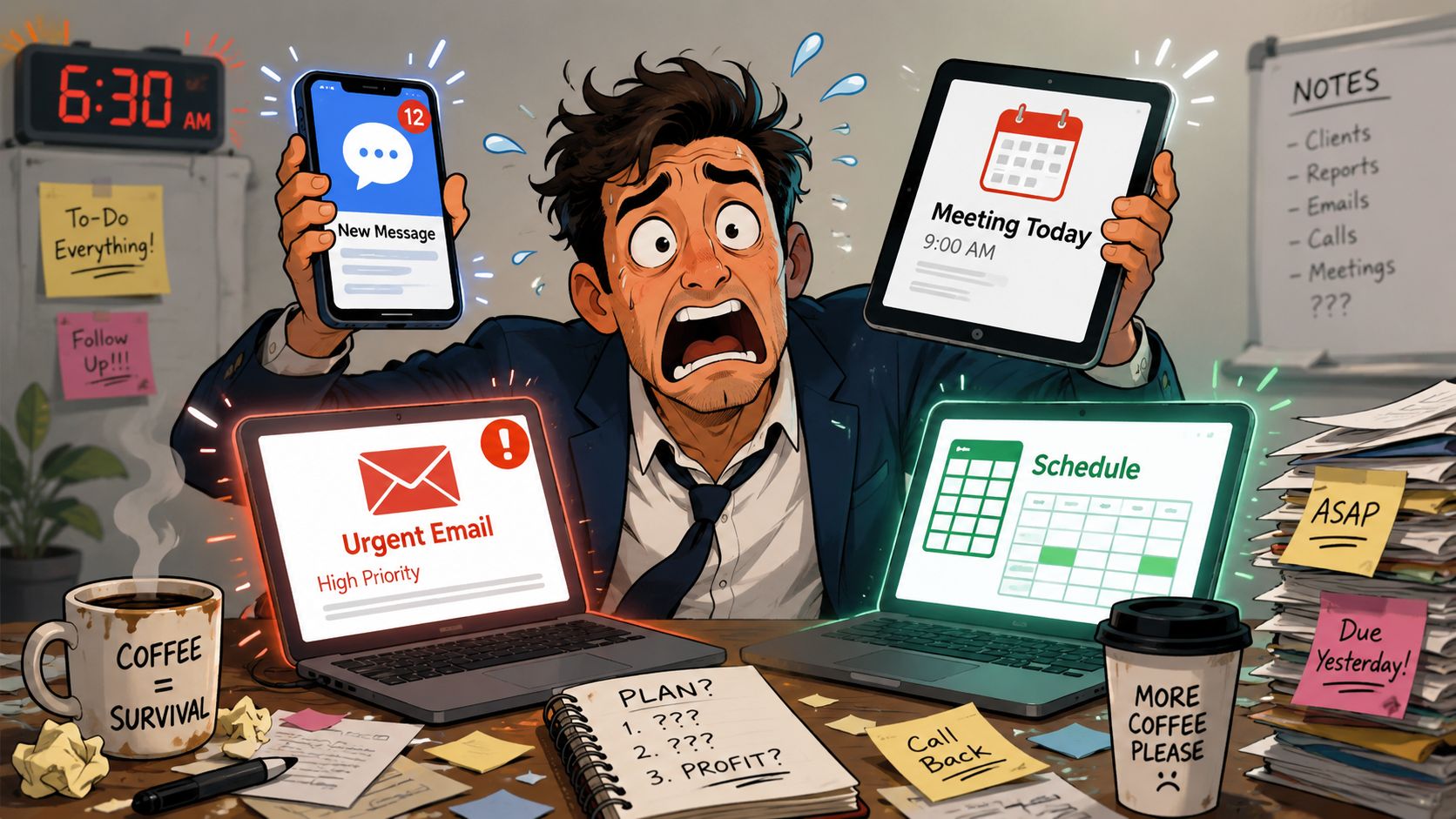
By 9 AM, a lot of teams have already lost the day.
A manager checks a scheduling app to see who called out. Then a group chat to find a replacement. Then email for a customer complaint. Then a spreadsheet for payroll notes. Then another tool for tasks nobody updated. Nothing is technically broken. But the work feels broken because the information is scattered.
That's usually what people mean when they search for Business Management Software Limited. They're not looking for one more app. They're looking for a calmer way to run the business.
The Daily Scramble Is Optional
A typical morning mess looks familiar. The opener can't find the latest rota. A supervisor sends a shift change in chat, but one person misses it. Someone updates a spreadsheet, someone else doesn't. By lunch, the team is working around the software instead of with it.
That scramble feels normal because a lot of businesses grew into it. One tool solved scheduling. Another handled customer messages. Another stored documents. Another tracked tasks. Each choice made sense on its own. Together, they created friction.
There's also a naming problem. Business Management Software Limited is a real UK company. It's an active private limited company incorporated on 31 October 1990, registered in Peterborough, with SIC code 62020 for information technology consultancy activities, according to the UK Companies House record for Business Management Software Limited. But that's probably not what brought you here.
You're likely trying to answer a more useful question. What tool can help run a limited company without turning every day into software triage?
What people usually need
Many teams don't need another specialist app. They need one place where the basics live together.
Schedules and shifts: so staff know when they're working
Messages and updates: so urgent information doesn't vanish in personal texts
Tasks and handoffs: so work survives a shift change
Files and policies: so people stop asking where the latest version is
People information: so managers aren't hunting across systems
If that's the actual problem, an all-in-one business software approach is a better place to start than another patch.
The daily scramble isn't a sign your team is weak. It's usually a sign your tools were never designed to work together.
Once you see that, the search changes. You stop asking, “Which app has the most features?” and start asking, “Which system helps us run the day without chaos?”
What Is Business Management Software Really
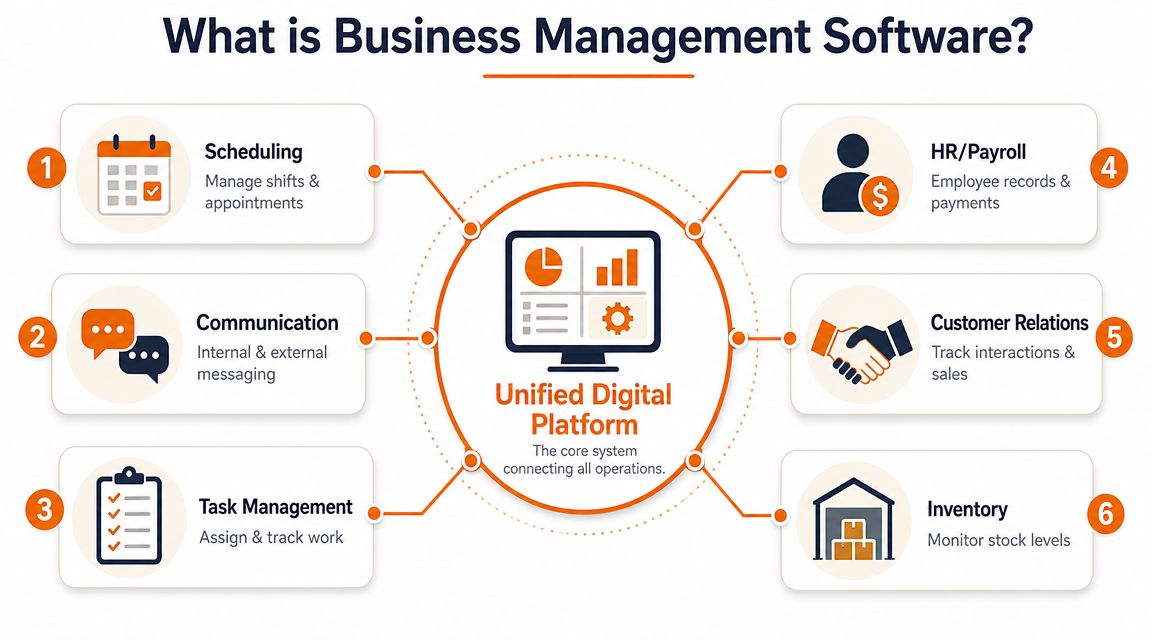
Strip away the category language and business management software is simple. It's a shared operating space for the work your company does every day. People can see what matters, act on it, and move without waiting for someone to forward the right file or paste the right update.
That idea has been around longer than the recent flood of “all-in-one” products. Modern ERP systems grew out of earlier MRP systems, then expanded in the 1990s into broader business functions like finance, HR, and supply chain, as described in Vtiger's overview of business management software. The important part isn't the acronym history. It's the reason those systems existed in the first place. Businesses needed one backbone instead of disconnected records.
A messy house versus a usable one
The easiest way to explain this is with a house.
In a messy house, the scissors are in one drawer, the tape is in the garage, the batteries are in a random box, and nobody knows where the spare keys went. You still own everything you need. You just can't find it when it matters.
A disconnected software stack works the same way. Customer details sit in one system. Schedules live somewhere else. Time-off requests happen in chat. Policies are buried in email attachments. The problem isn't the lack of tools. It's the lack of order.
A good business management platform is the opposite. It gives everything a home.
What belongs in that home
The exact setup depends on the business, but the core pattern is usually recognizable:
Area | What it should handle |
|---|---|
Communication | Team chat, announcements, updates |
Work coordination | Tasks, handoffs, approvals |
Workforce operations | Scheduling, time off, clock-ins |
People admin | Profiles, documents, onboarding |
Business visibility | Dashboards, reporting, shared context |
That's why a strong workforce management software setup matters so much for shift-based teams. It connects labor, communication, and execution instead of treating them as separate problems.
Practical rule: if staff need three apps to complete one routine task, you don't have a software stack. You have a relay race.
Business management software, at its best, fixes that. Not by making work magical. Just by making it easier to see, easier to update, and harder to lose.
Beyond Features What Actually Changes
Feature lists are where bad buying decisions begin.
A tool can offer chat, tasks, forms, approvals, dashboards, automations, integrations, and still make daily work worse. I've seen teams buy software because the demo looked polished, then spend months stitching together basic routines that should've been obvious from day one.
What matters is friction. How much effort does the system remove from ordinary work?
The hidden tax of disconnected tools
When systems don't share context, people become the integration layer. They copy information from one place to another. They repeat instructions. They chase updates. They ask the same questions all week because nothing lives where it should.
That tax rarely shows up on a software invoice. It shows up in smaller, uglier ways.
Managers spend energy remembering instead of managing
New hires learn workarounds before they learn the job
Staff stop trusting the system and go back to texts, calls, and side conversations
Decisions slow down because nobody is sure which screen is current
A centralized, integrated platform reduces those silos and helps productivity and decision-making by replacing disconnected tools with shared dashboards, role-based access, and automated workflows, as noted in eLeaP's summary of key business management software design patterns.
The real payoff is emotional
The technical benefit is obvious. Fewer silos. Cleaner workflows. Better visibility.
The human benefit is bigger. People feel less scattered.
When schedules, tasks, updates, and documents live together, the team stops wasting mental energy on basic coordination. A supervisor can answer a question without opening five tabs. A new starter knows where policies are. A shift lead can hand off cleanly to the next person.
Good software doesn't just save time. It reduces doubt.
That matters more than most buyers admit. Businesses don't break because they lack one more dashboard. They break because nobody trusts the flow of information.
So yes, features matter. But only after the tool proves it can create one reliable version of the day.
How This Works in the Real World
The easiest way to judge business management software is to ignore the sales language and look at one routine process. Pick the thing your team does every day that currently feels harder than it should. That's where good software earns its keep.
In retail, it's often the rota. A store manager builds the week in Excel, screenshots it, posts it in chat, then spends the next two days untangling swap requests. Someone misses a message. Someone else shows up late because they read the old version. The issue isn't effort. The manager is trying hard. The system is just flimsy.
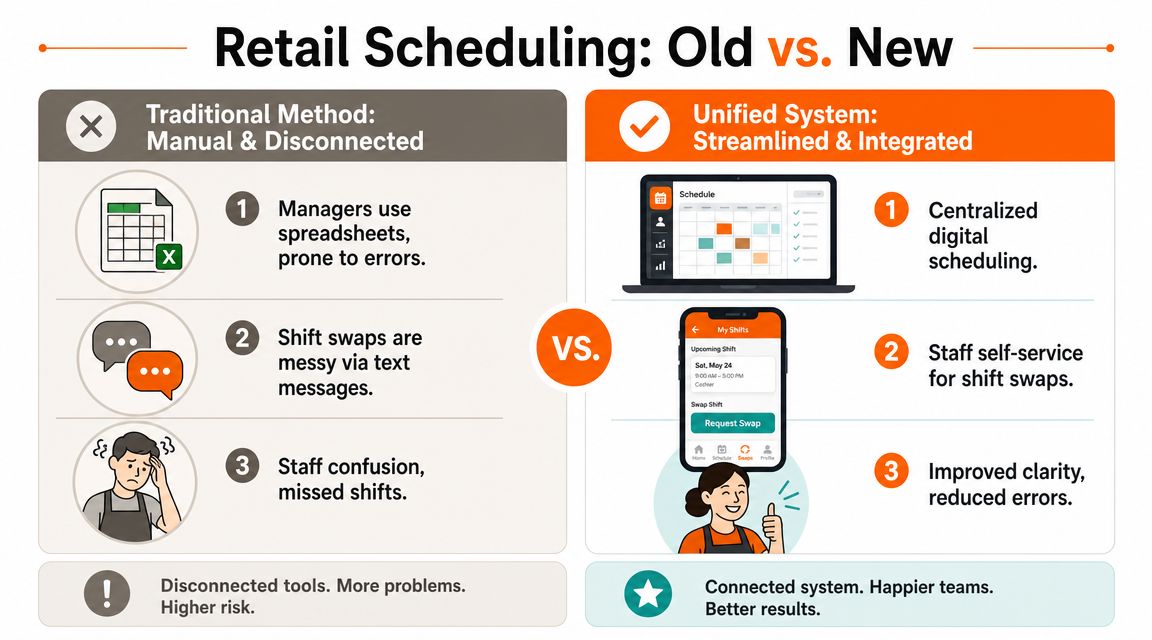
With a unified setup, the schedule lives in one place. Staff can check shifts on their phones, request time off without side messages, and handle swaps through a visible process instead of a text chain. The manager stops acting like air traffic control.
Four before and after snapshots
Hospitality has a different version of the same pain. Front desk staff hear about room status one way, housekeeping hears it another, and maintenance hears it last. A decent platform doesn't change the work itself. Rooms still need cleaning. Repairs still need doing. But updates move in one channel with a record attached, so the team spends less time repeating itself.
A clinic usually feels the drag in coordination. Reception needs one set of information, administrators need another, and everyone needs access to the same current documents. If internal updates, schedules, and policy files are scattered across email, paper, and personal messages, mistakes creep in. A shared hub gives staff one reference point, which is what regulated, fast-moving environments need most.
Logistics teams often struggle during onboarding and schedule changes. Seasonal workers join quickly, route details change fast, and safety information can't live in a binder nobody reads. A mobile-first system gives drivers and warehouse staff a direct place for updates, forms, tasks, and key documents. That's not a nice-to-have. It's basic operational hygiene.
What improves first
The first gains are usually boring. That's a good sign.
Industry | Before | After |
|---|---|---|
Retail | Spreadsheet rota and chat confusion | One live schedule with visible requests |
Hospitality | Fragmented room and maintenance updates | Shared operational communication |
Healthcare clinics | Policies and scheduling spread across channels | Central access to documents and updates |
Logistics | Paper-heavy onboarding and missed change notices | Mobile access to tasks, forms, and announcements |
If a tool can't make one repetitive process calmer within the first stretch of use, it probably won't fix the bigger mess either.
That's how I'd judge any platform. Not by the homepage. By the handoff, the shift change, the update, the request, the routine.
Making the Switch Without the Headache
Most software projects become miserable because companies try to replace everything at once.
They hold a big kickoff, map every workflow, promise total transformation, and dump a new system on the team in one shot. It looks ambitious. In practice, it usually creates confusion, resistance, and a lot of quiet backsliding into the old tools.
A calmer rollout works better.
Start with one problem that hurts
Don't begin with a master plan. Begin with the part of the day that keeps breaking.
If communication is a mess, fix communication first. If scheduling causes the most noise, start there. If onboarding is inconsistent, build one clean home for policies, forms, and first-week tasks before touching anything else.
That approach does two useful things. It gives the team a quick win, and it reveals whether the tool is usable under real conditions.
Look for connection, not replacement fantasy
Good software doesn't need to erase your whole stack on day one. It should fit into the business you already run.
Recent market guidance describes a shift from disconnected tools to unified suites, and one 2026 guide highlights connectivity with 850+ tools as a differentiator in this category, which reflects demand for faster implementation and broader visibility than older enterprise systems allowed, according to Keel's guide to business management software. That matters because it changes the buying question. You're no longer choosing between chaos and a total rebuild. You're choosing whether a platform can connect enough of the business to remove the daily friction.
A phased move also makes data migration best practices far more realistic. You migrate what matters first, test it with a real team, then expand.
What to watch for during rollout
A short checklist beats a grand strategy deck.
Adoption before perfection: if staff won't use it on a busy day, the feature depth doesn't matter
Mobile reality: frontline teams need the same clarity on a phone that office staff get on a desktop
Permission control: people should see what they need, not everything
Clear ownership: one person should own the rollout, even if several teams use the tool
Buy software in the order your pain appears, not in the order a vendor demo presents it.
That one habit prevents a lot of bad implementations. Small wins build trust. Trust builds usage. Usage is what turns software into an operating system instead of shelfware.
Where Most Business Software Falls Short
A store manager is covering a callout, approving time off, answering a stock question, and trying to tell the late shift about a delivery change. If the system expects that work to happen from a desktop at 3 p.m., it is built for the wrong day.
That is where a lot of business software still breaks down. The product may look polished in a demo, but the operating assumption is the same. The user is sitting at a desk, working through neat screens in a quiet block of time. Frontline businesses do not run like that.
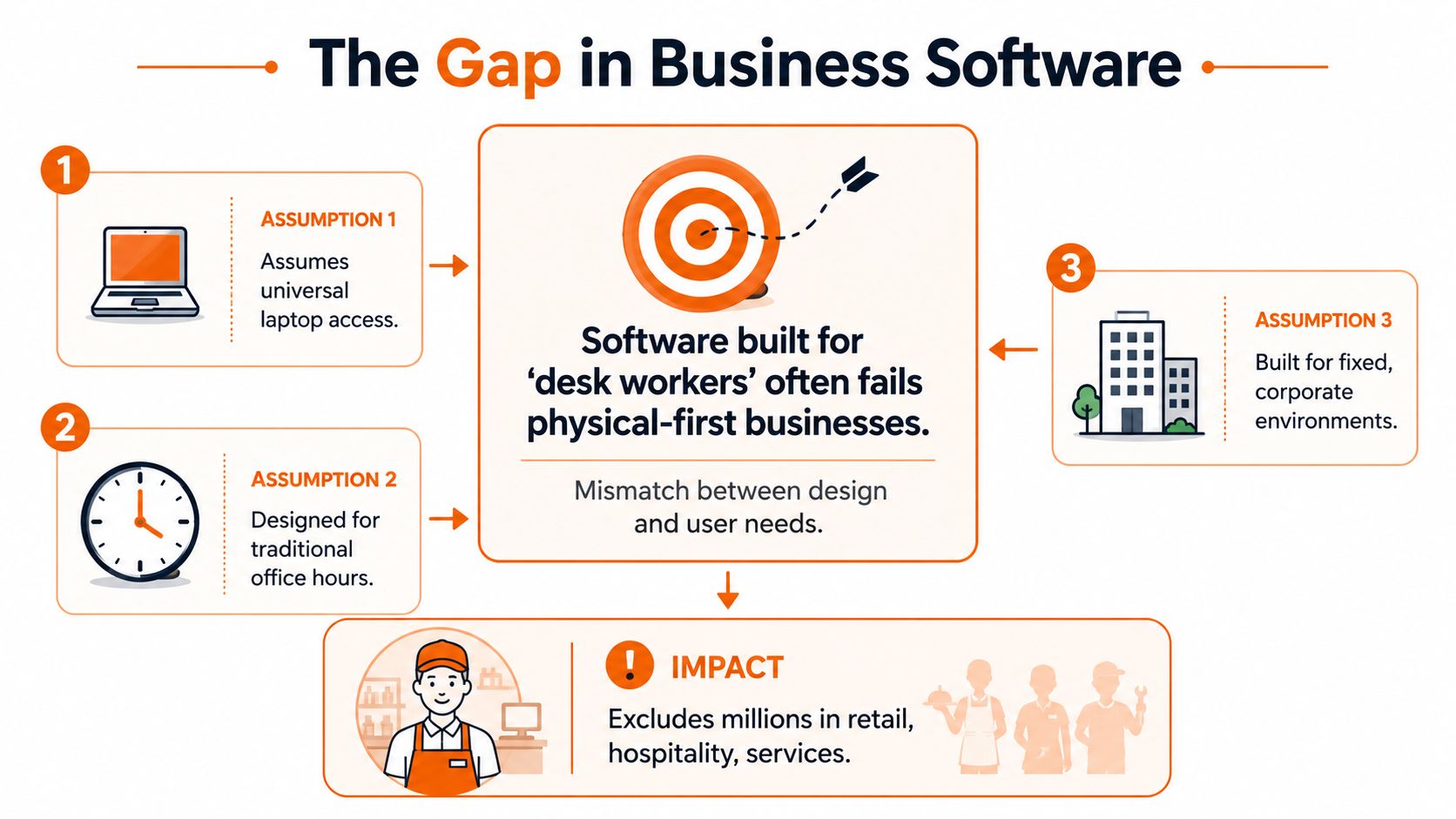
For retail, hospitality, logistics, healthcare, and field services, bad fit shows up fast. Mobile access is stripped down. Scheduling sits off to the side. Messages read like corporate announcements instead of quick instructions people can act on between jobs, tables, visits, or handovers.
The buying model is often wrong too
A lot of software reviews still reward volume. More modules. More settings. More things to click.
Small businesses rarely fail because they lacked another menu. They struggle because the tool asks too much of already stretched managers and gives too little back to the people doing the work. Bain makes that point from the commercial side in Bain's analysis of selling to small businesses. The opportunity is large, but vendors have to understand how smaller firms buy and operate, not just how to stack features on a pricing page.
I have seen this play out more than once. A company buys software that looks complete, then spends months building workarounds because the day-to-day reality was never part of the product design.
What better fit looks like
The practical test I'd use is simple. Can the software reduce coordination effort during a normal shift?
That means a new starter can be added without a long setup process. A supervisor can run the day from a phone. Team updates, tasks, scheduling, and basic people admin live close enough together that staff do not have to bounce between apps just to stay aligned. Multi-site businesses can keep standards consistent without every location inventing its own system.
Pebb is one example aimed at that operating model. It brings team communication, shift scheduling, clock-ins, PTO tracking, tasks, file sharing, knowledge, and employee profiles into one app across web and mobile. For frontline-heavy SMBs, that matters less as a feature list and more as an execution decision. Fewer handoffs. Fewer missed updates. Less manager chasing.
Software for physical-first teams should feel like part of the shift, not another task managers have to police.
Plenty of tools fall short because they were built around the wrong workday. That is usually the failure point. Not missing features. Bad assumptions about how the business runs.
Your Business Is a System Not a Spreadsheet
Most software decisions look small when you make them.
You pick a chat app because the team needs updates. A scheduler because rota changes are painful. A file tool because documents are messy. An HR tool because onboarding is inconsistent. Each choice solves something. Then one day the business is running on fragments.
That's why the better question isn't, “What software should we buy next?” It's, “What system are we building?”
Choose the kind of day you want
A spreadsheet can hold information. It can't hold a business together.
A real operating system for the company gives people one place to look, one place to act, and one place to understand what changed. That doesn't make work easy. It makes work clearer. There's a difference.
Chaotic systems depend on memory, side messages, and heroic managers
Calm systems depend on shared context, visible workflows, and tools people use
The businesses that run well usually aren't doing anything magical. They've just stopped tolerating preventable confusion.
When you look at business management software limited, that's the lens worth using. Not the category label. Not the feature grid. The lived experience of a normal Tuesday.
What does your team have to chase down every day that should already be in one place?
If your team is tired of juggling chat apps, schedules, tasks, documents, and updates across separate tools, Pebb is worth a look. It gives frontline and office teams one place to communicate, manage shifts, track time off, share knowledge, assign tasks, and keep work moving without the usual software sprawl.
