
Ditch the Sprawl: A Calmer Way to Run Your Business
Discover how all in one business software unifies teams, simplifies work, and drives real results. Find your path to a calmer, more productive workplace.
Dan Robin
It always starts with one good idea. A chat app to get everyone talking. A project tool to keep track of tasks. Then another for schedules, and another for company announcements. Each one felt like a solution at the time. But now, your workday is a frantic digital scavenger hunt. A dozen tabs, a dozen logins. Sound familiar?
This is what we call "tool sprawl," and it's the quiet chaos plaguing modern work. We thought more software would make us more productive, but we ended up with a tangled mess that creates more work than it saves.
The Real Cost of Juggling Too Many Tools
We’ve all lived this. You spend your morning toggling between apps, trying to piece together a project's status from three different places. An important conversation happens in one app, but the files are stored in another. It’s more than just annoying—it’s a quiet, steady drain on morale. It’s how you burn out your best people.

The cost isn't just wasted minutes; it’s missed opportunities. When your tools don't talk to each other, your people can't either. This creates invisible walls between departments, what folks call communication silos.
The Problem Magnified for Frontline Teams
For those of us at a desk, this app chaos is a headache. But for your teams on the front line, it’s a breaking point.
Imagine a nurse on a busy hospital floor, a retail associate managing inventory, or a logistics coordinator in a sprawling warehouse. They don't have the luxury of cycling through four different apps. They need one reliable place to clock in, see their tasks, and get a quick update from their manager.
For these essential teams, clarity isn't a "nice-to-have"—it's a core operational need. When information is scattered, mistakes happen, shifts get missed, and customers feel it.
The problem isn't the tools themselves. It's the fragmentation. It’s the mistaken belief that more software equals more productivity. In our experience, the opposite is true.
The real breakthrough comes from simplification. From having fewer, better tools that actually work together. This is where the idea of an all in one business software stops feeling like a buzzword and starts feeling like common sense. It’s about finally creating a single source of truth—a calmer, more organized digital home where your team can do their best work.
What We Mean By All in One Business Software
Let’s be honest. The term "all-in-one" often brings to mind a spork—an awkward tool that does everything poorly. That’s not what we’re talking about. Forget the spork.
A true all in one business software isn’t about cramming every feature imaginable into one bloated app. It’s about creating a single, digital home for your company. Think of it as a well-organized workshop versus a cluttered garage. In the workshop, every tool has its place, helping you build something great. In the garage, you spend half your time just looking for the right screwdriver.
Too many businesses are running out of that cluttered garage.
More Than Just a Bundle of Apps
A genuine unified tool is designed from the ground up to connect the core functions of a business. It’s helpful to think of it like a modern enterprise information system—a digital backbone for the company. These systems aren't just a random collection of features; they're thoughtfully designed to create flow.
This is where you bring communication, operations, and engagement together. It means your shift schedules live in the same place as your team chat. It means a company-wide announcement reaches everyone—from the C-suite to the newest hire on the warehouse floor—through a single app on their phone.
The demand for this simplicity is real. The global business software market is projected to grow from USD 0.74 trillion in 2026 to USD 1.28 trillion by 2031, according to Mordor Intelligence's research site. This isn’t a fluke. It’s a clear signal that companies are tired of the chaos and are actively seeking a better way.
The goal of an all-in-one platform isn’t to do everything. It’s to do the essential things in one place, exceptionally well, so that work feels calm and organized.
This approach creates a central hub where work flows naturally. For frontline teams in retail or healthcare, this is a game-changer. Everything they need is right there in their pocket. No more jumping between apps. It’s simple, it’s organized, and it just works.
Ultimately, it’s about choosing clarity over chaos. It's a deliberate decision to build a more connected and efficient place for your people, where technology helps them work together instead of getting in their way.
The Three Pillars of a Truly Unified Platform
When we talk about great all in one business software, it's easy to get lost in a long list of features. But from my experience, the best platforms aren't about having a million bells and whistles. They’re about doing three fundamental things exceptionally well.
Think of them as the three pillars holding up a calm, organized company. If one is weak, the whole structure feels shaky. In work software, those pillars are Communication, Operations, and Engagement.
The First Pillar: Communication
This is your foundation. It’s how information moves and how people connect on a human level. A great unified tool makes this flow effortless, whether it’s a quick chat between a manager and a frontline employee or a company-wide announcement from the CEO.
This is about more than just replacing email. It’s about creating a single source of truth where everyone—from the newest hire without a corporate email to the most seasoned executive—is part of the same conversation. No more crucial updates lost in the wrong channel.
This diagram shows how these three pillars aren't just separate features but are all connected through a central hub.
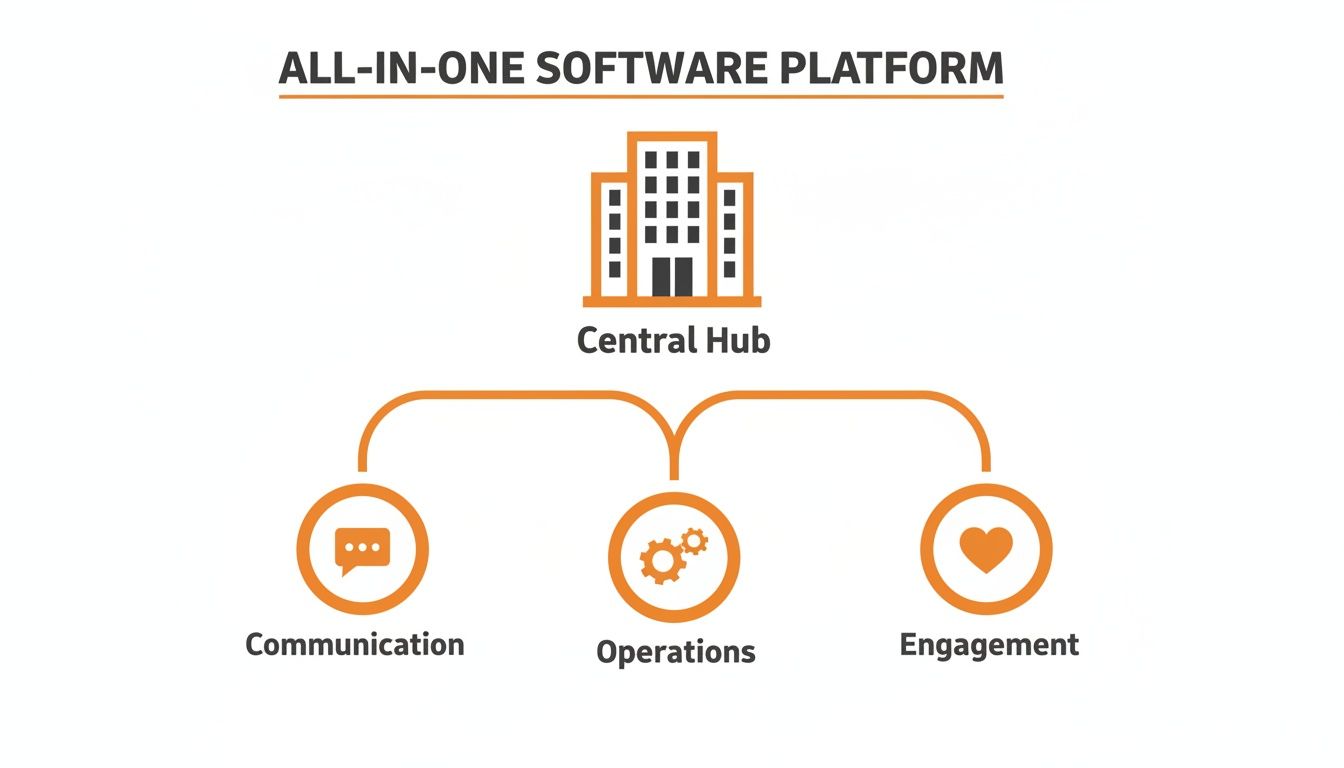
As you can see, these aren't siloed functions. They're interconnected parts of a single engine that supports the entire business.
The Second Pillar: Operations
This pillar is all about the work itself—the daily actions that keep your business running. We’re talking about the "how": scheduling shifts, managing tasks, clocking in and out, and finding important documents without a headache.
When your operations are scattered across different tools, you get chaos. A manager building a schedule has to juggle spreadsheets, text messages, and a separate scheduling app just to cover a weekend shift. It’s exhausting.
In a unified platform, these tasks all live in the same place. That same manager can build the schedule, share it with the team, and approve shift swaps all within the app they already use for communication.
Bringing these tools together is a massive trend. The business software and services market is projected to hit USD 721.14 billion in 2026 and an incredible USD 1,523.46 billion by 2034. According to the latest market insights from Fortune Business Insights, sectors like healthcare and retail are leading the charge.
The Third Pillar: Engagement
Finally, engagement is the roof that protects your culture. It’s what turns a group of individuals into a real team. This isn’t about forced fun or flimsy perks; it’s about creating genuine connection.
Genuine engagement comes from making people feel seen, recognized, and connected to the company's mission. It’s knowing who your colleagues are beyond their job titles.
A unified platform helps this happen naturally. Think of a social feed for sharing successes, searchable employee profiles that put a face to a name, and simple tools for celebrating wins, big or small.
When you bring these three pillars—Communication, Operations, and Engagement—together on one platform, you create something more powerful than just a piece of software. You build a digital home for your company.
The shift from a tangled web of apps to a single, elegant tool can be dramatic. Here’s a quick look at that change in practice.
Before and After All in One Business Software
Business Function | Fragmented Tools (The Old Way) | Unified Platform (The New Way) |
|---|---|---|
Communication | Email for official news, chat apps for teams, texts for urgent needs. | One central hub for all announcements, team chats, and direct messages. |
Scheduling | Spreadsheets, paper schedules, and third-party apps. | Interactive, mobile-friendly schedules with built-in shift swapping. |
Task Management | Sticky notes, separate to-do list apps, or project management software. | Tasks assigned and tracked within the same platform as communication. |
Employee Recognition | Infrequent emails or verbal shout-outs at meetings. | A public feed where anyone can recognize a colleague's great work instantly. |
The table makes it clear: a unified approach doesn't just add convenience. It fundamentally changes how work flows for the better.
How to Choose the Right Software for Your Team
Picking new software can feel like a chore. The market is flooded with tools, and every single one claims it will magically solve all your problems. But let's be real—a flashy feature list is a poor substitute for a tool that actually works for your people.
You aren't just buying technology; you're changing how your team works together. This choice will either add to the daily chaos or finally bring some clarity. So, how do you sift through the noise?
It comes down to asking better questions—ones that go beyond the sales pitch.
A Checklist for Real-World Fit
Forget getting bogged down in endless demos. Start with a simple, human-centered checklist. Your goal is to find a tool your people will genuinely want to use. Because if they don't, they won't. It’s that simple.
Here are the questions we always come back to:
Is it truly simple? Can a new hire figure it out in minutes without a training manual? A steep learning curve is a failure.
Does it work everywhere? The software must be just as smooth on a phone in the field as it is on a desktop. For frontline teams, mobile is everything.
Can you get started in days, not months? A long, complicated implementation is a huge red flag. A great all in one business software should let you start small with a simple invite link.
Does it feel like a partnership? The company behind the tool is as important as the tool itself. Do they get your industry? Are they quick to respond? You’re looking for a partner, not just another vendor.
The best way to know if a tool is right is to see it through your team's eyes. If it makes their day easier and helps them feel more connected, you’re on the right path. For a deeper dive, our guide on what to look for in an employee experience platform has more pointers.
The real test of any business software isn't what it can do, but how it feels to use. If it creates frustration, it's taking up more space than it's worth.
Don't settle for a tool that just ticks boxes. Look for one that feels like it was built with care, by people who understand that simplicity is the most valuable feature of all. Find the one that helps your people do their best work, together. That's the one that will stick.
Making the Switch Without the Headaches
Let's be honest—the idea of swapping out your company's software feels like a massive project. The disruption, the cost, the potential for chaos. It’s enough to make you put it off forever.
But it doesn't have to be that way.

We've seen too many companies get stuck in "analysis paralysis." They try to map out a giant, company-wide rollout, planning for every possible scenario. The plan becomes so huge that it never gets off the ground.
There's a much calmer way to do this.
Progress Over Perfection
Instead of trying to make a giant leap, take one small step. The best way to introduce an all in one business software is to start with a pilot program. Pick a single team or one location that's open to new ideas and let them run with it.
This approach immediately lowers the stakes. You're not gambling the entire company's workflow on day one. More importantly, it gives you a chance to get real feedback from the people who will actually use the tool.
The goal isn’t a flawless, big-bang launch. It's about building quiet momentum. When one team starts succeeding, other departments will want in.
Think about it. A simple invite link can get your pilot team running in minutes, not months. As they discover the benefits—like clearer communication and less scheduling chaos—their success story becomes your most powerful argument. If you're looking for a clear roadmap, our guide on data migration best practices is a great place to start.
This move toward unified software is happening for a reason. Businesses are finally calculating the true cost of juggling disconnected apps. In fact, software market predictions show the industry is set to grow from USD 921.14 billion in 2026 to an incredible USD 2,468.93 billion by 2035, fueled by the exact kind of cloud-based tools that make these easy rollouts possible.
Making the switch is less about a massive technical project and more about a thoughtful human one. Start small, listen to your people, and let the results do the talking. You might find the headaches you were bracing for never show up.
Thinking Beyond Just Software
Let's zoom out. This whole conversation isn't really about software. It’s about the kind of company we want to build. It’s about the daily experience we create for our people.
The tools we give our teams aren't passive. They actively shape our culture. They dictate how we talk to each other, set the pace of our workdays, and ultimately decide whether we’re creating a space for focused, meaningful work or just adding to the noise.
A Choice About Culture
When you're looking at an all in one business software, you're doing more than comparing features. You're making a statement about your company's values. It’s a choice between simplicity and chaos, between a unified team and a fragmented one.
Think about it. Do you want your people spending their energy toggling between tabs, hunting for that one piece of information they know they saw somewhere? Or do you want to give them a single, trusted place to connect, get answers, and do their best work?
When you simplify the tools, you simplify the work. And when the work is simpler, you free your team from the constant drag of tech frustrations, allowing them to truly shine.
At the end of the day, moving to a unified system is a step toward building a more thoughtful, resilient workplace. It’s a deliberate shift away from the frantic juggling of a dozen apps and toward a more sustainable way of operating.
The real question isn't, "Which software should we get?" It's, "What kind of company do we want to become?" The right tool is simply the one that helps you get there.
Frequently Asked Questions
We know what you’re thinking. Moving your company’s entire day-to-day operation into one new app can feel a little daunting. It’s a big move. So, let’s get straight to it and answer some of the most common questions we hear.
Will this be too complex for our frontline employees?
This is the most important question to ask. The short answer: it absolutely shouldn't be. Any unified platform worth considering is built to be simple and intuitive, especially for busy people on their phones. It should feel as natural to use as the apps they already know.
The best systems are designed from the ground up for frontline teams. Essential tasks—like clocking in, checking a task list, or messaging a manager—should only take a couple of taps. If a tool requires a massive training manual to get started, it’s the wrong tool. Period.
Is a unified platform actually affordable for a small business?
It’s easy to look at the price of a single platform and feel some sticker shock. But that's not the whole story. The real cost of your current setup is the total of all those separate subscriptions for chat, scheduling, and task management. Add them all up.
An all in one business software consolidates those bills into one predictable expense. But it also adds value that never shows up on an invoice, like giving your team back the hours they lose switching between apps. Less frustration for your employees is a huge, often overlooked factor in keeping them around. When you look at the total cost of ownership, it’s almost always a win.
As you think about consolidating software, it's a great time to review how you handle all your company's technology. Following smart IT asset management best practices gives you a clear view of everything from software licenses to company phones, helping you cut waste and tighten security.
Ready to see how a truly simple all in one business software can calm the chaos and get your teams on the same page? Pebb brings communication, operations, and engagement together in one delightful app your people will actually enjoy using. Learn more about Pebb.
