
Business Management Software for Service Contractors
Ditch the chaos. Our 2026 guide to business management software for service contractors explains what matters, from dispatch to invoicing. Choose the right
Dan Robin
You know the scene. It's 7:12 a.m. One tech texted that the first customer gave the wrong gate code. Another is calling because yesterday's part never got logged, so nobody knows if it's in the van or on a shelf. The office manager is digging through an email thread for an invoice from last month while a new “must-do-today” job just landed and blew up the schedule.
That kind of morning feels normal in a lot of service businesses. It shouldn't.
I've been through software selection more than once, and I can tell you the actual problem usually isn't lazy staff or bad luck. It's a patchwork system. One app for scheduling. Another for chat. A spreadsheet for job costing. Paper forms in the field. Invoices somewhere else. Everyone works hard, but the business runs on handoffs and memory.
That's why most conversations about business management software for service contractors start in the wrong place. People ask for features. They should be asking for one clean workflow and one place where the truth lives.
The Morning Scramble Is a System Problem
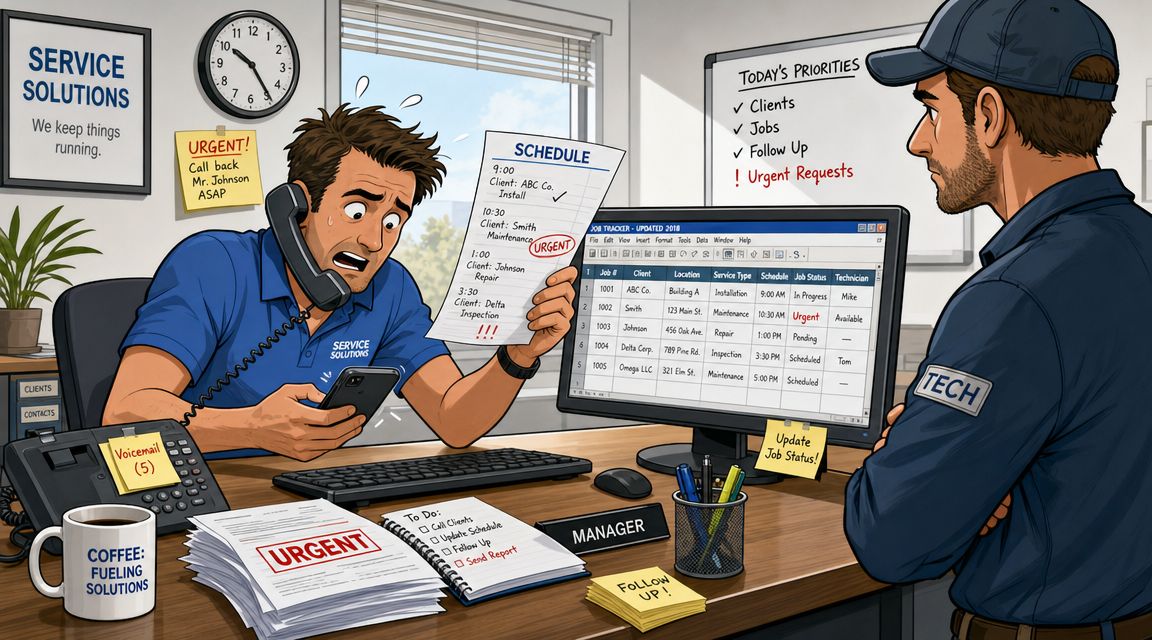
The scramble usually starts before the first truck leaves.
Dispatch has one version of the day. The technicians have another. The customer has a third. Nobody is lying. Nobody is careless. They're just looking at different systems that stopped matching each other sometime yesterday.
What the chaos actually looks like
A tech heads to the wrong address because the updated service location lived in a text message, not in the schedule. A customer asks for the status of an estimate, but the estimator saved it as a PDF in email and the office can't see whether it was approved. Someone finishes a job, but the paperwork stays in the truck until the end of the week, so billing waits too.
That isn't a people problem. It's a design problem.
When your tools don't share data, your team spends the day reconciling reality. They call, text, forward screenshots, and patch over gaps. Every little fix feels manageable. Together, they eat the day.
Most operational stress in a service business comes from stale information, not hard work.
The broader market is already moving away from that model. A Market.us construction software report found that 58% of contracting firms used software for scheduling, and average software spend per employee rose from USD 2.32 in 2016 to USD 2.85 in 2022. I don't read that as “buy more software.” I read it as a sign that contractors are tired of running real operations through scraps of paper and disconnected apps.
The cost of disconnected tools
The hidden cost isn't just wasted admin time. It's slower decisions.
When the office doesn't know a job is done, invoices go out late. When dispatch can't see who's available, customers wait longer. When notes sit in somebody's phone instead of the job record, the next visit starts cold.
If you're living in that cycle, stop treating it like the price of doing business. It's not. It's a symptom.
I'd start by looking at whether you need one system instead of another add-on. If you're rethinking the stack, this guide to all-in-one business software is a useful place to reset the conversation.
The goal isn't a prettier dashboard. It's operational calm. That starts with a single source of truth.
What This Software Is Really For
Most buyers make the same mistake. They shop for scheduling, invoicing, CRM, dispatch, or time tracking as if these are separate decisions.
They're not. In a service business, they're one operating system.
Think air traffic control, not app shopping
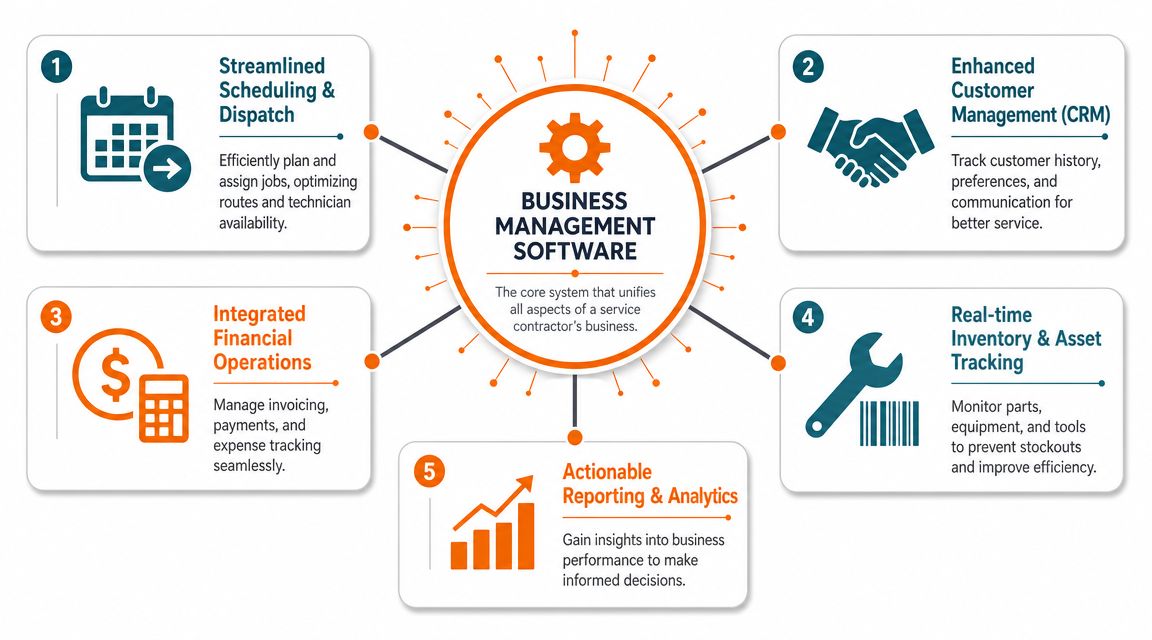
Good business management software for service contractors works like an air traffic control tower. One screen. One live view. Jobs, people, timing, customer details, notes, and money all tied together.
Bad software works like a junk drawer. One tool for the calendar. One for invoices. One for forms. One for team messages. It can look cheap at first. It gets expensive fast because your staff become the integration layer.
That's why I care less about feature count and more about whether the system creates one record per job that everyone shares. If the dispatcher, technician, office manager, and owner all touch the same record, your business gets cleaner overnight.
The paper trail matters more than vendors admit
This is also where compliance and recordkeeping stop being boring back-office topics and start becoming operational necessities. ADP's explanation of contractor management software gets this right. Modern systems create a centralized, auditable paper trail from onboarding to payment, moving businesses away from scattered spreadsheets and paper tickets toward unified cloud-based control.
That idea applies well beyond companies managing independent contractors. Service businesses need the same discipline. You need to know who was assigned, what changed, what was approved, what was completed, and what got paid. Not because it sounds impressive. Because memory is unreliable and paper disappears.
Practical rule: If a schedule change, customer note, or payment update can happen without touching the same core record, you don't have a unified system. You have a patch.
Other industries learned this earlier. Trucking is a good example. If you want a parallel, this guide on how to improve trucking operations with fleet software shows the same basic truth. Once dispatch, tracking, and records live together, the work gets less fragile.
That's what this software is for. Not collecting features. Removing friction between office and field so the business can finally see itself clearly.
The Workflows That Run Your Business
I don't evaluate software by feature tabs anymore. I look at workflows. A service company wins or loses in the gaps between steps.
If a quote can't become a scheduled job without retyping. If a field update doesn't flow into billing. If a customer call sits outside the job history. That software will create work, not remove it.
The job workflow
The first workflow starts before a technician ever shows up. A customer calls. Someone builds an estimate. The job gets approved, scheduled, assigned, and updated. That chain should happen in one place.
Townsquare Interactive's contractor software guidance makes the key point better than most. The highest-value requirement is a single operational data model tying scheduling, CRM, and invoicing together. That matters because service businesses don't have time to reconcile spreadsheets, paper records, and side-channel messages all day.
Here's the simple test I use:
Quote to job conversion: Can the office turn an approved estimate into a scheduled visit without creating a second record?
Customer history in context: Can anyone opening the job see prior visits, notes, and outstanding issues?
Rescheduling without chaos: If the day changes at 10:17 a.m., does every affected person see the same update right away?
If the answer is no, you're still paying for handoffs.
The field workflow
The second workflow lives in the technician's phone. Many software solutions struggle within this context. It looks polished in a sales demo, then turns clumsy the moment somebody's standing in a basement with gloves on and weak signal.
Your field team needs a short path to action. Open the job. See the address, notes, parts, files, and history. Add photos. Update status. Flag follow-up work. Move on.
A field app isn't a nice extra. It's the working surface of the business.
If technicians have to remember details until they get back to the office, your system is already behind.
That's also why I'd look hard at how the product handles task assignment and updates across teams. If you're comparing mobile-first tools, this piece on an operations management app for teams is worth reading with a field workflow lens, not just an office one.
The money workflow
The third workflow is where many contractors leave money on the table. Not because they can't bill. Because billing is delayed, incomplete, or disconnected from the actual job record.
The best setup moves cleanly from approved work to completed work to invoice. Customer signatures, photos, parts used, and notes should already be attached. The office shouldn't have to chase technicians for basic details before sending a bill.
An “all-in-one” solution holds real significance. Not a giant menu of features. A shorter distance between doing the work and getting paid for it.
A lot of software demos hide this by showing each feature in isolation. Don't fall for that. Your business doesn't run in modules. It runs in sequences.
An Evaluation Checklist That Cuts Through the Noise
Sales demos are built to make every product look smooth. The rep clicks through a clean sample account. Every customer has perfect data. Every technician follows the script. Real life won't.
So ask blunt questions. Not “Does it do scheduling?” Every vendor says yes. Ask what happens when the day goes sideways.
Questions that expose the truth
Area | Question to Ask |
|---|---|
Scheduling | When a priority call comes in, how many clicks does it take to reassign a job and notify the customer? |
Dispatch | Can dispatch see technician availability, job status, and customer notes on one screen? |
Mobile use | Can a tech see the full job history, photos, and notes from their phone without calling the office? |
Connectivity | What happens when there's weak signal or no service in the field? |
Invoicing | Can a completed job move straight into invoicing without re-entry? |
Customer records | Does every call, note, estimate, and invoice live under one customer record? |
Implementation | Who helps map our current workflow before rollout? |
Training | How do you train dispatchers, office staff, and field technicians differently? |
Support | When something breaks, what does support actually look like for a working service company? |
Reporting | Can I see open jobs, labor activity, and receivables without exporting data into spreadsheets? |
Permissions | Can we control who sees payroll, customer data, and internal notes? |
Mixed labor | Can the system handle employees and outside contractors in the same schedule with compliance tracking? |
One question most buyers forget
A lot of smaller tools assume you only dispatch your own employees. That's getting less realistic. Salesforce's discussion of contractor management software points to a requirement many SMB products gloss over: handling a blended workforce with unified scheduling and compliance tracking for both internal technicians and third-party contractors.
If you use subcontractors during peak season, after-hours coverage, or specialist jobs, ask about that early. Don't wait until after implementation to discover the system treats outside labor like an afterthought.
Buy for the messiest day in your business, not the cleanest demo in theirs.
The right vendor won't dodge these questions. They'll answer them plainly and show the workflow live.
How to Measure the Real Return
Software isn't cheap. Neither is confusion.
Most owners look at subscription cost and stop there. That's too narrow. The full value comes from shortening delays that already exist in your business. Delay in dispatch. Delay in updates. Delay in billing. Delay in follow-up.
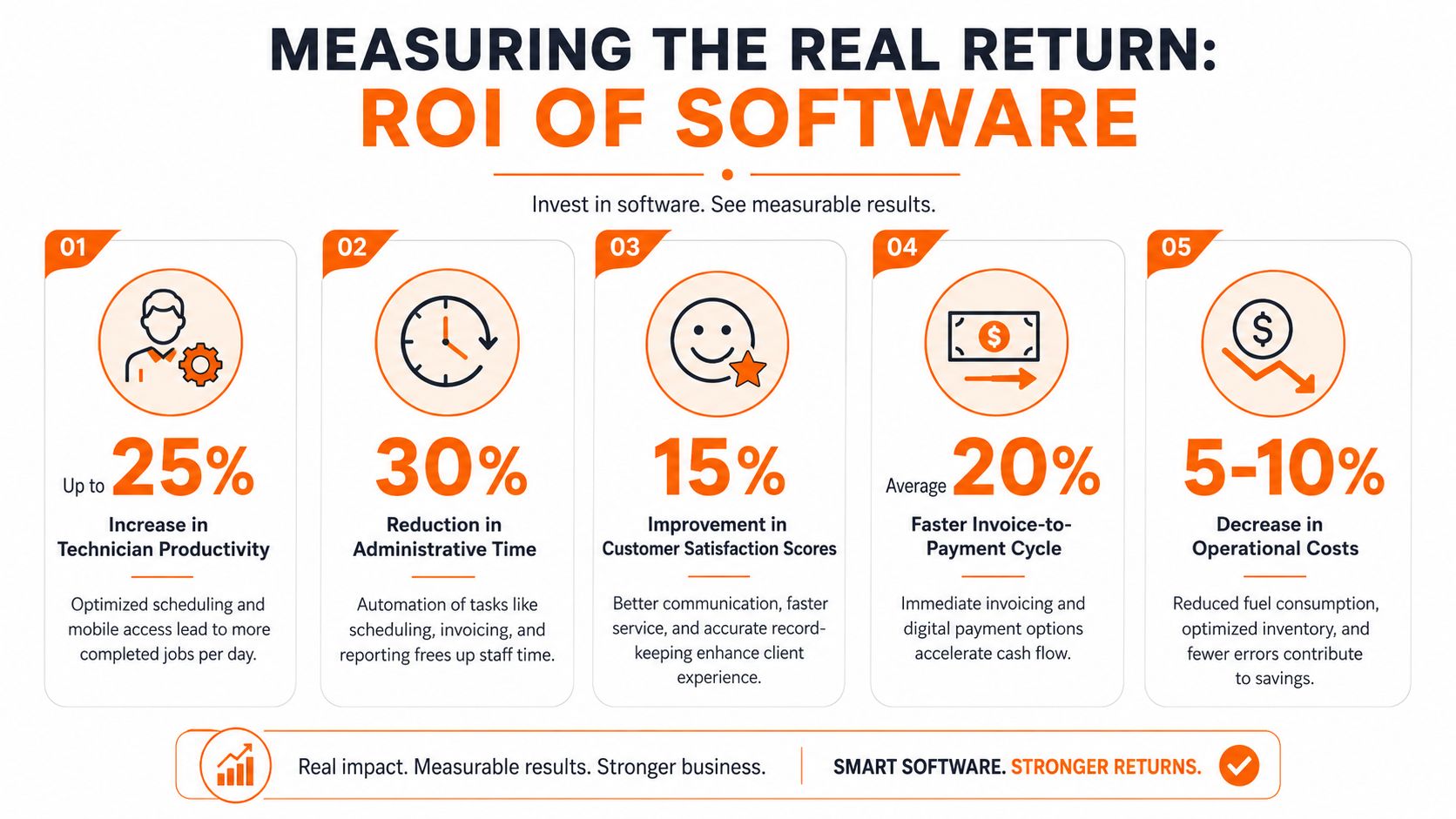
Sera's field service buying guide gets to the heart of it. Modern software creates value by compressing the time between a field event and an office decision. Real-time dispatch and mobile job updates improve coordination, billing speed, and responsiveness. That's the right lens for measuring return.
Measure time to cash
This is the first metric I'd watch.
If a job is finished today but invoiced later because paperwork sits in limbo, your software is slowing cash flow. A better system narrows that gap. The formula doesn't need to be fancy:
Time to cash: average days from completed job to payment
Compare before and after: old average minus new average
Cash flow impact: number of jobs invoiced in that period times the improvement in billing speed
Even if you never build a formal ROI model, this tells you whether the system is removing friction where it counts.
Measure technician output and admin drag
Then look at capacity. Not theoretical capacity. Actual work completed.
Try a basic before-and-after review:
Technician utilization: completed jobs per technician per week
Admin overhead: office hours spent on rescheduling, status checks, and invoice cleanup
Schedule recovery: how quickly dispatch can absorb a cancellation or urgent call
These are practical numbers your team can observe without a consultant. If dispatch can reassign work faster and technicians spend less time calling in updates, you'll feel it in the schedule first.
Watch this: If your office still spends Friday afternoon cleaning up notes, parts, and paperwork so invoices can go out, the workflow is broken even if the software “has invoicing.”
Measure service quality, not just labor
The final return shows up in customer experience. Fewer “where is my tech?” calls. Better job context on repeat visits. Faster answers when a customer asks for a past invoice or service note.
I wouldn't overcomplicate this. Pick a few signs that matter to your business:
Repeat visit quality: does the next tech walk in informed?
Customer communication: are arrival updates and job status easier to send and track?
Receivables health: are fewer invoices stalled because details are missing?
The best return usually isn't one giant leap. It's a pile of small delays removed from every job, every day.
How a Unified App Works in Practice
A unified app should make work easier to follow, not just easier to log. That's the standard I use.
Say you run an HVAC company with a dispatcher, a service manager, and a mixed crew of field technicians. A customer calls about a no-cool issue for a site you've serviced before. In a patchwork setup, the call note goes into one place, the schedule into another, and the equipment history lives somewhere else if you're lucky.
In a unified setup, the work starts inside one shared operating space. The request comes in, the job gets created, the dispatcher assigns it, the tech sees it on mobile, and every update stays attached to the same thread of work.
One place for the whole job
Tools built around shared workspaces are particularly effective. For example, Pebb uses Spaces, Tasks, chat, file sharing, scheduling, and mobile updates in one app. For a service team, that means you can create a Space for dispatch or for a long-running customer account and keep the conversation, files, task list, and status updates together instead of spread across inboxes and side texts.
That matters more than it sounds like it should.
When a tech uploads a photo from the field, the office shouldn't have to ask where it belongs. When a supervisor leaves a note about follow-up work, dispatch shouldn't have to paste it into another tool. A unified app keeps context attached to the work itself.
A simple HVAC example
A customer reports that the rooftop unit failed overnight.
The office logs the request and tags it urgent. Dispatch assigns the job to the right technician. The technician opens the job on their phone and sees the site contact, prior notes, and the task list. On site, they add photos, update status, and flag that a second visit is needed after a part order. The service manager sees that update immediately, not once the workday is over.
That's the difference. No scavenger hunt. No “send me the picture.” No retyping job notes so billing can make sense of them later.
The same pattern works for plumbing. A leak call comes in. The dispatcher assigns by zone. The tech posts an update from the property, attaches before-and-after photos, and notes that a valve replacement should be quoted. Office staff can turn that into the next task while the first job is still fresh.
If you work in adjacent trades with route-based teams, this article on software for a landscaping business shows a similar operational pattern. Different trade, same need for shared context.
What “unified” should feel like
You shouldn't need a training manual to answer basic questions such as:
What's happening on this job right now?
Who owns the next step?
What does the customer need to know?
Are we ready to bill?
If people still ask those questions in Slack, text, and email after buying the software, the tool didn't fix the operating model. It just gave the confusion a nicer interface.
That's why I push buyers to think in terms of workflow first. A unified app isn't impressive because it combines features. It's useful because it lets the whole business look at the same work without arguing over which version is current.
Clarity Is a Choice
Most service companies don't need more software. They need less fragmentation.
Ultimately, the decision isn't which app has the longest feature list. It's whether you want to keep running on interruptions, memory, and cleanup work, or build a business where the office and the field share the same reality. That choice shows up every morning.
If your team is still stitching the day together by hand, the problem is no longer hidden. The only question left is whether you want to keep managing the scramble or remove the cause.
If you want one place to bring together team communication, tasks, scheduling, files, and day-to-day operational updates, take a look at Pebb. It's built for teams that want a single home for work instead of another disconnected tool.
