
Buddy Punching How to Stop It Without Killing Trust
Learn buddy punching how to stop it with practical policies, tech controls and audits that protect payroll without hurting trust.
Dan Robin

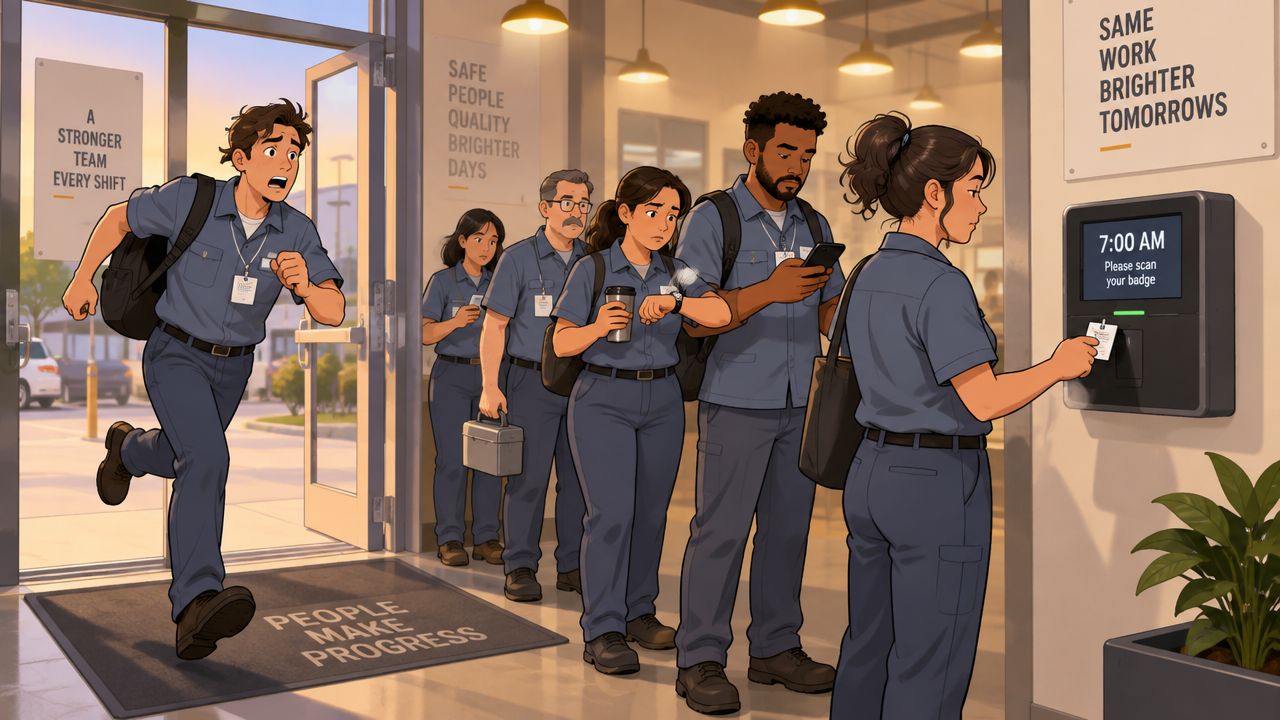
The shift starts in a few minutes. One employee is stuck in traffic. Another is already at the time clock, juggling a coffee, a radio, and a line of coworkers. The late employee sends a quick message: “Can you clock me in?”
That favor feels small. It isn't. The system now says someone worked when they hadn't arrived, and the manager has no reliable way to tell whether the record is accurate.
If you're searching for buddy punching how to stop, start with this principle: don't treat every incident as a character defect. Fix the conditions that make the shortcut easy, then add verification that fits the work. The strongest approach protects payroll without making honest employees feel like suspects.
Why Buddy Punching Keeps Happening on Busy Shifts
Busy shift changes create perfect conditions for buddy punching. Employees arrive through the same entrance, supervisors are answering questions, and the next team is waiting to take over. A shared PIN, badge, or open kiosk turns a rushed handoff into an easy identity swap.
The employee asking for help may not see it as fraud. They may be trying to avoid a lateness conversation, protect a coworker from discipline, or keep the team fully staffed on paper. The coworker may think they're doing a harmless favor. Managers often discover the problem only after a pattern has formed.
The system gap matters more than the excuse
A widely cited 2017 employee survey found that 16% of workers admitted to clocking in for a colleague at least once. Using U.S. hourly workforce estimates, that behavior was extrapolated to roughly $373 million in annual payroll losses, while other industry estimates have tied buddy punching to about 2.2% of gross payroll in organizations using traditional time clocks. Those figures are summarized with context by QuickBooks on preventing buddy punching.
The numbers don't prove that every employee is dishonest. They show that shared credentials and unverified punches create a predictable control failure. A reminder at the break room door won't solve an identity problem. The clock-in event needs a way to confirm who made the punch.
Scheduling problems can make the behavior worse. If employees regularly face unclear shift swaps, last-minute coverage requests, or conflicting assignments, they'll find workarounds. Review recurring scheduling conflicts alongside attendance exceptions. A payroll issue may begin with a schedule nobody could realistically follow.
Practical rule: Make the honest action easier than the shortcut. Employees should know how to report lateness, request a swap, and correct a missed punch without asking a coworker to impersonate them.
Why reminders alone fail
Industry reporting has described buddy punching as a recurring problem across employers. One commonly cited set of figures reports that 75% of U.S. businesses lost money to buddy punching, while 74% of employers experienced related payroll losses. Later survey reporting cited about 19% of workers admitting to buddy punching, and another report said one in four hourly employees had done it during the prior 12 months. These figures appear in industry reporting on time theft statistics.
The exact experience will vary by workforce, but the operational lesson is consistent. When the time clock accepts a shared credential, the company is asking policy to do the work of verification. Policy still matters. It just can't carry the whole load.
Set Clear Policies and Shift Rules That Remove Gray Areas
Technology can verify a person. It can't tell employees what the company considers acceptable. Before changing the clock, write an attendance policy that leaves no room for “I thought helping was okay.”
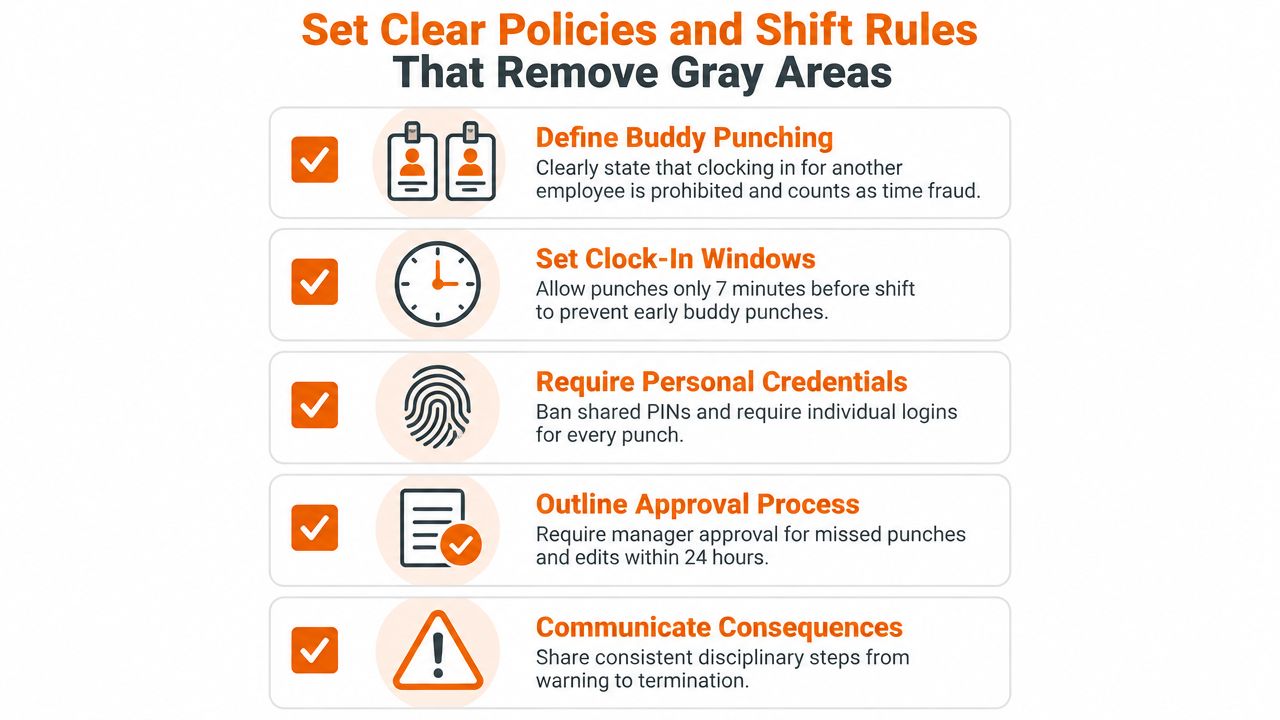
Use plain language. Define buddy punching as clocking in or out for another employee, using another person's credentials, or asking someone else to record attendance on your behalf. State that the time record must reflect the employee's actual arrival, departure, and approved breaks.
That definition should appear in onboarding materials, manager guides, and the employee acknowledgment process. Put it where people already look for rules, not in a document nobody opens after their first day. Attendance policy samples from Pebb can help you organize the language and approval rules.
Write the rules employees actually need
A useful policy answers the questions that come up during a rushed shift:
Clock-in timing: Set a clear window for early punches and explain what happens when someone arrives outside it.
Shift swaps: Require approval before a swap changes who is expected to work.
Missed punches: Give employees a simple process for reporting a missed clock-in or clock-out.
Time edits: Require a manager to approve corrections, with the original record and reason preserved.
Consequences: Use consistent disciplinary steps, applied regardless of seniority or personal relationships.
A defined clock-in window can prevent employees from recording attendance far ahead of a shift. The window itself should match the operation. Don't choose a rule that creates a line at the clock, delays handoffs, or forces employees to wait in unsafe conditions.
Give managers one fair response
Managers need a script and a process. When a suspicious record appears, they shouldn't confront an employee in front of the team or invent a consequence on the spot. They should review the record, ask for the employee's explanation privately, document the response, and apply the stated rule.
Train supervisors to distinguish a missed punch from an intentional proxy punch. An employee who forgets to clock out needs a correction path. An employee who uses a colleague's credentials needs a conduct conversation. Treating both events identically creates resentment, while ignoring the difference creates loopholes.
Explain the reason behind the policy. Accurate time records protect pay, scheduling decisions, overtime review, and fairness between employees. That message lands better than “management is watching.”
A good policy doesn't assume the worst. It makes the right process obvious when a shift goes sideways.
Choose the Right Verification Controls for Your Workforce
The right control depends on where employees work and how they move through the day. A fixed-site warehouse, a mobile care team, and a hybrid office shouldn't all use the same clock-in method.
Start with the lowest-friction control that closes the actual gap. If employees work at one location and the main problem is shared PINs, a personal login plus a clock-in photo may be enough. If workers travel between client sites, add location verification. If documented fraud continues at a controlled site, biometrics may be justified after privacy and legal review.
Verification Controls Compared by Fit and Friction
Control | Best For | Friction and Risk |
|---|---|---|
Personal PIN or login | Small teams with strong process discipline | Low friction, but shared credentials remain an obvious weakness |
Photo capture | Fixed sites and teams that need visible identity evidence | Low to moderate friction, with a review responsibility for managers |
GPS verification | Mobile, field, and distributed teams | Moderate privacy sensitivity, and location accuracy can vary |
Geofencing | Defined work locations where punches must happen on site | Moderate friction, with boundary and device-permission issues to manage |
Fingerprint or facial biometrics | Sites with a documented impersonation problem | Strong identity control, but higher privacy, legal, and rollout demands |
The strongest non-biometric guardrails are a photo captured at every punch, GPS verification for mobile punches, and an audit log for edits. Independent summaries identify these controls as practical layers because each closes a different gap. The photo addresses identity, GPS addresses place, and the audit trail addresses manipulation after the event. See the attendance tracking app options before choosing hardware.
When biometrics make sense
Biometric clocks require the employee to verify with a unique biological trait instead of a shared credential. Industry reporting commonly places fingerprint or facial-recognition clocks at 95% to 99%+ prevention of buddy-punching attempts, provided every punch point requires the biometric check and supervisors don't leave manual overrides open. The implementation guidance and limitations are outlined by ShiftFlow's biometric time clock analysis.
That last condition matters. A biometric clock won't help if employees can bypass it with a PIN, or if managers routinely edit punches without review. Roll out the control in a clear sequence:
Enroll each worker individually.
Require face or fingerprint verification at clock-in and clock-out.
Disable PIN-only fallback except for rare, documented exceptions.
Review override logs daily.
Explain what data is collected, why it's needed, who can access it, and how long it's retained.
Biometrics are not a complete time-theft system. They can block identity swapping at the punch event, but they won't stop long breaks, late returns, or off-site work abuse.
Some teams also need physical access controls, not just attendance verification. For that adjacent problem, securing facilities with biometrics offers useful context on how biometric identity checks fit into facility security.
Monitor Timecards and Audit Without Micromanaging
Prevention reduces the opportunity. Auditing tells you whether the controls are working.
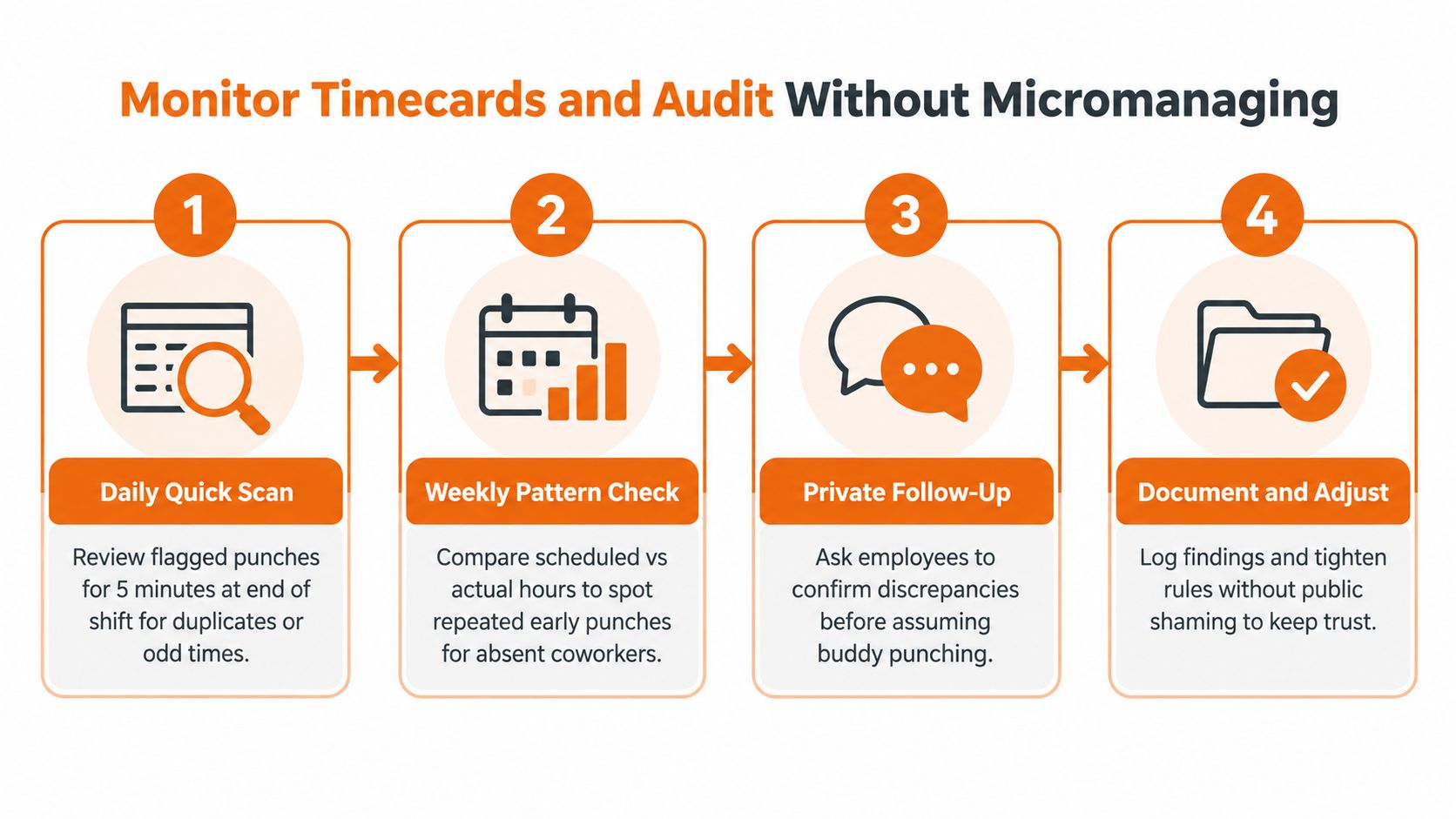
You don't need a manager hovering over every punch. You need a short, repeatable review that focuses on exceptions. Look for duplicate credentials, unusual edits, missing location data, repeated early punches, and records that don't match the scheduled employee.
Start at the end of the shift while the details are fresh. Review flagged punches, not every employee equally. That keeps the process focused and makes it easier to explain why a record needs attention.
Use patterns, not hunches
One odd punch is not proof. Several connected exceptions deserve a closer look.
Check whether the same employees appear together in repeated attendance anomalies. Compare scheduled shifts with actual punches. Review whether one manager edits more records than others, whether the same credentials appear at unusual locations, or whether employees who are absent still have complete attendance records.
The strongest non-biometric setup combines photo evidence, GPS for mobile punches, and a clean audit trail for every edit. That combination gives a supervisor enough context to ask a fair question instead of making an accusation. The layered-control rationale is also reflected in Kloqk's practical attendance guidance.
Ask before you accuse
A private conversation should begin with the record, not a verdict. Say that the punch doesn't match the schedule and ask the employee to explain it. There may be a missed approval, a device issue, a legitimate emergency, or a genuine policy violation.
Document the answer and the action taken. If the record was wrong, correct it through the approved workflow. If the explanation doesn't hold up, follow the policy consistently. Never use public examples to scare the rest of the team. Public shaming creates silence, not accuracy.
Audit for exceptions, then coach the behavior. Don't turn attendance into a daily courtroom.
How Pebb Helps You Enforce and Report on Attendance Fairly
A unified work app can connect the pieces that usually drift apart. Scheduling lives in one tool, clock-ins in another, policy documents somewhere else, and payroll corrections arrive through messages. That fragmentation makes fair enforcement harder because managers have to assemble the story manually.
Pebb brings those workflows into one place. Teams can use Spaces for shifts, tasks, posts, files, events, and team communication. Clock-in and PTO tracking can sit alongside the schedule, which helps managers compare what was planned with what was recorded.
Match the check to the work
For a fixed location, a manager can use configured clock-in permissions and location checks. For mobile employees, GPS-verified punches provide context about where attendance was recorded. Photo clock-in and facial-recognition options can add identity evidence, so the record isn't based only on a shared device or credential.
That doesn't mean every workforce should turn on every control. A retail team at one store may need a simpler setup than a field team working across customer locations. Configure the lightest combination that closes the known gap, then review the exceptions.
Keep evidence with the workflow
Pebb's permissions and admin tools can limit who changes attendance records. Its analytics can help leaders review activity and attendance trends without relying on scattered spreadsheets. Managers still need judgment, but they spend less time collecting basic facts.
The rollout can start with a single invite link across web and mobile. Teams can store attendance policies and onboarding material in the Knowledge Library, while integrations with HR, payroll, and authentication systems reduce duplicate administration.
Pebb is one option for teams that want communication, scheduling, clock-in, PTO, policy documents, and reporting connected in one employee app. The value isn't the number of settings. It's having the schedule, the punch, the explanation, and the follow-up in the same operational flow.
Make It Stick With Training and Trust
A new clock won't change a habit if managers explain it badly. Employees need to hear what is changing, why it is changing, and what protections are in place for legitimate exceptions.
Start with a short manager training session. Practice the private follow-up conversation. Show supervisors how to review a punch, ask for context, record a correction, and escalate a confirmed violation. Consistency matters more than severity.
Explain proportionality
Employees are right to ask about privacy when a company introduces photos, GPS, or biometrics. Answer directly. Explain what the system captures at clock-in, whether location is collected outside working time, who sees the records, how corrections are handled, and how long information is retained.
Don't deploy biometric hardware because it sounds stronger. Guidance for smaller employers recommends using it when there's a documented fraud problem and after legal review, rather than treating biometrics as an automatic first step. DohAssist's guidance on preventing buddy punching also emphasizes clear onboarding, proportionate controls, and policy design.
Reinforce the norm
Add attendance rules to onboarding. Keep the policy easy to find in the Knowledge Library. Remind employees how to report a missed punch or request a schedule change. Share updates when the process changes, and give managers the same language each time.
The goal isn't suspicion. It's a record everyone can trust.
A practical starting point is simple:
Review the policy: Remove vague language around swaps, lateness, and edits.
Map the workforce: Separate fixed-site, mobile, hybrid, and remote attendance needs.
Choose one layer: Begin with personal credentials, photos, location checks, or another proportionate control.
Set an audit habit: Review exceptions and overrides on a defined schedule.
Train the humans: Make sure supervisors can enforce the rule calmly and consistently.
Buddy punching stops when the system makes impersonation difficult and the process makes honesty practical. Build both, and you won't have to choose between payroll accuracy and employee trust.
Pebb brings scheduling, clock-in, PTO, policies, communication, and attendance reporting into one place, with configurable photo and location checks for teams that need stronger verification. Visit Pebb to see how it can help you replace shared-credential gaps with a fairer attendance workflow.
