
Workflow Optimization: A Practical Guide for 2026
A practical guide to workflow optimization for frontline and office teams. Learn frameworks, metrics, and tools to reduce friction.
Dan Robin

Tuesday mornings expose bad workflows quickly. A shift supervisor starts with a stockroom gap report on her phone, then checks a paper schedule near the break room. A walkie call reports a missing display. A new hire asks about payroll. She moves between group chat, a back-office spreadsheet, and a clipboard while the floor keeps moving.
A simple shift swap takes six touchpoints and half an hour. Nobody designed it that way. Each handoff seemed reasonable on its own. Together, they turn a two-minute decision into a small operational crisis.
That's the part of workflow optimization most desk-based advice misses. The hardest work often happens on a sales floor, in a stockroom, at a hotel desk, or during a hospital shift. The person doing the job may have a phone in one hand, a scanner in the other, and no patience for another login.
The Tuesday That Made Me Rethink Workflow Optimization
The supervisor's problem wasn't motivation. She cared about staffing, payroll, and the customer experience. The problem was that the work lived in too many places.
The stockroom report sat in one channel. The roster lived in a spreadsheet. The shift request arrived through chat. Payroll questions went to a manager who might not see them until later. Every answer required someone to remember what had already happened and update the next system manually.
The workflow failed at the point where real work met office administration.
A few weeks later, the team consolidated one process. The supervisor opened one mobile app, checked one roster view, and handled the request in one approval thread. The shift swap took two taps. The schedule updated without a second conversation, and the employee could see the decision without asking again.
The gain wasn't flashy. The floor felt calmer. The supervisor had time to walk the store instead of reconstructing messages. The team didn't need a grand transformation. It needed fewer places to look.
The frontline test
I use a simple test when reviewing a process: Can the person closest to the task complete it while standing where the task happens?
If the answer is no, adoption will struggle. A desktop workflow may look tidy to an operations team, but it breaks down for employees working shifts, moving between locations, or serving customers. A tool that requires a supervisor to leave the floor, find a laptop, and reconcile three systems isn't optimized. It's merely documented.
That distinction matters as generative AI adoption spreads. A BCG survey of 10,635 employees across 11 countries found that 72% of leaders, managers, and frontline workers are regular generative AI users, while frontline usage has stalled at 51%. The gap points to a work-design problem. More access won't fix a workflow that doesn't fit the shift.
The rest of this guide starts from that reality. Optimize for the worker carrying out the task, then build the office process around that person.
What Workflow Optimization Really Means
Workflow optimization is the deliberate redesign of how work moves from request to outcome. It isn't the same as putting an existing paper form into an app. Digitizing a bad process usually gives you a faster bad process.
Think of work as water moving from a tap to a glass. Many teams add buckets along the route. Someone copies the request into a spreadsheet, forwards it by email, asks for approval in chat, and then enters the result somewhere else. Optimization straightens the pipe, removes leaks, and widens the narrow points so the same work reaches its destination with less effort and fewer spills.
That means looking at the full path. A shift swap begins with a request and ends with confirmed coverage. Onboarding begins with an accepted offer and ends with a prepared employee. A purchase request begins with a need and ends with an approved order. The workflow includes every person, device, decision, and system involved.
What to improve
Start with outcomes you can observe:
Cycle time: How long does a request take from submission to completion?
Handoffs: How many times does work move between people, tools, or shifts?
First-time-right rate: How often does the result arrive without correction?
Rework: How often must someone chase missing information or repeat a step?
Adoption: Can employees complete the process on the device they carry?
The business case is practical. A technical review of intelligent process design, AI-based automation, and robotic process automation links these methods with improved production efficiency, lower error rates, and better resource allocation in this review of workflow automation. The useful question isn't whether software is involved. It's whether the work reaches the right outcome with fewer delays and mistakes.
That's also why inventory-heavy teams should think beyond stock counts and spreadsheets. The Beyond Surplus practical guide is useful context because inventory work depends on clean movement of information, not only accurate quantities.
What it isn't
Workflow optimization isn't buying more software. It isn't adding another approval layer to feel safe. It isn't drawing a process around the org chart while ignoring the employee who must execute it.
The guiding principle is simple: optimize for the person closest to the task, then back the office around them.
The Principles and Metrics That Actually Matter
Activity is measured because it is easy to report. Messages, logins, licensed seats, and dashboard views are counted. Those numbers can look healthy while a store still has uncovered shifts and an approval still waits in someone's inbox.
Start with the outcome. Define what “done” means before changing the steps. For a shift request, done might mean an approved replacement appears on the roster and both employees receive confirmation. For an incident report, done might mean the right manager receives the issue, the employee gets a response, and the record is closed.
Five rules for useful redesign
Flow beats handoffs. Every time work crosses a person, tool, or shift boundary, someone has to transfer context. Count those transfers. If a request passes through chat, email, a spreadsheet, and a verbal confirmation, the workflow has too many surfaces.
One source beats reconciliation. The roster, request status, owner, and final outcome should live together. Employees shouldn't compare screenshots to find the current answer.
Adoption is an operating metric. Track whether people complete the work on mobile without falling back to a desktop or asking a supervisor to do it for them. A workflow that only managers use isn't finished.
Right-size the change. Rebuild one process end to end. Sprinkling small improvements across a dozen workflows creates noise and makes ownership unclear.
Measure the work, not the tool. The guide to measuring communication effectiveness helps frame communication as an operational outcome rather than a message-volume contest.
Vanity metrics versus operational metrics
Vanity Metric, Feels Good | Operational Metric, Tells the Truth | Why It Matters |
|---|---|---|
Seats licensed | On-floor adoption | Shows whether employees can and will use the workflow |
Messages sent | Time to approval | Reveals whether communication produces a decision |
Dashboards viewed | Exception rate | Shows how often the normal process breaks |
Tasks created | First-time-right rate | Separates visible activity from usable output |
App opens | Shift fill rate | Connects engagement with staffing coverage |
Choose two or three numbers you'd defend in a weekly review. I'd usually start with cycle time, handoff count, and rework rate. They expose friction without creating a measurement project of their own.
The wider context supports that focus. APQC's survey of 982 full-time knowledge workers found that employees spent only 30 hours of a 40-hour week on productive work, with weekly losses of 3.6 hours managing internal communication, 2.8 hours looking for or requesting information, and 2.2 hours in unnecessary or unproductive meetings. The APQC findings show why information flow belongs inside workflow design, not in a separate communications review.
How to Redesign One Workflow in a Week
Large workflow programs stall because they try to fix the whole company before proving anything. Pick one painful process that people recognize immediately. Make the test small enough to finish and visible enough to matter.
Start with the work, not the diagram
Spend the first day shadowing the people who perform the process. Don't interview only the person who designed it. Watch where employees pause, switch devices, ask for clarification, copy information, or keep a private workaround.
Time each handoff. Mark the step that costs the most minutes or creates the most errors. Don't fix five pain points at once. Choose the one bottleneck that gives the team a clear before-and-after comparison.
On the second day, draw the future state on a whiteboard. Remove duplicate entry, unnecessary approvals, and systems that add no decision value. Keep the language familiar to the people doing the work.

Build before you polish
Create a minimal version within 48 hours. Use existing tools if they can support the test. An ugly workflow that employees can try teaches more than a polished proposal waiting for approval.
Run the pilot with two willing employees for three days. Watch them use it without coaching. Fix only what blocks adoption. If they hesitate at a field, remove or rename it. If they need to leave the app to find an answer, bring that answer into the workflow.
For technical or physical operations, the same discipline applies to safety checks. A focused Forge Reliability electrical fault guide is a useful reminder that fault detection depends on identifying the actual failure point, not decorating the surrounding process.
The guide to managing workflow dependencies across teams can help when the chosen process crosses departments. Dependencies matter, but they shouldn't become an excuse to delay a small pilot.
End the week with a before-and-after time snapshot. Decide whether to keep, tweak, or kill the workflow. Speed beats polish at this stage.
What It Looks Like on Real Teams
A process map can be technically correct and still tell you nothing about the employee experience. The useful test is whether the new path removes a real interruption at the moment work happens.
Consider a regional grocery operation where shift swaps lived on a paper whiteboard. Coverage gaps appeared during the day, and supervisors had to confirm changes through separate conversations. The team moved the request and approval into a mobile-first scheduling tool. The result was a 40% reduction in no-shows in a quarter, as reported in the scenario used for this guide. The important change wasn't the screen. It was that employees could request, approve, and see the change in one place.
An accounting firm faced a different version of the same problem. Client-letter approvals arrived through email, and each engagement produced several rounds of back-and-forth. The firm introduced a shared template with conditional routing, so the request carried the information needed for the next decision. The process eliminated three rounds of back-and-forth per engagement.
Small redesigns compound
At a hotel front desk, check-in slowed because housekeeping status lived in three places. Staff had to ask for updates, wait for a response, and explain delays to guests. The hotel consolidated the status into one operations dashboard, bringing check-in under two minutes and lifting guest satisfaction scores.
These examples have a common shape. None required a flashy platform. Each team mapped the friction, chose the worst offender, and selected a tool frontline employees would open on a phone.
A workflow earns its place when the employee stops inventing a private workaround.
Office teams face the same issue in less visible ways. Email signatures, for example, can create inconsistent contact details and extra administrative work across a company. A practical email signature management guide is useful when standardizing that small but recurring piece of communication.
The pattern is worth copying, but not the exact tools. Start with one local owner and one number. A store manager might own shift coverage. An accounting team lead might own approval cycle time. A hotel supervisor might own check-in time. When one person can see the result and adjust the process, improvement stays close to the work.
Interrupted work deserves attention, too. A Carnegie Mellon study of 338 crowd workers found that temporal interruptions slowed completion time by up to 102%, while contextual interruptions slowed it by 57%. The study on interruption effects reinforces a basic operational truth: fewer handoffs protect continuity, not just speed.
Choosing Tools That Hold Up Under Pressure
Tool selection can sink a good redesign. The first filter is blunt: will the person doing the work use it on the device they carry?
A desktop-only system may look excellent in a demonstration. It performs poorly when a supervisor is holding a scanner, serving a customer, or moving through a warehouse. Frontline adoption falls when the tool asks people to leave the work, find a computer, and remember a password.
Match the category to the job
Task and project trackers such as Asana, Trello, and Monday are strong for cross-functional visibility. They're less natural for shift coverage and quick frontline requests. Slack and Microsoft Teams move conversations quickly, but important decisions can disappear inside message streams.
Scheduling tools such as When I Work and Deputy understand the frontline calendar better. Notion and Confluence are useful for process documentation, but employees rarely want to search a wiki while handling a live customer issue.
Tool Category | Best For | Weak Spot |
|---|---|---|
Task and project trackers | Cross-functional projects and ownership | Can feel heavy for shift-based work |
Communication platforms | Fast discussion and announcements | Context fragments across channels |
Scheduling tools | Rosters, availability, and coverage | Limited knowledge and collaboration depth |
Lightweight wikis | Policies, procedures, and reference material | Weak for urgent execution |
Unified workplace platforms | Teams needing communication, tasks, schedules, and resources together | May offer less depth than a specialist tool |
A unified workplace app such as Pebb brings chat, scheduling, recognition, a feed, tasks, shared resources, and team areas into one mobile and web environment. That model fits dispersed teams when the main problem is app switching across retail, hospitality, healthcare, or similar operations.
A best-of-breed stack still wins when a process needs deep specialist features. Use a dedicated scheduling tool if complex labor rules drive the work. Use a project tracker if multiple departments need detailed dependencies and planning. Choose a unified platform when the bottleneck is whether employees can find and complete the work at all.
Keep the stack honest
Before buying, list every login and handoff the new workflow will replace. If the proposed tool adds another inbox, another notification stream, or another place to update status, it hasn't solved the root problem.
For teams handling documents and approvals, the guide to document workflow software offers a useful comparison point. The right choice should make ownership visible without asking frontline employees to become system administrators.
Measuring, Adjusting, and Building a Habit
Workflow optimization becomes durable when measurement is small enough to survive a busy week. You don't need a transformation office to see whether a process is improving. You need a short review, consistent definitions, and honest feedback from the people doing the work.
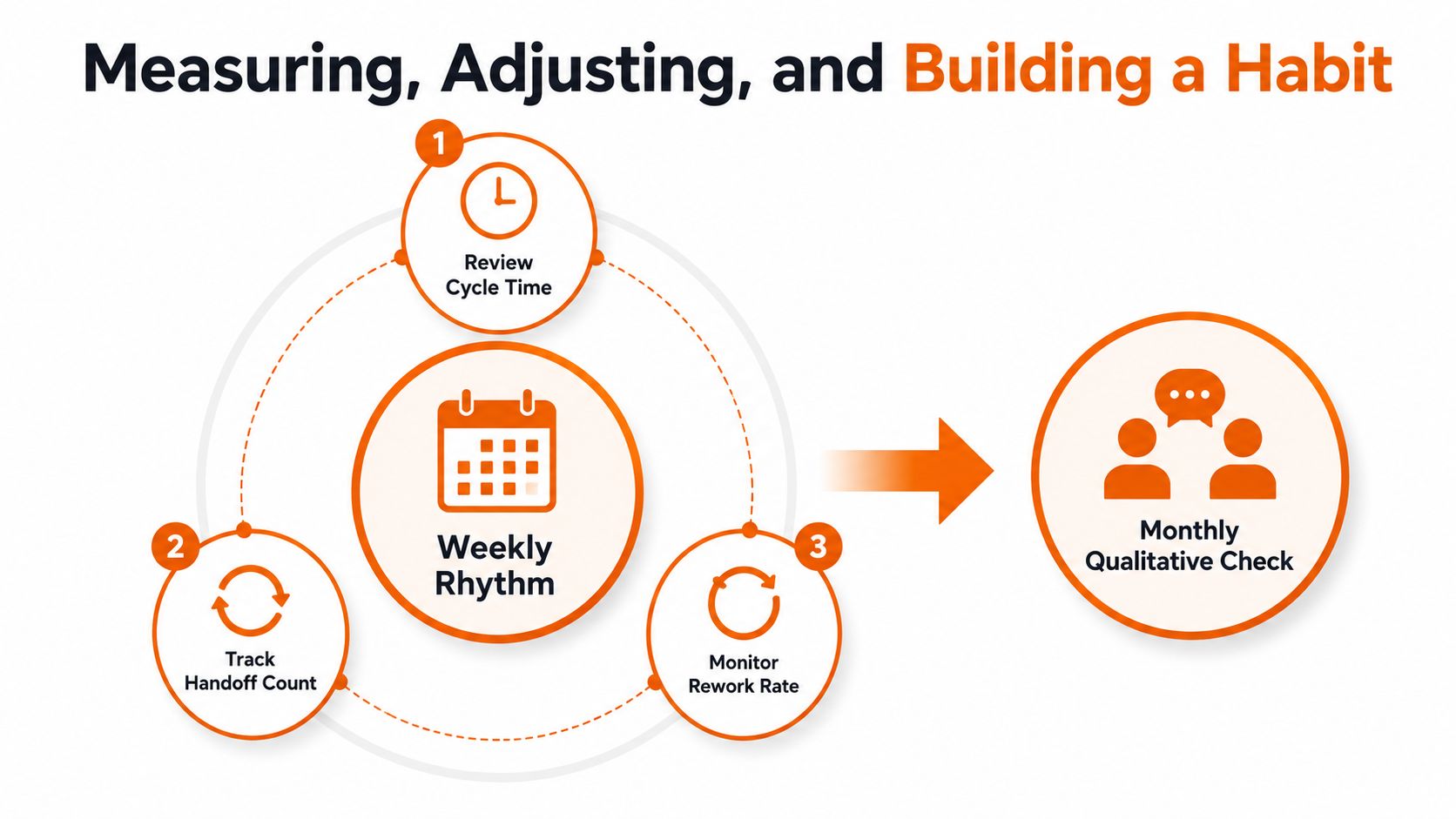
Meet for 15 minutes each week and review three numbers: cycle time, handoff count, and rework rate. Keep the conversation close to the workflow. Ask what slowed the request, where someone had to leave the system, and which exception repeated.
Meet with the frontline team monthly for a qualitative check. Numbers can tell you that a process slowed. Employees can tell you that the new form is hard to complete with gloves on, that notifications arrive after a shift ends, or that a manager still asks for a screenshot.
Retire what no longer helps
Run a quarterly reset. Remove workflows that have outlived their purpose, merge duplicate requests, and change ownership when the work has moved. A process shouldn't remain just because someone once documented it.
Meeting load deserves a direct review. Atlassian reported that 78% of respondents found the number of expected meetings made it hard to get work done, while 51% worked overtime at least a few days a week because of meeting overload. The survey also found 72% considered meetings ineffective for sharing information, encouraging collaboration, and completing tasks. Those figures are from Atlassian's workplace survey, and they point to a simple redesign opportunity: move routine updates and decisions into the workflow instead of scheduling another meeting.
A 2023 study of knowledge workers also connected more meeting-heavy periods with fewer microbreaks and lower energy, according to the published research on meetings and recovery. Protecting focus is part of workflow design.
Start next week with one workflow, one metric, and one employee to check in with. Small adjustments compound when the person closest to the task can see that their feedback changes the process.
Pebb brings communication, Tasks, Spaces, scheduling, file sharing, and a Knowledge Library into one mobile and web app for frontline and office teams. Visit Pebb to see whether one connected place can remove the app switching and handoffs slowing down your workflows.
