
10 Work Schedule Examples That Actually Work
Tired of broken schedules? We break down 10 real-world work schedule examples with pros, cons, and tips to find what truly fits your team.
Dan Robin

The 9-to-5 is a ghost. It haunts our calendars, a relic from an industrial age that has little to do with how real work gets done today. We try to cram modern jobs—from healthcare to software—into its rigid frame, and we wonder why everyone is so tired. The problem isn’t your team. It’s the schedule. It treats people like machines and measures time instead of progress.
We’ve spent years watching teams try to break free from this. What we’ve learned is that a schedule shouldn't be a cage. It should be a framework that serves the work and the people doing it. Most schedules fail because they assume every hour of the day is equal, which is just nonsense. Understanding the difference between energy management vs time management is the first step toward building something that feels less like a fight and more like a flow.
So, let’s stop trying to fix a broken model. Instead, I'll walk you through ten different work schedule examples that teams are actually using. We'll look at what works, what doesn't, and why. Think of this as a collection of ideas, not a set of instructions. The goal is to find a structure that gives your team the clarity and freedom they need to do great work.
1. The 9-5 Traditional Weekday Schedule: The Old Standard
Ah, the classic 9-to-5. Monday to Friday, same hours, no surprises. We all know it. It was built for a time when everyone had to be in the same place at the same time to get things done. It’s simple, predictable, and for a long while, it was good enough.
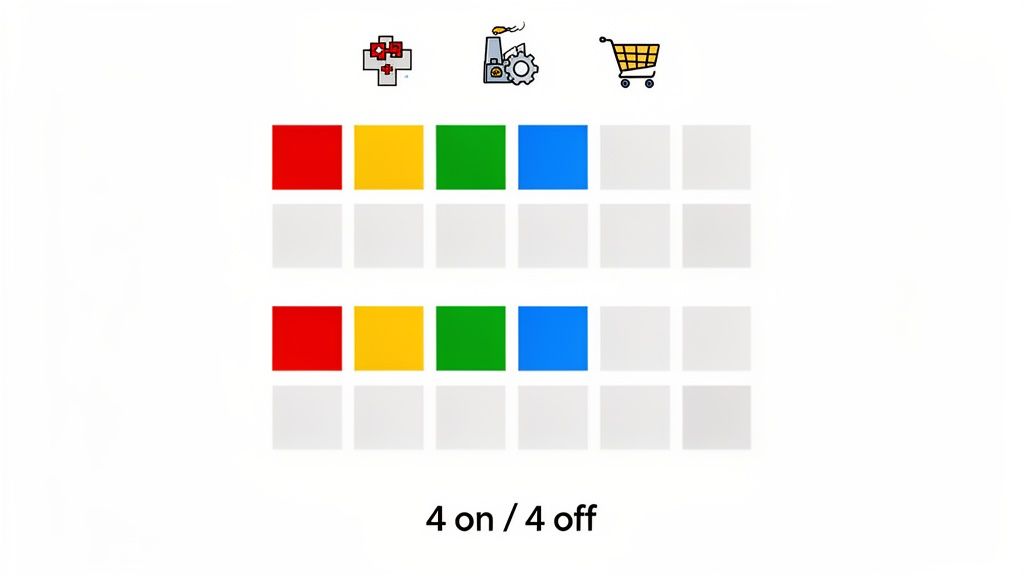
But let’s be honest. For most jobs today, it feels arbitrary. It wasn't designed for deep thinking or creative bursts. Still, its predictability is its strength, and in some cases, that’s exactly what’s needed.
When and Why to Use It
The 9-to-5 still makes sense where business hours are the whole point. Think banking, government offices, or any service where customers expect someone to answer the phone during the day. It makes scheduling meetings easy because, in theory, everyone is available at the same time.
It’s also a decent starting point for a new company. It provides a clear, simple structure before you have a reason to do something more interesting.
Pros and Cons
Pro: Predictable. Everyone knows the plan. It simplifies life, both inside and outside of work.
Pro: Simple Collaboration. When everyone shares the same hours, setting up a meeting is straightforward.
Con: One-Size-Fits-None. It ignores that some people do their best work at 9 PM and others at 6 AM. It forces everyone into the same box, often at the cost of their best energy.
Con: Doesn't Work for Global Teams. It creates bottlenecks when your team is spread across different time zones.
Actionable Tips for Implementation
If you’re stuck with a 9-to-5, you can still make it more human. We’ve found a few small things that help.
Use Status Updates: Encourage your team to use a status in their work app—in a meeting, focused work, at lunch. It adds a layer of respect for people’s time and attention.
Automate Reminders: Set up automatic end-of-day reminders in your project tool. It helps people wrap up without managers having to breathe down their necks.
Embrace Async: Even on a shared schedule, use chat tools that don’t demand an instant reply. It takes the pressure off and helps people stay in the loop without constant interruption.
2. The 9-5 Traditional Weekday Schedule: The Old Standard
Ah, the classic 9-to-5. It’s the work schedule we all know, the one that feels as standard as a Monday morning coffee. Monday to Friday, 9 AM to 5 PM. This model was built for an industrial-era ideal where everyone needed to be physically present and synchronized, like gears in a well-oiled machine. It’s simple, predictable, and for a long time, it just worked.
Let’s be honest, though. For many roles, this structure feels like a relic from a bygone era. It was never designed for deep, focused work or the diverse energy peaks of modern teams. Still, its predictability remains its greatest strength, making it a reliable choice for certain environments.
When and Why to Use It
The 9-to-5 shines in industries where business hours are non-negotiable and client-facing availability is key. Think banking, government offices, or professional services where customers expect to reach someone during a standard business day. It simplifies cross-team collaboration, as everyone is (in theory) online and available at the same time.
It’s also a solid starting point for new businesses creating their first work schedule. It provides a clear, easy-to-manage framework before you have enough data to explore more complex or flexible work schedule examples.
Pros and Cons
Pro: Unmatched Predictability. Everyone knows the schedule. It simplifies planning for both personal and professional commitments.
Pro: Simplified Collaboration. Scheduling meetings is a breeze when everyone shares the same core working hours.
Con: Rigid and Unforgiving. It completely ignores individual chronotypes. Your night owls are forced into a morning lark’s world, often at the expense of their best work.
Con: Outdated for a Global World. It creates communication bottlenecks for teams spread across different time zones.
Actionable Tips for Implementation
If the 9-to-5 is your reality, you can still inject flexibility and modern tooling to make it work better. We’ve found that even small adjustments can make a big difference.
Promote Status Updates: Encourage your team to use a status feature in your employee app to show when they’re in a meeting, heads-down on a project, or taking a lunch break. This adds a layer of transparency that respects focus time.
Automate Reminders: Use task management tools to set up automated end-of-day reminders. This helps everyone wrap up their work without managers needing to chase them down.
Embrace Asynchronous Communication: Even with a shared schedule, use chat tools to reduce the pressure for instant responses. This helps global team members stay in the loop without having to be online at odd hours.
3. Flexible or Flexible Hours Schedule: Embracing Autonomy
If the 9-to-5 is the skeleton, a flexible schedule is the living, breathing body. The idea is simple: establish "core hours" when everyone is reachable (say, 10 AM to 3 PM) and let people arrange the rest of their day as they see fit. It’s a schedule built on trust, not a time clock.
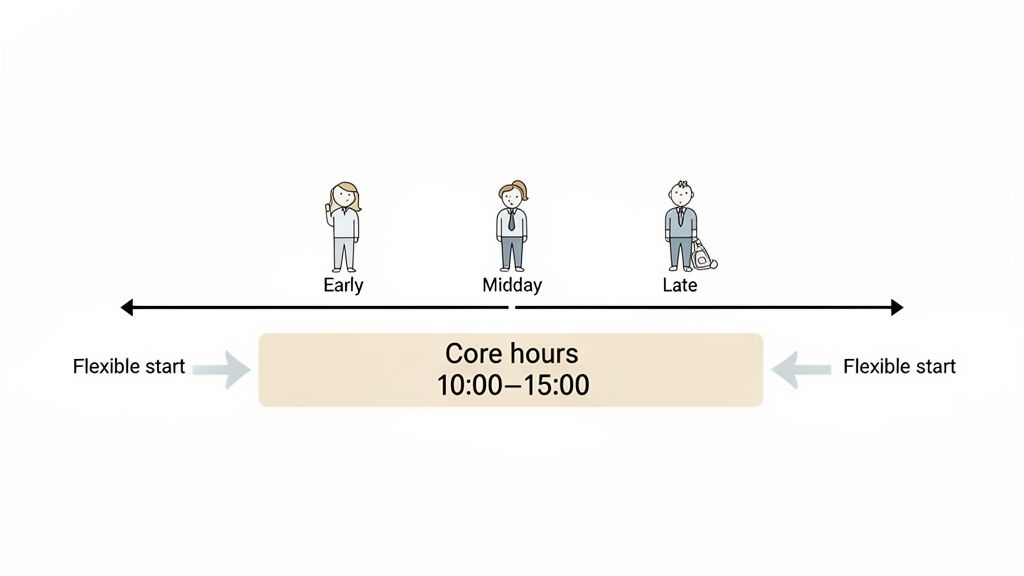
Here's the thing: this approach treats adults like adults. It admits that life exists outside of work—school runs, doctor’s appointments, or just the simple fact that some people think better at midnight. The focus shifts from "time in your seat" to the work itself.
When and Why to Use It
Flexible hours are a natural fit for knowledge work. Tech companies, creative agencies, and anyone whose job depends on deep thought can thrive with this model. The only real requirement is that the work isn't tied to a specific time of day.
It’s also a fantastic way to keep great people. When you give someone a schedule that bends with their life, you build a kind of loyalty that a free lunch never could.
Pros and Cons
Pro: Trust and Respect. People feel trusted, which is a huge motivator. Job satisfaction goes up.
Pro: A Magnet for Talent. In a competitive market, real flexibility is a serious advantage. It attracts professionals who want a better way to work.
Con: Communication Can Suffer. Without clear rules, it can be hard to know when you can grab someone for a quick chat.
Con: Needs a High-Trust Culture. This fails spectacularly in a company run by micromanagers. If you're more worried about activity than results, this isn't for you.
Actionable Tips for Implementation
To make a flexible schedule work, you need a framework of trust and clear communication. Here’s what we’ve seen work.
Define and Post Your Core Hours: Put your core hours policy somewhere everyone can see it. This makes sure everyone knows when they need to be available for real-time talk.
Encourage Status Updates: Ask your team to use their availability status—"Heads Down" or "Back in 30." It provides clarity without nagging.
Master Asynchronous Tools: Lean on project management tools and chat channels. This lets people contribute when it works for them, without the pressure to reply instantly.
4. Split Shift Schedule: Mastering the Peaks and Troughs
The split shift is a strategic pause. An employee works two separate blocks of time in one day, with a long, unpaid break in the middle. Think of a restaurant server who works the lunch rush, goes home for a few hours, and comes back for dinner. It's a schedule born from the rhythm of the business.
This isn't about working more hours; it’s about working the right hours. It’s a practical tool for businesses that have clear peaks and valleys in their day. Instead of paying someone to stand around when it's quiet, you concentrate their time where it matters most.
When and Why to Use It
Split shifts are perfect for industries with predictable rushes. The hospitality world lives on this, but it’s also useful for public transit, delivery services, and some retail shops with busy morning and evening windows.
This is one of the more specific work schedule examples. It only makes sense if your business has obvious, non-consecutive busy times. If your customer flow is steady all day, this will just make your employees' lives difficult. But for covering a noon lunch spike and a 7 PM dinner rush, it’s ruthlessly efficient.
Pros and Cons
Pro: Efficient Staffing. You match your labor costs directly to your revenue. No more paying for downtime.
Pro: Better Customer Service. Having a full team during the busiest hours means better service and happier customers.
Con: Tough on Work-Life Balance. That long break in the middle can chop up an employee’s day, making it hard to get anything else done.
Con: Burnout Risk. A long day with a break in the middle can be more draining than a straight shift. It can lead to high turnover if you’re not careful.
Actionable Tips for Implementation
If you use split shifts, clear communication and good tools are essential to make it sustainable for your team.
Visualize the Whole Day: Use your scheduling app to show both shifts and the break clearly. Label them—"Lunch Shift (11 AM - 2 PM)" and "Dinner Shift (5 PM - 9 PM)".
Send Automatic Reminders: Set up a push notification an hour before the second shift starts. This simple step cuts down on late arrivals.
Track Each Shift Separately: Make sure your system has a way to clock in and out for each part of the shift. This keeps payroll accurate and transparent.
5. Compressed Work Week (4-Day, 10-Hour Schedule)
The four-day work week is no longer a pipe dream. It’s a real strategy for companies that want to boost focus and well-being. The deal is simple: work your full weekly hours in four longer days—usually 10 hours each—and get a three-day weekend, every week.
There's a reason this is catching on. It gives people a real block of time to recharge, run errands, or just live their lives. The result is a team that’s more focused and motivated when they are at work. It’s a powerful way to say, "We trust you to get your work done."
When and Why to Use It
A compressed week is great for jobs that require deep, uninterrupted focus. Tech companies, customer service centers, and even some manufacturing plants have had great success with it.
It’s especially powerful if you can stagger the schedules. If Team A takes Fridays off and Team B takes Mondays off, you can stay open five days a week while still giving everyone that three-day weekend.
Pros and Cons
Pro: Huge Morale Boost. A three-day weekend is a life-changing perk. It improves work-life balance and job satisfaction in a big way.
Pro: Deeper Focus. Longer workdays mean fewer starts and stops. People can get into a state of flow and stay there.
Con: Long Days Are Tiring. Ten hours is a long time. This schedule isn't for everyone or every job.
Con: Coverage Can Be a Puzzle. Without careful planning, you can leave gaps in service. You have to be deliberate about staggering.
Actionable Tips for Implementation
If you want to try a compressed schedule, you have to set it up right. Modern tools are a must for managing the logistics.
Stagger Schedules for Coverage: Use a scheduling tool to create overlapping four-day schedules. This ensures someone is always there for your customers.
Set Clear Communication Rules: Create guidelines for asynchronous updates. The team that's off shouldn't feel pressure to respond, and the working team needs to know how to leave clear notes.
Focus on Wellness: Longer days require more care. Encourage real breaks. Use your work app to send reminders to get up, stretch, and drink water.
6. On-Call or Rotating On-Call Schedule: The Always-Ready Backup
Some problems don’t care about business hours. An on-call schedule is the answer for the unpredictable, ensuring that when something breaks, someone is ready to fix it. This isn't about working 24/7; it's about having a designated person on standby outside of normal hours.
This schedule is the safety net for industries where uptime is everything. It’s the IT admin who gets a server alert at 2 AM or the maintenance tech called in for a burst pipe on a weekend. They aren't actively working, but they are available, and that availability is crucial.
When and Why to Use It
An on-call schedule is non-negotiable for any business with 24/7 services or critical systems. It’s essential in healthcare, IT support, and manufacturing—anywhere a fast response can prevent a crisis.
It's one of the more demanding work schedule examples, but it's the only way to maintain trust with your customers. It ensures that when something goes wrong, you have a skilled person ready to jump in.
Pros and Cons
Pro: Continuous Coverage. You can respond to emergencies immediately, minimizing damage and downtime.
Pro: Cost-Effective. It's cheaper than having a full, active 24/7 team. You pay for availability, and only for active work when it's needed.
Con: High Burnout Potential. Being on-call is stressful. It disrupts life and can lead to fatigue if it’s not managed with fair pay and rotation.
Con: Complex to Manage. It requires clear policies, a fair rotation, and a reliable way to send alerts.
Actionable Tips for Implementation
If you run an on-call rotation, clear communication and solid tools are your best friends. Here’s how we’ve seen teams make it work.
Post the Schedule Centrally: Use a shared team space for the on-call calendar. Everyone should know who is on deck and when. No more guessing.
Use Priority Alerts: Your work app should be able to send high-priority notifications for on-call emergencies that cut through the noise.
Create an On-Call Playbook: Build a simple knowledge base with protocols and contact lists for common issues. This gives the on-call person the confidence to act quickly.
7. Remote or Fully Distributed Schedule: The Office is Optional
Remote work isn't a perk anymore. For many, it's just how work is done. This model separates work from a physical location, letting people work from wherever they have a good internet connection. It’s a fundamental change, driven by a desire for trust and autonomy.
But let's be clear: this isn't just about working from home. A truly distributed company has to rewire how it communicates and builds culture. Done right, it opens up a global talent pool. Done wrong, it leads to isolation and burnout.
When and Why to Use It
This model is a game-changer for any industry where the work is digital. Tech companies like GitLab and Automattic were the pioneers, but it’s now common in consulting, design, and marketing. The core idea is simple: results matter, not your physical location.
It’s the ultimate way to hire the best person for the job, no matter where they live. If you value output over office time and are willing to invest in the right tools, a distributed model is a massive competitive edge.
Pros and Cons
Pro: Global Talent Pool. Your search for the best candidate is no longer limited by commute times.
Pro: Real Autonomy. It trusts people to design a workday that fits their life and their energy, which leads to happier, more loyal employees.
Con: Isolation is a Real Risk. Without the spontaneous chats of an office, people can feel disconnected. Building culture takes deliberate effort.
Con: Communication is Harder. Time zones and asynchronous work can create delays. It demands excellent writing and documentation.
Actionable Tips for Implementation
Going remote means being intentional about connection. The right tools and routines are everything.
Build a Digital HQ: Use a central work app with dedicated channels for teams, projects, and social chat. This becomes your virtual water cooler.
Master Asynchronous Updates: Ditch the endless status meetings. Use a project tool where everyone posts their progress on their own time.
Write Everything Down: Create a central knowledge base for policies, processes, and project info. It becomes the single source of truth and cuts down on repetitive questions.
8. Hybrid Work Schedule (Office + Remote)
The hybrid schedule is the great compromise. It blends the freedom of remote work with the collaborative buzz of the office. The most common flavor is the 3-2 model—three days in the office, two at home—but the variations are endless.
This is more than just splitting your time. It’s about rethinking what the office is for. The office is no longer the default place for all work. It becomes a hub for specific things: brainstorming, team building, and tasks that are genuinely better done in person. It’s an admission that we need both autonomy and connection.
When and Why to Use It
A hybrid schedule is a smart move for companies moving away from a full-time office culture. It works best when face-to-face collaboration is important but not necessary every single day. Companies like Google and Deloitte use it to get the best of both worlds.
It’s also a powerful tool for attracting and keeping talent. When flexibility is a top priority, offering a hybrid model gives you a real edge. It shows you trust your team to manage their time, wherever they are.
Pros and Cons
Pro: Balanced Flexibility. People get the quiet focus of home and the social connection of the office.
Pro: Wider Talent Pool. It opens up hiring to people who don't want to commute five days a week.
Con: Risk of an "In-Group." There's a danger of creating a divide between the people in the office and those at home, which can affect promotions and opportunities.
Con: Logistical Headaches. Managing who is where, booking desks, and running meetings for both in-person and remote folks takes real planning and the right tools.
Actionable Tips for Implementation
To make hybrid work, you have to be intentional about visibility and communication. Here’s what we’ve learned.
Set Core Collaboration Hours: Define a time block each day (e.g., 10 AM to 3 PM) when everyone, remote or in-office, is available for meetings. This protects focus time.
Use a Status Feature: Encourage everyone to set their status in your work app to show if they are In-Office or Remote. This simple habit removes all the guesswork.
Create a Central People Directory: Make it easy for people to find and connect with each other, whether they're down the hall or across the country.
A successful hybrid model depends on the right tech. For a deeper look, check out the best tools for blending in-office and remote team communication.
9. The Retail/Hospitality Seasonal Schedule: Riding the Waves
For some businesses, work isn’t a steady stream; it’s a series of waves. A seasonal schedule is designed to ride those waves, staffing up for the holiday rush and scaling back during the quiet months. It’s all about matching your team to customer demand.
This model is the lifeblood of any business tied to seasons or holidays. Think of a ski resort that's mobbed in the winter but quiet in the summer, or a store that does 40% of its business in the six weeks before Christmas. It’s a dynamic approach that requires planning and flexibility.
When and Why to Use It
This is the default schedule for any business whose revenue chart looks like a rollercoaster. It's essential for retail during the holidays, hotels in tourist season, and restaurants with busy summer patios.
The reason to use it is simple: survival. Overstaffing in the slow season kills your budget, and understaffing during a rush kills your reputation. This schedule ties your labor costs directly to your revenue, making it one of the smartest work schedule examples for seasonal businesses.
Pros and Cons
Pro: Cost-Effective. You align your biggest expense—labor—with your busiest times.
Pro: Maximum Coverage. You have all hands on deck when you need them most, protecting the customer experience.
Con: Staffing Instability. It can be hard to keep good people who need consistent hours all year. It often relies on a temporary workforce.
Con: Forecasting is Everything. The whole model rests on your ability to predict your busy seasons. A wrong guess can be a disaster.
Actionable Tips for Implementation
Managing a seasonal business requires a solid communication plan. Being proactive is everything.
Plan Your Ramp-Up Early: Use your scheduling tool to build and share seasonal schedules weeks or months in advance. This gives your team predictability in an unpredictable environment.
Create a Seasonal Staff Hub: Set up a dedicated channel in your work app for seasonal hires. Post training docs and FAQs so they can get up to speed fast.
Communicate Expectations Clearly: Use company-wide announcements to set clear expectations for the busy season—overtime policies, performance goals, etc.
10. Rotating Shift Schedule (e.g., Early-Late-Night Rotation): The Constant Cycle
The rotating shift schedule is the engine of 24/7 operations. It keeps the lights on and the machines running around the clock. In this model, employees cycle through different shifts—mornings, evenings, nights—over a set period. It's a demanding system designed for one purpose: no gaps in coverage. Ever.
This schedule is about operational necessity, not personal preference. It powers the industries that never sleep, from hospitals to factories. The constant rotation is tough, but for many businesses, it’s the only way to meet demand.
When and Why to Use It
This is the go-to schedule for any business that runs 24/7. It's essential in healthcare, emergency services, and manufacturing plants that can't afford to shut down.
A rotating schedule ensures that the burden of working undesirable hours, like the night shift, is shared equally. This can help prevent the burnout that comes from being permanently stuck on a difficult schedule. It’s a system built for fairness and resilience.
Pros and Cons
Pro: Guarantees 24/7 Coverage. It's one of the most effective work schedule examples for making sure every shift is staffed with experienced people.
Pro: Fair Shift Distribution. Everyone takes a turn on the tough shifts, which can reduce resentment.
Con: Disruptive to Life. The constant changes can mess with sleep, social plans, and family routines. It’s a major adjustment.
Con: High Admin Load. Managing complex rotations requires meticulous planning and a powerful scheduling tool to avoid mistakes.
Actionable Tips for Implementation
If a rotating schedule is a necessity, supporting your team is key. Clear communication and smart tools can make a huge difference.
Publish Schedules Far in Advance: Use a scheduling tool to map out the rotation for several weeks or months. This gives people the predictability they need to plan their lives.
Send Automatic Shift Reminders: Set up notifications to remind staff of their upcoming shift change a few days beforehand. This simple step cuts down on confusion.
Build a Strong Handoff Process: Use a checklist or task feature for shift handoffs. This ensures critical information is never lost between teams.
Comparison of 10 Work Schedules
Schedule | Implementation complexity 🔄 | Resource requirements ⚡ | Expected outcomes ⭐📊 | Ideal use cases | Key advantages 💡 |
|---|---|---|---|---|---|
4-4-4-4 Fixed Shift Schedule | Medium — predictable rotation but needs careful coverage planning 🔄 | High — 24/7 staffing and fatigue monitoring ⚡ | ⭐⭐⭐ — Reliable continuous coverage; predictable payroll; fatigue risk 📊 | Hospitals, manufacturing, dispatch centers | Clear schedule visibility; long blocks of time off |
9–5 Traditional Weekday Schedule | Low — straightforward, widely understood 🔄 | Medium — standard office staffing and facilities ⚡ | ⭐⭐⭐ — Predictable business hours, easy coordination 📊 | Corporate offices, finance, government | Simplifies meetings and client alignment |
Flexible / Flexible Hours | Medium–High — requires asynchronous norms and policies 🔄 | Low–Medium — fewer office resources, strong comms tools ⚡ | ⭐⭐⭐⭐ — Higher satisfaction and productivity; overlap gaps possible 📊 | Tech, creative agencies, consulting | Attracts talent; accommodates chronotypes |
Split Shift Schedule | High — complex daily coordination and breaks 🔄 | Low–Medium — lean off-peak staffing but more scheduling work ⚡ | ⭐⭐ — Targets peak demand efficiently; fragments personal time 📊 | Retail, restaurants, transportation | Optimizes peak-hour coverage; reduces off-peak costs |
Compressed Work Week (4×10) | Medium — needs staggering to preserve coverage 🔄 | Medium — longer shifts, possible staggered teams ⚡ | ⭐⭐⭐ — Improved morale and fewer commute days; longer shift fatigue 📊 | Customer service, healthcare pilots, some tech teams | Three-day weekends; reduced office overhead |
On-Call / Rotating On-Call | Medium — rota rules and compensation considerations 🔄 | Low — cost-effective vs full overnight staffing; needs reliable alerts ⚡ | ⭐⭐⭐ — Fast emergency response; personal disruption and stress 📊 | IT support, ERs, facilities management | Covers emergencies without full staffing |
Remote / Fully Distributed | Medium — policy, tools, and documentation required 🔄 | Low — reduced office costs but needs strong connectivity ⚡ | ⭐⭐⭐⭐ — Access to global talent; potential culture/isolation issues 📊 | Fully remote tech firms, consultancies, creative agencies | Flexible location, improved work-life balance |
Hybrid Work Schedule (Office + Remote) | Medium–High — requires desk management and coordination 🔄 | Medium — office space management plus remote tooling ⚡ | ⭐⭐⭐ — Balances collaboration and flexibility; scheduling inequities possible 📊 | Large tech firms, professional services, enterprise teams | Mix of in-person connection and remote focus |
Retail / Hospitality Seasonal | High — surge planning, variable contracts, complex rostering 🔄 | High — temporary hires, training, flexible labor pools ⚡ | ⭐⭐ — Aligns labor to demand; high turnover and instability for staff 📊 | Retail holidays, tourism, event venues, hotels | Scales workforce to peak demand; cost-managed staffing |
Rotating Shift Schedule (Early/Late/Night) | High — complex rotation cycles and handoffs 🔄 | High — continuous coverage, health & overtime considerations ⚡ | ⭐⭐ — Fair distribution of shifts; health and retention risks 📊 | 24/7 healthcare, manufacturing, call centers, utilities | Equitable rotation; ensures continuous operations |
So, What's the 'Right' Schedule?
We've just looked at a dozen different work schedule examples. It’s tempting to search for the "best" one, a magic template you can just drop into your company. But if you've been paying attention, you already know the truth.
There is no perfect schedule. Not here, not anywhere.
The right schedule isn't a static document. It's a living agreement between you and your team. It’s found in the patterns of your business, the honest feedback from your people, and your courage to try something different. The goal isn’t to find a schedule and carve it in stone. It’s to build a way of working that is calm, productive, and human.
Beyond the Template: Key Principles to Remember
After looking at all these models, a few simple ideas stand out. These are the things that separate a schedule that just works from one that actually helps people thrive.
Clarity Over Complexity. Your team should be able to understand the schedule without a user manual. If you can't explain it in a single sentence, it's too complicated. Confusion leads to frustration and missed shifts.
Flexibility is a Two-Way Street. Real flexibility isn’t just about working from home. It's about building a system that can handle life’s messiness—a sick kid, a sudden appointment. A good schedule has some slack. It respects that your employees are people.
Your Industry Sets the Rules. The perfect schedule for a software company would be a disaster for a hospital. Context is everything. For instance, a CNA’s choice often goes beyond hours; it involves choosing the right facility type and workplace, because the environment shapes the schedule. Start with what your work absolutely requires.
Ownership Matters. Schedules feel like a burden when they're handed down from above. When people have a say in the process, even a small one, their engagement goes up. This could be as simple as an easy way to swap shifts.
Your Next Step
So, what do you do now? Don't tear up your current schedule. Just start by listening.
Sit down with your team. Ask them simple questions:
What’s the most frustrating part of our current schedule?
If you could change one thing, what would it be?
When do you actually feel productive?
The answers you get will be more valuable than any of the work schedule examples in this article. They’ll give you a real, human starting point. Pick one small problem you heard and try to solve it. Maybe it's making time-off requests easier. Maybe it's guaranteeing one weekend off a month.
Start small. See what happens. And remember, a schedule is just a tool. It's supposed to serve your people, so they can do their best work. That’s the whole point.
Tired of juggling spreadsheets and messy group chats to manage your schedules? Pebb brings all your scheduling, communication, and team operations into one simple, mobile-first app. See all these work schedule examples in action by building your own in minutes with Pebb.
