
What Is OAuth Authentication? a Plain English Guide
Unlock the power of secure access: discover what is oauth authentication. Our guide explains it in plain English, covering SSO & app integrations without
Dan Robin

You probably ran into this this week.
An employee needed a new app for scheduling, payroll, learning, benefits, or internal comms. They clicked a button that said Continue with Google or Sign in with Microsoft, approved a small permission screen, and got on with their day. No new password. No spreadsheet of shared admin logins. No note to IT saying, “I'm locked out again.”
That smooth moment feels simple on the surface. Underneath, it depends on one of the most important standards on the modern web.
When people ask what is OAuth authentication, they're usually trying to understand that moment. Why it feels easier. Why it's safer. And why employees sometimes trust it, or reject it.
I've found that non-technical teams don't need more jargon here. They need a practical model. They need to know what OAuth does, what it doesn't do, and why the consent screen matters so much when you're rolling out tools to real people with real work to do.
The Invisible Workhorse of the Internet
Most companies still carry too much password baggage.
HR has one tool. Operations has another. Managers have a scheduling app, a file tool, a payroll system, and some old platform no one likes but no one can remove. Every new system adds another login. That creates friction for employees and risk for the business.
OAuth sits right in the middle of that problem, in the background.
It powers the familiar buttons people already trust. OAuth 2.0 is the framework behind “Login with Google,” “Login with Facebook,” and “Login with Microsoft,” and these experiences serve billions of users daily. As of 2024, approximately 87% of technology companies use OAuth 2.0 as their primary way to delegate access to user data, according to the verified industry data provided for this article.
Why this matters to people who manage tools
If you manage a team, you're not asking for protocol theory. You're asking simpler questions.
Will this make access easier for employees?
Will it lower the chance that someone shares a password in the wrong place?
Will it help us connect our systems without making a mess?
OAuth helps because it changes the basic arrangement. Instead of giving one app your password to another app, you give limited permission. That's a cleaner model and a more humane one.
Good access design removes work from employees without removing control.
The important shift is this. OAuth was built for delegated access. One app can ask for a narrow slice of access to another system, and the user can approve that request without handing over their full credentials.
That's why the web feels different now than it did years ago. Fewer raw passwords. More permission-based access. More revocable connections.
The phrase is misleading
The phrase “OAuth authentication” is common, but it confuses people from the start. OAuth is famous because it often appears during login, so people assume it is the login system itself.
It isn't. That distinction matters more than is commonly understood.
If you hold onto one idea from this piece, hold onto this one. OAuth is the part that says what an app may access. The login step is a separate job.
Think of It Like a Hotel Key Card
The cleanest way to understand OAuth is to stop thinking about software for a minute.
Think about checking into a hotel.

At the front desk, you prove who you are. You show ID, confirm your booking, maybe hand over a card. The hotel verifies your identity. That is authentication.
Then the hotel gives you a key card. Not the master key. Not access to every room, office, and storage closet. Just a card that opens your room, maybe the gym, maybe the side entrance, and only for the length of your stay. That is authorization.
OAuth is the key card part.
The four actors in plain English
Under the hood, OAuth has four core parts. The names sound technical, but the roles are simple.
Part | Plain English meaning |
|---|---|
Resource Owner | The person who owns the data |
Client Application | The app asking for access |
Authorization Server | The service that approves access and issues the token |
Resource Server | The system that actually holds the data |
So if an employee connects a calendar app to another workplace tool, the employee is the Resource Owner. The workplace tool is the Client Application. Google or Microsoft may act as the Authorization Server. The calendar data sits in the Resource Server.
That arrangement matters because the employee never has to hand the second app their Google or Microsoft password.
What gets passed around instead of a password
OAuth uses an access token. Think of it as the digital version of the hotel key card.
The token says, in effect, “this app is allowed to do this specific thing for this limited time.” It might allow access to calendar availability. It might allow an HR system to read a profile field. It might allow a service to sync shifts or pull directory data.
It does not need to access everything.
Practical rule: Ask for the smallest permission set that still lets the job get done.
That's one reason OAuth is safer than direct password sharing. The verified data for this article states that the system is designed to reduce credential theft risk by over 90% compared to direct password sharing.
Why people trust this model faster
Employees are usually more comfortable approving a narrow request than surrendering a password.
That's not a small difference. It changes behavior. When the request is clear, specific, and time-bound, people can make a decent judgment call. They know what they're allowing.
When an app asks for broad access with vague language, trust drops fast. And it should.
Authorization Is Not Authentication and It Matters
Most confusion begins at this point.
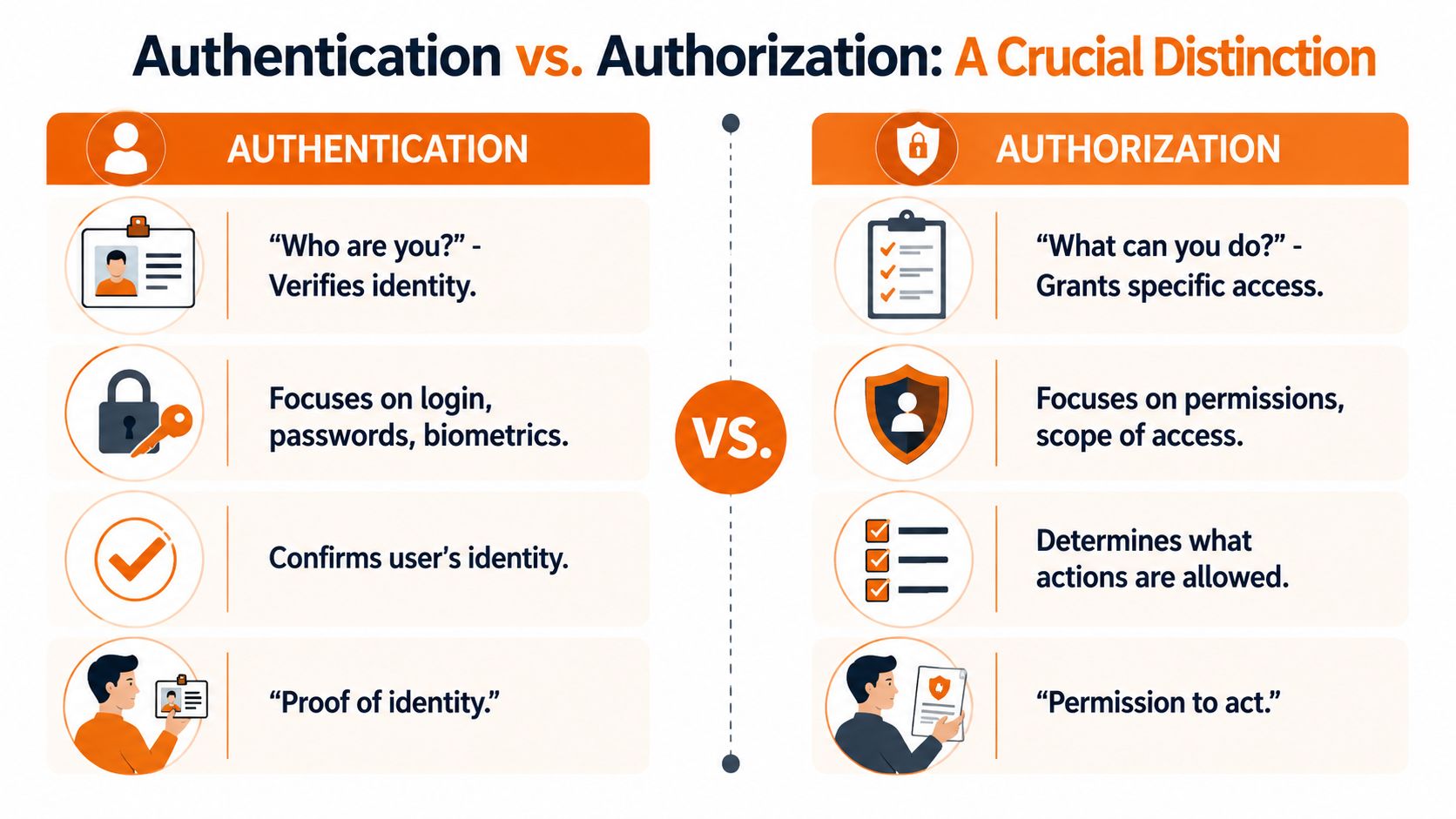
People say “OAuth login” or “OAuth authentication” because OAuth often appears at the moment of sign-in. But OAuth is an authorization protocol, not an identity protocol.
Two jobs, not one
Authentication answers one question: Who are you?
Authorization answers a different one: What are you allowed to do?
Those are separate jobs, and systems get more secure when we keep them separate. In the hotel example, your ID proves who you are. The key card decides which door opens.
The formal split was locked in when RFC 6749 published OAuth 2.0 in 2012. Then OpenID Connect arrived in 2014 to add the missing identity layer. The verified data for this article also notes that compliance frameworks such as SOC 2 and HIPAA now require this separation for secure third-party access.
Why this separation is healthier
I like this design because it keeps each piece honest.
OAuth does not pretend to prove identity. It assumes identity was verified somewhere else. Then it takes over the permissions problem. That may sound subtle, but it prevents a lot of sloppy thinking in product design.
If you blur those two jobs together, you get awkward systems and risky shortcuts. If you keep them distinct, you can be precise about both identity and access.
A similar idea shows up in solid role-based access control best practices. First decide who someone is in the system. Then decide what they should be able to reach.
What that looks like in real life
When someone clicks Sign in with Google, two things often happen in sequence.
First, the identity layer confirms the user. That's the authentication piece. Then OAuth handles permission grants, such as allowing the app to read a calendar, basic profile details, or another approved resource.
If a product team treats identity and permissions as the same thing, users feel it. Usually in the form of scary permission screens and avoidable support tickets.
This is also why the phrase what is OAuth authentication deserves a careful answer. The phrase is common, but the cleaner answer is that OAuth usually appears alongside authentication. It is not the whole story by itself.
How the Digital Handshake Happens
Once you understand the roles, the flow gets easier to follow.
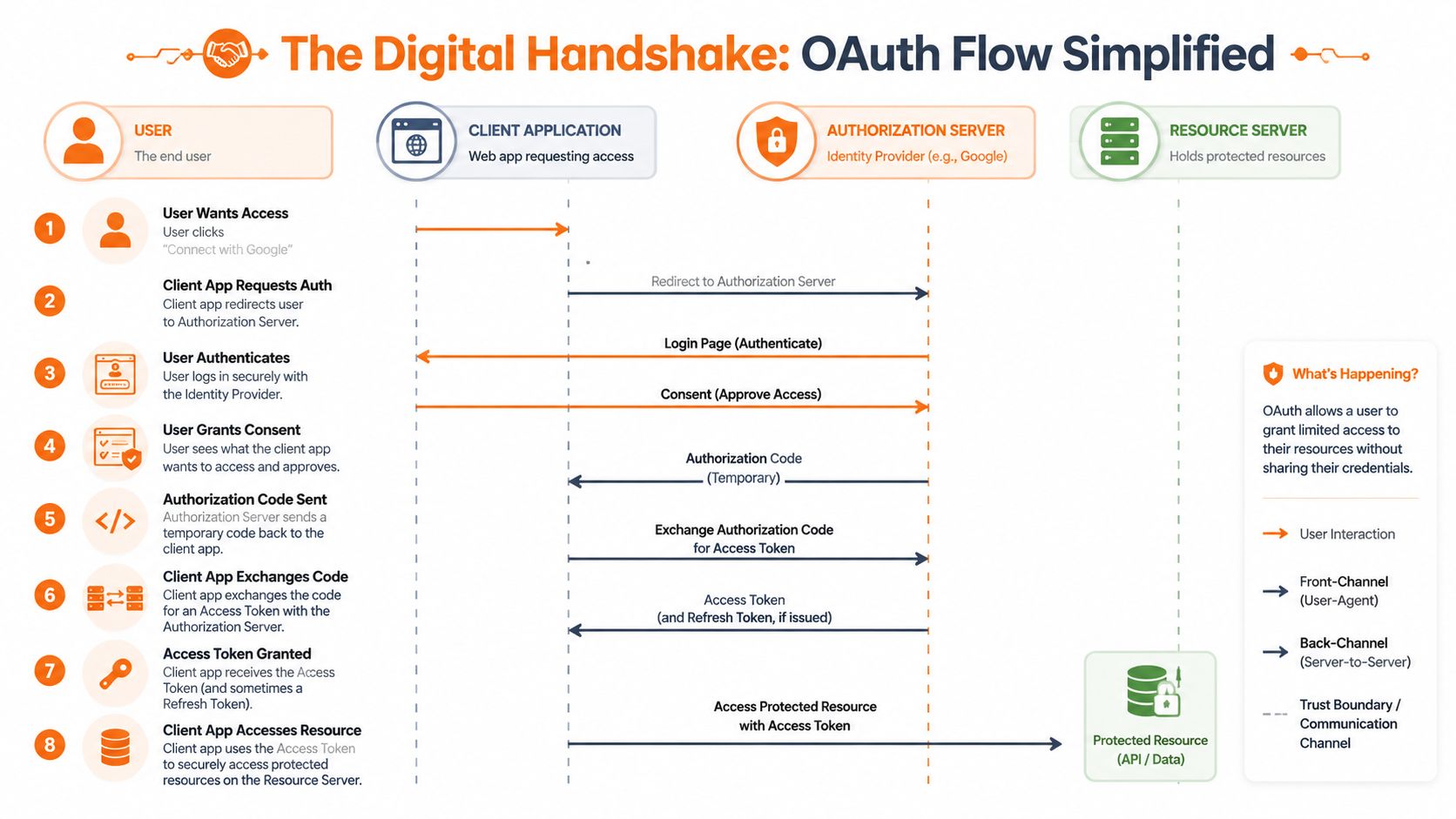
What looks like one click to an employee is really a short, structured handshake between the app, the identity provider, and the system that holds the data.
The common web flow
For a standard web app, the most common pattern is the Authorization Code flow.
It usually goes like this:
An employee clicks a connect button. Maybe it says connect Google Calendar or connect Microsoft.
The app sends the employee to the authorization server. This is the trusted sign-in and consent screen.
The employee signs in and reviews the request. They see what the app wants access to.
The authorization server returns a temporary code. Not a password. Not permanent access.
The app exchanges that code for an access token.
The app uses the token to access only the approved resource.
That may sound busy, but it's built that way on purpose. The app gets a limited token, not the user's main credentials.
When no employee is involved
Sometimes systems need to talk to each other without a person clicking anything.
A payroll sync is a good example. Or a nightly transfer of shift data between two approved internal services. In those cases, teams often use the Client Credentials flow. It's built for machine-to-machine access.
The key difference is consent. A person isn't granting access in the moment. The organization sets up the permission between trusted systems in advance.
That distinction gets missed all the time. Human-facing OAuth has consent screens. Service-to-service OAuth usually doesn't.
Why mobile changed
Mobile added a wrinkle. Older OAuth patterns for public apps turned out to be too easy to misuse, especially when token handling was weak.
The verified data for this article says that 78% of mobile app breaches in 2023 stemmed from insecure token handling in deprecated OAuth flows, based on the OWASP Mobile Security Guide. That's a strong reason the industry moved toward PKCE for mobile apps.
PKCE adds another verification step so a stolen code is much less useful. For teams rolling out apps to frontline staff on shared or personal devices, that matters a lot.
If your team is building on mobile stacks and wants a practical implementation walkthrough, AppLighter's guide to Mastering Supabase authentication is a useful technical companion because it shows how modern auth patterns play out in a real app environment.
Deprecated mobile OAuth flows are not a harmless legacy detail. They're a cleanup task with security consequences.
The part non-developers should watch
You don't need to memorize grant types.
You do need to ask a few sharp questions when a vendor says they “support OAuth”:
What permissions are you requesting? Narrow access is better.
How does mobile sign-in work? Modern mobile implementations should reflect the shift to PKCE.
Can access be revoked cleanly? It should be easy to shut off an integration without breaking everything else.
How are machine-to-machine connections separated from employee consent flows? Those are different use cases and should be treated differently.
That's the practical side of understanding what OAuth authentication really means in day-to-day operations.
What OAuth Means for Your Team
The technical part is only half the story.
The harder part, in many organizations, is the human reaction to the permission screen. Employees don't read OAuth docs. They read prompts. They see phrases like “allow access” and decide, in a few seconds, whether they trust what's happening.
Consent friction is real
The verified data for this article includes a striking point from the 2025 Gartner HR Technology Survey. It found that 65% of employees reject third-party app access requests because of “permission confusion.”
I believe that. Anyone who's managed a rollout has seen it.
An employee clicks connect. A dense screen appears. The app asks for several permissions in formal language. The employee backs out, not because they're resisting change, but because the request feels larger than the task.
What better design looks like
A thoughtful OAuth experience does a few simple things well.
It asks for less. If the job only requires calendar access, it shouldn't ask for mail.
It uses plain language. “View your work schedule” is better than a vague technical phrase.
It explains timing. People want to know whether access is one-time, ongoing, or revocable.
It matches the user's role. A supervisor, a payroll admin, and a frontline employee should not all see the same request if their needs differ.
This is as much a trust exercise as a security one. If you want people to adopt a tool, the request has to feel proportional.
That's also why broader data protection strategies matter beyond the login screen. Employees are judging your systems by the clarity of each interaction, not by your architecture diagram.
The business payoff
When OAuth is implemented well, teams feel the difference quickly.
Employees manage fewer passwords. IT or operations spends less time cleaning up account access issues. Managers connect tools without resorting to shared credentials. And when someone leaves a role or a vendor relationship ends, access can be cut off in a more controlled way.
There's also a cultural benefit. People are more likely to trust workplace software when the software behaves like it respects boundaries.
The fastest way to make an integration feel unsafe is to ask for more access than the user expected.
If you're evaluating tools, this is worth paying attention to. Don't just ask whether a platform has OAuth. Ask how the consent experience works for a non-technical employee at the end of a long shift.
That answer tells you a lot.
Good Technology Is Built on Trust
OAuth is often described as a protocol, and that's true. But it's also a design choice.
It says we should stop passing passwords around when a narrower permission will do. It says access should be explicit. It says access should be revocable. And it says the user should be able to see, in plain terms, what's being granted.
That's a better way to build software.
The quiet standard worth caring about
Most of the best workplace technology fades into the background. People don't want to think about token exchange, grant types, or identity layers. They want tools that open quickly, connect cleanly, and don't put them in awkward security situations.
OAuth helps make that possible when teams implement it with care.
If you remember nothing else, remember this. The real answer to what is OAuth authentication is that OAuth is the permission system that makes modern sign-in and integration safer, cleaner, and more respectful of user control. The actual identity check sits alongside it, not inside it.
For teams juggling HR systems, comms tools, payroll apps, scheduling platforms, and mobile workforces, that distinction isn't academic. It shapes how secure your stack is and how willing your employees are to use it.
You can see that same philosophy in a company's security approach. The details matter, but the principle is simple. Good systems earn trust by limiting access, explaining it clearly, and making control easy to take back.
That's the standard worth expecting from every tool you bring into your workplace.
If you're looking for one app that brings communication, operations, and engagement together without turning access into a mess, take a look at Pebb. It's built for frontline and office teams that need secure integrations, clear permissions, and a simpler day at work.
