
10 Role Based Access Control Best Practices We Actually Use
Tired of messy permissions? Learn the 10 role based access control best practices we use to keep teams secure and productive. Real-world tips, no jargon.
Dan Robin
Let's be honest. For most companies, 'access control' is a mess. It starts with one-off permissions, access inherited from jobs people left years ago, and a general feeling of hoping for the best. Give Susan access to the schedule. Give Mark access to inventory. Simple enough. Until you’re staring at a spreadsheet with a thousand exceptions, wondering who can see what and why. It feels fragile. It feels complicated. We’ve been there.
The secret isn’t more rules; it’s a calmer, more thoughtful system. It’s about building a framework that reflects how your teams actually work, not forcing them into a rigid, insecure box. That's what role-based access control (RBAC) promises, but the manual is often written in jargon that doesn't help. This isn't a theoretical guide. It's a clear, opinionated checklist of the role based access control best practices we’ve learned from the inside.
This cuts through the noise. We'll show you how to design clear roles, automate the tedious work of granting and revoking access, and run reviews that actually make your company more secure. Forget the vague advice. Here’s a practical roadmap to move from a tangled mess to a clean system that protects your data and makes life easier for everyone.
1. Start with the Principle of Least Privilege (PoLP)
Let's start with the cornerstone: the Principle of Least Privilege, or PoLP. Think of it like giving out keys to a building. You wouldn't hand every employee a master key, would you? You’d give them a key that only opens the doors they need to go through to do their job. PoLP applies that same simple logic to your digital workspace. It's one of the most effective role based access control best practices because it shrinks your attack surface. A lot.
The idea is simple: grant users the absolute minimum level of access they need. Nothing more. If an account is ever compromised, the potential damage is immediately contained. The intruder can only access what the compromised user could, which, under PoLP, shouldn't be very much. This isn't some obscure theory; it’s a foundational concept for a reason. It just works.
How We Put PoLP Into Action
Getting this right takes some upfront work, but it pays off in security and clarity.
First, we map job functions to permissions. We sit down and document what each role actually does. A cashier needs to see their schedule and PTO balance. They don't need access to company-wide payroll. A nurse on a specific floor needs records for their assigned patients, not the entire hospital's database.
Then, we use templates and customize. In a tool like Pebb, you can start with pre-built roles. From there, we tweak them to fit. Maybe warehouse team leads need to approve time-off requests, but retail team leads don't. The roles should reflect reality.
Finally, we review and audit. Regularly. Roles change. People get promoted. Teams evolve. We schedule quarterly reviews of all user permissions to make sure they're still appropriate. If someone moves from logistics to marketing, their old permissions are gone before they’ve finished setting up their new desk. PoLP isn't a "set it and forget it" task. It's a continuous practice.
2. Build Clear Role Hierarchies
Managing permissions one person at a time is a slow march to disaster. A better way is to build a logical structure using role hierarchies. Think of it as a family tree for access rights. A parent role passes down its permissions to child roles, which can then add their own. This is a core part of effective role based access control best practices because it creates consistency and simplifies everything. It mirrors how your business is actually structured.
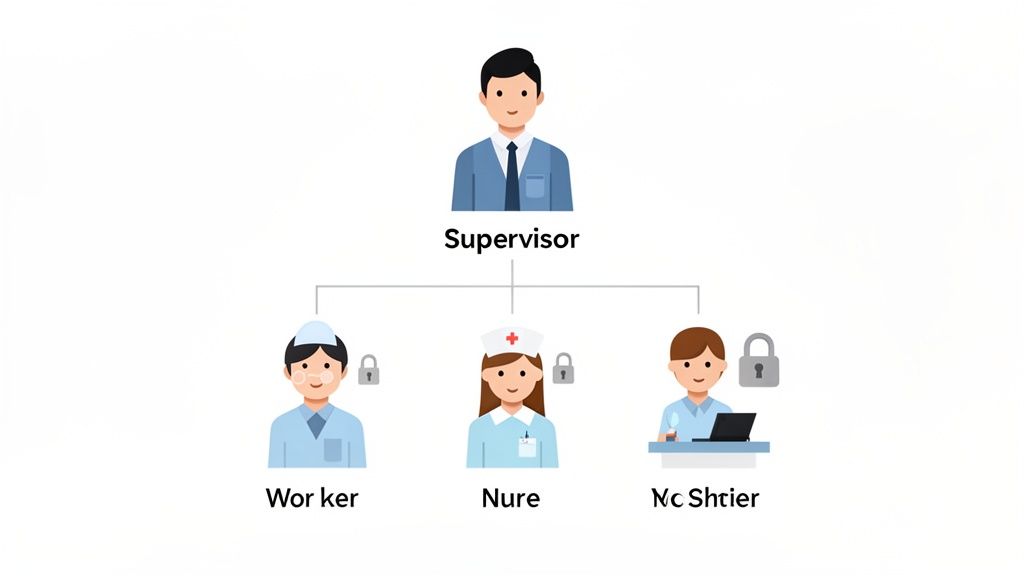
For instance, a shift supervisor needs the same access as the frontline workers they manage, plus the ability to approve timesheets. Instead of building two roles from scratch, the supervisor role simply inherits the permissions of the worker role and adds its own. Simple. Now, when a permission is updated for the worker role, it automatically flows down to all supervisors. No redundant work. No forgotten updates.
How We Build Our Hierarchies
Building a logical hierarchy means mapping out how your teams function, not just what the org chart says.
We start by mapping the real reporting structure. Before touching any settings, we draw out how teams operate. A Head Chef inherits everything a Line Cook can do, plus menu planning. An Assistant Manager gets a Cashier's access, plus permissions for scheduling.
Then, we keep it simple. It's tempting to create deep, complex hierarchies, but this often leads to confusion. We try to limit inheritance depth to three or four levels. A Worker > Supervisor > Manager hierarchy is clear and easy to manage.
And of course, we document and test. We create simple documentation showing what each parent role grants its children. Then we create a test user, assign them a child role, and log in to verify they have the right permissions. This catches errors before they impact real people. Role hierarchies aren't just a technical feature; they are a digital reflection of your operational structure.
3. Separate Duties to Build Guardrails
Next, let's talk about building guardrails. Imagine an employee who can request overtime, approve it, and then process the payroll for it. That’s a conflict of interest waiting to happen. This is where the principle of Separation of Duties (SoD) comes in. It’s a core idea in role based access control best practices designed to ensure no single person has the unchecked power to execute a sensitive transaction from start to finish.
This is about creating checks and balances. By distributing tasks for a specific process among multiple people, you slash the risk of errors, fraud, and abuse. It's not about distrusting your team; it's about protecting the business and the employees by removing temptation and single points of failure. The goal is to make it impossible for one person to act alone in a high-stakes workflow.
How We Implement SoD
Putting this into practice isn't about creating bureaucracy; it's about building thoughtful, secure workflows.
First, we identify the critical workflows. We map out our most sensitive processes: time-off approvals, expense reimbursements, schedule changes. These are prime candidates for SoD.
Next, we design multi-step approval chains. For each critical workflow, we define a clear path. A nurse requests a schedule swap, their supervisor must approve it, and the system automatically logs the change. No single person controls the entire process.
Finally, we automate the enforcement. We use tools to build these rules directly into our platform. A manager attempting to approve their own PTO request is blocked by the system, which can then escalate it to their boss. Separation of Duties is a proactive control. By embedding it into your daily operations, you prevent bad things from happening in the first place.
4. Keep Mobile and Web Access the Same
In today's world, your team works from everywhere: a desktop in the office, a tablet on the shop floor, a phone on their commute. Your security model has to keep up. Platform parity means a user's permissions are identical and consistent, no matter which device they use. This is a critical role based access control best practice that closes dangerous, often overlooked security gaps.
The goal is to eliminate any daylight between what a user can do on a web browser versus a mobile app. A nurse accessing a patient's chart on their phone should have the exact same rights as they would on a hospital desktop. If their access is different, you've created a loophole. This consistency is essential. When a user's role changes or they are offboarded, that change must reflect instantly across all platforms. No exceptions.
How We Achieve Platform Parity
Creating a seamless experience across devices requires a unified approach.
We design roles to be platform-agnostic. When defining roles, we think about the job function first, not the device. A retail manager needs to approve schedules. That need doesn't change whether they're using a laptop or their phone. The role is built around the work, and the permissions are enforced equally everywhere.
We also test on real devices. We don't just assume a permission on the web will behave the same way in an app. We conduct thorough testing on actual phones and tablets to confirm that restrictions are working as intended. We verify that a "view-only" role can't find a workaround to download sensitive files.
And we use a centralized identity. A single sign-on (SSO) integration enforces one consistent identity for each user. When you update a role or revoke access, the change is managed in one central place and immediately propagates to every connected device. Mobile isn't an accessory anymore; it's a primary interface. Treating mobile and web access as two separate problems is a recipe for disaster.
5. Run Regular Access Reviews
Even the most perfect roles can become a security risk over time. Think of it like a garden. If you plant it and walk away, weeds will eventually take over. Without regular upkeep, user permissions become overgrown and messy. Access reviews are the essential maintenance that keeps your system clean and secure. They are one of the most crucial role based access control best practices for long-term health.
The reality is that organizations change. Employees get promoted, switch departments, or leave. Without a formal review, their old permissions often linger, creating "permission creep." This gradual accumulation of unnecessary access quietly expands your attack surface. Regular recertification is the systematic process of verifying that a user's access is still right for their current job.
How We Make Reviews Routine
Making reviews a habit is less about policing and more about good digital hygiene. It’s a scheduled check-up.
We schedule them on a consistent cadence. We don't wait for an audit. We schedule reviews quarterly or semi-annually. A restaurant with high staff turnover might do monthly checks. A tech company might align them with annual planning. Consistency is everything.
We make it easy for managers. We don’t send them a blank spreadsheet. We use a tool to generate a simple report of their team's access levels. We send a pre-populated list and ask for a simple "approve" or "deny." The easier you make it, the more likely it is to get done.
And we document everything. Each review is a formal process. We document who conducted it, what was checked, the decisions made, and any actions taken. This creates a clear audit trail that demonstrates due diligence. Access reviews transform security from a one-time setup into an ongoing, collaborative process. They make security a shared responsibility, not just an IT problem.
6. Document Your Roles Clearly
If roles are the building blocks, then clear documentation is the mortar holding them together. Without it, roles become ambiguous, leading to inconsistent permissions and confusion. Think of role documentation as the official blueprint for each job’s digital access. It translates a title like "Store Manager" into a concrete set of permissions, ensuring everyone from IT to HR understands what that role can and cannot do.
The goal is a single source of truth that defines the intent behind each role. This clarity prevents "privilege creep," where permissions are added over time without a clear business reason. It also makes auditing dramatically simpler. When an auditor asks why a role has access to specific data, you can point directly to documentation that outlines the business justification. This turns abstract policies into actionable, auditable controls.
How We Approach Documentation
Building this documentation requires collaboration, but it solidifies your security and efficiency for the long haul.
We define roles with department leaders. We don’t create roles in an IT vacuum. We sit down with department heads to understand what their teams actually do. A 'Dock Supervisor' needs access to shipment tracking and their team's time-off requests. We document these real-world needs.
We use a simple, consistent format. We created a standard template for every role: Job Titles → Key Responsibilities → Required Systems & Permissions → Restrictions. For example, a 'Line Cook' role might list "accesses prep schedules" under permissions and "cannot approve PTO" under restrictions. It’s boring, but it works.
And we centralize the documentation. We don’t let these documents get lost in random folders. A central repository is key. A company knowledge base where each role's definition is stored, versioned, and easily accessible for reviews is the only way to keep this sane. Role documentation isn't just a technical exercise; it's a business agreement.
7. Monitor and Log Everything
If granting permissions is like handing out keys, then monitoring access is like having a security camera watching every door. You need to know who used their key, when, and what they did inside. This is where comprehensive logging comes in. It's a non-negotiable part of any effective role based access control best practices. It creates a complete, time-stamped record of all activity, turning a black box of user actions into a clear trail.
The goal is to log every significant event: every login, every file access, every permission change. When done right, these logs provide the irrefutable truth. If a terminated employee’s account accesses a system, your logs will show it. If a nurse views patient records outside their assigned unit, the logs will catch it. This practice is foundational because it provides the accountability needed for incident response and compliance.
How We Get Started with Logging
Setting up a robust logging system is about being proactive, not reactive. You don't want to scramble for answers after something has already gone wrong.
We log everything that matters. We enable audit logging for all critical events. This includes user authentications, access to sensitive data, and any action that changes permissions. The key is to capture the who, what, when, and where for every important action.
We establish a review cadence. Logs are useless if no one looks at them. We schedule regular reviews to look for anomalies. Are users logging in at odd hours? Is there a spike in access to a particular file? Analytics dashboards can help spot these trends quickly, turning raw data into insight.
And we secure and retain our logs. Logs themselves contain sensitive information and must be protected. We export them regularly to a secure, tamper-proof location and define a clear retention policy based on our needs—usually at least a year or two. Logging isn't just for catching bad actors. It’s a tool that provides visibility into how your organization actually works.
8. Use Role Templates to Scale Quickly
Imagine hiring ten new cashiers for ten different stores. Manually configuring access for each one is a recipe for mistakes and wasted time. This is where role templates come in. Think of them as pre-built permission packages for your most common jobs. Instead of building access rights from scratch, you simply assign a new hire a standardized profile, and they instantly get the exact access they need. It's a key strategy for scaling operations quickly and consistently.
This approach transforms onboarding from a tedious, error-prone task into a simple assignment. By standardizing access for roles like 'Shift Supervisor,' 'Registered Nurse,' or 'Dock Worker,' you eliminate guesswork and ensure every employee starts with the correct permissions from day one. This is one of the most practical role based access control best practices because it embeds security and efficiency directly into your growth process.
How We Use Templates
Creating effective templates is about identifying patterns and building for the majority.
First, we identify our core roles. We analyze our workforce. Which job titles make up the bulk of our team? We create templates for these high-volume roles first. For a retail chain, a 'Cashier' template grants access to the point-of-sale system, their schedule, and PTO requests, while denying access to inventory or payroll.
We use clear, human-readable names. We name templates after the job titles they represent, like 'Store Manager' or 'Front Desk Staff,' not cryptic codes. This makes it intuitive for managers to assign the correct profile.
And we build-in flexibility. Roles aren't always identical across locations. So we create base templates and then location-specific variations if needed. A 'Manager' template in one region might need different compliance permissions than in another. We document these differences clearly so everyone understands the "why." Role templates aren't just an IT tool; they are an operational asset.
9. Automate Provisioning and Deprovisioning
Manual access management is asking for trouble. Forgetting to grant a new hire access on day one is frustrating. Forgetting to revoke a departing employee's access is a massive security hole. The solution is to get humans out of the loop and tie access directly to the employee lifecycle. This is one of the most impactful role based access control best practices you can adopt.
The concept is simple: your HR system is the single source of truth. When an employee is hired, promoted, or terminated in that system, the change automatically triggers an update to their permissions. A new nurse hired in your HRIS is automatically assigned the 'Registered Nurse' role, and their access is ready on day one. When a worker is terminated, their access to everything is revoked within minutes, not days. This isn't just about efficiency; it's about closing security gaps the moment they appear.
How We Set Up Automation
Connecting your systems creates a powerful, self-managing access control engine.
We integrate with our HR system. The first step is connecting our core platforms to our HR system. This establishes the authoritative source for all employee data. Most modern systems offer pre-built integrations to make this straightforward.
We map HR roles to application roles. We create a clear mapping between job titles in the HR system and the specific roles we've defined. For example, an HR title of "Store Manager" automatically maps to the "Manager" role. We test these mappings thoroughly before going live.
We handle the edge cases. We plan for non-standard employees. Contractors might need time-limited roles. An employee on long-term leave should have their access suspended, not removed. We build these exceptions into our automation workflows from the start. Automation transforms RBAC from a reactive, manual task into a proactive, consistent function.
10. Enforce Multi-Factor Authentication for Key Roles
A password is like a lock on a door, but what happens when someone steals the key? Multi-Factor Authentication (MFA) is your digital deadbolt. It requires users to provide two or more verification factors to gain access, making it exponentially harder for unauthorized users to get in, even with a stolen password. It's a non-negotiable layer of security, especially for users with high-level privileges or those accessing your systems remotely.
Implementing MFA is one of the most impactful role based access control best practices because it directly counters account compromise. Think of your store managers approving schedules from their personal phone. A simple password isn't enough protection. By requiring a second factor, like a code from an authenticator app, you ensure the person logging in is who they claim to be. This stops attackers in their tracks.
How We Roll Out MFA
Rolling out MFA doesn't have to be a headache. A strategic approach works best.
We prioritize high-risk roles. We start with our most privileged accounts. System administrators, finance managers, and HR leaders get MFA first. This immediately protects our most valuable assets.
We secure remote and mobile access. Next, we extend MFA to any role that regularly accesses company data from outside the corporate network. A retail manager approving PTO on their mobile device presents a risk that MFA effectively mitigates.
We integrate with our identity provider. The easiest way to manage this is through Single Sign-On (SSO). Platforms like Pebb integrate with identity tools like Okta and Azure AD. This allows you to enforce your MFA policy in one place, and it will apply across all your connected applications. MFA isn't just about security; it's about building trust in a modern, distributed workforce.
10-Point RBAC Best Practices Comparison
Item | Brief description | Complexity 🔄 | Resources & Efficiency ⚡ | Expected outcomes ⭐ / Impact 📊 | Tips 💡 |
|---|---|---|---|---|---|
Implement the Principle of Least Privilege (PoLP) | Grant users only the minimum permissions needed for their duties. | Medium — requires role mapping and ongoing maintenance 🔄 | Moderate upfront effort; low runtime overhead ⚡ | ⭐⭐⭐⭐⭐ Significantly reduces breach impact and supports compliance 📊 | 💡 Document role needs, use role templates, audit quarterly |
Define Clear Role Hierarchies and Role Inheritance | Parent-child roles that inherit permissions to reduce redundant assignments. | Medium–High — design and governance required; watch for unintended inheritance 🔄 | Moderate — needs visualization tools and governance processes ⚡ | ⭐⭐⭐⭐ Improves consistency and speeds onboarding; reduces duplication 📊 | 💡 Map reporting lines first, limit inheritance depth, test with a sandbox |
Separate Duties and Prevent Privilege Escalation | Enforce dual approvals and prevent users from approving their own actions. | High — workflow redesign and approval chains needed 🔄 | Slower for sensitive actions; requires additional approvers ⚡ | ⭐⭐⭐⭐⭐ Prevents fraud, increases accountability, aids regulatory compliance 📊 | 💡 Define escalation rules, embed SoD into workflows, plan emergency exceptions |
Use Role-Based Access Control for Mobile and Web Parity | Ensure identical permission enforcement across mobile and web platforms. | Medium — requires cross-platform testing and sync logic 🔄 | Moderate — device testing, possible MDM/SSO integration ⚡ | ⭐⭐⭐⭐ Consistent security and user experience; fewer permission mismatches 📊 | 💡 Test on real devices, use SSO, document platform-specific restrictions |
Conduct Regular Access Reviews and Recertification | Scheduled manager-led reviews to remove permission creep and recertify access. | Medium — coordination and reporting workflows needed 🔄 | Manager time intensive; automation reduces burden ⚡ | ⭐⭐⭐⭐ Detects outdated access, supports audits and governance 📊 | 💡 Schedule quarterly, send pre-populated lists, document review outcomes |
Implement Robust Role Definition and Documentation Standards | Standard templates that map job titles to responsibilities and permissions. | Medium — time-consuming upfront to create accurate docs 🔄 | Ongoing maintenance required; accelerates onboarding when done ⚡ | ⭐⭐⭐⭐ Reduces ambiguity and provisioning errors; eases audits 📊 | 💡 Use simple templates, include business rationale, get manager sign-off |
Monitor and Log All Access and Permission Changes | Full audit trails, alerts, and long-term log retention for all access events. | Medium — logging infrastructure and analysis tooling required 🔄 | High storage and analysis needs; requires ongoing monitoring resources ⚡ | ⭐⭐⭐⭐⭐ Enables forensic investigation, deters misuse, meets compliance 📊 | 💡 Enable alerts for high-risk events, retain logs per policy, avoid logging sensitive data |
Use Role Templates and Standardized Profiles for Fast Scaling | Pre-built, versioned templates for common roles to speed onboarding. | Low–Medium — initial template creation and governance 🔄 | High efficiency gains for onboarding; minimal runtime cost ⚡ | ⭐⭐⭐⭐ Speeds scaling, reduces manual errors, ensures consistency 📊 | 💡 Start with top roles, name templates clearly, review templates regularly |
Automate Provisioning and Deprovisioning Based on Employee Lifecycle | Integrate with HR systems to auto-assign and revoke roles on lifecycle events. | Medium–High — integration and mapping work required 🔄 | High efficiency once live; saves admin time and reduces delays ⚡ | ⭐⭐⭐⭐⭐ Immediate access alignment, reduces orphaned accounts, supports compliance 📊 | 💡 Map HR fields carefully, handle exceptions, verify automation after go-live |
Enforce Multi-Factor Authentication for Privileged Roles and Remote Access | Require additional authentication factors for admins/managers and remote logins. | Low–Medium — policy, enrollment, and recovery procedures needed 🔄 | Moderate user friction; strong security payoff ⚡ | ⭐⭐⭐⭐⭐ Dramatically lowers account compromise risk; supports remote access security 📊 | 💡 Start with privileged roles, offer multiple MFA methods, provide clear enrollment help |
It’s a Garden, Not a Blueprint
The thing about access control is that it’s never really ‘done.’ You don’t build it once and walk away. It’s more like tending a garden. You plant the seeds with clear roles and the principle of least privilege. You water it with regular reviews and prune back the permissions that have overgrown. Sometimes you have to pull a few weeds when you find access that shouldn't be there. A perfect, unchanging system is a myth. But a healthy, resilient one? That’s achievable.
We’ve walked through ten critical role based access control best practices, from defining crisp role hierarchies to automating the lifecycle of a user's access. The common thread isn't about locking things down; it's about bringing clarity and intention to your operations. It’s a system that can adapt when someone gets promoted, a new team is formed, or the company changes direction. The goal isn’t a rigid fortress; it’s a calm, well-maintained space where everyone has exactly what they need to do their work, and nothing more.
From Theory to Reality: Your First Steps
Let’s be honest, staring at a list of ten best practices can feel overwhelming. You don't have to boil the ocean. The most successful implementations we've seen start small, with a clear focus on the biggest wins.
Your journey from a messy, ad-hoc permission model to a streamlined RBAC system begins with two fundamental actions:
Start with Your Most Critical Roles: Forget trying to map every single person in the company at once. Identify the 3-5 roles that handle the most sensitive data or have the widest operational impact. Think of your store managers, regional supervisors, or HR administrators. Document what they actually need to do their jobs, not what they currently have access to. This focused effort will deliver the most security and operational value right away.
Commit to a Review Cadence: The single biggest failure point for any access control system is neglect. Right now, open your calendar and schedule a quarterly "Access Review" for your core team. This isn't just another meeting. It's a non-negotiable checkpoint to ensure the roles you've defined still make sense and that old permissions aren’t lingering. This simple habit turns a static blueprint into a living, breathing system.
Mastering these role based access control best practices is more than a technical exercise in security. It's about building a foundation of trust and efficiency. When your team members can log in and see only the tools and information relevant to them, it reduces cognitive load and eliminates confusion. It ensures a new hire on their first day has everything they need, while a departing employee's access is cleanly and completely removed, protecting your business and its data.
This isn’t about control for the sake of control. It’s about creating an environment where work flows smoothly and securely, giving you the peace of mind to focus on what really matters: growing your business and supporting your people. The garden will always need tending, but with the right principles and tools, it will flourish.
Tired of managing permissions with spreadsheets and manual checklists? Pebb bakes these role based access control best practices directly into a unified platform for your frontline teams. See how you can build, assign, and manage roles with a few clicks by visiting Pebb to see it in action.
