
Warehouse Shift Handover Checklist App: A Practical Guide
Find the right warehouse shift handover checklist app for your team. Learn must-have features, rollout steps, integrations, and pitfalls to avoid.
Dan Robin

If you've ever watched a night supervisor try to hand off a messy warehouse in ten minutes flat, you already know the problem. The paper book gets scribbled on, the whiteboard gets erased, and by breakfast someone is asking why a blocked lane is full of pallets. That's not a people problem. It's a memory problem.
A warehouse shift handover checklist app fixes the part that keeps breaking, the handoff between shifts where exceptions get lost, details get softened, and responsibility gets fuzzy. The point isn't to replace judgment. It's to make sure judgment travels with the work.
Why Verbal Handovers Stop Working Past One Site
At one site, verbal handovers can limp along for a while. A good supervisor remembers the big stuff, the team knows the shortcuts, and everybody trusts the same handful of people. Then one bad evening hits. The night lead is trying to pass three inbound docks, two MHE batteries flagged for service, and one unresolved pick dispute to the morning supervisor who just clocked in. They talk fast, somebody nods, and half the nuance is gone before the coffee gets cold.
That's where verbal handovers start failing in a very ordinary way. Selective recall takes over. The detail that mattered at 05:50 gets flattened into “everything's fine.” There's no timestamp on what was said, no place to attach a photo of racking damage, and no clean record for the operations manager who wasn't standing there. A verbal handover can work as a conversation, but it doesn't leave a durable operational trail.
Practical rule: if a handover can't be reviewed later, it wasn't really transferred, it was just spoken aloud.
Once you add another site, the cracks show fast
The first building develops its own shorthand. The second building uses different phrases for the same problem. By the time you have two or three locations, handovers stop lining up and exceptions get retold until the original context is gone. That's how one site says “lane held open,” another says “staged and safe,” and both think they mean the same thing.
That's why I don't see verbal handover as wrong. I see it as incomplete. It has no memory and no verification. A good warehouse shift handover checklist app gives you both, and once you have that, the work gets a lot less fragile. If you want the team-side foundation around that, Pebb's warehouse team tools are a useful companion piece, especially when shifts need a shared place to see tasks and updates, not just a message thread, as outlined in Pebb's warehouse team employee app guidance.
What a Strong Handover App Must Actually Enforce
A lot of apps call themselves handover tools when they're really just nicer note pads. That's not enough. A real warehouse app has to make the outgoing lead do the work properly, even when they'd rather rush it.
The app should force the ugly details
Mandatory fields matter because they stop vague entries from sliding through. If a forklift is down, the note shouldn't close until someone enters a fault code and an expected return-to-service time. If a dock is blocked, the app should demand the reason, the owner, and what's being done about it. That's how you keep “we'll look at it” from becoming the whole record.
Photo and short-clip capture should sit on the line item itself, not in some loose attachment dump. Racking damage, torn stretch wrap, and freight issues lose meaning the moment they're only described in words. Timestamped sign-off from both outgoing and incoming leads matters too, because a signature pad at the dock door is only useful if it's tied to the actual shift record.
A handover app is only as good as its ability to make the outgoing shift unwilling to skip a field.
Exceptions need severity, not just labels
Flat lists are weak. Exception tagging should tell the next shift what rises first, what can wait, and what needs a face-to-face discussion. A blocked dock door is not the same thing as a minor conveyor note, and the app should reflect that difference in the way it surfaces the work.
Offline mode is essential in warehouses because dead zones near racking are normal, not rare. The app should queue updates and sync later instead of punishing crews for bad signal. Read receipts and acknowledgement matter for the same reason, since the inbound team needs proof that an open exception was actually seen, not just stored somewhere.
If you want the tool to behave like a control, not a diary, keep the audit log tight. Shift, user, edit trail, and manager sign-off should all be there. That's where the line gets clear. An app is useful only when it makes skipping a field harder than doing the right thing.
Feature | What it prevents | Weak substitute |
|---|---|---|
Mandatory fields | Vague status notes | Free-text “all good” entries |
Photo and clip capture | Lost damage context | Descriptions with no evidence |
Timestamped sign-off | Disputed responsibility | Paper signature at the dock door |
Severity tagging | Flat, noisy handover lists | One long open-items dump |
Offline mode | Lost updates in dead zones | Waiting for a perfect signal |
Read receipts | “Nobody told me” gaps | Hope that someone read it |
Audit log | Unclear edits and ownership | A shared note with no trail |
The Fields a Real Warehouse Template Catches
A serious template starts with the basics, because those basics are what make the record auditable. Site, shift, date, and a handover start and end timestamp tell you when the snapshot was taken and who it belongs to. Without that, you're not looking at a handover. You're looking at a memory.
The people block should be just as concrete. Outgoing lead, incoming lead, supervisor on call, and actual headcount versus scheduled headcount all belong in the record. Understaffing changes the next shift's plan more often than managers admit, so the form has to show that reality instead of hiding it.
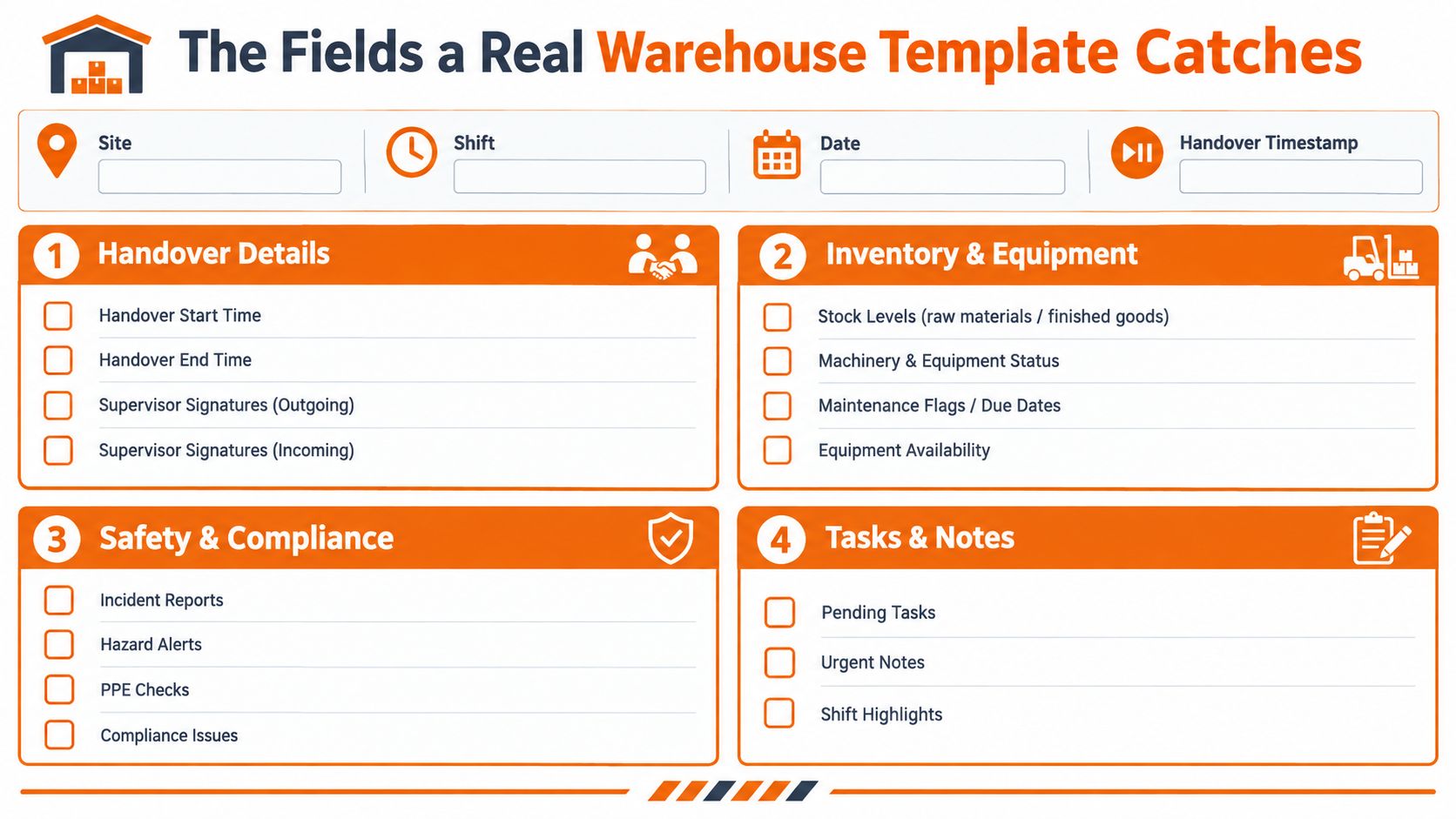
Equipment, inventory, and safety need their own blocks
Equipment status should be specific enough to act on. Forklift, reach truck, pallet jack, and conveyor zones each need a state, a fault note, and a photo if something's wrong. “Running,” “flagged,” and “out of service” are simple words, but they keep the next lead from guessing.
Inventory and dock state need the same discipline. Inbound trailers on yard, outbound loads staged, partial picks, short-ship holds, and lot or batch numbers tied to quality holds all tell the next shift where the friction is. Then safety closes the loop. Near-misses, first-aid events, lockout/tagout activity, location notes, and photos turn a quick warning into something the next team can verify.
If a field doesn't answer who owns this, when does it resolve, and how do I prove it was communicated, it probably doesn't belong on the form.
Open tasks should always carry owner and due window. A final “things to verify” field gives the incoming lead a place to write questions before signing. That tiny detail matters more than you might think, because it creates a pause before responsibility moves. For teams building cleaner forms, the handoff structure in Pebbl's digital forms guidance for deskless teams is worth studying for the way it keeps records organized without making them bloated.
Rolling Out the App Without Killing Trust on the Floor
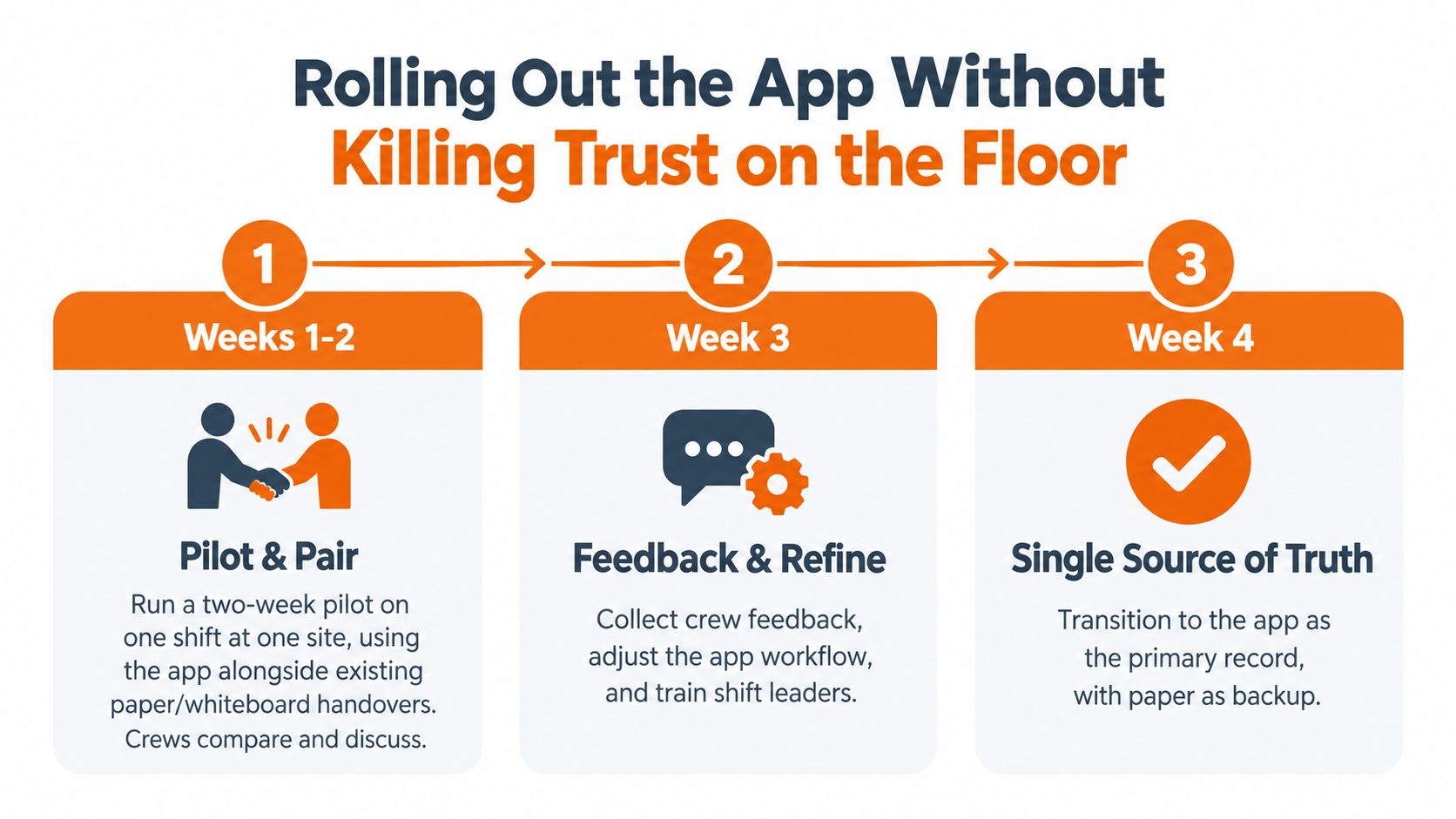
The fastest way to ruin a handover app rollout is to treat it like a software install. It's not. It's a behavior change, and the floor will notice the difference before management does. If people think the app exists to catch them out, they'll give you polished nonsense.
Start small and keep the old method beside it
I'd start with one shift at one site for two weeks. Keep the paper book or whiteboard running in parallel so crews can compare the two without pressure. Pick a shift lead the pickers and forklift drivers already trust. Their voice matters more than IT's.
The first walk-through should be short and practical. Show people how to log exceptions, flag open tasks, and attach a photo of damaged pallets. Don't waste time clicking through menus. Run the pilot for at least ten shift handovers before changing the form, then review missing fields, completion quality, and how long it takes to submit. Only expand to a second shift after the first lead team signs off.
Roll out by willingness, not by org chart size
For multi-site operations, sequence sites by openness. An enthusiastic forty-person site will teach you more than a resistant two-hundred-person one. That's just reality. Resistance hides process flaws, and enthusiastic crews expose them.
The message should stay simple. The app replaces the handover book, not supervisor judgment. If people still need to talk through red items, they should. The app is there to make sure the conversation leaves a record.
Integrations That Pay Off and Ones That Distract
Integration is where handover app projects often get bloated. Teams start with a clean use case, then somebody asks for everything to sync with everything else. That's how a simple rollout turns into a maintenance headache.
Use only the feeds that remove rework
Clock-in and time-and-attendance connections are worth doing because they let the app open the handover near shift end and show who's going off duty without manual typing. Basic WMS hooks are also useful when they pull last-hour pick, putaway, and exception counts into the handover record. The incoming lead should see what happened, not a pretty summary written after the fact.
HR sync helps if you run rotating schedules. If your shifts are stable, don't make that a phase-one obsession. The same goes for everything else people like to demo in steering meetings. Bidirectional ERP posting of every line, custom BI dashboards on day one, and IoT sensor feeds can wait. I'd rather have a maintained shared spreadsheet than half-broken middleware that fails twice a month.
Integration | Effort | Payoff | Phase |
|---|---|---|---|
Time and attendance | Low to medium | High for shift timing and ownership | Start here |
Basic WMS hooks | Medium | High for real operational context | Start here |
HR roster sync | Medium | Useful for rotating schedules | Phase 2 |
Shared spreadsheet fallback | Low | Practical when systems are unstable | Bridge option |
ERP posting for every line | High | Low in the early rollout | Later, if ever |
Custom BI dashboard | High | Low before the process is stable | Later |
IoT sensor feeds | High | Low for a first deployment | Later |
The rule I use is simple. Integrate only where the app removes a manual step the supervisor repeats every shift. If it doesn't remove rework, it's probably decoration.
Measuring Whether the Handover Got Cleaner
A cleaner handover shows up in fewer surprises, not in prettier login numbers. That's the mistake I see most often. Teams celebrate adoption while the same misses keep showing up on the floor.
Before rollout, capture a baseline week on the same shifts for repeat incidents across shifts, dock-to-stock cycle time variance by shift, supervisor escalation volume, and the rate of small stockouts found after the fact. Then compare the same measures after thirty days of full use. Keep the comparison honest. Same shifts, same site, same operating conditions as much as possible.
The one metric I'd trust first
The KPI that tells me the form is working is simple, percent of handovers completed with every required field populated within five minutes of shift end. If that number is weak, the form is wrong, the culture is wrong, or both. I'd track time-to-clear open items as a secondary measure, because unresolved work is where handover discipline either lives or dies.
What I would not chase is raw logins, photo uploads per day, or average form length. Those are activity signals, not outcome signals. Publish the before-and-after on the floor, not just in the ops review. People get serious when they can see the change in their own building.
Common Pitfalls and How to Dodge Them
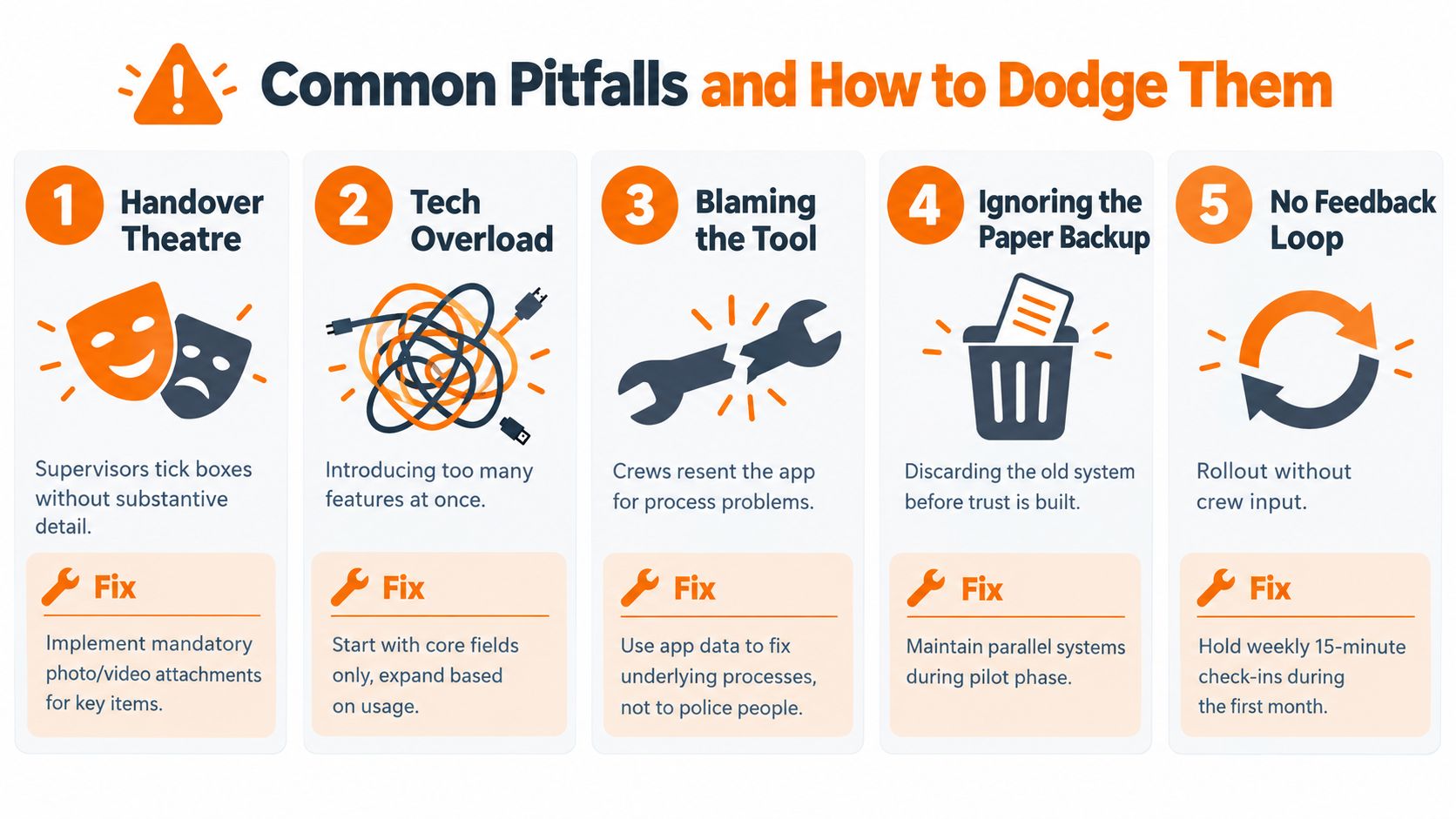
Most handover app rollouts fail because the operating discipline around them is sloppy. The software gets blamed, but the deeper issue is that no one enforced honest use. That's fixable, but only if you're blunt about it.
Don't let the form become theatre
Handover theatre is the worst version of this problem. Supervisors tick every box, write “all good,” and hand over the device without surfacing real status. Audit a sample of forms every week and require at least one exception field to contain actual detail. If not, the checklist is decorative.
Alert fatigue is the next trap. If every minor issue wakes the ops manager at 2 a.m., people will mute alerts and stop trusting the system. Tier notifications by severity, so a blocked dock door gets attention while a low conveyor note stays in the flow. And keep a face-to-face five-minute conversation for anything marked red. The app does not replace the human exchange.
You also need an offline test before go-live. Run a full shift in airplane mode because warehouses have dead zones near racking. And don't freeze version one forever. Review the form quarterly, retire fields nobody reads, and add only what the floor uses.
For teams that want to connect handover records to task closure instead of leaving them as orphan notes, Pebbl's task workflow guidance shows how handoffs can move into assigned work instead of sitting in a dead list. For a broader angle on lowering manual document drag, the piece on cut supply chain costs with OCR is a good reminder that paperwork only helps when it reduces rekeying, not when it creates more of it.
If you're trying to turn handover into something the floor will trust, Pebb gives you a place to handle shifts, tasks, updates, and records in one mobile app. It fits the kind of work warehouse teams already do, and it keeps the handoff visible instead of scattered across texts and notebooks. Take a look at Pebb if you want a single place for the work that keeps falling between shifts.
