
A Team Communication App Is More Than Just Chat
Ditch the chaos. Learn what a real team communication app is, why it matters for both frontline and office teams, and how to choose one that actually works.
Dan Robin
Many teams don't have a communication problem. They have a patchwork problem.
The office runs on email. Store managers use WhatsApp. Schedules live in a spreadsheet. HR posts an update in one place, operations posts another somewhere else, and frontline staff hear about a policy change from a coworker halfway through a shift. Everyone is technically “connected,” but nobody is working from the same reality.
I've seen this up close in more than one rollout. The pain rarely looks dramatic at first. It looks small. A missed shift swap. An outdated SOP. A manager answering the same question five times because the answer lives in a PDF no one can find. Then those small misses stack up and become the atmosphere your company works in.
The Sound of a Disconnected Team
A disconnected team has a sound to it. It's the ping of too many apps. The follow-up call after the missed message. The “I thought someone told them.” The quiet frustration from frontline staff who feel like the office always knows more, sooner.
In one company, the office team used email and calendar invites for nearly everything. Site leads relied on text threads. Shift updates were pinned to a break room board and copied into a spreadsheet by day's end. It worked, in the same way a bucket under a leaking ceiling works. You can keep going like that for a while, but you're still living with a leak.
The cost isn't only emotional, though it is that too. Poor communication costs U.S. businesses an estimated $1.2 trillion annually in productivity losses as of 2026, and teams using integrated communication platforms experience 32% higher engagement and 28% reduced burnout rates, according to Zoom's workplace communication statistics.
What chaos looks like in practice
It usually shows up in a few familiar ways:
Updates arrive unevenly. Office staff see decisions early. Frontline teams hear about them later, or secondhand.
Managers become routers. They spend their day forwarding screenshots, repeating answers, and translating one system into another.
Important information loses context. A message in WhatsApp refers to a file in email and a schedule in a spreadsheet.
Nobody trusts the latest version. People ask instead of checking, because checking takes too long.
The problem isn't that people aren't communicating. It's that the company has no shared place where communication becomes reliable.
That's when a team communication app starts to matter. Not as a shiny new layer on top of the mess, but as a calmer way to replace the mess.
What a Real Team Communication App Does
A real team communication app isn't just chat with a nicer interface. It's your company's digital home. It's the place where people know to look first, whether they sit at a desk, drive between sites, work a hospital shift, or close a store at midnight.
That difference matters. A group chat is like a phone call that never ends. Fast, informal, and easy to start. But a company can't run on that alone. A company needs a town square, a bulletin board, a meeting room, and a filing cabinet that don't contradict each other.
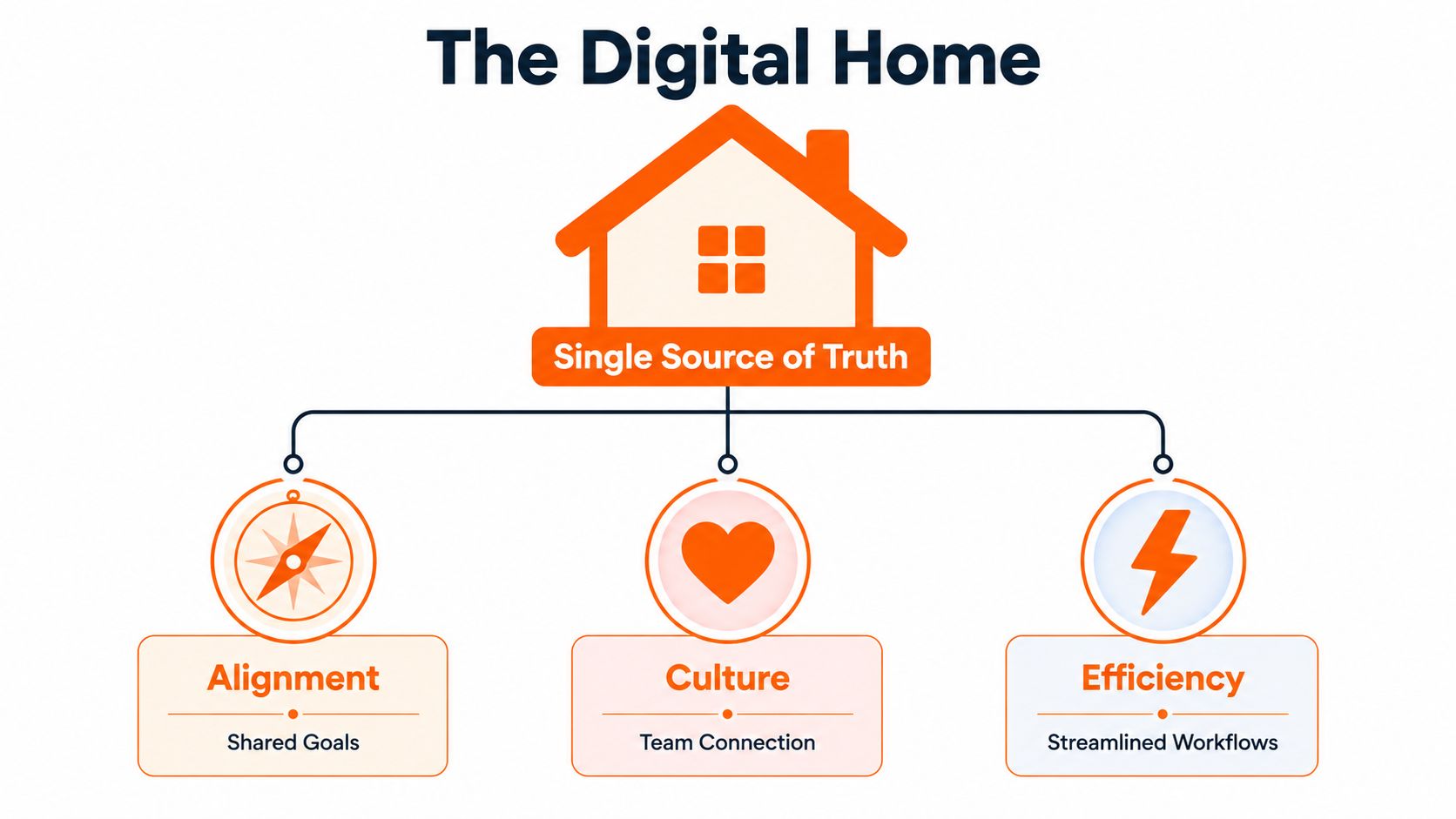
Businesses adopting unified communication apps see 25% faster decision-making and 37% higher employee satisfaction, particularly in hybrid setups where 72% of teams report reduced email overload, according to this review of top team communication apps. That tracks with what happens on the ground. When people stop hunting for context, they can move.
One place changes behavior
The best tools don't just move messages. They change habits.
When the app becomes the default place for updates, tasks, policies, and team conversations, a few useful things happen:
Decisions become visible. People don't have to guess what was agreed.
Work moves with context. A message, task, file, and owner can live together.
Inclusion gets practical. Frontline workers don't need a desktop login or a forwarded summary from management.
Culture stops being office-only. Recognition, updates, and shared moments reach everyone.
There's also a planning side to this that is frequently overlooked. Good communication systems aren't only about sending information. They're about predicting where friction will show up and designing around it. That's why I like thoughtful work on predicting human behavior for team collaboration. It addresses the core issue. Teams don't struggle because they lack channels. They struggle because people ignore, delay, forget, or misread signals in predictable ways.
What it should replace
A real team communication app should replace, or at least shrink, these patterns:
Old pattern | Better pattern |
|---|---|
Email chains for operational updates | Shared channels or spaces with clear ownership |
WhatsApp for urgent work issues | In-app messaging tied to teams and roles |
Spreadsheets for living schedules | Built-in scheduling with current status |
PDFs nobody reads | Searchable knowledge in one place |
If a new app doesn't reduce tool sprawl, it's probably just another tab.
The Anatomy of an All-in-One Work App
When teams evaluate tools, they often get stuck in feature bingo. Chat. Video. Tasks. Files. News feed. Directory. Analytics. Integrations. Every vendor has a grid, and every grid looks convincing.
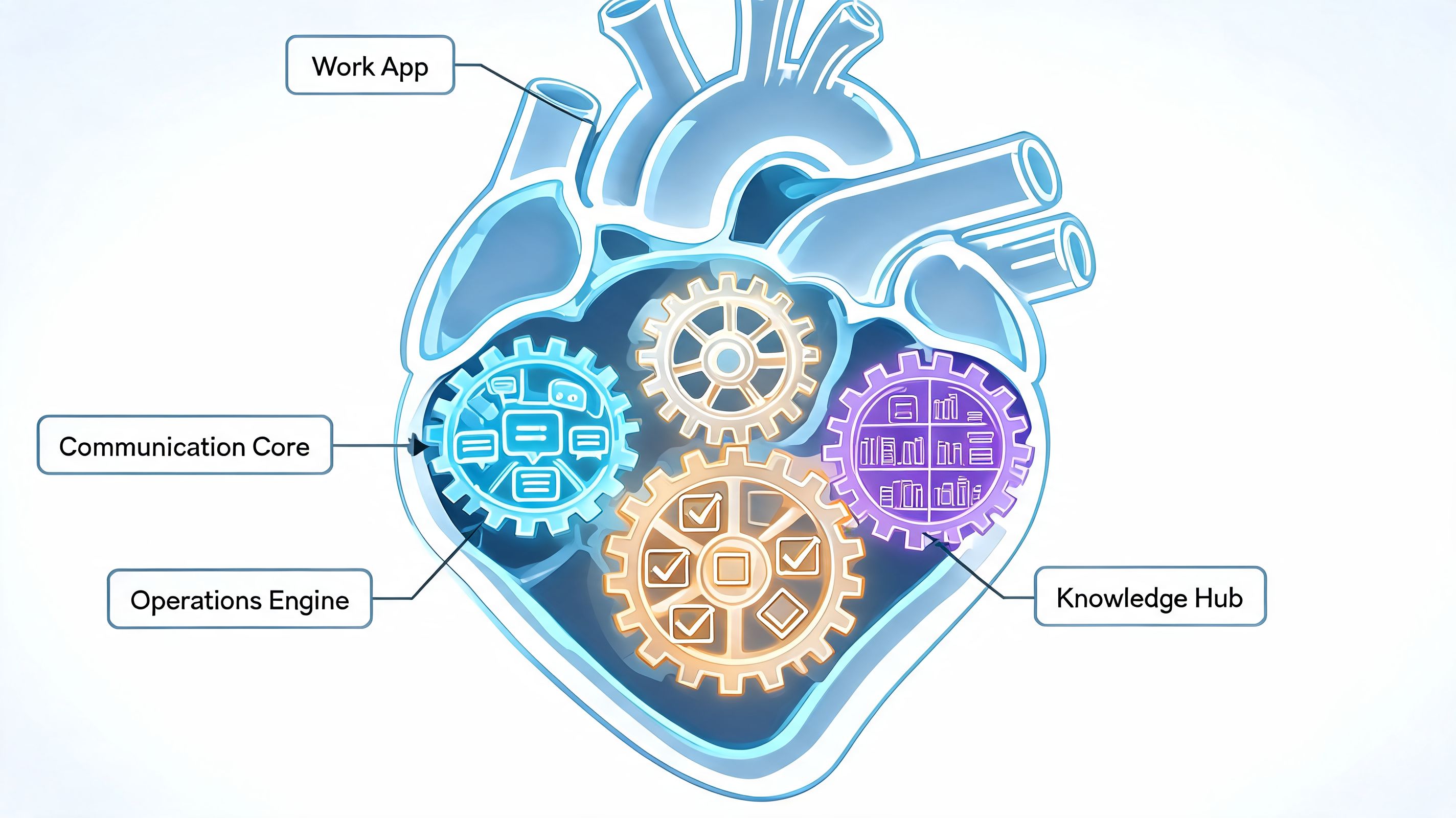
That's the wrong way to think about it. An all-in-one work app has to do three jobs well. If it misses one, the whole thing starts to wobble.
The communication core
This is the obvious layer. Chat, channels, voice, video, announcements, and a feed for updates that matter to more than one team.
But good communication tools do more than let people message each other. They help people separate signal from noise. That's where details like threading, role-based notifications, and language support stop being “nice to have” and become operational tools. In advanced apps, AI-powered features like real-time translation and smart notification routing can reduce miscommunication errors by up to 40% in multilingual workforces and cut message response times by 35%, according to Lark's overview of team communication tools.
That matters a lot in companies where one person is at a laptop and another is on a warehouse floor or in a retail aisle. If the system can't route urgency well, everything starts to feel urgent. Then people tune it out.
Practical rule: if every message looks important, none of them are.
The operations engine
Many chat tools fail in such scenarios. Teams talk about work in one app, then do the work somewhere else, then track exceptions in a third place. The handoff is where things get lost.
A stronger setup keeps the operational layer close to the conversation:
Tasks belong next to the discussion that created them.
Scheduling should be visible to the people affected by it.
Clock-in and PTO workflows need to be simple enough for mobile use.
Approvals and routine updates should not require digging through email.
This is why deskless-focused tools such as Connecteam or Beekeeper often resonate with operations teams. They understand that communication in a shift-based business isn't just social. It's tied to time, coverage, handoffs, and exceptions. Pebb sits in this category too, combining chat, spaces, tasks, scheduling, clock-in, PTO, files, and a knowledge library in one app for office and frontline teams.
The knowledge and culture hub
The third job is quieter, but it's what keeps the first two from collapsing under repetition.
People need a place to find policies, onboarding guides, forms, team directories, and the answer to “How do we do this here?” Without that, managers become search engines. They answer the same questions, resend the same file, and carry too much tribal knowledge in their heads.
A good app turns memory into infrastructure.
What works and what doesn't
What works is tight proximity. Messages lead to tasks. Tasks connect to schedules. Policies are easy to find. People can see who owns what.
What doesn't work is a stack of disconnected “best in class” tools glued together by habit. It looks flexible on paper. In practice, it asks employees to do the integration work themselves.
Bridging the Frontline and Office Divide
The deepest communication gap in most companies isn't remote versus in-office. It's office versus frontline.
Office teams usually have better access, better context, and more patience for complicated software. They can live inside Google Drive, Jira, Microsoft 365, or project boards all day. Frontline teams can't. They need something fast on mobile, easy to open mid-shift, and clear enough to use while doing practical work in applicable settings.

When companies give these groups separate tools, they usually create a quiet class system. The office gets the “real” system. Frontline staff get a stripped-down channel for announcements, or worse, a text thread. That choice doesn't only affect workflow. It tells people whose attention counts.
Different needs, same company
The needs are different. That's true. But separate systems are usually the wrong answer.
Office teams need | Frontline teams need |
|---|---|
Deep integrations with work software | Mobile-first speed |
Project threads and file context | Shift updates and quick actions |
Searchable history across teams | Simple access without training friction |
Meeting coordination | Announcements that are hard to miss |
The smart move is one environment that respects both modes of work. The office team can still connect calendars, files, and project tools. Frontline teams can still use quick updates, schedules, and clock-related workflows from a phone. But the company speaks in one place.
That's what makes culture more equal. A product launch, a policy change, a customer win, or a safety update shouldn't have one polished version for HQ and a watered-down version for everyone else.
Frontline employees don't need fewer tools because their work is simpler. They need fewer tools because their work is harder to interrupt.
The mobile test
If you're choosing a team communication app, test it on a phone before you test it in a boardroom. A tool can look brilliant in a desktop demo and fail completely in the field.
I'd ask simple questions:
Can someone pick up a shift update in seconds?
Can a supervisor post an urgent announcement without training?
Can a new hire find the PTO policy without asking around?
Can office staff and frontline staff see the same truth without jumping systems?
A lot of teams miss this and end up rebuilding bridges later. If you want a deeper look at that gap, this piece on making communication work in companies with frontline employees gets into the practical realities well.
How to Choose an App You Wont Regret
Buying a communication tool based on a feature checklist is how teams end up with regret six months later.
Every demo looks smooth. Every roadmap sounds promising. Every vendor says they support culture, alignment, productivity, and engagement. None of that helps much when your least technical supervisor can't post an update, your HR team worries about access controls, and your managers revert to texting.

Start with principles, not demos
I'd judge a team communication app on four things.
Security and governance
This comes first because fixing it later is painful. Enterprise-grade security is imperative. Self-hosted or secure SaaS apps with end-to-end encryption can reduce compliance costs by 50% under GDPR/CCPA and cut breach risks, according to Zapier's review of team chat apps.
If your tool handles schedules, employee records, PTO, or private HR communication, ask blunt questions. Who can see what? Can permissions be set by role, location, or team? Can managers post broadly without seeing sensitive data they shouldn't access?
Simplicity and adoption
The best system is the one people will use on a rushed Tuesday. Not the one that impressed the buying committee.
Watch the least tech-comfortable person on your team try basic actions. Send an update. Find a policy. Swap a shift. Reply in the right place. If they stumble, that friction won't disappear at scale.
Buy for the busiest person, not the most enthusiastic evaluator.
Decide what stack you want to live with
Some companies need a narrow tool that does one thing very well. Most don't. Most already have too many tabs, too many notifications, and too many places where information can go stale.
That's why I'd also weigh these two criteria:
All-in-one versus point solutions
If the app reduces switching between chat, scheduling, tasks, files, and updates, it has a real shot at becoming the default. If it adds another layer on top of the stack, expect drift back to old habits.Scalability
Don't ask only whether it works for your team now. Ask whether it still works after reorganizations, location growth, policy changes, and leadership turnover.
A short buyer's guide can help keep this honest. This article on how to pick the right team chat app for your business is useful because it pushes past surface-level comparisons.
A short decision filter
If I were narrowing options, I'd keep this filter nearby:
Will it replace at least two existing tools?
Can frontline staff use it comfortably from a phone?
Can IT and HR control access without slowing everyone down?
Does it support the way your company already works, without making chaos easier?
If the answer to any of those is shaky, keep looking.
Making the New Way of Work Stick
The rollout is where good intentions usually meet human reality.
A team communication app is not an IT install. It's a behavior change. If you treat it like software deployment alone, people will nod through training, download the app, and keep doing what they were doing before.
Start smaller than you want to
The best rollouts I've seen started with a team that had real pain and a manager who cared enough to model the change. Not a massive company-wide launch with posters and slogans. A single pilot team can teach you what people need, where the friction is, and which old habits will try to survive.
What matters in a pilot isn't perfection. It's proof. People need to feel that the new way is calmer, faster, and easier than the patchwork they had before.
Leadership has to show up
Approval from leadership isn't enough. Participation matters more.
If executives and senior managers keep using email for “important” updates while asking everyone else to use the app, they've already answered the question of which channel counts. The same goes for store leaders, shift supervisors, and department heads. If they ghost the tool, the rollout becomes optional in practice.
A few habits help:
Post key updates in the app first
Answer common questions in the shared space, not in private side channels
Use the knowledge hub instead of sending attachments again
Keep rules light, but defaults clear
People copy behavior faster than they follow policy.
Measure what changed, not what was clicked
A weak rollout celebrates activity. A useful rollout watches for operational relief.
I'd look for signs like less internal email, fewer repeated questions, faster clarification on day-to-day issues, and less dependence on managers as message relays. If a site supervisor no longer has to text five people to cover one shift issue, that's meaningful. If HR stops resending the same handbook file, that's meaningful too.
You don't need a giant governance manual. You need a few clear norms. What belongs in chat, what belongs in announcements, where policies live, who owns team spaces, and when people should use urgent notifications. Keep it simple enough that people remember it under pressure.
Where Communication Tools Quietly Fail
Most failures aren't dramatic. The app doesn't crash. The vendor doesn't disappear. People just drift.
Leadership stops posting. Urgent alerts get overused. Teams start duplicating messages across email, text, and chat “just in case.” The system loses its authority, and once that happens, trust drains fast. A 2025 Gartner report notes that 68% of HR leaders cite privacy as the top barrier to adopting unified work apps, which is a useful reminder that shaky permissions and unclear data boundaries can kill adoption before the tool ever has a fair chance, as noted in this discussion of communication risks and team systems.
The other quiet failure is when a communication app becomes a noise machine. More pings, more channels, more clutter. No clarity. If that's happening, the problem isn't under-communication. It's poor discipline. In such cases, a stronger approach to instant messaging in business becomes useful, especially if your team is trying to keep speed without creating chaos.
The point isn't to help people talk more. It's to help the company breathe better. A good system makes work feel less jagged. People know where to look, what matters, and who needs to act. That's not a feature. That's a different kind of workplace.
If your company is trying to bring chat, updates, tasks, scheduling, files, and frontline communication into one place, Pebb is worth a look. It's an all-in-one work app built for office and frontline teams, with spaces for communication and operations, plus tools for shifts, clock-in, PTO, knowledge sharing, and admin controls.
