
A No-Nonsense Guide to Software for Logistics Companies
Tired of jargon? Get a clear guide to the software for logistics companies you actually need, from TMS and WMS to the tools your frontline teams use daily.
Dan Robin

At 7:12 a.m., the day can already be off the rails.
A driver calls in late. The dock lead says trailer three is still sitting in door six. Customer service promises a delivery window nobody cleared with dispatch. Someone writes a note on a whiteboard. Someone else misses it. Ten minutes later, three people are solving the same problem in three different places.
Most logistics teams don't struggle because they lack grit. They struggle because the tools around them were built to record work, not coordinate it. That's why so many conversations about software for logistics companies miss the point. They focus on tracking trucks, pallets, and orders, which matters. But they skip the part where actual people have to react, decide, and move.
That's the gap I want to talk about.
The Morning Scramble Is a Software Problem
The morning scramble usually looks like a people problem until you slow down and watch it.
Dispatch is calling drivers. Drivers are texting back from the road. Warehouse supervisors are walking the floor trying to match labor to inbound changes they heard about five minutes ago. Customer service is forwarding screenshots. Radios crackle. Phone batteries die. Somebody says, “I told them already,” and they probably did. Just not in a place anyone else could see.
That isn't bad management. It's a bad operating system.
Old tools create new chaos
A lot of logistics companies still run the frontline on a patchwork of calls, texts, radios, email, spreadsheets, and memory. Each tool handles one sliver of the job. None of them give the whole team the same picture at the same time.
If you're sorting out truck assignments, route changes, and shift coverage, it helps to know what strong best fleet software for logistics looks like. Not because one tool fixes everything, but because fleet planning falls apart fast when vehicle data and team communication live in different worlds.
The warehouse side is no different. If you're reworking receiving, picking, staging, and handoff points, this guide to understanding warehouse operations is useful because it starts with how work really moves through a building, not how software sales decks describe it.
The ugly part of logistics isn't movement. It's misalignment.
The cost shows up in small misses
Most operational pain doesn't start with a disaster. It starts with lag.
A driver knows he'll miss a slot, but dispatch doesn't hear it in time. Receiving learns about the delay after labor has already been assigned. Customer service gives an outdated ETA because nobody updated the note from the first phone call. By noon, everybody's working harder, and the system still feels slow.
That's why I don't treat software for logistics companies as a technology shopping exercise. I treat it as a way to remove friction from the first two hours of the day. If the team starts calm, the rest of the operation has a chance. If the team starts blind, you're playing catch-up until close.
The Two Software Stacks You Actually Need
Most software conversations in logistics get lost in acronyms. TMS. WMS. OMS. Fleet tools. Visibility tools. Yard tools. Labor tools.
A simpler way to look at it is this. Every logistics business runs on two software stacks whether it admits it or not.
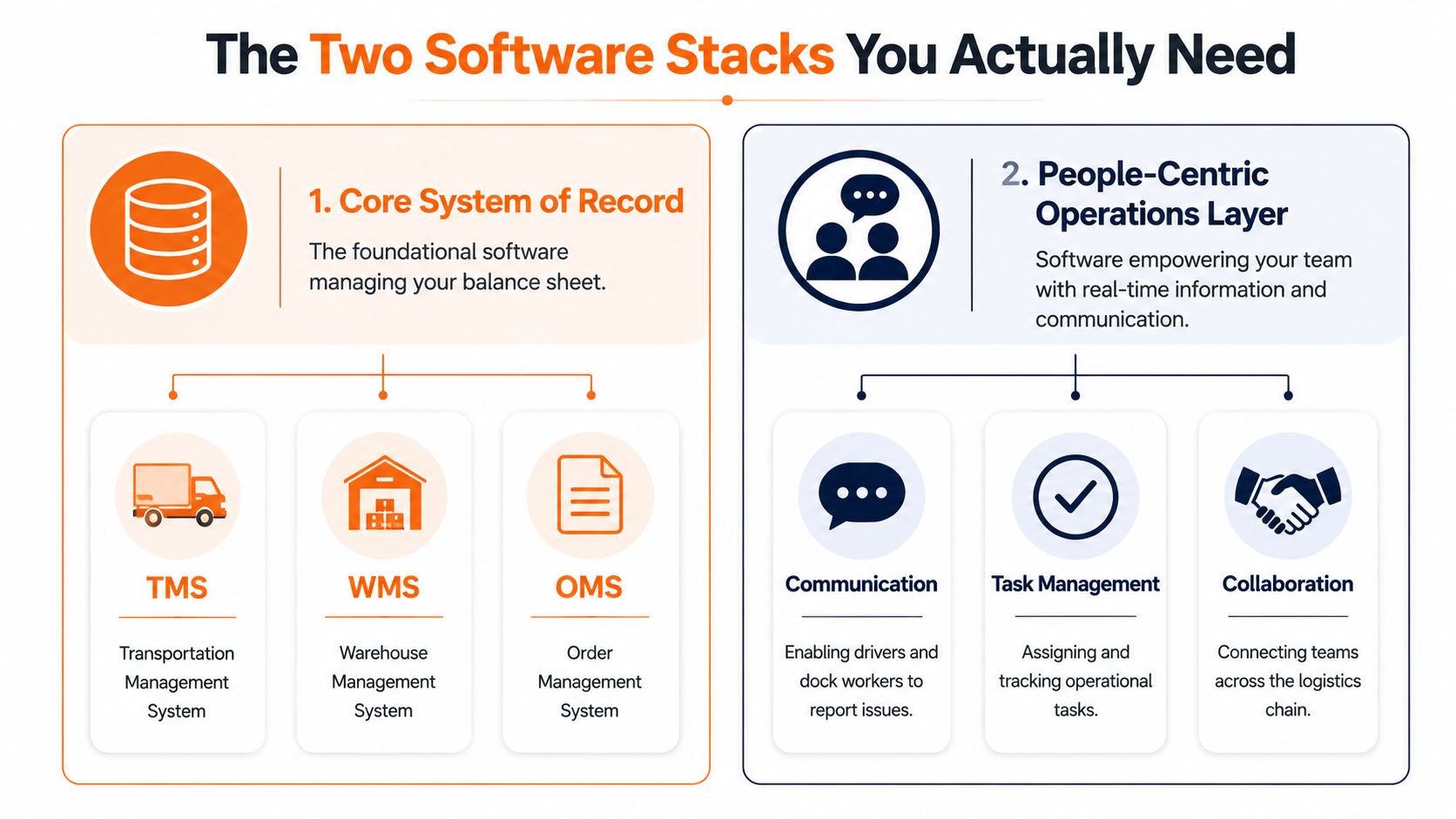
Stack one holds the facts
The first stack is your system of record. This is the software that tells you what exists, where it should be, and what status it's in. It usually includes your TMS, WMS, and OMS.
That category is getting bigger for a reason. The global logistics software market is projected to grow from USD 16.96 billion in 2026 to USD 31.7 billion by 2034, with a CAGR of 8.14%, according to Straits Research's logistics software market forecast. That matters because TMS and WMS tools aren't niche back-office systems anymore. They're becoming standard operating infrastructure.
If you want a closer look at the labor side that often sits beside those systems, this piece on workforce management software for logistics is worth reading.
Stack two moves the work
The second stack is the one most companies underbuild. I think of it as the system of action.
Logistics teams coordinate the day. Drivers report delays. Supervisors assign tasks. Dispatch flags exceptions. Team leads share updates between shifts. Managers answer the same question once, in one place, instead of six times by phone.
Here's the simple difference:
Stack | Main job | Typical users | What breaks without it |
|---|---|---|---|
System of Record | Track assets, orders, and status | Planners, managers, back office | You lose visibility into things |
System of Action | Coordinate people and response | Drivers, warehouse staff, dispatch, supervisors | You lose speed, clarity, and follow-through |
Software for logistics companies works best when one stack knows the truth and the other stack helps people act on it.
A lot of teams buy the first stack and expect it to solve the second problem. It won't. A TMS can tell you a load is at risk. It can't make sure the right dock lead, dispatcher, and customer rep all respond in time unless it's connected to the tools they use.
Your Core System of Record Explained
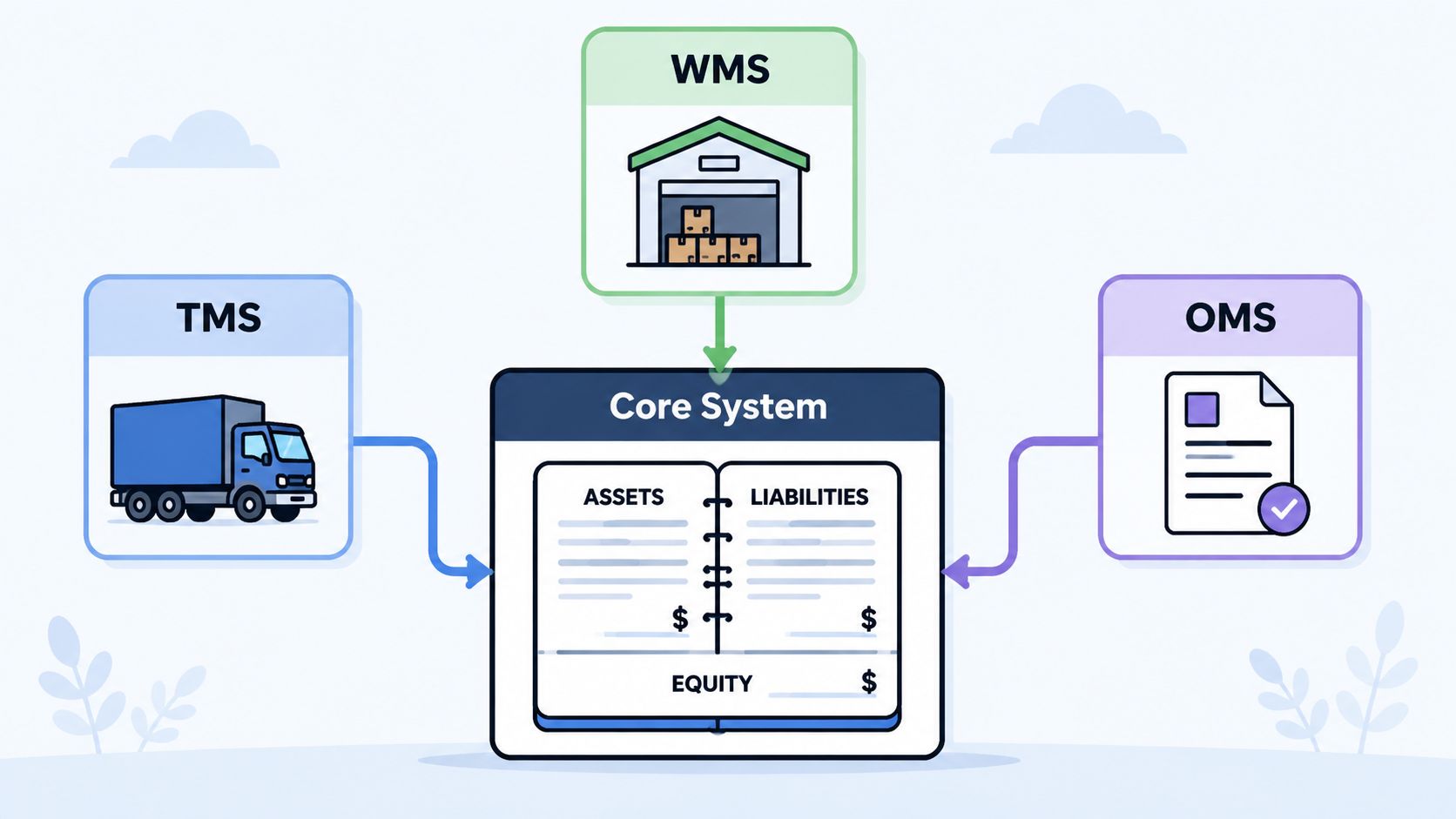
Your core system of record is the software that runs the ledger side of logistics. It answers the factual questions. What got ordered. What arrived. What shipped. What's still in the building. What route was assigned. What status changed.
That matters because logistics falls apart when every department keeps its own version of the truth.
What each core tool is hired to do
A TMS answers the transportation questions. Which carrier, which route, which stop sequence, which shipment status. If you're moving freight across multiple legs or handing off between sites, that visibility is the backbone of planning.
A WMS handles the building. It tells your team what inventory is on hand and where it sits. It supports receiving, putaway, picking, staging, and shipping so people aren't hunting for stock or guessing what got moved overnight.
An OMS sits closer to the commercial side. It keeps order details straight as they move from customer promise to operational execution. It matters more than people think because bad order data creates “warehouse problems” that started much earlier.
Visibility matters, but it has limits
Supply-chain visibility software earns its keep when networks get messy. Real-time tracking, at-risk monitoring, and event-status visibility can reduce the information lag behind missed handoffs and rushed shipping decisions, especially in multi-leg operations, as described in MacroPoint's overview of supply-chain visibility software.
That kind of visibility is valuable. It helps teams see location and ETA drift before a late load turns into a bigger mess.
A screen that shows the problem is useful. A process that helps people respond is better.
What these systems do not do well
Buyers often get confused. Core systems of record are good at storing truth. They are not always good at handling the messy middle of daily work.
They usually don't handle shift handovers gracefully. They don't replace quick frontline communication. They don't make it easy for a dock worker to flag a damaged pallet with context, photos, and a task owner in one move. They don't automatically create team alignment just because the data exists somewhere in the stack.
That's not a knock on TMS, WMS, or OMS. It's just the job description. Use them for recordkeeping, planning, and control. Then be honest about what else your people need.
The Missing Layer Software for Your People
At 6:12 a.m., dispatch knows a truck will hit the yard early. By 6:20, the warehouse lead is still staffing to the old schedule, customer service is quoting the old arrival window, and the driver is calling three different people for an answer. That gap is not a discipline problem. It is a software problem.
The miss usually happens after companies buy the big system and assume the job is done. The TMS or WMS holds the official record. Frontline work still runs through calls, texts, paper notes, and whoever happens to be standing nearby when the issue breaks.
That is the human layer. It sits between the system that stores the truth and the people who have to act on it fast. If that layer is weak, teams lose time repeating updates, chasing approvals, and correcting mistakes that came from a simple communication miss.
A lot of software projects fail here. Feature lists look fine in a demo, then the tool lands in a shift-based operation where supervisors hand off midstream, drivers are in and out of signal, and dock teams need a quick way to flag a problem with photos and an owner attached. As Vector Software notes in its discussion of logistics software integration realities, implementation across real workflows is often the hard part.
A simple test helps. If dispatch learns a truck will arrive early, can the receiving lead, labor planner, and customer service rep all get the same update in one place, with a clear next step for each person? If not, the software stack still has a hole in it.
Good people software usually does four things well:
Keeps communication tied to the work. Conversations stay linked to a site, route, shift, customer, or issue instead of disappearing into random text threads.
Assigns ownership. Someone owns “move door assignment,” “update receiver,” or “adjust labor plan,” with a status everyone can see.
Carries context with the message. Photos, documents, SOPs, and past updates live in the same thread as the decision.
Works on mobile without friction. Drivers, warehouse leads, and supervisors can use it on the move, not only from a desktop.
If you want a concrete example, this guide on centralizing driver and dispatch communication for logistics teams shows what that looks like in day-to-day operations.
Pebb is one example in this category. It brings team chat, tasks, file sharing, updates, scheduling, and clock-in features into one mobile-first app. For logistics teams, that matters because office staff and frontline crews need the same operating picture without bouncing between separate tools.
If your people cannot respond inside the flow of work, the stack is incomplete.
The best setups put action where the work already happens. That is how software stops being a record of operations and starts helping the operation run.
Connecting the Dots with Integration and Data
Once you accept that you need two stacks, the next question is obvious. How do they talk to each other without turning your IT team into a permanent cleanup crew?
The short answer is that good integration turns information into action. Bad integration turns software into separate islands.
What good flow looks like on a real day
Take a common exception. A truck hits congestion and the ETA slips enough to disrupt a dock appointment. Your TMS or visibility tool sees the change first. That part is easy.
The useful part comes next. The receiving team gets an alert in the communication tool they already use. The dock supervisor sees which load is affected. Dispatch can add context. Customer service can update the customer from the same thread. A task is assigned if labor needs to be shifted or a slot needs to be changed.
That is what integrated software for logistics companies should do. Not just report what happened, but help the right people respond in sequence.
The software layer is where the value sits
The reason this matters is bigger than convenience. In the big data in logistics market, the software segment accounted for over 51% of market share in 2023, according to GM Insights' big data in logistics analysis. That tells you where the industry is placing its bets. The value isn't only in collecting data. It's in using software to turn operational data into real-time visibility and decision support.
A simple way to think about integration is this:
If the core system says | The action layer should do |
|---|---|
Load delayed | Notify the receiving team and dispatcher |
Order priority changed | Alert pick team and shift supervisor |
Delivery exception logged | Assign follow-up and update customer-facing staff |
Capacity risk detected | Prompt dispatch review before it becomes a service miss |
APIs and webhooks are just bridges
People hear terms like API and webhook and assume this is all deep technical magic. It usually isn't. In plain terms, these are just ways for one system to pass a signal to another.
An API helps systems request or send information in a structured way. A webhook is more like an automatic tap on the shoulder. “This changed. Go tell the other tool now.”
Don't ask whether two systems can connect in theory. Ask what work changes when they do.
That's the standard I use. If the integration doesn't remove a call, prevent a miss, shorten a handoff, or clarify ownership, it might be technically impressive and operationally useless. The best data flow is boring. People get the update, know what to do, and move.
A Practical Checklist for Choosing Software
When you're evaluating software for logistics companies, feature grids can waste a lot of time. Every vendor sounds complete in a demo. The fundamental question is whether the tool helps your team make better decisions on a normal Tuesday when everybody's busy.
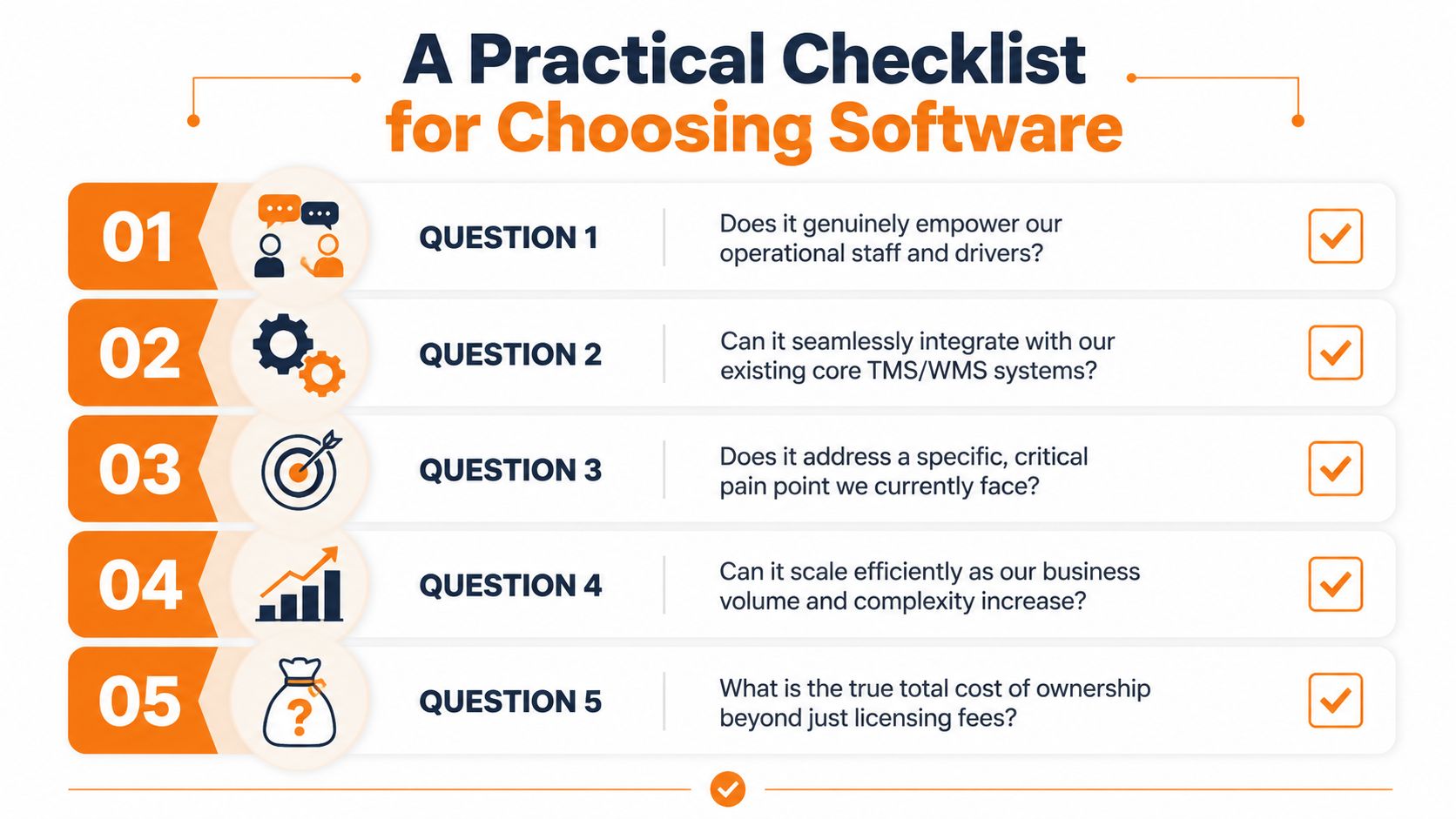
This is the checklist I'd use before signing anything.
Five questions worth asking
Will frontline staff use it? If a driver, picker, or dock lead needs training just to send an update, adoption will be weak. The tool has to feel obvious on a phone.
Does it solve one painful problem first? Start with a live issue like late-load communication, shift handoff confusion, or dispatch visibility. Broad transformation talk is cheap.
Can it fit your current stack? If it can't connect to the systems you already rely on, you'll create more swivel-chair work, not less.
What happens at more sites or more volume? Plenty of tools look tidy in one building and messy across multiple teams.
What does ownership really cost? Licensing is only part of it. You also need to think about rollout effort, admin load, support, and security habits.
That last point gets ignored more than it should. Even if your operation isn't in oil and gas, the basics in this guide to protecting oilfield company websites are a useful reminder that software choices come with security and maintenance responsibilities, not just workflow benefits.
Ask for proof in the workflow
Modern analytics and AI tools can improve route optimization by turning historical and real-time data into better dispatch decisions, with the practical effect of lower cost per delivery and fewer late arrivals, as described in Vitronic's article on data analytics in logistics. That's useful. But don't stop at the promise.
Ask the vendor to show you the full chain:
A real trigger from a route change, delay, or exception.
The exact user experience for the dispatcher, supervisor, or driver.
The follow-through after the alert. Who gets notified, who owns the task, and where the record lives.
Buy software that shortens the distance between knowing and doing.
If the demo can't show that clearly, the implementation will probably feel vague too. And vague software creates very concrete problems.
Its About People Not Just Pallets
Logistics has always been physical work. Trucks move. Forklifts move. Pallets move. Orders move.
But operations don't run on pallets. They run on people making good calls under pressure.
That's why I think the future of software for logistics companies has less to do with adding another shiny dashboard and more to do with respecting the job's practicalities. The driver needs one clear place to report an issue. The dock lead needs the same update dispatch has. The night shift needs context from the day shift without piecing it together from scraps.
Better tools make calmer teams
We've gotten pretty good at tracking assets. In many operations, we can tell you where the freight is, what status it's in, and when it's likely to arrive. That's useful.
The weak spot is still coordination. Too many teams can locate a load faster than they can align the people who need to react to it.
The real advantage is shared context
The best stack isn't the one with the most modules. It's the one that gives your operation a shared picture and a clean way to act on it.
When that happens, mornings feel different. Fewer duplicate calls. Fewer missed handoffs. Less hunting for answers that already exist somewhere in the system. People spend more time solving the actual problem and less time figuring out who knows what.
That doesn't make logistics easy. Nothing will. But it does make the work steadier, clearer, and more humane.
And that's the standard I'd use. Not whether the software looks impressive in a conference room. Whether it helps the people doing the work breathe a little easier by 9 a.m.
If your logistics team is tired of juggling chat apps, calls, paper notes, scheduling tools, and scattered updates, Pebb is worth a look. It gives frontline and office teams one place for communication, tasks, files, shifts, and day-to-day coordination, which is often the missing layer between a solid system of record and smooth execution.
