
Single Sign on Integration: A Practical Guide for 2026
Single sign on integration made clear. Learn SAML and OIDC setup, IdP config, common errors, and security tips for rolling out SSO in your stack.
Dan Robin

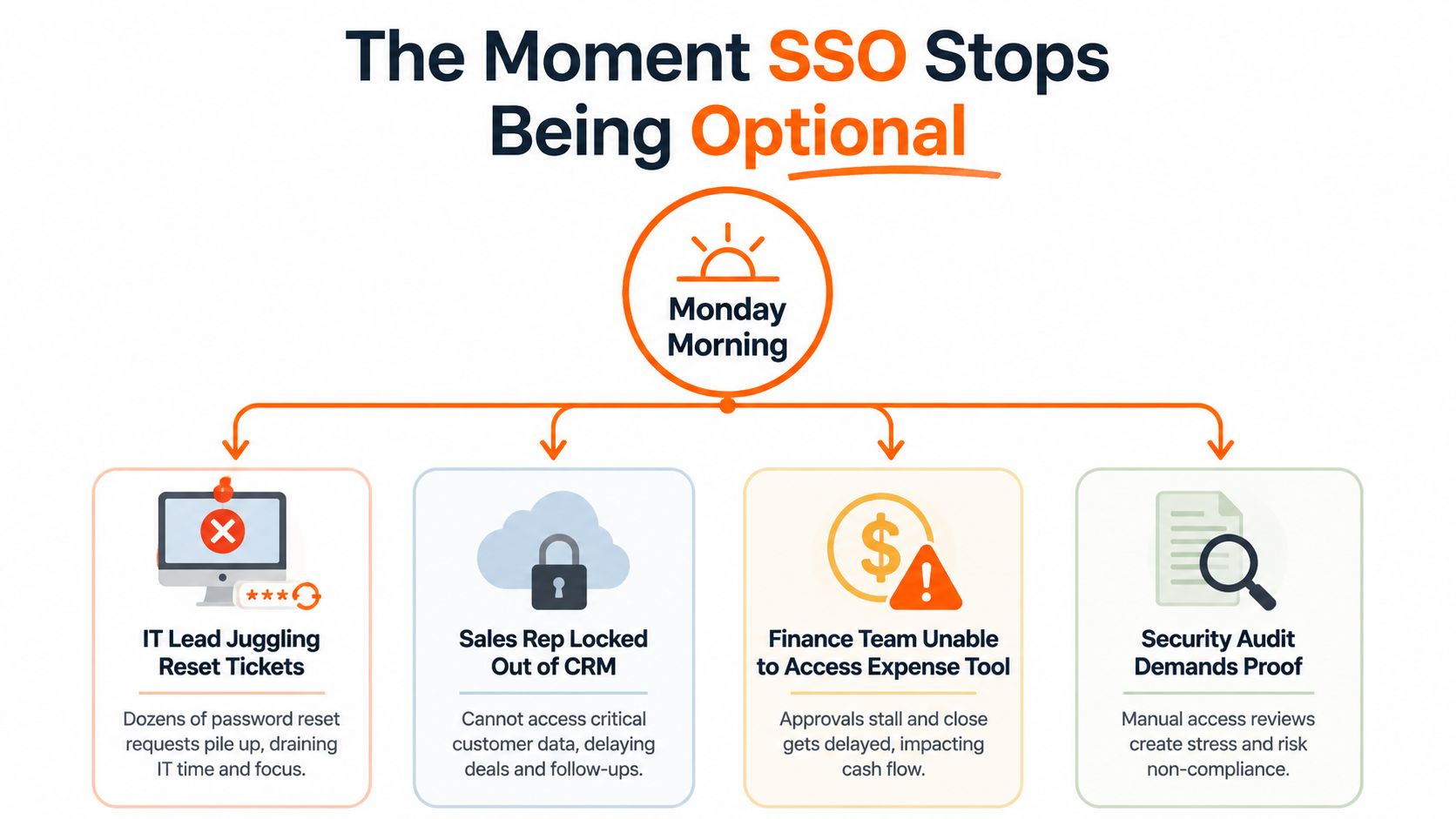
Monday morning starts with four different versions of the same problem. An IT lead is clearing password-reset tickets. A sales rep is locked out of the CRM before a customer call. Finance can't reach the expense tool. Then an auditor asks for evidence that a former employee's access was removed.
The applications aren't broken. The identity layer is.
That's where single sign-on integration stops being a convenience project and becomes an operating requirement. The login screen gets the attention, but the core work is deciding who gets access, how that access changes, and what happens when authentication fails.
The Moment SSO Stops Being Optional
A new compliance request lands on Friday. By Monday, IT is expected to explain which contractors still have access, whether a former employee can reach the CRM, and who owns the answer. The authentication system was treated as a login feature. The questions expose it as an operating system for access.
The warning signs usually arrive first. Employees keep passwords in shared documents because an application has too many accounts. Contractors remain active after their contracts end. A manager cannot list the systems a departed employee could still access. Disabling the corporate account may not disable the downstream CRM, payroll tool, or scheduling app.
Single sign on integration reduces repeated logins by placing authentication with a trusted identity provider. NIST defines SSO as one account and its authenticators being used to access multiple applications through a federation process (NIST Digital Identity Guidelines). That improves the user experience, while concentrating responsibility in one identity system. If its records, policies, or integrations are wrong, the error can reach many applications.
Why the project becomes urgent
SSO has become an infrastructure layer as cloud applications, distributed teams, and external workers make manual access management harder to sustain. Market estimates place the global SSO market at about USD 4.5 billion in 2024, with one projection reaching USD 9.4 billion by 2030 at a 13.1% CAGR (Expert Insights). Another forecast estimates USD 3.34 billion in 2025 and USD 6.29 billion by 2030, at a 13.5% CAGR (WorldMetrics).
Those forecasts do not make deployment necessary. They show how widely the access problem is appearing. One estimate says cloud deployments represented 67.7% of 2024 SSO spending, while large enterprises represented 71.1% of market size. The practical implication is broader than login: onboarding, role changes, offboarding, session controls, recovery procedures, and evidence for audits all need an owner.
Practical rule: If you cannot prove that access ended, you have not finished the SSO program. You have only improved the login.
A workable rollout defines the integration boundary, selects the protocol, establishes trust, tests failure paths, and assigns ownership after launch. The identity provider can go down, certificates can expire, and sessions can be stolen. Those events belong in the design, not in the post-incident plan.
Picking the Right Protocol for the Job
SAML, OIDC, and OAuth aren't three competing names for the same feature. They answer different questions.
SAML asks: “How can an enterprise identity provider authenticate a user to a service provider?” It uses signed XML assertions and remains common in enterprise applications and identity platforms such as Okta, Microsoft Entra ID, and Ping. The format is verbose, but the surrounding tooling is mature.
OIDC asks: “How can this web or mobile application verify a user's identity?” It sits on top of OAuth 2.0 and uses JSON-based tokens, including ID tokens that carry identity claims. NIST's implementation guidance makes the distinction explicit, OIDC is based on OAuth 2.0, while OAuth itself is the delegation framework underneath it (NIST federation security parameters).
OAuth asks: “Can this application access a resource on the user's behalf?” OAuth is authorization, not authentication. Calling something “OAuth SSO” often hides an implementation mistake. If you need login, you generally mean OIDC, not plain OAuth. This distinction is covered in more practical terms in this guide to OAuth authentication.
SAML vs OIDC vs OAuth at a glance
Dimension | SAML 2.0 | OIDC | OAuth 2.0 |
|---|---|---|---|
Primary job | Federated enterprise authentication | Identity authentication for modern applications | Delegated authorization |
Token format | XML assertion | JSON and JWT-based tokens | Access tokens |
Common fit | Enterprise SaaS and established IdPs | Web apps, SPAs, and native mobile apps | APIs and user-approved resource access |
Developer experience | More configuration and XML-specific failure modes | Cleaner application integration | Useful only when identity isn't the requirement |
Account lifecycle | Doesn't provision or remove accounts | Doesn't provision or remove accounts | Doesn't provision or remove accounts |
Default decision | Use when the IdP or enterprise app expects SAML | Use when both sides support OIDC natively | Use for authorization, not login |
Neither SAML nor OIDC creates the employee account by itself. Neither removes it when the employee leaves. Provisioning is a separate lifecycle concern, usually handled with SCIM, a directory bridge, or controlled application administration.
My default is simple. Use OIDC when the identity provider and application both support it properly. Use SAML when enterprise compatibility, an existing IdP catalog, or a legacy SaaS application requires it. Use OAuth when an application needs delegated API access and no user authentication decision is being made.
Preflight Checks Before You Touch the IdP
A successful SSO rollout can still create lifecycle problems if the application accepts the wrong identifier or creates accounts without an exit path. Set those rules before opening the identity provider console.
Start with the identifier. Email is familiar, but it can change when a person's name or domain changes. A UPN or immutable directory identifier may remain stable, provided the service provider accepts it and your support process can work with it. Choose a value that is unique, consistently populated, and stable enough to represent the same account over time.
Then define how accounts enter the application. Just-in-time provisioning creates an account at first successful login, which can suit a new workforce or a low-risk application. It does not remove that account when the person leaves. Pre-provisioning gives you more control before first access, but it adds a synchronization process that someone must operate and monitor.
SCIM belongs in this design, not in a later backlog. If the application supports SCIM, plan account creation, attribute updates, role changes, suspension, and deletion together. If it does not, document who performs each action and how termination is verified. This is part of the same operational contract as other API integration planning.

The decisions that prevent avoidable failures
Prefer SP-initiated login unless there is a clear reason to support another flow. The application sends the authentication request, allowing it to validate the destination and preserve the requested location. IdP-initiated tiles can still be useful, but unsolicited assertions and return destinations need explicit handling.
Treat certificates like credentials. Record the expiry date, protect private keys, and assign ownership for rotation before production relies on the current certificate. An expired certificate can turn a working integration into a broad login outage.
Check clock synchronization during preflight. SAML timestamps are strict, and differences between the IdP, service provider, and load balancers can invalidate a response. Many implementations allow a five-minute clock-skew window, but tests should use tighter timing so drift is detected before launch.
Before opening the IdP console, confirm:
Identifier: The exact NameID or subject value, its source, and its change policy.
Account creation: JIT or pre-provisioning, with an owner for each path.
Lifecycle sync: SCIM coverage, or a documented manual process where SCIM is unavailable.
Launch flow: SP-initiated, IdP-initiated, or both, with the security implications recorded.
Certificates: Current certificate, expiry owner, rotation method, and emergency contact.
Time: Clock synchronization across every system that validates tokens.
These decisions define the contract before configuration begins. They also expose the operational gaps that tend to appear when an IdP is unavailable or an account must be disabled quickly.
Configuring the IdP, Metadata, and Certificates
A SAML setup is a trust exchange. The identity provider authenticates the user. The service provider receives a signed assertion and decides whether the user can enter.
Create the application in the IdP first. Okta, Microsoft Entra ID, and JumpCloud use different screens, but the important outputs are similar: the entity ID, the SSO URL, and the signing certificate. Export the IdP metadata XML rather than copying values by hand when possible. The metadata gives the service provider the endpoints and certificate it needs to validate the response.
On the service provider side, import that metadata and compare the values you receive with the values the application expects. The ACS URL must match exactly. The audience URI must match the service provider's entity ID. A trailing character, a different environment hostname, or a copied test value can produce a generic login error that looks much less specific than the underlying mismatch.
Attribute mapping is authorization plumbing
NameID needs an explicit decision. Use the format the application expects, such as emailAddress, persistent, or transient. Then map the claims the application consumes, including email, given name, and groups.
Groups deserve special care. Authentication proves who the user is. Groups often determine what the user can do after entering the application. If the IdP sends a group claim as an array but the service provider expects a string, or if the group names differ between staging and production, login may succeed while authorization fails.
For OIDC, the parallel setup uses a client ID, a client secret or JWT bearer authentication, redirect URIs, scopes, and the provider's discovery URL. Public clients should use the appropriate browser and mobile protections, including PKCE where required. Don't reuse SAML assumptions inside an OIDC configuration. The names change, and so do the validation rules.
Setting | Recommended Value | Common Mistake |
|---|---|---|
Entity ID | Exact service provider identifier for the target environment | Using the staging audience in production |
ACS URL | Exact HTTPS assertion consumer endpoint | Adding a slash or copying an old hostname |
NameID | Stable identifier supported by the application | Using email without planning for name changes |
Groups claim | Explicitly mapped group values | Sending arrays when the app expects strings |
Signing certificate | RSA 2048 or higher with SHA-256 signing | Waiting for expiry before planning rotation |
OIDC redirect URI | Exact registered callback URI | Allowing an overly broad redirect pattern |
OIDC scopes | Only the scopes the application needs | Treating OAuth scopes as proof of identity |
SAML assertions should be signed, and the service provider must validate the signature against a trusted certificate. Small details cause most delays: mismatched entity IDs, unsigned assertions, incorrect NameID formats, and claims with the wrong type. The protocol isn't mysterious. The contract is just unforgiving.
Testing the Flow Without Breaking Production
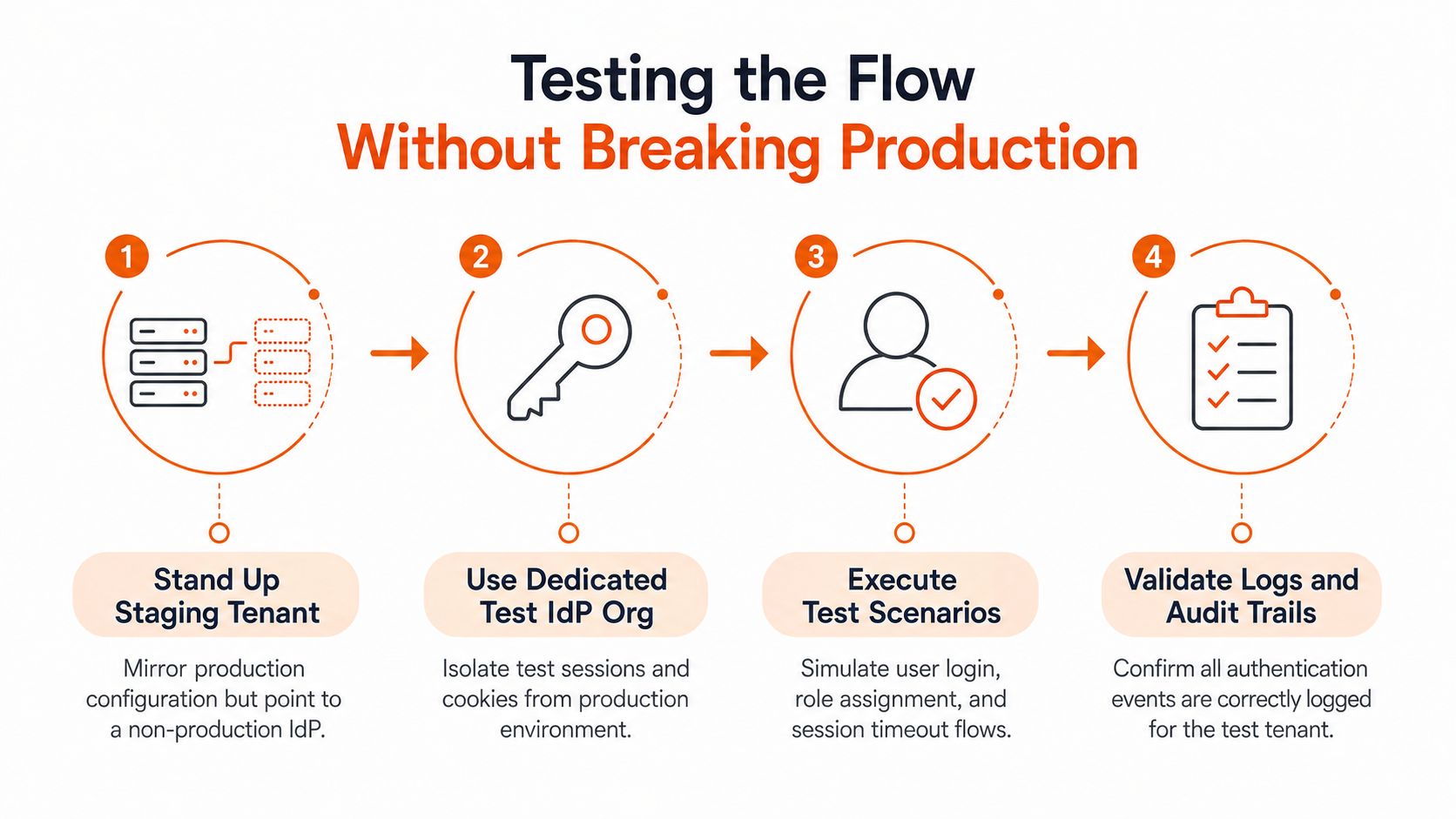
Never test a new SSO configuration against production users first. Stand up a staging tenant that mirrors the production application, then point it at a non-production IdP. A dedicated test IdP organization also works because it keeps production cookies, sessions, and group assignments out of the experiment.
Run the tests in a deliberate order. Start with an SP-initiated login from a fresh browser. Then test the IdP dashboard tile, deep linking with a return URL, logout, and session timeout. Each flow exposes a different part of the integration.
Inspect the assertion, not just the result
A successful redirect doesn't prove that the integration is correct. Inspect the SAML response and confirm the audience, signature trust chain, recipient, and NotBefore and NotOnOrAfter values. Keep the clocks on both sides inside a 30-second test window. That is a testing target, not a claim about every production system's tolerance.
For OIDC, inspect the ID token claims and verify that the issuer, audience, nonce, subject, and expiry match the expected values. Public clients should enforce PKCE. If the application accepts an ID token without validating the right claims, the green login screen is misleading.
Use browser developer tools to inspect redirects and cookies. Confirm that cookies belong to the intended domain and carry Secure and HttpOnly attributes where the application requires them. Cookie domain mistakes often appear only after a deep link or a transition between subdomains.
The final test should be negative. Revoke or replace the certificate in the test environment. Try an expired token. Send a response with the wrong audience. The application should reject each request and produce a useful audit event.
Testing standard: A flow isn't finished when the happy path works. It's finished when the system rejects bad identity data for the right reason, logs that rejection, and leaves production untouched.
The Harder Half of Single Sign On Integration
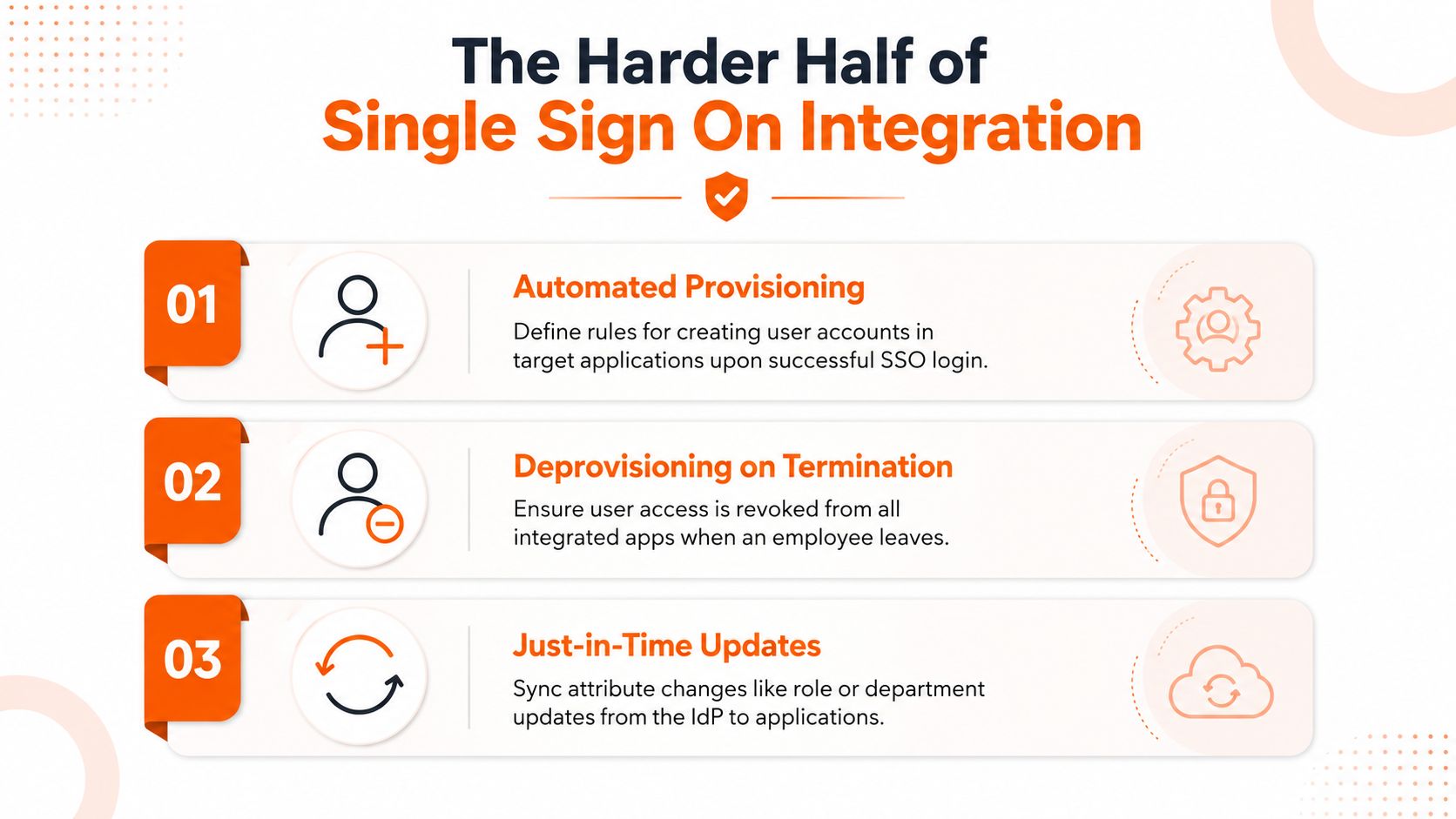
A user leaves the company at 5 p.m. If the IdP disables the identity but a downstream account remains active, SSO has completed authentication while access control has failed. Treat SSO as a lifecycle system from the first design review.
SCIM 2.0 usually handles that lifecycle. The identity provider sends create, update, and disable events to the service provider. A new employee can receive an account, a department change can update a role or group, and a termination can disable access without waiting for another login.
Without SCIM, teams rely on JIT provisioning, manual administration, imports, or a directory bridge. JIT handles first login, not departure. Manual work can support a small application set, but it depends on someone remembering every system during a pressured termination. The common deprovisioning gap appears when the IdP removes the user while downstream accounts persist. SSOJet's research also reports that average time-to-SSO fell from 14.2 weeks in 2020 to 3.8 weeks in 2025, a faster connection process that can make missing lifecycle controls easier to overlook (SSOJet enterprise SSO research).
Governance starts after authentication
Map access to groups instead of individual exceptions. A finance group should receive the finance role through a defined rule. When someone changes departments, the group update should remove the old role as well as add the new one. Check both the IdP membership and the permissions produced in the application. The audit trail must show that the event arrived and changed access, not merely that the directory looks correct.
A useful permissions model separates identity, role assignment, and resource access. That separation helps reviewers determine why a person has access, rather than only confirming that access exists.
Resilience needs a separate runbook. If the IdP is unavailable, decide whether existing application sessions continue, whether emergency access is possible, and who may use a break-glass account. Store those credentials under controlled access, limit their scope, and record every use.
A stolen IdP session can expose several integrated applications. SSO with MFA reduces account-takeover risk, but it does not confirm that access remains appropriate or that a former employee was removed promptly (Unified.to SSO implementation analysis). Session timeouts, conditional access, audit logging on both sides, and recurring access reviews reduce the resulting exposure.
NIST enterprise guidance describes an SSO service creating a token that applications use to confirm an active session and enforce rules such as timeouts. It also requires the session secret to have at least 64 bits of entropy, be created after authentication, be invalidated on logout, and travel over an authenticated protected channel (NIST enterprise SSO guidance).
SSO is a lifecycle commitment. It affects HR events, application permissions, incident response, and the people responsible for keeping the identity provider available. Test those paths before calling the integration complete.
A Short, Honest Checklist Before You Ship
Before enabling the integration for everyone, ask questions that can produce uncomfortable answers.
Which identifier survives a name change? If the application uses email as its username, determine what happens when the address changes. A stable identifier may prevent duplicate accounts, but only if the application supports it.
What creates the account? JIT is convenient, but it creates access at first login. Pre-provisioning gives you a controlled starting point. Pick one and write down who owns exceptions.
What removes the account? Confirm that SCIM sends disable events and that the service provider records them. If SCIM isn't available, maintain a termination runbook and verify removal directly in each application.
Which groups control permissions? Test a new hire, a department transfer, and a termination. An identity can authenticate correctly while retaining the wrong authorization.
Is IdP-initiated login necessary? If not, use SP-initiated login and avoid supporting an extra path that needs testing and monitoring.
When does the certificate rotate? Record the expiry date, notification owner, replacement procedure, and rollback path. Don't make one administrator the only person who knows where the certificate lives.
What happens when the IdP is unavailable? Test existing sessions, break-glass access, and the communication plan. An emergency account that nobody can find isn't an emergency control.
What happens when a session is stolen? Define revocation, timeout, device checks, and audit review. MFA helps at authentication, but it doesn't replace session governance.
Are clocks and cookies correct? Validate timestamp handling, cookie domains, Secure, and HttpOnly settings in the environment users operate in.
The rollout is the easy part. Operating SSO for years is the work. A successful single sign on integration reduces friction only when the organization keeps identifiers, groups, sessions, certificates, and employee access aligned.
If your employee app needs a practical identity layer, Pebb offers Enterprise SSO with existing work credentials and supports providers such as Okta and Active Directory, alongside HRIS and directory sync capabilities. Visit Pebb to see how it can fit into your employee communication, operations, and access workflow.
