
Understanding API Integration a Plain-English Guide
A plain-English guide to understanding API integration. Learn what APIs are, how they work, and why they matter for connecting your business tools and teams.
Dan Robin

You can tell a company is carrying too many disconnected tools when simple work starts feeling weirdly hard. A manager approves leave in one app, checks shift coverage in another, then copies a note into chat so the right people see it. Three logins. Three tabs. Three chances for something to get missed.
That friction doesn't look dramatic from the outside. It just eats the day. People wait on updates that should already be there. HR fixes records by hand. Operations leaders lose confidence in reports because they know data is scattered across systems.
That's where understanding API integration starts to matter. Not as a technical hobby. As a way to make the workday feel less patched together and more sane.
The Messy Reality of Disconnected Tools
I've seen this pattern in almost every growing company. The first tool solves one problem well. Then another gets added for payroll, another for scheduling, another for chat, another for onboarding. Soon the business isn't running on one system. It's running on glue, memory, and a lot of copying and pasting.
For frontline teams, the mess shows up fast. Someone updates a shift in one place, but the change doesn't reach the team app. A new hire appears in payroll, but not in the staff directory. A supervisor sends an update, then has to repeat it because the roster in the messaging tool is out of date.
That's not just annoying. It changes how people trust the company's systems.
What the problem feels like on the ground
An operations manager usually doesn't ask for “integration.” They ask why the schedule is wrong, why a terminated employee still has access, or why a leave request took two days to show up where it needed to go. They're describing the same problem from different angles. The tools don't talk.
A simple way to think about API integration is this. It's a digital handshake between apps. One system tells another something changed. The other system understands it and updates itself without a person stepping in.
Disconnected software creates invisible work. Someone always pays for it, and it's usually the team closest to the customer or the shift floor.
The hard part is that many of the people expected to sort this out aren't engineers. Tray notes that 68% of HR and internal communications leaders lack coding expertise yet must manage integrations for employee apps, while 92% of API integration guides skip authentication steps like OAuth or API keys entirely. That explains why so many leaders feel like they're being handed a technical problem with business consequences.
The better framing
You don't need to become a developer to evaluate whether your systems can work together. You need a plain-English way to spot sprawl, ask sharper questions, and avoid buying one more isolated app that adds to the mess. That's also why it helps to look closely at what happens when teams finally ditch the sprawl. The goal isn't technical elegance. It's calmer operations.
When people talk about understanding API integration, they often jump straight to code. Most business leaders need the opposite. They need to know what good integration feels like in daily work. Fewer manual steps. Fewer mismatches. Less chasing.
What Is an API Integration Really
API stands for Application Programming Interface, but that phrase doesn't help much on its own. The useful part is simpler. An API is a set of rules that lets one piece of software ask another piece of software for something and get a reliable answer back.
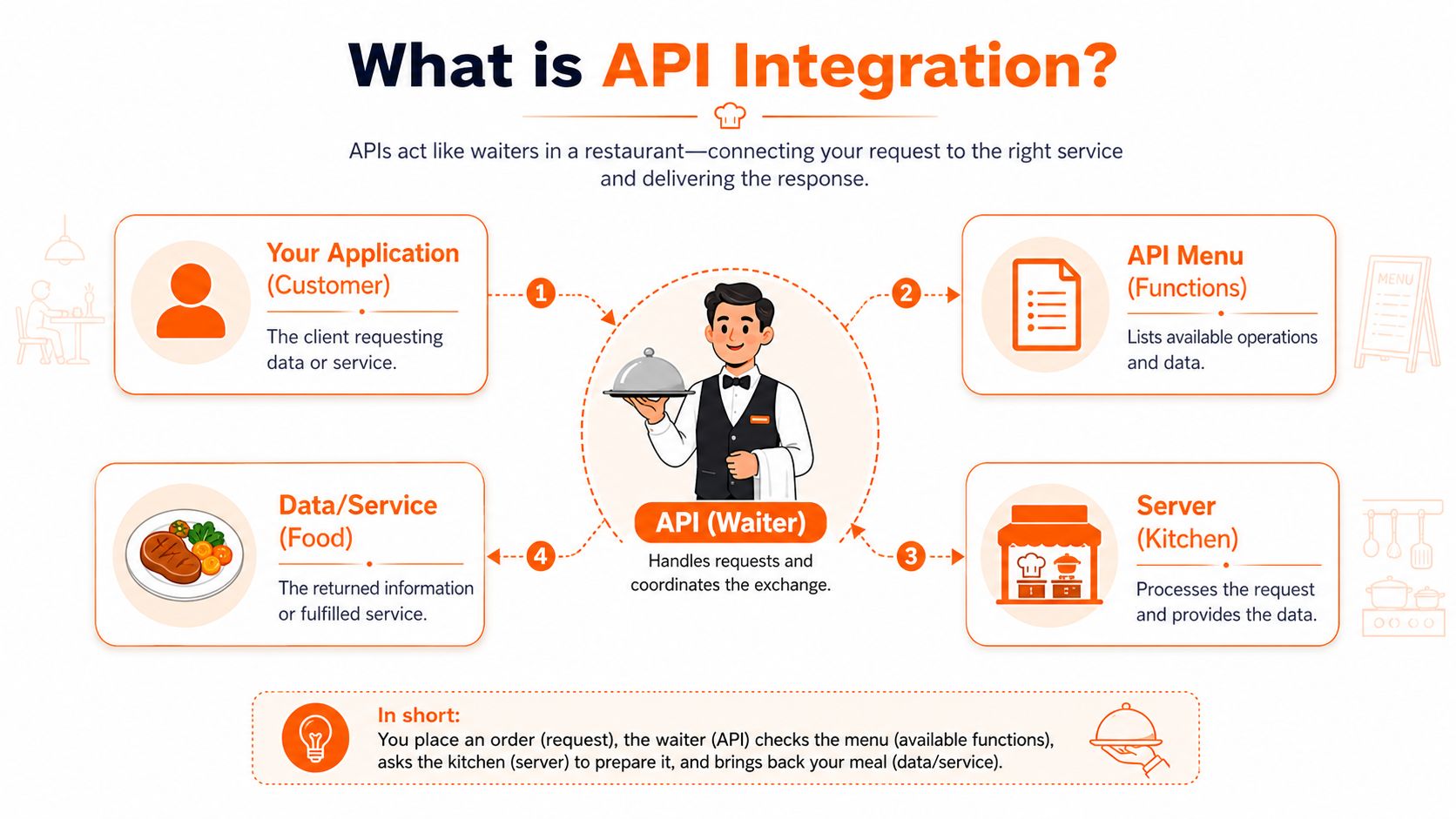
The restaurant analogy still works because it's close to how these systems behave in real life. Your app is the customer. The API is the waiter. The backend system is the kitchen. You ask for something, the waiter carries that request to the kitchen, and the kitchen sends back the result.
The plain-English version
Say your employee app needs to show whether someone is full-time, part-time, or on leave. Instead of storing that manually in two systems, the app can ask the HR system through its API. The HR system returns the current record. The employee app displays it. No one retypes it.
That's all an integration is at heart. A repeatable conversation between systems.
What matters is that the conversation follows rules both sides understand. Which data can be requested. How identity is confirmed. What the answer looks like. What happens when something goes wrong.
Why APIs matter so much now
This isn't a niche technical pattern anymore. SQ Magazine reports that over 83% of all web traffic comes from some form of API, and 93.4% of integrations use the REST architecture style. In practice, that means most modern software already expects to connect with other software.
If your business runs on more than one app, APIs aren't extra infrastructure. They're the roads between the buildings.
That's also why a lot of operational automation now starts with APIs instead of spreadsheets. If you want a practical example of how teams are using connected systems for automating tasks with API bots, Clepher's overview is useful because it ties API calls to actual repetitive work, not just developer theory.
What people often miss
An API doesn't magically fix a messy process. It gives you a reliable way to connect tools. If the business rule is unclear, the integration won't save you. If ownership is fuzzy, the integration may just move confusion faster.
So the right question isn't “Do we have an API?” The better question is “What job should these systems do together without a human carrying the data from one to the other?”
That question is the heart of understanding API integration.
Common Ways Your Apps Talk to Each Other
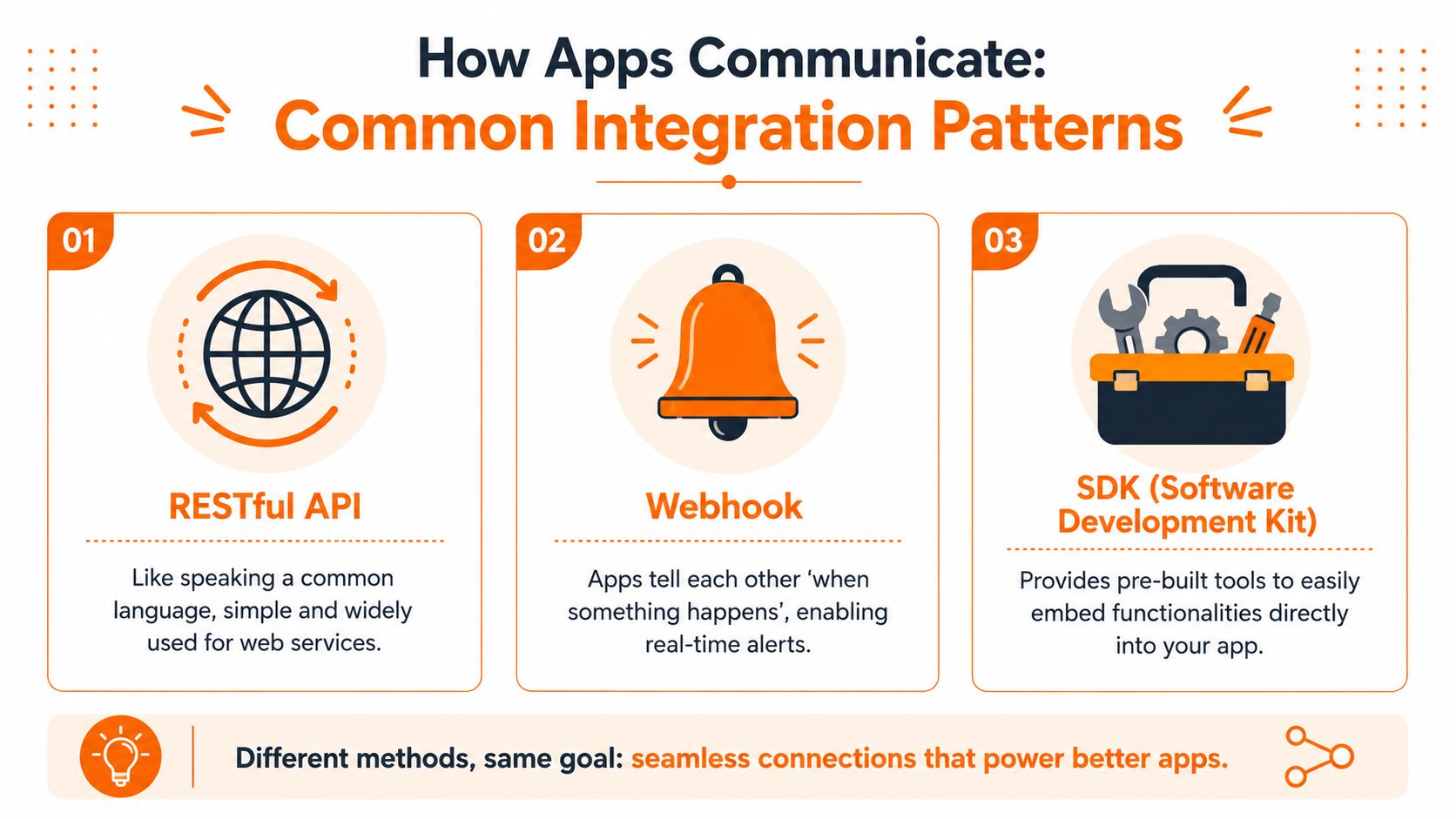
Not every integration behaves the same way. Some are good for pulling data when you need it. Others are better for instant updates. Some make access simpler for employees. The trick is knowing which pattern fits the job instead of forcing every problem through the same pipe.
REST when you need to ask for data
REST is the most common style, and for good reason. It's straightforward. One app requests something, the other sends back a response.
Think of REST as “ask and receive.” A manager opens a people directory, and the app asks the HR system for the latest employee record. A scheduling tool requests approved time-off data before building next week's rota. The information arrives when needed.
REST works well when:
The app needs current data on demand. A profile, status, balance, or record can be fetched at the moment someone opens the screen.
The business process is predictable. Request goes out, answer comes back, the app moves on.
Teams want broad compatibility. Most vendors support REST, so it's often the easiest common language between tools.
The trade-off is speed of awareness. If one system changes something, another system won't know until it asks again.
Webhooks when timing matters
Webhooks flip that model. Instead of one system checking for changes over and over, the source system sends a message when something happens.
A new employee is created. A webhook fires. Another app receives the event and creates the user profile. Someone's leave is approved. A webhook tells the scheduling system right away. This is the “call me when it's ready” model.
Here's a quick comparison:
Pattern | Best for | What it feels like |
|---|---|---|
REST | Looking up current data | Open the app and see the latest record |
Webhook | Triggering actions after events | Change happens once and other systems react |
SSO | Access across multiple apps | Sign in once and move through tools smoothly |
SSO when the real problem is access
Single Sign-On, or SSO, isn't mainly about moving business data. It's about letting people use multiple tools with one trusted identity.
For employees, this feels like one master key. They sign in once through a central identity provider, then move into the apps they're allowed to use. For administrators, SSO makes access cleaner when people join, change roles, or leave.
Good integrations don't always move records. Sometimes they remove friction by making identity consistent across the stack.
There's another path worth knowing about. Some vendors offer SDKs, which are pre-built toolkits that help teams embed features directly in an app. For teams exploring workflow automation beyond basic connectors, Ekipa AI for automating workflows is a useful example of how connected tools can turn triggers and actions into practical operating flows.
Understanding API integration gets easier once you stop seeing it as one thing. It's a family of patterns. REST is for asking. Webhooks are for notifying. SSO is for trusted access. The best setups usually combine them.
Why This Matters for Your Frontline and Office Teams
Most integration conversations drift toward systems, endpoints, and architecture. The lived experience is much simpler. Either work moves cleanly, or people spend their day compensating for tools that don't line up.
For frontline teams, the difference is immediate. A shift changes, and their phone reflects it. A policy is updated, and the right version is available without hunting through old messages. A manager approves time off once, not in three separate places.
For office teams, the gains show up in quieter ways. New hire data doesn't need to be entered again. Department changes don't have to be fixed across multiple apps by hand. Internal communications go to the right audience because the audience data is current.
The cost of broken connections
Poor integration isn't just a nuisance sitting in the background. Adalo reports that the annual IT maintenance burden associated with poorly integrated legacy systems is estimated at $1.14 trillion, and that visual integration platforms can deliver development cost reductions of 53–70% and maintenance savings of 80%.
That number gets attention, but the operational cost is what leaders feel first. Payroll corrections. Missed updates. Duplicate accounts. Slow onboarding. Managers turning into human middleware between systems that should be doing this on their own.
What good integration changes
When integration is done well, teams stop talking about the integration. They talk about smoother work.
A practical way to think about the benefit:
For HR. Fewer manual handoffs during onboarding, offboarding, and role changes.
For operations. More confidence that schedules, staffing records, and attendance data match across tools.
For employees. Less confusion about where to look and which version is right.
For leadership. Cleaner reporting because data isn't drifting between disconnected systems.
That's why understanding API integration matters to business leaders. It's not about admiring the plumbing. It's about whether the business can rely on its own daily operations.
It also changes employee trust
Employees notice when company systems make them do extra work. They notice when one app says they're on shift and another doesn't. They notice when they can't access a tool on day one, or when a former employee still shows up in a group.
Those moments send a message. Not about technology, but about how carefully the company runs.
The best integrations reduce friction people have learned to tolerate. And once that friction disappears, teams rarely want to go back.
The Unseen Work Security Governance and Reliability
Integration sounds clean from the outside. Connect one system to another, move some data, job done. In practice, the hard part is what people don't see. Permissions. token handling. audit trails. retries. failure recovery. the quiet discipline that keeps a useful connection from becoming a fragile one.
That's why security and reliability are the real tests of a vendor. A demo can make any integration look easy. The question is what happens on a bad network day, when a token expires, or when one system responds slowly and the other keeps firing requests.
Reliability is not luck
Theneo reports that 41% of API integration failures stem from transient outages, and that enterprises using middleware with built-in retry and interrupt patterns can reduce cascading failures by 68%. That matters because many failures aren't dramatic crashes. They're brief interruptions that ripple into user-facing issues if nobody designed for them.
A good integration partner plans for those interruptions. Requests should retry sensibly. Failing calls should pause before they overload dependent systems. Monitoring should show whether things are healthy before employees start reporting problems.
Reliable integrations aren't the ones that never hit trouble. They're the ones built to recover without turning a hiccup into an incident.
Security is mostly discipline
Authentication deserves more attention than it usually gets. Teams often hear “we support OAuth” and stop there. That's not enough. You want to know how credentials are stored, how access is scoped, and how token refresh is handled.
A practical baseline comes from Apideck's API integration guidance, which says teams should store both the access token and refresh token alongside their expiry timestamp, then proactively refresh the token if it's within a few minutes of expiry before making any request. That simple habit prevents silent authentication failures that break live workflows.
If you need a plain-English refresher on the authentication model many vendors use, this guide to OAuth authentication is worth reading before a vendor call.
Governance is what keeps “connected” from becoming “chaotic”
Security isn't only about who gets in. It's also about who gets what. The cleanest integrations use clear permissions, scoped access, and logs that make it obvious what happened and when.
That means asking questions like these:
Who can authorize the connection. Not every admin should be able to connect payroll data to every app.
What data is shared. The best integrations move only what the workflow needs.
How failures are traced. If something breaks, support teams should be able to follow the request path quickly.
What gets logged. Enough for accountability, not so much that sensitive data is sprayed everywhere.
Leaders don't need to engineer these controls themselves. But they should expect them. Good integration vendors don't treat security and resilience as add-ons. They treat them as the product.
How to Choose the Right Integrated Tools
Most vendor conversations go wrong at the first question. “Do you have an API?” is too broad to help. Nearly every serious software company will say yes. That answer tells you almost nothing about how usable, safe, or maintainable the integration is.
A better conversation starts with a real workflow. Ask them to show how a new hire in your HR system gets access to the right app, lands in the right team, and appears in the right directory without your staff doing cleanup afterward.
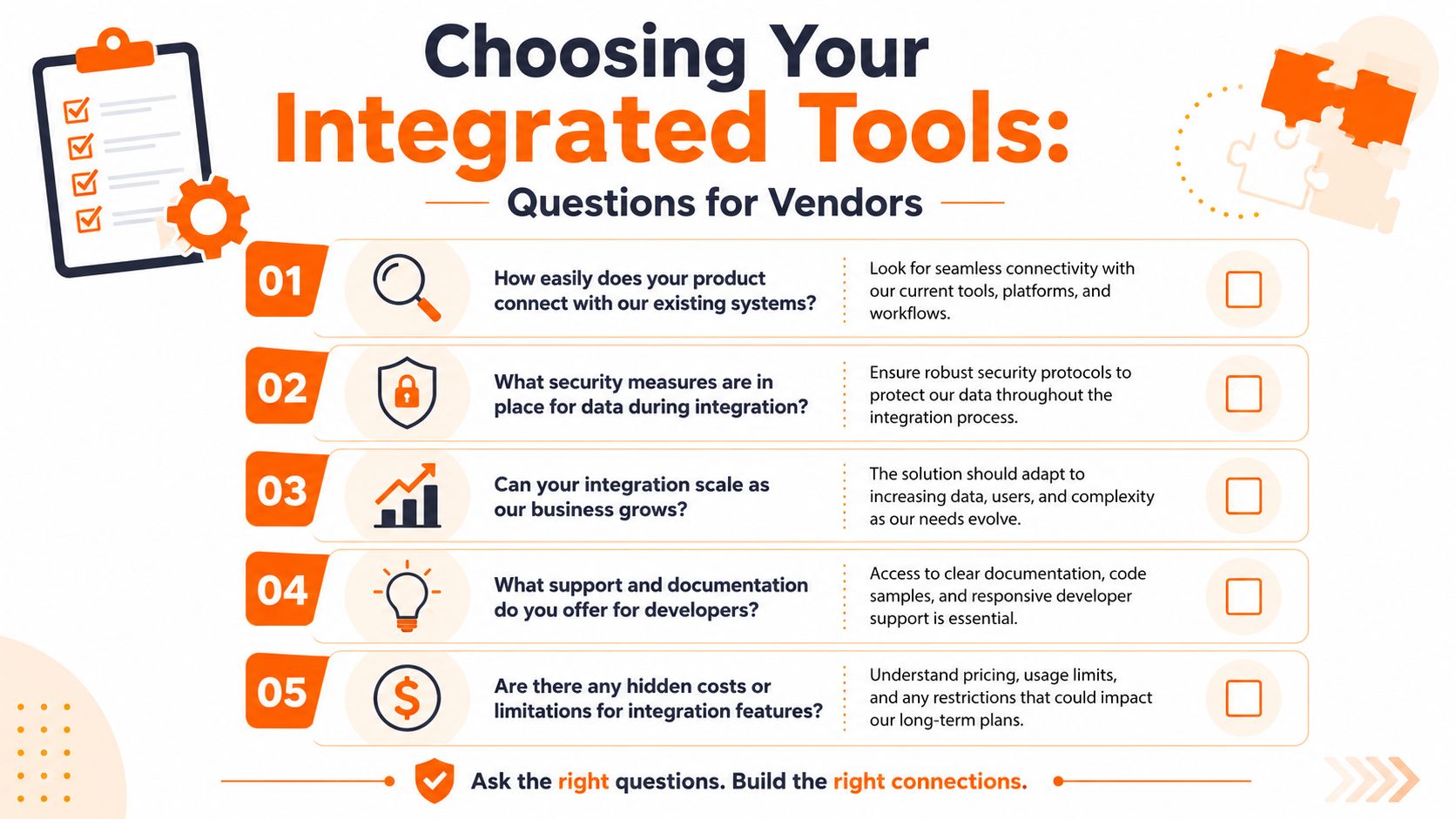
Questions worth asking out loud
Try these in plain English during the demo:
Show me the setup experience. Can a non-technical admin connect our systems, or will this depend on engineering every time?
Show me a failure. If a sync breaks, where do we see it, who gets alerted, and what can we do before opening a support ticket?
Show me the permissions. Can we limit what data is shared and who can authorize the connection?
Show me how this scales. What happens when we add locations, departments, or more tools next year?
Those questions force the discussion out of abstract feature claims and into operational reality.
The detail that separates mature tools from shallow ones
One sign of an effective integration is how it handles errors. Statisfy explains that standardized error schemas with correlation IDs can reduce mean-time-to-repair by up to 40% because teams can trace the exact path of a failed request more quickly.
You don't need to inspect every header yourself. You do want to hear a vendor explain this clearly. If something fails, can their support team identify the request, track it through the system, and tell you what happened without guesswork?
Ask vendors to demo the boring parts. Setup, permissions, logs, failure handling. That's where strong products separate themselves from shiny ones.
What usually works best
In my experience, the right tool tends to have a few common traits:
It connects to common systems without drama. Pre-built connectors matter because they lower effort and reduce custom work.
It doesn't hide the hard parts. Authentication, data mapping, and support responsibilities should be easy to understand.
It respects non-technical operators. HR and ops leaders should be able to manage day-to-day integration health without reading developer docs for fun.
Understanding API integration helps you buy software with fewer surprises. The best tools don't just connect. They stay connected in ways your team can live with.
Your Next Step Connecting Your World with Pebb
The point of integration isn't to create a more advanced tech stack. It's to make work feel less fragmented for the people doing it. Better communication. Cleaner operations. Fewer places where data goes stale and someone has to step in manually.
That standard matters even more for companies with both frontline and office teams. They don't need another app that handles one narrow task and creates three new gaps. They need connected systems that support the actual flow of work across shifts, locations, and roles.
Pebb is built around that reality. It brings communication, operations, and engagement into one place for frontline and office teams, and it connects with the systems businesses already rely on. If you want to see how that fits into a broader employee communication platform, it's a useful place to start.
Good integration work is often invisible when it's done right. People stop chasing updates. Managers stop reconciling systems by hand. Employees stop wondering which app tells the truth. The software fades into the background and the work gets clearer.
That's the future worth aiming for. Not more tools. Better connected ones.
Pebb helps companies replace disconnected employee tools with one connected home for communication, scheduling, knowledge, tasks, and day-to-day operations. If you're ready to make your systems easier to live with, explore Pebb.
