
The Shifts Schedule Template That Actually Works
Tired of scheduling chaos? Get our shifts schedule template to streamline work, reduce errors, and create a schedule your team will actually like.
Dan Robin
A good shifts schedule template isn’t just a grid of names and times. It’s a promise. A promise of clarity, fairness, and predictability that respects everyone’s time. It’s about leaving behind the chaos of spreadsheets for a system that actually works for you and your team.
Why Most Shift Schedules Are Quietly Broken
Let’s be honest. For most managers, creating the weekly schedule feels like solving a puzzle with missing pieces. It’s a messy scramble of spreadsheets, scribbled notes, and a last-minute flurry of texts. I've been there. It’s a constant source of low-grade stress. It’s the reason you jolt awake at 2 AM wondering if you remembered Sarah’s time-off request.

This process shouldn't be about just filling slots. It’s about building a rhythm that feels fair, predictable, and fundamentally human. But the old-school approach almost always falls short. It’s reactive, built on assumptions and quick fixes. The result? A schedule that feels like it’s working against you, not for you.
The Hidden Costs of a Bad Schedule
A broken scheduling process is more than a headache for the manager. It creates friction and uncertainty for the entire team, leading to real problems that ripple through the business. These aren't minor annoyances. They're operational drags that hurt morale and your bottom line.
Employee Burnout: Ever accidentally scheduled someone for a "clopen"—a closing shift followed immediately by an opening one? It's a classic sign of a rushed schedule. Without at least 10 hours between shifts, you're setting your team up for exhaustion.
Constant Confusion: When the schedule is a moving target, nobody knows where to find the truth. This leads to missed shifts, late arrivals, and a total breakdown in communication. Finding the easiest comms solution for shift workers is key to keeping everyone in sync.
Perceived Unfairness: Without a clear system, it’s easy for favoritism to creep in—or at least the perception of it. When one person always seems to get the weekend off, resentment builds quietly. It erodes your team culture from the inside out.
The goal isn't just to cover shifts. It's to build a rhythm the team can depend on. To free up their mental energy for the actual work.
The Old Way vs. A Better Way of Scheduling
Let's compare the pain of manual scheduling against the calm of using a thoughtful template. The difference is night and day.
Scheduling Aspect | The Old Way (The Mess) | A Better Way (The Template) |
|---|---|---|
Consistency | Haphazard; changes constantly | Predictable and reliable |
Communication | Last-minute texts, confusion | Centralized, clear updates |
Fairness | Prone to bias and favoritism | Based on clear, fair rules |
Time Spent | Hours of manual juggling | Minutes to fill and adjust |
Employee Impact | Stress, burnout, uncertainty | Balance, clarity, less anxiety |
The table says it all. Shifting from a chaotic scramble to a planned system is the first step toward a healthier workplace.
Moving from Chaos to Calm
Here’s the thing. A thoughtful shifts schedule template does more than organize hours. It communicates respect. It shows your team that their time is valued, that their well-being matters. It replaces ambiguity with clarity, which is the foundation of any calm, productive workplace.
We're not here to just hand you another downloadable grid. We’re offering a better way to think about your team’s time. Before you build a schedule, you have to build a philosophy. It starts with asking the right questions. That’s where the real work begins.
Build a Foundation Before You Build a Grid
Before you open a spreadsheet, stop. A great shift schedule isn't built on cells and formulas. It's built on principles—a shared understanding between you and your team.
Too often, we jump straight to the grid. We treat scheduling like a game of Tetris where people are just blocks to be slotted into place. That ignores the most critical part of the equation: the people.
This is where the real work happens, and it’s all about having a few essential conversations before you ever draw a line. Think of it as creating an architectural plan before laying the bricks. Get this part right, and the schedule almost builds itself.
Go Beyond the Intake Form
Remember that availability form your team filled out months ago? Let's be honest, it’s probably out of date. Life happens. A student's class schedule changes. A parent's childcare situation shifts.
Building a schedule on old information is like building on sand. The first, most important step is to simply check in. This doesn't need to be a bureaucratic nightmare. A simple, direct conversation or a quick survey works wonders.
The goal is to understand their real, current availability. Ask about their ideal hours, any hard-stop commitments, and their preferences. You won’t be able to accommodate every request, but just asking shows you respect their lives outside of work.
You’re not just gathering data; you’re building trust. When people feel heard, they’re more invested in making the schedule work for everyone.
This small act moves scheduling from a top-down mandate to a collaborative effort. It’s a tiny shift in approach with a huge impact on morale.
Define What Fairness Actually Means
“Fairness” is a word we all use, but it means different things to different teams. If you don’t define it together, you’re inviting misunderstanding and resentment.
For one team, fairness might mean everyone gets an equal number of hours. For another, it might be about rotating the undesirable shifts—like Friday night closings—so the same people aren’t always stuck with them. In some cases, fairness means giving senior staff priority for shift selection.
There’s no single right answer. Only the answer that is right for your team.
Have an open conversation about it. Ask directly: "What does a fair schedule look like to us?" You might be surprised by the answers. Getting this definition clear prevents the silent scorekeeping that can poison a team’s culture.
Understand Your True Capacity
Finally, a schedule has to be grounded in reality. This means understanding not just who is available, but what your business truly needs. Before you can build a grid for your shift schedule, you need to understand what is capacity planning. It’s an essential step.
Look at your busiest and slowest times and map staffing levels accordingly. Think about the skill mix on each shift. You don’t want all your trainees working the Saturday lunch rush without a seasoned veteran to guide them.
Consider these factors:
Peak Hours: When do you absolutely need all hands on deck? Map it out.
Skill Distribution: Does each shift have the right mix of experience? Pairing an expert with a newcomer is often far more effective than putting two new hires together.
Energy Patterns: Some people are morning larks, others are night owls. While you can't build the whole schedule around energy levels, being aware of them can help you place people where they’ll be most effective.
This upfront work—the conversations, the definitions, the planning—is what separates a schedule that just works from one that feels truly supportive. It transforms the schedule from a rigid grid into a document that reflects the reality of your team and your business. It's the thoughtful foundation that makes everything else hold together.
Designing Your Core Shifts Schedule Template
You've done the prep work. You’ve talked to the team, figured out what “fair” means, and you know what the business needs to run smoothly. Now for the fun part: turning those ideas into a concrete, usable schedule.
This is where we leave the chaos of sticky notes and last-minute texts behind for a single source of truth.
A great shift schedule template isn't about complicated formulas or a rainbow of colors. It’s about building something that’s visually clear, a breeze to update, and almost impossible to misread. The real goal? A schedule so straightforward a new hire can understand it in 30 seconds.
This whole process breaks down into three steps: gathering your requirements, defining the structure, and factoring in the human elements.
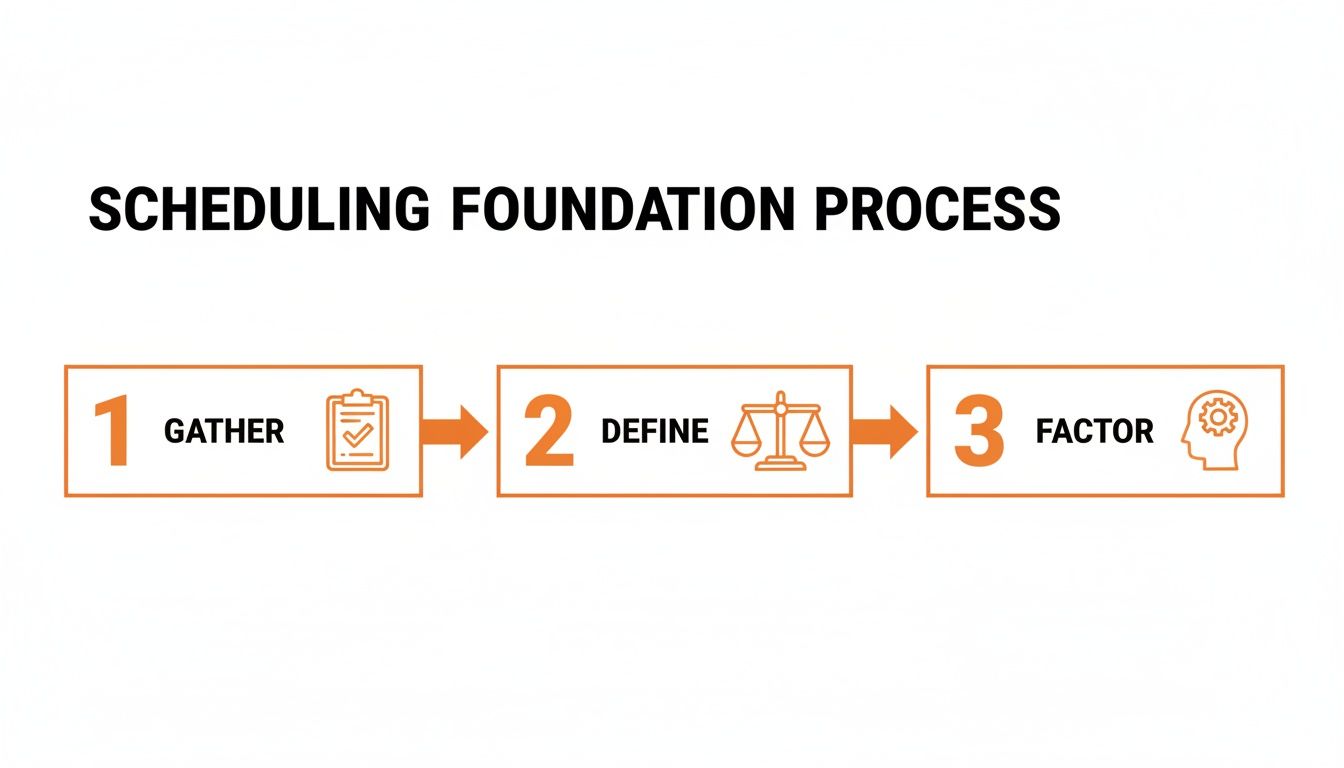
Each of these steps builds on the last, making sure your final template works for the business and for your people.
The Essential Building Blocks
Every schedule, no matter the industry, is built on a few core pieces of information. These are the absolute must-haves—the skeleton of your template. Miss one, and the whole thing gets confusing fast.
Let's start with the basics:
Employee Names: Obvious, but essential. List them in the first column.
Roles/Positions: Critical if you need a specific skill mix on every shift, like having a "Lead Barista" and "Server" on at all times.
Shift Times: Be crystal clear about start and end times (e.g., "9 AM - 5 PM").
Total Weekly Hours: Add a column at the end that sums up everyone’s hours. This is your best defense against accidental overtime and burnout.
These four elements are your minimum viable schedule. Once they’re locked in, you can layer in more detail as needed.
Choosing the Right Template Format
Honestly, there’s no one-size-fits-all answer here. The right schedule template matches the rhythm of your business. A quiet bookstore has completely different needs than a 24/7 hospital.
Let's look at a couple of real-world scenarios.
For a Bustling Restaurant You're running a busy place with distinct lunch and dinner rushes, split shifts, and different roles. A classic weekly grid is your best friend. Days of the week run across the top, names are down the side, and each box shows the shift and role: "11 AM - 3 PM (Host)" or "5 PM - Close (Server)." It’s a simple, visual way to spot coverage gaps.
For a 24/7 Healthcare Clinic Here, coverage is non-negotiable and shifts often follow a set pattern. A rotating or cyclical schedule makes more sense. This kind of template might span several weeks and map out a repeating pattern—like the DuPont schedule, where teams work a cycle of four night shifts, get three days off, then do three day shifts. It gives your staff predictability over a longer period, which is critical in high-stakes jobs.
The trick is to match the template's complexity to your reality. Don't over-engineer a rotating schedule if a simple weekly grid gets the job done. As you get more advanced, the best staff scheduling software can automate this heavy lifting, especially for complex rotations.
Building a Living Document
Here's a truth every manager knows: schedules are never really final. People get sick, appointments pop up, life happens. A rigid template that can’t adapt becomes a source of frustration. Your schedule needs to be a living document.
This means building in simple ways to handle reality. Add a small section at the bottom for approved shift swaps. When two employees agree to trade, you note it there. Simple. This creates a public record and stops any "he said, she said" confusion.
Do the same for approved time off. By visually blocking out those dates before you start slotting people in, you save yourself that classic "oops, I forgot" headache.
Your template shouldn’t just be a plan; it should be a record of what actually happened. It becomes the definitive source of truth, settling disputes before they start.
Manual scheduling is known for being error-prone, causing everything from understaffing to drama. A well-structured template helps ensure work is distributed fairly and you always have the right people on the floor. For growing teams, a dedicated scheduling app for employees can be a game-changer, automating these updates so your spreadsheet doesn't become a tangled mess.
Ultimately, designing your template is an exercise in thoughtful simplicity. Include what you need for clarity, and nothing you don't. Start simple, run it by your team, and only add complexity when a real, recurring problem pops up.
Putting Your New Schedule Into Practice
You’ve built it. A clean, thoughtful shifts schedule template that makes perfect sense. But a template is useless if it just lives on your desktop. The hardest part isn’t creating the schedule; it’s rolling it out without causing a mutiny.
I’ve seen great new schedules fall apart on day one. It usually happens when a manager just posts the new grid and expects everyone to magically adapt. Change, even good change, feels disruptive when people don't understand the why behind it.
Think of the rollout as a conversation, not an announcement. It begins with the ‘why.’
Start with the Why, Not the What
Before you show anyone the new grid, get the team together and walk them through your thinking. Be honest about what was broken with the old system. Maybe it was causing burnout, or perhaps it felt like the same people always got stuck with the worst shifts.
Frame this new template as the solution to those problems. Explain how it’s designed to create more clarity, predictability, and fairness for everyone. This isn't just spin; it's about showing respect by including them in the logic.
The goal is for your team to see the new schedule as a tool that helps them, not just another rule they have to follow. When they understand the benefits, they become partners in making it work.
Once everyone is on board with the 'why,' the 'what' becomes much easier to introduce. People are far more willing to adapt when they see the destination is a better place for the whole team.
Establish the Rules of Engagement
A schedule is a living document, so you need a clear, simple process for how it will live and breathe. Set a few ground rules from the beginning. Ambiguity is your enemy. It creates the exact kind of text-message chaos you’re trying to escape.
Here are the non-negotiables you need to define:
How to Request Changes: Is there a dedicated channel? A form? Make it a single, official process. No more last-minute requests in a hallway conversation.
The Shift Swap Protocol: A great rule is making the employee responsible for finding their own replacement. The manager's only job is to give the final sign-off.
Updating Availability: How and when should someone update their availability? Define a reasonable timeframe, like requiring two weeks' notice for non-emergency changes.
These rules aren’t about being rigid. They’re about creating a shared sense of responsibility. The schedule works because everyone agrees to play by the same rules.
Make It Accessible and Obvious
Now for the logistics. Where will this new schedule live? The answer has to be simple and accessible to everyone on your team. For many, a shared Google Sheet is a great starting point.
For teams on the move, like in a restaurant or retail setting, accessibility is everything. Our guide on the smartest way to share shift schedules with restaurant staff dives into how a mobile-first approach keeps everyone in the loop. The key is to pick one central location—digital or physical—and declare it the single source of truth.
The growing acceptance of structured planning is clear. Recent data shows that 48% of workers now use to-do lists to organize their time, a big jump over just a few years ago. This shows that people want clarity. A reliable schedule is the ultimate to-do list for their work week. You can find more insights on this trend over at TimeWatch.com.
Ultimately, putting your schedule into practice is a test of your communication and commitment. The template is just the starting line. The real work is turning that grid into a trusted, reliable rhythm for your entire team.
Knowing When Your Template Needs To Evolve
No schedule is perfect forever. That beautiful, clean template you built six months ago might start to feel… creaky. A little broken. That’s not failure. It’s a sign of life.
Your business changes. People come and go. Seasons shift. A schedule template isn’t a stone tablet—it’s a living document that has to adapt or become obsolete. Recognizing when your system is starting to break is the first step toward keeping your process healthy.
The signs are usually subtle at first. You spend more time making manual adjustments. Shift conflicts start creeping back in. Someone asks, "Hey, can I see the latest version?" because the one in the breakroom is already out of date.
These aren't just minor annoyances. They’re warning signs that your current system is reaching its limits.
When the Spreadsheet Starts to Fail
For most small teams, a spreadsheet is the perfect start. It's simple, free, and gets the job done. But as your team grows, that same spreadsheet can quietly turn into a major headache.
Here are a few red flags that tell you it’s time for something better:
You're Spending Hours, Not Minutes: If scheduling eats up more than an hour of your week, the tool is no longer saving you work—it's creating it. Your time is better spent leading, not copy-pasting cells.
Version Control is a Nightmare: Are you dealing with
Schedule_v3_FINAL.xlsxandSchedule_v4_USE_THIS_ONE.xlsx? When you can’t be sure everyone is looking at the same document, you're inviting chaos.Shift Swaps Are a Full-Time Job: Managing availability and swap requests through a jumble of texts and emails is exhausting. It puts you in the middle of every single change, turning you into a dispatcher instead of a manager.
Let’s be honest. When these issues pile up, the spreadsheet that once brought clarity now just creates confusion. It becomes a source of friction.
The point of a good system is to reduce the amount of time you spend thinking about the system. When the tool itself becomes the problem, it’s time to find a new tool.
The Natural Progression to a Dedicated Tool
This is the point where we need to talk about dedicated scheduling tools. The goal here isn't to sell you on software, but to be honest about the natural progression of a growing business. At some point, the manual work just becomes too costly.
Automating the tedious parts of scheduling—sending notifications, approving swaps, and tracking hours—is the logical next step. It frees you up to focus on the human side of management: coaching your team, solving real problems, and thinking about the bigger picture.
This shift is happening everywhere. The employee scheduling software market was valued at $481.5 million in 2023 and is projected to more than double to $1.2 billion by 2032. That shows just how many businesses are making this exact evolution. You can dive into the full research on these market trends on Allied Market research.
Evolving from Manager to Leader
Thinking about the health of your scheduling process is about more than efficiency. It’s about what kind of manager you want to be.
Do you want to be the one constantly putting out fires, chasing down confirmations, and triple-checking a spreadsheet for errors? Or do you want to be the one who has the time and mental space to actually support your team?
A well-oiled scheduling system isn't just an operational upgrade; it's a leadership upgrade. So, take a look at your current process. Is it still serving you and your team, or are you serving it? If your template feels like it’s holding you back, don’t be afraid to let it evolve. That's how you move from simply managing shifts to truly leading a team.
Your Top Shift Scheduling Questions, Answered
As managers, we get a lot of questions about building better shift schedules. It's understandable. When you finally decide to ditch the old, chaotic way of scheduling, you want to get the new system right.
Let's walk through some of the most common questions we hear, with some honest, real-world advice.
What’s the Best Format for a Shift Schedule Template?
Honestly, there’s no single "best" format. It all comes down to the rhythm of your business. For a retail store with standard hours, a simple weekly grid in a shared spreadsheet is often all you need. It’s visual, everyone gets it, and it works without being overly complicated.
But if you’re running a 24/7 operation like a hospital, a monthly or rotating template is a much better fit. These are designed for more complex rotations and give your team the predictability they need over a longer stretch of time.
The secret is choosing a format that's visually clean, easy for your least tech-savvy employee to read, and simple for you to adjust. Start with the most straightforward option that solves your main problem. Only add complexity when you absolutely have to.
How Can I Handle Last-Minute Shift Changes Fairly?
This is a huge one. The trick isn't a magic fix for the change itself, but having a rock-solid process in place before it happens. Fairness isn't your ability to juggle texts at 10 PM; it's a process that's consistent and transparent for everyone.
First, set up a single, official channel for all urgent requests. No more texts, DMs, or hallway conversations. Second, establish a clear policy. A great approach is to make the employee who needs the change responsible for finding their own replacement.
As the manager, your job is just to give the final thumbs-up on the swap, not to be the middleman brokering the deal. This empowers your team, builds accountability, and stops you from becoming the bottleneck.
How Far in Advance Should I Post the Schedule?
The gold standard is posting the schedule at least two weeks in advance. This is about more than just logistics; it's a sign of respect. It gives your team the breathing room they need to plan their lives—doctor's appointments, childcare, or just a night out with friends.
Consistency is also key. Try to release the schedule at the same time every cycle, like clockwork. Something as simple as "the new schedule always drops on Wednesday afternoon" builds an incredible amount of trust and cuts down on anxiety.
Keep in mind that some places have predictive scheduling laws, like the Fair Work Week Ordinance in Los Angeles County, which legally require advance notice. But even where it’s not the law, it’s just the right way to treat people.
When Is It Time to Switch from a Spreadsheet to Scheduling Software?
You'll know it's time when the spreadsheet starts creating more work than it saves. It’s a feeling every manager hits. The tool that once brought order now feels like a source of constant frustration.
Here are the classic warning signs:
You're sinking more than an hour or two every week just building and fixing the schedule.
You're constantly correcting copy-paste errors that mess up shifts.
Managing shift swaps has turned into a second job happening across five different apps.
You have no simple way to track hours or prevent accidental overtime without a calculator and a bottle of aspirin.
A spreadsheet is a fantastic place to start. But as your team grows or your needs get more complex, dedicated software automates all that tedious work. It frees you up to focus on what you're actually supposed to be doing—leading your team.
Ready to move beyond the spreadsheet? Pebb brings your scheduling, team chat, and daily operations together in one simple app. See how it can simplify your workday.
