
Shift Scheduling Template: Build One That Actually Works
Create a shift scheduling template that handles overtime, PTO, and shift swaps without the chaos. Practical steps and real examples for frontline teams.
Dan Robin

Sunday night, the schedule looks respectable. By Wednesday morning, someone has called out, a shift swap is sitting in a text thread, one employee is drifting toward overtime, and the person covering the late shift hasn't had enough rest. The spreadsheet still looks tidy. The operation doesn't.
A useful shift scheduling template isn't a prettier grid. It's a set of decisions that still works when availability changes, demand moves, and people get tired. The best templates make constraints visible before names go into cells, then give managers a clean way to handle the changes that follow.
Why Most Shift Scheduling Templates Fall Apart
The usual failure starts with a blank weekly grid. A manager fills in names until every opening has coverage, checks the totals quickly, and publishes the file. Then real life begins. A callout leaves a hole, a swap request arrives by text, and a late finish creates a problem for the next morning. Someone edits the spreadsheet, but nobody knows which version is current.
That process doesn't fail because managers are careless. It fails because a static template treats the schedule as finished once the cells are filled. Retail has rushes that move. Healthcare has credential requirements and handoffs. Logistics has loading windows, absences, and coverage that cannot simply be postponed. A grid can show who was supposed to work. It can't, by itself, show whether the replacement is qualified, rested, available, or already close to an overtime limit.
The manual workload is substantial. Industry summaries report that managers spend more than 8 hours per week building schedules manually, while another estimate places scheduling and administrative work at 6 to 11 hours per week, nearly 25% of a standard workweek. The same summary reports spreadsheet scheduling error rates of 10% to 30%, and notes that 88% of business spreadsheets contain errors. These figures are compiled in employee scheduling statistics from SchedulingKit.
The spreadsheet hides the expensive parts
The obvious cost is time spent typing. The less visible cost comes from rechecking every change. A manager may need to compare availability, role qualifications, rest between shifts, paid time off, weekly hours, and local notice rules before approving one replacement. When those checks live in different tabs, email threads, or memory, the schedule becomes a guessing exercise.
A small team can still use a template successfully, especially when shifts and roles are stable. But the template needs separate areas for availability, qualifications, requests, coverage requirements, and exceptions. A simple shift schedule maker from Pebb can help teams move beyond one isolated weekly grid.
Practical rule: If a change requires copying information between tools, your schedule has more than one source of truth.
Automation isn't automatically the answer. A poorly configured scheduling system can reproduce bad rules faster. The useful question is whether the template can absorb a callout, surface a conflict, and preserve the reasoning behind an assignment. That's also the practical case behind why automate restaurant scheduling, especially where managers spend each day adjusting the plan rather than running the floor.
Building the Core Structure of Your Template
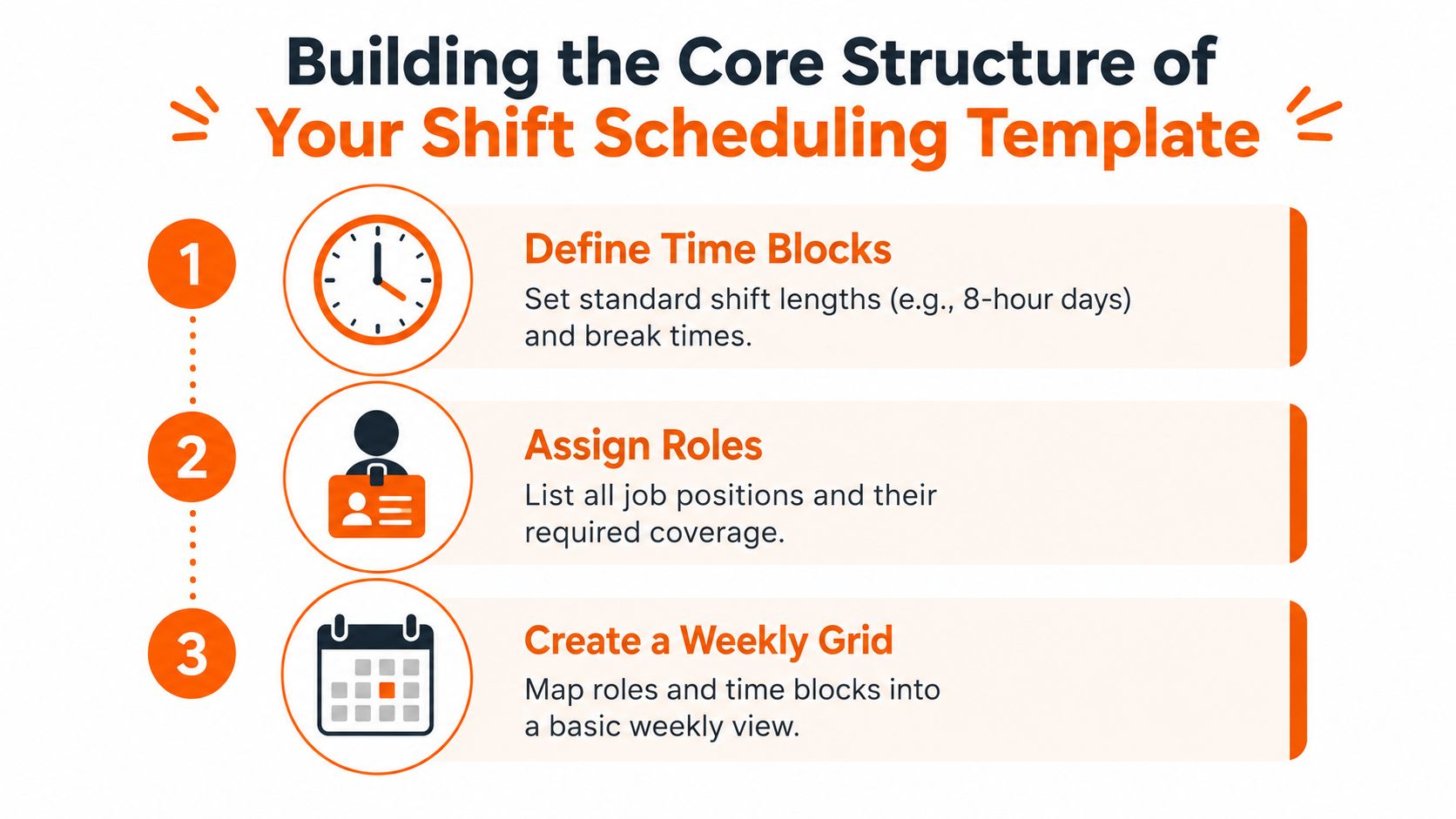
Start with the work, not the people. Write down the coverage needed for each operating period, then define the roles that must be present. A healthcare template might separate registered nurses, aides, and charge coverage. A warehouse template might distinguish receiving, picking, dispatch, and equipment-qualified staff. A retail template may need opening, floor, stockroom, and closing responsibilities.
Establish the constraints first
Before assigning names, set the rules that protect the operation and the people doing the work.
Time blocks: Choose standard shift lengths where the work allows it, and record handoff and break expectations separately.
Roles: List every position, required skill, credential, and minimum coverage by time block.
Rest windows: Flag short turnarounds between a late finish and an early start.
Consecutive shifts: Set a maximum streak for day, evening, and night work instead of relying on manager judgment.
Weekly hours: Add a hard cap and a warning threshold so the template identifies risk before payroll does.
Rotation rules: Define whether shifts move forward, how night blocks work, and how recovery days are assigned.
NASA's work-scheduling guidance strongly discourages working more than 4 consecutive 12-hour shifts because of excessive fatigue. The National Safety Council recommends forward rotation from day to afternoon to night, at least 12 hours off between shifts, and a limit of 4 consecutive night shifts. Those controls are summarized in the NASA fatigue and work scheduling guidance.
Then build the weekly view
Once the rules exist, create the grid. Put dates and time blocks across the top, roles down the side, and employee assignments inside the cells. Keep coverage visible by block. A manager should be able to see at a glance that the evening handoff is staffed, not merely that the total number of scheduled people looks adequate.
For operational teams, this is best treated as a constrained planning problem. Define required coverage, then reduce understaffing and unnecessary working time while enforcing rest, shift-length, and rotation rules. Research summarized in the workforce shift scheduling problem notes higher incident risk around consecutive shifts, higher near-miss likelihood above 41 hours per week, and higher incident likelihood above 51 hours per week. Those thresholds belong in warnings and review queues, not hidden in policy documents.
A good template also records why an assignment was changed. That history helps managers explain decisions, spot recurring gaps, and build your future workforce with better information than a collection of overwritten spreadsheets.
Handling Overtime, PTO, and Predictive Scheduling Rules
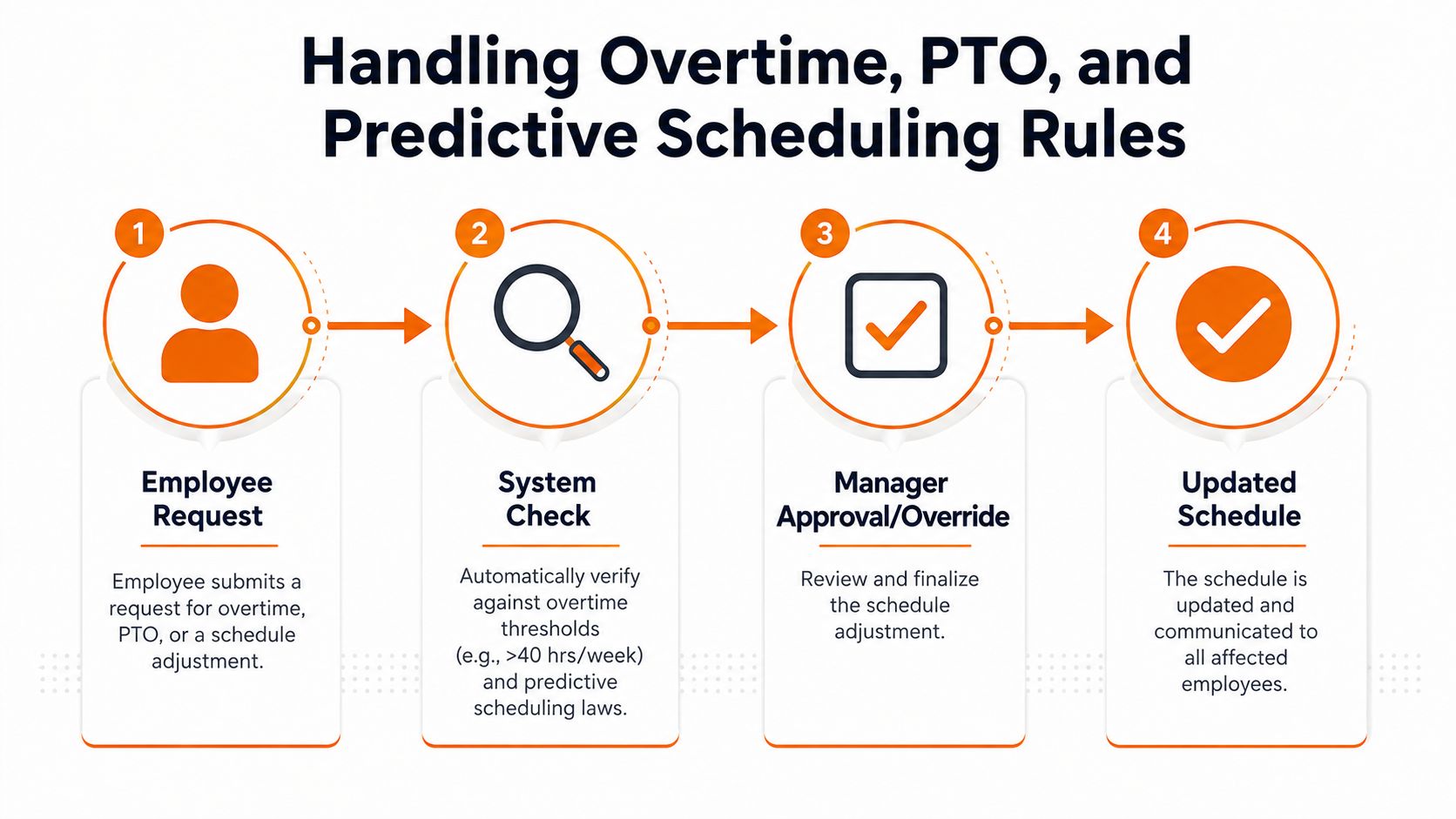
A schedule can be fully staffed and still be wrong. Overtime, approved leave, and notice requirements change what “covered” means. If the template checks those items only after publication, the manager is already negotiating with payroll, employees, and the law.
Build the checks into the workflow. An employee request should first be matched against availability and approved PTO. The proposed change should then be checked against weekly hours, rest rules, role qualifications, and the notice window. Only after those checks should a manager approve or override it.
Keep requests inside the schedule
PTO shouldn't live in a manager's inbox while the schedule lives in a spreadsheet. Record the request date, decision, affected shifts, and replacement status in the same system. A separate employee PTO workflow from Pebb can help clarify the handoff between request, approval, and schedule update.
For overtime, use visible thresholds rather than a single final total. Mark the hours already worked, the hours proposed, and the hours that would result after a swap. A replacement who appears available may still push the week into an expensive or unsafe pattern. The template should flag that situation before the manager confirms it.
Predictive scheduling adds another layer. In covered jurisdictions, employers typically must post schedules at least 14 calendar days in advance, and changes inside that window can trigger premium pay. Oregon provides a concrete example. The state requires the written schedule to be provided at least 14 calendar days before the first day on the schedule, posted where employees can easily see it, and inclusive of all work and on-call shifts. Oregon's official predictive scheduling requirements explain the rule directly.
There's no single federal predictive scheduling requirement across the United States. A template therefore needs a location or jurisdiction field, a publication timestamp, a change log, and a way to identify whether a change falls inside the protected window. Compliance shouldn't depend on someone remembering which city's rules apply.
Choosing a Rotation Pattern That Reduces Fatigue
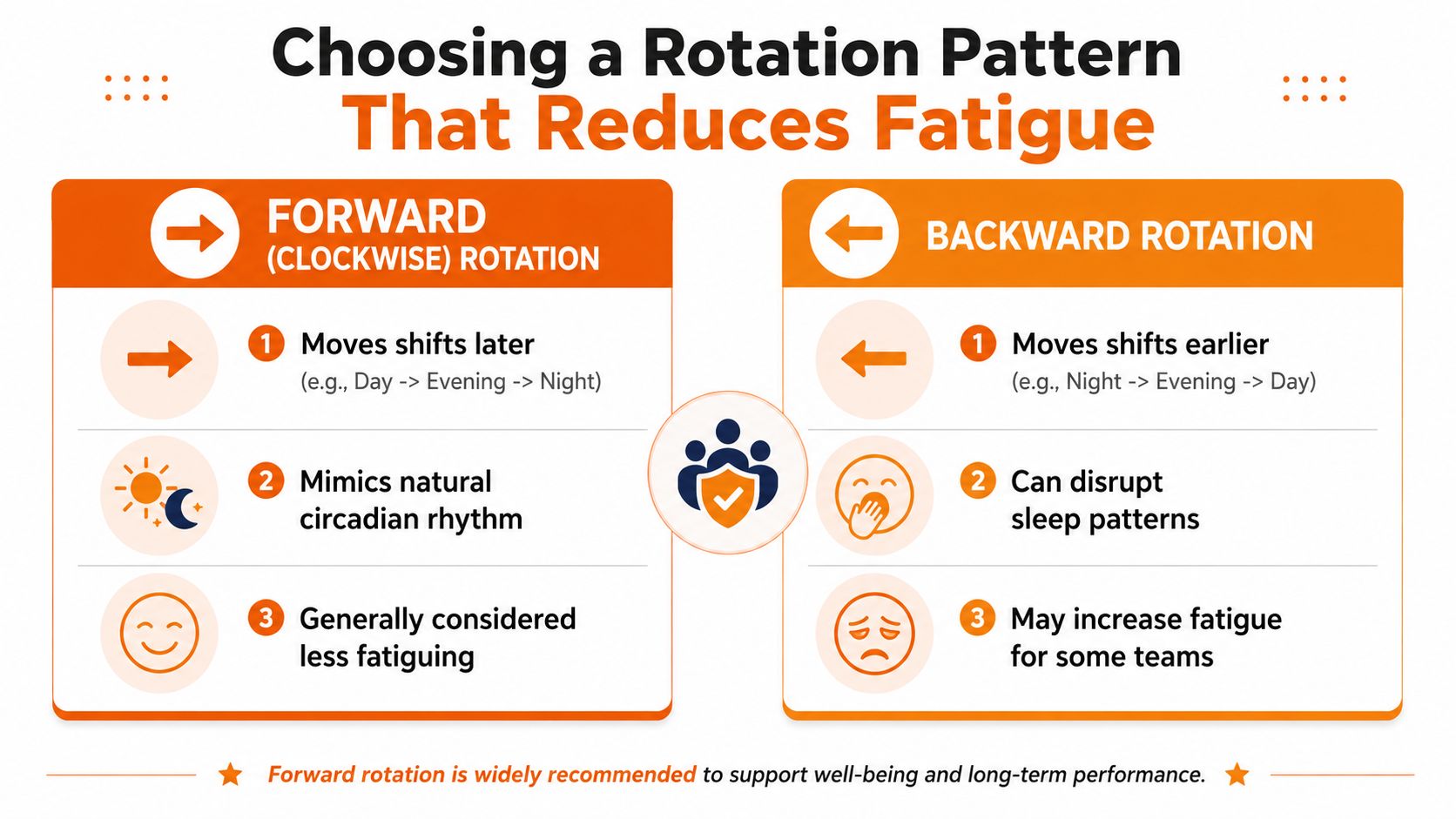
A rotation pattern is a recovery plan disguised as a staffing plan. The order of shifts affects how employees sleep, commute, and return to work. Treating every sequence as interchangeable is an easy way to create fatigue that never appears in the coverage count.
The familiar comparison is forward versus backward rotation. Forward, or clockwise, rotation moves from day to evening to night. Backward rotation moves from night to evening to day, asking people to adjust earlier after working later. Occupational guidance has generally favored the forward direction, though the evidence isn't perfectly uniform.
Use the shape, not just the label
One NIH-hosted review describes an optimal pattern as clockwise rotation, night shifts limited to blocks of 3, shift duration limited to 8 hours, and 3 days of recuperation after night work. It gives a possible sequence of 3 day shifts, 3 evening shifts, 3 night shifts, and 3 recovery days, if staffing makes that practical. The detailed discussion appears in the NIH review of shift work and rotation.
That pattern won't fit every hospital, warehouse, or store. The useful lesson is to avoid long, erratic runs and give night work a defined exit. If a team can't provide three recovery days, it should still decide what recovery looks like and encode that decision rather than leaving it to chance.
Forward rotation is not magic. A CDC-hosted summary notes that subjective sleep studies didn't clearly establish forward rotation as more beneficial than backward rotation, while broader review literature has reported positive effects from fast rather than slow rotation on sleep and fatigue. The CDC summary of shift rotation evidence supports a measured conclusion: test the pattern against your workforce, but favor shorter blocks and deliberate transitions over messy alternation.
What to put in the template
Use a rotation column that identifies the employee's current phase, the next phase, and the recovery period. Add warnings for a night-to-early-day transition, excessive consecutive nights, short rest, and long weekly totals. Then review the pattern with employees who work it. A rotation that looks elegant on paper may be punishing at 5 a.m.
The best schedule is not the one that fills every box. It's the one that keeps coverage dependable without making fatigue the hidden cost.
Setting Up Your Template in Pebb
Moving from a spreadsheet to a digital schedule only helps if the workflow is simpler for the manager and clearer for employees. Start by creating the recurring shifts your operation uses most often. Save the structure as a daily, weekly, monthly, or custom template, then load it when the same coverage pattern comes around.
Create the schedule around roles and locations first. Add the shift time, required position, assigned employee, break expectations, and any qualification needed. Once the recurring structure is in place, adjust the exceptions instead of rebuilding the week from a blank file.

Publish one current version
Publishing should give employees a clear view of the schedule on their phones, not send them hunting through email attachments. When a callout occurs, the manager can update the affected shift, communicate the change, and keep the revised schedule visible in the same place.
Pebb connects shifts with PTO tracking, clock-in, and communication inside Spaces. That matters because a swap request shouldn't disappear into a private text conversation while the official schedule remains unchanged. The workflow described in how Pebb helps frontline teams manage shift changes reflects the operational principle that scheduling and communication need to stay connected.
Use permissions carefully. Employees should be able to see their shifts and submit requests, while managers retain approval control for swaps, overtime exceptions, and coverage changes. Keep the schedule history available so someone can answer what changed, when it changed, and who approved it.
Pebb is one option for teams that want reusable shift templates alongside scheduling, PTO, clock-in, and team communication. Other scheduling tools can work too. The deciding test is practical: can employees find the current schedule, request a change, and understand the outcome without asking a manager to reconcile three systems?
Designing for Flexibility and Employee Trust
Employees don't need a schedule that never changes. They need a schedule that changes for understandable reasons, through a process they can use, without making them chase answers. Trust grows when people can see the rules, know when the schedule will be published, and understand how their availability and preferences affect assignments.
Explain the inputs. If coverage, qualifications, rest, and fairness all matter, say so. If a request can't be approved because it would create a short turnaround or an overtime conflict, show the reason in plain language. Silence makes a reasonable constraint feel like favoritism.
Fixed assignments are useful when work requires consistency. They're less useful when employees have changing availability or when demand shifts during the week. Shift bidding can work for desirable coverage, while self-scheduling windows can work when the team has enough skill overlap and managers still review the final result. Micro-shifts may help cover a narrow demand peak, but only when the handoff and total travel burden make sense.
One recent frontline report says nearly 75% of U.S. shift workers report that AI helps them leave work on time more often, as reported in 2026 roster trends on flexibility, AI, and employee wellbeing. That doesn't mean a manager should hand scheduling to an algorithm. It means planning tools should help protect the end of the workday, explain recommendations, and leave room for human judgment.
For practical policies around availability, swaps, callouts, and expectations in hospitality, practical HR for bars is a useful reference point. The same discipline applies in a warehouse or clinic: write the policy, make it easy to find, and apply it consistently.
A template is only the starting point. The system is the conversation between coverage needs and the people who provide the coverage. Build for change, show your reasoning, and review the patterns that keep breaking. That's how a schedule becomes something the team can rely on.
Pebb brings reusable shift scheduling templates together with PTO tracking, clock-in, and team communication, so managers can keep changes in one place and employees can see the current plan from their phones. Visit Pebb to see how it can support a more dependable scheduling workflow for your team.
