
Employee App Rollout Planning That Actually Works
A practical guide to rollout planning for an employee app across shifts and locations, with real tactics for pilots, training, KPIs, and measuring adoption.
Dan Robin

A Tuesday morning shift change is a poor place to discover that an employee app rollout has gaps. The app is live, the launch badges are printed, and the announcement went out. Three of six team leads forgot to mention it, two shift workers can't log in, and one manager is already asking how to turn off notifications.
That scene is more common than most rollout plans admit. Teams prepare for the launch date, then act surprised when real usage doesn't follow. The app works. The rollout doesn't.
Go-live is the starting gun, not the finish line. The first 30 days determine whether employees build a habit or return to old channels. Frontline workers need one useful task they can complete quickly. Managers need to reinforce the app in standups. IT needs coverage when the first tickets arrive. Leaders need to review adoption data every week.
Good rollout planning makes those conditions true before launch. It gives people a narrow reason to use the app, a clear person to ask for help, and enough time to fix what breaks before the next group arrives.
The First 30 Days Decide Everything
The first month exposes the difference between a launch event and an operating change. An employee app can be available to everyone and still be absent from daily work. People won't adopt a new channel because a banner appeared on the intranet. They adopt it because it helps them complete something they already need to do.
A warehouse associate might check a schedule. A nurse might find a policy. A restaurant employee might request a shift swap. If the first useful action takes too long, requires a forgotten password, or depends on a manager explaining the process correctly, the rollout loses momentum before the communications team has finished celebrating it.
Practical rule: Give every employee a first task that feels useful, familiar, and quick. Don't begin with a tour of every feature.
Managers shape that first experience more than launch emails do. When a supervisor mentions the app during a standup, checks a post during a shift handoff, or approves a request inside the new workflow, the app becomes part of work. When managers ignore it, employees reasonably conclude that the old process still matters more.
Support has to match the moment, too. First-week ticket volume rarely arrives in a neat office-hours window. A locked account at shift change can stop adoption for an entire team. Put a real owner on access issues, publish one support route, and give pilot users a place to ask questions without hunting through email.
Leadership needs a weekly view of what's happening. Track whether invitations reached the right people, whether employees completed a meaningful action, and whether usage differs by location, shift, or role. The point isn't to produce a handsome dashboard. It's to find the group that's stuck while there's still time to help.
The rest of the rollout follows from these basics. Phases, pilot groups, wave sizes, training, and governance all exist to protect the first 30 days from becoming a quiet return to old habits.
Why Most Rollouts Slip Before They Start
Large implementations rarely fail because nobody worked hard on launch day. They slip earlier, while requirements remain vague and every stakeholder assumes someone else has made the decision.
The Standish Group's CHAOS data gives a useful warning. The original survey reported 16.2% of software projects delivered on time and on budget, while 31.1% were canceled before completion. Later reporting showed 37% success in 2012, while figures cited in 2020 showed 31% successful, 50% challenged, and 19% failed (Standish CHAOS data and rollout milestones). Those figures aren't a forecast for your employee app. They are a reminder that well-funded programs still miss scope, schedule, or budget.
ERP implementations show the same planning problem from another angle. Independent industry summaries report that roughly 50% to 75% of complex projects exceed their original budget, timeline, or expected benefits, depending on the definition of failure (ERP implementation failure case studies). The usual issue is overrun, not abandonment. Teams keep going, but with more cost, more delay, and less confidence.
For an employee app, the failure modes are familiar:
Failure Mode | Planning Countermeasure |
|---|---|
Scope expands beyond the original use cases | Name the first jobs to be done and freeze the pilot scope |
Stakeholder approval arrives late | Assign decision owners during Assess and set approval dates |
Frontline employees receive a finished design | Include shift workers in discovery and pilot decisions |
Training assumes desk access | Build role-based, mobile-first practice around real shifts |
Launch date defines success | Set adoption and outcome measures before configuration |
A single big bang hides operational issues | Pilot first, then expand in controlled waves |
No owner handles post-launch problems | Assign named owners for support, content, data, and decisions |
The quiet weeks are where these choices get made. If the team hasn't agreed which use cases matter, every department will add one. If nobody owns content, old policies sit beside new ones. If managers haven't practiced the new workflow, they improvise in front of employees.
That's why a hopeful timeline isn't a rollout plan. A working plan names the decision, the owner, the date, and the evidence needed to move forward.
A Five Phase Rollout Plan for an Employee App
A rollout that survives contact with daily operations has five phases: Assess, Design, Pilot, Scale, and Sustain. The work after launch matters as much as the launch itself. Treat the first 90 days as part of the product, with clear owners for frontline support, content, permissions, and decisions.
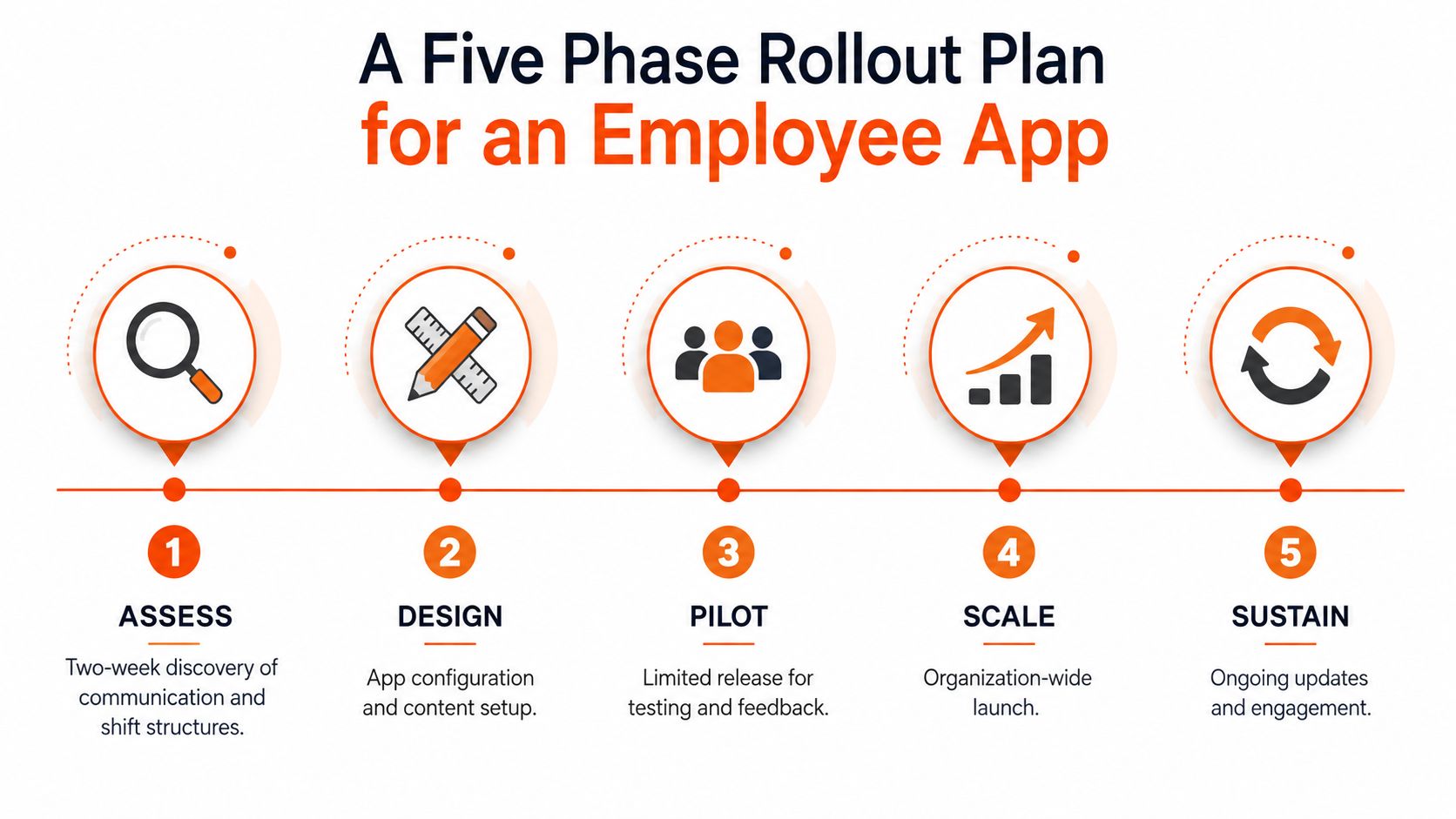
Assess the work before configuring the app
Start with a short discovery period. Map how employees communicate, how shifts run, which devices they use, and where requests disappear. Choose the three jobs to be done first, such as checking schedules, finding policies, or reporting an issue.
Assess should finish with a signed business case, named owners, and success measures. If the team cannot describe the problem in one sentence, it is not ready to configure screens and notifications. Include frontline employees early, because a workflow that looks sensible in a meeting may fail during a busy shift.
Design around high-value moments
Turn those jobs into a small set of app moments. Four to seven is a useful working range for a first release, not a reason to launch every available feature. Map each moment to a role, define the expected action, and assign a content owner.
A policy page without an owner becomes outdated. A shift workflow without an operations owner becomes a support queue. Design must account for the people who will keep the experience useful after go-live.
Pilot with real work
Run the pilot in one location and include different shift types. Use real employees performing real tasks, since a limited pilot can expose cases that user acceptance testing missed (why real-user pilots matter).
The exit checklist should cover activation, task completion, access problems, manager behavior, and qualitative feedback. Do not scale because the calendar says it is time. Scale when the team can explain what broke, who fixed it, and what changed.
Scale in waves
Move from the pilot into controlled waves. One implementation guide recommends keeping each wave to no more than 25% of remaining accounts, leaving room to respond when something breaks (wave sizing and change management). Hourly, high-attrition, or multilingual workforces often need smaller waves. Larger waves make sense when digital habits and local support are already strong.
Build stabilization time into every wave. A three-wave pattern can start with early adopters and low-risk processes, move into mission-critical workflows with tighter monitoring, then incorporate the process into standard operating procedures (three-wave rollout sequencing).
Sustain the behavior
Sustain is the operating period after launch. Reinforce manager habits, review content, govern permissions, and connect usage to business outcomes. Track the gap between employees who can access the app and employees who use it during real work. Do not fill this period with features just because the launch is complete.
For timing, dependencies, and ownership checkpoints, use this employee app implementation timeline as a planning reference.
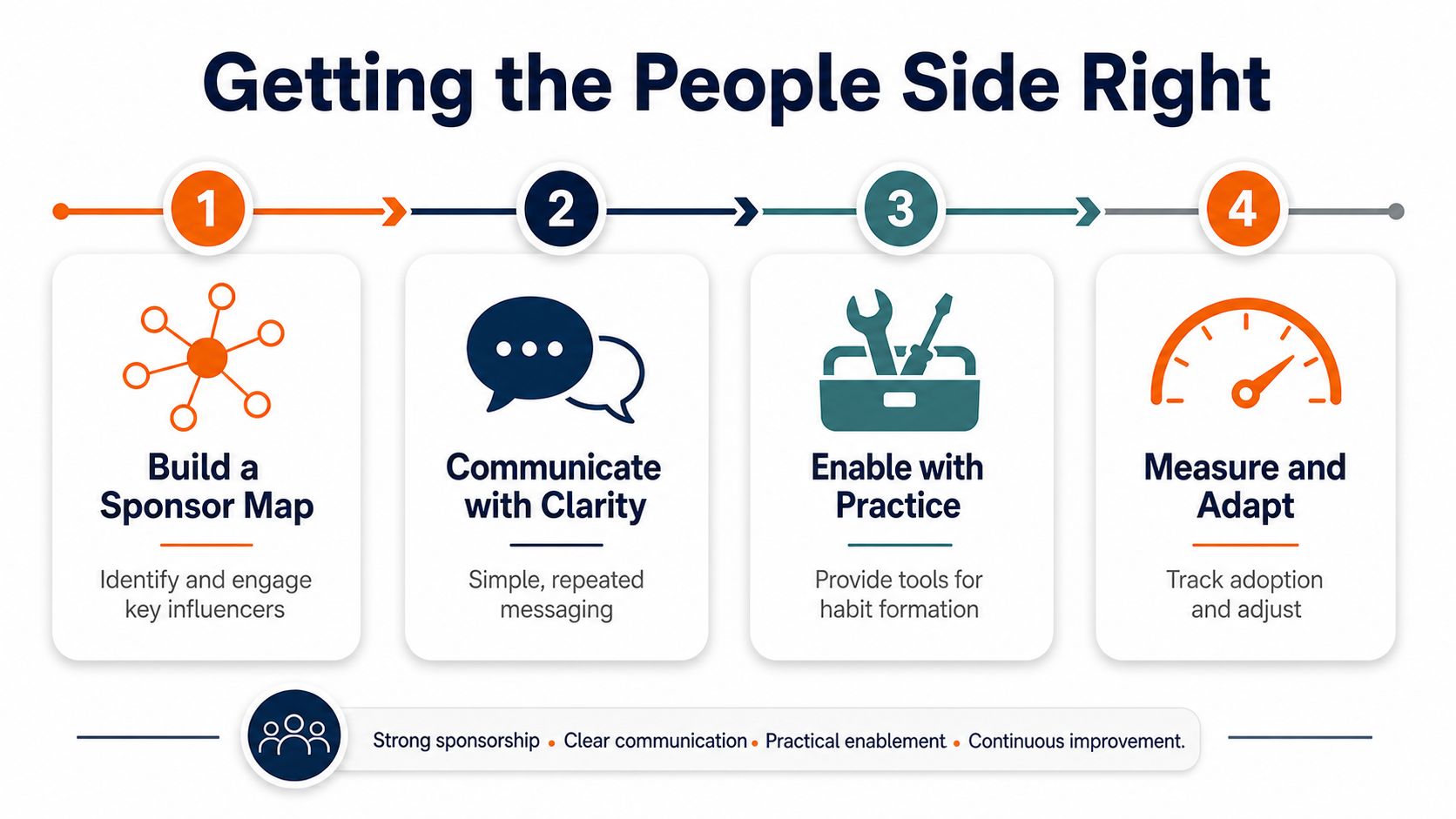
Getting the People Side Right
Software doesn't change behavior by itself. People change behavior when the new process fits their work, someone they trust reinforces it, and help arrives quickly when the process gets awkward.
Start with a sponsor map. It should include a named executive sponsor who can settle priorities, a frontline champion who understands the daily work, and an IT owner who can resolve access and integration issues. Give each person a clear accountability, not a ceremonial title.
The executive sponsor protects the problem from scope drift. The frontline champion catches the details that office-based teams miss. The IT owner keeps technical friction from becoming an adoption story.
Design for the shift, not the conference room
Frontline employees may be using a phone during a break, in a noisy area, with one hand free. They may share devices, use a locked-down corporate profile, or have no reason to open a desktop portal. A design that works beautifully for a manager at a desk can fail completely on the floor.
Training should follow the same logic. Give operators a short practice session before shift handoff, not during the busiest part of the shift. Managers need a deeper session that covers approvals, reporting, and how to reinforce the new habit without turning every standup into a software demonstration.
Run a calendar with real rituals
Use a T-60 to T+14 calendar, with communications and support assigned to dates. Preparation can include an intranet teaser, manager briefings, and physical posters in break rooms. Go-live needs floor walks and a staffed support route at shift change.
The two weeks after launch deserve special attention. Hold a weekly adoption review, route pilot questions through one Slack or Teams channel, and set a 24-hour reply standard. People can tolerate a rough first version. They won't tolerate silence when the rough version blocks their work.
The change management best practices for employee rollouts offer another practical lens for assigning ownership and reinforcing behavior.
Measuring Adoption Beyond Go-Live
A launch date is easy to report and almost useless on its own. Adoption is the key success factor. If employees don't use the app for meaningful work, the organization has installed software, not changed a process.
A useful scorecard follows the employee journey. First, invitations tell you whether the people data flowed correctly. Activation tells you whether an employee completed a meaningful first action. Weekly active users show whether the habit has any staying power. Outcome measures tell you whether the app is helping the business.
Metric Layer | What It Measures | Target Band | Review Cadence |
|---|---|---|---|
Invite acceptance rate | Whether employees received and accepted access | Set a baseline, then investigate gaps by site and role | Weekly during launch |
Activation within seven days | Whether a new user completed a meaningful task | Define the first task before pilot launch | Weekly during the first month |
Weekly active users | Whether usage continues across teams, shifts, and locations | Compare cohorts rather than relying on one total | Weekly for the first 90 days |
Outcome metrics | Whether the app improves the intended workflow | Choose one or two business measures tied to the use case | Monthly |
Track owners alongside the numbers. HR or IT may own invitations. Product or implementation may own activation. Operations leaders should own workflow outcomes. A scorecard without an owner becomes a report nobody acts on.
Avoid treating downloads as success. A person can install an app and never use it. Read the data by location, shift, role, and hire cohort. If one site activates well and another doesn't, the problem may be manager reinforcement or access support, not the interface.
Usage can dip after the initial launch period. That isn't automatically failure, but it is a reason to examine which tasks brought people back and which groups disappeared. Cohort views help separate a real product problem from a rollout assumption that was wrong.
For teams building a fuller measurement system, improve product adoption with KPIs provides a useful framework for connecting usage signals to product behavior. The important part is applying the framework to the work employees need to complete.
A 90-day scorecard also gives leaders a governance rhythm. Review the data weekly, make a decision, assign an owner, and record what changed. That loop is more valuable than adding another launch message.
Designing for the Frontline First
Many employee apps are designed as manager dashboards, then compressed into a phone layout. That order is backwards.
A frontline employee may open the app during a break, in noise, with one hand, or while wearing gloves. They may need one answer, not a home screen full of announcements. The first experience should respect those conditions.
Start with a few high-value moments tied to the shift:
View the schedule: Make the next shift easy to find.
Swap a shift: Keep the request and approval flow clear.
Access a payslip: Put a familiar document behind a predictable path.
Report an issue: Let employees send the right details without writing an essay.
Find a policy answer: Make common answers searchable and quick to reach.
Each moment needs a primary metric and a named owner. If the purpose is faster shift swaps, measure the workflow and assign operations responsibility. If the purpose is policy access, assign content ownership and review stale pages.
The launch-everything approach feels efficient because it creates one large release. In practice, it often creates a noisy first impression. Employees can't tell which feature matters, managers can't reinforce every workflow, and the home screen becomes a noticeboard nobody trusts.
The app should earn its place in the shift before it earns more features.
Governance keeps the frontline experience from decaying. Hold a monthly adoption review with the sponsor map in the room. Run a quarterly content audit to decide what belongs on the home screen. Keep one named feedback channel, and close the loop with users within 48 hours, even when the answer is that a request won't be prioritized.
Pebb is one example of a work app that combines communication, Spaces, tasks, knowledge, files, shifts, clock-in, PTO tracking, and analytics across web and mobile. The tool you choose matters less than whether your rollout gives frontline employees a clear reason to return.
Your First Week of Rollout Planning
Don't begin with a slide deck. Begin with a decision.
Write the problem the app will solve in one sentence. “Employees need a faster way to find shift information” is stronger than “We need a modern employee experience.” Get sign-off from one executive sponsor and one frontline shift lead. Two accountable people are more useful than a long list of interested stakeholders.
Then observe the current state. Ask how shifts communicate today, which devices employees carry, and where requests stall. Look at the actual path, not the documented path. The gap between those two is usually where the rollout will struggle.
Create a small core team with three clear roles:
Product owner: Defines the first use cases and configuration decisions.
Change owner: Owns messages, training, champions, and feedback.
Field operations owner: Tests the plan against locations, shifts, and supervisors.
Draft the wave plan on one page. Name the pilot site, Wave 1, and Wave 2. Size each by site and operational risk, not by ambition. Book the pilot start date and the post-pilot decision gate before anyone adds new scope.
Hold a 30-minute weekly standup with a written agenda. The meeting should answer three questions: What changed, what is blocked, and what decision is needed? If nobody needs to decide anything, cancel it. Meetings without decisions are often a sign that the plan hasn't assigned real ownership.

End the week with a written one-pager that names the problem, sponsor, pilot site, first success metric, and next checkpoint date. Ship that document. Don't turn it into a deck that people admire and never use.
The best rollout plan is not the one with the most detail. It's the one that makes the next decision obvious, gives frontline workers a useful first action, and leaves enough room to learn before the next wave.
Pebb brings communication, operations, engagement, tasks, knowledge, files, scheduling, and frontline access into one work app, which gives rollout teams a practical place to start with focused use cases. Visit Pebb to see how it can support a phased employee app rollout across shifts, locations, and office teams.
