
Real Time Notifications That Actually Work for Teams
Learn how real time notifications work, why they matter for frontline and distributed teams, and how to roll them out without burning out your staff.
Dan Robin

Tuesday night is when the weak spots show up. A shift swap slips through, the wrong phone gets the ping, and a floor manager ends up walking the aisles with a clipboard because nobody trusts the alert trail.
I've watched that scene play out in hospitals and retail. Different buildings, same mess. The alert came fast enough, but it didn't reach the right person, on the right device, at the right time. That's the part people skip when they talk about real time notifications. Speed is easy. Trust, timing, and restraint are the hard parts.
A Tuesday Night in the Warehouse
At 9:40 p.m., the night supervisor thinks the freezer team is covered. The schedule says yes. The text thread says maybe. Then one associate never sees the swap, another sees it too late, and the manager starts calling people one by one while the line keeps moving.
That's not a software problem. It's an operations problem wearing software clothes.
In frontline work, real time notifications stop being a nice extra the moment a missed message turns into overtime, a skipped task, or a compliance miss. Consumer platforms have already accepted that notifications are time-sensitive by design. Android 11 added a built-in Notification History screen that logs dismissed alerts, while Windows 10 and 11 generally don't keep retrievable notification history by default, so teams that need auditability have to add another logging layer Android notification history background. That matters because the live alert is often meant to disappear from the active feed. The record has to live somewhere else.
I've seen the same pattern in a hospital unit. A charge nurse doesn't need every update in a buzzy feed. She needs the one message that changes staffing, patient flow, or escalation. Everything else can wait.
Practical rule: if a notification would make someone stop what they're doing, it needs a stronger reason than “we wanted it out fast.”
That's the standard I use. Not, “Did we send it?” but, “Did we send the right thing to the right person with enough context to act?” If the answer is fuzzy, the system is too noisy to trust.
What Real Time Notifications Really Are
Strip away the sales copy and the idea is simple. Real time notifications are messages built to reach a specific person on a specific device within seconds, not minutes or hours. They're meant for moments when waiting for the next report is already too late.
The frontline team usually sees three delivery layers. In-app alerts show up inside the work app itself. Push notifications wake the lock screen and pull attention back to the phone. Fallback channels like SMS or email carry the message when the device is offline, backgrounded, or hard to reach.
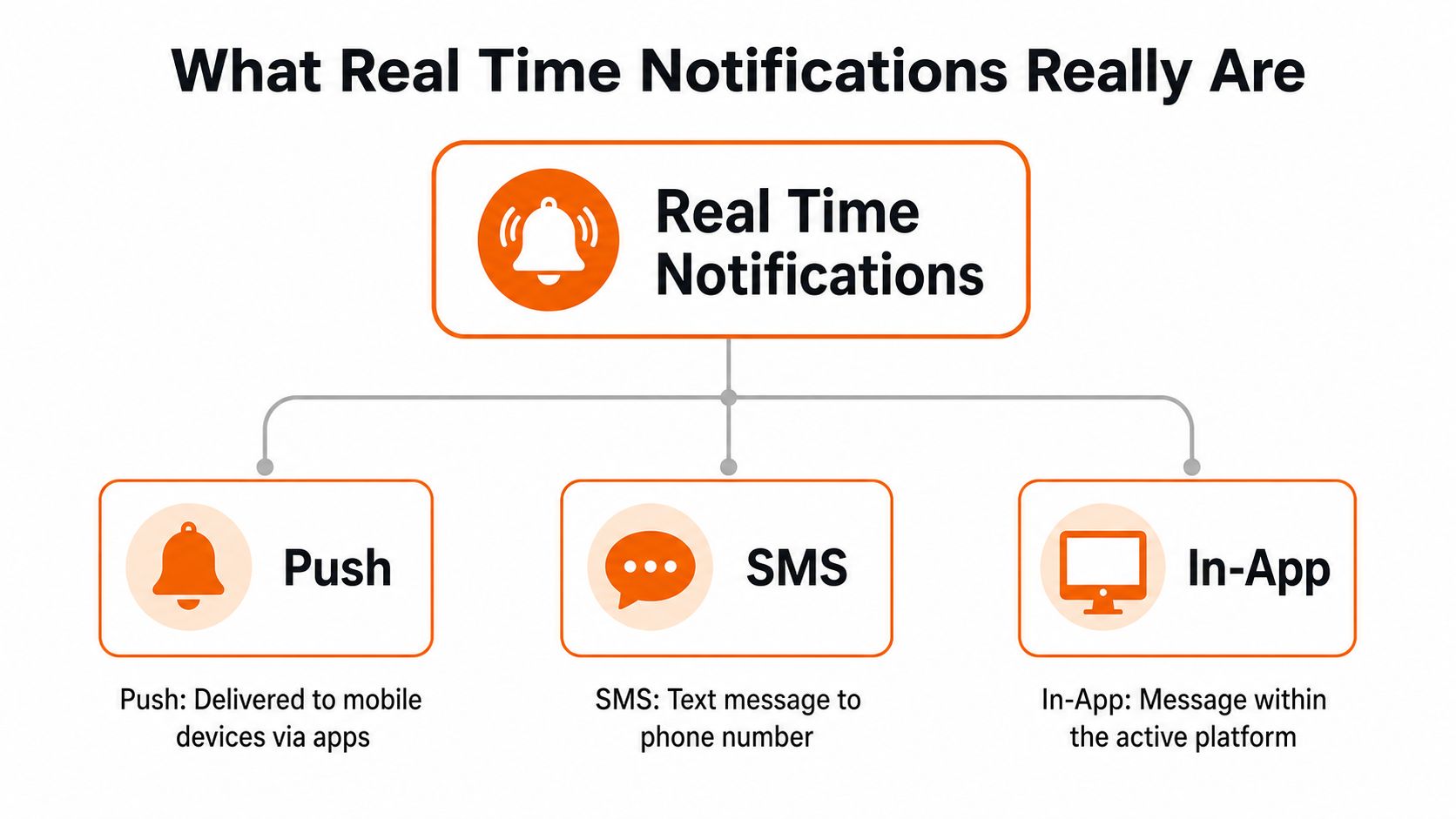
The delivery path that actually matters
You don't need to become a protocol nerd to ask good questions. WebSockets are usually the fastest path for live in-app delivery. Server-Sent Events are simpler when the flow is one-way. Push gateways handle the handoff to mobile systems, and fallback channels keep the message alive when the first route fails. A practical architecture usually mixes them, because one channel by itself is fragile real-time notification architecture.
That's why a midnight shift change and a policy reminder shouldn't travel the same way. The shift change needs interruption. The reminder needs a quieter path. If you're choosing a tool, ask whether it can separate those two without making your admins do manual gymnastics.
For a clean example of how live updates can be built around connected clients, the internal guide on real-time sync is worth a look. And if you want a publishing-oriented angle on the same idea, the piece on push notifications in digital publishing shows how immediacy works when timing is everything.
What to listen for in a vendor demo
In-app delivery: Good for active users already inside the system.
Push delivery: Good for drawing someone back when the phone is asleep.
SMS or email fallback: Good for cases where the primary route fails.
If a vendor talks only about speed and never about fallback, they're showing you half a system.
Why Speed Is the Easy Part
Fast delivery gets attention. Selective delivery earns trust. That's the divide, and it's where many teams stumble.
In healthcare, retail, and logistics, people don't get tired of notifications because they arrive too late. They get tired because too many of them feel equally urgent. Once that happens, the brain stops sorting. It just starts swiping away. The one critical alert gets treated like the ninth harmless one from the same afternoon.
Noise destroys the signal
Alert fatigue shows up. Not as one dramatic failure, but as a slow shrug. Nurses mute a channel. Store leads stop opening every ping. A supervisor assumes the message can wait because it usually can. The system still works on paper, but the people inside it have walked away from it.
That's why I like the idea of a notification budget by role and shift. Not every role should get the same volume. Not every shift should be interrupted the same way. The floor lead, the on-call manager, and the part-time associate do not need the same alert shape or the same default channel.
Hard truth: if every message is urgent, none of them are.
A useful rule is simple. Put time-sensitive action items in the alert stream. Put lower-value updates in a feed or digest. If you want people to keep trusting the interrupt, don't spend it on noise. That's how you keep a phone from getting muted by Wednesday.
Timing, Segmentation, and Priority in Practice
Good notification rules start with calendar reality. People work shifts. People go off duty. People live in different time zones. If your alerting system ignores that, it's not advanced. It's rude.
Timing windows that respect the shift
Send critical alerts during the active shift or on-call window. Delay non-urgent updates until the next sensible window. Quiet hours matter for more than politeness. They protect sleep, reduce opt-outs, and keep your channel from becoming background noise. In practice, that means a manager should be able to say, “This can wait until morning,” and have the system obey.
Segmentation that mirrors the floor
Segment by role, location, team, and employment status. A recall notice for a specific store doesn't belong in every employee inbox. A policy reminder can sit in the app feed for the whole site. A social post should almost never interrupt anyone. The more closely you map alerts to actual work groups, the fewer people you annoy and the faster the right person responds.
Priority tiers that keep order
I like three tiers because they're blunt enough to use.
Urgent: must interrupt now. Think safety issues, live operational blockers, or a recall notice.
Important: should be seen soon, but doesn't deserve a wake-up buzz. Think schedule changes or policy updates.
Informational: belongs in a feed, digest, or news post. Think social updates or general announcements.
The moment you start putting everything in the top tier, you've broken the system.
That's also where personalization helps. The article on personalization in internal communications makes the same point from a comms angle, and it's the right instinct. People respond better when the message feels like it was aimed at their job, not dumped at their feet.
Privacy, Security, and the Trust You Need to Send
If employees don't trust the channel, they'll mute it. That's the end of the story. Privacy and security aren't polish on top of notification systems. They're the price of admission.
Keep the payload small and the access tight
Send the minimum data needed to act. A notification should say enough to prompt the next step, not expose more than the recipient needs on a lock screen or shared device. Use encryption in transit, role-based access, and clear retention rules that fit the sensitivity of the message. If a message involves health or personal data, the bar is higher, especially in healthcare-adjacent settings where HIPAA-style caution is the right mindset.
For a practical read on the broader stakes, the piece on employee data security in 2026 is a good companion. The main lesson is straightforward. Admin sprawl becomes a security problem fast, especially when too many people can send too much to too many recipients.
Consent is not a checkbox
People should know what channels they're opting into and why. They should also be able to choose a quieter path for non-urgent information. Public systems already do this well. HNL Alert lets users choose channels and topics, and it even offers an urgent alerts only text opt-in path, which is exactly the kind of control employees expect from a serious system HNL Alert notification system.
For a small team, the first moves are boring and useful. Turn on SSO. Narrow admin roles. Decide what gets retained and for how long. Those three steps do more for trust than a long policy deck ever will.
Measuring What Actually Matters
The wrong dashboard can make a weak system look healthy. I'd rather watch a few plain numbers and know the truth.
Metric | What it tells you | Healthy range |
|---|---|---|
Delivery rate | Whether the message actually reached the channel | High and steady |
Acknowledgement rate | Whether people saw and accepted critical alerts | High for urgent items |
Time to acknowledgement | How quickly the team reacted | Short for urgent items |
Opt-out or mute rate | Whether the channel is wearing people down | Low and stable |
Engagement with the underlying content | Whether the message led to action or follow-up | Enough to support the workflow |
For urgent messages, acknowledgement matters more than open rate. Open rate is too soft. It tells you someone's device lit up. It doesn't tell you they read it, understood it, or acted on it. A rising mute rate is the early warning sign I trust most, because it shows fatigue before the incident review ever does.
Modern alerting tools often treat alert state as a stream of time-stamped events that you can filter by label, state, and time range. Grafana's alerting docs show that approach clearly, with history views and timeline inspection built into the workflow Grafana alerting documentation context. That's the right model. Good measurement is not one dashboard. It's a queryable history that lets you ask better questions after the fact.
Track what people do, not just what the system tried to send.
Integrations and How Pebb Fits In
The cleanest rollout I've seen starts with identity and role data. SSO keeps sign-in simple. HRIS sync keeps roles, teams, and shifts current. If payroll or timekeeping already knows who's working, that data should shape who gets interrupted and when. Admins should not be maintaining a second user database by hand.
What a sane stack looks like
A notification system should sit on top of the tools you already trust. Existing identity providers handle authentication. HR and scheduling tools provide role and shift context. The notification layer reads that data and sends the right message without asking managers to rebuild their org chart every week.
Pebb fits that model because it already bundles chat, posts, tasks, shifts, and updates into one mobile-first workspace. Its Spaces give teams a place to group work by function or location, while the heartbeat-style feed keeps lower-priority updates visible without turning every change into a buzz. For a retail manager, a hospitality GM, or a healthcare lead, that matters more than another standalone alerting app.
The internal guide on understanding API integration is the right backdrop here. If your systems can't talk cleanly, your notifications will always be messy. And if you want a contrasting example of how front-desk workflows use immediate routing, the 24/7 AI receptionist solution shows how one always-on channel can handle a very specific job without becoming the whole operating model.
The trade-off to keep in mind
A single workspace makes notifications easier to control, but only if roles and permissions stay tight. That's the part people forget. One app is not automatically one system. Without good structure, it just becomes one more noisy place to ignore.
Your Rollout Checklist
Start small. Prove the rules. Then expand.
Before launch
Define priority tiers: Decide what must interrupt, what can wait, and what belongs in a feed.
Map roles and shifts: Tie alerts to real people, not just departments.
Set delivery rules: Write quiet-hours and fallback-channel policies.
Enable SSO: Keep identity simple and secure.
Set retention rules: Decide what gets logged and how long it stays.
During pilot
Pilot with one team: Use a group that feels the pain and will tell the truth.
Measure acknowledgement and mute rates: Watch behavior, not assumptions.
Gather direct feedback: Ask what felt noisy, late, or unclear.
Tighten segmentation: Fix the obvious misroutes before broad rollout.
After launch
Review KPIs monthly: Keep an eye on delivery, acknowledgement, and mute patterns.
Audit send permissions: Limit who can interrupt people.
Retire noisy alert types: Kill the pings that don't earn their place.
Document escalation paths: Make sure urgent messages don't stall when the first person misses them.
The warehouse problem from the opening doesn't get solved by sending faster. It gets solved by sending better. That's the work.
If you want a work app that keeps alerts tied to shifts, roles, and real operations instead of random noise, take a look at Pebb. It brings chat, updates, shifts, and permissions into one place so your notifications land with more context and less chaos. If your team is tired of missed messages and noisy pings, start there.
