
A Humane On Call Schedule That Respects Your Team
Stop burning out your engineers. Learn how to build a humane on call schedule that protects your team's time, sanity, and focus while keeping services reliable.
Dan Robin
An on-call schedule is a plan for who handles urgent problems after hours. The goal is simple: keep your critical systems running 24/7 without burning out your team. It’s usually a rotation that turns potential chaos into a predictable, calm process.
The On-Call Dread Is Real, and It Needs Fixing
Let's be honest. Hearing the words "on-call" can make your stomach drop. It brings up images of late-night alerts wrecking your sleep, weekend plans evaporating, and that constant, low-grade anxiety that you're on the hook if something breaks. We've all been there.
The old way of thinking is that this is just the cost of doing business—a rite of passage. We think that’s a fundamentally broken way to look at it. Being on-call shouldn't be an endurance test. It should be a manageable system for dealing with the unexpected.
Why This Matters More Than Ever
Getting this right isn't just about morale; it’s a huge deal for the business. The market for on-call scheduling software was valued at $3.88 billion in 2024 and is expected to hit $5.32 billion in 2025.
That’s a 37% jump in one year. This isn't just a number—it’s a signal that companies are scrambling for better ways to coordinate their teams and stop burning people out. Experts point to alert fatigue as a top reason great engineers leave. If you want to go deeper, you can explore the full on-call scheduling software market report.
This guide is our playbook for building a better system. We’ll skip the fluff and share what we’ve learned from years of getting it wrong before we got it right. The goal is a system that is:
Fair: Responsibility is shared equally. No single person becomes the hero or the martyr.
Clear: Everyone knows who's on deck, when their turn is, and what's expected.
Humane: It’s built for actual people, protecting their personal time while keeping services online.
A great on-call schedule isn't about having someone always available to suffer. It's about creating a system so calm and orderly that being on-call is just another part of the job, not a sacrifice.
Moving Beyond the Broken Model
Too many teams still manage on-call rotations with messy spreadsheets and a prayer. This isn't just inefficient; it's corrosive. It leads to fatigue, kills creativity, and eventually pushes your best people out the door.
This is about more than just a tool. It’s a mindset shift. It’s about recognizing that your team's well-being is a critical part of your system's reliability.
When your people are rested, respected, and not constantly on edge, they do better work. It’s that simple. Let’s get started.
Finding the Right On Call Rotation Model
Let’s get one thing straight: there’s no magic formula here. A model that works for a five-person startup will cripple a global team. Instead of an academic list of every option, we’ll focus on three models we’ve seen succeed in the real world.
This isn't about theory. It’s about making a practical choice that fits how your team actually works.
The Follow-the-Sun Model
For teams scattered across the globe, this is the dream. The idea is simple: on-call responsibility follows the sun, passing from one region to the next as their workday begins.
When the team in San Francisco signs off, the team in Sydney is just clocking in. When Sydney goes to sleep, London takes over. The benefit is massive: no one ever gets paged in the middle of their night.
But let's be real, this isn't a simple fix. This model demands serious scale and maturity. You need enough engineers in each region to build a real rotation, and your handoff process has to be perfect. A dropped handoff can leave an entire continent in the dark.
The Weekly Rotation Model
This is the classic. One person is on call for an entire week, 24/7. It’s straightforward, easy to manage on a calendar, and gives everyone else a long stretch of uninterrupted peace.
For smaller, co-located teams, this simplicity is a huge win. The person on call for the week also gets deeply familiar with the system’s behavior. They learn its quirks.
The catch? Burnout. It’s a very real risk. A single bad week—a noisy alert, a bug that won't die—can leave someone completely fried. If you go this route, you have to be disciplined about protecting your on-call engineer. That means ruthlessly silencing non-critical alerts and fostering a culture where asking for help is expected, not a sign of weakness.
Your on call schedule shouldn't be a test of endurance. If a week-long rotation consistently leaves people exhausted, the problem isn’t the person—it’s the system.
The Primary and Secondary Model
This approach builds a safety net right into the schedule. You have a primary person who gets the first page. But you also have a secondary person on deck as backup.
If the primary doesn’t acknowledge an alert within a few minutes, it automatically escalates to the secondary. This provides incredible peace of mind. The primary can actually go to dinner or a movie without panicking about a dead phone battery.
This model is also fantastic for training. Pairing a senior engineer as primary with a junior as secondary is a great way to transfer knowledge under real-world pressure. The junior gets valuable exposure without the full weight of responsibility.
Choosing the right model is a critical decision. On-call schedules are pivotal for maintaining uptime in distributed teams, with different rotations serving unique needs. Globally, this matters as workforces span continents. You can explore more insights about how different industries handle on-call schedules on everhour.com.
With that in mind, here’s a quick comparison to help you think through which approach might be the best starting point for your team.
On Call Rotation Model Comparison
Rotation Model | Best For | Primary Benefit | Key Challenge |
|---|---|---|---|
Follow-the-Sun | Large, globally distributed teams | Eliminates overnight alerts completely | Requires significant team size and flawless handoffs |
Weekly Rotation | Small to mid-sized, co-located teams | Simplicity and deep ownership for the person on call | High potential for burnout during noisy weeks |
Primary/Secondary | Teams of any size seeking a safety net | Built-in backup and great for training | Requires twice the number of people in the rotation |
Ultimately, don't overthink it at the start. The best on-call schedule isn’t carved in stone. It's a living system that needs to evolve with your team.
Start with the model that feels closest to your reality, and don't be afraid to tweak it—or scrap it—as you learn what works. The goal is predictable, calm, and sustainable. Not heroic.
Designing a Schedule That Actually Works
Choosing a rotation model is the easy part. The real work is in the details. Translating that model into a living, breathing schedule is where things often go wrong.
A great schedule isn't just a calendar invite; it's a clear, predictable system that anyone on the team can understand. If it relies on one person’s memory to function, it’s already broken.
Absolute Clarity on Roles
Let’s get down to basics: who does what? When an alert fires at 3 AM, ambiguity is your enemy. You need crisp, well-defined roles.
At a minimum, define these three:
The Primary Responder: The first person who gets paged. Their job is to acknowledge the alert and start digging in.
The Secondary Responder (or Backup): If the primary doesn't respond in time—say, five minutes—the alert rolls over to the secondary. This is your safety net.
The Incident Commander: For bigger problems, you need someone to coordinate. This person isn't necessarily in the code; they're managing communication, pulling in experts, and keeping the response on track.
Without these roles laid out, you get chaos.
This visual shows how different on-call models provide the structure for these roles.
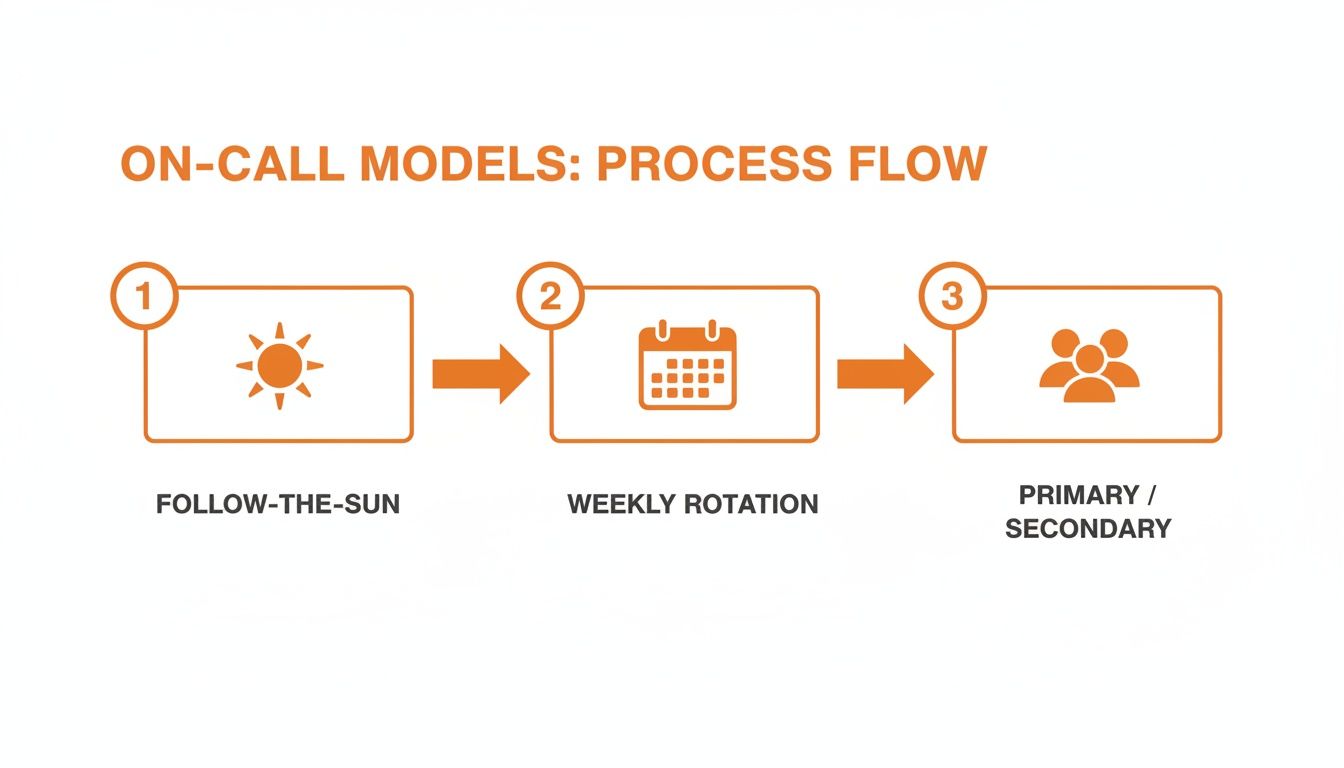
Each model offers a different rhythm, but the need for clear roles and smooth handoffs is constant.
Building Smart Escalation Policies
An alert that just pings into the void is worse than no alert at all. It creates noise and anxiety without accountability. This is where your escalation policy becomes your best friend. It’s the automated path an alert takes to get a human’s attention.
A good policy isn't just about paging a second person. It's about getting the right information to the right people at the right time. A minor database warning, for example, should not wake up the entire engineering department.
A healthy on-call system isn't about ensuring someone is always available to suffer. It's about ensuring critical issues get a swift, calm, and effective response. The rest is just noise.
Think of it as a logical chain. If the primary responder doesn’t acknowledge the page in five minutes, it escalates to the secondary. If the secondary doesn’t respond in another five, maybe it pages the on-call manager. The goal is to guarantee a response without burning everyone out.
Mastering the Handoff
I’m going to be blunt: the handoff is where most on-call schedules fail. It’s the single most critical moment in any rotation.
A handoff isn't just passing a metaphorical pager; it's a transfer of context. The outgoing person holds a ton of short-term knowledge in their head—a fragile system they were watching, a recent deployment that feels shaky. If that context doesn't get passed on, the incoming person is flying blind.
We’ve found that a simple, documented handoff is non-negotiable. It can be a quick 15-minute call or a standardized post in a dedicated Slack channel. The point is to cover three things:
Open Issues: What’s currently broken or being investigated? Share links to tickets and dashboards.
Recent Changes: Were there any major deployments in the last 24 hours?
Potential Risks: Are there any systems that feel a bit wobbly?
This little ritual ensures a smooth transition. The core principles of clear communication are universal, which is why we’ve learned a lot from exploring insights on how to best share shift schedules with teams in other industries.
Ultimately, designing a schedule isn’t a one-and-done task. It’s an ongoing process. You build it, you run it, you listen to your team, and you make it better. The goal is a system so clear and reliable that being on call feels like a normal part of the job.
The Human Side of a Healthy On-Call Culture
A schedule is just a document. What makes it work is the culture surrounding it. This is the human element, and frankly, it’s the part most companies get wrong.
We get so focused on models and policies that we forget about the people who have to live with them. A perfect schedule on paper can become a nightmare if the culture is broken.
It Starts with Blamelessness
When something breaks at 3 AM and the on-call engineer makes a mistake, the absolute worst thing you can do is point a finger. The goal of a review isn't to find a scapegoat; it's to understand what in the system allowed the failure to happen.
Was the documentation confusing? Was the alert misleading? Was the person exhausted from a week of constant pages? These are the questions that lead to real improvements.
A blameless culture doesn't mean a lack of accountability. It means shifting accountability from the individual to the system they operate within. It's the only way to build resilient, reliable services.
When people feel safe to admit mistakes, they share information freely. That transparency is how you turn a painful outage into a valuable lesson that prevents the next one.
The Uncomfortable Question of Compensation
Let’s talk about money. Being on call is extra work. It’s a real demand on someone’s time and mental energy. Pretending otherwise is unfair.
There isn't a single right answer here. Some teams offer a flat stipend for on-call shifts. Others pay an hourly rate for time spent on an incident. Some prefer to offer comp time—if you worked four hours overnight, you get that time back the next day.
Here's the thing: the method matters less than the principle. Acknowledging the sacrifice and compensating for it sends a powerful message: "We see the extra effort, and we value it." Ignoring the question says the opposite.
Setting and Respecting Boundaries
Being on call means you need to be reachable. It does not mean you are chained to your desk. A healthy on-call culture is built on mutual trust and respect for personal time.
This means the person on call should feel comfortable going to the grocery store or having dinner with friends. As long as they have their phone and a laptop is reasonably accessible, life should go on.
Leaders play a huge role here. They must model these boundaries by not using the on-call channel for non-urgent questions and protecting the on-call person from distractions. Our guide on work-life balance strategies for remote teams offers practical tips that apply here, too.
A few practical tips we've learned the hard way:
Define "Available": Clarify what being available means. Does it mean acknowledging a page within 5 minutes? Being able to log on within 30? Clear expectations reduce anxiety.
Encourage Muting: The person on call should feel empowered to mute non-critical channels. Their focus should be on alerts, not chatter.
Protect Time Off: When someone's shift is over, it's over. The next person is on deck. There should be a firewall that prevents "just one quick question" from bleeding into someone's rest.
Treat Your Schedule as a Living System
Finally, your on-call schedule should never be set in stone. It needs regular care. The best way to do that is to create a feedback loop with the people living it.
Run a short retro every month. Ask simple questions: What’s working? What’s painful? Are alerts too noisy? The answers will give you a roadmap for improvement.
A humane on-call schedule thrives on a strong team foundation. This is where great leadership is essential. Investing in leadership training to build high-performing teams can make a significant difference in fostering the trust needed for a healthy on-call culture.
A schedule without trust is a recipe for burnout. But one built on blamelessness, fairness, and respect? That’s how you build a system that lasts.
Using Tools as Your On-Call Safety Net
Let's be real: you can't run a modern on-call schedule with a spreadsheet and a group text. That's a recipe for missed alerts and team burnout. The right tools are your safety net, handling the tedious work so your team can focus on solving problems.
I'm not going to throw a list of vendors at you. Instead, let's break down the core features you absolutely need in any on-call management tool. Think of this as an investment in your team's sanity.
Core Capabilities That Actually Matter
First, look for flexible scheduling. Your tool needs to make it dead simple to build your rotation. Crucially, it must handle the messy reality of life, like last-minute shift swaps, without forcing you to rebuild the entire calendar.
Next is automated escalations. This is non-negotiable. A good tool lets you define a clear chain of command. If the primary on-call person doesn't acknowledge an alert in five minutes, it should automatically ping the secondary. This is the feature that lets your team live their lives.
Finally, you need multi-channel notifications. Sending a single email alert isn't a strategy; it's a prayer. A solid tool will find people where they are—via push notification, SMS, a phone call, or a direct message in Slack. The goal is to guarantee the alert is seen, not just sent.
Integrations and Mobile Access Are Everything
But that's only half the story. A great on-call tool doesn't live on an island. It has to integrate into your existing workflow.
This means connecting directly to your:
Monitoring systems (like Datadog) to automatically trigger alerts.
Chat apps (like Slack) to post updates where the team already is.
Project management tools (like Jira) to create tickets without manual work.
When these systems talk to each other, the manual toil just melts away.
Your on-call tool shouldn't be another screen to check. It should be the invisible nervous system that connects your monitoring, your people, and your response process into one cohesive whole.
And let’s face it, incidents don't wait for you to be at your desk. A mobile-first approach is critical. Your team must be able to acknowledge alerts, view incident details, and loop in colleagues right from their phones. The app can't be an afterthought.
These principles apply far beyond tech teams. To implement equitable on-call systems in other demanding fields, exploring dedicated healthcare staff scheduling software is essential for streamlining operations.
The right tool should feel less like software and more like a partner. For many, having a communication tool built for shift work and frontline teams can serve as the foundation for this entire system. It’s all about building a calm, predictable process that respects your team's time.
On-Call FAQs: Your Questions Answered
We’ve walked through the fundamentals, but the real challenges pop up in the details. These are the questions I get asked all the time, the ones that keep people up at night. Here are my straight answers.
What’s the Ideal Size for an On-Call Rotation?
This is a balancing act. Too few people, and you get burnout. Too many, and engineers get rusty between shifts.
From what I've seen, the magic number is usually between 5 and 8 people. This keeps the rotation cycle long enough that no one feels chained to the pager, but it's frequent enough that the process stays fresh. If your team is smaller than five, you might consider pairing up with another team, but tread carefully.
What Makes a Handoff Actually Work?
A handoff is where the baton is passed. A silent handoff is a recipe for disaster. The best ones are active, intentional, and clear.
A handoff isn't just about passing the pager; it's a transfer of context. Without that context, the incoming person is flying blind.
I always recommend a quick, 15-minute sync or a structured post in a dedicated channel. The outgoing engineer needs to cover three things:
Active Issues: Are there any simmering alerts?
Wobbly Systems: Anything recently deployed or acting flaky?
Ready Check: A simple confirmation that the incoming person is ready to go.
This little ceremony takes minutes but can save hours of pain.
Does Every Single Alert Need to Wake Someone Up?
No. Absolutely not. Waking people up for non-critical issues is the number one cause of on-call fatigue. It’s almost always preventable.
Your alerting strategy is just as crucial as your schedule. You have to be ruthless about what constitutes a "wake-me-up" alert versus a "look-at-this-in-the-morning" notification. Is the entire platform down? Page someone. Is a disk hitting 80% capacity? That’s a ticket for business hours. A healthy on-call culture fiercely protects sleep.
We Have Nothing Formal in Place. Where Do We Even Begin?
If you're starting from zero, don't try to build your dream system overnight. Start small.
Just create a simple rotation on a shared calendar. Name one person as the point of contact for the week. Then, define a single, manual escalation path: "If you can't reach the on-call person after 15 minutes, call their manager."
Let that run for a month. You'll quickly see where the pain points are. How many alerts came in? What time did they hit? This real-world experience is the best ammunition you'll have for building a more mature process and getting the right tools. It's about evolution, not revolution.
At Pebb, we believe a calm, organized workplace starts with clear communication and simple tools. If you’re ready to ditch messy spreadsheets and confusing group chats for a single platform that handles scheduling, communication, and everything in between, see how we can help at https://pebb.io.
