
Manufacturing Operations Management Software: The Real Story
A no-nonsense guide to manufacturing operations management software. Learn what it is, why it matters, and how to get it right without the corporate fluff.
Dan Robin
At one plant, I watched a supervisor jog across the floor with a marked-up printout because the schedule had changed again. Ten minutes later, an operator was still running the old spec.
That's not drama. That's a normal Tuesday in a factory that hasn't connected planning, execution, and people.
The Sound of a Factory Without a Brain
A disconnected factory has a sound to it. Radios crackling. Forklifts stopping in the wrong place. A lead asking, “Did anyone tell Line 3?” Someone always has a spreadsheet. Someone else has a newer spreadsheet. Neither matches what the machine is running.
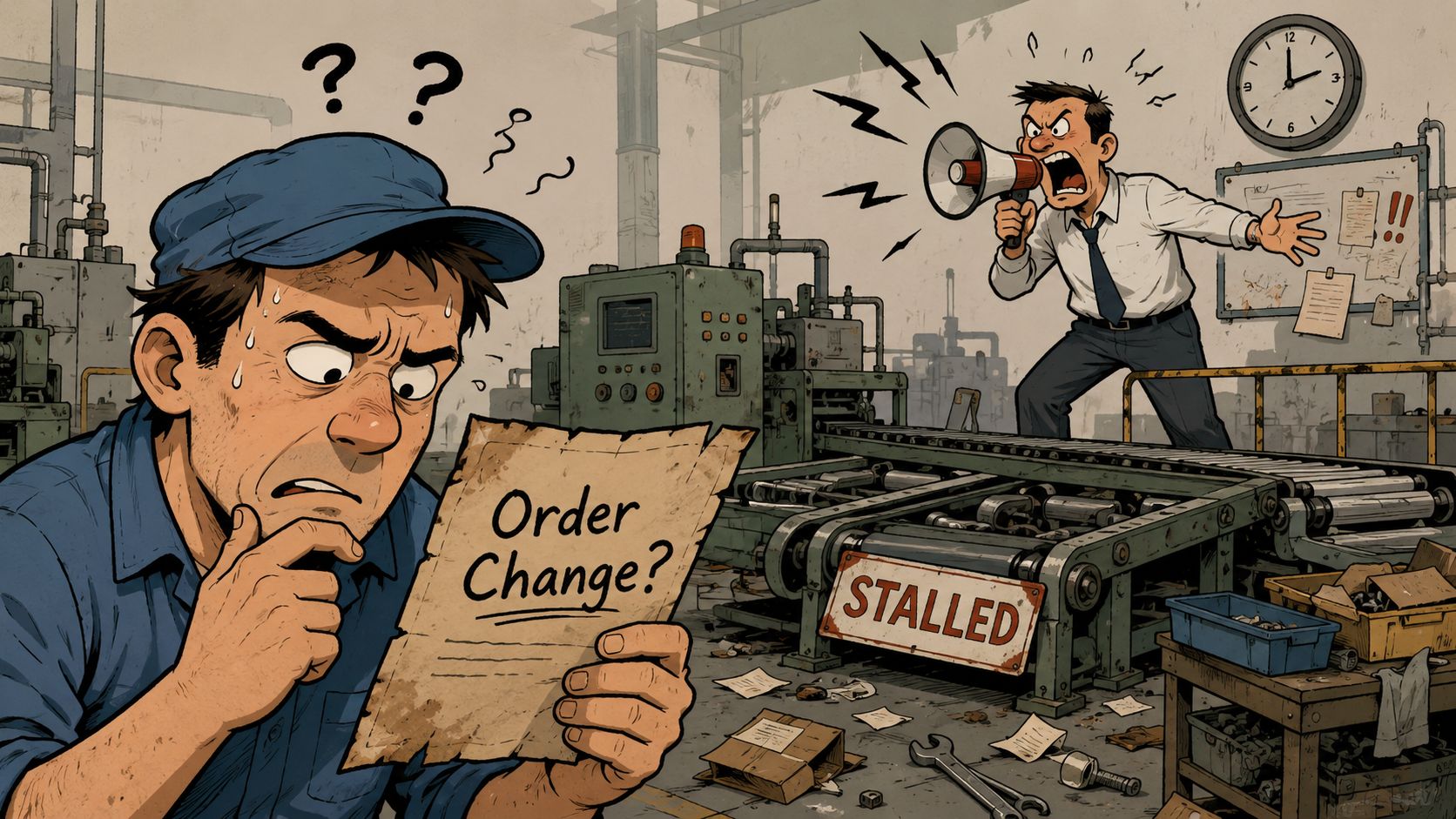
I've seen this twice from the inside. The first time, we tried to fix it with meetings, whiteboards, and heroic supervisors. That works right up until a rush order lands, a machine goes down, or quality changes a check mid-shift. Then the whole thing turns into human middleware. People spend their day carrying information from one system to another.
That's the core problem. It isn't lazy operators or weak supervisors. It's a plant trying to run with broken feedback loops.
What chaos actually looks like
The symptoms are easy to spot:
Schedule changes travel by rumor: Planning updates the order. The floor hears about it late.
Downtime gets explained after the fact: Someone fills in a reason code at shift end, mostly from memory.
Quality lives in its own lane: Inspection finds a problem, but production keeps moving because the message doesn't reach the line in time.
Maintenance hears too late: By the time a mechanic gets called, the machine has already burned an hour.
None of this feels strategic when you're in it. It feels annoying. Expensive too, but mostly annoying.
The shop floor rarely breaks because people don't care. It breaks because the truth arrives late.
That's why this category has grown so fast. The global manufacturing operations management software market was estimated at USD 17.46 billion in 2024 and is projected to reach USD 76.71 billion by 2033, a projected 19.1% CAGR according to Grand View Research's manufacturing operations management software market report. You don't get that kind of growth from a nice-to-have. You get it when a lot of manufacturers are trying to solve the same mess.
The sales deck will call it digital transformation. Fine. On the floor, it's simpler than that. You want the right job, right spec, right material, and right response to reach the right person before the mistake gets expensive.
What Is Manufacturing Operations Management Software Anyway
The cleanest way to think about manufacturing operations management software is this. ERP is the business brain. Machines are the muscles. MOM is the nervous system.
ERP knows what should happen. It knows orders, materials, due dates, costs, and demand. The line knows what is happening. Parts are running, machines are waiting, operators are checking dimensions, scrap is building, and maintenance is getting called. MOM sits between those worlds and keeps them in sync.
It translates plans into real work
A good MOM system takes the production plan and turns it into something the floor can execute. Not a static report. A living workflow.
That means it can coordinate production scheduling, inventory status, quality checks, process monitoring, workforce activity, and analytics in one operating layer. That broad scope is one reason the category has expanded well beyond a single-purpose tool. A separate market study sized the global MOM software market at USD 15.78 billion in 2023 and projected USD 51.16 billion by 2032 at a 14.03% CAGR, with the U.S. market at USD 3.76 billion in 2023, or roughly 24% of global value in that base year, according to SNS Insider's MOM software market analysis.
If you're still sorting out where MOM ends and MES begins, this MES guide for manufacturing executives is a useful read because it frames MES as part of the execution picture rather than the whole operating model.
It also listens back
This part matters more than vendors usually admit. MOM isn't just a command center. It's a truth-telling system.
It collects what happened on the floor and sends that back upstream. Production counts. Delays. Scrap events. Holds. Checks completed. Work in process. If that loop is tight, planners stop guessing, supervisors stop chasing, and managers stop waiting until tomorrow morning to learn what went wrong today.
Here's the practical difference:
Without MOM | With MOM |
|---|---|
Plan and execution drift apart | Plan and execution stay linked |
Operators rely on paper and memory | Operators work from current digital context |
Quality data shows up late | Quality events show up during production |
Reporting explains yesterday | Reporting helps manage the current shift |
The best systems feel boring once they're working. That's a compliment. Nobody is sprinting across the building to confirm which version of the work order is current. The plant gets quieter.
The Core Building Blocks of a MOM System
The first rollout I lived through failed for a simple reason. We bought one platform and expected it to behave like an operating system for the plant without deciding how production, quality, maintenance, and materials would work together. The second time, we treated MOM as a stack of connected capabilities. That changed the result.
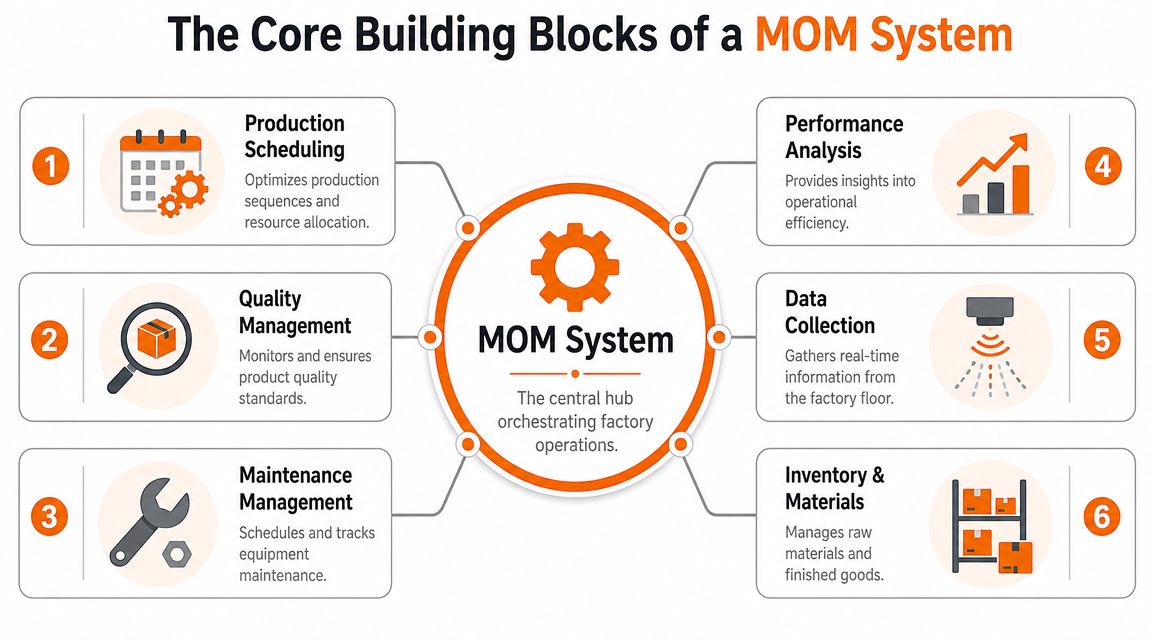
Data collection comes first
Every other function depends on this layer. If machine states, counts, downtime reasons, and process readings come in late or come in wrong, the rest of the system just spreads confusion faster.
Good MOM platforms pull signals from PLCs, SCADA, sensors, and machine controllers through standard industrial connections such as OPC-UA, MQTT, and MTConnect. On the floor, that means stoppages and cycle losses can be captured when they happen instead of being reconstructed later from memory, whiteboards, and whatever an operator had time to write down.
The trade-off is real. More automation usually improves accuracy, but it also exposes bad tag structure, inconsistent machine naming, and years of ad hoc controls work. Cleaning that up is not glamorous. It is still worth doing.
Scheduling has to react to the plant you actually have
Scheduling tools often look polished in a demo because demos do not include missing material, an absent forklift driver, a filler that keeps faulting, or a sanitation hold that overruns by forty minutes.
A useful MOM schedule accounts for line status, available labor, tools, materials, and changeover logic inside the same operating picture as execution. Then supervisors can make decisions with current conditions in view instead of rebuilding the plan by phone call and spreadsheet.
I use a simple test here. If the supervisor is still the one stitching together ERP dates, machine status, staffing gaps, and quality holds by hand, the system is not doing enough.
Execution and quality need to share the same workflow
Quality should not sit off to the side as a reporting function. In a plant that runs well, quality checks, deviations, holds, and approvals live inside the flow of work. SYSPRO's overview of manufacturing operations management explains that integrated model clearly, including planning, scheduling, publishing, collecting, tracking, and analyzing inside one connected process SYSPRO's description of manufacturing operations management.
That matters because bad product is usually created in the gap between detection and action. If an SPC trend drifts, a non-conformance is logged, or a batch misses a check, the line team needs more than a record. They need a prompt response, a hold, a task, or an escalation.
The human layer gets missed. MOM can record the event. The plant still needs a fast way to get the right instruction to the right people. A connected employee app such as Pebb turns that system event into coordinated action on the floor, so the hold is seen, the check is completed, and the handoff does not die in someone's inbox.
Traceability is the plant's memory
Traceability earns its keep on a bad day.
When a customer complaint lands, or an internal defect shows up after packing, the team needs to trace the path quickly. Which lot ran on which line. Which materials were used. Which checks passed. Which operator was signed in. Which equipment was in service. Without that chain, root cause turns into a meeting full of theories.
With that chain, the team can isolate inventory, target inspections, and answer auditors with records that hold up.
Maintenance and materials cannot sit outside the loop
Production losses rarely stay in one department. A maintenance fault becomes a schedule miss. A late component becomes idle labor. A blocked quality release starves the next operation.
That is why the core building blocks need to work as one operating model:
Production execution keeps work orders moving through the actual process.
Quality management catches drift, defects, and holds before they spread.
Maintenance coordination shortens the gap between a fault, a response, and a return to running.
Inventory and materials visibility reduces line starvation and surprise shortages.
Performance analysis helps teams fix repeated losses by cause, not just report them.
Shared workflows connect system events to human action across shifts and functions.
If you are comparing MOM with adjacent categories, this guide to operations management tools for manufacturing teams is useful because it shows where execution systems stop and broader coordination tools start.
The Real Payoff Business Benefits and KPIs
A plant manager usually knows the payoff before finance does. It shows up in the hour that goes sideways. The line slows, scrap ticks up, maintenance is chasing the wrong fault, and planning still thinks the order will ship on time. MOM software earns its keep when that hour becomes manageable instead of expensive.
A core benefit is shorter distance between what happened, who knows, and what gets done about it.
OEE matters when it changes the current shift
OEE is useful when it helps a supervisor act before the shift is lost. If the capper is losing speed, the upstream process is waiting on material, or a line keeps tripping on short stops, the team needs that signal while product is still running.
That is the difference between reporting and control.
A good MOM system turns availability, performance, and quality into live operating context. It shows where output is slipping and ties that loss to the actual run, order, asset, and time window. On the floor, that means fewer arguments about what happened and faster decisions about whether to adjust settings, call maintenance, hold material, or resequence work.
Track the KPIs that change behavior
Early on, I would keep the KPI set tight. Plants get in trouble when they build a beautiful scorecard no one can use at 10:30 on a Tuesday.
Start with measures that connect directly to action:
Downtime by cause: Use causes the line team and maintenance team can fix.
Schedule adherence: Compare plan to actual, then record why the plan moved.
First-pass quality: Show where product clears the process cleanly and where rework starts creeping in.
Changeover stability: Measure how long it takes to reach first good output after the switch.
WIP aging: Expose where material is sitting too long between steps.
Response time to disruptions: Measure how quickly the right people acknowledge and respond.
Those KPIs improve when the system reduces delay between event and response. That last part gets overlooked in too many software evaluations.
Better numbers usually come from better coordination
MOM gives operations one record of what happened. That matters. But software alone does not close the loop. Someone still has to notice the issue, pull in the right people, confirm the decision, and keep the next handoff from breaking.
That human layer is where weak rollouts stall. The dashboard updates. The plant still waits on radio calls, hallway conversations, and missed messages between shifts.
Old habit | Better habit with MOM |
|---|---|
Argue about whether the stop happened | Check the machine-state record and the event timeline |
Guess why scrap went up | Review the linked process conditions, checks, and operator actions |
Blame the schedule | Compare planned sequence with the actual material, labor, and equipment constraints |
Wait for tomorrow's report | Assign the response during the current run and confirm it was completed |
The plants that get the full return usually add a simple way to turn system signals into coordinated action. If labor movement, staging, and handoffs outside the line are affecting flow, this guide to warehouse workforce management for manufacturing operations is a useful reference point. MOM identifies the exception. A complementary employee app such as Pebb helps get the message to the right operator, lead, mechanic, or picker fast enough to matter.
That is how KPIs stop being executive wallpaper and start improving the next hour of production.
Getting It Right Implementation and Pitfalls
My first MOM rollout failed in a very ordinary way. We bought too much software, mapped too much process, invited too few operators, and believed the demo more than the plant. Nothing exploded. The system just never became the place people trusted.
The second rollout was smaller, slower, and much better.
Don't ask the wrong architecture question
A lot of teams start with this. Should MOM replace MES, CMMS, or QMS?
Usually, that's the wrong starting point. In many plants, MOM works best as a coordinating layer that connects production, quality, maintenance, inventory, and related workflows while still relying on separate integrated systems. That architectural boundary matters, and Parsec's discussion of MOM architecture and integration scope gets to the heart of it.
If you try to force one platform to swallow every existing function on day one, you create risk you don't need.
What works in practice
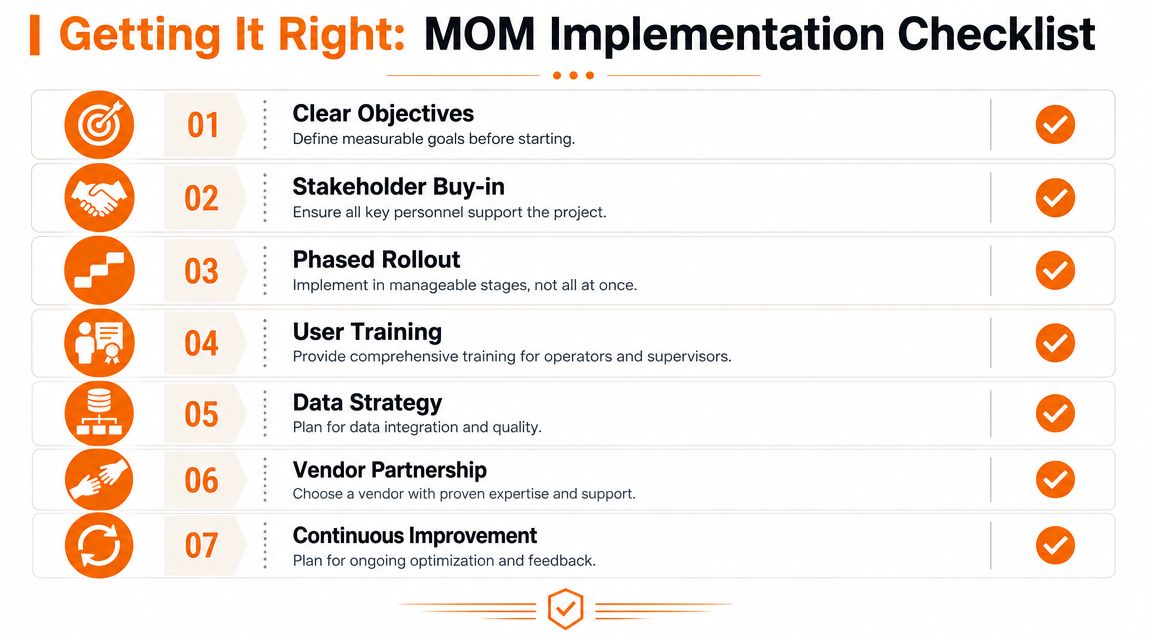
The plants I've seen succeed did a few simple things well:
They picked one pain point first: One line, one process family, one plant area. Not the whole enterprise.
They defined what good looked like: Faster response to downtime, cleaner traceability, tighter scheduling discipline, fewer manual entries.
They kept operators in design reviews: Not as a courtesy. As a control measure.
They treated integration as real work: ERP, SCADA, CMMS, and quality data don't line up by magic.
They used the first phase to learn language: Reason codes, event definitions, exceptions, and escalation paths all need local meaning.
That's boring project discipline. It's also what saves you.
What usually goes wrong
I don't worry much about a weak feature list. I worry about implementation habits.
Bad sign | Why it hurts |
|---|---|
Vendor demo drives scope | Demos hide ugly plant realities |
No one owns master data | Reports drift and trust disappears |
Operators see it late | Adoption becomes compliance theater |
Every site must be identical | Local workarounds move off-system |
Go-live equals finish line | Improvement stops at configuration |
One more hard truth. Training isn't a one-time classroom event. A plant learns by repetition, exceptions, and shift turnover. If supervisors don't reinforce the system during the first rough weeks, people fall back to whiteboards and side texts.
Buy the software if you want. But really, you're buying process discipline and a new source of truth.
A short vendor checklist
When I evaluate vendors now, I care less about the giant feature matrix and more about these questions:
Can they model our real process without ugly workarounds?
Do they integrate cleanly with the systems we're keeping?
Can the floor understand the screens without a translator?
Will they help define event logic and governance, not just install software?
Do they know our industry's quality and traceability demands?
What happens after go-live when shift B uses it differently than shift A?
That last one matters more than most procurement teams realize.
The Missing Link Connecting the System to Your People
This is the part most manufacturing operations management software still handles poorly. It knows a lot. It doesn't always communicate well.
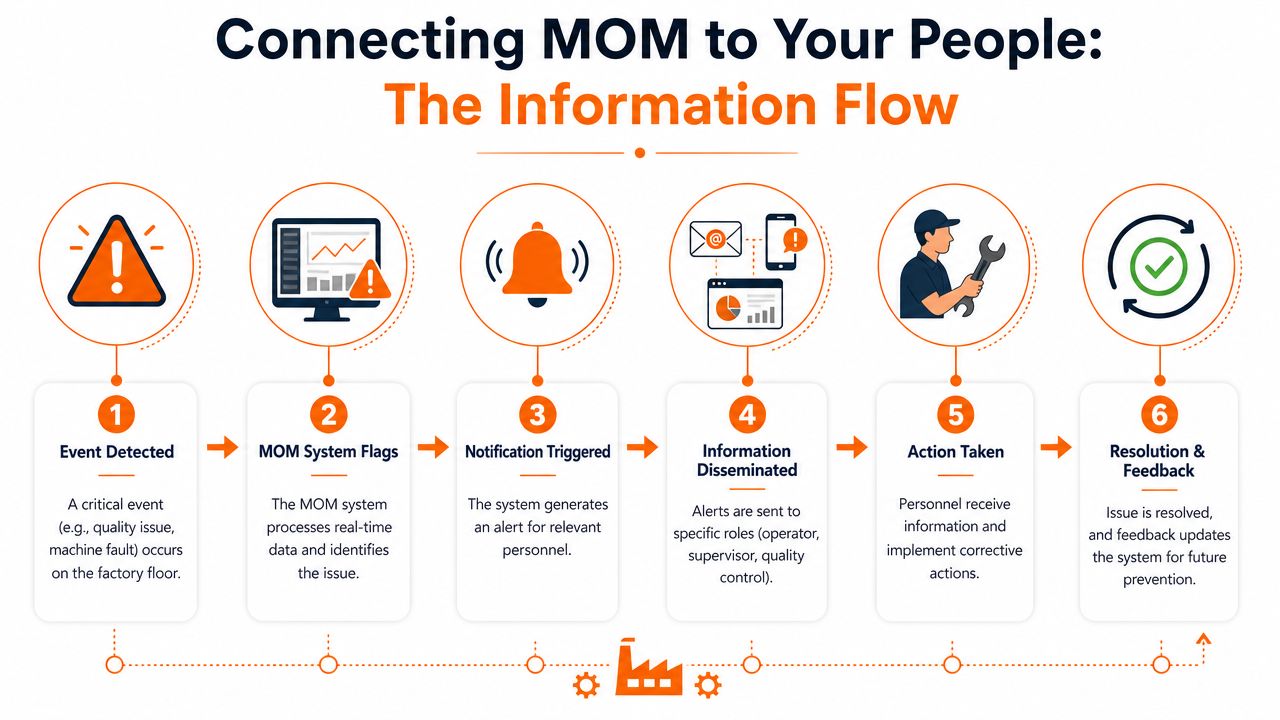
A machine fault appears. A quality hold triggers. A sequence changes. A work instruction updates. The system records it beautifully. Then what? In too many plants, the next step is still a supervisor calling, texting, walking, or hoping the right person checks the right screen.
Data is not the same as coordination
This is the human gap. MOM is built to collect, synchronize, and present operational truth. That's valuable. But people on the floor still need timely, role-specific communication.
An operator needs to know the work standard changed. A mechanic needs the exact machine and fault context. A quality lead needs the hold, the lot, and the escalation path. A supervisor needs confirmation that the message reached the team and that someone owns the next action.
Without that final step, the system becomes a very accurate witness to delays.
What the handoff should look like
The best operating environment I've seen has two layers working together. One layer captures and organizes production reality. The other gets that reality into human hands quickly enough to matter.
That second layer should handle things like:
Targeted alerts: Not everyone needs every event.
Shift-aware updates: The night crew can't act on a memo buried in a day-shift email.
Shared task ownership: Someone needs to see it, claim it, and close it.
Current procedures in one place: If a spec changes, old copies need to disappear from daily use.
Two-way response: Teams need a way to confirm, comment, and escalate.
A lot of manufacturers end up bolting these behaviors together with email, radios, messaging apps, paper notices, and verbal follow-up. That works until pace increases.
Where a dedicated employee communication layer fits
This is why many operations teams pair production systems with a frontline communication tool. Not to replace MOM, but to finish the loop between system intelligence and human action.
For manufacturing teams evaluating that side of the stack, this guide to communication software for manufacturing companies is worth a look because it addresses the practical problem most operations leaders run into after they've improved visibility. The data exists. Now it has to move through real people, across shifts, devices, and departments.
If the system flags a problem but the right person doesn't act in time, the plant still has the problem.
The strongest factories aren't the ones with the most dashboards. They're the ones where machine events, quality signals, schedule changes, and human response all travel on purpose.
Your Factory Has a Pulse
For years, a lot of plants have run on effort, memory, and workarounds. Good people carry weak systems farther than they should have to. That's why manufacturing can look steady from the office and still feel fragile on the floor.
Manufacturing operations management software changes that. It gives the plant a live record of what's happening, not what people hope is happening. That's a big step.
But the full win comes when that intelligence reaches the people doing the work in a form they can act on quickly and clearly. Machines generate signals. Systems organize them. People make the call, fix the issue, hold the batch, reroute the work, and get the shift back on track.
A healthy factory isn't just automated. It's coherent. You can feel the difference when the information flow is finally clean.
If your operation has good systems but weak communication between shifts, teams, or sites, Pebb is worth a look. It gives frontline and office teams one place for chat, updates, tasks, knowledge, files, and coordination, so the right people can act on operational information without waiting for another meeting, email chain, or walk across the floor.
