
Hotel Operations Management Software: The Real-Life Guide
Tired of radios and paper logs? See what hotel operations management software actually does and how to choose a tool that unifies your entire team.
Dan Robin
Most hotels don't have an operations problem. They have a communication problem that shows up as an operations problem.
A VIP amenity gets missed because the note stayed at the desk. Maintenance blocks a room that housekeeping thought was ready. A guest asks for extra towels, the front desk radios someone, that someone gets pulled into something else, and the request disappears into the shift. Then the manager spends the afternoon doing detective work instead of running the hotel.
I've seen that mess up close. It doesn't look dramatic from the outside. It just feels like friction everywhere. Too many calls. Too many handoffs. Too much guessing. People work hard and still end the day feeling behind.
That's why hotel operations management software matters. Not because hotels need another app. Because teams need one place where the truth lives.
More Than Software It's Your Hotel's Central Nervous System
The old setup usually grows by accident.
First it's radios. Then binders at the desk. Then a maintenance log. Then a WhatsApp group because the night team doesn't check email. Then a second WhatsApp group because housekeeping doesn't need all the chatter from front office. After that, nobody can say for sure where a request lives, who owns it, or whether it's done.
That isn't a minor inconvenience. It's the operating model.
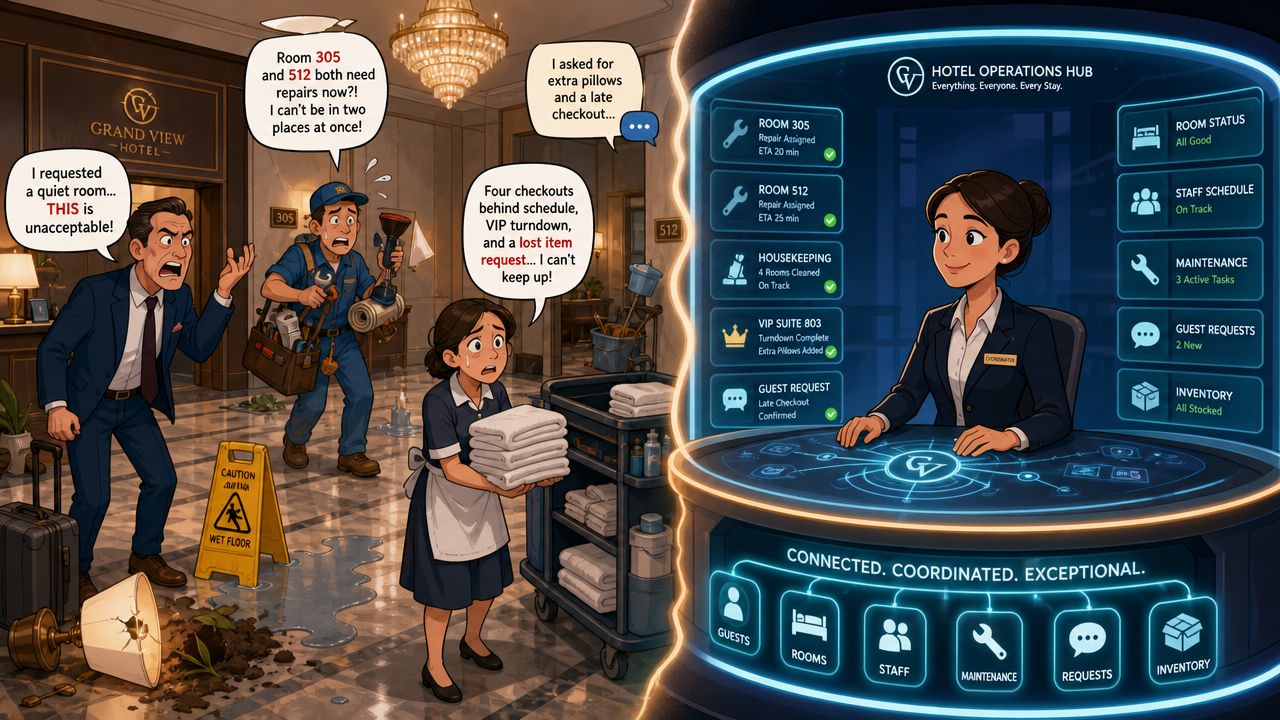
A good hotel doesn't run on heroic effort. It runs on reliable handoffs. When front desk, housekeeping, maintenance, and supervisors all work from the same system, the whole property gets calmer. Not perfect. Calmer. And calm is underrated in hospitality.
What changes when the signal gets cleaner
The point of hotel operations management software isn't to impress ownership with a dashboard. It's to stop work from falling between people.
A modern platform becomes the hotel's shared nerve center. A guest request gets logged once, routed to the right team, updated in real time, and closed with a record. Room status isn't whatever someone last heard on the radio. It's whatever the system says now. Managers stop chasing updates because updates come to them.
Practical rule: If your team still needs to ask three people for the status of one room, you don't have a staffing problem first. You have a systems problem.
This shift isn't niche. The hotel and hospitality management software market was valued at USD 4.18 billion in 2025 and is projected to reach USD 7.03 billion by 2033, with a 7.2% CAGR from 2026 to 2033. That tells you hotels are still replacing manual coordination with digital workflows, not treating this as some temporary tech wave.
Why this matters to the people on the floor
Managers buy software. Line staff live with it.
That's the part many vendors skip. The ultimate payoff isn't just cleaner reports. It's fewer interruptions for room attendants, fewer missed handoffs at shift change, and fewer front desk agents acting as human routers for every task in the building. A unified app gives each department one source of truth, and that changes the texture of the day.
If you're trying to understand what that looks like in practice, this guide on an all in one app for hotels, resorts, and cruise ships is useful because it frames the tool as an operational hub, not just a messaging layer.
Ditching the Jargon What This Software Really Does
Let's strip the label down.
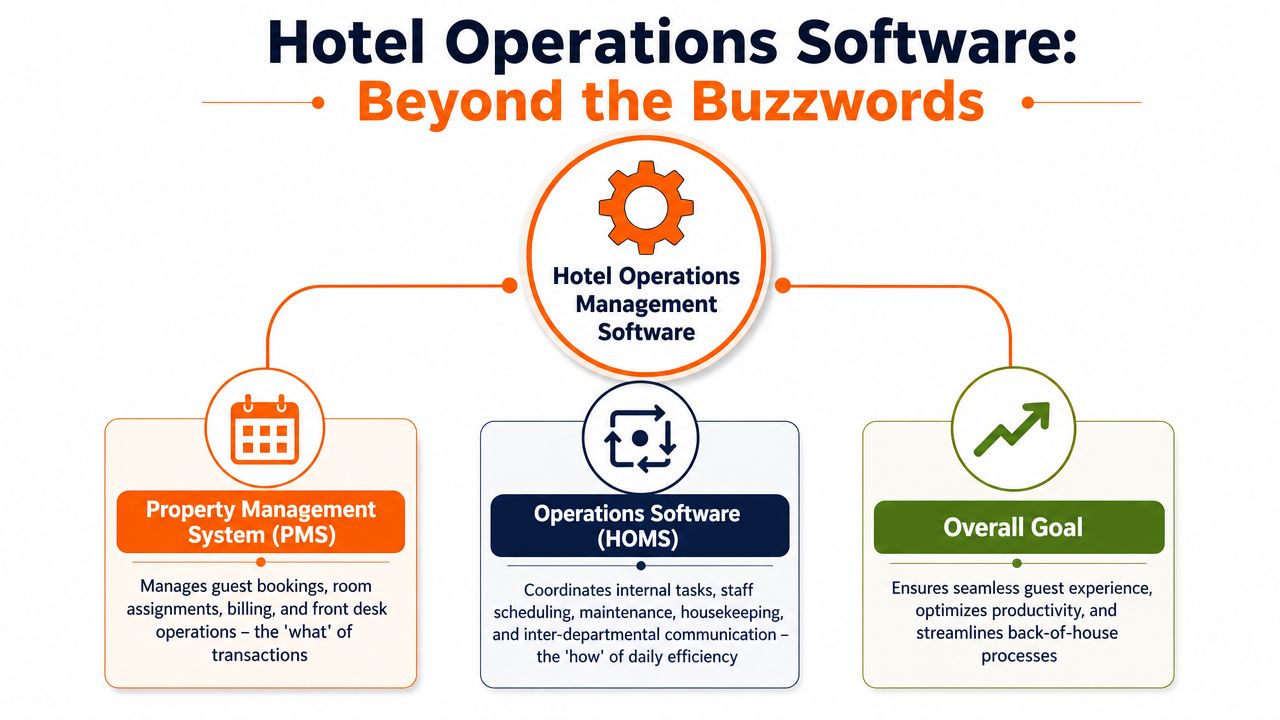
A PMS handles reservations, room assignments, folios, and billing. That's the transaction side of the hotel. Important, obviously. But it doesn't run the work of the building. It doesn't make sure the extra crib gets delivered, the leaking faucet gets assigned, or the inspected room status reaches the desk fast enough to matter.
Hotel operations management software handles the work around the stay.
The simplest way to think about it
The PMS is the reservation book.
The operations platform is the clipboard, walkie-talkie, task board, shift handover, maintenance log, housekeeping board, and staff chat, all pulled into one place that updates live.
That difference matters because hotels don't break down when a booking exists. They break down when the work around the booking gets fragmented.
A late checkout affects housekeeping. A maintenance issue affects room inventory. A VIP arrival affects front desk, housekeeping, and sometimes food and beverage. If each team works in a separate tool, the manager becomes the integration layer. That's expensive, slow, and exhausting.
What the software is really buying you
The best systems create one visible chain of accountability.
A request gets captured once: No rewriting notes or retyping messages.
The right person gets it fast: Not the whole hotel, just the person or team who owns it.
Status changes stay visible: Open, in progress, done, escalated.
The next team inherits context: Shift changes stop wiping the slate clean.
That sounds basic. In practice, it's a huge operational upgrade.
Most hotels don't need more communication. They need less scattered communication.
This is why real-time coordination has become the standard. Modern hotel operations software is defined by its ability to unify communication and task execution in real time, and some forecasts identify central reservation systems as the fastest-growing component at 9.81% CAGR. The bigger point isn't the reservation module itself. It's the industry's push toward live, synchronized data instead of delayed updates and departmental silos.
What it is not
It is not a magic layer that fixes sloppy management.
If supervisors don't close tasks, if teams don't trust room status discipline, or if every exception still gets handled off-platform "just this once," the software turns into another dead screen. The tool works when the hotel decides one thing clearly: if work matters, it lives in the system.
Inside a Unified Hotel Operations Platform
The phrase "all in one" gets abused, so it's worth being concrete. A unified hotel operations platform should feel less like a giant software suite and more like a clean operating floor where each department can see what matters to them and still share the same truth.
The key word is unified. Not stuffed with features. Connected.
Front desk and guest requests
The front desk needs speed and context. When a guest asks for pillows, reports a noisy AC, or wants a room checked before arrival, that request shouldn't leave the desk as a phone call plus a hope.
In a strong setup, the desk logs the request directly in the system, attaches the room, priority, and notes, and the task moves to the right team without another handoff. When it's completed, the desk sees that instantly and can follow up with confidence instead of making another round of calls.
That changes the guest conversation. Staff stop saying, "Let me check on that," and start saying, "It's already assigned."
Housekeeping and live room status
Housekeeping is where many hotels still lose time because status changes lag behind reality. A room can be cleaned, inspected, and sellable on the floor while the desk still sees it as dirty. Or worse, the opposite.
A better platform gives attendants and supervisors mobile access to update statuses during the shift. Cleaned means cleaned now. Out of order means out of order now. Priority arrivals can be flagged without a supervisor walking the floor with a paper list.
Maintenance and the work nobody should have to chase
Maintenance gets messy when requests come in from everywhere. A radio call from the desk. A note from housekeeping. A guest complaint relayed through a supervisor. Nothing kills accountability faster.
A unified platform turns that into a visible queue. Each ticket has a source, location, urgency, notes, and status. Preventive work can live in the same environment as reactive work, which matters because hotels that only track breakdowns usually stay in firefighting mode.
Here's the practical difference:
Old way | Unified way |
|---|---|
"Can someone look at 412?" | Ticket created with room, issue, priority, and owner |
Updates live in memory | Updates live in the system |
Repeated follow-up calls | Status visible to desk and managers |
Lost context at shift handover | Next shift sees full history |
Communications, scheduling, and the glue between departments
This is the overlooked layer. Chat, announcements, shift updates, clock-ins, and team-level coordination often live in separate apps. That's where fragmentation sneaks back in.
If the task lives in one place, the policy in another, the shift schedule somewhere else, and urgent updates in a personal messaging app, the hotel still has four systems and no single source of truth. The cleanest setups pull communication and operational work together, especially for mobile teams who rarely sit at a desktop.
If your room attendant needs to switch between three apps and a paper sheet to finish one shift, the system was designed for management, not for staff.
Food and beverage can benefit from the same model. Not because every outlet needs heavy operational software, but because event notes, service issues, stock alerts, and cross-department requests need the same visibility as housekeeping and maintenance. The common thread is simple. The platform should reduce handoffs, not create new ones.
The End of Radio Chatter and Sticky Notes
One guest request is enough to expose a weak operating system.
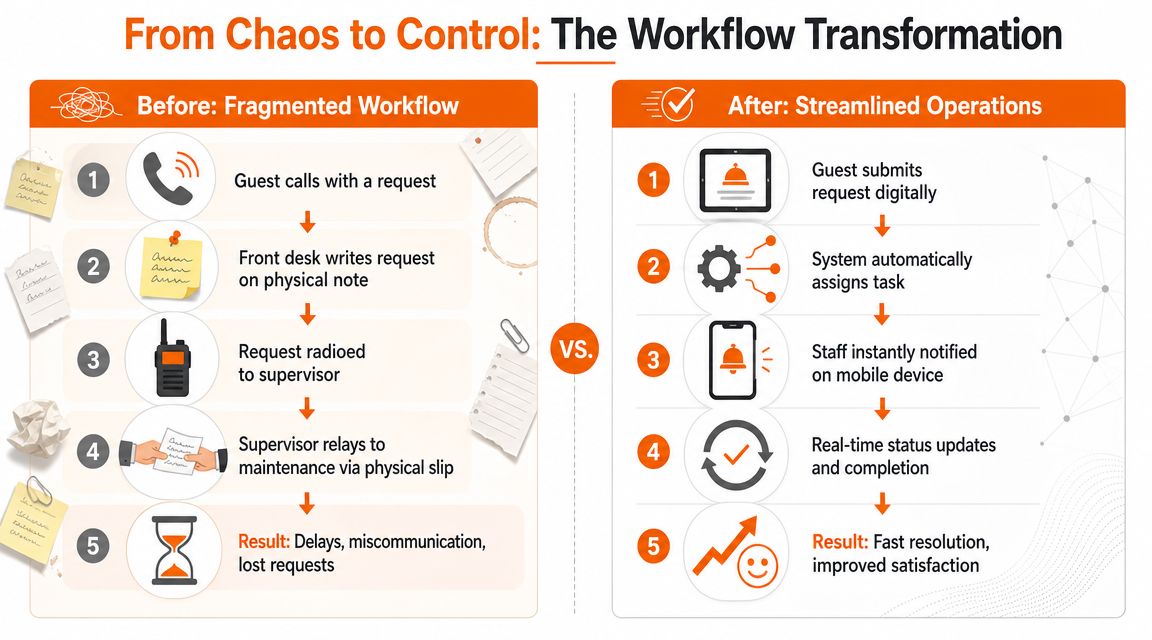
A guest calls the desk and asks for extra towels and a feather-free pillow. The front desk agent writes it on a sticky note while answering a second call. They radio housekeeping. Housekeeping doesn't answer because they're inside a room. The supervisor hears it later, finds the right attendant, and passes it along verbally. Forty minutes later, the guest calls back annoyed. Now everyone is doing archaeology.
That's the old workflow. It survives because people are used to it, not because it works.
Before the unified platform
Fragmented tools create the same pattern every time.
The request starts in one channel: Phone, desk conversation, text, or radio.
The handoff happens manually: Someone rewrites it, repeats it, or forwards it.
Ownership gets fuzzy: A team heard it, but no person owns it.
Follow-up becomes a scavenger hunt: The desk calls around to see what happened.
None of this is dramatic on its own. That's why hotels tolerate it for so long. But stack that across check-ins, room moves, maintenance calls, housekeeping priorities, and shift changes, and the whole building slows down.
After the switch to one system
The same guest request can move very differently.
The desk logs it once. The software routes it to the appropriate team or person. The attendant receives it on their phone, completes it, and marks it done. The desk sees the status change in real time and can call the guest back if needed. The manager can review response patterns later without asking staff to reconstruct the story from memory.
That isn't about elegance. It's about removing failure points.
A dedicated hotel staff communication app matters because it ties messaging to action. Chat alone doesn't fix operations. A message that can't become a task, carry context, and show status is still just chatter.
What gets replaced
A true win is not adding software. It's retiring clutter.
You don't need radios, sticky notes, personal messaging threads, printed task sheets, and three daily recap calls all doing the same job badly.
Most hotels won't eliminate every legacy habit overnight. Some teams still keep radios for urgent incidents. That's fine. The mistake is letting radios remain the system of record. Voice is good for urgency. It's terrible for memory, accountability, and reporting.
Once teams trust the platform, a lot of noise disappears. Fewer "just checking" calls. Fewer duplicate requests. Fewer supervisors acting as switchboards. People still work hard, but the hard part becomes serving guests, not chasing information.
The Tangible Payback of Smoother Operations
Owners usually ask about return. Fair question. But if you only look for one neat spreadsheet answer, you'll miss how the value appears.
The payback comes from three places at once. Lower waste, stronger revenue protection, and a workday that feels less chaotic for staff.
Where the hard savings show up
Labor gets wasted in small bursts. A supervisor walks a floor to verify room status that should already be visible. Two people respond to the same issue because ownership wasn't clear. An engineer gets interrupted for something that could have been queued properly. None of that looks huge in isolation. Together, it drags.
A better system reduces those collisions. Not because software works magic, but because teams stop duplicating effort and managers stop coordinating by interruption.
There's another savings bucket that doesn't show up cleanly on day one. Frustration. When staff spend their shift chasing updates and cleaning up broken handoffs, the work feels heavier than it should. Better workflows don't solve every staffing issue, but they remove a lot of avoidable irritation.
Revenue protection is operations work
Hotels often separate service from revenue as if they live in different departments. They don't.
When room turnover runs tighter, sellable inventory becomes available faster. When maintenance issues get surfaced and resolved sooner, fewer rooms sit in limbo. When guest requests are handled reliably, front desk spends less time apologizing and more time serving.
Industry guidance also points to the biggest gains coming from workflow automation combined with analytics-driven forecasting, using demand signals and historical patterns to help managers optimize staffing, prioritize work, and make smarter pricing decisions. That's where operations stops being reactive. The software should help managers see what's coming, not just document what already went wrong.
The payoff managers feel first
The first benefit many teams notice isn't financial. It's psychological.
Supervisors stop chasing updates: They can scan status instead of hunting it down.
Front desk gets more certainty: They know whether something is done.
Teams feel less blamed: The system shows what happened and when.
Managers get cleaner judgment: Decisions come from patterns, not anecdotes.
That calmer environment matters more than many buyers admit. Hotels ask staff to deliver warmth under pressure. If the operating system adds friction all day, that pressure leaks straight into the guest experience.
A Buyer's Guide for the Real World
Most demos are built to impress the buyer, not the people who'll use the tool at 7:10 on a busy morning.
That's why feature-heavy evaluations often go sideways. A platform can look fully-featured in a boardroom and still fail on the floor because the room attendant needs six taps to update a room, the engineer can't use it with one hand, or the supervisor needs vendor support to change a workflow.
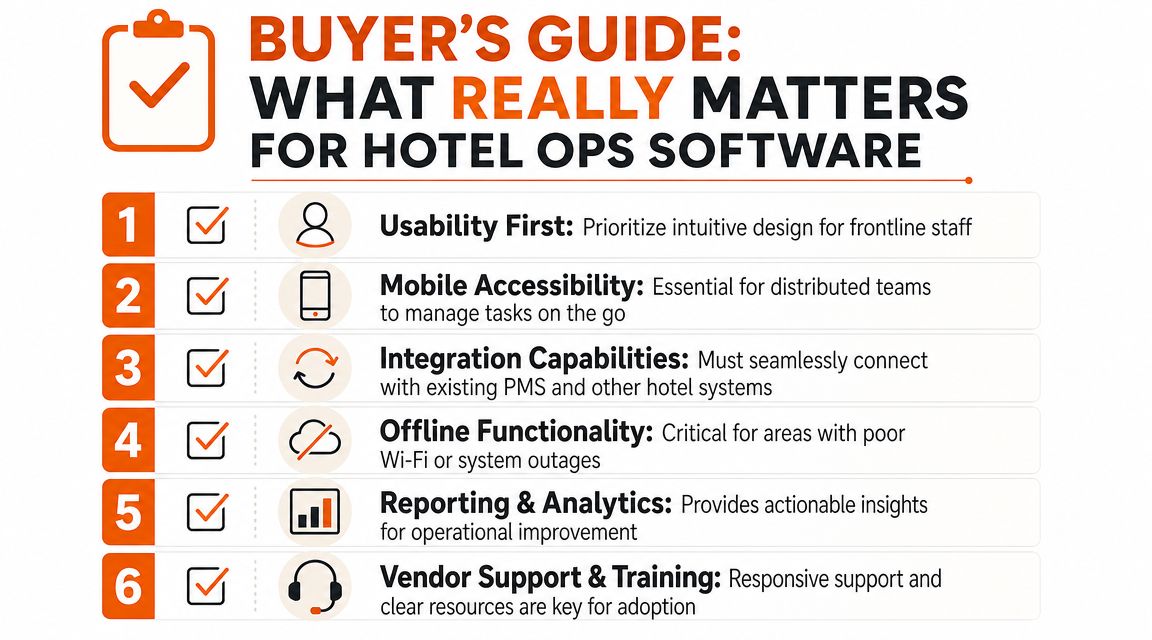
Buy for adoption, not for bragging rights
The strongest buying question is not, "How much can this system do?"
It's, "Will my team use it without workarounds?"
That sounds obvious. It isn't. Hotels still overbuy all the time, especially when ownership wants one large platform to solve everything at once. Sometimes that works. Often it creates a long rollout, thin adoption, and a quiet return to old habits.
What I'd check before signing anything
Use this as a filter, not a shopping list.
Can a new hire understand it fast? If basic task updates need training sessions and cheat sheets, the tool is too heavy.
Is it mobile first? Not desktop software squeezed onto a phone. Your housekeeping and maintenance teams live on the move.
Do communication and tasks live together? If the app handles chat but pushes work into another system, you still have fragmentation.
Can supervisors adjust workflows themselves? If every change needs the vendor, you'll stop improving the setup.
What happens when Wi-Fi is weak? Hotels have dead zones. Pretending otherwise is amateur hour.
How cleanly does it fit your stack? PMS integration matters, but so does practical fit with scheduling, documents, and day-to-day team communication.
A lot of hotels also need to think beyond internal efficiency. If you're trying to generate revenue through guest experiences, the operations layer matters because guest-facing initiatives fall apart fast when internal coordination is weak. Experience revenue still depends on staff seeing the right information at the right time.
One practical example of fit
A tool like operations management software for frontline teams can make sense when a hotel wants communication, tasks, scheduling, file access, and team coordination in one mobile environment. That's useful if your pain is scattered systems rather than deep property-specific workflows. But the broader point stands. Match the tool to the actual bottleneck, not to the nicest demo.
Good software fits the hotel's habits just enough to get adopted, then improves those habits over time.
Your Hotel Does Not Run on Spreadsheets
Hotels are living systems. People hand work to other people, often under time pressure, often across departments, often in the middle of a guest moment.
A spreadsheet can track something after the fact. It can't run the day. A binder can store information. It can't move it. A radio can shout urgency. It can't create accountability. That's why so many teams feel busy and blind at the same time.
The move to hotel operations management software isn't really a technology decision. It's a management decision. You're deciding whether your team deserves clarity or confusion as the default setting.
The culture question underneath the software
Tools shape behavior.
If the hotel's tools are fragmented, people protect themselves with side notes, personal messages, and informal workarounds. That's not bad staff behavior. It's adaptation. Give the same team a clean shared system, and you usually see something better. Fewer misunderstandings. Better handovers. Less blame. More trust in what the shift knows.
The software won't create discipline by itself. But it can make discipline much easier to sustain.
The real upgrade is not digital. It's operational honesty. One place for the work, one version of the truth, one team that doesn't have to guess.
When you strip away the sales pitch, that's the choice in front of any hotel still juggling spreadsheets, radios, and disconnected apps. Not whether to modernize for the sake of it. Whether to keep asking good people to operate inside a messy system.
What kind of workplace are you building for the people who carry your guest experience every day?
If you're trying to replace scattered chats, task lists, schedules, and updates with one mobile-first workspace, Pebb is worth a look. It brings team communication, tasks, file sharing, shifts, clock-ins, and internal updates into one app, which is exactly the kind of consolidation many hotel teams need before operations can get simpler.
