
Hospital Staff Scheduling App: Cut Costs & Improve Care
Modern hospital staff scheduling apps cut overtime, improve coverage, & boost retention. Discover key features to choose the best one for 2026.
Dan Robin
At 5:12 a.m., the charge nurse was calling down a list of names while the unit clerk refreshed an old spreadsheet that nobody trusted anymore. By 5:40, we had a body in the slot, but nobody felt good about how we got there.
The Unspoken Cost of Bad Scheduling
Bad scheduling doesn't look dramatic from the outside. It looks like texts before sunrise, a manager eating lunch at a desk, a nurse staying late because nobody wants to hand off to someone floated in cold. Small moments. Repeated all week.
The problem isn't just that the process is messy. It's that the mess lands on people who are already carrying enough.
What the scramble really feels like
In a lot of hospitals, the schedule still lives in too many places at once. One version in a spreadsheet. Another in email. A few changes in text threads. One note taped at the desk. Then someone calls out, census shifts, or a credential issue pops up, and the whole thing starts wobbling.
That wobble has a cost:
Schedulers lose time chasing confirmations instead of managing coverage.
Nurse managers lose trust because the posted schedule never stays posted.
Staff lose predictability because they don't know if a “final” roster is final.
Patients feel the downstream effect when units run thin or handoffs get rushed.
A broken schedule doesn't stay in the office. It walks onto the floor with the staff.
This gets worse because the labor market is already tight. The U.S. had a projected shortage of about 200,000 to 450,000 registered nurses by 2025, with many hospitals still struggling to cover shifts and prevent burnout, according to this healthcare staffing software overview. When staffing is fragile, every bad scheduling habit hurts more.
This is a people problem first
Hospitals sometimes treat scheduling as clerical work. It isn't. It's an operating system for the workforce. If that system is sloppy, people feel it in their sleep, their stress, and their willingness to stay.
That's why sleep matters here too. When staff bounce between poorly controlled shifts and constant last-minute changes, fatigue stops being a personal issue and becomes an organizational one. If you're trying to support people already dealing with rotating hours, this guide to shift work sleep solutions is worth reading alongside your scheduling review.
A lot of leaders go shopping for software too early. First, admit what's broken. The issue usually isn't that your hospital lacks a calendar. It's that your current process creates avoidable stress, unfairness, and confusion. A better workforce management approach for healthcare starts there.
What a Real Scheduling App Actually Does
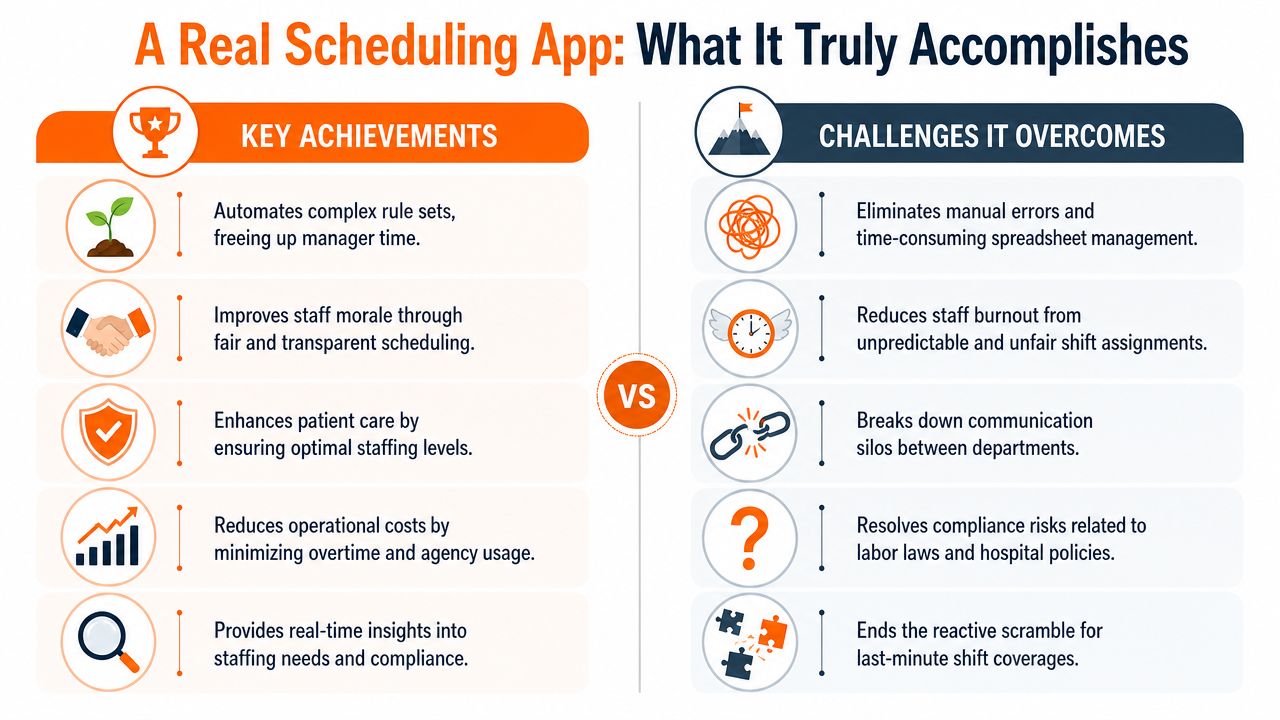
A real hospital staff scheduling app is not a prettier spreadsheet. It's closer to air traffic control. One live view. Clear rules. Constant updates. No guessing about what changed and who saw it.
That distinction matters because most scheduling failures don't come from a lack of effort. They come from fragmented information.
One schedule, not five versions of the truth
When people say they need a scheduling app, they often mean they want fewer phone calls. Fair enough. But the underlying shift is deeper than convenience. A modern app becomes the single place where staffing decisions happen and stay current.
That means:
Managers see coverage clearly across units, roles, and problem shifts.
Staff see their actual schedule on mobile without hunting through messages.
Changes move fast instead of getting stuck in someone's inbox.
Rules stay visible so fairness isn't left to memory.
The old way depends on heroic effort. A scheduler remembers who can float, who asked for weekends off, who is near overtime, who still needs an on-call block, and who can't be assigned to a certain unit. That works until it doesn't.
Calm comes from shared visibility
The best hospital staff scheduling app gives both sides something they rarely get at the same time. Managers get control. Staff get clarity.
Those are not competing goals.
If nurses can set availability, request time off, pick up open shifts, and see changes instantly, they stop feeling like the schedule is something being done to them. If managers can publish one live roster and trust that everyone is looking at the same thing, they stop spending half the day fixing communication gaps instead of staffing gaps.
Practical rule: If your app needs a follow-up text chain to explain the schedule, the app isn't doing the job.
This is also why generic scheduling tools usually fall short in hospitals. Healthcare staffing isn't a simple rotation problem. It sits inside a bigger staffing reality shaped by credentialing, call-outs, fatigue, float coverage, and fairness. For a broader view of that shift, this piece on modern healthcare staffing approaches is useful.
A real app brings calm because it reduces ambiguity. That sounds modest. It isn't. On a busy floor, less ambiguity means fewer mistakes, fewer resentments, and fewer frantic minutes before change of shift.
The Non-Negotiable App Features You Need
Most feature lists are useless because they treat every line item as equal. They aren't. Some features save real operational pain. Others are decoration.
If you're choosing a hospital staff scheduling app, start with what breaks your current process. Then ask whether the app removes that friction in daily use, not in a demo.
The engine matters more than the interface
A clean screen is nice. It won't save you if the scheduling logic underneath is weak.
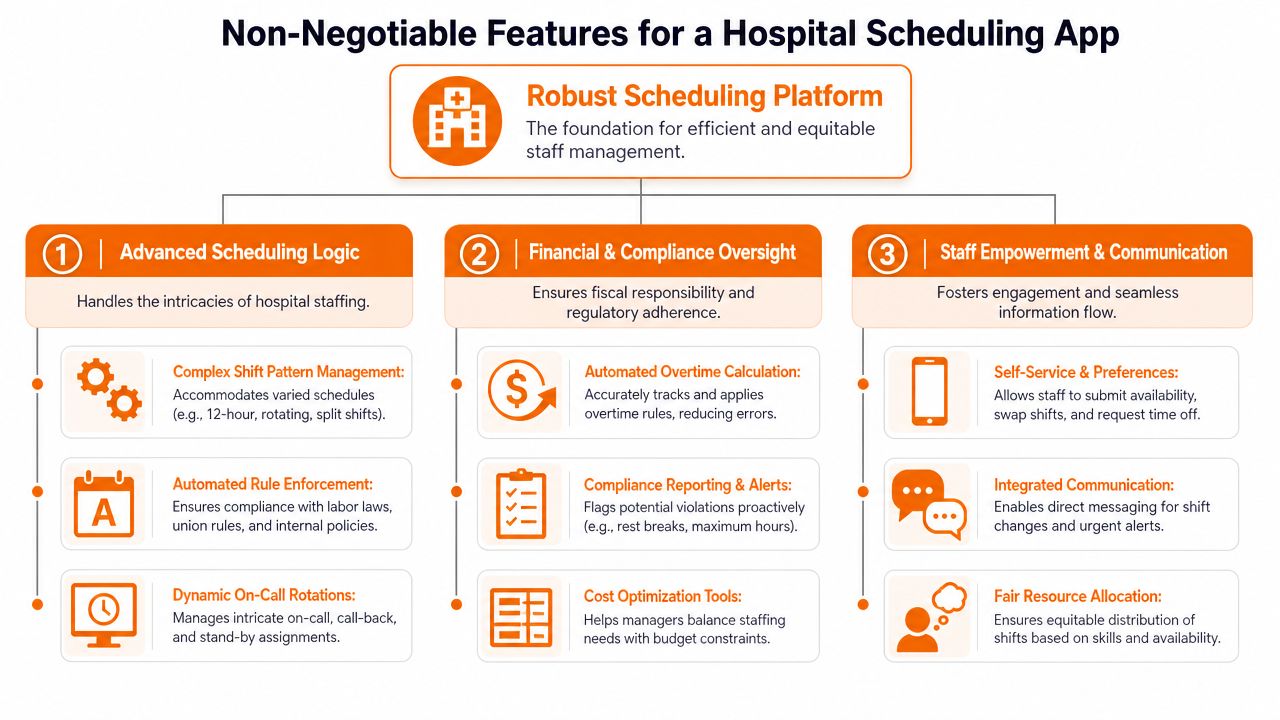
The core of the app should treat staffing as a constrained assignment problem, not a blank calendar. That means the system has to account for hard rules such as credentials, role restrictions, maximum hours, rest periods, and coverage minimums, then build a schedule that reduces violations and overtime while still considering staff preferences, as described in this research on personalized hospital scheduling.
If the app can't do that, your managers become the engine. They'll still be manually checking who is allowed to work where, who is about to tip into overtime, and which assignment will create a downstream problem two days later.
Features that solve real pain
Some capabilities are essential because the pain of missing them shows up fast.
Complex shift pattern support. Hospitals rarely run on neat, repeating blocks. You need a tool that can handle rotating schedules, 12-hour shifts, on-call structures, split coverage, and unit-specific patterns without workarounds.
Shift swaps with guardrails. Staff should be able to swap, but not in a way that breaks policy, credential rules, or fairness. Easy swaps reduce manager workload only when the system checks the rules first.
PTO and availability management. If time-off requests and availability updates live outside the app, schedule quality drops. Managers end up building rosters from stale assumptions.
Overtime and rest alerts. People don't catch these reliably by eye, especially under pressure. The app should flag problems before the schedule goes live, not after payroll asks questions.
The right feature isn't the one that looks smart in a screenshot. It's the one that prevents a bad assignment at 6 p.m. on a Sunday.
Mobile is not optional
Frontline staff don't live at desktops. If the mobile experience is weak, adoption will be weak too.
Staff need to be able to do a few things quickly from a phone: check shifts, accept changes, request time off, upload availability, and respond to open-shift notices. If any of that requires logging into a clunky browser view, they'll go back to texting each other.
This is one reason many teams end up comparing dedicated scheduling tools with broader frontline platforms. A resource on nurse scheduling software options can help frame those trade-offs.
Integrations are where good intentions go to die
A hospital staff scheduling app can look excellent in isolation and still create more work if it doesn't connect to payroll, HR, and related systems. Schedule data has to move cleanly. Otherwise, managers end up entering the same information twice and correcting mismatches later.
Here's the short version of what works and what doesn't:
Need | What works | What fails |
|---|---|---|
Coverage logic | Rules-based auto-scheduling | Manual patching after publication |
Compliance | Built-in checks before posting | Hoping managers remember every rule |
Staff communication | Mobile notifications inside one system | Group texts and email chains |
Time off | Requests tied directly to schedule build | Separate forms and side spreadsheets |
Data flow | Payroll and HR integrations | Re-entering shifts by hand |
HIPAA and security matter too, of course. But that's table stakes. If a vendor treats basic healthcare security as a premium extra, move on.
Benefits Beyond a Full Roster
A full roster is the baseline. It's not the win.
The test of a hospital staff scheduling app is whether it makes work more sustainable for the people who keep the place running. If it only fills holes faster, you've bought speed without stability.
More control changes how work feels
One of the most important things scheduling software can do is give staff a real voice in the schedule. Not total freedom. Hospitals can't run that way. But meaningful participation matters.
In a large follow-up study of hospital employees, participatory working time scheduling software reduced the risk of low control over shift scheduling to RR 0.34, short sleep to RR 0.70, and poor workability to RR 0.74, according to this hospital scheduling and wellbeing study. That matters because it turns scheduling into more than an admin workflow. It becomes part of workforce health.
The return isn't just financial
Leaders often ask whether the software cuts overtime. Fair question. But the deeper return usually shows up in ways that are harder to miss once you've lived through the alternative.
Fewer grudges about fairness because assignment logic is more visible.
Less manager exhaustion because they aren't constantly rebuilding the roster.
More stable teams because people can plan their lives with less uncertainty.
Safer coverage decisions because the app checks the constraints before people improvise.
When staff feel like the schedule is arbitrary, every change feels personal. When the rules are clear and preferences are part of the process, people may still dislike a shift, but they're less likely to feel disrespected by it.
Better scheduling doesn't remove the hard parts of hospital work. It removes some of the unnecessary ones.
That's the benefit people underestimate. Predictability is a form of respect. In a hospital, respect is not soft. It affects who picks up, who stays, and how much strain a team can absorb before it starts fraying.
How to Evaluate and Choose the Right App
By the time most hospitals start looking seriously, they've already been burned by something. Usually a generic scheduler that looked flexible, or a legacy system everyone tolerated because replacing it felt worse.
The market is more specialized now. By 2026, healthcare scheduling software had clear segments, with products positioned for health systems, senior care, staffing agencies, and hospital nursing management. The same comparison also noted that native credential tracking and payroll integration had become real differentiators, while a mobile app was expected, as shown in this 2026 healthcare scheduling software comparison.
Don't buy a generic scheduler and hope
Many teams get it wrong. They shop by feature count instead of fit.
A hospital doesn't need the same thing a retail chain needs. The schedule is tied to licensure, role mix, fatigue rules, internal policies, and unit coverage standards. If a vendor can't show how the product handles healthcare-specific constraints without workarounds, keep moving.
You can include products aimed at different parts of the market in your review. QGenda, OnShift, ShiftWizard, and agency-focused tools all reflect real specialization. If you also want a broader employee app that includes scheduling as one part of operations and communication, employee scheduling app options can help you compare that category.
Use a simple evaluation table
You don't need a complicated scorecard. You need disciplined questions.
Evaluation Area | Key Questions to Ask | Why It Matters |
|---|---|---|
Scheduling logic | Can it enforce credentials, role limits, hours, rest, and unit coverage rules automatically? | This determines whether the app reduces manual correction or just digitizes it. |
Mobile use | Can staff handle swaps, availability, time off, and alerts from their phones without friction? | If mobile use is clumsy, adoption will stall. |
Integrations | Does it connect cleanly to payroll, HR, and your current workforce systems? | Weak integrations create duplicate work and data errors. |
Fairness and transparency | Can staff see requests, open shifts, and schedule updates clearly? | Trust rises when people understand how schedules are built and changed. |
Exception handling | What happens during a call-out, surge, or last-minute redeployment? | A hospital app has to perform under stress, not just during normal weeks. |
Support and rollout help | Who trains your schedulers and unit leaders, and what happens after go-live? | Hospitals need support that matches operational reality, not generic onboarding. |
Ask vendors to show the ugly parts
Demos are usually polished around the easy path. Don't stop there.
Ask them to walk through a call-out on a night shift. Ask how the system handles a credential expiration discovered after publication. Ask how an open shift gets offered, escalated, filled, and sent downstream. Ask what the nurse manager sees, and what the staff member sees.
If they can't show the messy scenarios cleanly, the product probably won't help much when your day gets messy too.
Rolling It Out Without a Revolt
The software can be sound and the rollout can still fail. That usually happens when leaders treat the change like a technical installation instead of a shift in daily habits.
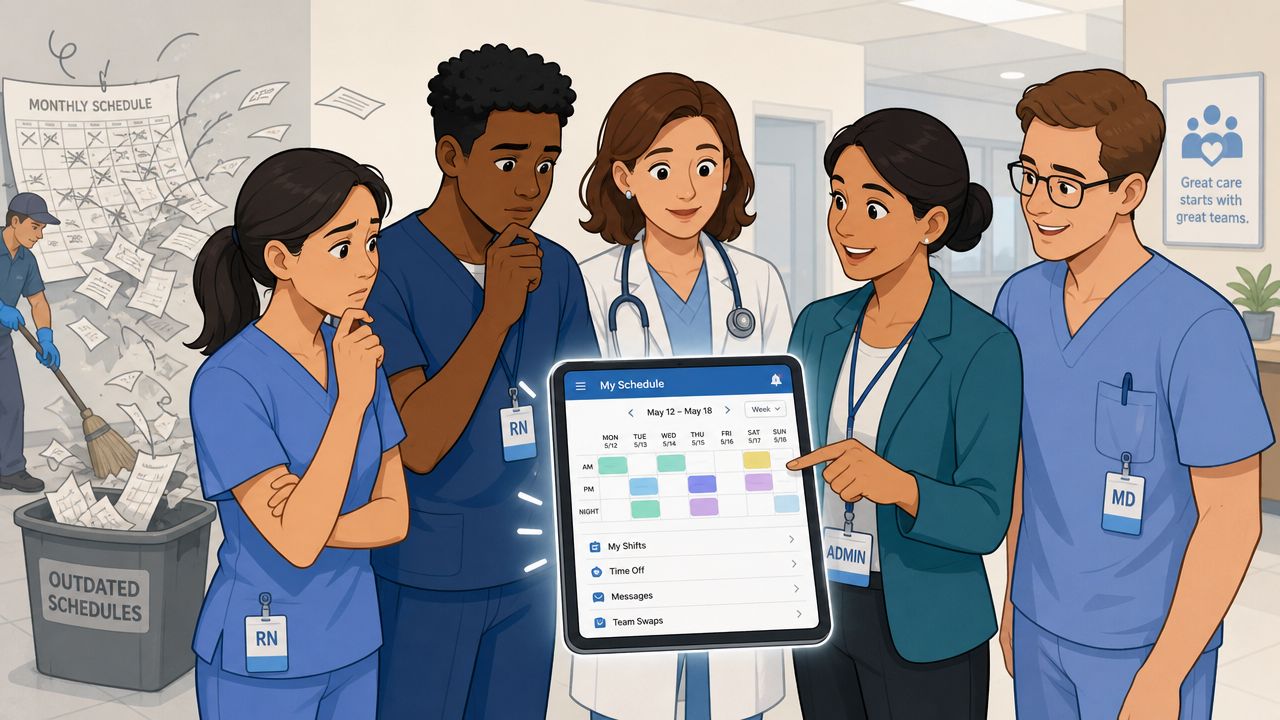
People get attached to bad systems for understandable reasons. The spreadsheet may be ugly, but they know where the landmines are. The text chain may be chaotic, but it feels fast. A new hospital staff scheduling app threatens both comfort and control unless you handle the transition carefully.
Start smaller than you want to
Pick one unit, one manager, and one group of staff who will give honest feedback. Not your most enthusiastic team. Not your most resistant team. A normal one.
A good rollout does a few basic things well:
Pilots one environment first so you can catch process gaps before they spread.
Trains managers hands-on because they'll set the tone for everyone else.
Shows staff what's better for them such as easier swaps, clearer updates, and fewer surprise changes.
Keeps the old process on a short leash so people don't split work between systems for months.
Win trust with speed and consistency
One capability matters more than people realize during rollout. Schedule changes must update everywhere, quickly and reliably. Industry guidance emphasizes that a modern system should keep a single live schedule, support escalation paths for call-outs, and ensure that one change updates the mobile app and payroll flow together, as discussed in this healthcare scheduling operations guide.
If staff see one shift changed in the app but not reflected elsewhere, trust drops immediately.
The first week doesn't need to be perfect. It does need to be consistent.
Celebrate small wins. A smoother weekend call-out. Fewer duplicate messages. One manager who got time back. Those moments matter because they make the change feel real, not mandated.
Looking Beyond the Schedule
The best hospital staff scheduling app does something subtle. It makes the organization feel more dependable.
That sounds small until you've worked in a place where the opposite is true. In those environments, staff expect confusion. They double-check every change. They keep backup screenshots. They assume a posted schedule is provisional. Over time, that teaches people something about the culture. It tells them their time is negotiable.
A better system sends a different message. It says the hospital takes fairness seriously. It says change will happen, but not sloppily. It says leaders understand that scheduling isn't separate from morale, communication, or trust.
That's also why scheduling gets stronger when it lives inside a broader employee system instead of standing alone. If the same place that handles shifts also handles team updates, policy access, files, tasks, and day-to-day communication, people spend less time bouncing between tools and less time missing context. That's where a platform such as Pebb fits. It combines scheduling with communication and operational tools in one employee app, which can make sense for teams trying to reduce tool sprawl without losing frontline usability.
What matters most is not the logo on the login screen. It's the signal your process sends to the people doing the work.
If your current scheduling process feels fragile, staff already know. The better question is whether you're willing to fix what that fragility has been teaching them.
If you want one place for scheduling, team communication, updates, tasks, files, and frontline operations, take a look at Pebb. It's built to give teams a shared home for daily work, which is often what hospitals are really missing when scheduling keeps breaking down.
