
HIPAA Compliant Messaging: A Practical Guide for Modern
Learn how HIPAA compliant messaging protects patient data. Discover best practices for secure team communication in healthcare.
Dan Robin

HIPAA compliant messaging means using a channel that combines encryption, access controls, audit trails, and a signed Business Associate Agreement so protected health information stays attributable, recoverable, and secured at rest and in transit. That sounds dry until you've watched a nurse send a quick patient update from a personal phone at the end of a shift and realized nobody can later prove who saw it.
That's the core challenge with this topic. The market for secure messaging has moved from niche IT plumbing to a mainstream healthcare tool, with a 2026 estimate putting the global market at USD 185.98 million, projected to reach USD 431.76 million by 2035 at an 8.9% CAGR. Adoption is already broad in the U.S., and that's the point, because this is no longer about whether teams will message, it's about whether they'll do it in a way that holds up when something goes wrong. MarketGrowthReports market overview on HIPAA compliant messaging software
The Real Problem HIPAA Compliant Messaging Solves
The problem isn't that healthcare teams like texting. The problem is that they already do it, often before anyone has a policy in place. In clinical settings, over 85% of physicians and nurses owned smartphones or tablets, and 60% to 80% of clinical staff were already exchanging text messages related to patient care, according to peer-reviewed research on clinical texting behavior. The same work found that 30% or more of medical users incorrectly believed standard SMS met HIPAA security requirements, which tells you everything you need to know about why ordinary texting became such a liability. Peer-reviewed study on clinical texting and HIPAA misconceptions
Why the old habit keeps surviving
A hallway text feels fast, private, and harmless. A nurse asks a doctor to review a wound photo, a resident pings pharmacy, a charge nurse checks bed status, and suddenly patient care is running through a consumer app that was never designed to prove identity, preserve audit history, or protect PHI in a defensible way.
That's the operational trap. People don't ignore compliance because they're careless, they ignore it because the work keeps moving and the old tool is always there. The result is a system where the message itself may be useful, but the organization can't always reconstruct who sent it, who read it, or whether the content crossed into PHI.
Practical rule: if the message could matter in an audit, it shouldn't live in a channel that can't show who touched it.
That's why HIPAA compliant messaging exists as a category at all. It replaces guesswork with traceability. It gives teams a way to keep the speed of chat without handing compliance officers a blind spot.
What the HIPAA Privacy and Security Rules Actually Require
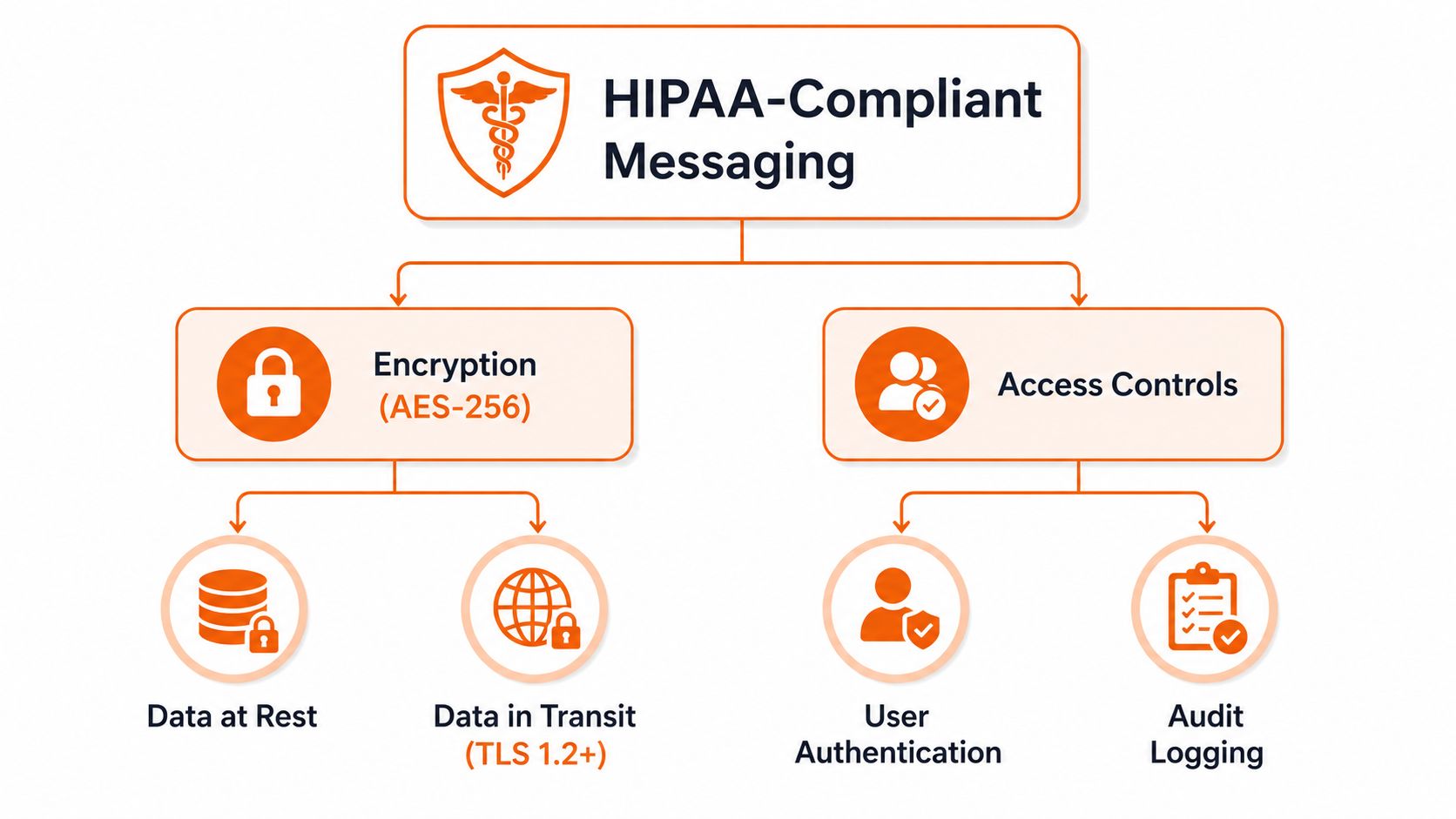
HIPAA does not bless a specific app. It sets the conditions a system has to meet, and messaging falls squarely inside those conditions the moment it creates, receives, maintains, or transmits ePHI. The Privacy Rule limits how PHI can be used and disclosed, while the Security Rule demands administrative, physical, and technical safeguards. In plain English, the Security Rule is the part that shapes software design, and the Privacy Rule is the part that keeps people from oversharing in the first place.
Where messaging turns into PHI
A text reminder can be fine if it stays minimal. The moment it includes identifiers, diagnosis details, treatment notes, medication names, or anything that points back to a person's health status, you're in a different category. One source puts it plainly, texting is okay when it doesn't contain personal identifiers, and any text involving PHI has to follow the minimum necessary standard. HIPAA rules regarding text messaging
That distinction matters more than people think. A lot of internal messaging looks harmless until someone adds just one more detail, then the message stops being administrative and becomes clinical. That's the gray area most vendors breeze past in their sales decks.
For a more grounded regional example of the surrounding risk, I'd point teams to cybersecurity for medical clinics Saskatchewan from Accelerate IT Services Inc., because it frames the broader clinic-security picture without pretending messaging is separate from everything else.
The rule that does the heavy lifting
The Security Rule is what governs the tool. It's why your first question shouldn't be “does this app say it's HIPAA compliant?” It should be “does this app, with our settings and contracts, meet the safeguards we need?” That's a harder question, but it's the right one.
HIPAA isn't a sticker you put on software. It's a system you have to operate well.
That system includes who can log in, what gets logged, how long logs are kept, and whether the organization can prove the chain of access later. If the app can't support that, the app is not the answer.
The Technical Safeguards That Actually Matter
Good messaging security starts with boring things done well. TLS 1.2 or higher protects traffic in transit, AES-256 protects stored data, and end-to-end encryption helps narrow who can read message content. Those aren't decorative features. They close the three failures that matter most, network interception, unauthorized server-side access, and device loss. HIPAA-compliant hosting insights on secure text messaging
Identity is the real control plane
If a clinician uses a shared login, the whole audit story starts to wobble. Unique user IDs, role-based access, SSO, MFA, and session timeouts make every action traceable to one person instead of a shift, a department, or a sticky note taped to a monitor. The mechanics sound tedious because they are. That's the point.
When teams ask for role-based access control guidance, I send them to role-based access control best practices. The concept is simple, access should follow job function, not convenience. If a receptionist, a nurse, and a physician see the same message surface with the same rights, the system is too loose.
Logs have to survive scrutiny
Audit logging is not a nice extra. A compliant system should log who sent what, when, and to whom, and those logs should be tamper-resistant and retainable for years. One source says logs must be retained for a minimum of six years, and that's the kind of requirement that turns a vague “we probably have records” into an actual investigation trail. HIPAA-compliant messaging audit logging guidance
If you can't reconstruct message history later, you can't really prove who touched ePHI or when.
That's also why logs need to export cleanly into SIEM tools without exposing PHI. Security teams need the visibility, but they don't need the message body sitting in every monitoring system. A system that can't separate those concerns creates more noise than protection.
Administrative and Contractual Controls You Cannot Skip
A lot of vendors sell the illusion that compliance lives in the app. It doesn't. It lives in the agreement, the policy, the role assignment, and the offboarding process that gets used when somebody leaves. A Business Associate Agreement is necessary, but it's only the starting line. Without it, any PHI touching the vendor is already a problem, no matter how polished the interface looks.
The paperwork that keeps the wheels on
The first thing I want to see is a signed BAA with every vendor that can touch PHI. Then I want to know who can access what, how access is granted, how access is removed, and who reviews the logs. A proper administrative setup includes onboarding, offboarding, annual training, sanctions for misuse, and a written risk analysis that names messaging as a system, not a side note.
That risk analysis matters because it forces the organization to stop pretending messaging is informal. It isn't. If you depend on it for patient care, it belongs in the same governance stack as email, EHR access, and device management.
Clauses worth reading instead of skimming
Ask how breach notification works. Ask whether subcontractors inherit the same obligations. Ask whether the vendor has audit rights, and whether they're willing to support an investigation without turning it into a six-week support ticket. Those details matter more than feature demos because they determine whether the vendor can stand behind the promise when something breaks.
A BAA without enforceable follow-through is just paperwork with a nicer font.
The practical test is simple. If a vendor can't show how the contract maps to access controls, logging, and incident response, then the contract is doing too much heavy lifting. Compliance should be visible in the workflow, not hidden in legal fine print.
Choosing Between SMS, Consumer Apps, and Enterprise Platforms
Plain SMS still has a place, but only for minimal reminders. Consumer chat apps are convenient for staff who already use them, which is exactly why they keep creeping into care teams. Enterprise platforms are the only category built to handle PHI with the controls auditors expect, but even there, configuration matters.
The gray zone is where teams get burned
A reminder becomes risky the moment it includes a diagnosis, a lab result, a medication name, or a reply that turns into a clinical question. That is the part most guides skip. They talk about “messaging” as if every conversation is the same, when the channel choice should track the sensitivity of the content and the chance that the thread will escalate.
The clean rule is simple. Use the lightest channel that still fits the content, and define the escalation path before staff need it. If a reminder can turn into PHI, the team needs a way to move that conversation out of SMS fast.
For a useful comparison lens, I'd pair this with protecting patient data with messaging from FaxZen and secure messaging vs non-compliant platforms, because the difference between a tool that sends text and a tool that can defend care communication is bigger than most buying teams admit.
Channel Fit for Healthcare Messaging | Encryption in Transit | Can Carry PHI Safely | Audit Trail | Typical Best Use |
|---|---|---|---|---|
SMS | Usually limited | Only for very minimal reminders | No dependable audit trail | Simple appointment nudges |
Consumer apps | Varies | Not a safe default | Usually weak or absent | Casual staff chatter that shouldn't include PHI |
Enterprise platforms | Designed for it | Yes, with policy and configuration | Yes | Clinical coordination and PHI-bearing workflows |
The table is blunt because the decision should be blunt. If the message matters clinically, the channel has to be built for that reality. If it does not, keep it simple and keep the content sparse.
A Vendor Checklist You Can Bring to the Demo
Don't buy a promise. Buy proof. I want a vendor to show me the BAA, the architecture for encryption in transit and at rest, how identities are assigned, how roles are separated, and how logs are stored. If they can't explain tenant separation, exportability, and what happens when an employee leaves, they're not ready for a healthcare deployment.

What I ask before anyone signs
A SOC 2 Type II report tells me the vendor has been through a meaningful control review. A sample BAA tells me they're not hand-waving legal obligations. An architecture diagram tells me whether encryption is real or just marketing copy. And if logs can be altered by too many hands, that's a red flag I don't ignore.
I also ask what happens to messages when staff leave. If the answer is vague, the policy is probably vague too. That usually means someone will keep using an old login longer than they should.
The red flags are usually obvious
Shared logins are a deal-breaker. So are systems that can't export data cleanly or that treat compliance like a sales feature instead of an operating model. If the demo leans hard on glossy screens but avoids the questions above, I assume the product is built to impress a buyer, not survive an audit.
If the vendor keeps saying “we're HIPAA compliant” but won't show you the controls behind it, walk away.
That's not cynicism. That's discipline. Healthcare has enough hidden work without adding avoidable compliance debt to the stack.
Common Pitfalls and Audit Nightmares
The ugly failures are usually small at first. A shift handoff uses one shared account. Someone writes a password on a sticky note. A consultant gets added without the right agreement in place. Then a screenshot of a message lands on a personal phone, and the organization loses the clean line between convenience and control.
The human habits that undo the software
Audit logs don't help if nobody reviews them. Training doesn't help if staff know the policy but the official tool is so clumsy they fall back to shadow IT. And a secure platform doesn't save you from a contractor who was never properly onboarded in the first place. The software can only support the behavior you enforce.
That's why audits tend to ask for more than technical settings. Investigators want the risk analysis, the sanction policy, the training records, and evidence that the team has practiced incident response. If those pieces are stale, the rest of the stack starts looking cosmetic.
The fix is usually mundane
Kill shared logins. Clean up offboarding the same day someone leaves. Make screenshots of PHI a policy issue, not an informal annoyance. Review logs on a schedule, not when someone feels uneasy. The work is boring, but boring is what defensible looks like.
A healthy program doesn't depend on perfect staff memory. It depends on habits that are hard to skip. That's the difference between a tool that exists on paper and one the hospital can defend under pressure.
Bringing It All Together With an All-in-One Work App
A hospital does not lose control of PHI because of one bad message. It loses control because chat, scheduling, file sharing, and admin tasks live in separate tools, each with its own permission rules and its own failure points. A single platform reduces the number of places where sensitive work can drift, and it makes access easier to govern. That is why consolidation matters. Fewer tools mean fewer BAA reviews, fewer identity systems, and fewer chances for staff to send sensitive work through the wrong channel. all-in-one employee app

Pebb is one example of that approach. It brings chat, Spaces, file sharing, roles, and SSO into one place. For mixed teams, that matters because the fewer tools staff have to jump between, the less often they improvise or send work into a channel that was never meant to carry PHI.
The point is not to promise perfection. The point is to give staff a system they will use, with clear permissions and fewer places for sensitive information to end up in the wrong hands. If you want a broader look at the model, the all-in-one employee app overview lays out how a single work app can reduce tool sprawl without turning daily work into a compliance drill.
If you are replacing patchy texting with something your compliance team can live with, take a look at Pebb. It brings communication, permissions, and work tools into one place, which makes HIPAA-aligned workflows easier to enforce without making staff hate the process. If you want fewer tools, cleaner access, and a messaging setup that fits real hospital work, start there.
