
10 Data Governance Best Practices That Actually Work
Tired of theory? Discover 10 actionable data governance best practices to secure data and simplify operations. Built for real-world use.
Dan Robin
The phrase ‘data governance’ can put a room to sleep. It sounds like bureaucracy. Like red tape. Like something designed by a committee to make sure no actual work gets done. For a long time, that’s how we saw it, too. It was a corporate checkbox, something to satisfy the lawyers.
Then we started building Pebb. It’s an app for the people who don't sit at desks—the nurses, the warehouse crews, the cashiers. The ones who run the real world. Suddenly, data governance wasn't an abstract concept anymore. It was a nurse’s personal phone number. It was a retail associate’s schedule. It was a driver’s clock-in data, which had to be perfect for their paycheck to be right. It got personal. Fast.
We realized good data governance isn’t about control. It’s about clarity and trust. It’s the quiet foundation that lets you move fast without breaking things—or worse, breaking someone’s trust. When your data represents real people doing real work, you don’t get a second chance. We had to find a way to make these ideas simple, human, and useful.
This isn’t a textbook list. This is what we learned in the trenches. It’s a straightforward guide to the data governance best practices that actually matter, especially when the data you’re managing belongs to your team.
1. Start with a Simple Rulebook
Before you can manage your data, you need a map. A data governance framework is that map. It’s a simple rulebook that says who can do what with your data, why, and how. Without it, you’re just hoping for the best. And hope isn’t a strategy.
This isn’t a dusty binder on a shelf. It’s a living agreement across the company that outlines roles and responsibilities for how data is collected, stored, used, and eventually, deleted. For a tool like Pebb, which handles everything from shift schedules to personal employee messages, this framework is everything. It’s how we make sure we’re handling data with care while meeting serious regulations like GDPR.
The Big Idea: A good framework turns fuzzy goals like "data security" into a concrete plan everyone can understand.
How to Get Started
You don’t need to boil the ocean. Start small.
Form a Small Council: You can’t do this alone. Grab a few people from HR, IT, Legal, and Operations. This small group owns the framework and makes sure it works for everyone.
Know What You Have: First, figure out what data you’re sitting on. Map out the information flowing through your systems, from employee details in Pebb’s People Directory to operational data from other tools.
Write It Down: Put your policies into plain English. Use a tool your team already uses, like a simple knowledge base inside Pebb, to make the rules easy to find. For a deeper look at the principles behind this, it's worth understanding AI Innovation with Strategic Risk, Compliance, and Governance.
Revisit and Revise: Your framework isn’t set in stone. Plan to look at it once a year, or whenever a big rule changes. We do this, too. You can see how our own standards evolve by checking Pebb's privacy standards.
2. Give Your Data Labels
Not all data is created equal. A company announcement is different from an employee's salary. Data classification is just a fancy way of saying you put labels on things based on how sensitive they are. That way, you know what needs Fort Knox-level security and what’s okay to share.
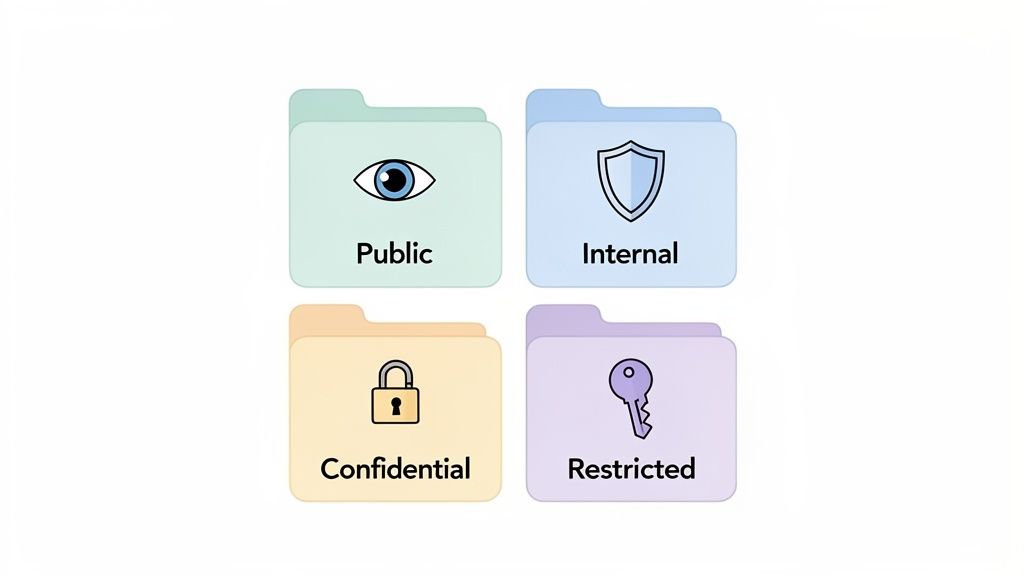
For a tool like Pebb, where you’re managing everything from public updates to private HR files, this is essential. Without labels, you’re flying blind. You can't apply the right security, access rules, or retention policies. This is a fundamental step and one of the most important data governance best practices.
The Big Idea: Classification tells you what your data is worth, so you can match your protection to the risk.
How to Get Started
You don't need fifty categories. Start simple.
Define Your Levels: Keep it simple. Most companies do fine with four: Public, Internal, Confidential, and Restricted. Write down what each one means with real-world examples, like classifying shift schedules as Internal but performance reviews as Restricted.
Use Your Tools to Help: Your software should do the heavy lifting. In Pebb, you can use dedicated Spaces to create digital walls. A "Managers Only" Space for confidential data or a "Company News" Space for public info. The right data stays in the right box.
Automate It: Don’t rely on people to tag everything by hand. See if your other systems, like HR or payroll, can automatically classify data when it’s created. For instance, any file from your payroll tool can be pre-tagged as Confidential.
Train and Check: Teach your team what these labels mean when they join. Then, run simple, regular checks to make sure data is in the right place. It keeps the system honest.
3. Assign an Owner to Everything
Imagine a library with no librarian. Books would be everywhere. Nobody would know who has what. That’s your data without clear ownership. You need librarians for your data—people who are accountable for its quality, security, and use.
This is about giving responsibility for specific data to individuals or teams. These "data owners" aren't IT nerds; they're the people who know the data best because they use it all day. The HR director owns employee records. The operations manager owns scheduling data. Giving someone ownership makes it personal. It ensures someone is always steering the ship.
The Big Idea: When someone owns the data, they care about it. Accountability turns a vague corporate goal into a personal responsibility.
How to Get Started
This is about recognizing who already cares the most.
Find the Natural Owners: Look around. Who would be most affected if the shift schedule data was wrong? The operations manager. Who understands the details of employee records? The HR director. Those are your data owners.
Make Ownership Public: Create a simple list of who owns what. You can build this right into a knowledge base or even Pebb’s People Directory. Now everyone knows who to ask if they have a question or a problem.
Give Owners the Keys: Ownership without power is useless. Use your tool’s admin settings to give data owners the permissions they need to manage their data, like approving access or fixing errors.
Check In Regularly: Things change. Set up a quick quarterly chat with your data owners to review their data, check its accuracy, and tackle any new problems. It keeps things fresh.
4. Insist on Good Data
The best framework in the world can’t save you if your data is garbage. Bad data isn't an IT problem; it's a business problem. It leads to payroll mistakes, scheduling messes, and a slow erosion of trust. If an employee’s clock-in time is wrong, their paycheck is wrong. It’s that simple.
Data quality management is the ongoing work of keeping your information accurate, complete, and up-to-date. For a tool like Pebb, which handles critical things like time tracking, this isn’t optional. It’s what ensures payroll is right, you're following labor laws, and your decisions are based on reality. This is a core pillar of any decent list of data governance best practices.
The Big Idea: Good data turns a potential liability into a reliable asset. It’s the difference between making smart decisions and just guessing.
How to Get Started
This isn’t a one-time project. It’s a habit.
Decide What "Good" Means: You can't improve what you don't measure. For each key piece of data, define what "good" looks like. Maybe it’s 99.9% accuracy for clock-in times or 100% complete profiles for new hires in Pebb.
Stop Bad Data at the Door: The best way to fix bad data is to prevent it in the first place. Use built-in rules in Pebb to make critical fields mandatory when creating a shift or adding a new person. This one step stops most errors before they happen.
Schedule Regular Checkups: Put a recurring event on the calendar—maybe monthly—for managers to review their team’s data. Use Pebb’s analytics to spot odd patterns, like someone always forgetting to clock out, and fix them early.
Explain the "Why": Don’t just tell people to be accurate. Explain why it matters. When your team understands that correct data entry means their friends get paid correctly, they become your best defense against bad data.
5. Create a Data Dictionary
If your framework is the map, your data dictionary is the legend. It’s the official translator that makes sure everyone in the company is speaking the same language. Without it, one team’s “active employee” is another’s “currently scheduled.” That confusion leads to broken reports and bad decisions.
A data dictionary is a central document that defines every piece of data you handle—what it means and where it comes from. For a tool like Pebb, which connects to HR, payroll, and scheduling, this is the glue that holds everything together. It ensures that "PTO" in a Pebb report means the exact same thing it does in your payroll system.
The Big Idea: A data dictionary stops data from becoming a Tower of Babel. It creates a single source of truth for what your data means.
How to Get Started
This sounds technical, but it’s really about clear communication.
Start with What Matters: Don’t try to define everything at once. Begin with the most critical and confusing data points, like “employee status,” “shift type,” or “job role.” Ask your teams where they get tripped up.
Define It for Humans: For each piece of data, write down what it means to the business (e.g., "PTO is paid time off for hourly staff") and its technical details (e.g., data type, source).
Make it Easy to Find: A dictionary no one can find is worthless. Put it in a central, easy-to-access place. A simple guide on how to build a knowledge base inside Pebb is a great start. It makes your dictionary a searchable resource for everyone.
Give People Ownership: Assign responsibility for different data areas (like HR or operations) to specific people. They keep the definitions accurate.
6. Give Keys, Not the Whole Keychain
Not everyone in your company needs access to everything. That simple idea is the heart of one of the most powerful data governance best practices: role-based access control (RBAC). It’s like giving a cashier keys to the register but not the main office. You give people access only to the data they absolutely need to do their job.
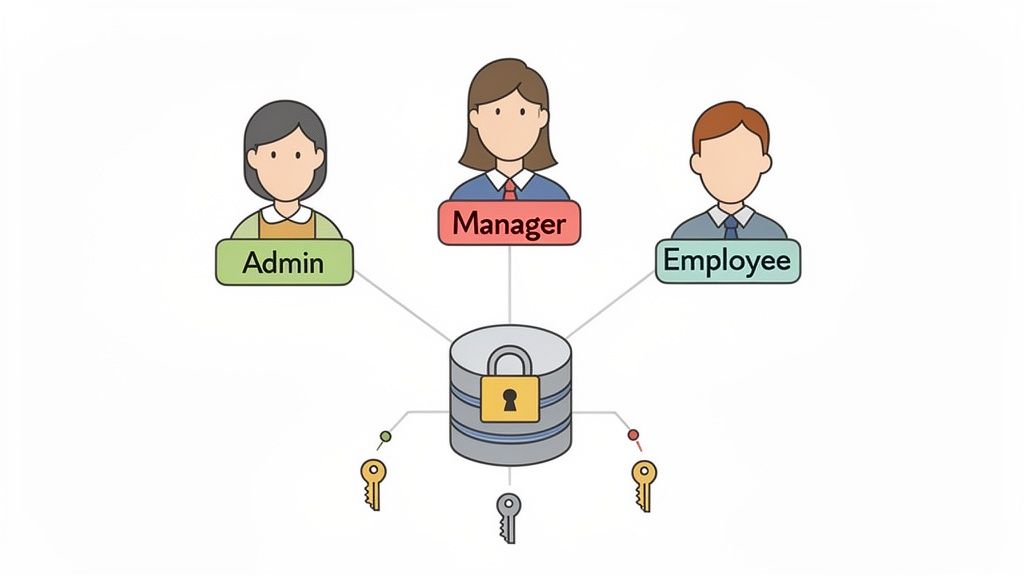
This isn’t about mistrust. It's about smart security. For a tool like Pebb, where you manage everything from payroll details to daily chats, RBAC is critical. A nurse needs to see schedules, not the CFO's salary. A store manager needs to see their team's performance, but not another store's. RBAC makes this clean and automatic, which dramatically cuts down the risk of accidents.
The Big Idea: The principle of least privilege isn't about holding people back. It's about protecting everyone by giving them exactly what they need to succeed, and nothing more.
How to Get Started
This is about being deliberate from day one.
Map Your Roles: Before you touch a single setting, sketch out the key roles in your company. What does a frontline worker need versus a regional manager or an HR admin? Write it down.
Use the Controls You Have: Your tool should let you set granular permissions. In Pebb, you define who can see, create, or manage things in specific Spaces, tasks, or files.
Document and Train: Write down who gets what access and why. Put it in your Pebb Knowledge Library. Transparency helps people understand the system. For a closer look, you can explore these role-based access control best practices.
Do Regular Audits: People change jobs. Responsibilities shift. Schedule a quarterly review of who has access to what. Remove permissions that are no longer needed. This simple habit stops "permission creep" in its tracks.
7. Know When to Let Go
Not all data should live forever. Keeping everything is a huge liability and costs money. A data retention policy is your plan for saying goodbye. It defines how long you keep information, when it gets archived, and when it’s securely deleted. This isn't just about cleaning house; it's a critical part of compliance and security.
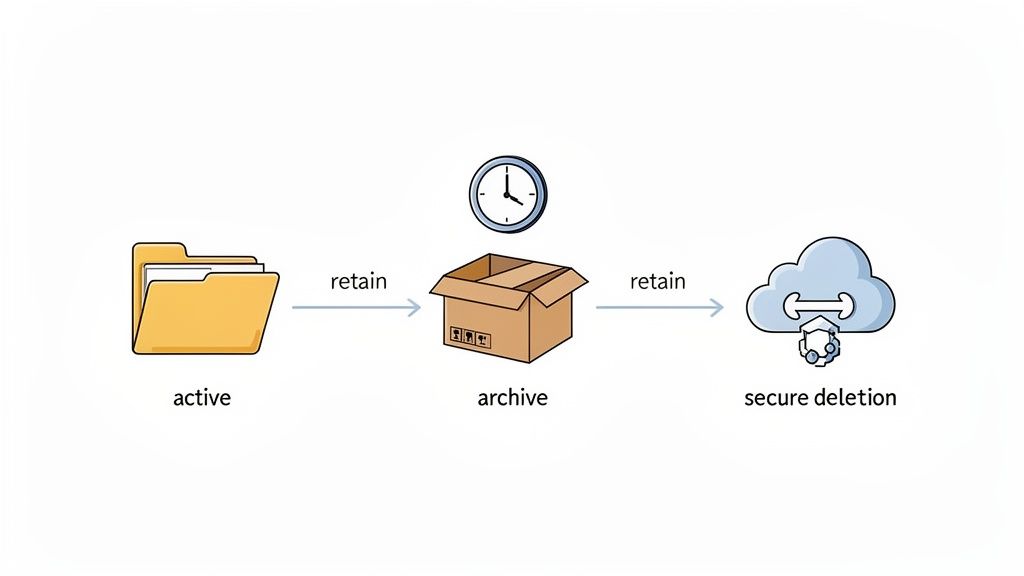
For a platform like Pebb, which holds everything from clock-in records to private messages, these policies keep you on the right side of labor laws and privacy rules. A hospital might need to keep shift records for three years; a restaurant might need payroll data for seven. Without a policy, you’re either deleting data you legally have to keep or hoarding information that just adds risk.
The Big Idea: A retention policy is an automatic cleanup crew for your data. It helps you meet your legal duties without becoming a digital hoarder.
How to Get Started
This turns a legal chore into a smart operation.
Know the Rules: Research the data retention laws for your industry and region. Don’t guess. Healthcare, retail, and hospitality all have different rules for employee records.
Write It Down: Put your retention policies in plain English and make them easy to find. Your Pebb Knowledge Library is a great place for this, so everyone knows the rules.
Automate It: Use your tools to do the work. Set up automatic archiving for chats and files in Pebb to move old data out of the way. This reduces clutter and risk.
Delete for Real: Just hitting 'delete' isn't always enough. You need to be sure the data is truly gone. For retired media, it's crucial to follow a proven standard like the NIST SP 800-88 standard for data sanitization to make sure sensitive information is destroyed for good.
8. Make It a Team Effort
A brilliant policy is useless if nobody knows about it. Rules don't enforce themselves; people do. Training and communication are how you turn a document into a real, shared practice across the company.
For a tool like Pebb, which everyone uses, adoption is everything. You can't just send a memo and hope a warehouse worker understands the nuances of data privacy. Good training makes sure everyone, no matter their role, gets why these rules matter and how to follow them in their daily work.
The Big Idea: Data governance is a team sport. Training is the playbook that ensures every player knows their position and the rules of the game.
How to Get Started
Think of this as an ongoing conversation, not a one-time lecture.
Tailor the Training: Your HR director needs different training than a nurse clocking in. Create short, focused modules. For managers, focus on policy and access reviews. For frontline staff, focus on practical things, like why accurate clock-ins matter.
Use the Tools You Already Have: Keep it simple. Pebb’s built-in onboarding is perfect for training new hires. Use the news feed for reminders and quick tips, reinforcing ideas without pulling people away from their work.
Make it Mobile: Frontline workers are on their feet and on their phones. Design short, mobile-friendly training they can do on a break. A 30-minute webinar won't work.
Encourage Questions: Use a dedicated Pebb Space for a Q&A where people can ask about data policies. When people feel safe asking for help, they’re more likely to do the right thing.
9. Keep an Eye on Things
A policy you don't check is just a suggestion. Setting up your framework is the start. The real work is making sure it’s being followed. Monitoring and auditing are the feedback loop that tells you if your policies are working, where the risks are, and what needs to change.
Without this, the best plans fall apart. For a tool like Pebb, holding sensitive data like shift schedules and performance reviews, this is how you prove you're compliant and build trust. It’s how you make sure your data governance best practices are more than just words.
The Big Idea: Governance isn’t "set it and forget it." It’s a continuous cycle of checking, reviewing, and improving that keeps your data safe.
How to Get Started
You don't need a complex tool to start. Just build a regular rhythm of review.
Define Success: What does "working" look like? Pick a few clear metrics. This could be the percentage of data fields classified correctly or the number of blocked access attempts.
Use Your Tool's Analytics: Your software can do a lot of the work. Pebb’s built-in analytics, for example, can track access patterns and help you spot anything unusual without digging through logs by hand.
Schedule Audits: Put it on the calendar. Work with your IT team to schedule quarterly checks of access logs, permissions, and policies.
Report Simply: Don’t just dump data on your leadership. Create simple reports that tell a story. A quarterly summary showing trends is far more useful than a raw spreadsheet. It shows the value of your work and keeps everyone on board.
10. Mind the Gaps Between Systems
Your data doesn't live in one place. It flows between your HR platform, payroll system, and other tools. Data integration governance is the set of rules that makes sure this flow is secure and reliable. It’s the traffic control for your data highways.
When you connect a tool like Pebb to your other systems, you're opening a door. API governance makes sure that door has a strong lock and a clear guest list. It controls what other apps can see and do with your data. This isn't just a technical detail; it's a fundamental part of your data governance best practices.
The Big Idea: Good integration turns data movement from a potential risk into a controlled, secure process that powers your business.
How to Get Started
It’s about being deliberate with every connection you make.
Map Your Data Highways: Write down every integration and what data flows between them. If you connect Pebb to your payroll system, map out exactly which employee fields are synced and how often.
Set Clear Rules of the Road: Create standards for how systems talk to each other. This ensures they speak the same language and know what to do if something goes wrong.
Control Access: Use API keys and other security measures to control who can access your data and how often. This prevents unauthorized access and protects your systems.
Test, Monitor, and Review: Never turn on an integration without thorough testing. Once it's live, monitor it for failures or strange activity. Schedule regular reviews to make sure it still meets your needs securely.
10-Point Data Governance Best Practices Comparison
Practice | Implementation (🔄) | Resource Requirements (⚡) | Expected Outcomes (⭐📊) | Ideal Use Cases | Key Advantages (⭐) | Quick Tip (💡) |
|---|---|---|---|---|---|---|
Establish a Data Governance Framework and Policy | High — cross-functional design and formal policies | High — governance team, legal, tooling | Regulatory compliance; consistent, trusted data | Large, multi-country organizations handling employee PII | Accountability; compliance; standardized processes | Start with a data audit and form a cross‑functional governance committee |
Implement Data Classification and Categorization Systems | Medium — taxonomy design and automation rules | Medium — classification tools, training | Reduced unauthorized access; clearer retention rules | Environments with mixed-sensitivity data (payroll, comms) | Enforced access controls; simplified compliance | Use automated rules and visual guides; separate data by Spaces |
Define Clear Data Ownership and Accountability | Medium — role assignment and approval workflows | Low–Medium — org alignment, admin setup | Single-point accountability; faster access decisions | Multi-shift/location deployments where ownership is ambiguous | Clear responsibilities; faster approvals; auditability | Document owners in the Knowledge Library and schedule quarterly reviews |
Establish Data Quality Management Processes | Medium — metrics, validation, cleansing routines | Medium — validation tools, audits, training | Higher data accuracy; fewer payroll/scheduling errors | Operations where inaccurate data impacts costs/compliance | Reliable analytics; reduced rework; improved trust | Define KPIs, validate at data entry, and run monthly quality reviews |
Create a Data Dictionary and Metadata Management System | High — cataloging, lineage and standards | Medium–High — metadata tooling, ongoing maintenance | Consistent terminology; faster integrations and onboarding | Integrations across HR, payroll, and multiple systems | Self-service discovery; integration accuracy; governance support | Build in a central Knowledge Library; use business‑friendly definitions |
Implement Access Controls and Role-Based Permissions | Medium — RBAC model design and audits | Medium — admin effort, periodic reviews | Least-privilege enforcement; reduced insider risk | Systems with varied job functions and sensitive employee data | Simplified permission management; audit trails | Map org roles to permission levels and review quarterly |
Establish Data Retention and Archival Policies | Medium — policy definition and lifecycle automation | Low–Medium — legal input, automation scripts | Legal compliance; lower storage costs; controlled exposure | Regulated industries (healthcare, hospitality, payroll) | Cost control; compliance; reduced breach surface | Research regional retention requirements and automate deletion/archival |
Develop Data Governance Training and Change Management | Medium — training programs and comms planning | Medium — content creation, exec sponsorship | Higher adoption; fewer governance breaches; cultural buy‑in | Mobile-first frontline teams with varying technical skill | Increased compliance; sustained behavior change | Create short, role-specific mobile modules and use news feed for updates |
Monitor, Audit, and Report on Data Governance | Medium — KPIs, dashboards, audit cadence | Medium — monitoring tools, analyst time | Early detection of issues; documented compliance evidence | Organizations subject to audits or regulatory oversight | Visibility; prioritized remediation; accountability | Build governance dashboards and schedule regular audits with documented findings |
Establish Data Integration and API Governance | High — integration architecture, API standards, testing | High — engineering, testing, monitoring resources | Consistent cross-system data; secure third‑party access | Integrations with HR, payroll, auth systems and BI tools | Reduced integration errors; controlled API access; traceability | Document all touchpoints, enforce API auth/rate limits, and test integrations before production |
It’s Not a Project, It's a Habit
We’ve covered a lot of ground. Your to-do list might feel a little long right now. That’s okay.
But if you walk away with just one thing, let it be this: data governance isn’t a project you finish. It’s a habit. It’s a cultural shift that becomes part of how your company works.
Let’s be honest. Nobody gets excited about writing retention policies. But they do get excited when they have the right information at the right time. They care about systems that just work. They value clarity and trust. That's the real point of these data governance best practices. You’re not just managing data; you’re building a more reliable and trustworthy company.
From Checklist to Culture
These ten practices are the building blocks. Think of them as a compass, not a rigid checklist.
Structure and Ownership (1 & 3): This creates a clear map of responsibility.
Clarity and Context (2 & 5): This turns abstract data into a shared language.
Quality and Control (4, 6, & 7): This is about building trust in the system.
Adoption and Evolution (8, 9, & 10): This is what makes it a living process.
In a tool where work happens moment to moment, this mindset is everything. Governance isn’t a separate, top-down order. It’s built into every action: a manager updating a schedule, an HR leader posting a policy, a frontline worker clocking in.
The goal isn’t to achieve a perfect state of ‘governance.’ It’s to build a culture where everyone understands that data represents real people and real work. When your team sees data not as an abstract asset but as a reflection of their own effort, the policies become the easy part. It stops being a chore and starts being… just how you get work done.
Ready to see how a unified work app can simplify your operations without sacrificing control? Pebb was built with intentional governance in mind, giving you the tools to manage your data, communications, and people in one calm, organized place. See how it works at Pebb.
