
Business Management System Manual: Build a Calm Organization
Stop chaos! This practical business management system manual helps you document workflows, roles, and knowledge. Build a calm, effective organization for 2026.
Dan Robin
Someone calls in sick. A customer needs an answer now. The shift lead swears the process changed last month, but the only version anyone can find is an old PDF buried in a shared drive. So people improvise. Again.
Most companies don't break because people are lazy. They break because the system asks everyone to remember too much, guess too often, and hunt for basic information in the middle of real work.
That's why a business management system manual matters. Not as a binder on a shelf. Not as a compliance trophy. As a human tool. A company operating system. A clear, shared way of working that helps people do good work without constant interruption, confusion, or heroics.
Your Company Is More Complicated Than It Needs to Be
I've seen the same pattern in small teams and growing companies alike. The work itself is usually manageable. What makes it exhausting is the mess around the work. People don't know which version of a process is current. Managers answer the same questions every week. Handoffs depend on memory. Urgent problems expose how little is documented.
That kind of chaos hides in plain sight because it often looks like hustle. Lots of messages. Lots of follow-up. Lots of people being "helpful." But a business can't run forever on side conversations and tribal knowledge.
Chaos isn't a people problem
When an employee misses a step, leaders often blame carelessness. More often, the underlying problem is simpler. The process wasn't easy to find, wasn't clear, or wasn't updated when something changed. A decent person in a weak system will still produce a shaky result.
A useful manual fixes that. It creates one place where the team can see how the company runs. Not what leadership hopes happens. What should happen when a customer escalates an issue, when a store opens, when someone requests time off, when a new hire starts, when a handoff moves from one team to another.
A calm company is usually just a clear company.
What the manual really replaces
It doesn't replace judgment. It replaces avoidable confusion.
The strongest manuals reduce dependence on:
Memory: People shouldn't have to recall every step under pressure.
Private messages: Core process decisions shouldn't live in chat threads.
Unofficial shortcuts: Teams shouldn't need to invent their own version of the work just to get through the day.
If your company is trying to bring communication, operations, and day-to-day work into one place, it's worth looking at how all-in-one business software changes the shape of the problem. The big shift isn't convenience. It's coherence.
A business management system manual gives people a reliable base layer. Once that exists, work gets quieter. Fewer escalations. Fewer repeated questions. Less stress masquerading as urgency.
Laying the Foundation with Purpose and Scope
A bad manual starts with "we should document things." That's not a reason. That's guilt wearing a clipboard.
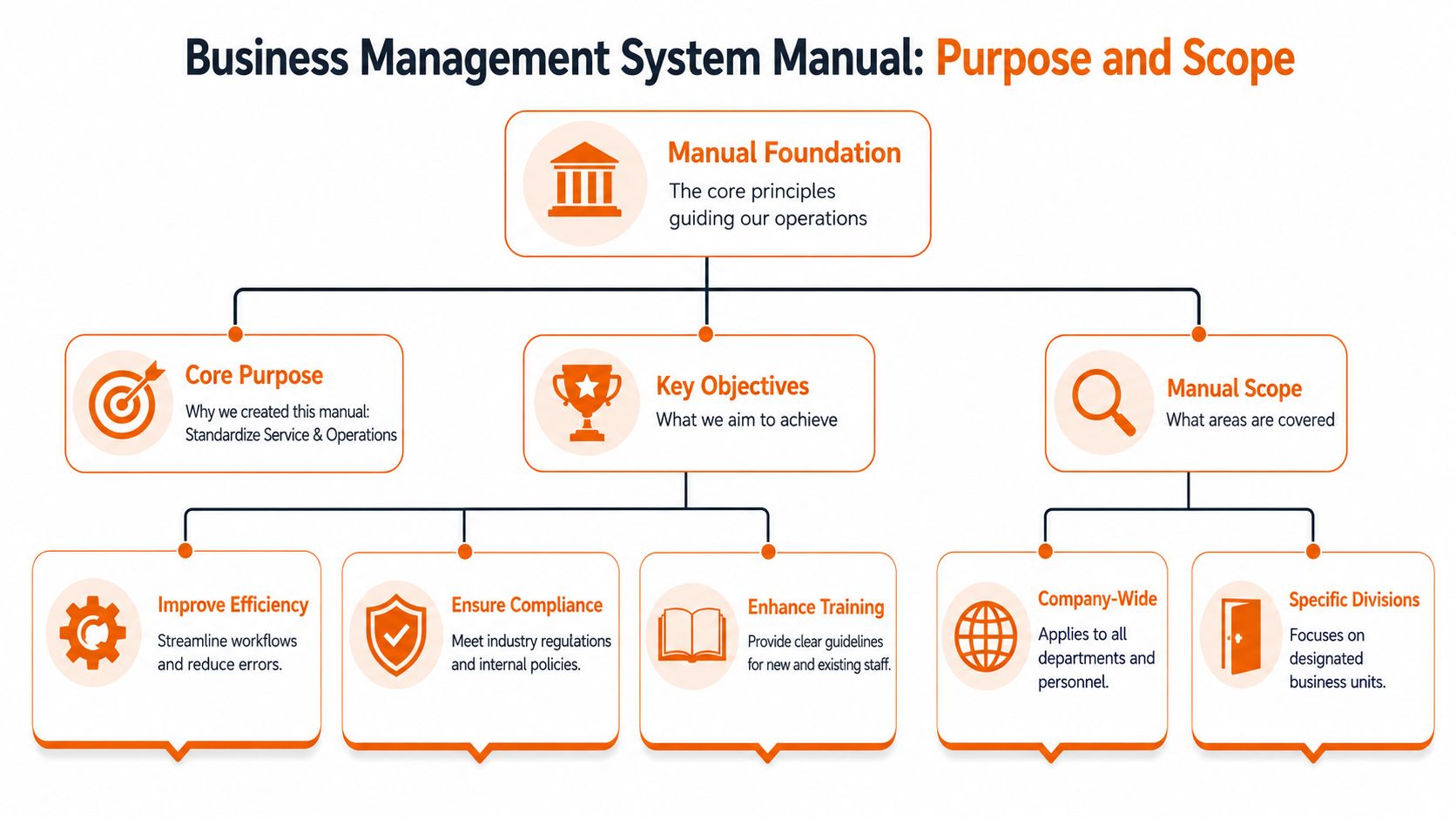
A good manual starts with a sharper question. What confusion are we trying to remove? If you don't answer that first, you'll build a bloated archive that nobody trusts and nobody uses.
Purpose comes before documentation
Some teams need consistency across locations. Others need cleaner onboarding. Others need tighter control because changes in process aren't being communicated well. The point isn't to copy someone else's manual template. The point is to define the operating problem you're solving.
When the purpose is clear, scope gets easier. You can decide what belongs in the manual and what doesn't. A business management system manual should cover the parts of the company that require repeatability, accountability, and shared understanding. It should not become a dumping ground for every file anyone doesn't want to delete.
A useful rule is simple:
Include repeatable work: Opening procedures, approvals, handoffs, training paths, policies, role expectations.
Include decision rules: Who can approve what, when escalation happens, what exceptions need review.
Exclude noise: Draft thinking, personal preferences, outdated artifacts, duplicate versions of the same thing.
This is bigger than a binder
The discipline behind this has matured over time. According to this knowledge management history and ISO 30401 summary, McKinsey coined the term in its modern context in 1987, the practice became standard business practice in the 1990s, and ISO 30401:2018 became the first international standard for Knowledge Management Systems. That matters because it reframes the manual. It isn't just documentation. It's a managed system for preserving how the organization knows, teaches, and repeats its work.
That shift is why I treat the manual as a strategic asset. A company that captures operational knowledge well is easier to train, easier to scale, and less fragile when key people leave.
Practical rule: If a process matters enough to repeat, it matters enough to define clearly.
For teams that are also modernizing service workflows and internal support, this guide to AI-powered ITSM is a useful companion read. Not because every company needs another framework, but because it shows how quickly process clarity falls apart when ownership, service rules, and operating knowledge live in separate places.
Scope should feel tight, not impressive
The best early version of a manual is narrower than most leaders expect. Start with the work that creates the most confusion, most handoff risk, or most repeated questions. Get that right first.
If your first version tries to document the whole company in one push, you'll create paperwork. If it starts with a few essential operating areas and earns trust, you'll create a system people come back to.
Defining Roles and Granting Permissions
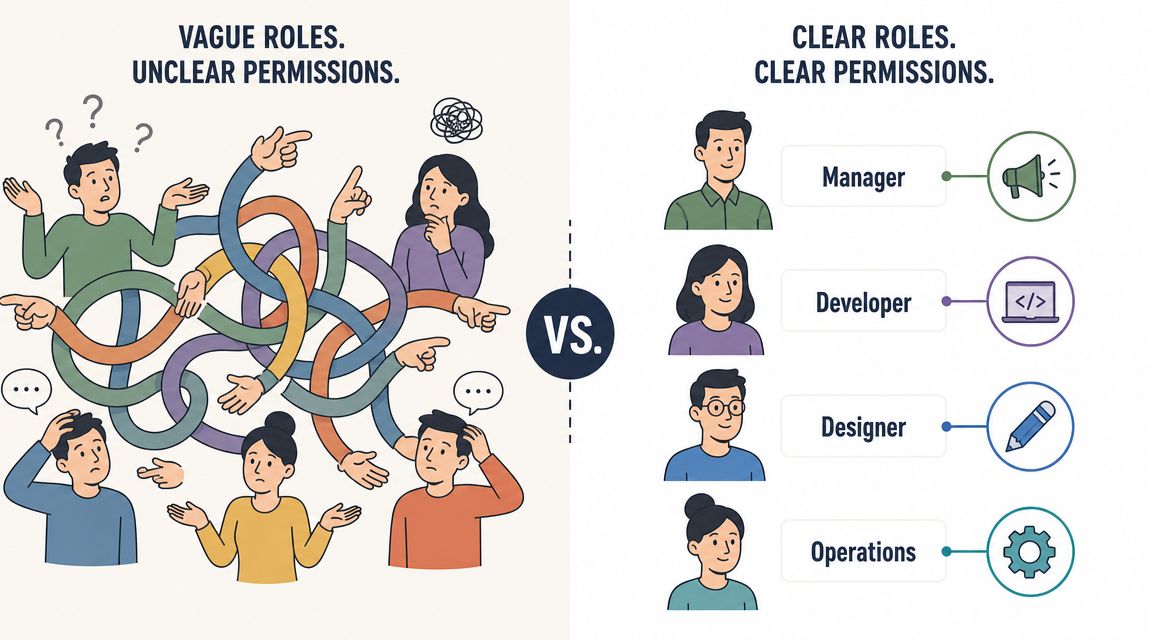
A surprising amount of operational pain comes down to this: people don't know what they're responsible for, and they don't know what they're allowed to do.
Job titles don't solve that. "Manager" can mean ten different things in one company. "Coordinator" can carry real authority in one team and none in another. If your business management system manual stops at job descriptions, you'll still get bottlenecks, duplicate work, and quiet resentment.
Write position contracts, not vague profiles
EMyth puts this well in its advice on building a management system. It recommends documenting “the standards for your way we do it here,” including position contracts and operations manuals, in its management system guidance from EMyth.
That phrase matters. A position contract is not a personality sketch. It's an agreement about outcomes, responsibilities, and decision boundaries.
A strong entry for each role should answer:
What result owns this role: Not "helps with operations," but "ensures every shift is staffed and schedule changes are communicated."
What decisions this role can make alone: Approve swaps, publish updates, sign off on inventory counts, escalate incidents.
Where handoffs happen: Which tasks move to payroll, HR, support, or a supervisor.
Permissions are part of role clarity
Too many manuals define responsibilities but ignore access. That's a mistake. If someone is accountable for a result but can't access the tools, documents, or approval settings needed to do the work, your system is lying to them.
I like to map each role across three layers:
Role layer | What to define | Example |
|---|---|---|
Operational ownership | What the role is answerable for | Shift coverage, customer escalations |
Decision authority | What the role can approve or change | PTO requests, policy acknowledgments |
System access | What the role can view, edit, or publish | Scheduling, payroll-adjacent records, internal updates |
That third layer becomes concrete fast in digital systems. Who can edit the policy library. Who can publish a company-wide notice. Who can see sensitive employee records. Who can only view the frontline checklist.
If you're tightening access rules, this guide on role-based access control best practices is worth reading because it connects governance to everyday work rather than treating permissions as an IT-only concern.
Autonomy needs boundaries
Some leaders worry that spelling out permissions feels controlling. I think the opposite is true. Undefined authority forces people to ask for permission constantly. Clear authority lets them act with confidence.
People do better work when they know where they're trusted to decide.
A good business management system manual gives employees enough structure to move without hesitation. That's not bureaucracy. That's respect.
Crafting Onboarding and Training Procedures
A new hire can tell within a day what kind of company they've joined. If their first week depends on chasing links, asking five people the same question, and guessing which process is current, they don't feel welcomed. They feel exposed.
The manual should fix that from day one.
Build onboarding around self-service clarity
Most onboarding fails because the company assumes proximity equals training. Sit near someone. Shadow them. Ask questions. Pick it up as you go. That works only when the team has time, the trainer is excellent, and the process rarely changes. Real life is messier.
A stronger system gives new people a clear path. Not a pile of documents.
That path usually starts with a sequence like this:
Start with orientation basics
Give people the essentials first. Where to find policies. How communication works. What the workday rhythm looks like. How to request help.Move into role-specific tasks
Show the recurring work for their role in the order they'll encounter it. Daily tasks before edge cases. Common approvals before unusual scenarios.Add proof of understanding
This doesn't need to be formal or stiff. A checklist, manager signoff, short practical walkthrough, or observed task completion is enough.
Good training reduces dependency
The true win isn't speed for its own sake. It's confidence. When people know where information lives and trust that it's current, they stop hovering around managers for reassurance.
Your manual should include:
Onboarding checklists tied to role, location, or team
Policy entries written in plain language
Task instructions with screenshots, examples, or decision notes where useful
Escalation points so a new employee knows when not to improvise
I also like to separate "must know now" from "reference later." The WiFi process, clock-in rules, schedule expectations, and customer-facing standards belong up front. Detailed exceptions can wait until the employee has context.
Write for the nervous reader
This matters more than most companies realize. A new hire is rarely reading your manual in a calm, ideal setting. They're trying to remember names, avoid mistakes, and prove they can keep up.
So write procedures the way a stressed person needs to read them. Short sections. Clear verbs. Obvious next steps. No internal jargon unless it's explained.
A good test is simple. Can someone with basic context follow the procedure without a translator sitting beside them?
The best onboarding manual doesn't impress managers. It reassures new employees.
When that happens, managers get time back, team standards improve, and the first week feels less like survival.
Mapping Daily Operations and Workflows
The business management system manual becomes real. Not in the mission statement. Not in the policy pages. In the daily work.
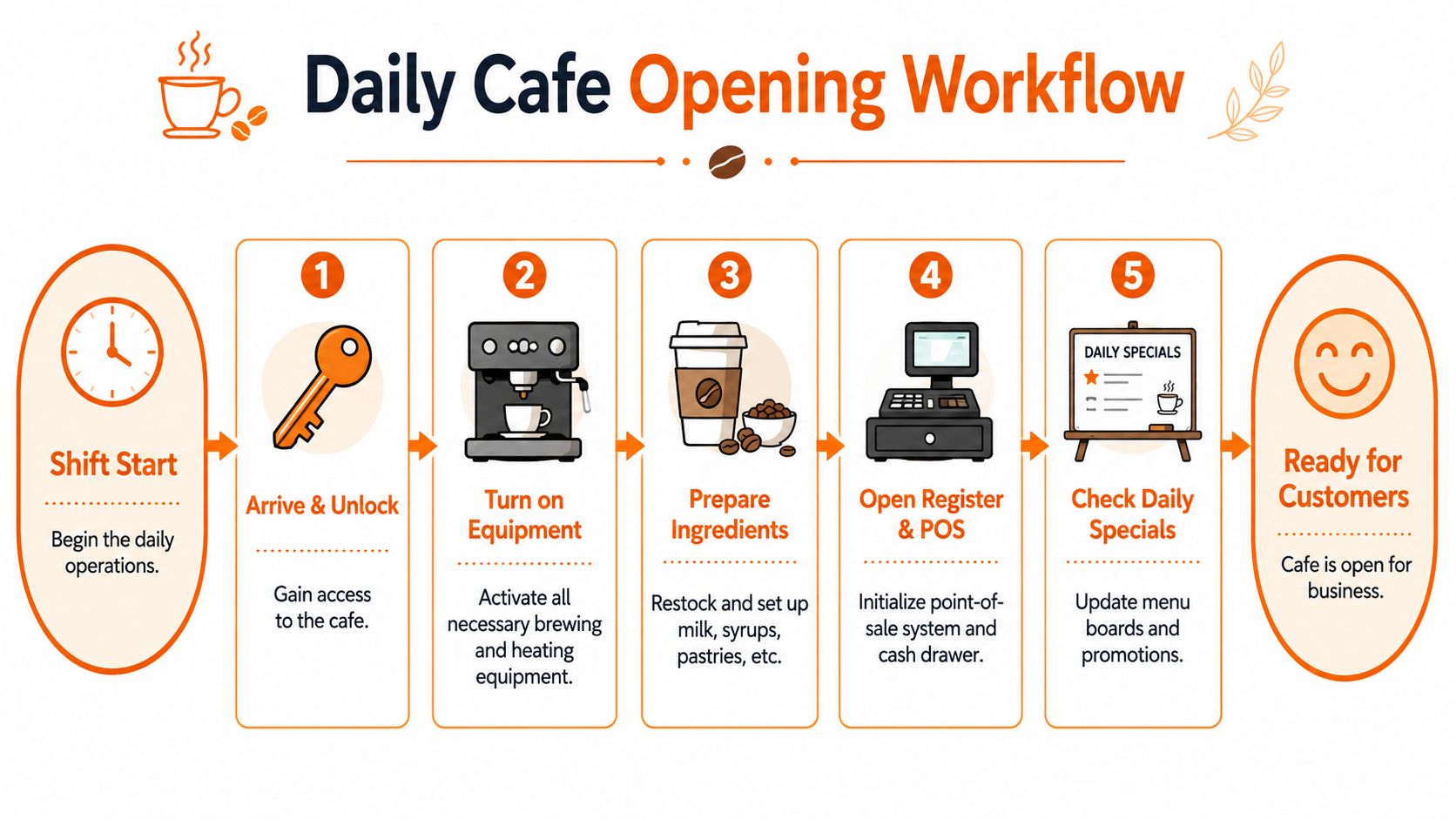
Open the store. Start the shift. Handoff the patient. Approve the return. Close the register. Respond to the service request. If these routines aren't mapped clearly, the company is still running on memory.
The need for this kind of integration isn't new. In this history of management information systems, a 1967 Booz, Allen & Hamilton survey published in 1968 found that “the computer increasingly is penetrating and permeating all areas of major manufacturing corporations,” and by the early 1970s the goal had become fully integrated systems. That's the same operating principle good teams still need now. Connected work, not isolated tasks.
Use triggers, steps, and outcomes
Most workflow documentation is either too vague or too detailed. It says "handle customer complaint" without telling people how, or it drowns them in a wall of text they won't use during a real shift.
The cleanest format I've found has three parts:
Workflow part | What it answers | Example |
|---|---|---|
Trigger | What starts the work | Customer submits complaint |
Steps | What to do next, in order | Verify issue, review account, respond, escalate if needed |
Outcome | What done looks like | Case resolved or handed off correctly |
That structure works for simple tasks and cross-team processes alike. It also keeps people from documenting activities without defining the finish line.
Daily operations should live together
A company gets calmer when related workflows stop living in separate systems. Scheduling in one app. PTO in email. shift handoffs in chat. Policies in a drive. Clock-in rules in someone's head. That setup forces employees to stitch together the company every day.
Your manual should connect the recurring work of the business in one operating model:
Shift routines: Opening, mid-shift checks, closing, handoffs
People processes: Scheduling, availability updates, leave requests, attendance rules
Service workflows: Requests, incidents, escalations, customer follow-up
Admin work: Approvals, reporting, exceptions, recordkeeping
Keep the map practical
A workflow isn't useful because it's complete. It's useful because people can follow it under normal pressure.
That means:
use plain verbs
note where judgment is required
define who owns the next step
call out exceptions without letting them swallow the whole process
If you do this well, the manual stops being abstract documentation and becomes the place where the company's routine work lives.
Building Your Central Knowledge Library
Not everything belongs in a workflow. Some information just needs to be easy to find.
People need the holiday policy. The emergency contact list. The dress code. The brand file. The handbook. The explanation of how reimbursement works. None of that needs a process map, but it does need a home.
Separate reference material from active procedures
A lot of manual projects become messy because they mix two different things in one pile. One is how work moves. The other is what people need to know. Both matter. They just shouldn't be organized the same way.
A central knowledge library should hold the second category. I think of it as the company's internal reference shelf. Searchable, current, and boring in the best possible way.
Good categories usually include:
People and policy such as leave, conduct, benefits, travel, expenses
Company basics such as org charts, values, key contacts, location details
Brand and communication such as templates, tone guidance, approved assets
Safety and emergency such as incident contacts, procedures, reporting rules
Organize for retrieval, not elegance
Leaders often overdesign taxonomy. Employees don't care whether your category names are intellectually tidy. They care whether they can find the parental leave policy in seconds on a phone before their shift starts.
So the library needs plain labels, predictable structure, and a small number of top-level categories. That sums it up.
A simple pattern works well:
Library layer | What belongs there |
|---|---|
Top category | Broad area like HR, Operations, Safety |
Subcategory | Narrower grouping like Leave, Scheduling, Incident Response |
Article or file | The actual policy, form, guide, or reference note |
If you're building this from scratch, this article on how to build a central knowledge hub for your team is a practical reference because it stays focused on findability instead of theory.
Searchability beats completeness
A giant archive feels productive until nobody can use it. The better approach is to publish the information people ask for most, keep naming conventions consistent, and remove outdated duplicates fast.
I also recommend naming entries the way employees naturally search. "Time off request rules" beats "absence administration protocol." "Store closing checklist" beats "end-of-day procedural framework." People search in plain language. Your library should answer in plain language too.
When the knowledge library is clean, interruptions drop. People stop asking coworkers for documents they should be able to find themselves. That alone changes the mood of a team.
Managing Integrations and Ensuring Security
A manual falls apart fast when it lives in one place and the work lives somewhere else. HR updates a title, IT changes access, a manager moves someone to a new team, and the manual is already out of sync. People hit the wrong procedure, lose access they need, or keep access they should not have.
That is how confusion turns into risk.
The fix is to treat the manual like part of the company operating system. It should stay connected to the systems that define who people are, what work they do, and what they are allowed to see. If employee status changes in HR, permissions should update. If someone transfers departments, the workflows and documents tied to that role should change too. Manual upkeep should not depend on a supervisor remembering a checklist item three days later.
A connected platform helps here. Pebb, for example, combines communication, knowledge, tasks, scheduling, clock-in, and PTO in one workspace with role and admin controls. The practical benefit is simple. The manual sits inside the flow of work instead of off to the side as a separate filing project.
Security needs the same first-principles approach. Easy access matters, especially for frontline teams checking procedures on a phone during a shift. But broad access and careless access are not the same thing. People need fast answers. The business needs clear boundaries.
Alberon's guidance on business management systems makes that balance clear. A sound setup should be web-accessible, include version-controlled procedures, support periodic quality reviews, and align with quality-management thinking such as ISO 9001, as outlined in this business management system guide from Alberon.
In practice, I group manual access into three levels:
Open internal access for company policies, standard workflows, onboarding materials, and routine team guidance
Limited managerial access for approval rules, supervision records, and sensitive operating notes
Restricted admin access for employee data, system settings, audit records, and compliance documents
That structure keeps the manual useful without turning it into a free-for-all.
Version control matters just as much as permissions. If two versions of a process are floating around, staff will choose the one they found first, not the one you intended them to follow. Every controlled document needs a clear owner, a visible current version, and a simple review date. Old copies should be archived or removed, not left around to confuse people.
A secure manual supports autonomy. People can find what they need, trust that it is current, and know where the boundaries are. That creates the kind of calm many teams lack.
Using Analytics for Governance and Improvement
Most manuals decay. Nobody announces that the process library is losing credibility. It happens in smaller ways. People stop opening certain pages. Managers keep answering the same question manually. Teams create their own workaround because the official process is behind reality.
You don't fix that with enthusiasm. You fix it by checking whether the system is still being used and still helping.
Measure behavior, not vanity
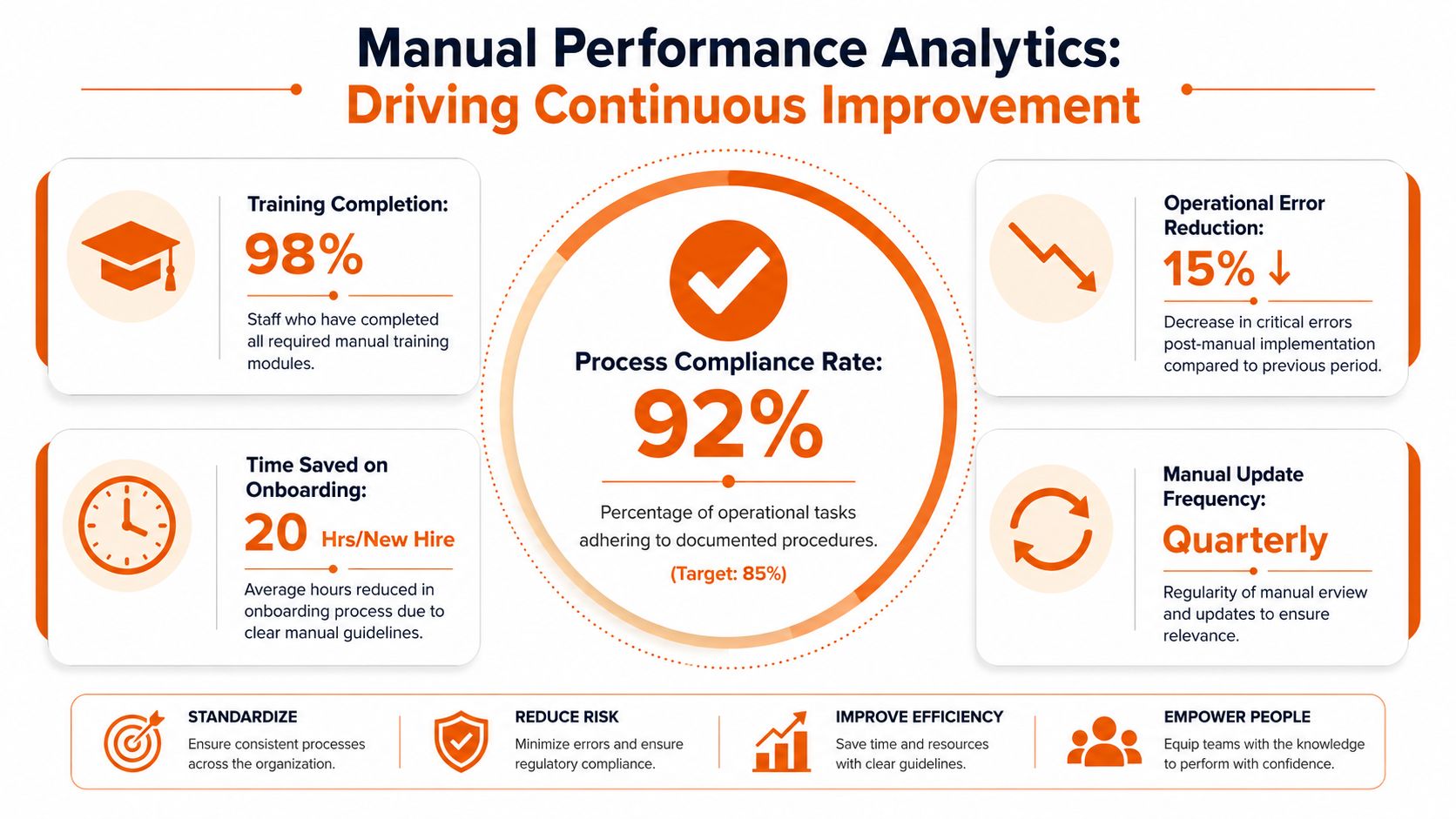
The point of analytics isn't to watch employees more closely. It's to spot friction in the operating system.
Good signals are usually practical:
Are people viewing key procedures before or during recurring work
Are onboarding materials being completed in the expected flow
Are certain policies never opened because they're hidden, unclear, or irrelevant
Are tasks or approvals stalling at the same point each week
You don't need a giant reporting program to learn something useful. Even basic visibility into article usage, task completion patterns, and engagement with updates can show where the manual is helping and where it's being bypassed.
Review on a cadence, not in a panic
A manual should be reviewed before it becomes embarrassing.
That doesn't mean every page needs constant rewriting. It means each critical area should have an owner and a review rhythm. The owner checks whether the content still matches current practice, whether exceptions have piled up, and whether linked materials still work.
I prefer a simple governance rhythm:
Review focus | What to ask |
|---|---|
Usage | Are people actually using this content? |
Accuracy | Does it still match the way work is done now? |
Friction | Where are managers still stepping in manually? |
Ownership | Does someone clearly own updates and approvals? |
A living manual earns trust
Teams know very quickly whether the manual is alive or fake. If they open an article and find outdated steps, they stop trusting the rest. If they see regular cleanup and clear ownership, they'll come back.
This is why I don't separate governance from usability. A business management system manual stays useful only when leaders treat it like an operating asset. Something to maintain, not just launch.
If nobody reviews the manual until something breaks, the manual isn't governing anything.
That's the difference between documentation and management.
Frequently Asked Questions About Your Manual
The hard part isn't writing the first version. The hard part is dealing with the messy reality after launch. Exceptions show up. Teams invent shortcuts. A manager changes a process but forgets to update the manual. That's where most systems lose credibility.
One common failure shows up when businesses rely on unofficial fixes. As described in this analysis of manual reconciliation compliance gaps, manual workarounds and undocumented exceptions can create hidden compliance gaps and weak audit trails. The problem isn't manual work itself. It's uncontrolled manual intervention that isn't logged, reviewed, or auditable.
The questions leaders usually ask too late
That risk shows up in everyday operations long before anyone uses the word compliance. It appears when a supervisor says, "We always do it this way on weekends," but that version isn't documented anywhere. It appears when finance keeps a side spreadsheet because the official process doesn't handle exceptions well. It appears when a team invents a shortcut that works until the wrong person is absent.
The answer isn't to outlaw judgment. The answer is to make exceptions visible.
If people need a workaround often, that isn't an exception anymore. It's a process design problem.
Common Questions for Your Business Management System Manual
Question | Answer |
|---|---|
How detailed should the manual be? | Detailed enough that a trained employee can follow the work without guessing. Not so detailed that routine judgment disappears into clutter. |
What should we do with exceptions? | Log them, route them to an owner, and review them regularly. If the same exception keeps returning, update the process. |
How often should the manual be reviewed? | Review critical procedures on a set cadence and after meaningful operational change. Waiting until failure is too late. |
Who should own updates? | Each major area needs a named owner. Shared ownership usually becomes no ownership. |
How do we keep people using it? | Keep it current, searchable, and tied to real work. If the manual helps people finish tasks, they will return to it. |
Is a manual still useful if parts of our workflow are manual? | Yes. The risk isn't manual effort by itself. The risk is manual effort with no rules, no review trail, and no documentation. |
A manual should reduce admin, not add to it
The idea that auditable exceptions and reviewable changes might mean more bureaucracy often spooks many companies. It doesn't have to.
Keep the mechanism light. A simple exception form. A clear owner. A review note. A version update when the pattern proves real. That's enough to keep the system honest without drowning people in process theater.
A business management system manual works when it gives the company a shared memory and a sane way to adapt. Not a rigid script. Not a loose suggestion. Something in between. Strong enough to create consistency. Flexible enough to survive real life.
If you're trying to build that kind of operating system in practice, Pebb is one option to look at. It brings team communication, knowledge, tasks, scheduling, clock-in, PTO, files, and permissions into one place, which makes it easier to keep the manual close to the work instead of hiding it in a separate tool nobody opens.
