
Business Management Software for Small Businesses: Grow 2026
End app chaos! Our business management software for small businesses unifies teams, streamlines operations, and brings sanity back to your workday in 2026.
Dan Robin
Some days it feels like you're not running a business. You're babysitting apps.
The team chat is in one place. Schedules live somewhere else. Tasks are scattered between a project board, text messages, sticky notes, and whatever your manager remembered to mention before clock-out. HR documents sit in a drive nobody opens. Someone asks for time off in a group chat. Someone else misses the update because they were on shift, not at a desk.
That's the modern small-business mess. Not a lack of tools. Too many of them.
The Messy Reality of Running a Small Business Today
If you run a small business with both office staff and frontline workers, you already know the pattern. The people at desks get the polished systems. The people moving the day along get scraps. A scheduling app here. A WhatsApp thread there. A bulletin board in the break room. Maybe an HR portal they only use when they forget a password.
It looks manageable from a distance. Up close, it's chaos.
A shift swap gets approved, but the updated schedule doesn't reach everyone. A new policy gets uploaded, but half the team never sees it. A manager sends an announcement, but the night shift is left out. Someone clocks in late because they were checking three different places just to figure out where they were supposed to be.

Most articles about small-business tools still miss this lived reality. As Factorial's roundup of small business management software points out, generic SMB software roundups mention communication and task tracking, but usually skip operational realities like shift handoffs, clock-in, PTO, and policy access, even though those are core to frontline productivity.
That gap matters. A lot.
Where tool sprawl actually hurts
The problem isn't just that you pay for too many subscriptions. The problem is that work gets split into pieces that no longer talk to each other.
Communication breaks first: The office hears the update. The floor doesn't.
Context disappears: A task exists, but nobody knows why it matters or who owns the next step.
Managers become human glue: They spend their day repeating, forwarding, reminding, and checking.
You can survive with disconnected tools for a while. Then the business gets a little busier, adds a few more people, and the cracks turn into your daily routine.
What small businesses actually need
At this point, business management software for small businesses starts to matter. Not as a fancy category label. As an antidote to the mess.
For a real small business, “management” doesn't just mean finance dashboards and sales reports. It means the basic daily mechanics of work: who's on shift, what changed today, where the file lives, what needs approval, who saw the policy, and whether the whole team can use the same system without training sessions that feel like punishment.
When people talk about growth, they often mean more revenue. Fair enough. But operationally, growth usually means more handoffs, more exceptions, and more chances for confusion. If your systems are already duct-taped together, growth just gives the duct tape more places to fail.
Beyond Spreadsheets and Separate Apps
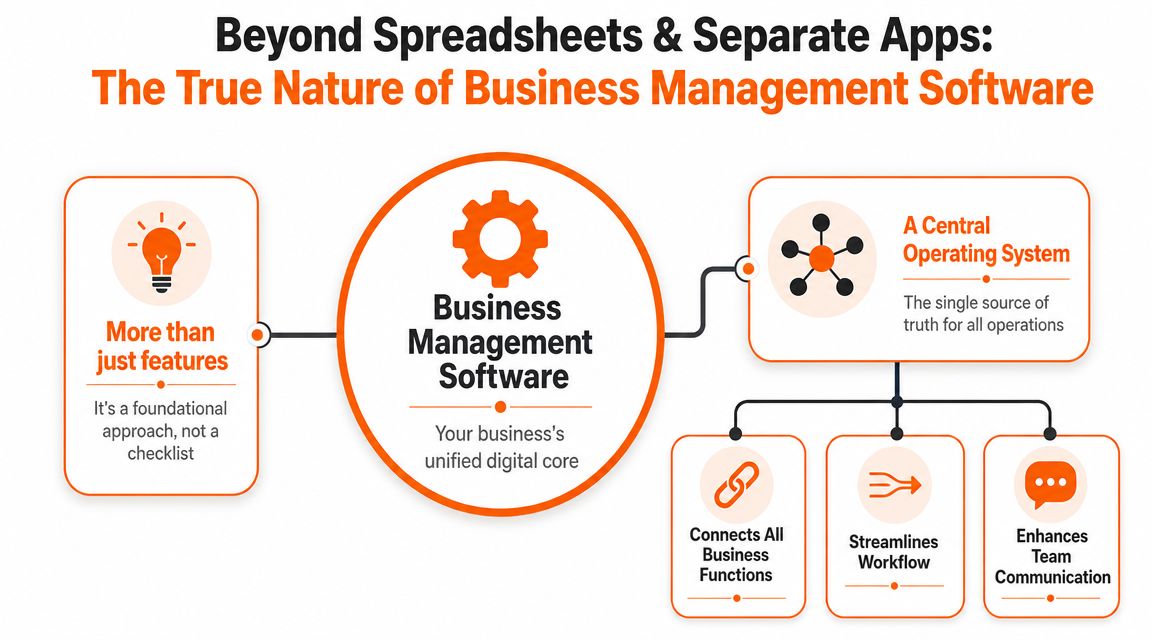
I think of business management software as the business's operating system.
Not a pile of features. Not a marketplace of add-ons. An operating system. One place where the work connects.
That's the shift a lot of small businesses miss when they shop for tools. They compare feature lists instead of asking a simpler question: does this give us one reliable place to run the company?
It's not software. It's coordination.
A spreadsheet can track things. A chat app can pass messages around. A scheduler can put names on a calendar.
But none of those tools, on their own, creates shared context. They don't give everyone the same picture of what's happening. They don't tie the conversation to the task, the task to the schedule, or the schedule to the person doing the work.
That's why separate apps feel productive at first and exhausting later. Each one solves a local problem. Together, they create a systems problem.
The category grew up
There's a reason the market moved this way. A real milestone in small-business software was the shift from isolated desktop tools to integrated cloud suites. By the 2020s, platforms commonly bundled many business functions into one system. One example cited in Knack's guide to small business management software described Zoho One as offering over 45 integrated applications, while another guide characterized it as a 40+ app suite for CRM, accounting, HR, marketing, and project management.
That matters because it changed expectations. Small businesses stopped asking, “Which tool do we use for this task?” and started asking, “Why isn't this connected already?”
Practical rule: If your staff has to re-enter the same information in two places, you don't have a system. You have paperwork with better branding.
The real standard now
Modern business management software for small businesses should act like a central nervous system. It should carry signals across the whole company, not just help one department keep its own notes tidy.
That includes desk workers, but it also includes the shift lead opening the store, the nurse checking an updated policy, the restaurant manager filling tomorrow's rota, and the warehouse supervisor trying to get everyone the same message before the next handoff.
If you want a broader view of how consolidation changes day-to-day operations, this take on all-in-one business software is worth reading.
The main point is simple. A business runs better when its tools stop acting like strangers.
What to Expect from a Single Source of Truth
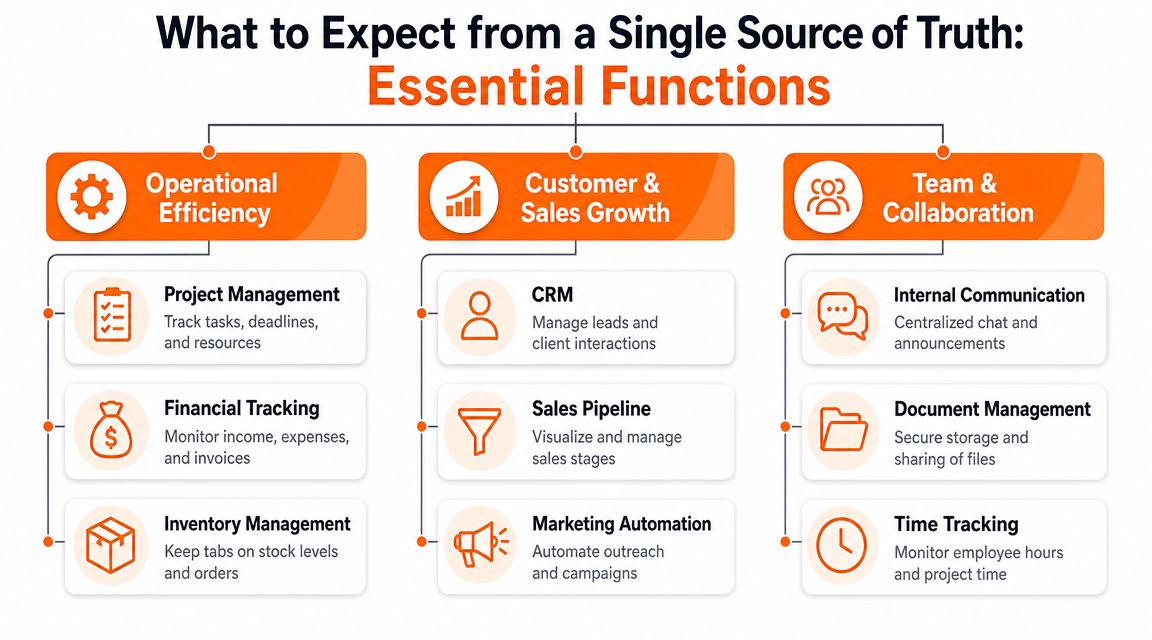
A good system should do three jobs well. Keep everyone in sync. Run the day-to-day. Manage the people side without making it feel like paperwork theater.
That's what a single source of truth means in practice. Not one giant dashboard nobody checks. One shared system where the same information flows through the business without getting copied, lost, or argued over.
Keeping everyone in sync
For small teams, communication isn't a “culture” layer sitting on top of core work. It is core work.
Announcements, team chat, shift updates, handoff notes, quick calls, group spaces, and file sharing all belong close together. When they're separated, people miss context. They see the message but not the task. They get the task but not the latest update. They find the file but not the policy that explains it.
This is especially true when half the team sits at desks and the other half doesn't. Office tools tend to assume everyone has time to log into a portal, hunt around, and catch up. Frontline teams don't work that way. They need the update, the task, and the document in the same mobile-friendly place.
Running the day-to-day
Much software either earns its keep or becomes shelfware.
Scheduling, tasks, time tracking, shift coverage, approvals, calendars, and status updates should work like parts of one machine. Not six tabs held together by wishful thinking. If someone requests time off, that shouldn't trigger a chain of manual edits and reminder messages. It should affect the relevant workflow without drama.
The strongest pattern here is workflow unification. As Homebase explains in its small-business management software guide, when scheduling, time tracking, and payroll share the same data, hours worked flow directly into calculations without rekeying. That reduces manual errors because each process is computed from the same source-of-truth time event.
That sounds technical, but the business impact is plain. Less duplicate entry. Fewer payroll mistakes. Less manager time spent fixing preventable issues.
When one clean time record feeds the next process, the business gets calmer. Not because people suddenly got smarter, but because the system stopped asking them to repeat themselves.
Managing your people without adding friction
Small businesses need employee profiles, onboarding materials, policy access, documents, permissions, and a people directory. They also need all of that to be usable by actual humans on a phone.
A document repository alone won't cut it. If policies are buried in folders, they may as well be in a filing cabinet. If onboarding takes place across email, chat, PDF attachments, and a few verbal reminders, new hires start confused and stay that way longer than they should.
That's why document access matters inside the daily workflow. This guide to document management for business beyond simple storage gets at the core idea well. Documents should support action, not sit in a digital attic.
One example that shows the difference
Say an employee submits a PTO request inside the same system used for schedules, team communication, and records. A manager reviews it there. The approved time off updates the schedule. The team sees the shift gap. Coverage gets assigned. The relevant record is preserved. Nobody copies anything by hand.
That's the difference between “we have software” and “we have a working system.”
For teams looking at unified employee apps, tools such as Connecteam, Zoho One, Microsoft Teams paired with other business tools, and Pebb all reflect this broader move toward bringing communication, operations, and people management into one place. The important part isn't the logo. It's whether the tool keeps the work connected for everyone, including people away from desks.
Putting It to Work in the Real World
Abstract talk about “integration” is easy to ignore. Daily problems aren't abstract.
A retail team feels it when shift swaps turn into long message threads and nobody knows which version of the schedule is current. A restaurant feels it when front-of-house and kitchen staff work from different assumptions during a busy service. A clinic feels it when a policy changes and managers have no clean way to confirm who saw it.
According to an industry summary citing TechRadar research, 70% of small businesses that switched to integrated software saw a measurable increase in productivity within six months. That result makes sense. Work speeds up when people stop stitching systems together by hand.
Three very ordinary examples
In retail, the pain often starts with coverage. Someone calls out. A manager scrambles through texts. Another employee says they never saw the latest stockroom task list. The store opens with half the context it needs. In a unified app, the same place that handles the shift update can also carry the task list, the opening checklist, and the announcement about the new promotion.
In restaurants, the friction is often timing. Menus change. Specials change. Staffing changes. The kitchen needs one set of updates. Front-of-house needs another. Managers need both groups aligned before service starts. When communication, tasks, and scheduling live together, that pre-shift coordination gets shorter and cleaner.
In healthcare or care settings, policy access matters as much as scheduling. A revised procedure isn't helpful if it sits unnoticed in email. Staff need quick access on mobile, and managers need a straightforward way to keep operational updates close to the daily workflow.
Industry | Common Pain Point | Unified App Solution |
|---|---|---|
Retail | Shift swaps, missed announcements, unclear daily priorities | Shared scheduling, team updates, and task lists in one place |
Hospitality | Front-of-house and back-of-house misalignment | Role-based communication tied to shifts and service tasks |
Healthcare | Policy updates and schedule coordination across teams | Mobile access to documents, announcements, and staffing workflows |
Logistics | Cross-location communication gaps | Central updates, task tracking, and team visibility across sites |
Why this works better than a patchwork stack
The biggest win isn't that one app replaces five. It's that your managers stop acting as the integration layer.
They don't have to copy a note from chat into the scheduler. They don't have to repost the same announcement in three places. They don't have to answer the same “where do I find this?” question every week.
Software should remove repeat explanations. If your managers still have to narrate the business all day, the system isn't doing its job.
That's what “business management” should mean for a small business. Not a dashboard for the owner alone. A practical system that helps everybody work from the same page.
How to Choose a Tool Without Losing Your Mind
Most software buying advice is too polite.
It tells you to compare features, book demos, and think about scalability. Fine. But small businesses don't usually fail at software selection because they forgot to ask about reporting filters. They fail because they buy something broad, heavy, and impressive that their team never really adopts.
The harder part isn't choosing. It's choosing something your actual company will use.
Start with the mess, not the feature grid
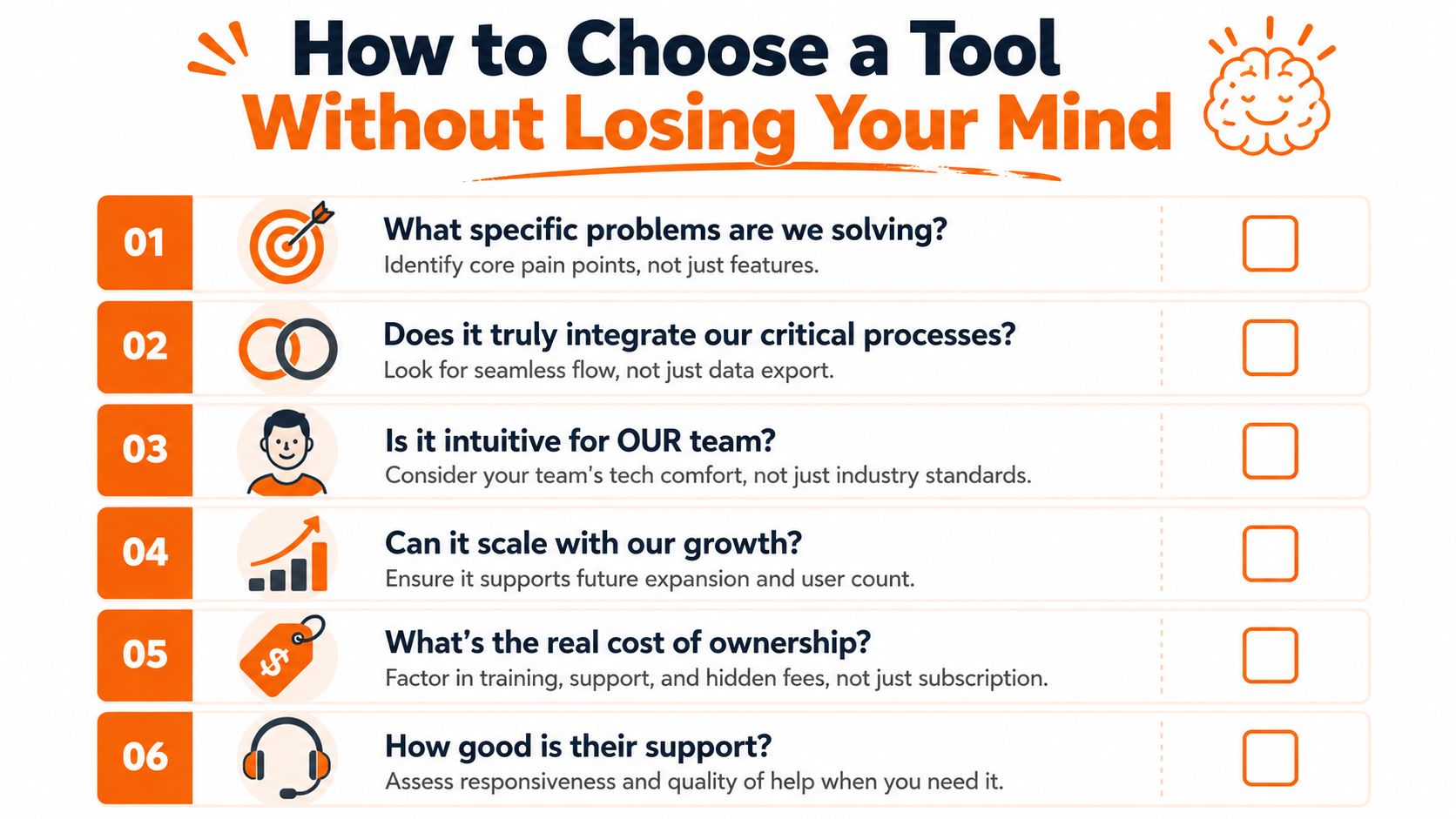
Ask what's causing daily friction right now. Is it missed updates? Shift confusion? Policy access? Duplicate entry? Managers wasting hours chasing people? Begin there.
That sounds obvious, but it's easy to get distracted by polished demos. A feature can be impressive and still irrelevant. Small teams need relief, not theater.
Most guides also skip a key question: how much effort will adoption take? As Systems and Teams notes in its review of business management systems for small businesses, many software guides don't quantify the setup effort, change-management costs, or hidden time tax of replacing multiple tools with one system.
That's the part to take seriously.
Five questions that matter more than another demo
Will people use it on their phones? If your frontline staff need a desktop browser and ten spare minutes, adoption will drag.
Does it connect the workflows that matter most? Data export is not the same as a genuine workflow connection.
Can you start small? A system that only pays off after a giant rollout is risky for a lean team.
Is it intuitive for your least technical user? Ignore this and your managers become permanent support staff.
What happens in week two? That's when the novelty fades and the actual usability test begins.
Beware the “all-in-one” trap
I like unified tools. Clearly. But not every business needs the biggest suite it can afford.
A small company with simple needs may be better off with a narrower tool that does a few connected jobs well. The point isn't to buy the most software. The point is to reduce friction. Sometimes that means a focused system. Sometimes it means a broader platform.
If your team is also trying to align goals and execution, this guide on choosing OKR tools is useful because it asks practical questions about fit, clarity, and adoption instead of assuming more features are always better.
What I'd prioritize in order
For a mixed desk and non-desk workforce, I'd look for these in plain order of importance:
Mobile-first use
Communication tied to daily operations
Scheduling, tasks, and documents in one flow
Permissions that don't require an IT department
A rollout path that doesn't consume a quarter of your life
If you're comparing categories, this overview of operations management tools can help frame the difference between broad operations systems and narrower point tools.
Choose the tool that removes the most repeated effort with the least ongoing explanation. That's usually the right one.
Rolling It Out Is Simpler Than You Think
The worst way to roll out new software is to announce that everyone must now do everything differently starting Monday.
Small businesses don't need a dramatic launch. They need an early win.
Start with one problem
Pick one pain point that everybody already agrees is annoying. Weekly scheduling is a good candidate. So is shift communication. So is policy access for new hires.
When the first use case is obvious, the team doesn't need a long speech. They understand the change because it solves a real irritation they felt yesterday.
Don't roll out a platform. Roll out relief.
Give the team a reason to care
People adopt tools when the “why” is concrete. “No more hunting through group texts” works. “One place for updates and schedules” works. “You can check your shift, request PTO, and find the handbook on your phone” works.
Vague transformation language does not work.
A few practical habits help:
Pick a local champion: Choose one manager or team lead who'll use the tool well and answer everyday questions.
Keep the first workflow small: Don't migrate every process at once.
Make the first week useful: Post updates, share one key document, and run one routine task through the system.
Listen for friction: If people keep asking the same question, fix the workflow, not the person.
Build momentum before adding complexity
Once one team uses the system naturally, expand. Add another workflow. Bring in another location. Move one more recurring process into the same place.
That gradual approach works better because confidence spreads faster than instructions do. When employees see that the tool saves time, the rollout stops feeling like management's new hobby and starts feeling normal.
For most small businesses, that's the entire game. Not a perfect implementation. A believable one.
The Goal Is Sanity Not Software
Small businesses don't need more software. They need less confusion.
That's why this category matters when it's done right. Good business management software for small businesses isn't really about dashboards, modules, or feature checklists. It's about giving the company one dependable place to work. One place where updates, schedules, tasks, documents, and people stop drifting apart.
The best systems feel quiet. They remove little frictions that used to eat the day. The manager doesn't have to repeat the same update three times. The employee doesn't have to guess where to look. The owner stops spending energy reconciling tools that were never meant to fit together.
That's the payoff. More clarity. Fewer dropped balls. A company that feels more connected than scattered.
A unified app should feel like a digital home for the team, not another tab to tolerate.
If your current stack disappeared tomorrow, would your business get simpler or harder?
If you're looking for a calmer way to run communication, scheduling, tasks, documents, and team coordination in one place, Pebb is worth a look, especially for businesses with both frontline and office staff that want one mobile-friendly system instead of a pile of disconnected apps.
