

Author: Ron Daniel
Why every frontline business needs a digital headquarters in 2026
Unify chat, schedules, forms, and clock‑in into one mobile app to stop missed updates, simplify shifts, and reduce wasted time.
83% of frontline workers miss important information at work. When I first saw that number, I didn’t think, “That sounds high.” I thought, yeah, that tracks.
At Pebb.io, I keep seeing the same problem in stores, warehouses, hotels, and field teams across the U.S.: work is split across texts, paper schedules, bulletin boards, and too many apps. The result is simple but costly - missed updates, coverage gaps, payroll issues, and managers wasting part of the day just trying to piece together what’s going on. Add in the fact that 70% of frontline workers already use mobile devices for work, and the gap gets hard to ignore: the phone is there, but the work system often isn’t.
That’s why I think every frontline business now needs one digital home for daily work. Not more tools. One place for chat, schedules, forms, updates, and day-to-day tasks.
Based on what I’ve seen at Pebb.io, this comes down to three things: what fragmented work is costing teams, what changes when everything sits in one app, and which frontline worker solutions make the biggest difference first. If you run frontline teams in 2026, that’s the shift worth looking at.
The frontline communication problem in 2026
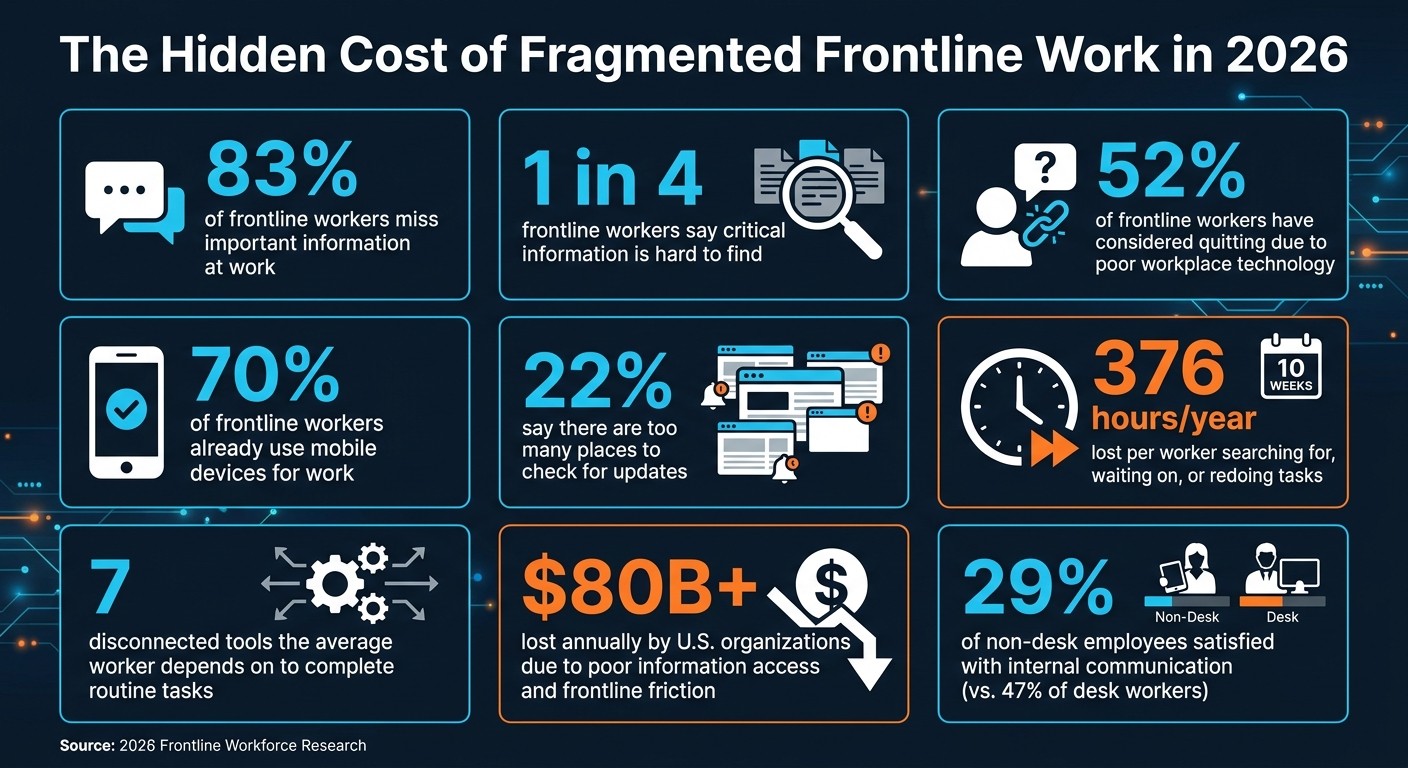
The Hidden Cost of Fragmented Frontline Work in 2026
I’ve seen this play out more times than I’d like to admit at Pebb.io. A manager starts a shift, opens one app for schedules, checks text messages for callouts, scans email for updates, and then hunts through a bulletin board post that half the team never saw. Before the day even gets going, the first hour is gone.
That kind of mess wears people down fast. And honestly, it’s the exact problem a digital headquarters is supposed to fix.
Scattered tools cause daily breakdowns
Here’s the thing: when there’s no single place for the team to work from, small gaps turn into daily fires.
A 2026 global survey found workers depend on an average of seven disconnected tools to complete routine tasks. On top of that, one in four frontline workers says critical information is hard to find, and 22% say there are too many places to check.
I don’t need a survey to believe that, but the numbers hit home. We hear versions of this all the time. A manager thinks an update was posted. An employee thinks the swap was approved. Someone else saw the message, but only after the shift started.
Let me tell you what happened next in one common scenario. A shift swap gets agreed to over text. It feels done. But it never makes it into the main schedule. Then the wrong person shows up, or worse, no one does. Now the manager is calling around, the team is short-staffed, and customers feel the impact.
That’s why, in 2026, frontline teams need one place to find, act on, and verify every update.
The real cost of missed messages and manual work
This isn’t just annoying. It hits the bottom line.
Poor information access and frontline friction cost U.S. organizations more than $80 billion each year in lost productivity. That number is hard to ignore.
And the damage doesn’t stop at wasted time. When time and attendance data sits in one system and the schedule lives somewhere else, payroll mistakes start creeping in. Then comes the rework. Then the wage disputes. Then the legal risk under U.S. labor laws.
I’ve learned that these issues rarely show up all at once. They pile up quietly. One missed update here. One bad clock-in there. One payroll correction at the end of the week. Over time, that pile gets expensive.
The people cost is just as serious. 52% of frontline workers have considered quitting because of poor or frustrating workplace technology. In frontline industries, frontline employee turnover is already one of the biggest cost drivers. Broken systems just make that problem worse in the background, day after day.
Fragmented tools vs. a digital headquarters
I’ve found the gap shows up fastest in communication, scheduling, and follow-through.
Operational area | Fragmented tools | Digital headquarters |
|---|---|---|
Communication | Updates scattered across texts, email, and bulletin boards; workers unsure where to look | All updates in one mobile app; every employee knows exactly where to check |
Scheduling | Spreadsheets and separate apps; swaps handled via text, leading to mismatches | Scheduling, swaps, PTO, and clock-ins in one place with real-time visibility |
When I look at that table, it feels less like a software comparison and more like two different workdays. In one, managers chase information. In the other, they can spend their time running the shift.
That’s why one central system matters so much for daily frontline work.
Why one digital headquarters fixes daily operations
I’ve seen this play out up close at Pebb.io: the moment communication, scheduling, and updates live in one mobile app, the daily chaos starts to calm down.
Before that, people guess. Managers chase answers. Someone checks a text, misses an email, forgets the paper schedule, and now a five-minute task turns into a half-hour scramble. Put it all in one place, and that friction starts to disappear.
One place for communication, scheduling, and updates
When one app becomes the home base, employees know exactly where to go. They check schedules, read updates, and clock in before the shift starts. It sounds simple, but simple systems are often the ones that save the day.
At Pebb.io, we talk a lot about routine because routine cuts stress. If a frontline employee has to hunt for info across three or four channels, that’s not just annoying. It chips away at trust. And the data backs that up: only 29% of non-desk employees are satisfied with internal communication quality, compared with 47% of desk-based workers. That gap is the problem a single digital headquarters solves.
Here’s the thing: once the app becomes the one place for work updates, managers stop sending the same message over and over. No more “I posted it in the group chat, emailed it, and texted the shift lead just in case.” The update is either in the app or it isn’t. Everyone knows where to look, and that alone removes a lot of noise.
Faster manager workflows across locations
This is where I’ve seen the time savings hit hard.
Let me tell you what happens in a pretty normal scenario. A sick call comes in through the app. The manager sees the gap in the schedule right away. Then they post an open shift to qualified staff across locations in seconds. People who want it can accept inside the app, and the schedule updates on its own.
That’s not just smoother. It saves hours that usually get burned on phone calls, back-and-forth texts, and manual edits.
And those hours add up fast. Frontline workers currently spend 376 hours per year - nearly 10 full workweeks - searching for, waiting on, or redoing tasks because information is hard to access. I always stop at that number, because it’s wild. Almost 10 workweeks lost, not because people aren’t working hard, but because the system around them makes basic tasks harder than they should be.
A single hub cuts right into that waste.
Better consistency, visibility, and accountability
This part matters even more when you’re running more than one location.
I’ve learned that leaders don’t just need updates. They need a clear line of sight into what’s happening day to day. When schedules, attendance, messages, and forms all sit in one system, that view gets a lot sharper. You’re not waiting for a weekly meeting to hear what may or may not have happened. You can see it.
A regional director can check which stores finished a new product launch checklist and follow up only with the ones that haven’t. A store manager can see who acknowledged a policy update and who didn’t. That changes the tone of follow-up. It stops being vague and turns into something concrete.
Every task, form submission, and announcement acknowledgment is tied to a specific person and timestamp. That makes accountability fair. It also makes it traceable. No one has to rely on memory, paper notes, or “I thought someone handled it.”
I’ve also seen how much easier digital records make follow-up. Compared with paper logs or scattered text threads, they’re far easier to pull up when there’s a question, a missed step, or a dispute. That means less arguing, less delay, and less time spent piecing together what happened.
Those gains come from the tools frontline teams use every day.
The features frontline teams use every day
I’ve seen this up close at Pebb.io: most frontline worker management problems don’t start with bad intent. They start with missed messages, patchwork tools, and way too much manual follow-up.
When I talk to teams, the pattern is almost always the same. One app handles chat. Another handles scheduling. A paper sheet, a binder, or a manager’s memory handles the rest. It works... until it doesn’t.
Group chat and news feed cut missed updates
Here’s the thing: frontline teams miss urgent messages and bury company updates all the time. And those are two different problems, so they need two different tools.
Group chat handles the fast-moving stuff. If orders spike and you need to move two associates to curbside pickup, chat works. If someone’s running late and coverage needs to shift, chat works there too.
But company-wide updates? That’s where a news feed earns its keep.
I’ve learned that policy changes and safety alerts shouldn’t get lost between “On my way” and “Can someone cover break at 2:00?” A news feed gives every employee the same message in one place, and managers can track acknowledgments instead of hoping people saw a printed notice or a post buried somewhere.
That’s a big deal. Acknowledgments replace bulletin-board guesswork.
One feed keeps every location aligned without extra chasing.
Shift scheduling, PTO, and clock-in keep staffing on track
I’ll be honest, the 6:00 a.m. callout is one of those small moments that can throw off an entire day.
I’ve watched what happens next in teams that still piece this together by hand: the manager checks who might be free, sends a few messages, waits for replies, and then updates the schedule manually before the shift even gets going. It’s slow, and it puts pressure on everyone before the morning has even settled down.
When scheduling, PTO, and clock-in sit in one app, that whole chain changes.
The manager marks the shift as open. Qualified staff get notified. Someone taps to volunteer. The schedule updates on its own. Since approved PTO already blocks that employee’s availability, there’s no double-booking mess to clean up later.
Let me tell you what happened next in one scenario like this: by 9:05 a.m., the manager could already see who clocked in and where coverage was still short. No calls. No second system. No guessing.
That gives managers a live staffing view across every shift.
Digital forms and knowledge bases close execution gaps
This is one of those issues that sounds small until you see how much time it drains.
If employees still need a binder or a supervisor to finish a task, the execution gap is still there. The information existed. It just wasn’t connected to the action.
That’s why digital forms and a knowledge base matter so much. They keep the instructions and the task in the same place.
So let’s say an employee needs to handle a spill cleanup. They can pull up the SOP, follow the steps, and submit the incident report without leaving the app. No hunting around. No stopping to ask where the form lives. No half-finished process.
On the manager side, it gets cleaner too. A procedure can be updated centrally, a news feed notification can push out the change, and form completions can be tracked to make sure the new process is being followed.
That closed loop turns policy into consistent action across every location.
That keeps every location working from the same playbook.
What changes for managers and employees
I’ve seen this shift up close at Pebb.io, and it usually starts with a small moment that says a lot. A manager who used to juggle texts, spreadsheets, and phone calls for a single shift suddenly opens one dashboard and handles the whole thing in minutes. That’s when it clicks.
Managers stop chasing information
Once work sits in one system, the change shows up fast in day-to-day behavior. The biggest shift is simple: managers stop hunting for information and start running the day from one view.
Before that, one shift could turn into a mess. I’ve watched managers bounce between text threads, spreadsheets, and calls just to figure out who’s in, who’s out, and what still needs attention. They end up acting like coordinators, patching together tools that were never built to work side by side.
When attendance, open shifts, task completion, and unread announcements all live in one dashboard, managers can move a lot faster across locations. They can approve a PTO request, post a safety update, track who acknowledged it, and message a shift lead without jumping between apps. Here’s the thing: that kind of visibility changes how the whole day feels. Less scrambling. More control.
Employees know where to go and what to do
Employees feel the same shift, just from a different angle. For them, the win is even simpler: one app, one routine.
They open it to check the schedule, clock in, read updates, message coworkers, access SOPs, submit PTO, and finish forms. That kind of clarity cuts out the daily friction that wears people down.
I’ve seen what happens without that setup. People forget which app holds the schedule. They miss a policy change buried in a text thread. They send a PTO request and have no clue whether it was recorded. It sounds small, but those little misses stack up fast.
With one place to go, employees spend less time guessing and more time getting through the day.
Better engagement without added complexity
This is the part I like most. When the app is already part of the daily routine, recognition gets much easier to keep up.
It doesn’t need its own program or another layer of process. If a manager posts a shout-out in an internal news feed to celebrate a team that hit a safety milestone or an associate who handled a tough customer situation, every employee across every location can see it. That matters more than some teams think. Frontline workers notice when recognition is public and shared with everyone.
We’ve learned that recognition works best when it lives in the same app employees already use, showing how internal chat and news feeds help achieve business goals. Then shout-outs, milestones, and wins feel like part of the workday instead of one more thing people are supposed to check.
Why Pebb is built for the digital headquarters model

I’ve seen this play out up close at Pebb.io: a team starts the week with good intentions, then by Tuesday they’re buried in group texts, chasing paper forms, and flipping between apps just to keep a shift running. It looks small in the moment. But across a full week? It slows everything down.
That’s the gap we built Pebb to fix.
An all-in-one app frontline teams will actually use
Here’s the thing: the digital headquarters idea only works if people use it every day. That’s why we turned it into something much more practical at Pebb.io - a daily operating system for frontline work.
We built Pebb for frontline teams that need one place to run the day. In one app, teams get chat, news, scheduling, PTO, clock-in, forms, knowledge, tasks, and the people directory. And because it’s mobile-first, managers can onboard a new employee with a single invite link using frontline employee onboarding best practices and get them connected to the team within minutes.
I’ve watched managers do this when they’re short-staffed and under pressure. Instead of sending three links, printing paperwork, or explaining where everything lives, they send one invite and move on to the next job. That saves time, but more than that, it cuts the usual chaos on day one.
Pebb replaces the group texts, paper forms, and separate scheduling tools that slow frontline work. That means less confusion, fewer missed updates, and a smoother shift.
Free for small teams, $4 per user/month for teams that need advanced features
Let me tell you what happened next in a lot of these conversations: once a team gets its workflow into one place, the next question is always pricing.
We kept that simple.
Pebb stays accessible for frontline businesses of any size. The Standard plan is free for teams of up to 15 and includes work chat with unlimited history, shift scheduling, PTO management, clock-in, digital forms, a knowledge library, tasks, and more. Premium is $4 per user/month and adds analytics, permissions, voice and video calls, and integrations.
I like this model because it gives small teams a real shot at setting up a digital headquarters without a big upfront cost. Then, as they grow, they can add more features without switching tools or retraining staff. We’ve seen how painful that kind of switch can be, and we built Pebb to help teams avoid it.
FAQs
What is a digital headquarters?
A few years ago, I watched teams bounce between chat apps, email threads, spreadsheets, and pinned docs like they were playing digital ping-pong. It worked... until it didn’t. Messages got missed. Tasks slipped. People on the frontline felt out of the loop, and office teams assumed everyone had seen the latest update when they hadn’t.
That’s where a digital headquarters comes in.
At Pebb.io, we talk about it as the company’s central hub and single source of truth. In plain English, it’s the one place where work actually comes together. Instead of scattering communication, operations, and employee engagement across a pile of disconnected tools, a digital headquarters pulls them into one app.
Here’s the thing: when everything lives in separate places, people spend too much time hunting for answers. When it lives in one place, work feels a lot less messy.
A digital headquarters gives employees one app for the things they need every day, like:
schedules
announcements
tasks
policies
messaging
That means frontline and office teams can stay connected, informed, and aligned from any location without digging through five different systems just to find one update.
How do you roll it out without disrupting shifts?
I’ve seen this go sideways when teams try to flip the switch for everyone at once. It sounds bold on paper. In practice, it usually turns into confusion, side chats, and people drifting back to the old tools by Friday.
At Pebb.io, we’ve had much better results with a gradual transition. We start small, usually with one pilot team or one location that’s already open to trying something new. That gives us room to listen, tweak a few things, and spot friction early. Then, when that first group gets momentum, their early wins make the next rollout a lot easier. People trust what they can see.
Here’s the thing: early support inside the company matters more than a big internal announcement. If one team can show that the new platform saves time or cuts tool overload, others pay attention.
We also skip the marathon training sessions. I’ve sat through those before, and most people forget half of it by the next day. What works better for us is simple:
short video tutorials
quick demos
department heads acting as champions
That mix helps people phase out old tools without making the change feel heavy. It also fits the new platform into daily operations instead of treating it like some side project no one has time for.
Which feature should frontline teams implement first?
I learned this the hard way at Pebb.io.
When teams first roll out a new internal platform, there’s a strong urge to build everything on day one. More spaces. More tools. More workflows. More tabs. It feels productive… until people log in and have no clue where to start.
So here’s what I’d do first: start with your first Spaces. Create one Everyone space for company-wide communication, then add one or two team-specific spaces.
That’s it.
At Pebb.io, we’ve seen that this small setup gives people a clear path. The Everyone space becomes the home base for updates, announcements, and the kind of posts the whole company needs to see. Then the team spaces give smaller groups a place to talk about their day-to-day work without turning the main feed into chaos.
Here’s the thing: less at the start usually works better.
I’d begin with the core features only:
chat
a news feed
a few spaces
That simple setup gives you a strong base before you pile on more advanced tools like shift scheduling, clock-in workflows, or knowledge bases.
Let me tell you what happened next when teams skipped this step. People got overwhelmed fast. Too many options made the platform feel heavier than it needed to be. But when we kept the setup lean, adoption felt smoother, and employees could figure things out without a long training session.
My advice is simple: get the basics working first, make sure people know where to go, and then layer in more tools once that daily habit is there.
