
Author: Ron Daniel
Employee Forms Software - Digital Forms for Modern Teams
Replace paper with secure digital forms to speed onboarding, cut errors, and save costs while integrating with HR systems.
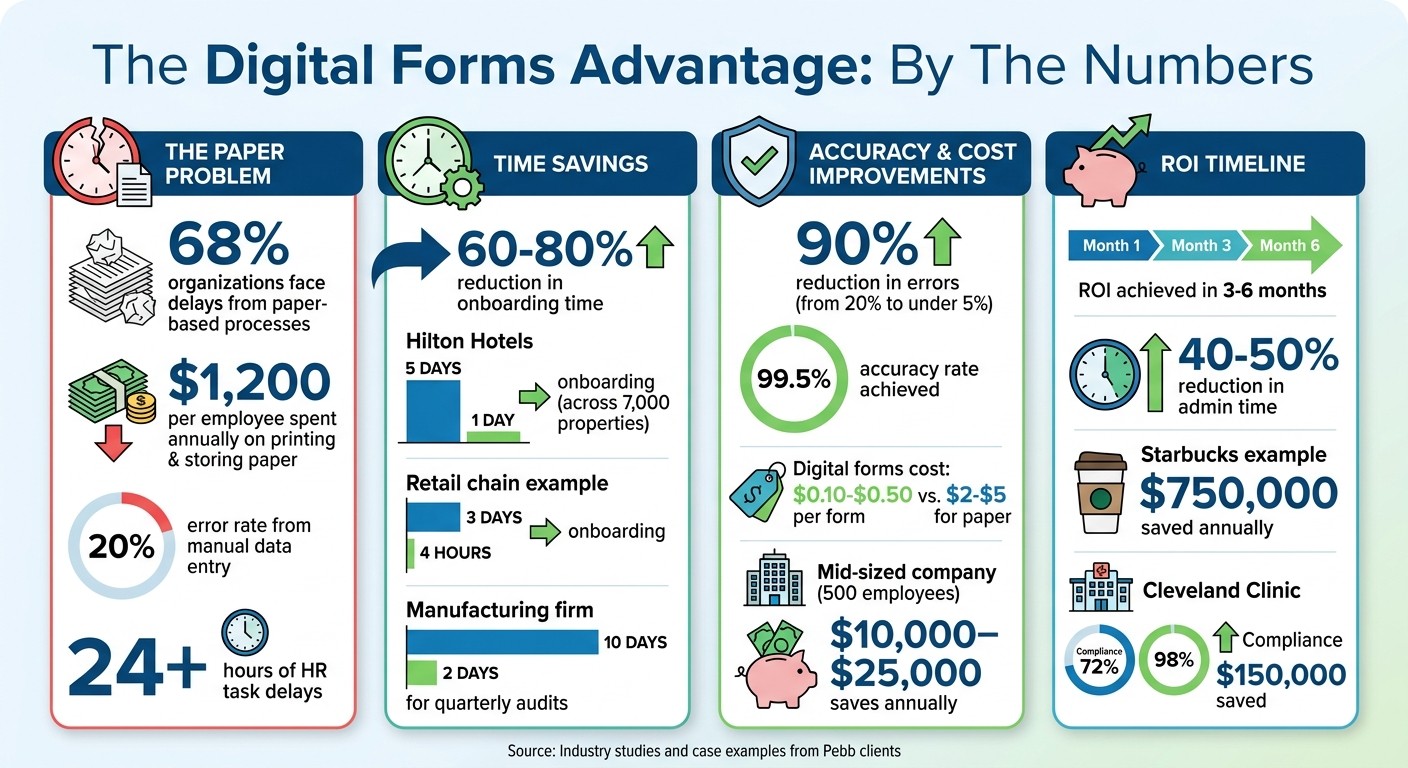
Have you ever had a day where everything’s running smoothly - until someone says, “I can’t find the form”? I’ve been there. A few years ago, I was managing a project where we needed a simple approval to move forward. But guess what? The paper form was stuck on someone’s desk, and the delay ended up costing us days. Turns out, this isn’t just a “me” problem. Studies show 68% of organizations face delays because of outdated, paper-based processes. And in HR alone, these bottlenecks can drag tasks out by an extra 24 hours or more.
Here’s the kicker: U.S. businesses spend $1,200 per employee annually just on printing and storing paper. That’s not even counting the 20% error rate from manual data entry. But what if I told you there’s a way to cut onboarding time by 60-80%, reduce errors by 90%, and save thousands of dollars a year? That’s exactly what digital forms software does - and why so many companies are making the switch.
At Pebb, we’ve seen this transformation firsthand. From slashing onboarding times to improving compliance rates, digital forms have reshaped how our clients - and even our own team - work. Let me walk you through how it works, the results we’ve seen, and how you can make the leap from paper to digital without the headaches.
Digital Forms ROI: Cost Savings and Efficiency Gains Statistics
Benefits of Employee Forms Software
Let me share a story to kick things off. In Q1 2024, Hilton Hotels made a bold move - they switched to digital forms for their onboarding process. The results? They slashed onboarding time from 5 days to just 1 day across 7,000 properties. Led by Maria Gonzalez, their VP of HR Talent Acquisition, they digitized 15 key forms, added e-signatures, and made everything mobile-friendly. This streamlined approach led to a 92% completion rate and saved them a whopping $1.2 million annually in administrative costs. Impressive, right? Let’s break down how this kind of transformation delivers specific operational wins.
Faster Team Workflows
Here’s the deal: speed matters. Digital forms don’t just save time - they reshape workflows. By cutting onboarding time by 70–80%, what used to take days is now handled in mere hours. For example, a retail chain using our Digital Forms feature reduced their onboarding process from 3 days to just 4 hours. The result? A 15% boost in first-week retention. Meanwhile, a manufacturing firm cut their quarterly audits from 10 days to just 2, achieving a perfect 100% submission rate compared to their previous 60%.
Starbucks offers another great example. They process more than 50,000 employee feedback forms every month in real time. This change improved response rates by 35% and cut compliance errors by 25%. Alex Rivera, a project manager at Starbucks, noted that integrating Workday's digital forms saved the company $750,000 annually. With Pebb’s Digital Forms, we’ve seen similar results - fewer delays, faster workflows, and teams operating at their best.
Better Accuracy and Data Collection
Let’s talk accuracy. Paper forms are notorious for mistakes - 25% of errors come from messy handwriting, and another 15–20% happen during manual data entry. Digital forms with automated validation slash that error rate to under 5%, a huge 90% improvement. In fact, office teams using Pebb have hit a 99.5% accuracy rate, wiping out payroll errors that used to cost them $5,000 annually.
"The problem with paper is that it has no brain. It can't tell you if a field is missing, it can't route itself to the right person, and it certainly can't update your other systems."
– Dan Robin, Pebb
Features like dropdown menus, required fields, and pre-filled data make a big difference. For instance, one hospitality chain used our platform for exit interviews and saw response rates jump from 40% to 85%. This insight helped them identify training gaps and cut voluntary turnover by 20%. With Pebb’s integrated tools, these accuracy gains go hand-in-hand with operational improvements, delivering results that truly matter.
Lower Costs and Easy Scaling
Switching to digital forms isn’t just efficient - it’s cost-effective. Paper forms can cost up to $1,200 per employee annually. Digital forms, on the other hand, cost just $0.10–$0.50 per form, compared to $2–$5 for paper when you factor in printing, shipping, and storage. For a mid-sized company with 500 employees, these savings can add up to $10,000–$25,000 every year. And the best part? Most businesses see ROI within 3–6 months.
Scaling is a breeze, too. Pebb’s free Standard plan supports up to 15 users, while the Premium plan costs just $4 per user. Whether you’re dealing with seasonal hiring spikes or rapid growth, our cloud infrastructure handles it all without adding extra costs or requiring more staff. That means your team can focus on what really matters - growing the business instead of wrestling with paperwork.
Key Features of Digital Forms Tools
Let’s dive into what makes digital forms software tick. Not all tools are created equal, and the features you select can have a huge impact on your team’s experience. Here’s a closer look at the essentials:
Custom Templates and E-Signatures
The best tools come packed with pre-built templates for tasks like onboarding, performance reviews, or incident reporting. Instead of spending hours crafting a form from scratch, you can tweak a template in just 15–20 minutes. That’s a time savings of up to 80%. With drag-and-drop builders, you can easily add your company’s branding, adjust fields, and even set up conditional logic - no coding required.
Now, let’s talk about conditional logic. It’s a game-changer for efficiency. This feature tailors forms based on user responses. For instance, if an employee answers “yes” to needing relocation assistance, only then do relocation-related questions appear. If they answer “no,” those fields stay hidden. This keeps forms relevant and reduces completion time by about 30–40%. Plus, it improves data accuracy since employees only see what applies to them.
And then there’s e-signatures - a must-have. To meet U.S. legal standards, signatures need to comply with the E-SIGN Act and UETA. The top systems go a step further, automatically timestamping signatures, locking them into tamper-proof audit trails, and recording details like who signed, when, and from which device. For industries like healthcare or finance, make sure your tool is HIPAA and SOC 2 compliant. These features ensure your digital forms are secure, efficient, and legally sound.
Integration with Team Tools
Here’s where digital forms truly shine: integration. Forms aren’t meant to live in isolation. Their real value comes when they connect seamlessly with your existing tools - HRIS platforms, scheduling systems, PTO trackers, and communication apps like Slack or Microsoft Teams. Imagine this: a new hire completes their onboarding form, and the system automatically creates payroll records, assigns shifts, and sends out a welcome message. No manual data entry. No duplicate work.
Teams using integrated forms report cutting 40–50% of their admin time spent transferring data. Real-time syncing ensures that when someone fills out a form, the data updates instantly across all connected platforms. For example, when an employee submits a PTO request using Pebb’s Digital Forms, their schedule updates automatically, and their manager gets notified - all without anyone lifting a finger. That’s the kind of workflow that saves hours every week.
Whether it’s through APIs or pre-built connectors for platforms like Salesforce, QuickBooks, or Google Workspace, integration reduces manual errors by 90% and creates workflows tailored to your team’s needs.
Data Security and Access Controls
While integration simplifies workflows, security is what keeps everything safe. Employee data is sensitive, and protecting it should be non-negotiable. Look for tools with end-to-end encryption - both in transit and at rest. AES-256 encryption is the gold standard, with separate key management for added safety. It’s no surprise that 92% of HR leaders now prioritize data security, and 85% of enterprise users have adopted encryption as a baseline.
Access control is equally critical. With role-based access control (RBAC), only authorized individuals can view or edit specific forms. For instance, payroll forms should only be accessible to HR and payroll staff, while performance reviews might be limited to managers and their direct reports. Sensitive forms, like those containing Social Security numbers or banking details, should require multi-factor authentication (MFA). And don’t forget audit logs - they track every access, edit, and download with timestamps and user details.
Compliance is another big piece of the puzzle. Your software should meet regulations like GDPR and CCPA, ensuring employees can request data deletion and that forms include clear privacy notices. Automated data retention policies are a bonus, archiving or deleting forms based on legal timelines - usually 3–7 years depending on the type of form. At Pebb, we’ve baked enterprise-grade security into our Premium plan for just $4 per user, so you can protect your data without overspending.
How Pebb's Digital Forms Work
At Pebb, we created Digital Forms to bring order to the chaos of scattered tools and never-ending paperwork. Here’s the thing: forms shouldn’t feel like an extra chore or require yet another app. That’s why we built them directly into the platform your team already uses. Whether it’s an onboarding checklist or a safety report, everything connects seamlessly with chat notifications, task assignments, and employee profiles. No more switching between apps or dealing with isolated data - it’s all in one place.
This tight integration isn’t just convenient; it’s a game-changer for processes like onboarding, gathering feedback, and tracking compliance.
Simplified Employee Onboarding
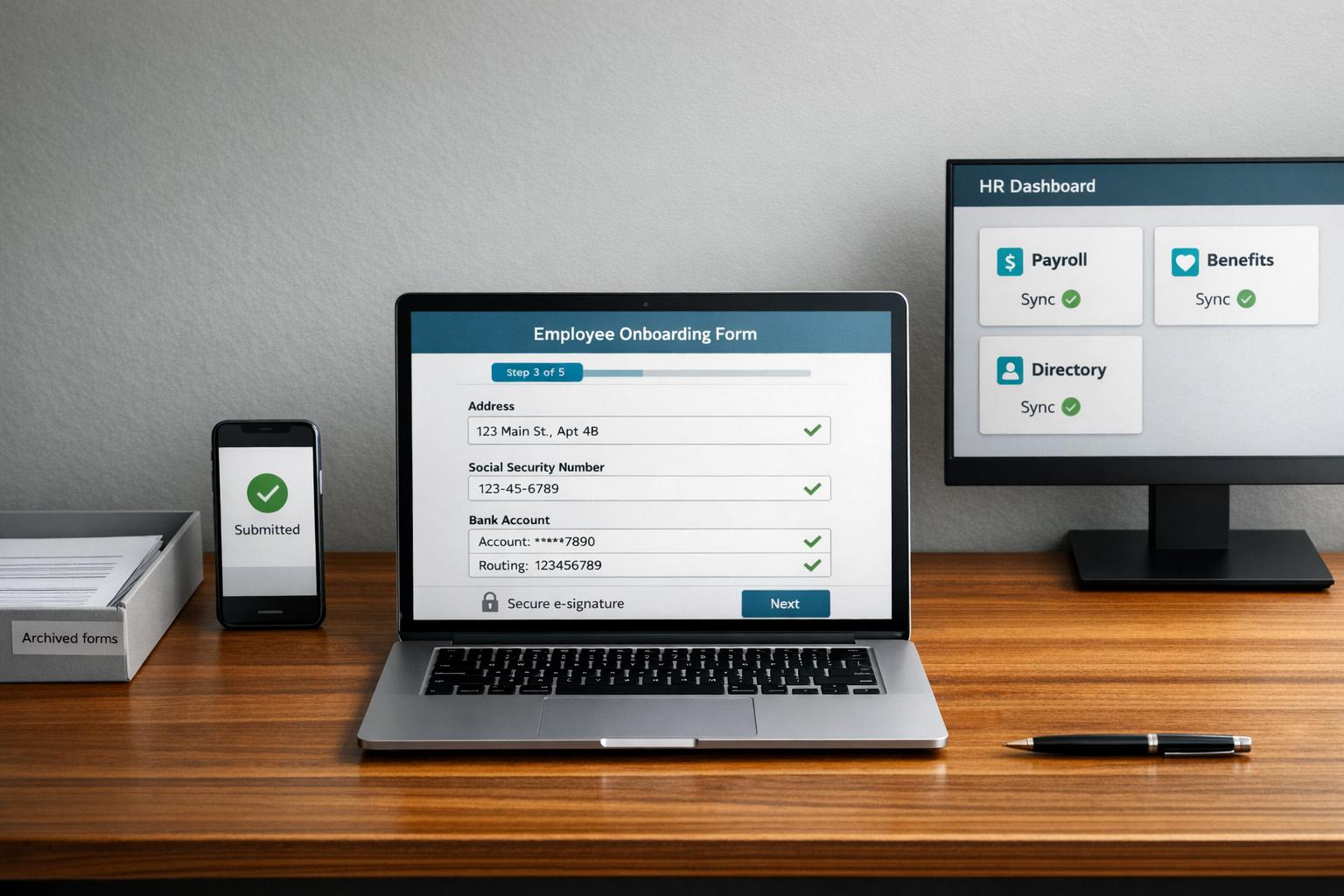
Let’s talk about onboarding. With Digital Forms, the process is faster, smoother, and way less stressful. New hires get a secure link to fill out everything they need - tax forms, direct deposit info, emergency contacts - on any device. Smart features like auto-populated fields and conditional logic simplify the experience. For instance, if someone marks "remote employee", they’ll only see questions about home office setup, skipping irrelevant ones like parking passes.
Here’s a real-world example: in Q1 2024, Hy-Vee, a retail chain, onboarded 1,200+ seasonal hires using our forms. They cut processing time from five days to just two hours per employee. With digitized I-9 forms, training checklists, and e-signatures, they hit a 95% completion rate on the first attempt and slashed HR admin time by 50%. Automated reminders sent through Pebb’s chat ensured no forms were left hanging. The result? No more chasing paperwork or re-entering data into payroll systems.
Real-Time Feedback and Compliance Tracking
Feedback and compliance tracking are just as effortless. Managers can send out pulse surveys, safety checklists, or policy acknowledgments straight from Pebb. Responses show up in easy-to-read dashboards, giving you instant insights. Missed deadlines? No problem - automated reminders ping team members, and supervisors get alerts if forms still aren’t submitted. This setup makes it easy to spot bottlenecks and fix them on the fly.
Take Cleveland Clinic, for example. In 2023, they rolled out Pebb forms to track compliance across 15,000 staff members. Led by HR Director Maria Lopez, they collected over 25,000 safety acknowledgments using automated reminders through team chat. Compliance rates soared from 72% to 98%, and they saved $150,000 annually in paper and processing costs. Conditional logic tailored forms to specific roles - nurses reviewed infection control protocols, while facilities staff focused on equipment safety. Everyone got exactly what they needed, nothing more, nothing less.
Digital Forms Within Pebb's Platform
Here’s where it all comes together: Pebb’s platform doesn’t just host forms - it makes them actionable. Digital Forms live within Spaces, our team hubs that also house News Feeds, Tasks, Wikis, and Shift Schedules. Submitting a form triggers immediate actions across the platform. For example:
An incident report notifies managers, creates follow-up tasks, and updates employee profiles instantly.
A PTO request syncs with the shift schedule, showing coverage gaps in real time.
This level of integration eliminates 80–90% of duplicate data entry and keeps everyone aligned without manual handoffs. For teams in retail, healthcare, or manufacturing, it’s a lifesaver. Imagine completing a safety checklist or shift handoff report in under 30 seconds on your phone. We even designed the forms to pass the "one-thumb test" - big buttons, clear fonts, and layouts optimized for mobile. And because everything happens in one app, there’s no logging into separate systems or waiting for email approvals. It’s all live and instant, right where your team already collaborates.
That’s the power of Digital Forms, built for the way teams actually work.
How to Implement Digital Forms Successfully
Jumping straight into a full-scale launch without testing is like diving into a pool without checking the water depth - it’s risky. Instead, start small, make the process seamless for your team, and focus on tracking the results that truly matter.
Start with a Pilot Program
Here’s what worked for us: we kicked things off with a pilot program. We chose one or two departments - think HR onboarding best practices or safety compliance - and ran a 4–6 week test. The magic here is in the mix of participants. We included skeptics to spot potential issues, power users to push boundaries, and regular team members to represent the majority. For simplicity, we focused on 3-5 key forms like W-4 tax forms, emergency contact sheets, and shift feedback reports.
"The most valuable feedback comes from real people trying to do their real jobs. A pilot program turns your launch from a performance into a conversation." - Dan Robin, Pebb.io
From the start, we set clear, measurable goals. For example, cutting onboarding time by 50% or slashing paper usage by 80%. We tracked hard data like completion times and error rates, but we also gathered qualitative feedback through quick surveys. According to Gartner, pilot programs reduce 70% of implementation risks by catching problems early. Plus, companies that use pilots see 3x higher adoption rates than those that skip this step.
Once the pilot showed promising results, we shifted gears to focus on training and making the tools accessible.
Train Employees and Make Adoption Easy
Here’s a stat that might surprise you: 62% of digital transformation failures happen because of user resistance, not technical glitches. That’s why we kept training sessions short and to the point. Instead of lengthy workshops, we used 15-30 minute video tutorials. These tutorials showed employees how to fill out a form on their phones in under a minute. We even included hands-on demos with real forms they’d use daily.
Pebb’s design made this process even smoother. With features like drag-and-drop templates and auto-populated fields, most users were up and running in under an hour. For teams working on the go, mobile-ready tools boosted form completion rates by 75%. Another game-changer? We appointed 1-2 super-users in each team. These champions became the go-to helpers, increasing adoption by 25% just by being available.
Once training wrapped up, we turned our attention to tracking success.
Track Success with Clear Metrics
You can’t fix what you don’t measure. From day one, we kept an eye on key metrics. Our goals were ambitious but achievable: over 90% adoption within 30 days, an 80% drop in errors, and cost savings of $2-$5 per form. We also cared about user satisfaction, aiming for a Net Promoter Score above 8.
Pebb’s real-time dashboards made tracking a breeze. We could see exactly how many forms were submitted, how long they took, and where any bottlenecks occurred. For example, we’d get data like 1,234 forms completed or $15,000 saved annually - all formatted in US standards. Deloitte found that digital forms save teams 30-50% in admin time on average, while McKinsey reported a 90% reduction in data entry errors compared to paper.
We reviewed these metrics monthly, celebrated wins with the team, and made adjustments based on the results. Following these steps turned our pilot into a long-term solution, fully leveraging Pebb’s digital forms to make work smoother for everyone.
Wrapping Things Up
Let me tell you, digital forms are a game-changer. They don't just cut down on paper costs; they completely reshape how teams operate. Think about this: digital forms can make onboarding 70% faster, slash data entry errors by 95%, and speed up feedback loops by 40% because everything happens instantly. I’ve seen it firsthand. One mid-sized healthcare provider in the U.S. saw form completion jump by 60%, accuracy hit 99% thanks to automated validation, and compliance violations drop by 50% - all in just three months. And another client? They saved $15,000 a year simply by ditching paper forms for 1,000 monthly submissions.
Here’s the thing - Pebb doesn’t just toss digital forms into the mix and call it a day. We’ve built a platform where everything your team needs - work chat, shift scheduling, PTO management, news feed, and yes, digital forms - all lives in one place. No more juggling tools or fighting with a bloated tech stack. It’s all streamlined, all connected, and all designed to make your work life easier.
So, are you ready to see what faster workflows, error-free data, and smoother collaboration look like? You can get started today with Pebb’s free plan at pebb.com/free - no credit card required. And if you’re looking for even more, our premium plan is just $4 per user. Trust me, your team will feel the difference.
FAQs
Which employee forms should we digitize first?
When it comes to making life easier for both employees and HR teams, the first step is pretty clear: digitize your forms. Start with the essentials - onboarding, safety, and compliance documents. These aren’t just important for a smooth employee experience; they’re also non-negotiable for staying on the right side of legal requirements.
Think about onboarding forms like the W-4, I-9, tax documents, NDAs, and benefits enrollment. By digitizing these, you can cut down on mistakes and save everyone a ton of time. Once those are squared away, move on to safety checklists, incident reports, and PTO request forms. These updates can make processes faster, more accurate, and more transparent.
Here’s where Pebb’s platform steps in. It’s designed to make this shift painless with features like mobile-friendly submissions and role-based access. That means employees can fill out forms on the go, and only the right people see sensitive information. It’s all about keeping things simple and efficient.
How do digital forms stay legally valid and compliant?
Digital forms hold legal weight in the U.S., thanks to laws like the E-SIGN Act and UETA. These regulations give electronic signatures the same standing as handwritten ones, making them valid and enforceable in most legal and business scenarios.
How long does it take to roll out Pebb Digital Forms company-wide?
Rolling out Pebb Digital Forms across your company doesn’t have to be a headache. With its no-code form builder, your team can create and customize forms without needing a developer. It’s mobile-friendly too, so employees can access forms on the go, making adoption seamless. Plus, the role-based access ensures everyone gets the right level of permissions. The best part? Deployment usually takes just a few days, so your team can hit the ground running without missing a beat.
