
Author: Ron Daniel
The Best Employee PTO Tracker App for 2026
Compare top PTO tracker apps for 2026 and learn which offers native time-off tracking, scheduling, HR/payroll integrations, and offline mobile support.
Managing time off shouldn’t feel like solving a Rubik’s Cube. Yet, for so many businesses, it does. I’ve seen HR teams spend hours juggling spreadsheets, fighting formula errors, and trying to untangle compliance rules that vary from state to state. And let’s not even start on the chaos of international teams. It’s no wonder PTO management feels like a full-time job in itself.
Here’s the kicker: while companies struggle with outdated systems, employees aren’t exactly thriving either. Did you know over 40% of professionals don’t even use all their PTO? That’s wild. Burnout is through the roof, and clunky processes are a huge part of the problem. When taking time off feels like more hassle than it’s worth, everyone loses - employees, managers, and the business as a whole.
At Pebb, we decided enough was enough. We built a platform that doesn’t just track PTO - it simplifies the entire process, from requests to approvals to managing time off in one place. And we didn’t stop there. Pebb is more than just a PTO tracker; it’s an all-in-one tool designed to make work easier and more connected for everyone. Let me walk you through how we’re solving these challenges and why Pebb is the app your team needs in 2026.
1. Pebb
At Pebb, we set out to tackle a challenge we saw time and time again: managing PTO was a headache thanks to disconnected tools and scattered systems. So, we built something better - an all-in-one employee app that keeps everything, including PTO tracking, in one easy-to-access place.
PTO Tracking Features
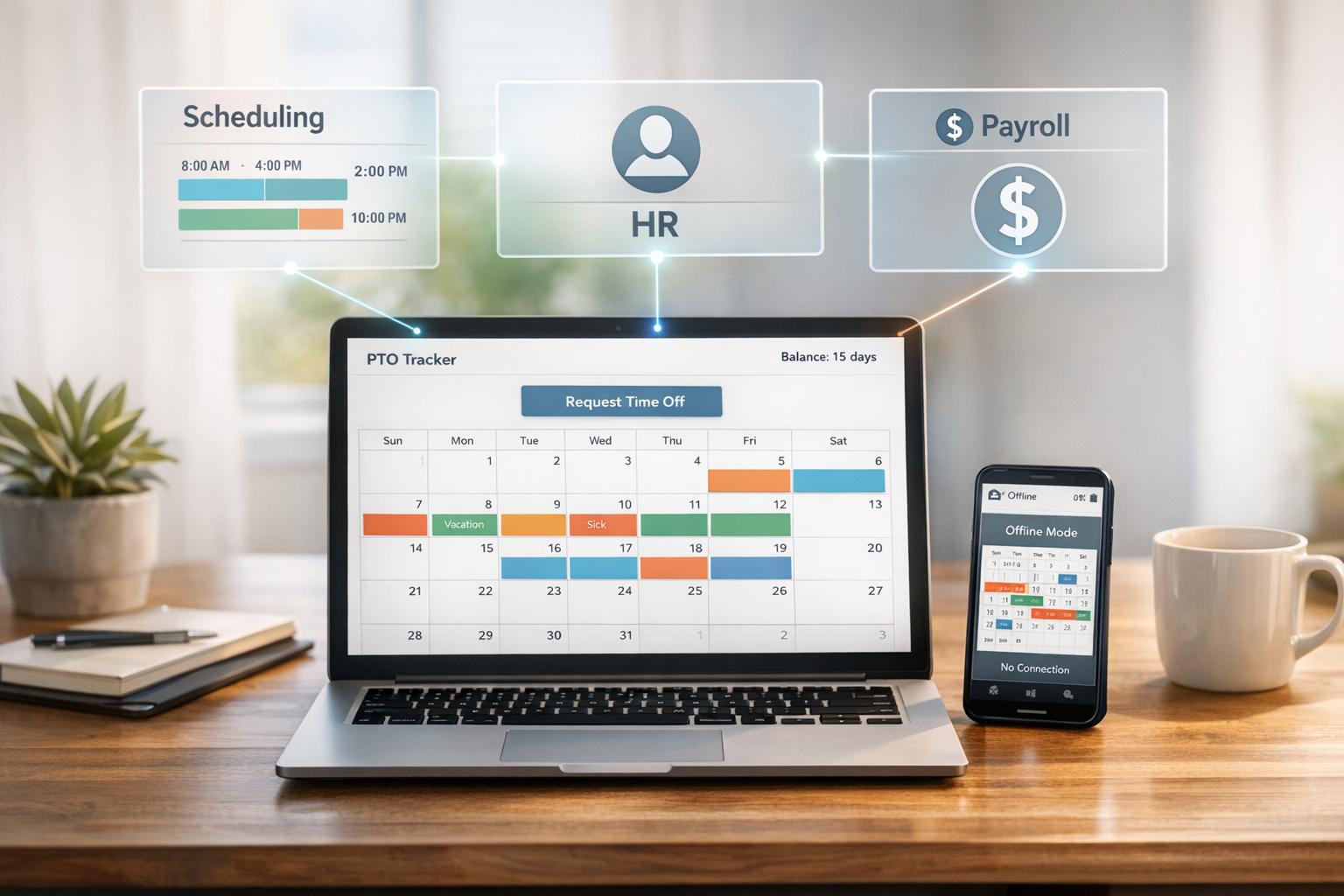
Here's how our PTO tracking stands out: it’s built right into the same app where you handle shift scheduling, work chats, and your news feed. Employees can submit PTO requests, check their balances instantly, and get notified as soon as a manager makes a decision. For managers, it’s a breeze to see who's off using our integrated calendar, which syncs directly with shift schedules. No jumping between platforms or wasting time on clunky systems - just a simple, clear process that works.
Integration Capabilities
We’ve made sure Pebb plays well with others. It includes integrations to help your employee data stay up-to-date without any extra work. Whether you're using Okta, Microsoft 365, or Google Workspace, our Enterprise SSO keeps everything secure and centralized. Plus, for frontline workers, Pebb keeps teams connected with tools to check schedules, submit PTO requests, and stay aligned in one place. When they’re back online, everything syncs automatically. No duplicate entries. No version mismatches. Just smooth, reliable integration.
Pricing and Plans
We believe in keeping things simple and affordable. Our Standard plan is free for up to 15 employees and includes unlimited message history, shift scheduling, and PTO management. If you need more, the Premium plan costs just $4 per user per month - a fraction of what competitors charge (some go as high as $8.75 to $15+ per user). Premium gets you voice and video calls, analytics, unlimited admins, and Premium SLA support. No hidden fees. No surprises.
Additional Tools and Benefits
But let’s talk about the extras. Pebb isn’t just about PTO tracking - it’s a full employee experience platform. You’ll also get a Knowledge Library for company policies, Tasks for managing projects, Calendar events, Digital forms, and a People Directory for discovering your team. It’s everything your team needs to stay connected and productive in one app.
With Pebb, you’re not just getting a PTO tracker - you’re getting a streamlined, affordable all-in-one employee app for communication and operations.
2. Slack
Slack has become a staple for millions of teams worldwide, offering a central hub for communication and collaboration. But let's be honest - tracking PTO (Paid Time Off) wasn't exactly what it was built for. To make it work, teams usually rely on a mix of native workflows, manual updates, spreadsheets, or third-party tools like Vacation Tracker.
PTO Tracking Features
Slack’s Workflow Builder includes a simple PTO request template, but it’s pretty barebones. It doesn’t come with features like automatic balance tracking, policy enforcement, or calendar syncing. If your team needs anything beyond the basics, you’ll need to bring in third-party apps. These integrations allow employees to request time off with quick slash commands like /vacation or shortcuts, all without leaving Slack. Plus, their Slack status updates automatically with an emoji and return date - a small but handy touch.
Third-party tools take things further by adding features like:
Automated accruals and carryover rules
TOIL (Time Off In Lieu) tracking
Real-time updates posted to Slack channels through daily or weekly digests
These added layers of functionality make Slack more than just a chat app - it becomes a lightweight PTO management tool with the right integrations.
"We needed something that was easy to use, required little oversight, and worked with the tools we already had in place."
Vladimir, IT Director, Drury Design
Integration Capabilities
Slack’s integration game is strong. It syncs seamlessly with calendars like Google Calendar, Outlook, and iCal, automatically blocking off approved time off to avoid scheduling conflicts. While Slack excels as a collaboration hub, effective PTO tracking almost always requires pairing it with external apps.
Pricing and Plans
Here’s where things get interesting. Slack’s pricing reflects its flexibility but also its limitations.
The Free plan gives you 90 days of message history and up to 10 app integrations.
The Pro plan, at $7.25 per user per month (billed annually) or $8.75 per user per month (billed monthly), offers unlimited message history and integrations.
For larger teams, the Business+ plan costs $15.00 per user per month (annually) or $18.00 per user per month (monthly). It includes extras like SAML-based SSO and 24/7 priority support.
While Slack’s native features are helpful, unlocking its full PTO-tracking potential usually means investing in third-party tools or higher-tier plans.
3. Microsoft Teams
Microsoft Teams wasn’t designed as a PTO tracker - it’s primarily a collaboration hub. But thanks to third-party integrations like Vacation Tracker, Day Off, and Calamari, Teams can step into the PTO management game pretty effectively.
PTO Tracking Features
Here’s where things get interesting: bots. Within Teams, employees can simply type something like, "I want to take next Friday off", and a bot will handle the rest. It notifies managers in real time, who can approve or deny the request with just one click. Teams also allows organizations to add custom "Overview" and "Calendar" tabs to any channel, giving everyone a clear visual of upcoming absences. Some integrations even send out automated daily or weekly updates to specific channels, so team members stay in the loop without being overwhelmed with unnecessary notifications.
"Everything is accessible from our Teams workspace, which is a huge advantage. I can request leaves through the bot and access all leave-related information without logging into another site."
Capterra Review, 2023
Another feature worth mentioning is out-of-office automation. A few days before someone’s scheduled leave, the bot can nudge them to set up an out-of-office message for both Teams and Outlook. It even provides templates to make the process quicker. These features fit right into Microsoft’s ecosystem, making PTO management feel like a natural extension of your existing workflow.
Integration Capabilities
Teams doesn’t stop at just managing leave requests. It syncs directly with Outlook, automatically blocking off approved leave on the calendar. This ensures that schedules remain centralized and free of conflicts. For organizations already running on Microsoft 365, this integration ties everything together seamlessly, keeping workflows smooth and organized.
Pricing and Plans
To use Teams for PTO tracking, you’ll need a Microsoft 365 license, plus a third-party tool. Here’s how the costs break down:
Vacation Tracker: Free plan available, with paid tiers starting at $1 per user/month.
Day Off: Free for up to 10 employees; additional users cost $2 per user/month.
TimeCamp: Starts at $3.99 per user/month.
While these tools are budget-friendly on their own, the combined expense of Microsoft licensing and integration fees can add up, especially for smaller teams. That’s where an all-in-one solution like Pebb starts to stand out - it eliminates the need for piecing together multiple tools and keeps costs manageable.
4. Firstup
Firstup is an employee experience platform that emphasizes internal communications and employee engagement. While it’s not primarily a PTO tracker, it does incorporate time-off requests as part of its broader platform.
PTO Tracking Features
Firstup embeds PTO tracking into its communication flow rather than offering a dedicated leave management system. Employees can submit their time-off requests directly within the platform, and managers are notified in real-time - keeping everyone in the loop without extra steps.
Integration Capabilities
One of Firstup's strengths is its ability to integrate with popular HR systems and workplace tools like Microsoft 365, Workday, and SAP SuccessFactors. These integrations ensure that shared calendars are updated automatically. However, while Firstup connects with major systems, it doesn’t offer the same streamlined, all-in-one approach that sets Pebb apart.
Pricing and Plans
Here’s where things get tricky. Firstup doesn’t provide transparent pricing - you’ll need to contact their sales team for a custom quote. On the other hand, Pebb keeps things simple and affordable with a free plan for up to 15 employees and Premium at $4 per user/month, without any surprises. It’s a clear, no-nonsense approach that’s hard to beat.
5. Workvivo
Workvivo, now part of Zoom's suite of tools, takes a different approach to managing workplace communication and HR resources. Instead of offering built-in PTO tracking, it pulls time-off data directly from your existing HRIS systems, like Workday or BambooHR.
PTO Tracking Features
Here’s how it works: Workvivo integrates with popular HR systems such as Workday, BambooHR, and SAP SuccessFactors, creating a centralized hub where employees can see their PTO balances, submit leave requests, check holiday calendars, and access PTO policies - all without jumping between platforms. However, unlike Pebb, which has native PTO tracking baked right in, Workvivo relies entirely on these external systems for leave management.
Integration Capabilities
Workvivo’s strength lies in its ability to sync with enterprise systems like Workday and SAP SuccessFactors. This makes it a solid choice for larger organizations already invested in these platforms. That said, this reliance on third-party tools can be a drawback for companies looking for an all-in-one solution. With Pebb, for example, you get integrated PTO management that doesn’t require any external add-ons - it’s all part of the package.
Pricing and Plans
When it comes to pricing, Workvivo operates on a custom enterprise model, meaning you’ll need to contact their sales team to get a quote. While this might work for large corporations, it can make budgeting tricky for smaller teams. On the other hand, Pebb keeps things simple with a free plan for up to 15 employees and Premium at $4 per user/month. That pricing includes PTO tracking, scheduling, communication tools, and more - without the hassle of custom quotes or unexpected fees.
6. Staffbase
Staffbase markets itself as an enterprise-focused internal comms platform, but it’s not designed to handle PTO tracking. Its strengths lie in delivering company news, creating employee directories, and offering branded mobile apps. However, when it comes to managing time-off requests or balances, Staffbase falls short.
PTO Tracking Features
Instead of functioning as a PTO tracker, Staffbase acts as a hub for sharing PTO policies, holiday calendars, and leave announcements. Employees can view this information through the mobile app, but they can’t submit time-off requests or check their balances directly within the platform. If you want to handle actual leave management, you’ll need to connect it with external HR systems - adding complexity that Pebb’s all-in-one solution avoids entirely.
Integration Capabilities
Staffbase does offer integrations with various HR platforms to sync employee data and information. However, setting up these integrations often requires enterprise-level support, which can be time-consuming. One advantage Staffbase offers is offline access through its branded mobile apps, a feature particularly useful for frontline workers without consistent internet access. Still, these additional technical steps highlight a clear distinction from Pebb’s unified, plug-and-play approach.
Pricing and Plans
The limitations of Staffbase’s PTO features are reflected in its pricing. With annual contracts starting at $30,000 per year, it’s a hefty investment, especially for small and mid-sized businesses. There’s no free plan or transparent per-user pricing, making it less accessible. Compare that to Pebb’s straightforward pricing - $4 per user/month or free for teams of up to 15 employees. Pebb delivers integrated PTO tracking, shift scheduling, work chat, and more, without the enterprise-level price tag or drawn-out sales process.
Pros and Cons
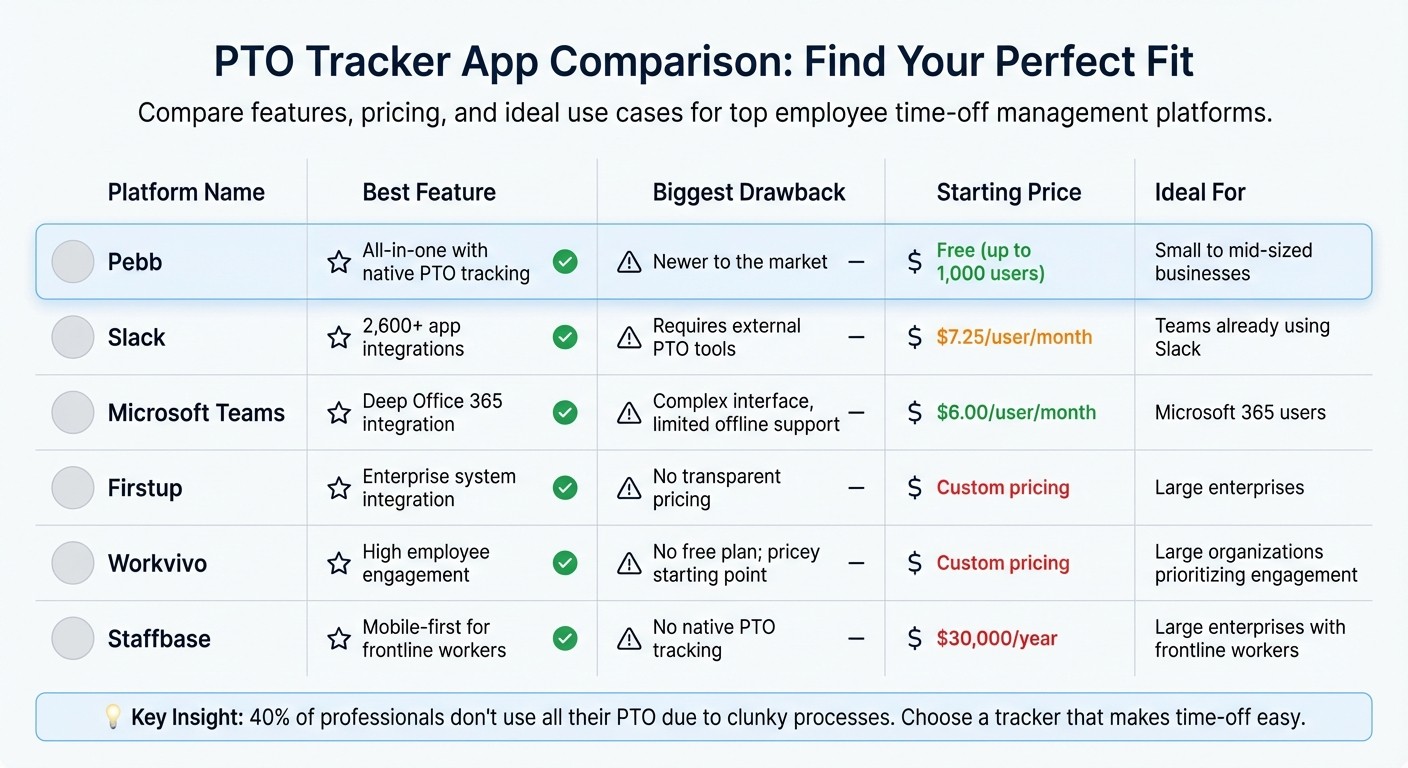
PTO Tracker App Comparison 2026: Features, Pricing & Best Use Cases
When it comes to picking the right PTO tracker, it’s all about finding that sweet spot between cost, ease of setup, and usability. Let me break it down for you so you can decide what actually fits your needs.
Let’s start with Pebb. It’s a standout for its affordability and simplicity. The free plan covers up to 15 employees and combines PTO tracking, chat, and scheduling in one neat package. If you need more, the premium plan is just $4 per user per month. The only hitch? Pebb is relatively new to the scene, which might give some folks pause compared to big names like Microsoft Teams or Slack.
Speaking of Slack and Microsoft Teams, they’re solid for chat and collaboration but fall short when it comes to handling PTO. Both require third-party apps like Vacation Tracker (starting at $1 per user per month, with a $25 monthly minimum) to manage PTO requests. Slack’s free plan gives you a 90-day message history, while Teams leans heavily on the Office 365 ecosystem, which can feel clunky if you’re not a fan of that setup.
Now, if employee engagement is a top priority, Workvivo and Firstup are worth a look. They’re designed for enterprise-level communication and engagement, but there’s a catch - neither platform offers transparent pricing, which can be frustrating. Then there’s Staffbase, which focuses on mobile-first solutions for frontline workers. But at $30,000 per year, it’s out of reach for most small and mid-sized businesses. For larger organizations with complex needs, these platforms might make sense, but for everyone else, the cost can feel hard to justify.
Here’s a quick side-by-side comparison to help you see the highlights:
Platform | Best Feature | Biggest Drawback | Starting Price |
|---|---|---|---|
Pebb | All-in-one with native PTO tracking | Newer to the market | Free (up to 15 employees) |
Slack | 2,600+ app integrations | Requires external PTO tools | $7.25/user/month |
Microsoft Teams | Deep Office 365 integration | Complex interface, limited offline support | $6.00/user/month |
Firstup | Enterprise system integration | No transparent pricing | Custom pricing |
Workvivo | High employee engagement | No free plan; pricey starting point | Custom pricing |
Staffbase | Mobile-first for frontline workers | No native PTO tracking | $30,000/year |
Each platform has its strengths and weaknesses, so the best choice really depends on your company’s size, budget, and specific needs. If you’re a smaller team, Pebb’s free plan is hard to beat. For larger enterprises, you might find value in the higher-end options - just be prepared to pay for it.
Conclusion
After diving into the top PTO tracker apps for 2026, Pebb clearly shines as the go-to choice, combining PTO tracking and communication tools into one seamless platform.
Here’s the thing - many competitors fall short in key areas. Slack and Microsoft Teams, for instance, rely on external integrations to handle PTO, which can feel clunky and disjointed. On the other hand, enterprise platforms like Workvivo, Firstup, and Staffbase often come with custom pricing that’s not only higher but also harder to navigate compared to Pebb’s straightforward plans.
What sets Pebb apart is its all-in-one design. No need for extra tools or complicated setups. We’ve built Pebb to tackle real-world challenges, from managing communication and operations in one app to keeping frontline and office teams aligned. It’s a solution that bridges the gaps other tools often leave open.
For small and mid-sized businesses or even rapidly growing enterprises, Pebb stands out as the clear winner for 2026. With features like a user-friendly interface for time-off requests, shift scheduling, tasks, digital forms, calendar events, and everything your team needs to stay connected, Pebb makes PTO management effortless. It’s the modern answer to simplifying workplace communication and keeping your team on the same page - all in one place.
FAQs
How does Pebb's PTO tracker work with my HR and payroll systems?
Managing paid time off can be a logistical headache, but let me tell you how Pebb’s PTO tracker has made it a breeze for us. It works hand-in-hand with your current HR and payroll systems, taking the guesswork out of leave management. By helping teams manage PTO data in one place, it eliminates the need for tedious manual input and drastically reduces errors. This means both employees and HR teams are always on the same page - no more back-and-forth emails to clarify balances or approvals.
What’s even better? Since it’s part of Pebb’s all-in-one platform, the PTO tracker seamlessly integrates with payroll workflows. This helps teams stay updated and keeps everything transparent. For us, it’s been a game-changer in cutting down on administrative tasks while keeping the workplace more connected and organized. It’s like having a personal assistant for leave management - only smarter!
Why is Pebb's pricing the most affordable option for PTO tracking?
Pebb is truly a game-changer when it comes to PTO tracking, especially for businesses looking to save money. Here's the deal: we offer a free plan for up to 15 employees. Yep, you read that right - 15 employees. That kind of generosity is almost unheard of in this space.
Now, if your team needs more advanced features, our premium plan is just $4 per user per month. Compare that to other platforms that either charge way more or make you jump through hoops with custom pricing. It’s a no-brainer.
What’s even better? Pebb isn’t just about PTO tracking. It’s a complete package, combining PTO management with tools for employee communication and collaboration. You get everything you need in one place, all while keeping your costs in check.
Is Pebb suitable for both frontline and office employees?
Pebb is built with both frontline and office employees in mind, making it a versatile solution for diverse teams. For those on the frontlines, Pebb offers mobile-first tools, real-time updates, and easy access to schedules, chat, and updates - perfect for staying in the loop while on the move.
For office teams, it brings everything together with features like work chat, a dynamic news feed, shift scheduling, and collaboration tools. It’s a single platform designed to keep everyone aligned and working smoothly, no matter their role or where they’re located.
