
The Complete Warehouse Opening Closing Checklist App Guide
Learn how to build and manage a warehouse opening closing checklist app that prevents errors, ensures safety compliance, and streamlines shift transitions.
Dan Robin

At 6:45 on a Tuesday morning, the day crew walks into a warehouse that should be ready but isn't. A forklift is plugged in, though nobody knows whether it passed its inspection. A blocked aisle has become somebody else's problem. The night team mentioned an inventory exception, but no one can say which zone it affects.
That's how a normal shift starts badly. Not with one dramatic failure, but with small gaps between people, systems, and responsibilities. A warehouse opening closing checklist app can close those gaps, but only if it does more than turn a paper form into a phone screen.
Why Your Warehouse Opening Routine Feels Chaotic
The problem usually starts at the handover. The closing supervisor says, “Everything's mostly fine,” while the incoming lead scans a crowded staging area and tries to work out what “mostly” means. One person reports a damaged pallet. Another reports it again later because the first entry is buried in a chat thread. A third person assumes someone has already isolated the issue.
The warehouse keeps moving, but nobody shares the same picture of its condition.

Paper checklists don't solve this. They can prove that someone checked a box, but they rarely show which zone was checked, what failed, who owns the fix, or whether the next shift accepted the handover. Conversations have the opposite weakness. They contain useful context, but that context disappears when people leave, get interrupted, or remember the same event differently.
The risk isn't theoretical. OSHA's warehouse safety guidance notes an injury and illness rate of 4.8 cases per 100 full-time workers in warehousing and storage, compared with 2.9 across all industries, a difference of 39%. The rate doesn't explain every incident, but it does show why routine controls deserve more respect than they often receive.
A checklist must describe the warehouse state
A useful app records more than completion. It records the state of the operation at a specific point in time.
The opening supervisor should see whether the previous shift left unresolved equipment, housekeeping, security, or inventory issues. The closing lead should see which tasks still need attention before the site is left unattended. A forklift operator should receive the equipment checks relevant to that role, not a warehouse-wide form filled with irrelevant items.
That's the difference between digital paperwork and an operational workflow.
Practical rule: If the next shift has to ask what a failed item means, where it happened, or who owns it, the checklist hasn't finished its job.
A properly configured tool makes responsibility visible. It ties tasks to a site, zone, shift, and role, then carries open exceptions forward instead of allowing each shift to create a fresh copy of the same problem. The Pebb guide to warehouse employee apps is useful background for thinking about that broader connection between frontline communication and daily work.
The best opening routine creates a clean starting point. The best closing routine leaves a truthful record. Together, they reduce the guessing that turns shift change into a daily reset.
Selecting Requirements and Configuring Your Checklist App
Start with the work, not the app store. Before comparing tools, walk through an actual opening and closing routine and sort every check into site readiness, operational readiness, or people readiness.
Map the three readiness layers
Site readiness covers the physical environment. Utilities, lighting, internet, docks, access points, alarms, fire controls, spill kits, and housekeeping belong here. These checks answer a simple question: can people enter and work safely?
Operational readiness concerns the systems and equipment that move goods. Verify racking, physical labels, WMS or ERP settings, handhelds, printers, barcode scanners, and exception routes. The location master data must match the physical labels exactly. Scan failures and mis-slotted inventory often begin with a data mismatch, not a badly arranged floor. Optioryx's guidance on digitizing warehouse work makes this relationship explicit.
People readiness is less visible and just as important. Supervisors and frontline workers need to know escalation paths, first priorities, and the sequence for receiving initial inventory or handling a blocked task. A checklist that ignores people can confirm that equipment works while leaving nobody sure what to do next.
Configure for decisions, not decoration
A generic template is a starting point, not a finished process. Build separate forms for roles and shifts, then make the next question depend on the answer to the current one.
Pass: Record completion and move on.
Fail: Require a comment, owner, and target action.
Critical fail: Stop the relevant workflow and notify the responsible supervisor immediately.
This structure prevents a failed forklift inspection from looking identical to a missing cleaning task. It also stops the next shift from reporting the same defect again because the original entry has no owner or status.
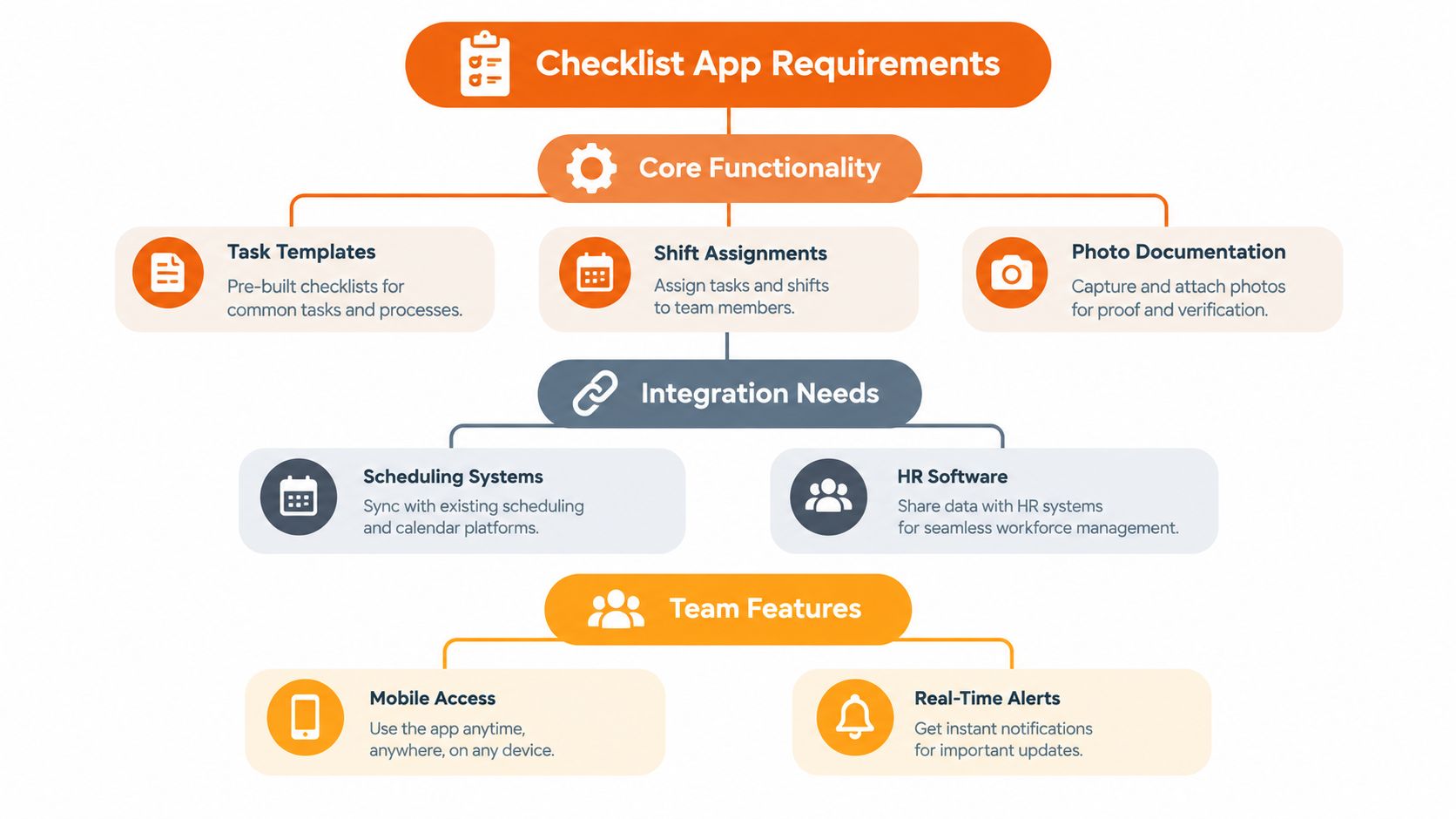
When evaluating a platform, look for mobile access, offline behavior, photo evidence, task assignment, conditional questions, role permissions, and an issue history that stays attached to the location. Integrations matter too, but they should support a process you already understand. Guidance on CMMS implementation for distribution can help when equipment checks need to connect with maintenance work rather than sit in a separate form.
Treat the checklist as a living operating document. Digital forms for deskless teams offers useful context for designing forms that people can complete on the floor, not just in an office.
Integrating Checklists with Scheduling and Shift Systems
A checklist detached from the schedule becomes another thing supervisors must remember. That's where adoption starts to weaken. The operator clocks in, heads to a zone, and has to find the right form manually. The night lead finishes late, leaves a note somewhere, and assumes the morning team will discover it.
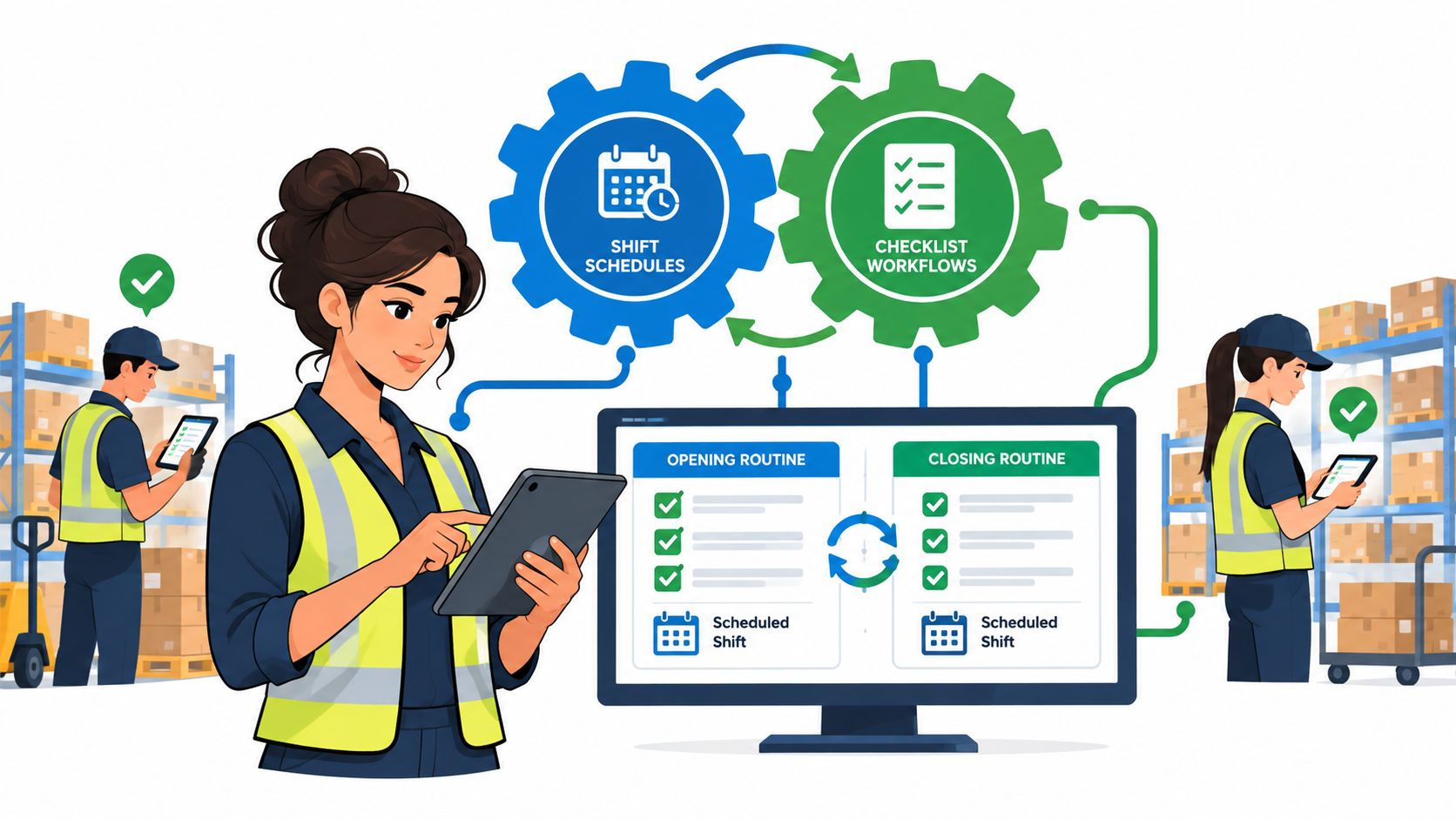
The app should assign work from the shift itself. When a person clocks in, the system should know the role, location, zone, and relevant opening or closing tasks. A forklift operator shouldn't receive a long administrative form, and a closing supervisor shouldn't have to hunt through several templates to find the security checks for that site.
Connect the trigger to the responsibility
Build the workflow around events:
A shift starts or a worker clocks in.
The app assigns the appropriate role and zone checklist.
A failed item creates an exception with an owner.
The closing handover carries unresolved items into the next relevant shift.
The incoming lead acknowledges the current warehouse state.
That sequence turns the handover into a transfer of information rather than a rushed conversation. The next team can see staffing, workload, inventory exceptions, inbound and outbound status, dock and yard activity, equipment condition, safety concerns, open actions, and priorities in one place.
The safety case is strong. A warehouse safety summary records 21 fatal injuries in 2020, down from 24 in 2019, a 12.5% decrease, and cites a finding that 70% of forklift accidents are preventable with proper inspections. Those figures appear in Conger's warehouse safety overview. The useful operational lesson is not to chase a percentage. It's to place the inspection at the moment when the equipment is about to be used.
Don't postpone the connection
Scheduling integration shouldn't be a later enhancement. If the first rollout leaves assignments manual, workers learn that the checklist is optional and supervisors learn to repair the process with reminders. By the time an integration arrives, the operation has already built habits around workarounds.
A shift scheduling app can provide the timing and assignment layer, but the checklist still needs clear rules. Decide who owns a failed check, which alerts interrupt work, which issues wait for review, and what the next shift must acknowledge. Automation is valuable only when it removes uncertainty instead of moving it into a different screen.
Training Staff Without Creating Resistance
Most checklist rollouts fail in the training room before they fail on the warehouse floor. Someone demonstrates every feature, workers nod, and then the first busy shift arrives. The team goes back to paper, memory, and quick messages because the app feels like extra work.
The frontline question is reasonable: will this slow me down? At first, probably. Any new routine adds friction while people learn it. Your responsibility is to make the first useful result appear quickly, then remove steps that don't protect people or move work forward.
Let operators shape the form
Ask shift leads and experienced operators to build the first version with you. They know which checks happen in the actual sequence, which questions duplicate existing controls, and which fields nobody can complete from the floor. A form designed without them will often be technically complete and operationally useless.
Keep training short. Use a low-volume period, demonstrate one opening walk-through, and show what happens after a failed item. Don't teach the entire platform when the immediate task is to confirm a safe, prepared floor.
A good first session begins with safety and equipment readiness:
Clear egress: Confirm routes are open and emergency exits are visible.
Fire controls: Check that extinguishers are accessible and unobstructed.
Emergency supplies: Verify spill kits and first-aid supplies are intact.
PPE: Confirm required protective equipment is available and stocked.
Forklifts: Complete the pre-use inspection before operating equipment.
Dock readiness: Check that dock areas are ready for receiving and dispatch.
Systems and staffing: Verify inventory systems, devices, and the planned team.
These checks make the purpose obvious. The app isn't asking a worker to satisfy management. It's helping the team avoid starting with a blocked aisle, unsafe machine, or missing control. Cleverence's warehouse operations checklist guidance also puts safety, equipment, docks, systems, and staffing inside the opening routine.
Roll out in a way people can survive
Start with one zone or shift. Watch where workers hesitate, where connectivity causes trouble, and where the form asks for information they can't reasonably provide. Then change the form.
Recognize thorough reporting, including honest failures. If workers believe a failed check will bring blame, they'll learn to select “pass” quickly. Coaching works better than punishment because it keeps the data truthful. Review completion and exception quality regularly, but judge the process by whether the team starts safer and hands over clearer information.
Enforcing Compliance and Measuring Real Completion
A completed form can still represent poor control. Someone may tap through every item, leave a critical issue unresolved, and create a perfect completion record for an unsafe floor. Completion matters, but it's only the beginning.
The first improvement is to remove the supervisor as the reminder system. The app should notify the right person when a scheduled checklist hasn't started, then escalate when a critical failure appears. The exact timing should reflect your operation and risk tolerance, not a copied default.
Measure what changes the work
Useful measures connect activity to outcomes:
Start discipline: Did the assigned worker begin the checklist when the shift required it?
Evidence quality: Do failed items include useful comments, photos, and locations?
Resolution time: How long did an open issue remain unresolved?
Repeat exceptions: Does the same equipment or zone keep generating failures?
Handover acceptance: Did the next shift acknowledge the outstanding state?
False completion: Do audits show that submitted checks match physical conditions?
The key distinction is between a submitted checklist and a resolved risk. A closed form with an open safety issue is not operational success.
Use trends to find weak points
Look for patterns by zone, role, shift, equipment type, and issue category. If one area repeatedly reports blocked staging, the answer may involve layout or workload rather than better reminders. If one role submits forms without evidence, the form or training may be wrong. If the same machine fails repeatedly, the checklist is revealing a maintenance problem that deserves a separate work order.
Warehouse handover guidance emphasizes carrying open issues forward instead of letting them disappear at submission. A concrete logistics handover checklist includes volumes, replenishment, putaways, goods-in counts, staffing, exceptions, dock activity, equipment, safety, and next-shift priorities. That level of detail gives managers something better than a completion chart. It gives them a way to decide what needs attention.
If the app stores employee, location, or incident information, review access controls and retention rules early. A practical privacy-first compliance checklist is a useful reference for checking that operational visibility doesn't become careless data collection.
Troubleshooting Common Problems and Using Sample Templates
A checklist system should make problems easier to see, not create a new layer of administrative noise. The most common failures are predictable.
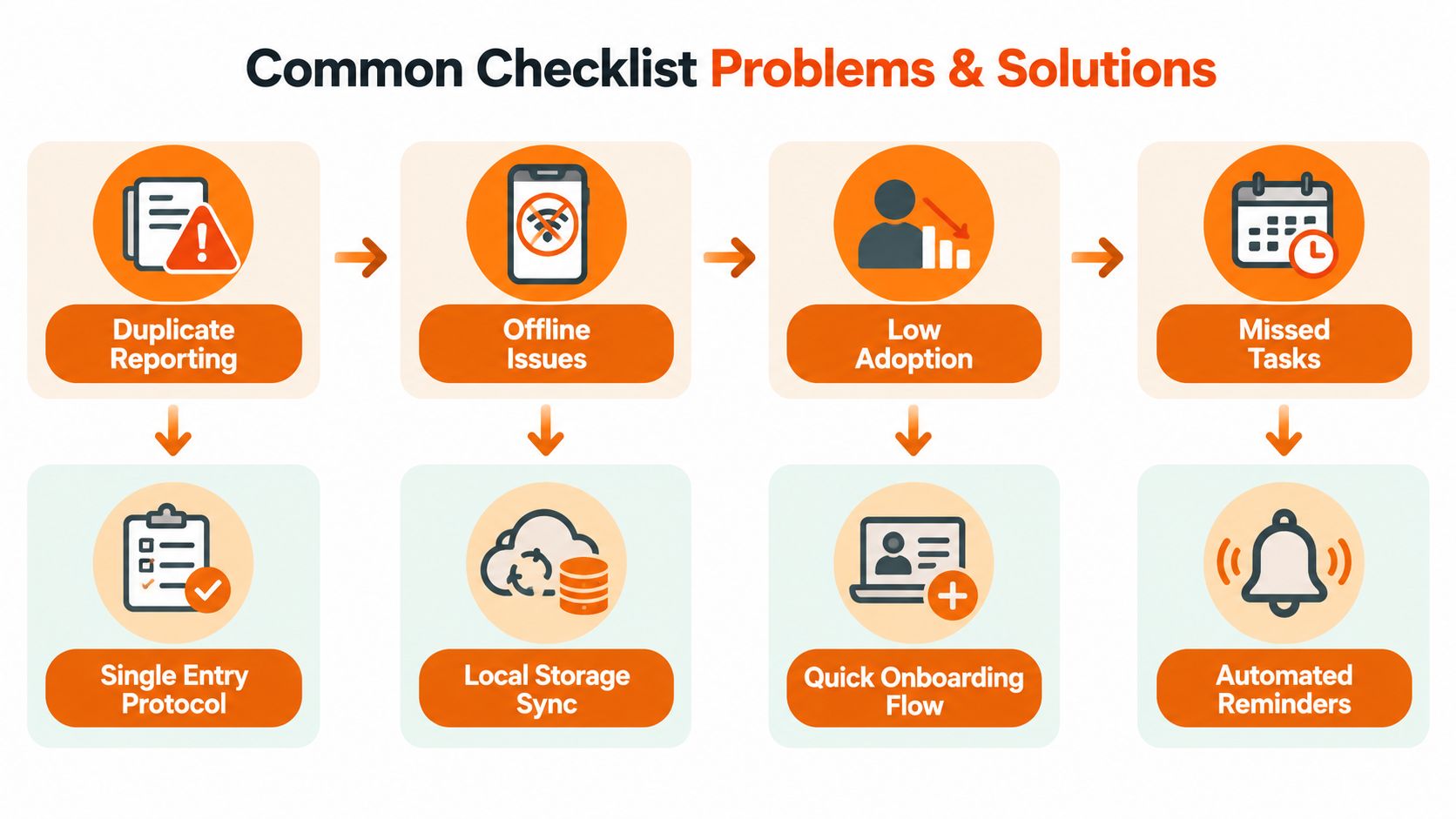
Duplicate reporting appears when each shift starts with a blank form. Vague handovers appear when the app records only completed boxes. Checklist fatigue appears when old tasks stay in the process long after they stop helping. Offline gaps appear when workers can't submit from the floor and later reconstruct events from memory.
Fix the workflow at the point of failure
Use one record for one issue. A later shift should update the original exception, not create another entry describing the same broken pallet, scanner, or dock door. Require a sign-off when the next shift accepts ownership, and make comments mandatory for failed items.
Photo evidence helps when the condition is visible, but don't demand photos for every minor task. Reserve them for critical equipment, damage, housekeeping hazards, security concerns, and other checks where an image adds useful proof.
Keep the daily sequence aligned with the work:
Opening readiness: Safety, equipment, docks, systems, and staffing.
Receiving: Loads, purchase orders, and receiving exceptions.
Putaway: Location accuracy, replenishment, and temporary staging.
Picking and packing: Urgent orders, short picks, and packing status.
Shipping: Manifested, staged, and collected orders.
Inventory control: Negative balances, repeated discrepancies, and cycle checks.
Housekeeping and security: Waste, access, shutdown, and lockup.
Handover: Open issues, owners, status, and next-shift priorities.
Sample opening and closing templates
An opening form might assign the supervisor site readiness, the maintenance lead equipment readiness, and the shift lead staffing confirmation. A failed forklift check should require the unit identifier, a photo if appropriate, a comment, and an escalation. A failed access check should identify the door or zone and prevent the task from disappearing into the next shift.
A closing form should confirm waste removal, temporary staging, equipment shutdown, dock condition, security controls, and unresolved exceptions. It should leave the morning team a plain account of what happened, not a row of green ticks.
The broader daily sequence is supported by a 3PL warehouse operations checklist, which includes comparing staffing with expected workload, assigning urgent orders and previous-shift exceptions, clearing temporary staging, investigating negative balances and repeated short picks, and reconciling packed, staged, manifested, and collected orders.
Audit the form whenever the floor shows you it's wrong. Remove irrelevant questions. Add a conditional follow-up when a failure needs context. The right checklist is never finished, but it should always be getting more honest.
Pebb brings mobile checklists, digital forms, task tracking, photo evidence, shift scheduling, and clock-in workflows into one employee app, so warehouse teams can connect opening and closing work to the people and shifts responsible for it. Visit Pebb to see whether its configurable spaces and frontline workflows fit the way your warehouse operates.
